> ## Documentation Index
> Fetch the complete documentation index at: https://cometchat-22654f5b-docs-rn-guide-message-privately.mintlify.site/llms.txt
> Use this file to discover all available pages before exploring further.
# MessageTemplate
> MessageTemplate — CometChat documentation.
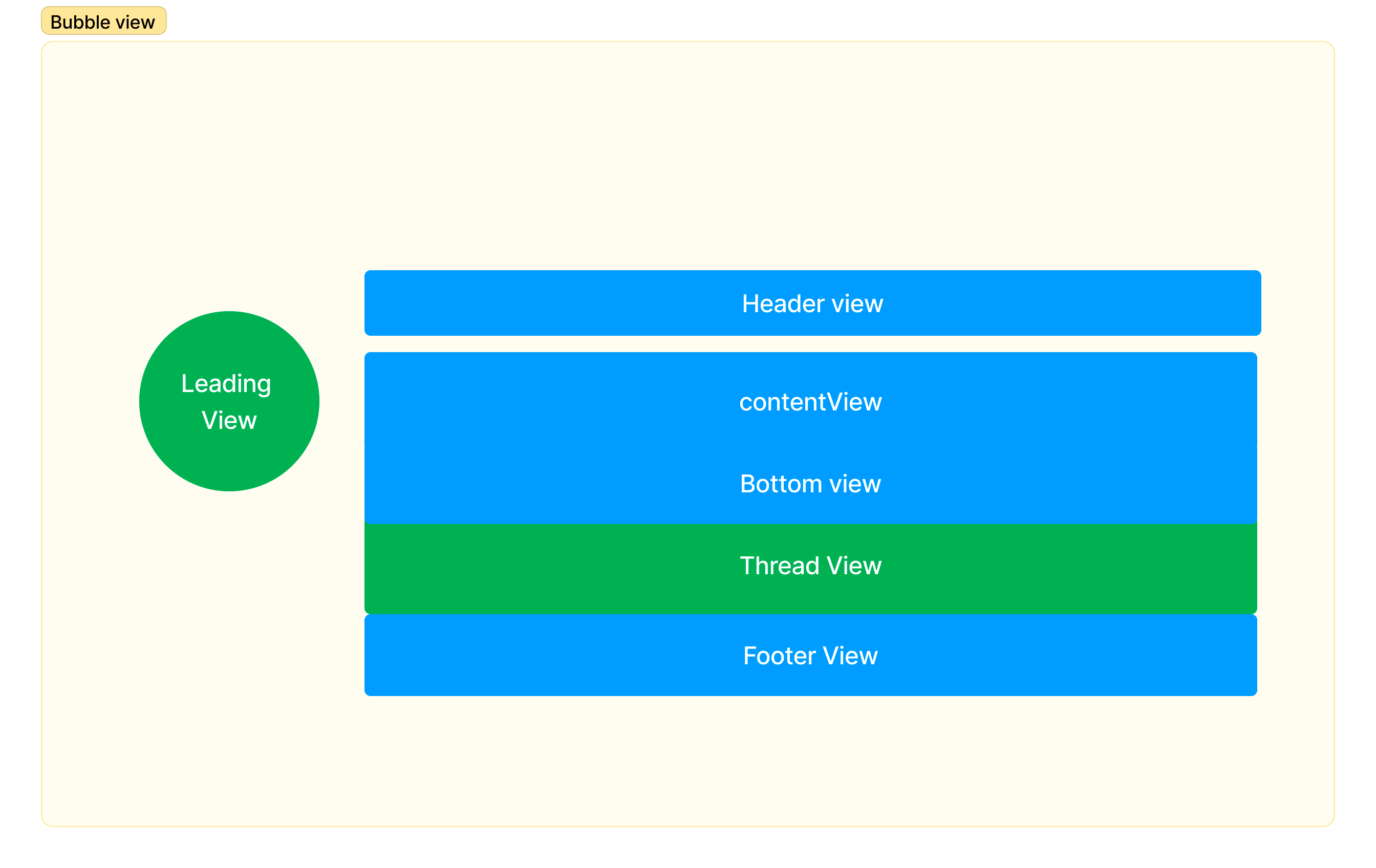
`CometChatMessageTemplate` is a pre-defined structure for creating message views that can be used as a starting point or blueprint for creating message views, often known as message bubbles. These views appear in the message list view and render the messages of that particular chat or conversation. It allows developers to define standard message viewing formats that can be reused or customised for different use cases, or even add new ones for their own purposes.
## Structure of a MessageTemplate
| Name | Purpose |
| --------------- | --------------------------------------------------------------------------------------------------------------------------------------------------------- |
| Leading view | This is where the avatar is displayed. |
| Header view | This is where the name of the sender is displayed. |
| Content view | This is the main view where the contents of the message, such as text, image, etc. are displayed. |
| Bottom view | This is the view which can be used to extend the message with some additional element such as the link preview or a "load more" button for long messages. |
| Thread view | This is specifically meant for threaded messages where the "view replies" action appears. |
| Footer view | This is the designated area where any reactions added to the message are displayed. |
| StatusInfo view | This is where the timestamp of the message and delivery & read status are displayed. |
 ### Properties
| Name | Type | Description |
| -------------- | ----------------------------------------------------------------------------------------------------------------------------------------------------------- | ------------------------------------------------------------------------------------------------------------------------------------------------------------------------------------------------------------------------------------------------------------------------------------------------------------------------------------------------------------------- |
| type | string | Type of the CometChat message |
| category | string | Category of the CometChat message |
| headerView | view | Custom component to customize the header section for each message bubble. By default, it displays the message sender's name. |
| contentView | view | Custom component to customize the content section for each message bubble. By default, it displays the [Text bubble](/web-elements/text-bubble), [Image bubble](/web-elements/image-bubble), [File bubble](/web-elements/file-bubble), [Audio bubble](/web-elements/audio-bubble), and [Video bubble](/web-elements/video-bubble) based on the type of the message. |
| footerView | view | Custom component to customize the footer section for each message bubble. By default, it displays the reactions. |
| statusInfoView | view | Custom component to customize the statusInfo section for each message bubble. By default, it displays the receipt and the timestamp. |
| bubbleView | view | Custom component to customize the complete message bubble. By default, headerView, contentView and footerView collectively forms a message bubble. |
| options | (loggedInUser:CometChat.User \| null, group:CometChat.Group \| null, message: CometChat.BaseMessage) => array\
```javascript theme={null}
import {
CometChatMessages,
ChatConfigurator,
CometChatContext,
} from "@cometchat/chat-uikit-react";
import {
MessagesStyle,
MessageListConfiguration,
MessageStatus,
} from "@cometchat/uikit-shared";
import {
CometChatUIKitConstants,
CometChatMessageEvents,
CometChatMessageOption,
CometChatMessageTemplate,
CometChatTheme,
fontHelper,
CometChatActionsIcon,
} from "@cometchat/uikit-resources";
import { CometChat } from "@cometchat/chat";
```
### List all available templates
To list all available templates, you can check the `getAllMessageTemplates()` from DataSource.
```javascript theme={null}
const [templates, setTemplates] = React.useState([]);
let definedTemplates = CometChatUIKit.getDataSource().getAllMessageTemplates();
```
### Customize an existing template
Once you get the list of existing templates, you need to find the one that you are looking to edit.
```javascript theme={null}
let imageTemplate = definedTemplates.find(
(template) =>
template.category === CometChatUIKitConstants.MessageCategory.message &&
template.type === CometChatUIKitConstants.MessageTypes.image
);
```
And then you can make changes to it.
```javascript theme={null}
if (imageTemplate) {
const imageTemplateObjectIndex = definedTemplates.indexOf(imageTemplate);
imageTemplate.options = (
loggedInUser: CometChat.User,
message: CometChat.BaseMessage,
theme: CometChatTheme,
group?: CometChat.Group | undefined
) => getOptions(loggedInUser, message, theme, group);
console.log("imageTemplateObjectIndex", imageTemplateObjectIndex);
if (imageTemplateObjectIndex > -1) {
definedTemplates.splice(imageTemplateObjectIndex, 1, imageTemplate);
console.log("definedTemplates", definedTemplates);
setTemplates(definedTemplates);
}
}
```
### Add a new template
To add a new template, you can simply create a new one and add it to the list of existing templates.
```javascript theme={null}
const myTemplate = new CometChatMessageTemplate();
definedTemplates.unshift(myTemplate);
setTemplates(definedTemplates);
```
### Remove a template
Removing a template is also as simple as adding a new template. Find the template that you are looking to remove.
```javascript theme={null}
let imageTemplate = definedTemplates.find(
(template) =>
template.category === CometChatUIKitConstants.MessageCategory.message &&
template.type === CometChatUIKitConstants.MessageTypes.image
);
```
And remove it from the array.
```javascript theme={null}
if (imageTemplate) {
definedTemplates.shift(imageTemplate);
}
```
### Properties
| Name | Type | Description |
| -------------- | ----------------------------------------------------------------------------------------------------------------------------------------------------------- | ------------------------------------------------------------------------------------------------------------------------------------------------------------------------------------------------------------------------------------------------------------------------------------------------------------------------------------------------------------------- |
| type | string | Type of the CometChat message |
| category | string | Category of the CometChat message |
| headerView | view | Custom component to customize the header section for each message bubble. By default, it displays the message sender's name. |
| contentView | view | Custom component to customize the content section for each message bubble. By default, it displays the [Text bubble](/web-elements/text-bubble), [Image bubble](/web-elements/image-bubble), [File bubble](/web-elements/file-bubble), [Audio bubble](/web-elements/audio-bubble), and [Video bubble](/web-elements/video-bubble) based on the type of the message. |
| footerView | view | Custom component to customize the footer section for each message bubble. By default, it displays the reactions. |
| statusInfoView | view | Custom component to customize the statusInfo section for each message bubble. By default, it displays the receipt and the timestamp. |
| bubbleView | view | Custom component to customize the complete message bubble. By default, headerView, contentView and footerView collectively forms a message bubble. |
| options | (loggedInUser:CometChat.User \| null, group:CometChat.Group \| null, message: CometChat.BaseMessage) => array\
```javascript theme={null}
import {
CometChatMessages,
ChatConfigurator,
CometChatContext,
} from "@cometchat/chat-uikit-react";
import {
MessagesStyle,
MessageListConfiguration,
MessageStatus,
} from "@cometchat/uikit-shared";
import {
CometChatUIKitConstants,
CometChatMessageEvents,
CometChatMessageOption,
CometChatMessageTemplate,
CometChatTheme,
fontHelper,
CometChatActionsIcon,
} from "@cometchat/uikit-resources";
import { CometChat } from "@cometchat/chat";
```
### List all available templates
To list all available templates, you can check the `getAllMessageTemplates()` from DataSource.
```javascript theme={null}
const [templates, setTemplates] = React.useState([]);
let definedTemplates = CometChatUIKit.getDataSource().getAllMessageTemplates();
```
### Customize an existing template
Once you get the list of existing templates, you need to find the one that you are looking to edit.
```javascript theme={null}
let imageTemplate = definedTemplates.find(
(template) =>
template.category === CometChatUIKitConstants.MessageCategory.message &&
template.type === CometChatUIKitConstants.MessageTypes.image
);
```
And then you can make changes to it.
```javascript theme={null}
if (imageTemplate) {
const imageTemplateObjectIndex = definedTemplates.indexOf(imageTemplate);
imageTemplate.options = (
loggedInUser: CometChat.User,
message: CometChat.BaseMessage,
theme: CometChatTheme,
group?: CometChat.Group | undefined
) => getOptions(loggedInUser, message, theme, group);
console.log("imageTemplateObjectIndex", imageTemplateObjectIndex);
if (imageTemplateObjectIndex > -1) {
definedTemplates.splice(imageTemplateObjectIndex, 1, imageTemplate);
console.log("definedTemplates", definedTemplates);
setTemplates(definedTemplates);
}
}
```
### Add a new template
To add a new template, you can simply create a new one and add it to the list of existing templates.
```javascript theme={null}
const myTemplate = new CometChatMessageTemplate();
definedTemplates.unshift(myTemplate);
setTemplates(definedTemplates);
```
### Remove a template
Removing a template is also as simple as adding a new template. Find the template that you are looking to remove.
```javascript theme={null}
let imageTemplate = definedTemplates.find(
(template) =>
template.category === CometChatUIKitConstants.MessageCategory.message &&
template.type === CometChatUIKitConstants.MessageTypes.image
);
```
And remove it from the array.
```javascript theme={null}
if (imageTemplate) {
definedTemplates.shift(imageTemplate);
}
```