> ## Documentation Index
> Fetch the complete documentation index at: https://cometchat-22654f5b-docs-rn-guide-message-privately.mintlify.site/llms.txt
> Use this file to discover all available pages before exploring further.
# Message Bubble Styling
> Customize incoming and outgoing message bubble colors, backgrounds, and styles using CSS variables and class selectors in the CometChat React UI Kit.
| Field | Value |
| ------------- | ----------------------------------------------------------------------------------------------------------------------- |
| Goal | Customize message bubble appearance (colors, backgrounds) per direction and message type |
| Where | `App.css` (global) — imported in app entry via `import "./App.css";` |
| Base selector | `.cometchat .cometchat-message-bubble-(incoming\|outgoing) .cometchat-message-bubble__body` |
| Type modifier | Append `.cometchat-message-bubble__-message` to target specific types (`text`, `image`, `video`, `audio`, `file`) |
| Key tokens | `--cometchat-primary-color` (outgoing bg), `--cometchat-neutral-color-300` (incoming bg) |
| Constraints | Global CSS only (no CSS Modules), no `!important`, type selectors override generic bubble selectors |
Message bubble styling uses distinct CSS classes for incoming and outgoing messages. Each message type (text, image, video, audio, file, etc.) has predefined classes for default styling, customizable via CSS variable overrides.
**Prerequisites before applying any CSS customization:**
1. All selectors assume the UI Kit renders under a `.cometchat` root wrapper
2. Import your CSS file at the app entry: `import "./App.css";` in `App.tsx`
3. Use **global CSS** (not CSS Modules with hashed class names) — hashed selectors won't match
***
## Selector Pattern
Use this table to construct the correct CSS selector for any message bubble target. AI agents should use this pattern to generalize — do not guess selectors.
| Target | Selector Pattern |
| ----------------------------- | ------------------------------------------------------------------------------------------------------------------------ |
| All bubbles | `.cometchat .cometchat-message-bubble .cometchat-message-bubble__body` |
| Outgoing bubbles (all types) | `.cometchat .cometchat-message-bubble-outgoing .cometchat-message-bubble__body` |
| Incoming bubbles (all types) | `.cometchat .cometchat-message-bubble-incoming .cometchat-message-bubble__body` |
| Specific type (outgoing) | `.cometchat .cometchat-message-bubble-outgoing .cometchat-message-bubble__body.cometchat-message-bubble__-message` |
| Specific type (incoming) | `.cometchat .cometchat-message-bubble-incoming .cometchat-message-bubble__body.cometchat-message-bubble__-message` |
| Action bubbles (no direction) | `.cometchat .cometchat-message-bubble__body .cometchat-action-bubble` |
``
`` is one of `text`, `image`, `video`, `audio`, `file`
Link Preview Bubbles
It reuse the `text-message` type selector since link previews are rendered inside text messages.
***
## CSS Variable Reference
These are the CSS variables (tokens) used across message bubble styling. This table tells you exactly what each token controls — do not assume a token affects something not listed here.
| Variable | What It Controls | Default (Light) | Commonly Used On |
| ---------------------------------------- | ------------------------------------------ | --------------- | -------------------------------------------------- |
| `--cometchat-primary-color` | Outgoing bubble background, primary accent | `#6852d6` | Outgoing bubbles (all types), action bubble accent |
| `--cometchat-neutral-color-300` | Incoming bubble background | `#E8E8E8` | Incoming bubbles (all types) |
| `--cometchat-extended-primary-color-900` | Outgoing bubble shade/gradient variant | `#5d49be` | Outgoing text bubble, link preview |
| `--cometchat-extended-primary-color-800` | Outgoing bubble secondary shade | `#5745b4` | Direct call outgoing bubble |
| `--cometchat-extended-primary-color-700` | Outgoing bubble tertiary shade | `#4f3ea3` | Poll outgoing bubble |
| `--cometchat-neutral-color-400` | Incoming bubble secondary shade | varies | Link preview incoming |
| `--cometchat-primary-button-background` | Primary button fill inside bubbles | matches primary | Whiteboard/document incoming buttons |
| `--cometchat-text-color-secondary` | Secondary/caption text color | varies | Action bubble text |
| `--cometchat-icon-color-secondary` | Secondary icon color | varies | Action bubble icons |
| `--cometchat-border-color-default` | Default border color | varies | Action bubble borders |
***
**CSS Specificity & Precedence Rules:**
1. Message-type selectors (e.g., `__text-message`) override "All Message Bubbles" selectors
2. Always keep the `.cometchat` prefix to avoid leaking styles into the host app
3. Component-level variable overrides (`.cometchat-message-list { --var: val }`) override global overrides (`.cometchat { --var: val }`)
4. CSS variable overrides only affect properties the UI Kit theme binds to that variable — they do NOT change layout or spacing
5. `!important` should never be needed — if it is, your selector specificity is wrong
***
## Bubble Structure
Each message bubble has this DOM structure:
```
.cometchat-message-bubble
├── .cometchat-message-bubble__leading-view (avatar)
├── .cometchat-message-bubble__header-view (sender name)
├── .cometchat-message-bubble__body-container
│ ├── .cometchat-message-bubble__body-wrapper
│ │ ├── .cometchat-message-bubble__body
│ │ │ ├── .cometchat-message-bubble__body-reply-view (quoted message)
│ │ │ ├── .cometchat-message-bubble__body-content-view (plugin bubble content)
│ │ │ └── .cometchat-message-bubble__body-status-info-view (timestamp + receipts)
│ │ ├── .cometchat-message-bubble__body-footer-view (reactions)
│ │ ├── .cometchat-message-bubble__body-thread-view (reply count)
│ │ └── .cometchat-message-bubble__body-bottom-view (moderation)
│ └── .cometchat-message-bubble__options (context menu)
```
***
## Incoming & Outgoing Messages
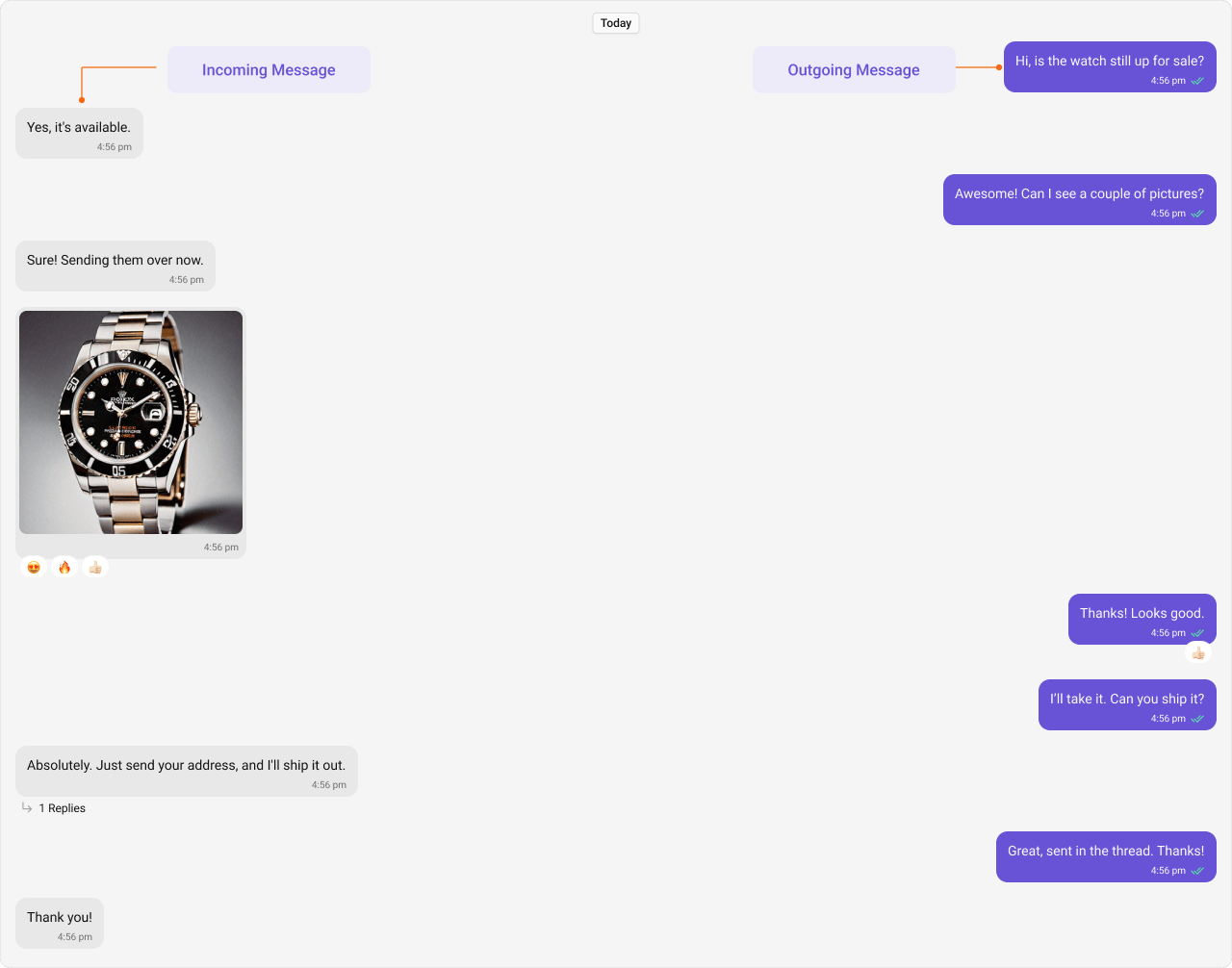
Incoming and outgoing messages have different styling by default, allowing users to visually separate their own messages from others'. Here, we show both the default view and examples of customizations for these message bubbles.
Shown below is the default chat interface.
 ***
### Styling
#### Outgoing Message Bubbles
**Selectors:**
```css theme={null}
.cometchat .cometchat-message-bubble-outgoing .cometchat-message-bubble__body
```
**Tokens used:**
| Token | Controls |
| ---------------------------------------- | -------------------------- |
| `--cometchat-primary-color` | Outgoing bubble background |
| `--cometchat-extended-primary-color-900` | Outgoing bubble shade |
The customized chat interface is displayed below.
***
### Styling
#### Outgoing Message Bubbles
**Selectors:**
```css theme={null}
.cometchat .cometchat-message-bubble-outgoing .cometchat-message-bubble__body
```
**Tokens used:**
| Token | Controls |
| ---------------------------------------- | -------------------------- |
| `--cometchat-primary-color` | Outgoing bubble background |
| `--cometchat-extended-primary-color-900` | Outgoing bubble shade |
The customized chat interface is displayed below.
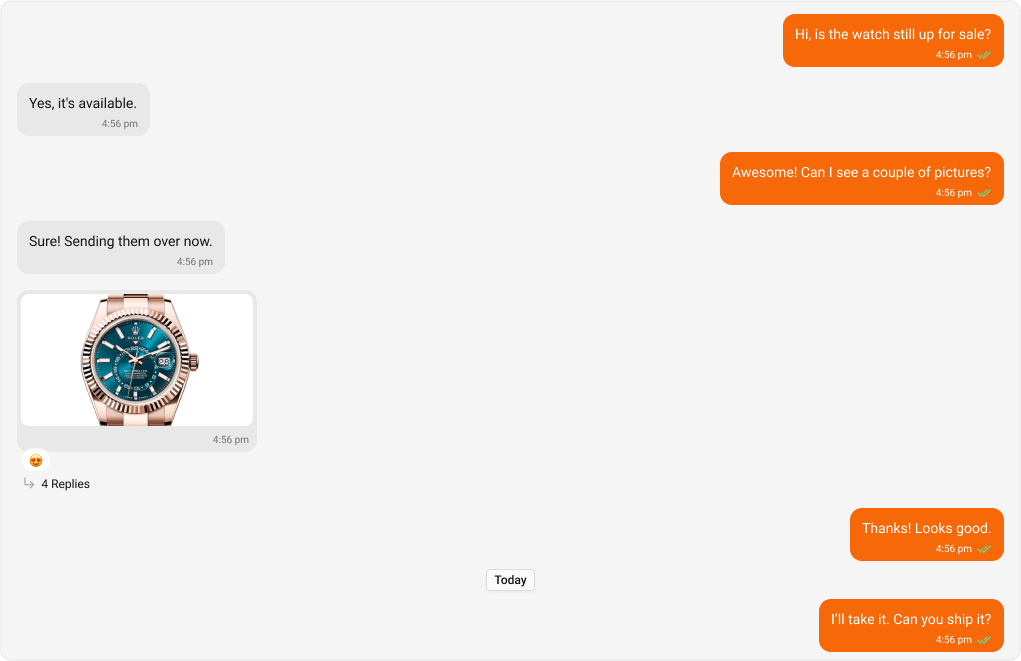 Use the following code to achieve the customization shown above.
```css title="App.css" theme={null}
.cometchat .cometchat-message-bubble-outgoing .cometchat-message-bubble__body {
--cometchat-primary-color: #f76808;
--cometchat-extended-primary-color-900: #fbaa75;
}
```
**Expected result:** All outgoing message bubbles change from purple to orange (#f76808) with a lighter orange shade (#fbaa75).
***
#### Incoming Message Bubbles
**Selectors:**
```css theme={null}
.cometchat .cometchat-message-bubble-incoming .cometchat-message-bubble__body
```
**Tokens used:**
| Token | Controls |
| ------------------------------- | -------------------------- |
| `--cometchat-neutral-color-300` | Incoming bubble background |
The customized chat interface is displayed below.
Use the following code to achieve the customization shown above.
```css title="App.css" theme={null}
.cometchat .cometchat-message-bubble-outgoing .cometchat-message-bubble__body {
--cometchat-primary-color: #f76808;
--cometchat-extended-primary-color-900: #fbaa75;
}
```
**Expected result:** All outgoing message bubbles change from purple to orange (#f76808) with a lighter orange shade (#fbaa75).
***
#### Incoming Message Bubbles
**Selectors:**
```css theme={null}
.cometchat .cometchat-message-bubble-incoming .cometchat-message-bubble__body
```
**Tokens used:**
| Token | Controls |
| ------------------------------- | -------------------------- |
| `--cometchat-neutral-color-300` | Incoming bubble background |
The customized chat interface is displayed below.
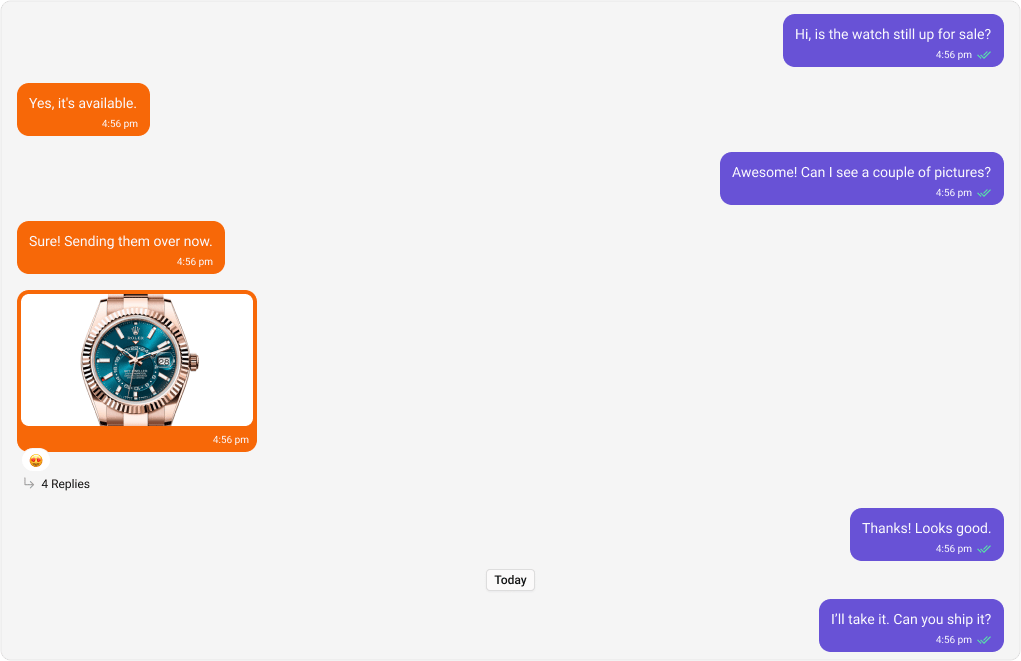 Use the following code to achieve the customization shown above.
```css title="App.css" theme={null}
.cometchat .cometchat-message-bubble-incoming .cometchat-message-bubble__body {
--cometchat-neutral-color-300: #f76808;
}
```
**Expected result:** All incoming message bubbles change from white/light to orange (#f76808).
***
#### All Message Bubbles
**Selectors:**
```css theme={null}
.cometchat .cometchat-message-bubble .cometchat-message-bubble__body
```
**Tokens used:**
| Token | Controls |
| ---------------------------------------- | -------------------------- |
| `--cometchat-neutral-color-300` | Incoming bubble background |
| `--cometchat-primary-color` | Outgoing bubble background |
| `--cometchat-extended-primary-color-900` | Outgoing bubble shade |
The customized chat interface is displayed below.
Use the following code to achieve the customization shown above.
```css title="App.css" theme={null}
.cometchat .cometchat-message-bubble-incoming .cometchat-message-bubble__body {
--cometchat-neutral-color-300: #f76808;
}
```
**Expected result:** All incoming message bubbles change from white/light to orange (#f76808).
***
#### All Message Bubbles
**Selectors:**
```css theme={null}
.cometchat .cometchat-message-bubble .cometchat-message-bubble__body
```
**Tokens used:**
| Token | Controls |
| ---------------------------------------- | -------------------------- |
| `--cometchat-neutral-color-300` | Incoming bubble background |
| `--cometchat-primary-color` | Outgoing bubble background |
| `--cometchat-extended-primary-color-900` | Outgoing bubble shade |
The customized chat interface is displayed below.
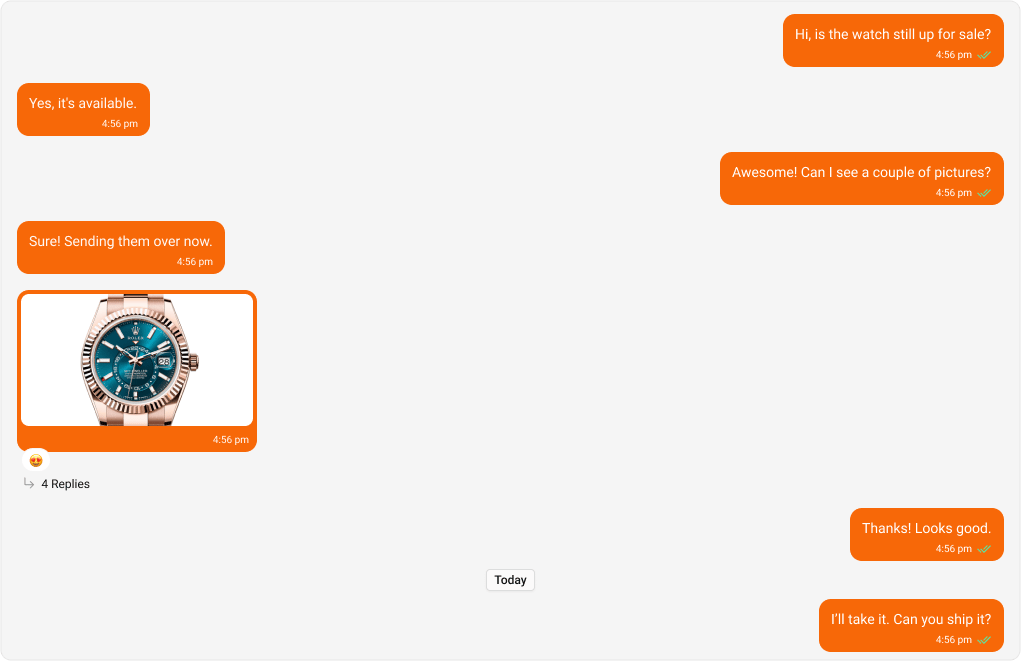 Use the following code to achieve the customization shown above.
```css title="App.css" theme={null}
.cometchat .cometchat-message-bubble .cometchat-message-bubble__body {
--cometchat-neutral-color-300: #f76808;
--cometchat-primary-color: #f76808;
--cometchat-extended-primary-color-900: #fbaa75;
}
```
**Expected result:** Both incoming and outgoing bubbles use orange (#f76808), with outgoing shade set to lighter orange (#fbaa75).
***
### Complete End-to-End Example
To apply custom bubble colors in your app:
**Step 1:** Add to `App.css`:
```css theme={null}
/* Custom outgoing bubbles */
.cometchat .cometchat-message-bubble-outgoing .cometchat-message-bubble__body {
--cometchat-primary-color: #f76808;
--cometchat-extended-primary-color-900: #fbaa75;
}
/* Custom incoming bubbles */
.cometchat .cometchat-message-bubble-incoming .cometchat-message-bubble__body {
--cometchat-neutral-color-300: #feede1;
}
```
**Step 2:** Ensure `App.tsx` imports the CSS:
```tsx theme={null}
import "./App.css";
// ... render CometChat UI Kit components
```
**Expected result:** Outgoing bubbles use orange (#f76808) with lighter shade (#fbaa75); incoming bubbles use light peach (#feede1).
***
## Message Types
CometChat UI Kit includes classes for various message types. Below are examples of default & customised views for each message type, along with the relevant CSS code snippets so that you can quickly get up to speed with CSS customization.
***
### Text Message Bubble
**Selectors:**
```css theme={null}
.cometchat .cometchat-message-bubble-outgoing .cometchat-message-bubble__body.cometchat-message-bubble__text-message
```
```css theme={null}
.cometchat .cometchat-message-bubble-incoming .cometchat-message-bubble__body.cometchat-message-bubble__text-message
```
**Tokens used:**
| Token | Controls |
| ------------------------------- | ------------------------------- |
| `--cometchat-primary-color` | Outgoing text bubble background |
| `--cometchat-neutral-color-300` | Incoming text bubble background |
Shown below is the default chat interface.
Use the following code to achieve the customization shown above.
```css title="App.css" theme={null}
.cometchat .cometchat-message-bubble .cometchat-message-bubble__body {
--cometchat-neutral-color-300: #f76808;
--cometchat-primary-color: #f76808;
--cometchat-extended-primary-color-900: #fbaa75;
}
```
**Expected result:** Both incoming and outgoing bubbles use orange (#f76808), with outgoing shade set to lighter orange (#fbaa75).
***
### Complete End-to-End Example
To apply custom bubble colors in your app:
**Step 1:** Add to `App.css`:
```css theme={null}
/* Custom outgoing bubbles */
.cometchat .cometchat-message-bubble-outgoing .cometchat-message-bubble__body {
--cometchat-primary-color: #f76808;
--cometchat-extended-primary-color-900: #fbaa75;
}
/* Custom incoming bubbles */
.cometchat .cometchat-message-bubble-incoming .cometchat-message-bubble__body {
--cometchat-neutral-color-300: #feede1;
}
```
**Step 2:** Ensure `App.tsx` imports the CSS:
```tsx theme={null}
import "./App.css";
// ... render CometChat UI Kit components
```
**Expected result:** Outgoing bubbles use orange (#f76808) with lighter shade (#fbaa75); incoming bubbles use light peach (#feede1).
***
## Message Types
CometChat UI Kit includes classes for various message types. Below are examples of default & customised views for each message type, along with the relevant CSS code snippets so that you can quickly get up to speed with CSS customization.
***
### Text Message Bubble
**Selectors:**
```css theme={null}
.cometchat .cometchat-message-bubble-outgoing .cometchat-message-bubble__body.cometchat-message-bubble__text-message
```
```css theme={null}
.cometchat .cometchat-message-bubble-incoming .cometchat-message-bubble__body.cometchat-message-bubble__text-message
```
**Tokens used:**
| Token | Controls |
| ------------------------------- | ------------------------------- |
| `--cometchat-primary-color` | Outgoing text bubble background |
| `--cometchat-neutral-color-300` | Incoming text bubble background |
Shown below is the default chat interface.
 The customized chat interface is displayed below.
 **Complete CSS:**
```css theme={null}
/* Outgoing Text Message Bubble */
.cometchat
.cometchat-message-bubble-outgoing
.cometchat-message-bubble__body.cometchat-message-bubble__text-message {
--cometchat-primary-color: #f76808;
}
/* Incoming Text Message Bubble */
.cometchat
.cometchat-message-bubble-incoming
.cometchat-message-bubble__body.cometchat-message-bubble__text-message {
--cometchat-neutral-color-300: #feede1;
}
```
**Expected result:** Outgoing text bubbles change to orange (#f76808); incoming text bubbles change to light peach (#feede1).
***
### Image Message Bubble
**Selectors:**
```css theme={null}
.cometchat .cometchat-message-bubble-outgoing .cometchat-message-bubble__body.cometchat-message-bubble__image-message
```
```css theme={null}
.cometchat .cometchat-message-bubble-incoming .cometchat-message-bubble__body.cometchat-message-bubble__image-message
```
**Tokens used:**
| Token | Controls |
| ------------------------------- | -------------------------------- |
| `--cometchat-primary-color` | Outgoing image bubble background |
| `--cometchat-neutral-color-300` | Incoming image bubble background |
Shown below is the default chat interface.
**Complete CSS:**
```css theme={null}
/* Outgoing Text Message Bubble */
.cometchat
.cometchat-message-bubble-outgoing
.cometchat-message-bubble__body.cometchat-message-bubble__text-message {
--cometchat-primary-color: #f76808;
}
/* Incoming Text Message Bubble */
.cometchat
.cometchat-message-bubble-incoming
.cometchat-message-bubble__body.cometchat-message-bubble__text-message {
--cometchat-neutral-color-300: #feede1;
}
```
**Expected result:** Outgoing text bubbles change to orange (#f76808); incoming text bubbles change to light peach (#feede1).
***
### Image Message Bubble
**Selectors:**
```css theme={null}
.cometchat .cometchat-message-bubble-outgoing .cometchat-message-bubble__body.cometchat-message-bubble__image-message
```
```css theme={null}
.cometchat .cometchat-message-bubble-incoming .cometchat-message-bubble__body.cometchat-message-bubble__image-message
```
**Tokens used:**
| Token | Controls |
| ------------------------------- | -------------------------------- |
| `--cometchat-primary-color` | Outgoing image bubble background |
| `--cometchat-neutral-color-300` | Incoming image bubble background |
Shown below is the default chat interface.
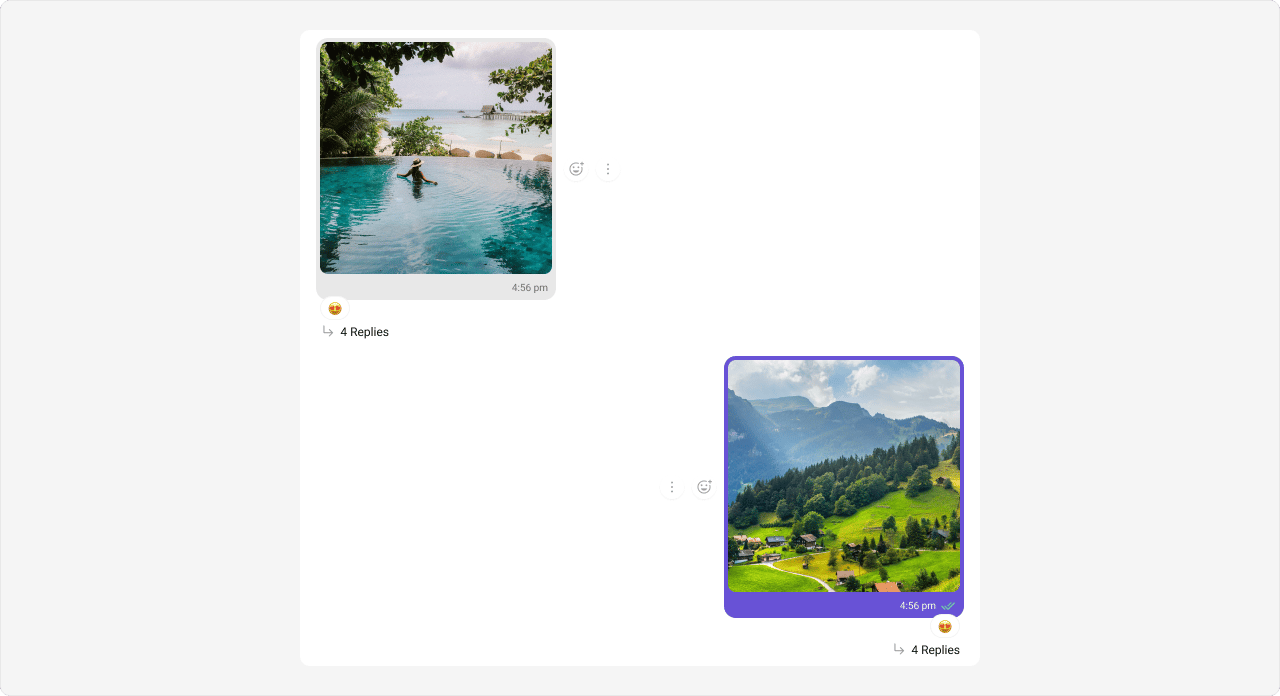 The customized chat interface is displayed below.
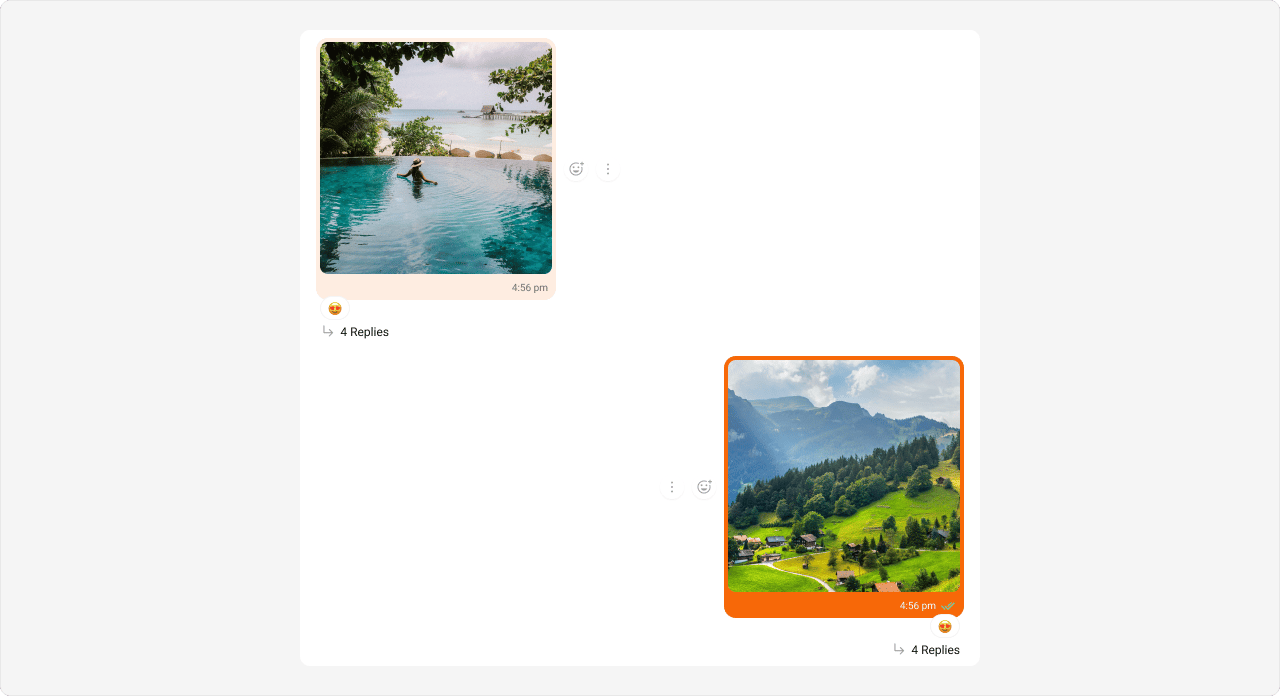 **Complete CSS:**
```css theme={null}
/* Outgoing Image Message Bubble */
.cometchat
.cometchat-message-bubble-outgoing
.cometchat-message-bubble__body.cometchat-message-bubble__image-message {
--cometchat-primary-color: #f76808;
}
/* Incoming Image Message Bubble */
.cometchat
.cometchat-message-bubble-incoming
.cometchat-message-bubble__body.cometchat-message-bubble__image-message {
--cometchat-neutral-color-300: #feede1;
}
```
**Expected result:** Outgoing image bubbles change to orange (#f76808); incoming image bubbles change to light peach (#feede1).
***
### Video Message Bubble
**Selectors:**
```css theme={null}
.cometchat .cometchat-message-bubble-outgoing .cometchat-message-bubble__body.cometchat-message-bubble__video-message
```
```css theme={null}
.cometchat .cometchat-message-bubble-incoming .cometchat-message-bubble__body.cometchat-message-bubble__video-message
```
**Tokens used:**
| Token | Controls |
| ------------------------------- | -------------------------------- |
| `--cometchat-primary-color` | Outgoing video bubble background |
| `--cometchat-neutral-color-300` | Incoming video bubble background |
Shown below is the default chat interface.
**Complete CSS:**
```css theme={null}
/* Outgoing Image Message Bubble */
.cometchat
.cometchat-message-bubble-outgoing
.cometchat-message-bubble__body.cometchat-message-bubble__image-message {
--cometchat-primary-color: #f76808;
}
/* Incoming Image Message Bubble */
.cometchat
.cometchat-message-bubble-incoming
.cometchat-message-bubble__body.cometchat-message-bubble__image-message {
--cometchat-neutral-color-300: #feede1;
}
```
**Expected result:** Outgoing image bubbles change to orange (#f76808); incoming image bubbles change to light peach (#feede1).
***
### Video Message Bubble
**Selectors:**
```css theme={null}
.cometchat .cometchat-message-bubble-outgoing .cometchat-message-bubble__body.cometchat-message-bubble__video-message
```
```css theme={null}
.cometchat .cometchat-message-bubble-incoming .cometchat-message-bubble__body.cometchat-message-bubble__video-message
```
**Tokens used:**
| Token | Controls |
| ------------------------------- | -------------------------------- |
| `--cometchat-primary-color` | Outgoing video bubble background |
| `--cometchat-neutral-color-300` | Incoming video bubble background |
Shown below is the default chat interface.
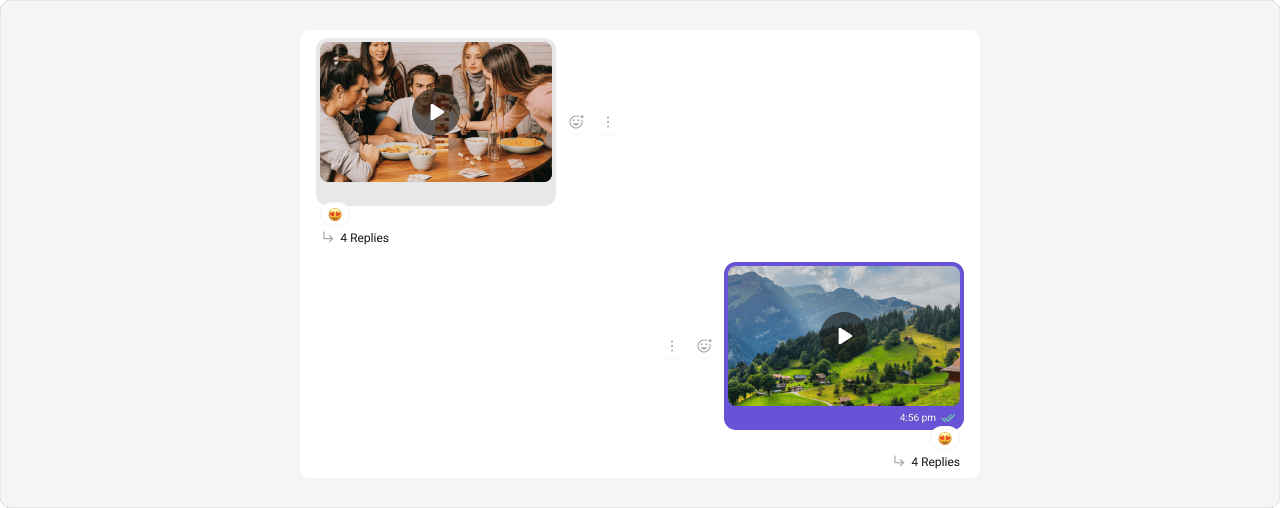 The customized chat interface is displayed below.
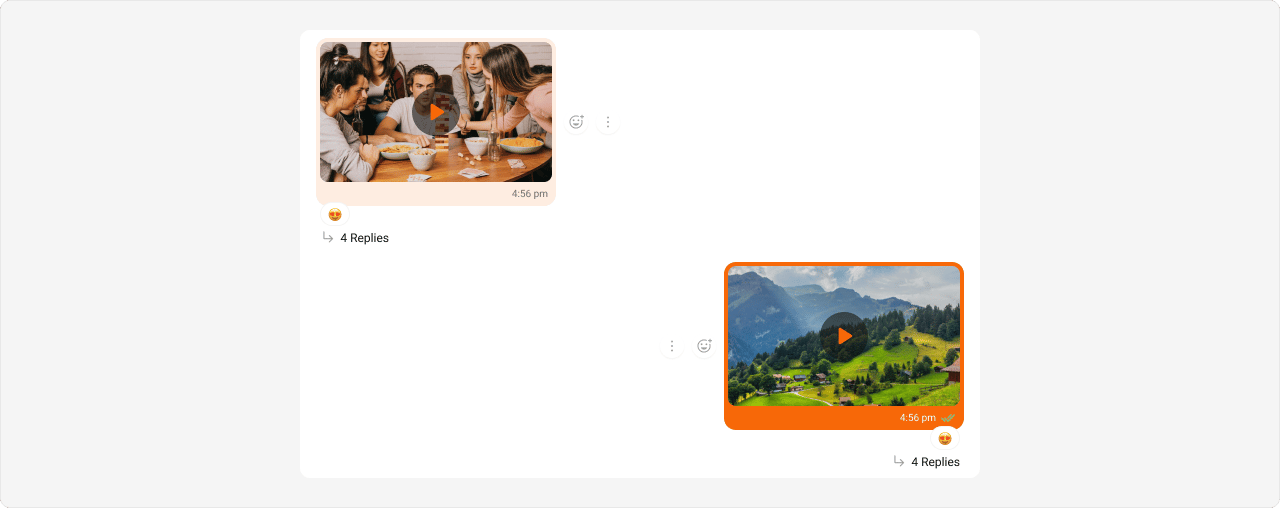 **Complete CSS:**
```css theme={null}
/* Outgoing Video Message Bubble */
.cometchat
.cometchat-message-bubble-outgoing
.cometchat-message-bubble__body.cometchat-message-bubble__video-message {
--cometchat-primary-color: #f76808;
}
/* Incoming Video Message Bubble */
.cometchat
.cometchat-message-bubble-incoming
.cometchat-message-bubble__body.cometchat-message-bubble__video-message {
--cometchat-neutral-color-300: #feede1;
}
```
**Expected result:** Outgoing video bubbles change to orange (#f76808); incoming video bubbles change to light peach (#feede1).
***
### Audio Message Bubble
**Selectors:**
```css theme={null}
.cometchat .cometchat-message-bubble-outgoing .cometchat-message-bubble__body.cometchat-message-bubble__audio-message
```
```css theme={null}
.cometchat .cometchat-message-bubble-incoming .cometchat-message-bubble__body.cometchat-message-bubble__audio-message
```
**Tokens used:**
| Token | Controls |
| ------------------------------- | ------------------------------------------------------- |
| `--cometchat-primary-color` | Outgoing audio bubble background, incoming audio accent |
| `--cometchat-neutral-color-300` | Incoming audio bubble background |
Shown below is the default chat interface.
**Complete CSS:**
```css theme={null}
/* Outgoing Video Message Bubble */
.cometchat
.cometchat-message-bubble-outgoing
.cometchat-message-bubble__body.cometchat-message-bubble__video-message {
--cometchat-primary-color: #f76808;
}
/* Incoming Video Message Bubble */
.cometchat
.cometchat-message-bubble-incoming
.cometchat-message-bubble__body.cometchat-message-bubble__video-message {
--cometchat-neutral-color-300: #feede1;
}
```
**Expected result:** Outgoing video bubbles change to orange (#f76808); incoming video bubbles change to light peach (#feede1).
***
### Audio Message Bubble
**Selectors:**
```css theme={null}
.cometchat .cometchat-message-bubble-outgoing .cometchat-message-bubble__body.cometchat-message-bubble__audio-message
```
```css theme={null}
.cometchat .cometchat-message-bubble-incoming .cometchat-message-bubble__body.cometchat-message-bubble__audio-message
```
**Tokens used:**
| Token | Controls |
| ------------------------------- | ------------------------------------------------------- |
| `--cometchat-primary-color` | Outgoing audio bubble background, incoming audio accent |
| `--cometchat-neutral-color-300` | Incoming audio bubble background |
Shown below is the default chat interface.
 The customized chat interface is displayed below.
 **Complete CSS:**
```css theme={null}
/* Outgoing Audio Message Bubble */
.cometchat
.cometchat-message-bubble-outgoing
.cometchat-message-bubble__body.cometchat-message-bubble__audio-message {
--cometchat-primary-color: #f76808;
}
/* Incoming Audio Message Bubble */
.cometchat
.cometchat-message-bubble-incoming
.cometchat-message-bubble__body.cometchat-message-bubble__audio-message {
--cometchat-primary-color: #f76808;
--cometchat-neutral-color-300: #feede1;
}
```
**Expected result:** Outgoing audio bubbles change to orange (#f76808); incoming audio bubbles change to light peach (#feede1) with orange accent for playback controls.
***
### File Message Bubble
**Selectors:**
```css theme={null}
.cometchat .cometchat-message-bubble-outgoing .cometchat-message-bubble__body.cometchat-message-bubble__file-message
```
```css theme={null}
.cometchat .cometchat-message-bubble-incoming .cometchat-message-bubble__body.cometchat-message-bubble__file-message
```
**Tokens used:**
| Token | Controls |
| ------------------------------- | ----------------------------------------------------- |
| `--cometchat-primary-color` | Outgoing file bubble background, incoming file accent |
| `--cometchat-neutral-color-300` | Incoming file bubble background |
Shown below is the default chat interface.
**Complete CSS:**
```css theme={null}
/* Outgoing Audio Message Bubble */
.cometchat
.cometchat-message-bubble-outgoing
.cometchat-message-bubble__body.cometchat-message-bubble__audio-message {
--cometchat-primary-color: #f76808;
}
/* Incoming Audio Message Bubble */
.cometchat
.cometchat-message-bubble-incoming
.cometchat-message-bubble__body.cometchat-message-bubble__audio-message {
--cometchat-primary-color: #f76808;
--cometchat-neutral-color-300: #feede1;
}
```
**Expected result:** Outgoing audio bubbles change to orange (#f76808); incoming audio bubbles change to light peach (#feede1) with orange accent for playback controls.
***
### File Message Bubble
**Selectors:**
```css theme={null}
.cometchat .cometchat-message-bubble-outgoing .cometchat-message-bubble__body.cometchat-message-bubble__file-message
```
```css theme={null}
.cometchat .cometchat-message-bubble-incoming .cometchat-message-bubble__body.cometchat-message-bubble__file-message
```
**Tokens used:**
| Token | Controls |
| ------------------------------- | ----------------------------------------------------- |
| `--cometchat-primary-color` | Outgoing file bubble background, incoming file accent |
| `--cometchat-neutral-color-300` | Incoming file bubble background |
Shown below is the default chat interface.
 The customized chat interface is displayed below.
 **Complete CSS:**
```css theme={null}
/* Outgoing File Message Bubble */
.cometchat
.cometchat-message-bubble-outgoing
.cometchat-message-bubble__body.cometchat-message-bubble__file-message {
--cometchat-primary-color: #f76808;
}
/* Incoming File Message Bubble */
.cometchat
.cometchat-message-bubble-incoming
.cometchat-message-bubble__body.cometchat-message-bubble__file-message {
--cometchat-primary-color: #f76808;
--cometchat-neutral-color-300: #feede1;
}
```
**Expected result:** Outgoing file bubbles change to orange (#f76808); incoming file bubbles change to light peach (#feede1) with orange file icon accent.
***
### Action Message Bubble
Action messages (e.g., "User joined the group") use a different selector pattern — they are not directional (no incoming/outgoing).
**Selector:**
* `.cometchat .cometchat-message-bubble__body .cometchat-action-bubble`
**Tokens used:**
| Token | Controls |
| ---------------------------------- | -------------------------------------------------------------- |
| `--cometchat-primary-color` | Action bubble accent color |
| `background-color` | Action bubble background (direct CSS property, not a variable) |
| `--cometchat-text-color-secondary` | Action bubble text color |
| `--cometchat-icon-color-secondary` | Action bubble icon color |
| `--cometchat-border-color-default` | Action bubble border color |
Shown below is the default chat interface.
**Complete CSS:**
```css theme={null}
/* Outgoing File Message Bubble */
.cometchat
.cometchat-message-bubble-outgoing
.cometchat-message-bubble__body.cometchat-message-bubble__file-message {
--cometchat-primary-color: #f76808;
}
/* Incoming File Message Bubble */
.cometchat
.cometchat-message-bubble-incoming
.cometchat-message-bubble__body.cometchat-message-bubble__file-message {
--cometchat-primary-color: #f76808;
--cometchat-neutral-color-300: #feede1;
}
```
**Expected result:** Outgoing file bubbles change to orange (#f76808); incoming file bubbles change to light peach (#feede1) with orange file icon accent.
***
### Action Message Bubble
Action messages (e.g., "User joined the group") use a different selector pattern — they are not directional (no incoming/outgoing).
**Selector:**
* `.cometchat .cometchat-message-bubble__body .cometchat-action-bubble`
**Tokens used:**
| Token | Controls |
| ---------------------------------- | -------------------------------------------------------------- |
| `--cometchat-primary-color` | Action bubble accent color |
| `background-color` | Action bubble background (direct CSS property, not a variable) |
| `--cometchat-text-color-secondary` | Action bubble text color |
| `--cometchat-icon-color-secondary` | Action bubble icon color |
| `--cometchat-border-color-default` | Action bubble border color |
Shown below is the default chat interface.
 The customized chat interface is displayed below.
 **Complete CSS:**
```css theme={null}
.cometchat .cometchat-message-bubble__body .cometchat-action-bubble {
--cometchat-primary-color: #f76808;
background-color: #feede1;
--cometchat-text-color-secondary: #f76808;
--cometchat-icon-color-secondary: #f76808;
--cometchat-border-color-default: #f76808;
}
```
**Expected result:** Action message banners change to light peach background (#feede1) with orange text, icons, and borders (#f76808).
***
### Extensions
#### Collaborative Whiteboard Bubble
**Selectors:**
```css theme={null}
.cometchat .cometchat-message-bubble-outgoing .cometchat-message-bubble__body.cometchat-message-bubble__text-message
```
```css theme={null}
.cometchat .cometchat-message-bubble-incoming .cometchat-message-bubble__body.cometchat-message-bubble__text-message
```
In v7, collaborative whiteboard messages use the `text-message` type class internally.
**Tokens used:**
| Token | Controls |
| --------------------------------------- | -------------------------------------- |
| `--cometchat-primary-color` | Bubble accent and background |
| `--cometchat-primary-button-background` | Incoming whiteboard "Open" button fill |
| `--cometchat-neutral-color-300` | Incoming bubble background |
Shown below is the default chat interface.
**Complete CSS:**
```css theme={null}
.cometchat .cometchat-message-bubble__body .cometchat-action-bubble {
--cometchat-primary-color: #f76808;
background-color: #feede1;
--cometchat-text-color-secondary: #f76808;
--cometchat-icon-color-secondary: #f76808;
--cometchat-border-color-default: #f76808;
}
```
**Expected result:** Action message banners change to light peach background (#feede1) with orange text, icons, and borders (#f76808).
***
### Extensions
#### Collaborative Whiteboard Bubble
**Selectors:**
```css theme={null}
.cometchat .cometchat-message-bubble-outgoing .cometchat-message-bubble__body.cometchat-message-bubble__text-message
```
```css theme={null}
.cometchat .cometchat-message-bubble-incoming .cometchat-message-bubble__body.cometchat-message-bubble__text-message
```
In v7, collaborative whiteboard messages use the `text-message` type class internally.
**Tokens used:**
| Token | Controls |
| --------------------------------------- | -------------------------------------- |
| `--cometchat-primary-color` | Bubble accent and background |
| `--cometchat-primary-button-background` | Incoming whiteboard "Open" button fill |
| `--cometchat-neutral-color-300` | Incoming bubble background |
Shown below is the default chat interface.
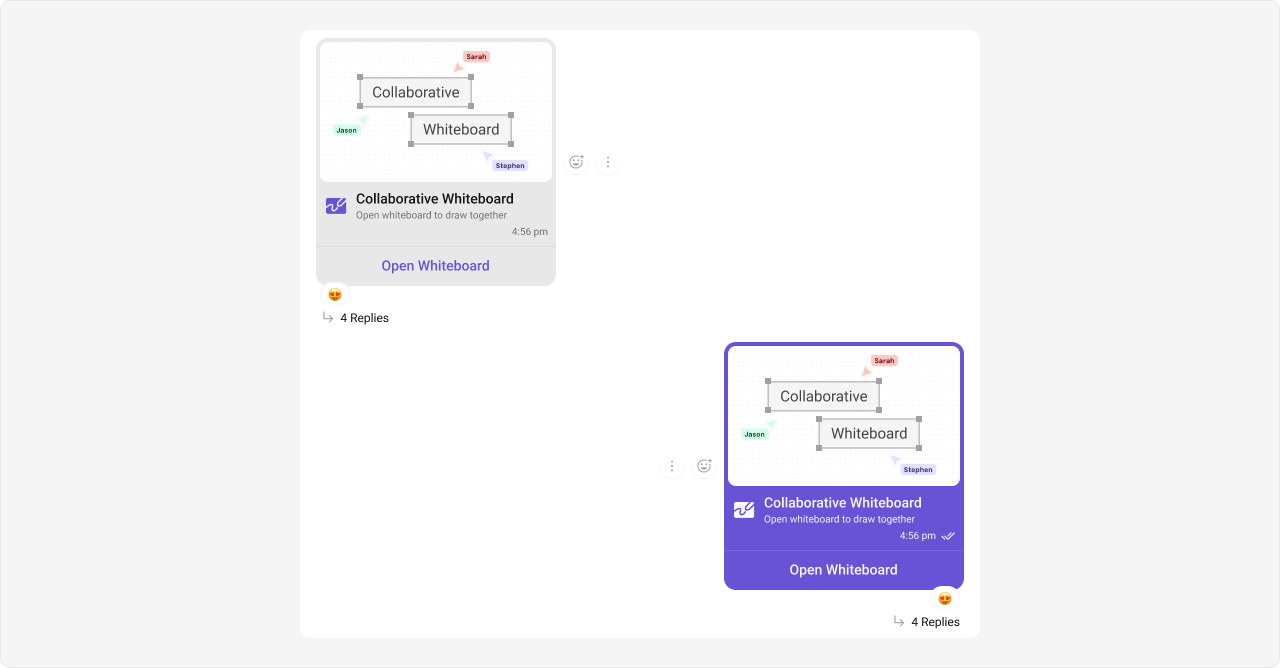 The customized chat interface is displayed below.
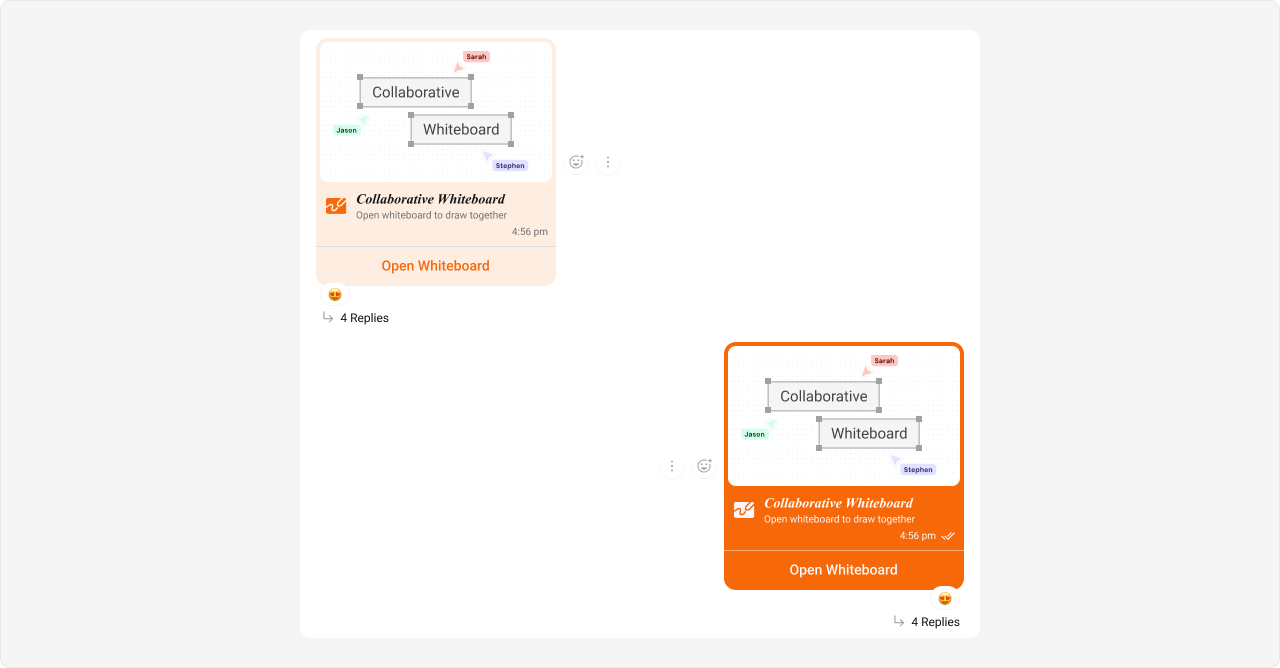 **Complete CSS:**
```css theme={null}
/* Outgoing Collaborative Whiteboard Bubble */
.cometchat
.cometchat-message-bubble-outgoing
.cometchat-message-bubble__body.cometchat-message-bubble__text-message {
--cometchat-primary-color: #f76808;
}
/* Incoming Collaborative Whiteboard Bubble */
.cometchat
.cometchat-message-bubble-incoming
.cometchat-message-bubble__body.cometchat-message-bubble__text-message {
--cometchat-primary-color: #f76808;
--cometchat-primary-button-background: #f76808;
--cometchat-neutral-color-300: #feede1;
}
```
**Expected result:** Outgoing whiteboard bubbles change to orange (#f76808); incoming whiteboard bubbles change to light peach (#feede1) with orange button and accent.
***
#### Collaborative Document Bubble
**Selectors:**
```css theme={null}
.cometchat .cometchat-message-bubble-outgoing .cometchat-message-bubble__body.cometchat-message-bubble__text-message
```
```css theme={null}
.cometchat .cometchat-message-bubble-incoming .cometchat-message-bubble__body.cometchat-message-bubble__text-message
```
In v7, collaborative document messages use the `text-message` type class internally.
**Tokens used:**
| Token | Controls |
| --------------------------------------- | ------------------------------------ |
| `--cometchat-primary-color` | Bubble accent and background |
| `--cometchat-primary-button-background` | Incoming document "Open" button fill |
| `--cometchat-neutral-color-300` | Incoming bubble background |
Shown below is the default chat interface.
**Complete CSS:**
```css theme={null}
/* Outgoing Collaborative Whiteboard Bubble */
.cometchat
.cometchat-message-bubble-outgoing
.cometchat-message-bubble__body.cometchat-message-bubble__text-message {
--cometchat-primary-color: #f76808;
}
/* Incoming Collaborative Whiteboard Bubble */
.cometchat
.cometchat-message-bubble-incoming
.cometchat-message-bubble__body.cometchat-message-bubble__text-message {
--cometchat-primary-color: #f76808;
--cometchat-primary-button-background: #f76808;
--cometchat-neutral-color-300: #feede1;
}
```
**Expected result:** Outgoing whiteboard bubbles change to orange (#f76808); incoming whiteboard bubbles change to light peach (#feede1) with orange button and accent.
***
#### Collaborative Document Bubble
**Selectors:**
```css theme={null}
.cometchat .cometchat-message-bubble-outgoing .cometchat-message-bubble__body.cometchat-message-bubble__text-message
```
```css theme={null}
.cometchat .cometchat-message-bubble-incoming .cometchat-message-bubble__body.cometchat-message-bubble__text-message
```
In v7, collaborative document messages use the `text-message` type class internally.
**Tokens used:**
| Token | Controls |
| --------------------------------------- | ------------------------------------ |
| `--cometchat-primary-color` | Bubble accent and background |
| `--cometchat-primary-button-background` | Incoming document "Open" button fill |
| `--cometchat-neutral-color-300` | Incoming bubble background |
Shown below is the default chat interface.
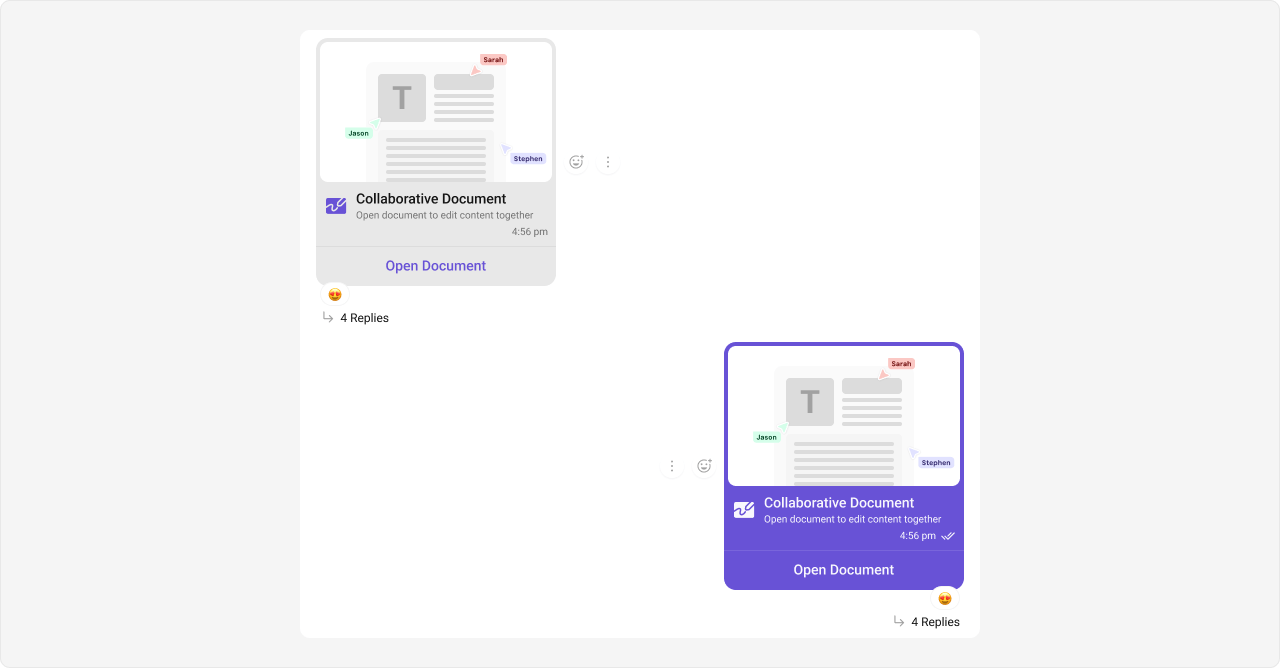 The customized chat interface is displayed below.
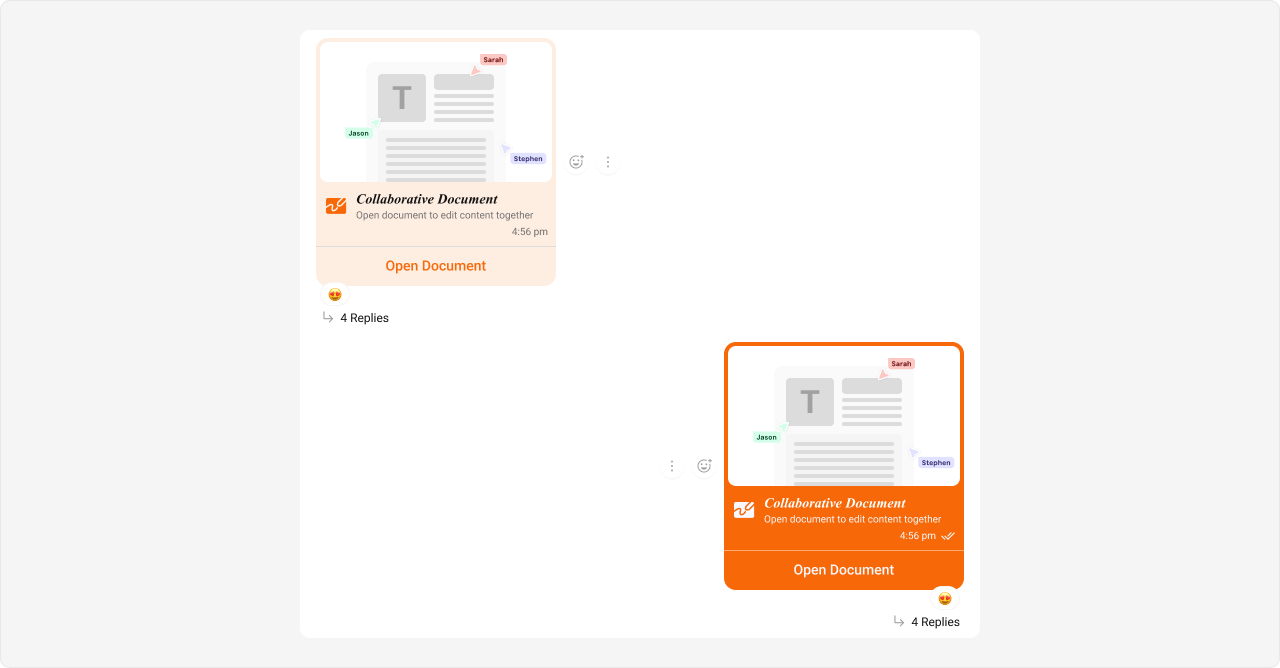 **Complete CSS:**
```css theme={null}
/* Outgoing Collaborative Document Bubble */
.cometchat
.cometchat-message-bubble-outgoing
.cometchat-message-bubble__body.cometchat-message-bubble__text-message {
--cometchat-primary-color: #f76808;
}
/* Incoming Collaborative Document Bubble */
.cometchat
.cometchat-message-bubble-incoming
.cometchat-message-bubble__body.cometchat-message-bubble__text-message {
--cometchat-primary-color: #f76808;
--cometchat-primary-button-background: #f76808;
--cometchat-neutral-color-300: #feede1;
}
```
**Expected result:** Outgoing document bubbles change to orange (#f76808); incoming document bubbles change to light peach (#feede1) with orange button and accent.
***
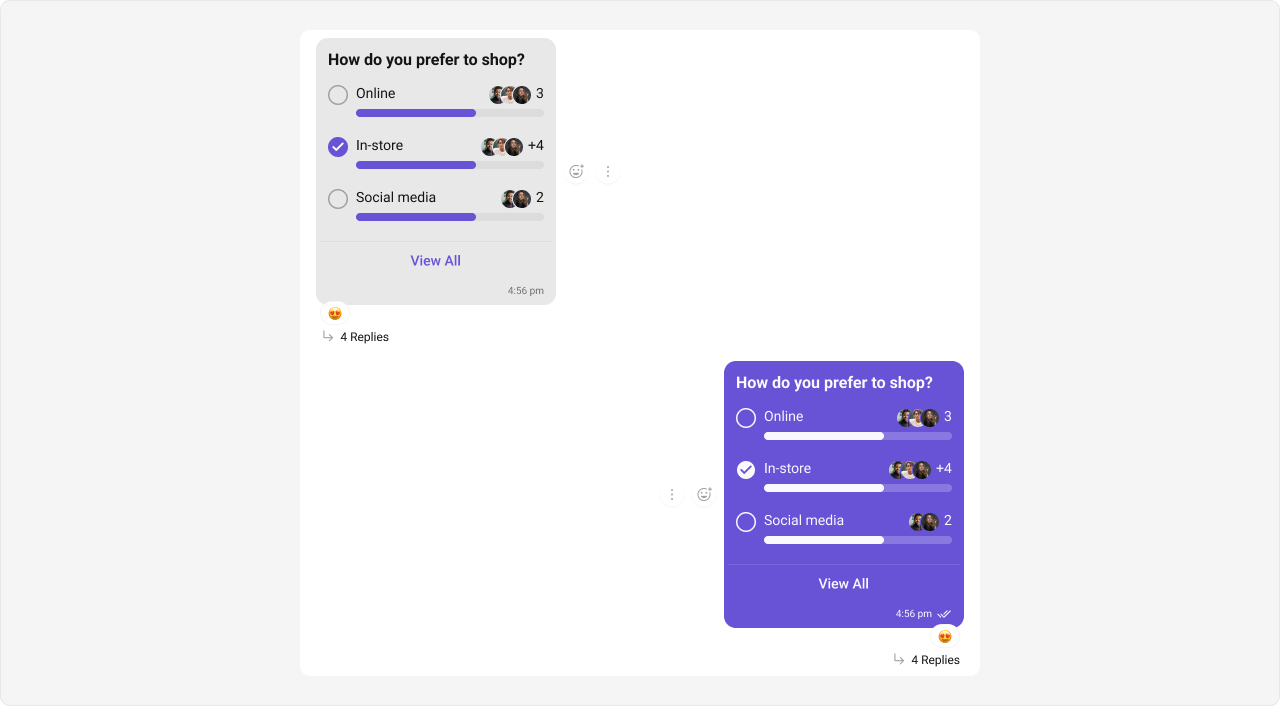
#### Polls Bubble
**Selectors:**
```css theme={null}
.cometchat .cometchat-message-bubble-outgoing .cometchat-message-bubble__body.cometchat-message-bubble__text-message
```
```css theme={null}
.cometchat .cometchat-message-bubble-incoming .cometchat-message-bubble__body.cometchat-message-bubble__text-message
```
In v7, poll messages use the `text-message` type class internally.
**Tokens used:**
| Token | Controls |
| ---------------------------------------- | -------------------------------- |
| `--cometchat-primary-color` | Bubble accent and background |
| `--cometchat-extended-primary-color-700` | Outgoing poll progress bar shade |
| `--cometchat-neutral-color-300` | Incoming bubble background |
Shown below is the default chat interface.
**Complete CSS:**
```css theme={null}
/* Outgoing Collaborative Document Bubble */
.cometchat
.cometchat-message-bubble-outgoing
.cometchat-message-bubble__body.cometchat-message-bubble__text-message {
--cometchat-primary-color: #f76808;
}
/* Incoming Collaborative Document Bubble */
.cometchat
.cometchat-message-bubble-incoming
.cometchat-message-bubble__body.cometchat-message-bubble__text-message {
--cometchat-primary-color: #f76808;
--cometchat-primary-button-background: #f76808;
--cometchat-neutral-color-300: #feede1;
}
```
**Expected result:** Outgoing document bubbles change to orange (#f76808); incoming document bubbles change to light peach (#feede1) with orange button and accent.
***
#### Polls Bubble
**Selectors:**
```css theme={null}
.cometchat .cometchat-message-bubble-outgoing .cometchat-message-bubble__body.cometchat-message-bubble__text-message
```
```css theme={null}
.cometchat .cometchat-message-bubble-incoming .cometchat-message-bubble__body.cometchat-message-bubble__text-message
```
In v7, poll messages use the `text-message` type class internally.
**Tokens used:**
| Token | Controls |
| ---------------------------------------- | -------------------------------- |
| `--cometchat-primary-color` | Bubble accent and background |
| `--cometchat-extended-primary-color-700` | Outgoing poll progress bar shade |
| `--cometchat-neutral-color-300` | Incoming bubble background |
Shown below is the default chat interface.
 The customized chat interface is displayed below.
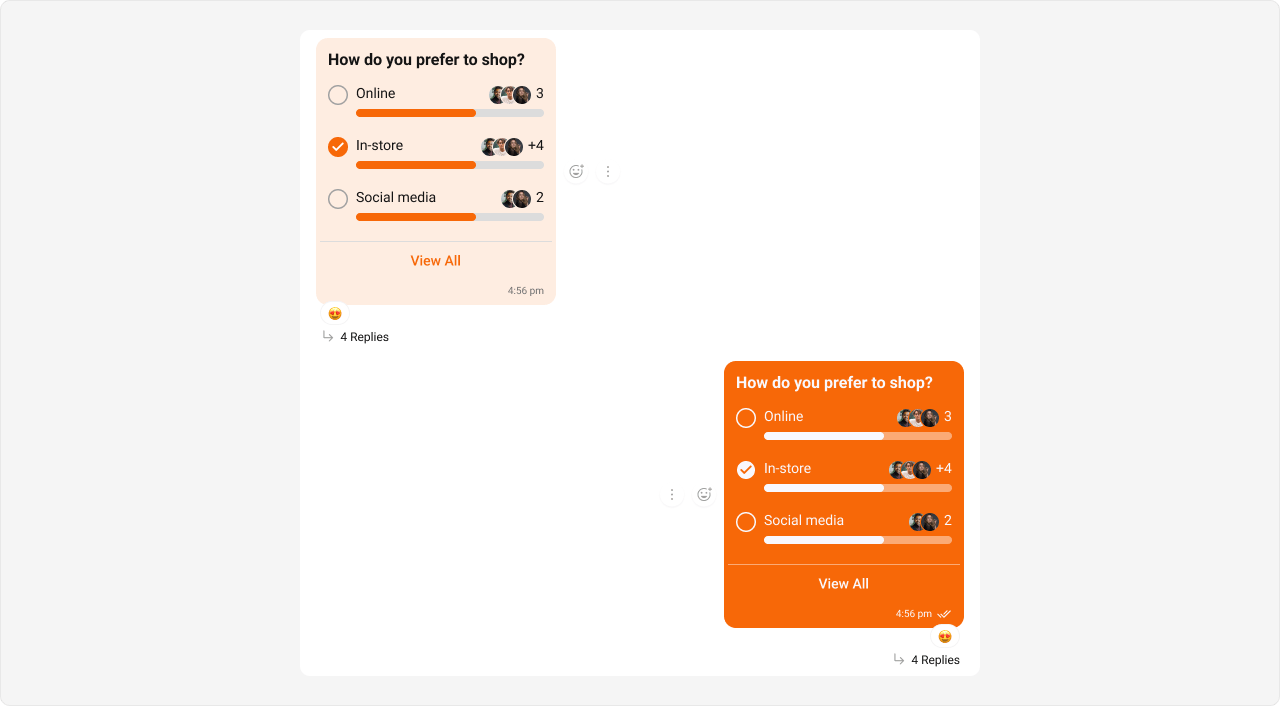 **Complete CSS:**
```css theme={null}
/* Outgoing Poll Message Bubble */
.cometchat
.cometchat-message-bubble-outgoing
.cometchat-message-bubble__body.cometchat-message-bubble__text-message {
--cometchat-primary-color: #f76808;
--cometchat-extended-primary-color-700: #fbaa75;
}
/* Incoming Poll Message Bubble */
.cometchat
.cometchat-message-bubble-incoming
.cometchat-message-bubble__body.cometchat-message-bubble__text-message {
--cometchat-primary-color: #f76808;
--cometchat-neutral-color-300: #feede1;
}
```
**Expected result:** Outgoing poll bubbles change to orange (#f76808) with lighter progress bars (#fbaa75); incoming poll bubbles change to light peach (#feede1) with orange accent.
***
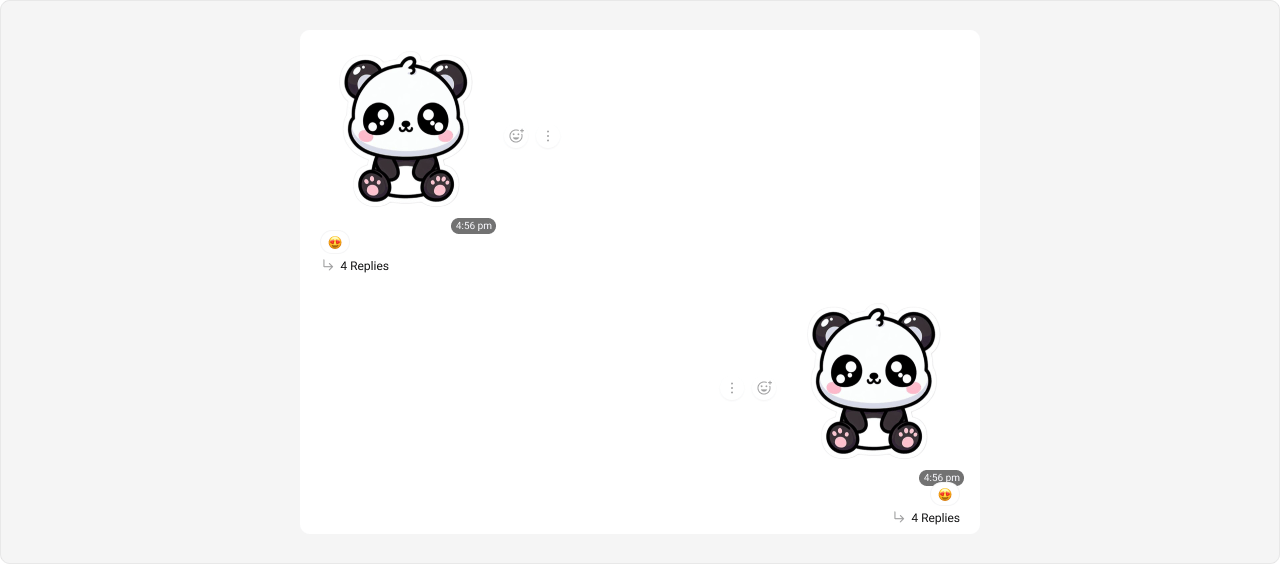
#### Stickers Bubble
**Selectors:**
```css theme={null}
.cometchat .cometchat-message-bubble-outgoing .cometchat-message-bubble__body.cometchat-message-bubble__image-message
```
```css theme={null}
.cometchat .cometchat-message-bubble-incoming .cometchat-message-bubble__body.cometchat-message-bubble__image-message
```
In v7, sticker messages use the `image-message` type class internally.
**Tokens used:**
| Token | Controls |
| ------------------------------- | ---------------------------------- |
| `--cometchat-primary-color` | Outgoing sticker bubble background |
| `--cometchat-neutral-color-300` | Incoming sticker bubble background |
Shown below is the default chat interface.
**Complete CSS:**
```css theme={null}
/* Outgoing Poll Message Bubble */
.cometchat
.cometchat-message-bubble-outgoing
.cometchat-message-bubble__body.cometchat-message-bubble__text-message {
--cometchat-primary-color: #f76808;
--cometchat-extended-primary-color-700: #fbaa75;
}
/* Incoming Poll Message Bubble */
.cometchat
.cometchat-message-bubble-incoming
.cometchat-message-bubble__body.cometchat-message-bubble__text-message {
--cometchat-primary-color: #f76808;
--cometchat-neutral-color-300: #feede1;
}
```
**Expected result:** Outgoing poll bubbles change to orange (#f76808) with lighter progress bars (#fbaa75); incoming poll bubbles change to light peach (#feede1) with orange accent.
***
#### Stickers Bubble
**Selectors:**
```css theme={null}
.cometchat .cometchat-message-bubble-outgoing .cometchat-message-bubble__body.cometchat-message-bubble__image-message
```
```css theme={null}
.cometchat .cometchat-message-bubble-incoming .cometchat-message-bubble__body.cometchat-message-bubble__image-message
```
In v7, sticker messages use the `image-message` type class internally.
**Tokens used:**
| Token | Controls |
| ------------------------------- | ---------------------------------- |
| `--cometchat-primary-color` | Outgoing sticker bubble background |
| `--cometchat-neutral-color-300` | Incoming sticker bubble background |
Shown below is the default chat interface.
 The customized chat interface is displayed below.
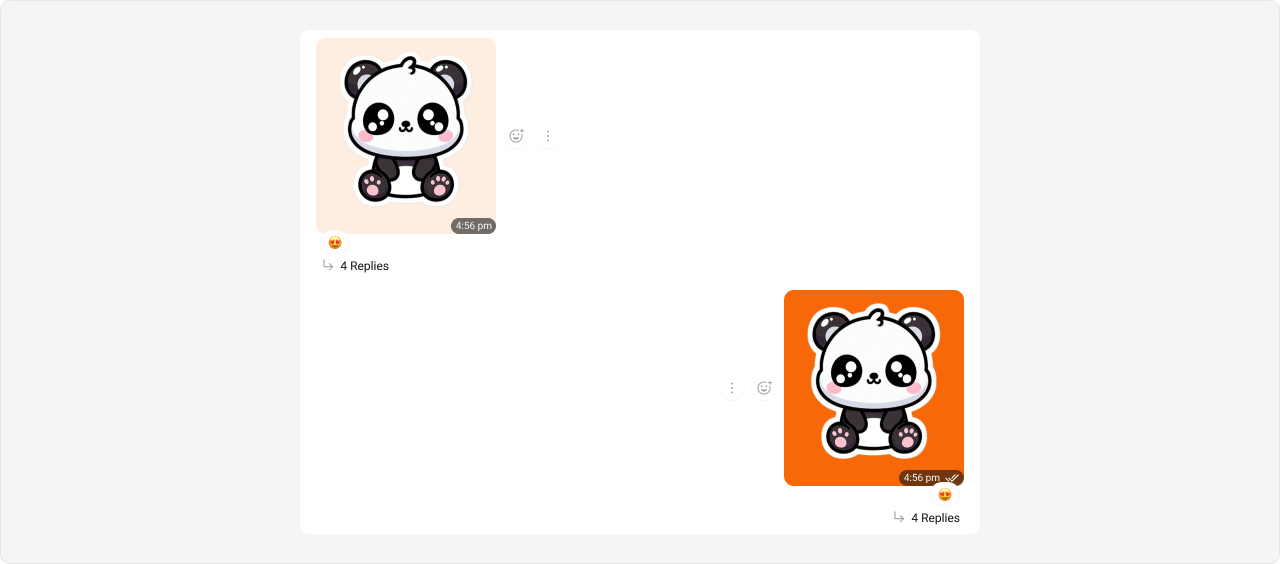 **Complete CSS:**
```css theme={null}
/* Outgoing Sticker Bubble */
.cometchat
.cometchat-message-bubble-outgoing
.cometchat-message-bubble__body.cometchat-message-bubble__image-message {
--cometchat-primary-color: #f76808;
}
/* Incoming Sticker Bubble */
.cometchat
.cometchat-message-bubble-incoming
.cometchat-message-bubble__body.cometchat-message-bubble__image-message {
--cometchat-neutral-color-300: #feede1;
}
```
**Expected result:** Outgoing sticker bubbles change to orange (#f76808); incoming sticker bubbles change to light peach (#feede1).
***
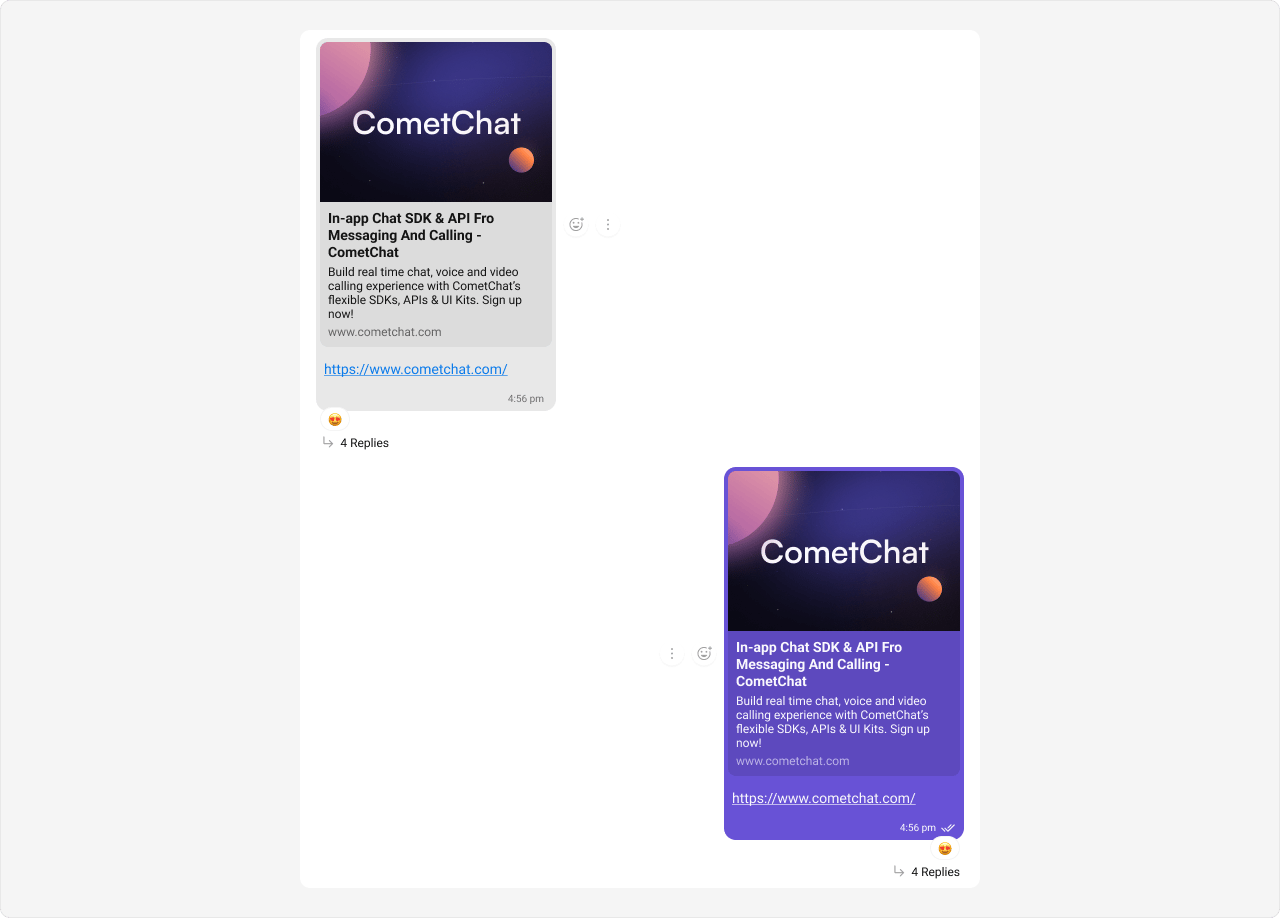
#### Link Preview Bubble
Link previews render inside text message bubbles, so they use the `text-message` type selector.
**Selectors:**
```css theme={null}
.cometchat .cometchat-message-bubble-outgoing .cometchat-message-bubble__body.cometchat-message-bubble__text-message
```
```css theme={null}
.cometchat .cometchat-message-bubble-incoming .cometchat-message-bubble__body.cometchat-message-bubble__text-message
```
**Tokens used:**
| Token | Controls |
| ---------------------------------------- | --------------------------------------- |
| `--cometchat-primary-color` | Outgoing link preview bubble background |
| `--cometchat-extended-primary-color-900` | Outgoing link preview shade |
| `--cometchat-neutral-color-400` | Incoming link preview secondary shade |
| `--cometchat-neutral-color-300` | Incoming link preview bubble background |
Styling link preview bubbles also affects regular text message bubbles since they share the same `__text-message` selector. This is by design — link previews are a sub-feature of text messages.
Shown below is the default chat interface.
**Complete CSS:**
```css theme={null}
/* Outgoing Sticker Bubble */
.cometchat
.cometchat-message-bubble-outgoing
.cometchat-message-bubble__body.cometchat-message-bubble__image-message {
--cometchat-primary-color: #f76808;
}
/* Incoming Sticker Bubble */
.cometchat
.cometchat-message-bubble-incoming
.cometchat-message-bubble__body.cometchat-message-bubble__image-message {
--cometchat-neutral-color-300: #feede1;
}
```
**Expected result:** Outgoing sticker bubbles change to orange (#f76808); incoming sticker bubbles change to light peach (#feede1).
***
#### Link Preview Bubble
Link previews render inside text message bubbles, so they use the `text-message` type selector.
**Selectors:**
```css theme={null}
.cometchat .cometchat-message-bubble-outgoing .cometchat-message-bubble__body.cometchat-message-bubble__text-message
```
```css theme={null}
.cometchat .cometchat-message-bubble-incoming .cometchat-message-bubble__body.cometchat-message-bubble__text-message
```
**Tokens used:**
| Token | Controls |
| ---------------------------------------- | --------------------------------------- |
| `--cometchat-primary-color` | Outgoing link preview bubble background |
| `--cometchat-extended-primary-color-900` | Outgoing link preview shade |
| `--cometchat-neutral-color-400` | Incoming link preview secondary shade |
| `--cometchat-neutral-color-300` | Incoming link preview bubble background |
Styling link preview bubbles also affects regular text message bubbles since they share the same `__text-message` selector. This is by design — link previews are a sub-feature of text messages.
Shown below is the default chat interface.
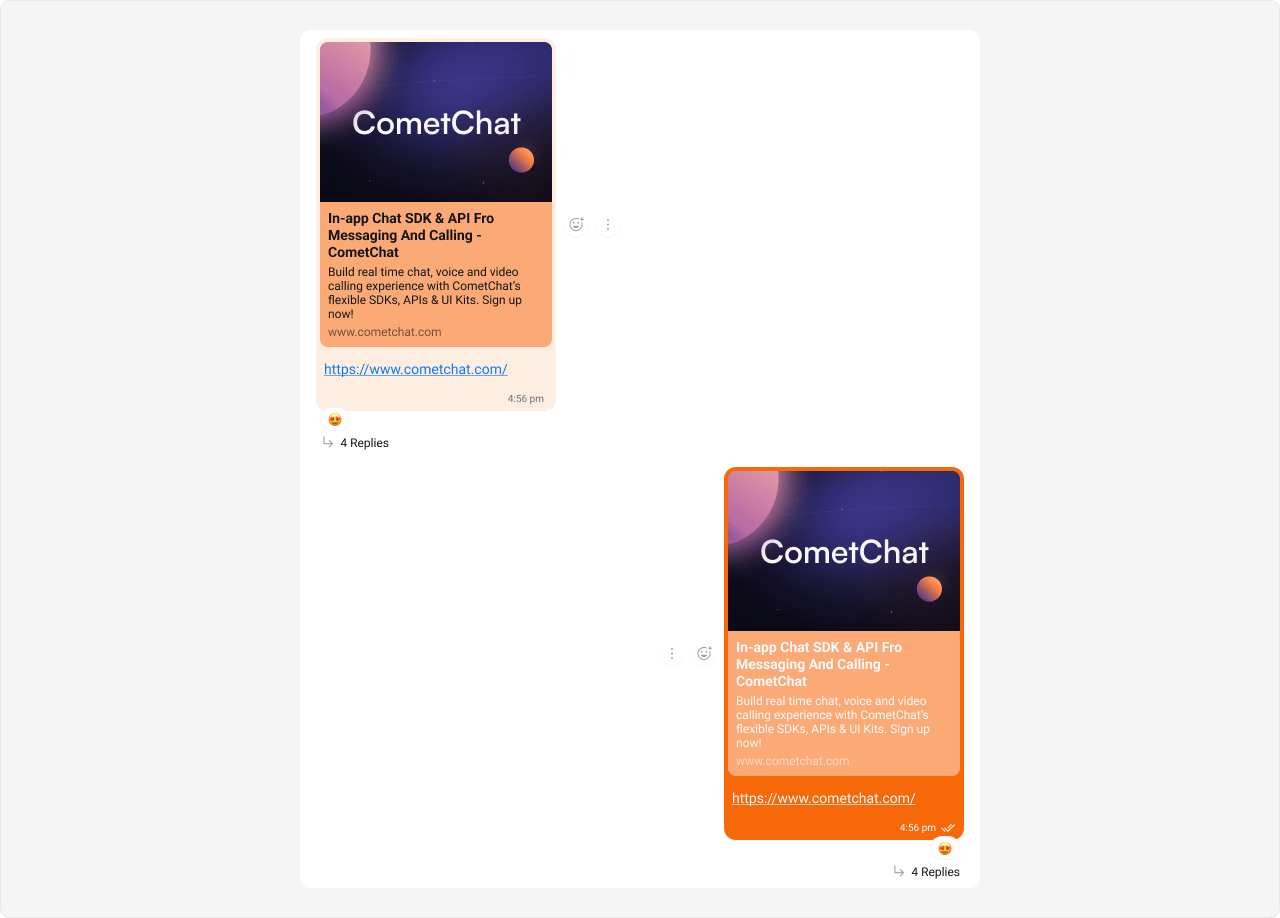
 The customized chat interface is displayed below.
 **Complete CSS:**
```css theme={null}
/* Outgoing Link Preview Bubble */
.cometchat
.cometchat-message-bubble-outgoing
.cometchat-message-bubble__body.cometchat-message-bubble__text-message {
--cometchat-primary-color: #f76808;
--cometchat-extended-primary-color-900: #fbaa75;
}
/* Incoming Link Preview Bubble */
.cometchat
.cometchat-message-bubble-incoming
.cometchat-message-bubble__body.cometchat-message-bubble__text-message {
--cometchat-neutral-color-400: #fbaa75;
--cometchat-neutral-color-300: #feede1;
}
```
**Expected result:** Outgoing link preview bubbles change to orange (#f76808) with lighter shade (#fbaa75); incoming link preview bubbles change to light peach (#feede1) with orange secondary shade (#fbaa75).
***
## CSS Selectors Reference
Class names are plain, stable BEM names that you can target directly:
| Target | Selector |
| ----------------------------- | -------------------------------------------------- |
| Bubble wrapper | `.cometchat-message-bubble` |
| Leading view (avatar) | `.cometchat-message-bubble__leading-view` |
| Header view (sender name) | `.cometchat-message-bubble__header-view` |
| Sender name | `.cometchat-message-bubble__sender-name` |
| Body container | `.cometchat-message-bubble__body-container` |
| Body wrapper | `.cometchat-message-bubble__body-wrapper` |
| Body | `.cometchat-message-bubble__body` |
| Reply view (quoted message) | `.cometchat-message-bubble__body-reply-view` |
| Content view | `.cometchat-message-bubble__body-content-view` |
| Status info (time + receipts) | `.cometchat-message-bubble__body-status-info-view` |
| Footer (reactions) | `.cometchat-message-bubble__body-footer-view` |
| Thread indicator | `.cometchat-message-bubble__body-thread-view` |
| Bottom (moderation) | `.cometchat-message-bubble__body-bottom-view` |
| Options (context menu) | `.cometchat-message-bubble__options` |
| Incoming direction | `.cometchat-message-bubble-incoming` |
| Outgoing direction | `.cometchat-message-bubble-outgoing` |
| Action message | `.cometchat-message-bubble-action` |
All class names follow BEM conventions and are stable across builds. You can target them with standard `.class-name` selectors in your CSS.
**Complete CSS:**
```css theme={null}
/* Outgoing Link Preview Bubble */
.cometchat
.cometchat-message-bubble-outgoing
.cometchat-message-bubble__body.cometchat-message-bubble__text-message {
--cometchat-primary-color: #f76808;
--cometchat-extended-primary-color-900: #fbaa75;
}
/* Incoming Link Preview Bubble */
.cometchat
.cometchat-message-bubble-incoming
.cometchat-message-bubble__body.cometchat-message-bubble__text-message {
--cometchat-neutral-color-400: #fbaa75;
--cometchat-neutral-color-300: #feede1;
}
```
**Expected result:** Outgoing link preview bubbles change to orange (#f76808) with lighter shade (#fbaa75); incoming link preview bubbles change to light peach (#feede1) with orange secondary shade (#fbaa75).
***
## CSS Selectors Reference
Class names are plain, stable BEM names that you can target directly:
| Target | Selector |
| ----------------------------- | -------------------------------------------------- |
| Bubble wrapper | `.cometchat-message-bubble` |
| Leading view (avatar) | `.cometchat-message-bubble__leading-view` |
| Header view (sender name) | `.cometchat-message-bubble__header-view` |
| Sender name | `.cometchat-message-bubble__sender-name` |
| Body container | `.cometchat-message-bubble__body-container` |
| Body wrapper | `.cometchat-message-bubble__body-wrapper` |
| Body | `.cometchat-message-bubble__body` |
| Reply view (quoted message) | `.cometchat-message-bubble__body-reply-view` |
| Content view | `.cometchat-message-bubble__body-content-view` |
| Status info (time + receipts) | `.cometchat-message-bubble__body-status-info-view` |
| Footer (reactions) | `.cometchat-message-bubble__body-footer-view` |
| Thread indicator | `.cometchat-message-bubble__body-thread-view` |
| Bottom (moderation) | `.cometchat-message-bubble__body-bottom-view` |
| Options (context menu) | `.cometchat-message-bubble__options` |
| Incoming direction | `.cometchat-message-bubble-incoming` |
| Outgoing direction | `.cometchat-message-bubble-outgoing` |
| Action message | `.cometchat-message-bubble-action` |
All class names follow BEM conventions and are stable across builds. You can target them with standard `.class-name` selectors in your CSS.