> ## Documentation Index
> Fetch the complete documentation index at: https://cometchat-22654f5b-docs-rn-guide-message-privately.mintlify.site/llms.txt
> Use this file to discover all available pages before exploring further.

# Tab-Based Chat

> Build a tab-based chat interface with Chat, Call Logs, and Users tabs in Next.js (App Router).

<Accordion title="AI Integration Quick Reference">
  | Field        | Value                                                                                                                                         |
  | ------------ | --------------------------------------------------------------------------------------------------------------------------------------------- |
  | Package      | `@cometchat/chat-uikit-react`                                                                                                                 |
  | Framework    | Next.js (App Router)                                                                                                                          |
  | Components   | `CometChatConversations`, `CometChatCallLogs`, `CometChatUsers`, `CometChatMessageHeader`, `CometChatMessageList`, `CometChatMessageComposer` |
  | Layout       | Tabbed sidebar (Chat, Calls, Users) + message view                                                                                            |
  | Prerequisite | Complete [Next.js Integration](/ui-kit/react/integration-nextjs) first                                                                        |
  | SSR          | Component loaded with `dynamic(() => import(...), { ssr: false })`                                                                            |
  | Pattern      | Full-featured messaging app with multiple sections                                                                                            |
</Accordion>

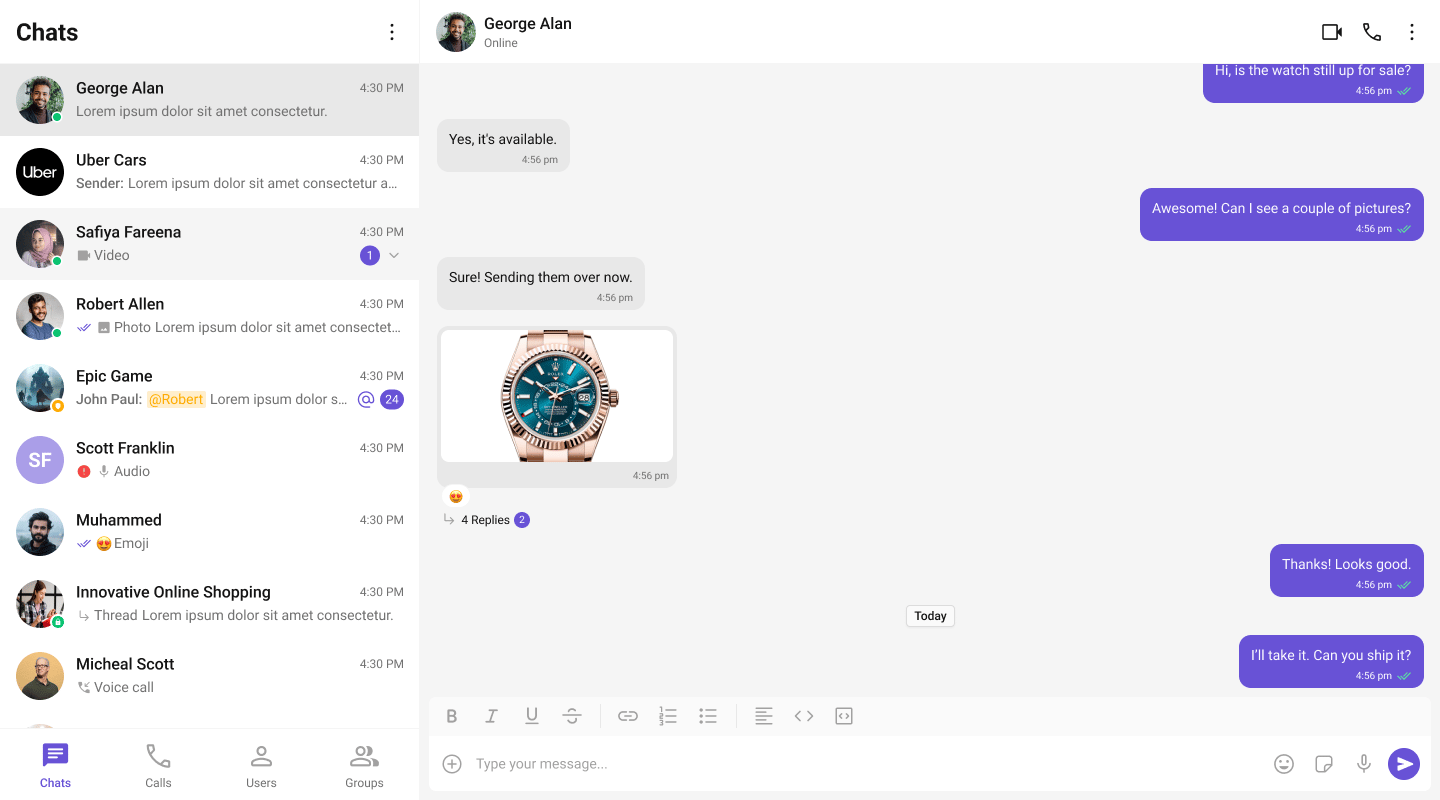
This guide builds a tabbed messaging UI — Chat, Calls, and Users tabs in the sidebar, with a message view on the right. Good for full-featured apps that need more than just conversations.

This assumes you've already completed [Next.js Integration](/ui-kit/react/integration-nextjs) (project created, UI Kit installed, init + login working).

<Frame>
  <img src="https://mintcdn.com/cometchat-22654f5b-docs-rn-guide-message-privately/9bgr-iIAUJixmNKk/images/two_panel_layout_with_tabs_react_v7.png?fit=max&auto=format&n=9bgr-iIAUJixmNKk&q=85&s=f37ff665439e27bf270f62880f99ba41" width="1440" height="800" data-path="images/two_panel_layout_with_tabs_react_v7.png" />
</Frame>

***

## What You're Building

Three sections working together:

1. **Tab bar** — switches between Chat, Calls, and Users
2. **Sidebar** — renders the list for the active tab
3. **Message view** — header + messages + composer for the selected item

***

## Full Code

Create the client component with the tabbed UI, then import it dynamically in your page. Init and login happen in a `useEffect` before the provider mounts.

```tsx title="app/chat/CometChatClient.tsx" theme={null}
'use client';

import { useEffect, useState } from "react";
import { CometChat } from "@cometchat/chat-sdk-javascript";
import {
  CometChatUIKit,
  UIKitSettingsBuilder,
  CometChatProvider,
  CometChatConversations,
  CometChatUsers,
  CometChatCallLogs,
  CometChatMessageHeader,
  CometChatMessageList,
  CometChatMessageComposer,
} from "@cometchat/chat-uikit-react";

type Tab = "chat" | "calls" | "users";

export default function CometChatClient() {
  const [ready, setReady] = useState(false);
  const [activeTab, setActiveTab] = useState<Tab>("chat");
  const [selectedUser, setSelectedUser] = useState<CometChat.User | undefined>(undefined);
  const [selectedGroup, setSelectedGroup] = useState<CometChat.Group | undefined>(undefined);

  useEffect(() => {
    const settings = new UIKitSettingsBuilder()
      .setAppId("YOUR_APP_ID")
      .setRegion("YOUR_REGION")
      .setAuthKey("YOUR_AUTH_KEY")
      .subscribePresenceForAllUsers()
      .build();

    CometChatUIKit.init(settings).then(async () => {
      await CometChatUIKit.login("cometchat-uid-1");
      setReady(true);
    });
  }, []);

  if (!ready) return <div>Loading chat...</div>;

  const handleConversationClick = (conversation: CometChat.Conversation) => {
    const entity = conversation.getConversationWith();
    if (conversation.getConversationType() === "user") {
      setSelectedUser(entity as CometChat.User);
      setSelectedGroup(undefined);
    } else {
      setSelectedGroup(entity as CometChat.Group);
      setSelectedUser(undefined);
    }
  };

  const handleUserClick = (user: CometChat.User) => {
    setSelectedUser(user);
    setSelectedGroup(undefined);
  };

  const handleCallClick = (call: any) => {
    const initiator = call.getInitiator();
    const receiver = call.getReceiver();

    // Determine the other party in the call
    if (receiver instanceof CometChat.User) {
      setSelectedUser(receiver);
      setSelectedGroup(undefined);
    } else if (receiver instanceof CometChat.Group) {
      setSelectedUser(undefined);
      setSelectedGroup(receiver);
    } else if (initiator instanceof CometChat.User) {
      setSelectedUser(initiator);
      setSelectedGroup(undefined);
    }
  };

  return (
    <CometChatProvider>
      <div className="tabbed-chat">
        <div className="sidebar">
          <div className="tab-bar">
            <button
              className={`tab-button ${activeTab === "chat" ? "tab-button--active" : ""}`}
              onClick={() => setActiveTab("chat")}
            >
              Chats
            </button>
            <button
              className={`tab-button ${activeTab === "calls" ? "tab-button--active" : ""}`}
              onClick={() => setActiveTab("calls")}
            >
              Calls
            </button>
            <button
              className={`tab-button ${activeTab === "users" ? "tab-button--active" : ""}`}
              onClick={() => setActiveTab("users")}
            >
              Users
            </button>
          </div>

          <div className="sidebar-list">
            {activeTab === "chat" && (
              <CometChatConversations onItemClick={handleConversationClick} />
            )}
            {activeTab === "calls" && (
              <CometChatCallLogs onItemClick={handleCallClick} />
            )}
            {activeTab === "users" && (
              <CometChatUsers onItemClick={handleUserClick} />
            )}
          </div>
        </div>

        {selectedUser || selectedGroup ? (
          <div className="messages-wrapper">
            <CometChatMessageHeader user={selectedUser} group={selectedGroup} />
            <CometChatMessageList user={selectedUser} group={selectedGroup} />
            <CometChatMessageComposer user={selectedUser} group={selectedGroup} />
          </div>
        ) : (
          <div className="empty-conversation">
            Select a conversation to start chatting
          </div>
        )}
      </div>
    </CometChatProvider>
  );
}
```

```css title="app/chat/chat.css" theme={null}
.tabbed-chat {
  display: flex;
  height: 100vh;
  width: 100%;
}

.sidebar {
  width: 360px;
  height: 100%;
  display: flex;
  flex-direction: column;
  border-right: 1px solid #eee;
}

.tab-bar {
  display: flex;
  border-bottom: 1px solid #eee;
  background: var(--cometchat-background-color-01, #fff);
}

.tab-button {
  flex: 1;
  padding: 12px 0;
  border: none;
  background: none;
  cursor: pointer;
  font: var(--cometchat-font-body-medium, 500 14px Roboto);
  color: var(--cometchat-text-color-secondary, #727272);
  border-bottom: 2px solid transparent;
  transition: color 0.2s, border-color 0.2s;
}

.tab-button:hover {
  color: var(--cometchat-text-color-primary, #141414);
}

.tab-button--active {
  color: var(--cometchat-text-color-highlight, #6851d6);
  border-bottom-color: var(--cometchat-primary-color, #6851d6);
}

.sidebar-list {
  flex: 1;
  overflow: hidden;
  display: flex;
  flex-direction: column;
}

.messages-wrapper {
  flex: 1;
  height: 100%;
  display: flex;
  flex-direction: column;
}

.empty-conversation {
  flex: 1;
  display: flex;
  justify-content: center;
  align-items: center;
  background: var(--cometchat-background-color-03, #f5f5f5);
  color: var(--cometchat-text-color-secondary, #727272);
  font: var(--cometchat-font-body-regular, 400 14px Roboto);
}
```

```tsx title="app/chat/page.tsx" theme={null}
import dynamic from 'next/dynamic';

const CometChatClient = dynamic(() => import('./CometChatClient'), { ssr: false });

export default function ChatPage() {
  return <CometChatClient />;
}
```

***

## How It Works

1. **`'use client'`** marks the component as a Client Component — required because CometChat uses browser APIs.
2. **`dynamic(() => import(...), { ssr: false })`** prevents the component from rendering on the server.
3. **Tab state** — `activeTab` controls which list component renders in the sidebar.
4. **Conditional rendering** — only the active tab's component mounts. Switching tabs unmounts the previous list and mounts the new one.
5. **Unified selection** — all three tabs feed into the same `selectedUser` / `selectedGroup` state. Clicking any item (conversation, call log, or user) updates the message panel.
6. **Call log handling** — when a call log is clicked, the receiver (user or group) is extracted and passed to the message components.

***

## Adding More Tabs

To add a Groups tab, import `CometChatGroups` and add another tab button + conditional render:

```tsx theme={null}
import { CometChatGroups } from "@cometchat/chat-uikit-react";

// Add to Tab type:
type Tab = "chat" | "calls" | "users" | "groups";

// Add button in tab-bar:
<button
  className={`tab-button ${activeTab === "groups" ? "tab-button--active" : ""}`}
  onClick={() => setActiveTab("groups")}
>
  Groups
</button>

// Add in sidebar-list:
{activeTab === "groups" && (
  <CometChatGroups
    onItemClick={(group: CometChat.Group) => {
      setSelectedGroup(group);
      setSelectedUser(undefined);
    }}
  />
)}
```

You can follow the same pattern for any additional tabs (Settings, Contacts, etc.).

***

## Run

```bash theme={null}
npm run dev
```

Open `http://localhost:3000/chat`. You should see the tab bar at the top of the sidebar. Switch between Chats, Calls, and Users — clicking any item loads the message view on the right.

***

## Next Steps

<CardGroup cols={2}>
  <Card title="Conversation List + Messages" icon="comments" href="/ui-kit/react/next-conversation">
    Two-panel layout without tabs
  </Card>

  <Card title="Components Overview" icon="grid-2" href="/ui-kit/react/components-overview">
    Browse all prebuilt UI components
  </Card>

  <Card title="Theming" icon="paintbrush" href="/ui-kit/react/theming">
    Customize colors, fonts, and styles
  </Card>
</CardGroup>
