> ## Documentation Index
> Fetch the complete documentation index at: https://cometchat-22654f5b-docs-rn-guide-message-privately.mintlify.site/llms.txt
> Use this file to discover all available pages before exploring further.
# Outgoing Call
> Displays the outgoing call screen with receiver info and a cancel button while waiting for the call to be answered.
```json theme={null}
{
"component": "CometChatOutgoingCall",
"package": "@cometchat/chat-uikit-react",
"import": "import { CometChatOutgoingCall } from \"@cometchat/chat-uikit-react\";",
"description": "Displays the outgoing call screen with receiver info and a cancel button while waiting for the call to be answered.",
"cssRootClass": ".cometchat-outgoing-call",
"primaryOutput": {
"prop": "onCallCanceled",
"type": "() => void"
},
"props": {
"data": {
"call": {
"type": "CometChat.Call",
"required": true,
"note": "The CometChat call object representing the outgoing call"
}
},
"callbacks": {
"onCallCanceled": "() => void",
"onError": "((error: CometChat.CometChatException) => void) | null"
},
"sound": {
"disableSoundForCalls": { "type": "boolean", "default": false },
"customSoundForCalls": { "type": "string", "default": "built-in" }
},
"viewSlots": {
"titleView": "ReactNode",
"subtitleView": "ReactNode",
"avatarView": "ReactNode",
"cancelButtonView": "ReactNode"
}
},
"events": [],
"eventsReceived": [],
"sdkListeners": [],
"types": {}
}
```
## Overview
`CometChatOutgoingCall` is a purely presentational component that displays the outgoing call screen while waiting for the receiver to answer. It shows the receiver's name, avatar, a "Calling..." subtitle, and an end-call button.
**Live Preview** — interact with the default outgoing call screen.
[Open in Storybook ↗](https://storybook.cometchat.io/react/?path=/story/components-calls-cometchat-outgoing-call--default)
The component handles:
* Displaying receiver name and avatar from the `call` object
* "Calling..." subtitle text
* End-call/cancel button
* Outgoing call sound playback (looping while mounted, pauses on unmount)
> **Required prop:** The `call` prop is required. The component needs a valid `CometChat.Call` object to render receiver information.
> **Typical usage:** `CometChatOutgoingCall` is typically rendered by `CometChatMessageHeader` or `CometChatIncomingCall` internally when a call is initiated, but it can be used standalone.
***
## Usage
### Flat API
```tsx theme={null}
import { CometChatOutgoingCall } from "@cometchat/chat-uikit-react";
function OutgoingCallScreen({ call }: { call: CometChat.Call }) {
return (
{
console.log("Call canceled by user");
// Cancel the call via SDK
CometChat.rejectCall(call.getSessionId(), CometChat.CALL_STATUS.CANCELLED);
}}
/>
);
}
```
### Standalone Usage Example
```tsx theme={null}
import { useState } from "react";
import { CometChat } from "@cometchat/chat-sdk-javascript";
import { CometChatOutgoingCall } from "@cometchat/chat-uikit-react";
function CallManager() {
const [outgoingCall, setOutgoingCall] = useState(null);
const initiateCall = async (receiverUID: string) => {
const call = new CometChat.Call(
receiverUID,
CometChat.CALL_TYPE.VIDEO,
CometChat.RECEIVER_TYPE.USER
);
const initiatedCall = await CometChat.initiateCall(call);
setOutgoingCall(initiatedCall);
};
const cancelCall = () => {
if (outgoingCall) {
CometChat.rejectCall(
outgoingCall.getSessionId(),
CometChat.CALL_STATUS.CANCELLED
);
setOutgoingCall(null);
}
};
return (
{outgoingCall && (
)}
);
}
```
***
## Actions and Events
### Callback Props
| Prop | Signature | Fires when |
| ---------------- | --------------------------------------------------------- | --------------------------------- |
| `onCallCanceled` | `() => void` | User clicks the cancel/end button |
| `onError` | `((error: CometChat.CometChatException) => void) \| null` | SDK error occurs |
### Events Emitted
This component does not emit any UI events.
### Events Received
This component does not subscribe to any UI events from other components.
### SDK Listeners (Automatic)
This component does not attach any SDK listeners. It is purely presentational — the parent component is responsible for managing call state transitions (e.g., listening for `onOutgoingCallAccepted` or `onOutgoingCallRejected`).
***
## Customization
### View Props
Use view props to replace sections of the default UI while keeping the component's behavior intact:
```tsx theme={null}
{call.getReceiver().getName()}}
subtitleView={Ringing...}
avatarView={}
cancelButtonView={}
/>
```
| Slot | Type | Replaces |
| ------------------ | ----------- | ----------------- |
| `titleView` | `ReactNode` | Receiver name |
| `subtitleView` | `ReactNode` | "Calling..." text |
| `avatarView` | `ReactNode` | Receiver avatar |
| `cancelButtonView` | `ReactNode` | End-call button |
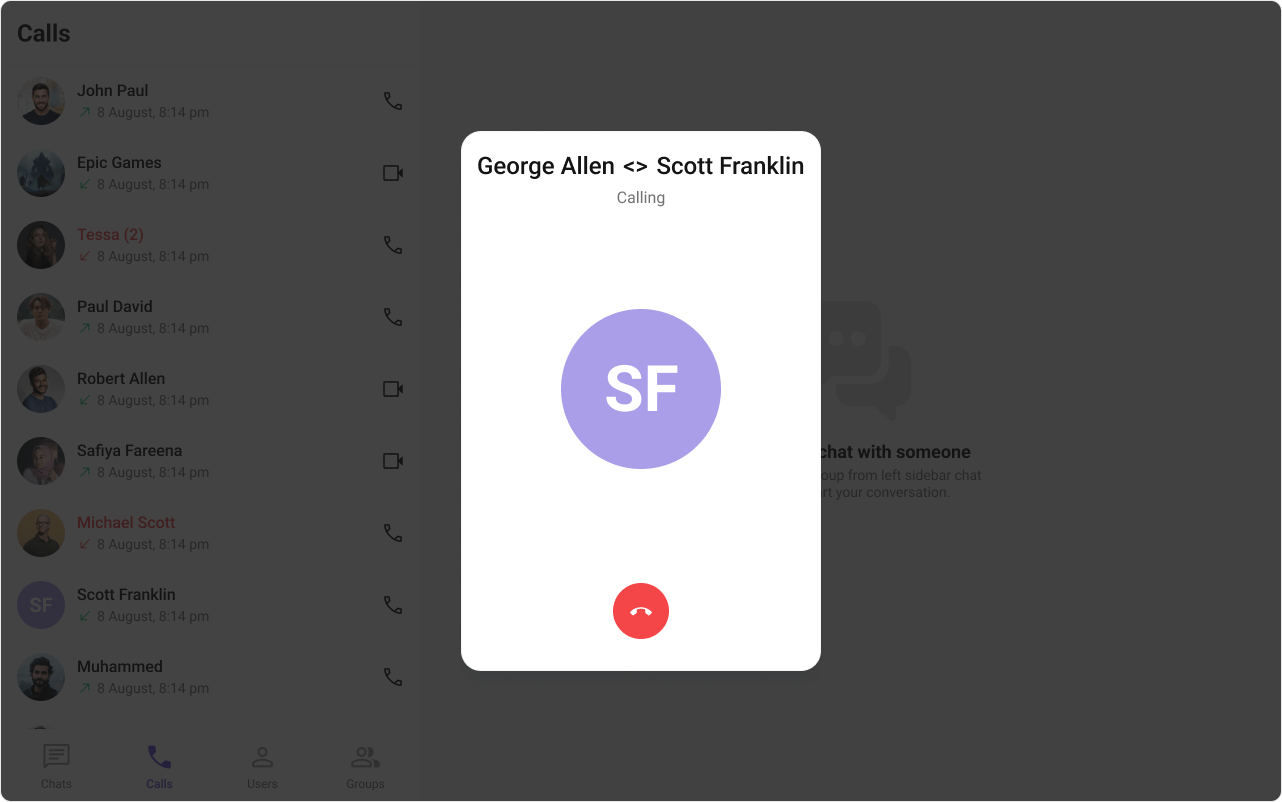
#### titleView
```tsx theme={null}
import { CometChat } from "@cometchat/chat-sdk-javascript";
import { CometChatOutgoingCall } from "@cometchat/chat-uikit-react";
function OutgoingCallCustomTitle({ call }: { call: CometChat.Call }) {
return (
{call.getCallInitiator().getName()} {" <> "} {call.getCallReceiver().getName()}
}
/>
);
}
```
```css theme={null}
.outgoing-call__title {
color: #141414;
text-align: center;
font: 500 24px Roboto;
}
```
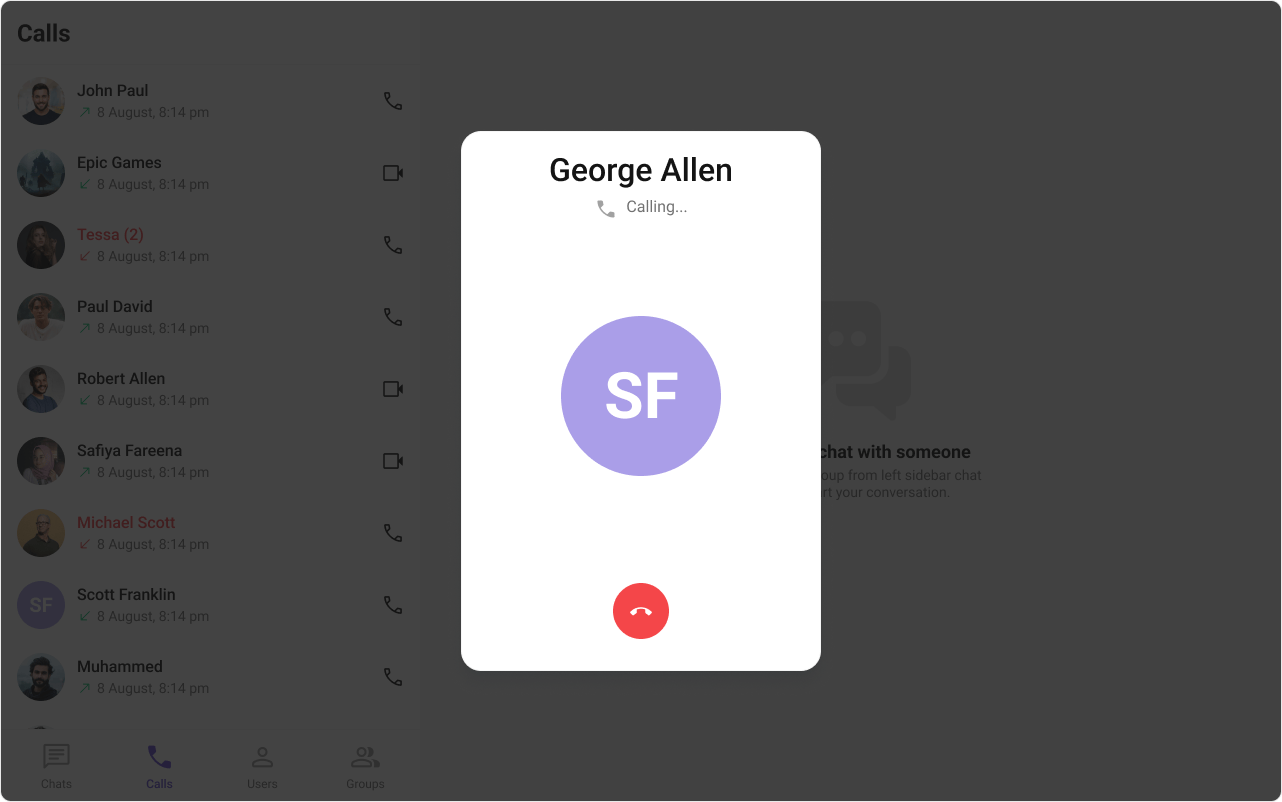
#### subtitleView
```tsx theme={null}
import { CometChat } from "@cometchat/chat-sdk-javascript";
import { CometChatOutgoingCall } from "@cometchat/chat-uikit-react";
function OutgoingCallCustomSubtitle({ call }: { call: CometChat.Call }) {
return (
{"Calling..."}
}
/>
);
}
```
```css theme={null}
.outgoing-call__subtitle {
display: flex;
justify-content: center;
align-items: flex-start;
gap: 8px;
color: #727272;
text-align: center;
font: 400 16px Roboto;
}
.outgoing-call__subtitle-icon {
background: #a1a1a1;
height: 24px;
width: 24px;
}
```
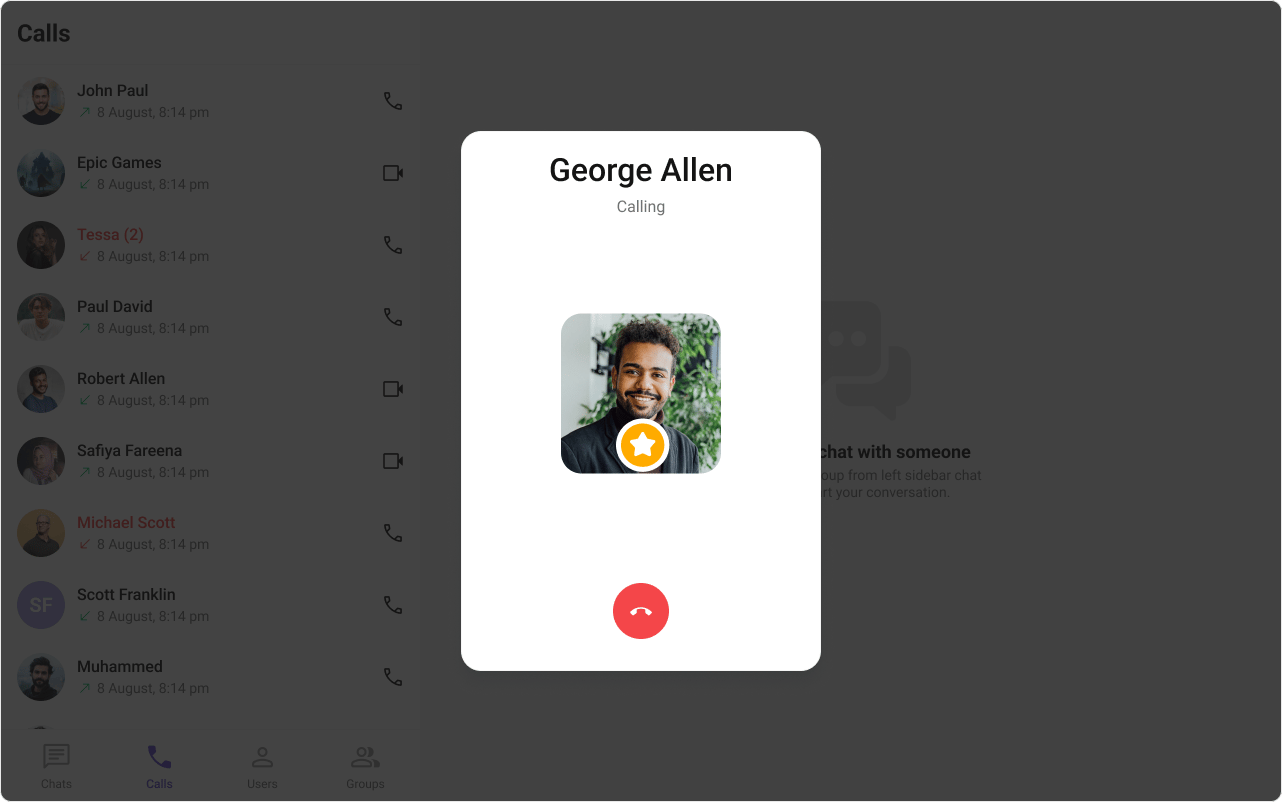
#### avatarView
```tsx theme={null}
import { CometChat } from "@cometchat/chat-sdk-javascript";
import { CometChatOutgoingCall, CometChatAvatar } from "@cometchat/chat-uikit-react";
function OutgoingCallCustomAvatar({ call }: { call: CometChat.Call }) {
return (
}
/>
);
}
```
```css theme={null}
.outgoing-call__avatar .cometchat-avatar {
width: 160px;
height: 160px;
border-radius: 20px;
}
```
### CSS Styling
Override design tokens on the component selector:
```css theme={null}
.cometchat-outgoing-call {
--cometchat-background-color-01: #1a1a2e;
--cometchat-text-color-primary: #ffffff;
}
.cometchat-outgoing-call__button {
background: var(--cometchat-error-color);
}
```
***
## Props
The `call` prop is required. All other props are optional.
***
### call
The CometChat call object representing the outgoing call. **Required.**
| | |
| -------- | ---------------- |
| Type | `CometChat.Call` |
| Required | Yes |
***
### disableSoundForCalls
Disable the outgoing call sound.
| | |
| ------- | --------- |
| Type | `boolean` |
| Default | `false` |
***
### customSoundForCalls
Custom sound URL to play during the outgoing call (replaces the built-in sound).
| | |
| ------- | ---------------------------- |
| Type | `string` |
| Default | Built-in outgoing call sound |
***
### onCallCanceled
Callback when the user clicks the cancel/end button.
| | |
| ------- | ------------ |
| Type | `() => void` |
| Default | `undefined` |
***
### onError
Callback when an SDK error occurs.
| | |
| ------- | --------------------------------------------------------- |
| Type | `((error: CometChat.CometChatException) => void) \| null` |
| Default | `null` |
***
### titleView
Custom view that replaces the receiver name.
| | |
| ------- | ----------- |
| Type | `ReactNode` |
| Default | `undefined` |
***
### subtitleView
Custom view that replaces the "Calling..." text.
| | |
| ------- | ----------- |
| Type | `ReactNode` |
| Default | `undefined` |
***
### avatarView
Custom view that replaces the receiver avatar.
| | |
| ------- | ----------- |
| Type | `ReactNode` |
| Default | `undefined` |
***
### cancelButtonView
Custom view that replaces the end-call button.
| | |
| ------- | ----------- |
| Type | `ReactNode` |
| Default | `undefined` |
***
### className
Additional CSS class name applied to the root element.
| | |
| ------- | ----------- |
| Type | `string` |
| Default | `undefined` |
***
## CSS Selectors
| Target | Selector |
| ------------------ | ------------------------------------------- |
| Root container | `.cometchat-outgoing-call` |
| Title container | `.cometchat-outgoing-call__title-container` |
| Title | `.cometchat-outgoing-call__title` |
| Subtitle | `.cometchat-outgoing-call__subtitle` |
| Avatar | `.cometchat-outgoing-call__avatar` |
| Cancel button | `.cometchat-outgoing-call__button` |
| Cancel button icon | `.cometchat-outgoing-call__button-icon` |
***
## Next Steps
Handle incoming call notifications with accept/decline actions
Browse call history and re-initiate calls
Customize colors, fonts, and spacing