> ## Documentation Index
> Fetch the complete documentation index at: https://cometchat-22654f5b-docs-rn-guide-message-privately.mintlify.site/llms.txt
> Use this file to discover all available pages before exploring further.
# Notification Feed
> Full-screen notification feed component with category filtering, card rendering, real-time updates, and engagement reporting.
```json theme={null}
{
"component": "CometChatNotificationFeed",
"package": "@cometchat/chat-uikit-react",
"import": "import { CometChatNotificationFeed } from \"@cometchat/chat-uikit-react\";",
"description": "Full-screen notification feed with category filtering, timestamp grouping, card rendering via @cometchat/cards-react, real-time updates, and automatic engagement reporting.",
"cssRootClass": ".cometchat-notification-feed",
"props": {
"data": {
"title": { "type": "string", "default": "\"Notifications\"" },
"notificationFeedRequestBuilder": { "type": "NotificationFeedRequestBuilder", "default": "SDK default (20 per page)" },
"notificationCategoriesRequestBuilder": { "type": "NotificationCategoriesRequestBuilder", "default": "SDK default (50 per page)" }
},
"callbacks": {
"onItemClick": "(feedItem: NotificationFeedItem) => void",
"onActionClick": "(feedItem: NotificationFeedItem, action: CardAction) => void",
"onError": "(error: CometChat.CometChatException) => void",
"onBackPress": "() => void"
},
"visibility": {
"showHeader": { "type": "boolean", "default": true },
"showBackButton": { "type": "boolean", "default": false },
"showFilterChips": { "type": "boolean", "default": true }
},
"viewSlots": {
"headerView": "ReactNode",
"emptyView": "ReactNode",
"errorView": "ReactNode",
"loadingView": "ReactNode",
"itemView": "(item: NotificationFeedItem) => ReactNode"
},
"cards": {
"cardThemeMode": { "type": "\"auto\" | \"light\" | \"dark\"", "default": "\"auto\"" },
"cardThemeOverride": { "type": "Record", "default": "undefined" }
}
},
"automaticBehaviors": [
"Real-time updates via WebSocket listener",
"Delivery reporting on fetch",
"Read reporting on viewport visibility (IntersectionObserver)",
"Unread count polling every 30 seconds",
"Infinite scroll pagination",
"Timestamp grouping (Today, Yesterday, day name, date)",
"Category filter chips with unread badges",
"Mark all read button"
],
"additionalExports": {
"useNotificationUnreadCount": "Hook for tracking unread count with shared polling"
}
}
```
`CometChatNotificationFeed` displays a scrollable notification feed where each item is rendered as a card using `@cometchat/cards-react`. It handles fetching, pagination, category filtering, timestamp grouping, real-time updates, and read/delivered/engagement reporting automatically.
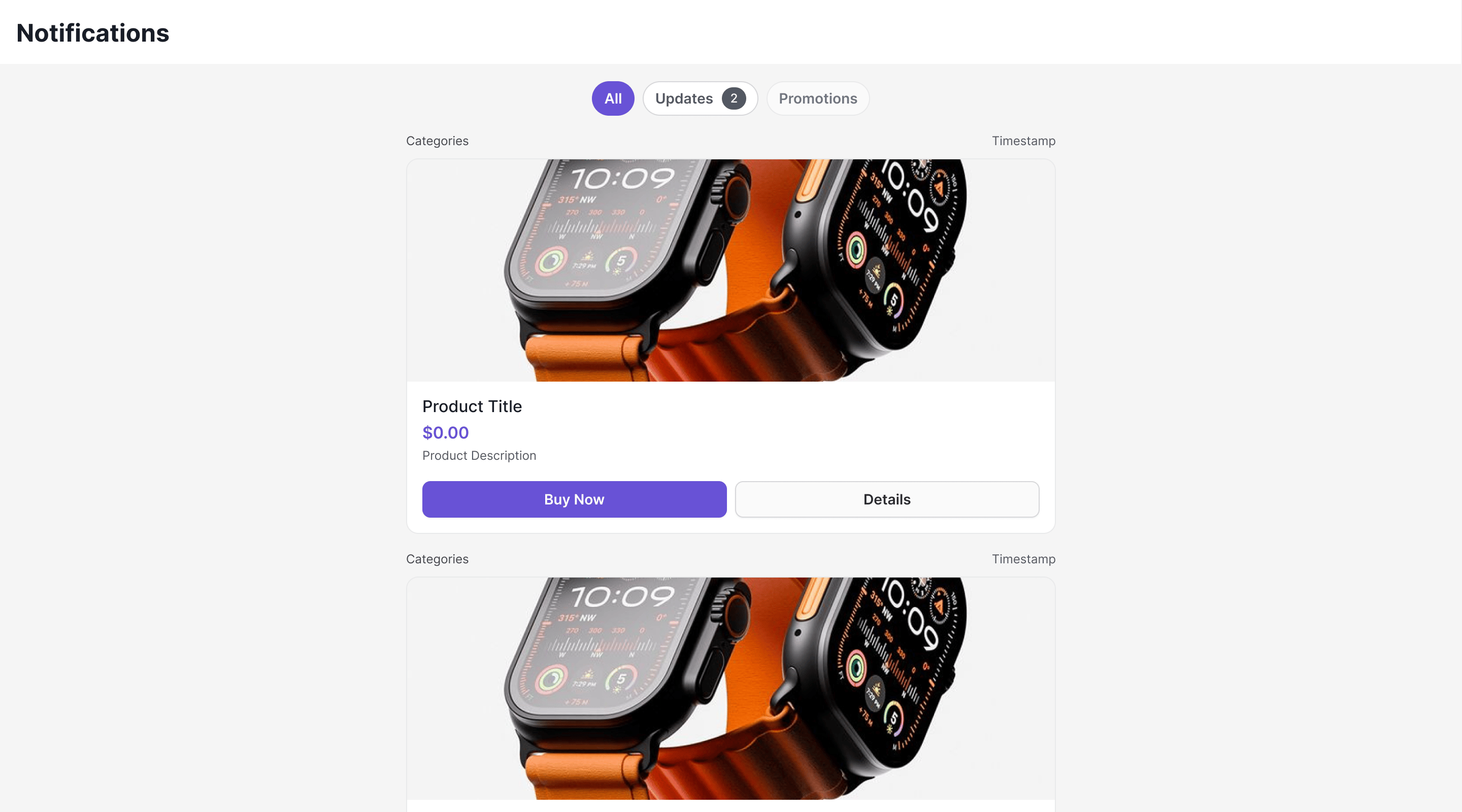 **Live Preview** — interact with the notification feed component.
[Open in Storybook ↗](https://storybook.cometchat.io/react/?path=/story/components-notification-feed-cometchat-notification-feed--default)
***
## Where It Fits
`CometChatNotificationFeed` is a full-screen component. Drop it into a page or route. It manages its own data fetching, state, and real-time listeners — you just handle navigation callbacks.
```tsx theme={null}
import { CometChatNotificationFeed } from "@cometchat/chat-uikit-react";
function NotificationsPage() {
return (
window.history.back()}
onItemClick={(item) => {
// Handle item click (e.g., open detail or deep link)
}}
/>
);
}
```
***
## Minimal Render
```tsx theme={null}
import { CometChatNotificationFeed } from "@cometchat/chat-uikit-react";
function NotificationsDemo() {
return (
**Live Preview** — interact with the notification feed component.
[Open in Storybook ↗](https://storybook.cometchat.io/react/?path=/story/components-notification-feed-cometchat-notification-feed--default)
***
## Where It Fits
`CometChatNotificationFeed` is a full-screen component. Drop it into a page or route. It manages its own data fetching, state, and real-time listeners — you just handle navigation callbacks.
```tsx theme={null}
import { CometChatNotificationFeed } from "@cometchat/chat-uikit-react";
function NotificationsPage() {
return (
window.history.back()}
onItemClick={(item) => {
// Handle item click (e.g., open detail or deep link)
}}
/>
);
}
```
***
## Minimal Render
```tsx theme={null}
import { CometChatNotificationFeed } from "@cometchat/chat-uikit-react";
function NotificationsDemo() {
return (
);
}
export default NotificationsDemo;
```
Prerequisites: CometChat SDK initialized with `CometChatUIKit.init()` and a user logged in.
Root CSS class: `.cometchat-notification-feed`
***
## Filtering Feed Items
Control what loads using custom request builders:
```tsx theme={null}
import { CometChatNotificationFeed } from "@cometchat/chat-uikit-react";
import { CometChat } from "@cometchat/chat-sdk-javascript";
function UnreadNotifications() {
return (
);
}
```
### Filter Options
| Builder Method | Description |
| ----------------------- | ------------------------------------ |
| `.setLimit(number)` | Items per page (default 20, max 100) |
| `.setReadState(state)` | `"read"`, `"unread"`, or `"all"` |
| `.setCategory(string)` | Filter by category label |
| `.setChannelId(string)` | Filter by channel |
| `.setTags(string[])` | Filter by tags |
| `.setDateFrom(string)` | ISO 8601 date lower bound |
| `.setDateTo(string)` | ISO 8601 date upper bound |
***
## Actions and Events
### Callback Props
#### onItemClick
Fires when a feed item card is clicked.
```tsx theme={null}
{
console.log("Item clicked:", item.getId());
}}
/>
```
#### onActionClick
Fires when an interactive element (button, link) inside a card is clicked. The `action` object contains the action type, parameters, and the element ID that triggered it.
```tsx theme={null}
{
const { type, params, elementId } = action;
switch (type) {
case "openUrl":
window.open(params.url as string, "_blank");
break;
case "chatWithUser":
// Navigate to chat with params.uid
break;
case "chatWithGroup":
// Navigate to group chat with params.guid
break;
}
}}
/>
```
#### onError
Fires when an internal error occurs (network failure, SDK exception).
```tsx theme={null}
{
console.error("Feed error:", error.message);
}}
/>
```
#### onBackPress
Fires when the back button in the header is clicked.
```tsx theme={null}
window.history.back()}
/>
```
### Automatic Behaviors
The component handles these automatically — no manual setup needed:
| Behavior | Description |
| -------------------- | -------------------------------------------------------------------------- |
| Real-time updates | New items appear at the top via WebSocket `NotificationFeedListener` |
| Delivery reporting | Items are reported as delivered when fetched |
| Read reporting | Items are reported as read when visible in viewport (IntersectionObserver) |
| Unread count polling | Polls unread count every 30 seconds to update badges |
| Infinite scroll | Fetches next page when scrolling near the bottom |
| Timestamp grouping | Groups items as "Today", "Yesterday", day name, or date |
| Category filtering | Filter chips row with per-category unread badges |
| Mark all read | Header button to mark all notifications as read |
***
## Customization
### View Props
```tsx theme={null}
}
emptyView={}
loadingView={}
errorView={}
itemView={(item) => }
/>
```
| Slot | Signature | Replaces |
| ------------- | ------------------------------------------- | ------------------------------ |
| `headerView` | `ReactNode` | Entire header bar |
| `loadingView` | `ReactNode` | Loading state |
| `emptyView` | `ReactNode` | Empty state |
| `errorView` | `ReactNode` | Error state |
| `itemView` | `(item: NotificationFeedItem) => ReactNode` | Individual feed item rendering |
### Compound Composition
For full layout control, use sub-components. Omit any sub-component to hide it:
```tsx theme={null}
```
Available sub-components:
| Sub-component | Description | Props | Flat API equivalent |
| -------------- | ------------------------------------- | ---------------------------------------------------- | ------------------- |
| `Root` | Context provider and container | All Root props + `children` | — |
| `Header` | Header bar with title + mark-all-read | `title`, `showBackButton`, `onBackPress`, `children` | `headerView` |
| `FilterChips` | Category filter chips | `children` | — |
| `List` | Scrollable feed list | `itemView` | `itemView` |
| `Item` | Individual feed item | `item`, `cardThemeMode`, `cardThemeOverride` | — |
| `EmptyState` | Empty state | `children` | `emptyView` |
| `ErrorState` | Error state | `children` | `errorView` |
| `LoadingState` | Loading state | `children` | `loadingView` |
### CSS Styling
Override design tokens on the component selector:
```css theme={null}
.cometchat-notification-feed {
--cometchat-background-color-01: #1a1a2e;
--cometchat-text-color-primary: #ffffff;
}
```
### CSS Classes
| Class | Description |
| ------------------------------------------------ | ----------------------------------- |
| `.cometchat-notification-feed` | Root container |
| `.cometchat-notification-feed__header` | Header bar |
| `.cometchat-notification-feed__header-title` | Header title text |
| `.cometchat-notification-feed__header-back` | Back button |
| `.cometchat-notification-feed__mark-all-read` | Mark all read button |
| `.cometchat-notification-feed__chips` | Filter chips container |
| `.cometchat-notification-feed__chip` | Individual filter chip |
| `.cometchat-notification-feed__chip--active` | Active filter chip |
| `.cometchat-notification-feed__chip--inactive` | Inactive filter chip |
| `.cometchat-notification-feed__chip-badge` | Chip unread badge |
| `.cometchat-notification-feed__content` | Scrollable content area |
| `.cometchat-notification-feed__item` | Feed item container |
| `.cometchat-notification-feed__item--unread` | Unread feed item |
| `.cometchat-notification-feed__unread-indicator` | Unread dot indicator |
| `.cometchat-notification-feed__item-meta` | Item metadata row (category + time) |
| `.cometchat-notification-feed__card-container` | Card wrapper |
| `.cometchat-notification-feed__loading` | Loading state |
| `.cometchat-notification-feed__empty` | Empty state |
| `.cometchat-notification-feed__error` | Error state |
***
## Props
All props are optional.
***
### title
Header title text.
| | |
| ------- | ----------------- |
| Type | `string` |
| Default | `"Notifications"` |
***
### showHeader
Shows/hides the entire header.
| | |
| ------- | --------- |
| Type | `boolean` |
| Default | `true` |
***
### showBackButton
Shows/hides the back button in the header.
| | |
| ------- | --------- |
| Type | `boolean` |
| Default | `false` |
***
### showFilterChips
Shows/hides the category filter chips row.
| | |
| ------- | --------- |
| Type | `boolean` |
| Default | `true` |
***
### notificationFeedRequestBuilder
Custom request builder for fetching feed items.
| | |
| ------- | ------------------------------------------ |
| Type | `CometChat.NotificationFeedRequestBuilder` |
| Default | SDK default (20 per page) |
***
### notificationCategoriesRequestBuilder
Custom request builder for fetching categories.
| | |
| ------- | ------------------------------------------------ |
| Type | `CometChat.NotificationCategoriesRequestBuilder` |
| Default | SDK default (50 per page) |
***
### onItemClick
Callback fired when a feed item card is clicked.
| | |
| ------- | ------------------------------------------ |
| Type | `(feedItem: NotificationFeedItem) => void` |
| Default | `undefined` |
***
### onActionClick
Callback fired when an interactive element inside a card is clicked.
| | |
| ------- | -------------------------------------------------------------- |
| Type | `(feedItem: NotificationFeedItem, action: CardAction) => void` |
| Default | `undefined` |
The `CardAction` object contains:
* `type` — Action type (e.g., `"openUrl"`, `"chatWithUser"`)
* `params` — Action parameters (e.g., `{ url: "..." }`, `{ uid: "..." }`)
* `elementId` — ID of the element that triggered the action
***
### onError
Callback fired when the component encounters an error.
| | |
| ------- | ----------------------------------------------- |
| Type | `(error: CometChat.CometChatException) => void` |
| Default | `undefined` |
***
### onBackPress
Callback fired when the back button is pressed.
| | |
| ------- | ------------ |
| Type | `() => void` |
| Default | `undefined` |
***
### cardThemeMode
Theme mode for the card renderer (`@cometchat/cards-react`).
| | |
| ------- | ----------------------------- |
| Type | `"auto" \| "light" \| "dark"` |
| Default | `"auto"` |
***
### cardThemeOverride
Custom theme override passed to the card renderer.
| | |
| ------- | ------------------------- |
| Type | `Record` |
| Default | `undefined` |
***
### headerView
Custom component replacing the entire header.
| | |
| ------- | --------------------------------------------------- |
| Type | `ReactNode` |
| Default | Built-in header with title and mark-all-read button |
***
### loadingView
Custom component displayed during the initial loading state.
| | |
| ------- | ---------------------- |
| Type | `ReactNode` |
| Default | Built-in loading state |
***
### errorView
Custom component displayed when an error occurs.
| | |
| ------- | -------------------------------------- |
| Type | `ReactNode` |
| Default | Built-in error state with retry button |
***
### emptyView
Custom component displayed when there are no notifications.
| | |
| ------- | -------------------------------------- |
| Type | `ReactNode` |
| Default | Built-in empty state with illustration |
***
### itemView
Custom renderer for each feed item.
| | |
| ------- | ------------------------------------------- |
| Type | `(item: NotificationFeedItem) => ReactNode` |
| Default | Built-in card renderer |
***
## Additional Exports
### useNotificationUnreadCount
A React hook for tracking unread notification count. Uses a shared singleton — multiple components share one polling interval and WebSocket listener.
```tsx theme={null}
import { useNotificationUnreadCount } from "@cometchat/chat-uikit-react";
function NotificationIcon() {
const { count, refresh, isLoading } = useNotificationUnreadCount();
return (
);
}
```
#### Options
| Option | Type | Default | Description |
| ----------------- | ------ | --------- | -------------------------------- |
| `category` | string | undefined | Filter count by category |
| `pollingInterval` | number | 30000 | Polling interval in milliseconds |
#### Return Value
| Field | Type | Description |
| ----------- | --------------------- | ---------------------------------------- |
| `count` | number | Current unread count |
| `refresh` | `() => Promise` | Manually refresh the count |
| `isLoading` | boolean | Whether the initial fetch is in progress |
***
## Common Patterns
### Show only unread items
```tsx theme={null}
```
### Hide filter chips and header
```tsx theme={null}
```
### Embed in a sidebar
```tsx theme={null}
import { CometChatNotificationFeed } from "@cometchat/chat-uikit-react";
function NotificationsSidebar() {
return (
);
}
```
### Add notification badge to navigation
```tsx theme={null}
import { useState } from "react";
import {
CometChatNotificationFeed,
useNotificationUnreadCount,
} from "@cometchat/chat-uikit-react";
function App() {
const [showFeed, setShowFeed] = useState(false);
const { count } = useNotificationUnreadCount();
return (
<>
{showFeed && (
setShowFeed(false)}
showBackButton={true}
/>
)}
);
}
```
***
## Next Steps
Overview of how campaigns work end-to-end
Low-level SDK APIs for feed items, categories, and engagement
Customize colors, fonts, and appearance
Browse all prebuilt UI components