> ## Documentation Index
> Fetch the complete documentation index at: https://cometchat-22654f5b-docs-rn-guide-message-privately.mintlify.site/llms.txt
> Use this file to discover all available pages before exploring further.
# React Native UI Kit
> Prebuilt React Native components for chat, voice, and video calling. Supports React Native CLI and Expo.
| Field | Value |
| ------------ | --------------------------------------------------------------------------------------------------------------------------- |
| Package | `@cometchat/chat-uikit-react-native` v5.x |
| Peer deps | `react-native` >=0.70, `@cometchat/chat-sdk-react-native`, `react-native-gesture-handler`, `react-native-safe-area-context` |
| Calling | Optional — `@cometchat/calls-sdk-react-native` |
| Localization | Built-in localization support |
| Source | [GitHub](https://github.com/cometchat/cometchat-uikit-react-native/tree/v5) |
| AI Skills | `npx @cometchat/skills add` — [GitHub](https://github.com/cometchat/cometchat-skills) |
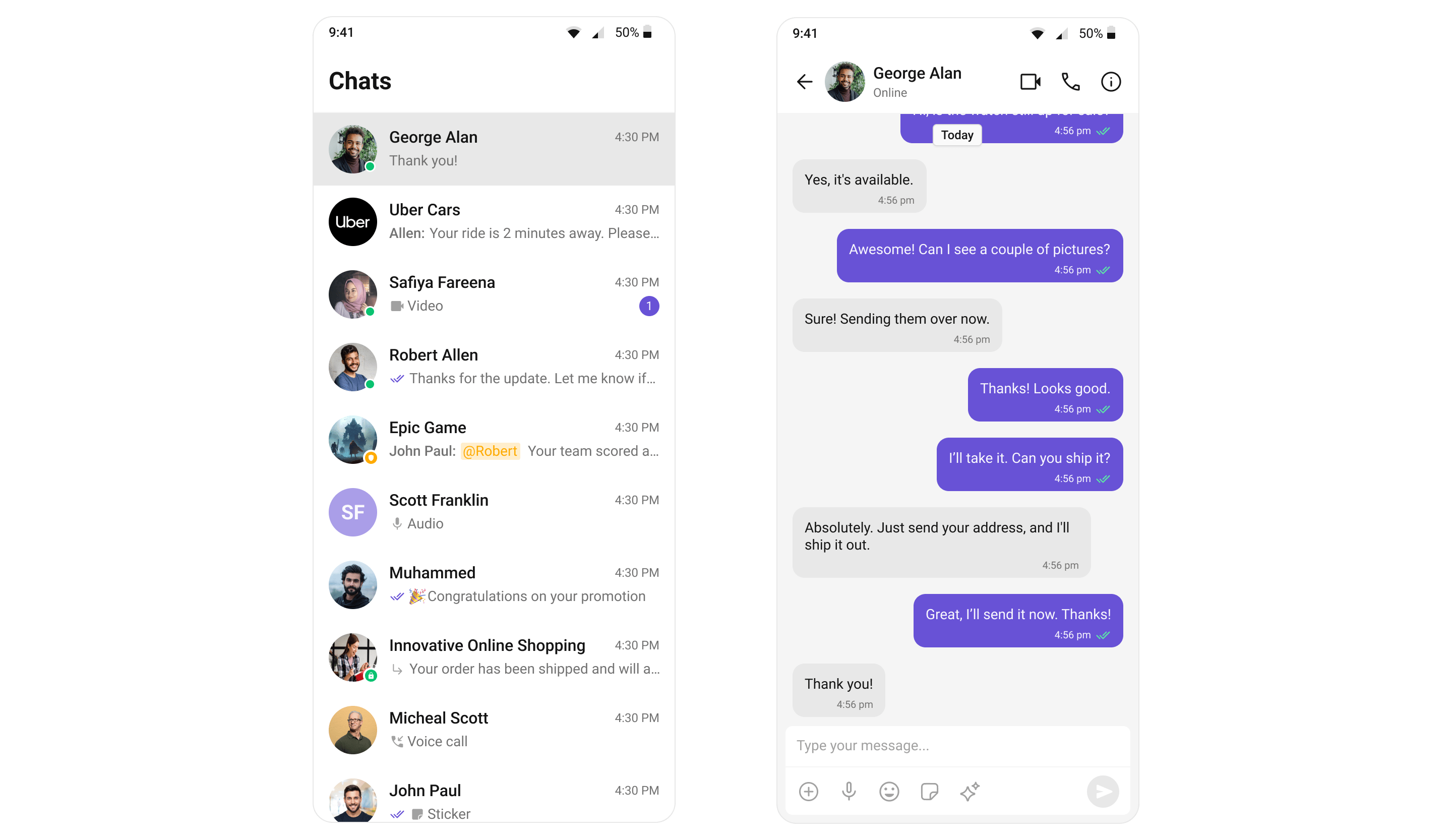
The CometChat React Native UI Kit provides prebuilt, customizable components for adding chat, voice, and video calling to any React Native app. Each component handles its own data fetching, real-time listeners, and state — you just drop them into your layout.
 `CometChatUIKit.init(UIKitSettings)` must be called before rendering any UI Kit components or calling any SDK methods. Initialization must complete before login.
Auth Key is for development/testing only. In production, generate Auth Tokens on your server using the REST API and pass them to the client. Never expose Auth Keys in production client code.
***
## Integrate with AI Coding Agents
Use [CometChat Skills](https://github.com/cometchat/cometchat-skills) to add chat to any React Native project through your AI coding agent. The skill takes an AI-first approach — your agent has a short conversation with you to understand your project and chat requirements, then writes production-grade integration code tailored to the files you already have.
Works with Claude Code, Cursor, Codex, VS Code Copilot, Windsurf, Cline, Kiro, and [30+ more agents](https://github.com/cometchat/cometchat-skills).
```bash theme={null}
npx @cometchat/skills add
```
Use `--ide ` to target a specific IDE (e.g. `--ide cursor`), or `--ide all` to install for all supported IDEs.
Then in your IDE:
```
/cometchat add chat to my app
```
The skill detects your framework (Expo or bare React Native), navigation setup, and existing auth system. It onboards you to CometChat directly in the terminal — signup, login, and app creation all via the CLI. It reads your screens, nav, and components before proposing a placement (stack, tab, modal, or bottom sheet), shows the plan (which files it will create, modify, and leave untouched), and waits for your approval before writing code.
After the first integration, re-run `/cometchat` anytime to pick from the iteration menu:
* **Customize look & feel** — theme presets (slack / whatsapp / imessage / discord / notion) or your own brand color
* **Add a feature** — 40+ features including calls, reactions, polls, AI smart replies, file sharing, presence
* **Customize a component** — custom message bubbles, headers, composer actions, empty/loading states
* **Add another placement** — modal / bottom sheet / extra tab
* **Set up production auth** — replace the dev Auth Key with a server-side token endpoint
* **Set up user management** — server endpoints for creating/updating/deleting CometChat users
* **Set up push notifications** — APNs + FCM end-to-end
* **Run diagnostics** — verify, drift detection, symptom-to-cause lookup
***
## Get Started
Pick your framework and follow the step-by-step integration guide:
Standard React Native project setup
} href="/ui-kit/react-native/expo-integration">
Expo managed workflow
***
## Explore
Browse all prebuilt UI components
Chat, calling, AI, and extensions
Colors, fonts, dark mode, and custom styling
Initialize, authenticate, and send messages
Common issues and fixes
***
## Resources
Working reference app
Full UI Kit source on GitHub
Open a support ticket
`CometChatUIKit.init(UIKitSettings)` must be called before rendering any UI Kit components or calling any SDK methods. Initialization must complete before login.
Auth Key is for development/testing only. In production, generate Auth Tokens on your server using the REST API and pass them to the client. Never expose Auth Keys in production client code.
***
## Integrate with AI Coding Agents
Use [CometChat Skills](https://github.com/cometchat/cometchat-skills) to add chat to any React Native project through your AI coding agent. The skill takes an AI-first approach — your agent has a short conversation with you to understand your project and chat requirements, then writes production-grade integration code tailored to the files you already have.
Works with Claude Code, Cursor, Codex, VS Code Copilot, Windsurf, Cline, Kiro, and [30+ more agents](https://github.com/cometchat/cometchat-skills).
```bash theme={null}
npx @cometchat/skills add
```
Use `--ide ` to target a specific IDE (e.g. `--ide cursor`), or `--ide all` to install for all supported IDEs.
Then in your IDE:
```
/cometchat add chat to my app
```
The skill detects your framework (Expo or bare React Native), navigation setup, and existing auth system. It onboards you to CometChat directly in the terminal — signup, login, and app creation all via the CLI. It reads your screens, nav, and components before proposing a placement (stack, tab, modal, or bottom sheet), shows the plan (which files it will create, modify, and leave untouched), and waits for your approval before writing code.
After the first integration, re-run `/cometchat` anytime to pick from the iteration menu:
* **Customize look & feel** — theme presets (slack / whatsapp / imessage / discord / notion) or your own brand color
* **Add a feature** — 40+ features including calls, reactions, polls, AI smart replies, file sharing, presence
* **Customize a component** — custom message bubbles, headers, composer actions, empty/loading states
* **Add another placement** — modal / bottom sheet / extra tab
* **Set up production auth** — replace the dev Auth Key with a server-side token endpoint
* **Set up user management** — server endpoints for creating/updating/deleting CometChat users
* **Set up push notifications** — APNs + FCM end-to-end
* **Run diagnostics** — verify, drift detection, symptom-to-cause lookup
***
## Get Started
Pick your framework and follow the step-by-step integration guide:
Standard React Native project setup
} href="/ui-kit/react-native/expo-integration">
Expo managed workflow
***
## Explore
Browse all prebuilt UI components
Chat, calling, AI, and extensions
Colors, fonts, dark mode, and custom styling
Initialize, authenticate, and send messages
Common issues and fixes
***
## Resources
Working reference app
Full UI Kit source on GitHub
Open a support ticket