> ## Documentation Index
> Fetch the complete documentation index at: https://cometchat-22654f5b-docs-rn-guide-message-privately.mintlify.site/llms.txt
> Use this file to discover all available pages before exploring further.
# Call Logs
> Display and manage the list of call history with CometChatCallLogs component in React Native UI Kit, including missed, received, and outgoing calls.
```json theme={null}
{
"component": "CometChatCallLogs",
"package": "@cometchat/chat-uikit-react-native",
"import": "import { CometChatCallLogs } from \"@cometchat/chat-uikit-react-native\";",
"description": "Scrollable list of call history showing missed, received, and outgoing calls.",
"props": {
"data": {
"callLogRequestBuilder": {
"type": "CallLogRequestBuilder",
"note": "Pass the builder, not the result of .build()"
},
"datePattern": {
"type": "DatePattern",
"note": "Custom date format for call timestamps"
}
},
"callbacks": {
"onItemPress": "(call: any) => void",
"onItemLongPress": "(prop: { call: any }) => void",
"onCallIconPress": "(item: any) => void",
"onBack": "() => void",
"onError": "(error: CometChat.CometChatException) => void",
"onLoad": "(list: any[]) => void",
"onEmpty": "() => void"
},
"visibility": {
"showBackButton": { "type": "boolean", "default": true },
"hideError": { "type": "boolean", "default": false },
"hideHeader": { "type": "boolean", "default": false },
"hideLoadingState": { "type": "boolean", "default": false }
},
"viewSlots": {
"ItemView": "(call: any) => JSX.Element",
"LeadingView": "(call: any) => JSX.Element",
"TitleView": "(call: any) => JSX.Element",
"SubtitleView": "(call: any) => JSX.Element",
"TrailingView": "(call: any, defaultOnPress?: (call: any) => void) => JSX.Element",
"LoadingView": "() => JSX.Element",
"EmptyView": "() => JSX.Element",
"ErrorView": "(e: CometChat.CometChatException) => JSX.Element",
"AppBarOptions": "() => JSX.Element"
}
},
"compositionExample": {
"description": "Call history list with call-back functionality",
"components": [
"CometChatCallLogs",
"CometChatOutgoingCall"
],
"flow": "onItemPress initiates call to participant, onCallIconPress triggers call-back"
}
}
```
## Where It Fits
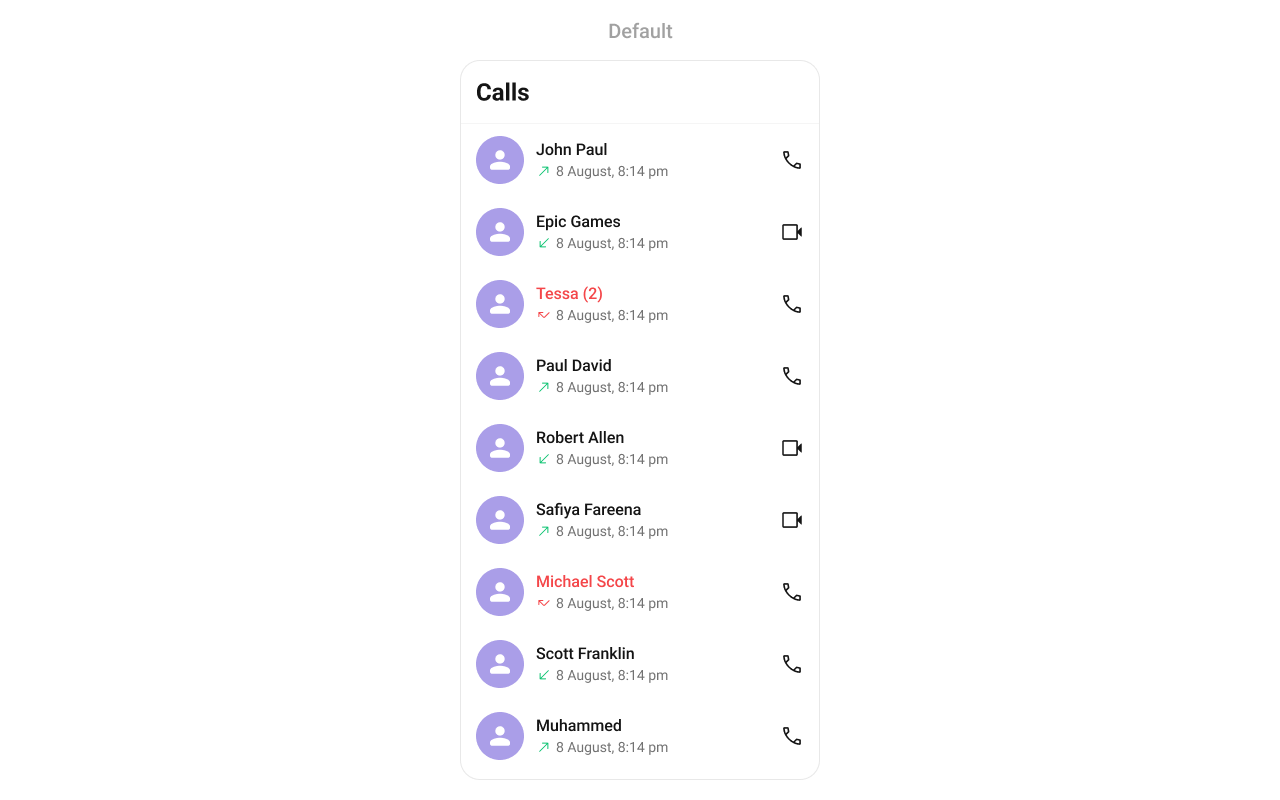
`CometChatCallLogs` is a [Component](/ui-kit/react-native/components-overview#components) that shows the list of Call Logs available. By default, names are shown for all listed users, along with their avatars if available.
 ***
## Minimal Render
```tsx lines theme={null}
import { CometChatCallLogs } from "@cometchat/chat-uikit-react-native";
function CallLogsDemo() {
return ;
}
```
***
## Filtering Call Logs
Pass a `CallLogRequestBuilder` to `callLogRequestBuilder`. Pass the builder instance — not the result of `.build()`.
```tsx lines theme={null}
import { CometChatCallLogs } from "@cometchat/chat-uikit-react-native";
import { CallLogRequestBuilder } from "@cometchat/chat-sdk-react-native";
function FilteredCallLogs() {
const callLogRequestBuilder = new CallLogRequestBuilder()
.setLimit(20)
.setCallStatus("cancelled")
.setAuthToken(loggedInUser.getAuthToken());
return (
);
}
```
### Filter Recipes
| Recipe | Code |
| --------------------- | ---------------------------------------------------------- |
| Limit to 20 per page | `new CallLogRequestBuilder().setLimit(20)` |
| Only cancelled calls | `new CallLogRequestBuilder().setCallStatus("cancelled")` |
| Only incoming calls | `new CallLogRequestBuilder().setCallDirection("incoming")` |
| Only outgoing calls | `new CallLogRequestBuilder().setCallDirection("outgoing")` |
| Calls with recordings | `new CallLogRequestBuilder().setHasRecording(true)` |
| Filter by user UID | `new CallLogRequestBuilder().setUid("user_uid")` |
***
## Actions and Events
### Callback Props
#### onItemPress
Fires when a call log row is tapped. By default initiates a call to the participant.
```tsx lines theme={null}
onItemPress?: (call: any) => void
```
```tsx lines theme={null}
import { CometChatCallLogs } from "@cometchat/chat-uikit-react-native";
function CallLogsWithPress() {
const handleItemPress = (call: any) => {
console.log("Selected call:", call);
};
return ;
}
```
#### onItemLongPress
Fires when a call log item is long-pressed, allowing additional actions like delete or select.
```tsx lines theme={null}
onItemLongPress?: (prop: { call: any }) => void
```
```tsx lines theme={null}
import { CometChatCallLogs } from "@cometchat/chat-uikit-react-native";
function CallLogsWithLongPress() {
const handleLongPress = (prop: { call: any }) => {
console.log("Long pressed:", prop.call);
};
return ;
}
```
#### onCallIconPress
Fires when the call icon is pressed.
```tsx lines theme={null}
onCallIconPress?: (item: any) => void
```
```tsx lines theme={null}
import { CometChatCallLogs } from "@cometchat/chat-uikit-react-native";
function CallLogsWithCallIcon() {
const handleCallIconPress = (call: any) => {
console.log("Call icon pressed:", call);
};
return ;
}
```
#### onBack
Fires when the back button in the app bar is pressed.
```tsx lines theme={null}
onBack?: () => void
```
```tsx lines theme={null}
import { CometChatCallLogs } from "@cometchat/chat-uikit-react-native";
function CallLogsWithBack() {
return (
{
console.log("Back pressed");
}}
/>
);
}
```
#### onError
Fires on internal errors (network failure, auth issue, SDK exception).
```tsx lines theme={null}
onError?: (e: CometChat.CometChatException) => void
```
```tsx lines theme={null}
import { CometChatCallLogs } from "@cometchat/chat-uikit-react-native";
import { CometChat } from "@cometchat/chat-sdk-react-native";
function CallLogsWithError() {
return (
{
console.error("CallLogs error:", error);
}}
/>
);
}
```
#### onLoad
Fires when the list is successfully fetched and loaded.
```tsx lines theme={null}
onLoad?: (list: any[]) => void
```
```tsx lines theme={null}
import { CometChatCallLogs } from "@cometchat/chat-uikit-react-native";
function CallLogsWithLoad() {
const handleLoad = (list: any[]) => {
console.log("Call logs loaded:", list.length);
};
return ;
}
```
#### onEmpty
Fires when the call log list is empty.
```tsx lines theme={null}
onEmpty?: () => void
```
```tsx lines theme={null}
import { CometChatCallLogs } from "@cometchat/chat-uikit-react-native";
function CallLogsWithEmpty() {
return (
{
console.log("No call logs available");
}}
/>
);
}
```
***
## Custom View Slots
Each slot replaces a section of the default UI. Slots that accept a call parameter receive the call log object for that row.
| Slot | Signature | Replaces |
| --------------- | -------------------------------------------------- | ------------------------ |
| `ItemView` | `(call: any) => JSX.Element` | Entire list item row |
| `LeadingView` | `(call: any) => JSX.Element` | Avatar / left section |
| `TitleView` | `(call: any) => JSX.Element` | Caller name / title text |
| `SubtitleView` | `(call: any) => JSX.Element` | Call type / details |
| `TrailingView` | `(call: any, defaultOnPress?) => JSX.Element` | Duration / right section |
| `LoadingView` | `() => JSX.Element` | Loading spinner |
| `EmptyView` | `() => JSX.Element` | Empty state |
| `ErrorView` | `(e: CometChat.CometChatException) => JSX.Element` | Error state |
| `AppBarOptions` | `() => JSX.Element` | Header bar options |
### LoadingView
Custom view displayed when data is being fetched.
```tsx lines theme={null}
LoadingView?: () => JSX.Element
```
```tsx lines theme={null}
import { CometChatCallLogs } from "@cometchat/chat-uikit-react-native";
import { Text } from "react-native";
function LoadingViewDemo() {
const getLoadingView = (): JSX.Element => {
return Loading call logs...;
};
return ;
}
```
### EmptyView
Custom view displayed when there are no call logs.
```tsx lines theme={null}
EmptyView?: () => JSX.Element
```
```tsx lines theme={null}
import { CometChatCallLogs } from "@cometchat/chat-uikit-react-native";
import { Text } from "react-native";
function EmptyViewDemo() {
const getEmptyView = (): JSX.Element => {
return No calls yet. Make your first call!;
};
return ;
}
```
### ErrorView
Custom view displayed when an error occurs.
```tsx lines theme={null}
ErrorView?: (e: CometChat.CometChatException) => JSX.Element
```
```tsx lines theme={null}
import { CometChatCallLogs } from "@cometchat/chat-uikit-react-native";
import { CometChat } from "@cometchat/chat-sdk-react-native";
import { Text } from "react-native";
function ErrorViewDemo() {
const getErrorView = (e: CometChat.CometChatException): JSX.Element => {
return Error loading calls. Please try again.;
};
return ;
}
```
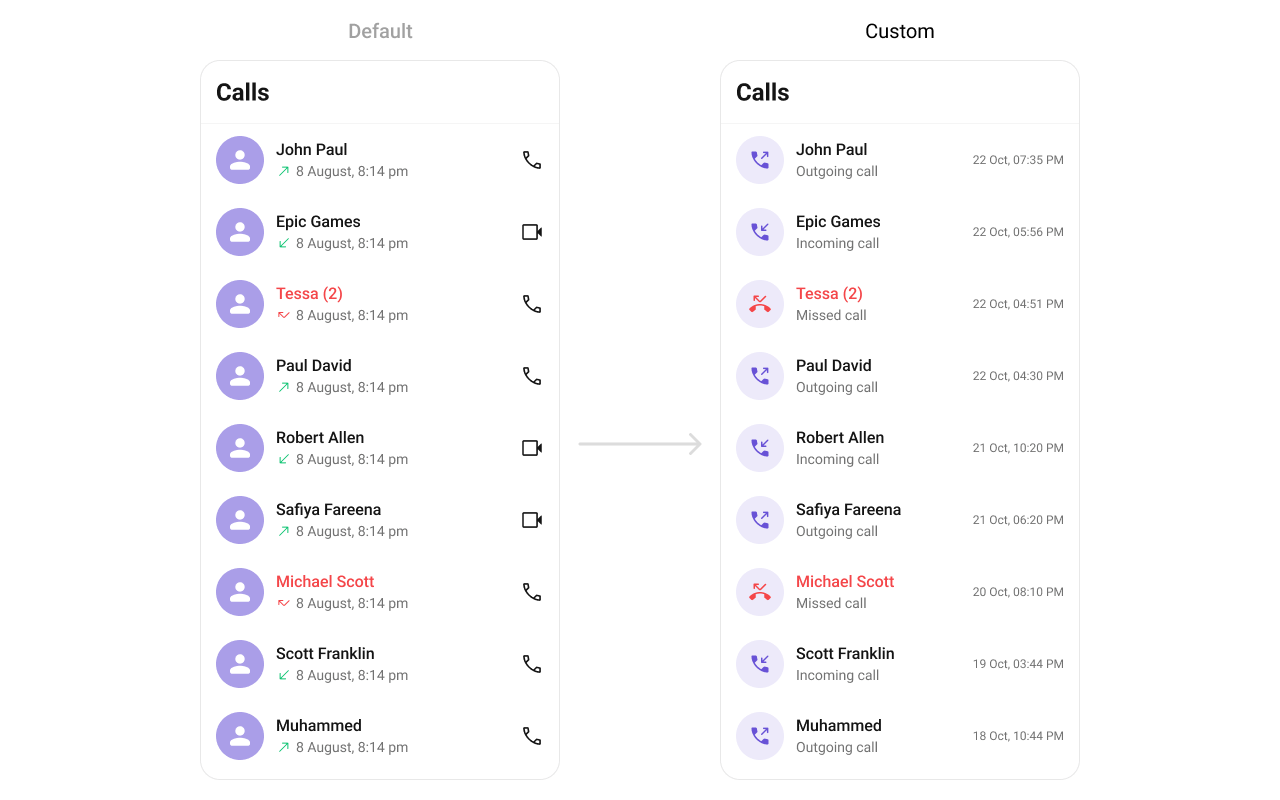
### ItemView
Custom view for the entire list item row.
```tsx lines theme={null}
ItemView?: (call: any) => JSX.Element
```
***
## Minimal Render
```tsx lines theme={null}
import { CometChatCallLogs } from "@cometchat/chat-uikit-react-native";
function CallLogsDemo() {
return ;
}
```
***
## Filtering Call Logs
Pass a `CallLogRequestBuilder` to `callLogRequestBuilder`. Pass the builder instance — not the result of `.build()`.
```tsx lines theme={null}
import { CometChatCallLogs } from "@cometchat/chat-uikit-react-native";
import { CallLogRequestBuilder } from "@cometchat/chat-sdk-react-native";
function FilteredCallLogs() {
const callLogRequestBuilder = new CallLogRequestBuilder()
.setLimit(20)
.setCallStatus("cancelled")
.setAuthToken(loggedInUser.getAuthToken());
return (
);
}
```
### Filter Recipes
| Recipe | Code |
| --------------------- | ---------------------------------------------------------- |
| Limit to 20 per page | `new CallLogRequestBuilder().setLimit(20)` |
| Only cancelled calls | `new CallLogRequestBuilder().setCallStatus("cancelled")` |
| Only incoming calls | `new CallLogRequestBuilder().setCallDirection("incoming")` |
| Only outgoing calls | `new CallLogRequestBuilder().setCallDirection("outgoing")` |
| Calls with recordings | `new CallLogRequestBuilder().setHasRecording(true)` |
| Filter by user UID | `new CallLogRequestBuilder().setUid("user_uid")` |
***
## Actions and Events
### Callback Props
#### onItemPress
Fires when a call log row is tapped. By default initiates a call to the participant.
```tsx lines theme={null}
onItemPress?: (call: any) => void
```
```tsx lines theme={null}
import { CometChatCallLogs } from "@cometchat/chat-uikit-react-native";
function CallLogsWithPress() {
const handleItemPress = (call: any) => {
console.log("Selected call:", call);
};
return ;
}
```
#### onItemLongPress
Fires when a call log item is long-pressed, allowing additional actions like delete or select.
```tsx lines theme={null}
onItemLongPress?: (prop: { call: any }) => void
```
```tsx lines theme={null}
import { CometChatCallLogs } from "@cometchat/chat-uikit-react-native";
function CallLogsWithLongPress() {
const handleLongPress = (prop: { call: any }) => {
console.log("Long pressed:", prop.call);
};
return ;
}
```
#### onCallIconPress
Fires when the call icon is pressed.
```tsx lines theme={null}
onCallIconPress?: (item: any) => void
```
```tsx lines theme={null}
import { CometChatCallLogs } from "@cometchat/chat-uikit-react-native";
function CallLogsWithCallIcon() {
const handleCallIconPress = (call: any) => {
console.log("Call icon pressed:", call);
};
return ;
}
```
#### onBack
Fires when the back button in the app bar is pressed.
```tsx lines theme={null}
onBack?: () => void
```
```tsx lines theme={null}
import { CometChatCallLogs } from "@cometchat/chat-uikit-react-native";
function CallLogsWithBack() {
return (
{
console.log("Back pressed");
}}
/>
);
}
```
#### onError
Fires on internal errors (network failure, auth issue, SDK exception).
```tsx lines theme={null}
onError?: (e: CometChat.CometChatException) => void
```
```tsx lines theme={null}
import { CometChatCallLogs } from "@cometchat/chat-uikit-react-native";
import { CometChat } from "@cometchat/chat-sdk-react-native";
function CallLogsWithError() {
return (
{
console.error("CallLogs error:", error);
}}
/>
);
}
```
#### onLoad
Fires when the list is successfully fetched and loaded.
```tsx lines theme={null}
onLoad?: (list: any[]) => void
```
```tsx lines theme={null}
import { CometChatCallLogs } from "@cometchat/chat-uikit-react-native";
function CallLogsWithLoad() {
const handleLoad = (list: any[]) => {
console.log("Call logs loaded:", list.length);
};
return ;
}
```
#### onEmpty
Fires when the call log list is empty.
```tsx lines theme={null}
onEmpty?: () => void
```
```tsx lines theme={null}
import { CometChatCallLogs } from "@cometchat/chat-uikit-react-native";
function CallLogsWithEmpty() {
return (
{
console.log("No call logs available");
}}
/>
);
}
```
***
## Custom View Slots
Each slot replaces a section of the default UI. Slots that accept a call parameter receive the call log object for that row.
| Slot | Signature | Replaces |
| --------------- | -------------------------------------------------- | ------------------------ |
| `ItemView` | `(call: any) => JSX.Element` | Entire list item row |
| `LeadingView` | `(call: any) => JSX.Element` | Avatar / left section |
| `TitleView` | `(call: any) => JSX.Element` | Caller name / title text |
| `SubtitleView` | `(call: any) => JSX.Element` | Call type / details |
| `TrailingView` | `(call: any, defaultOnPress?) => JSX.Element` | Duration / right section |
| `LoadingView` | `() => JSX.Element` | Loading spinner |
| `EmptyView` | `() => JSX.Element` | Empty state |
| `ErrorView` | `(e: CometChat.CometChatException) => JSX.Element` | Error state |
| `AppBarOptions` | `() => JSX.Element` | Header bar options |
### LoadingView
Custom view displayed when data is being fetched.
```tsx lines theme={null}
LoadingView?: () => JSX.Element
```
```tsx lines theme={null}
import { CometChatCallLogs } from "@cometchat/chat-uikit-react-native";
import { Text } from "react-native";
function LoadingViewDemo() {
const getLoadingView = (): JSX.Element => {
return Loading call logs...;
};
return ;
}
```
### EmptyView
Custom view displayed when there are no call logs.
```tsx lines theme={null}
EmptyView?: () => JSX.Element
```
```tsx lines theme={null}
import { CometChatCallLogs } from "@cometchat/chat-uikit-react-native";
import { Text } from "react-native";
function EmptyViewDemo() {
const getEmptyView = (): JSX.Element => {
return No calls yet. Make your first call!;
};
return ;
}
```
### ErrorView
Custom view displayed when an error occurs.
```tsx lines theme={null}
ErrorView?: (e: CometChat.CometChatException) => JSX.Element
```
```tsx lines theme={null}
import { CometChatCallLogs } from "@cometchat/chat-uikit-react-native";
import { CometChat } from "@cometchat/chat-sdk-react-native";
import { Text } from "react-native";
function ErrorViewDemo() {
const getErrorView = (e: CometChat.CometChatException): JSX.Element => {
return Error loading calls. Please try again.;
};
return ;
}
```
### ItemView
Custom view for the entire list item row.
```tsx lines theme={null}
ItemView?: (call: any) => JSX.Element
```
 ```tsx lines theme={null}
import { CometChatCallLogs } from "@cometchat/chat-uikit-react-native";
import { View, Text } from "react-native";
function ItemViewDemo() {
const getItemView = (call: any): JSX.Element => {
return (
{call.getInitiator().getName()}
{call.getStatus()}
);
};
return ;
}
```
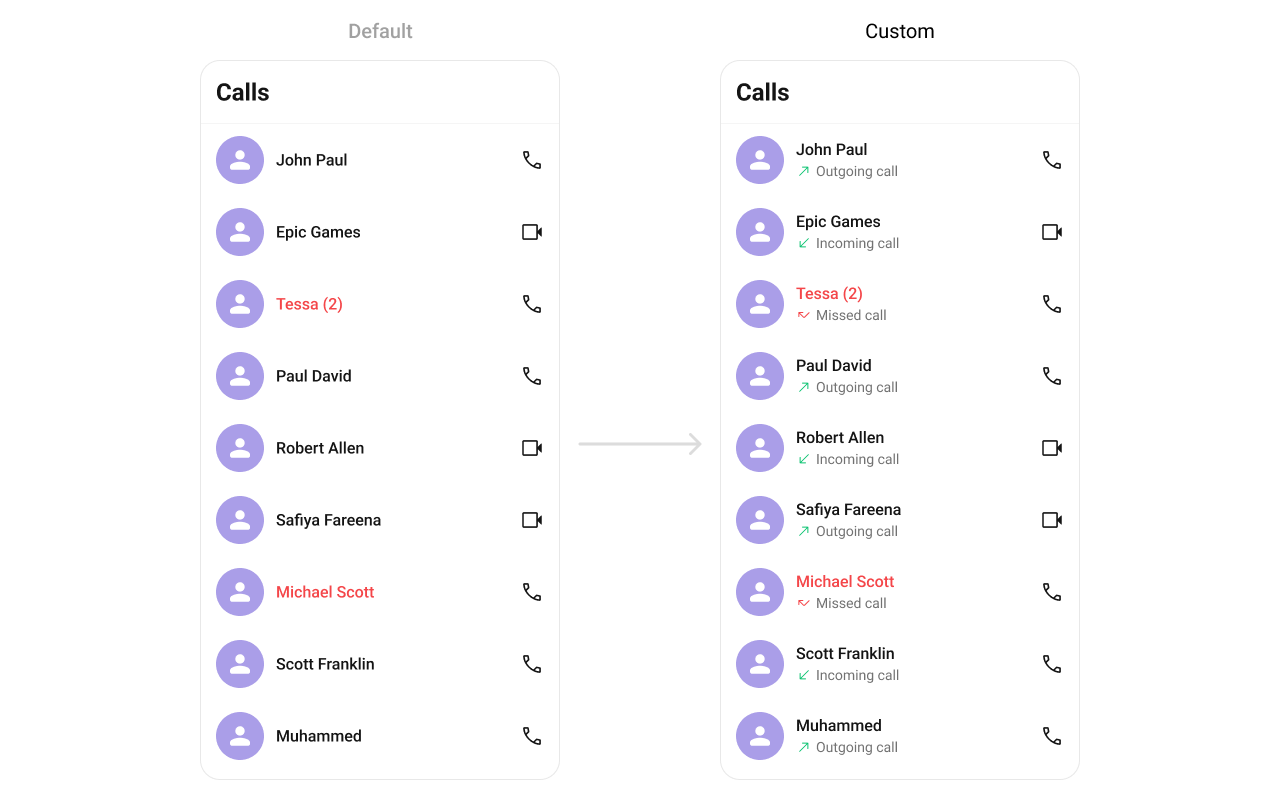
### SubtitleView
Custom view for the call type / details.
```tsx lines theme={null}
SubtitleView?: (call: any) => JSX.Element
```
```tsx lines theme={null}
import { CometChatCallLogs } from "@cometchat/chat-uikit-react-native";
import { View, Text } from "react-native";
function ItemViewDemo() {
const getItemView = (call: any): JSX.Element => {
return (
{call.getInitiator().getName()}
{call.getStatus()}
);
};
return ;
}
```
### SubtitleView
Custom view for the call type / details.
```tsx lines theme={null}
SubtitleView?: (call: any) => JSX.Element
```
 ```tsx lines theme={null}
import { CometChatCallLogs } from "@cometchat/chat-uikit-react-native";
import { Text } from "react-native";
function SubtitleViewDemo() {
const getSubtitleView = (call: any): JSX.Element => {
return (
{call.getStatus()} • {call.getDuration()}s
);
};
return ;
}
```
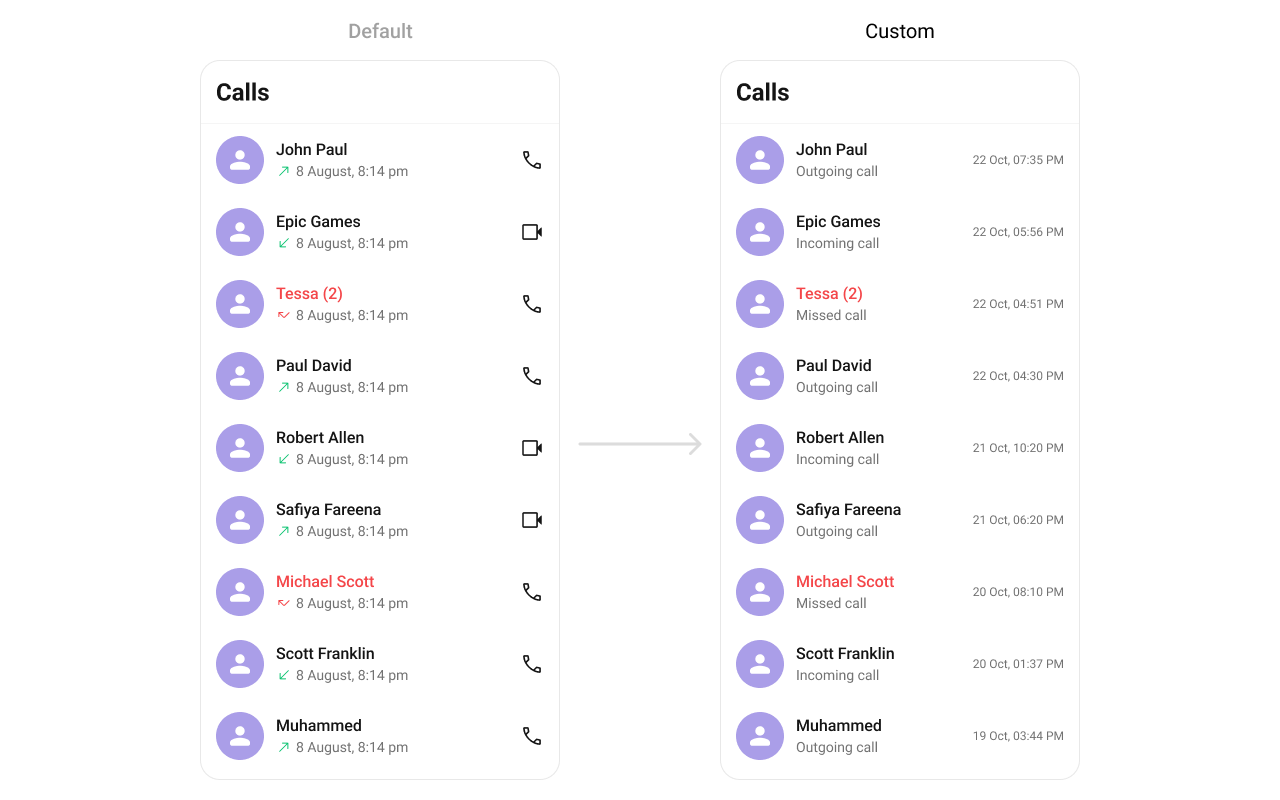
### TrailingView
Custom view for the duration / right section.
```tsx lines theme={null}
TrailingView?: (call: any, defaultOnPress?: (call: any) => void) => JSX.Element
```
```tsx lines theme={null}
import { CometChatCallLogs } from "@cometchat/chat-uikit-react-native";
import { Text } from "react-native";
function SubtitleViewDemo() {
const getSubtitleView = (call: any): JSX.Element => {
return (
{call.getStatus()} • {call.getDuration()}s
);
};
return ;
}
```
### TrailingView
Custom view for the duration / right section.
```tsx lines theme={null}
TrailingView?: (call: any, defaultOnPress?: (call: any) => void) => JSX.Element
```
 ```tsx lines theme={null}
import { CometChatCallLogs } from "@cometchat/chat-uikit-react-native";
import { TouchableOpacity, Text } from "react-native";
function TrailingViewDemo() {
const getTrailingView = (call: any, defaultOnPress?: (call: any) => void): JSX.Element => {
return (
defaultOnPress?.(call)}>
📞 Call Back
);
};
return ;
}
```
### AppBarOptions
Custom view for the header bar options.
```tsx lines theme={null}
import { CometChatCallLogs } from "@cometchat/chat-uikit-react-native";
import { TouchableOpacity, Image } from "react-native";
function AppBarOptionsDemo() {
return (
{
return (
console.log("Filter pressed")}>
);
}}
/>
);
}
```
***
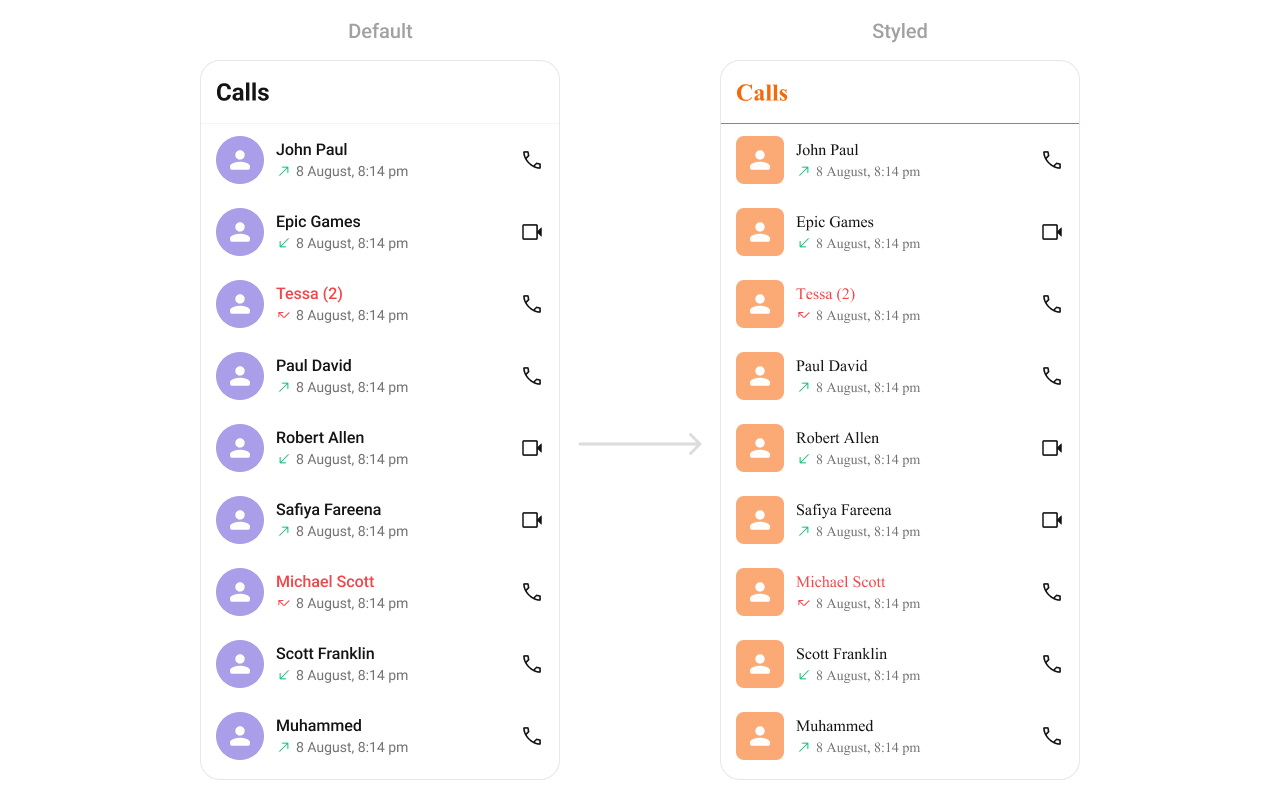
## Styling
Using Style you can customize the look and feel of the component in your app. Pass a styling object as a prop to the `CometChatCallLogs` component.
```tsx lines theme={null}
import { CometChatCallLogs } from "@cometchat/chat-uikit-react-native";
import { TouchableOpacity, Text } from "react-native";
function TrailingViewDemo() {
const getTrailingView = (call: any, defaultOnPress?: (call: any) => void): JSX.Element => {
return (
defaultOnPress?.(call)}>
📞 Call Back
);
};
return ;
}
```
### AppBarOptions
Custom view for the header bar options.
```tsx lines theme={null}
import { CometChatCallLogs } from "@cometchat/chat-uikit-react-native";
import { TouchableOpacity, Image } from "react-native";
function AppBarOptionsDemo() {
return (
{
return (
console.log("Filter pressed")}>
);
}}
/>
);
}
```
***
## Styling
Using Style you can customize the look and feel of the component in your app. Pass a styling object as a prop to the `CometChatCallLogs` component.
 ```tsx lines theme={null}
import { CometChatCallLogs } from "@cometchat/chat-uikit-react-native";
function StylingDemo() {
return (
);
}
```
### Visibility Props
| Property | Description | Code |
| ------------------ | --------------------------------------------------- | ---------------------------- |
| `showBackButton` | Toggle visibility of the back button in the app bar | `showBackButton?: boolean` |
| `hideError` | Hide error state on fetching call logs | `hideError?: boolean` |
| `hideHeader` | Toggle visibility for the toolbar/header bar | `hideHeader?: boolean` |
| `hideLoadingState` | Toggle visibility of loading state | `hideLoadingState?: boolean` |
### Outgoing Call Configuration
You can customize the properties of the OutGoing Call by making use of the `outgoingCallConfiguration` prop:
```tsx lines theme={null}
import { CometChatCallLogs } from "@cometchat/chat-uikit-react-native";
import { Text } from "react-native";
function OutgoingCallConfigDemo() {
return (
{
return Outgoing Call;
},
style: {
containerStyle: {
backgroundColor: '#FFE4EBF5',
},
},
}}
/>
);
}
```
***
## Next Steps
Display and handle incoming calls
Display and manage outgoing calls
Add voice and video call buttons to your UI
Overview of all calling features
```tsx lines theme={null}
import { CometChatCallLogs } from "@cometchat/chat-uikit-react-native";
function StylingDemo() {
return (
);
}
```
### Visibility Props
| Property | Description | Code |
| ------------------ | --------------------------------------------------- | ---------------------------- |
| `showBackButton` | Toggle visibility of the back button in the app bar | `showBackButton?: boolean` |
| `hideError` | Hide error state on fetching call logs | `hideError?: boolean` |
| `hideHeader` | Toggle visibility for the toolbar/header bar | `hideHeader?: boolean` |
| `hideLoadingState` | Toggle visibility of loading state | `hideLoadingState?: boolean` |
### Outgoing Call Configuration
You can customize the properties of the OutGoing Call by making use of the `outgoingCallConfiguration` prop:
```tsx lines theme={null}
import { CometChatCallLogs } from "@cometchat/chat-uikit-react-native";
import { Text } from "react-native";
function OutgoingCallConfigDemo() {
return (
{
return Outgoing Call;
},
style: {
containerStyle: {
backgroundColor: '#FFE4EBF5',
},
},
}}
/>
);
}
```
***
## Next Steps
Display and handle incoming calls
Display and manage outgoing calls
Add voice and video call buttons to your UI
Overview of all calling features