> ## Documentation Index
> Fetch the complete documentation index at: https://cometchat-22654f5b-docs-rn-guide-message-privately.mintlify.site/llms.txt
> Use this file to discover all available pages before exploring further.
# Extensions
> Enhance your chat with built-in extensions including stickers, polls, collaborative tools, message translation, and link previews
| Field | Value |
| -------------------- | ---------------------------------------------------------------------------------------------------------------------------------------------------------------------------------------------------------------------------------------------- |
| Package | `cometchat_chat_uikit` |
| Required setup | `CometChatUIKit.init(uiKitSettings: UIKitSettings)` then `CometChatUIKit.login(uid)` + Extensions enabled in [CometChat Dashboard](/fundamentals/extensions-overview) |
| Extension categories | User Experience, User Engagement, Collaboration, Security |
| Key components | `CometChatMessageComposer` → [Message Composer](/ui-kit/flutter/v5/message-composer) (Stickers, Polls, Whiteboard, Document), `CometChatMessageList` → [Message List](/ui-kit/flutter/v5/message-list) (Translation, Link Preview, Thumbnails) |
| Activation | Enable each extension from the CometChat Dashboard — UI Kit auto-integrates them, no additional code required |
CometChat's UI Kit comes with built-in support for a wide variety of extensions that provide additional functionality. These extensions enhance the chatting experience, making it more interactive, secure, and efficient.
Activating any of the extensions in CometChat is a simple process done through your application's dashboard. Refer to our guide for detailed information on [Extensions](/fundamentals/extensions-overview).
Once you have successfully enabled the desired extension in your dashboard, it will be reflected in your CometChat application upon initialization and successful login. The extension features will only be available if they are supported by CometChat UI Kit.
***
## Built-in Extensions
The grouping below mirrors the CometChat Dashboard.
### User Experience
#### Link Preview
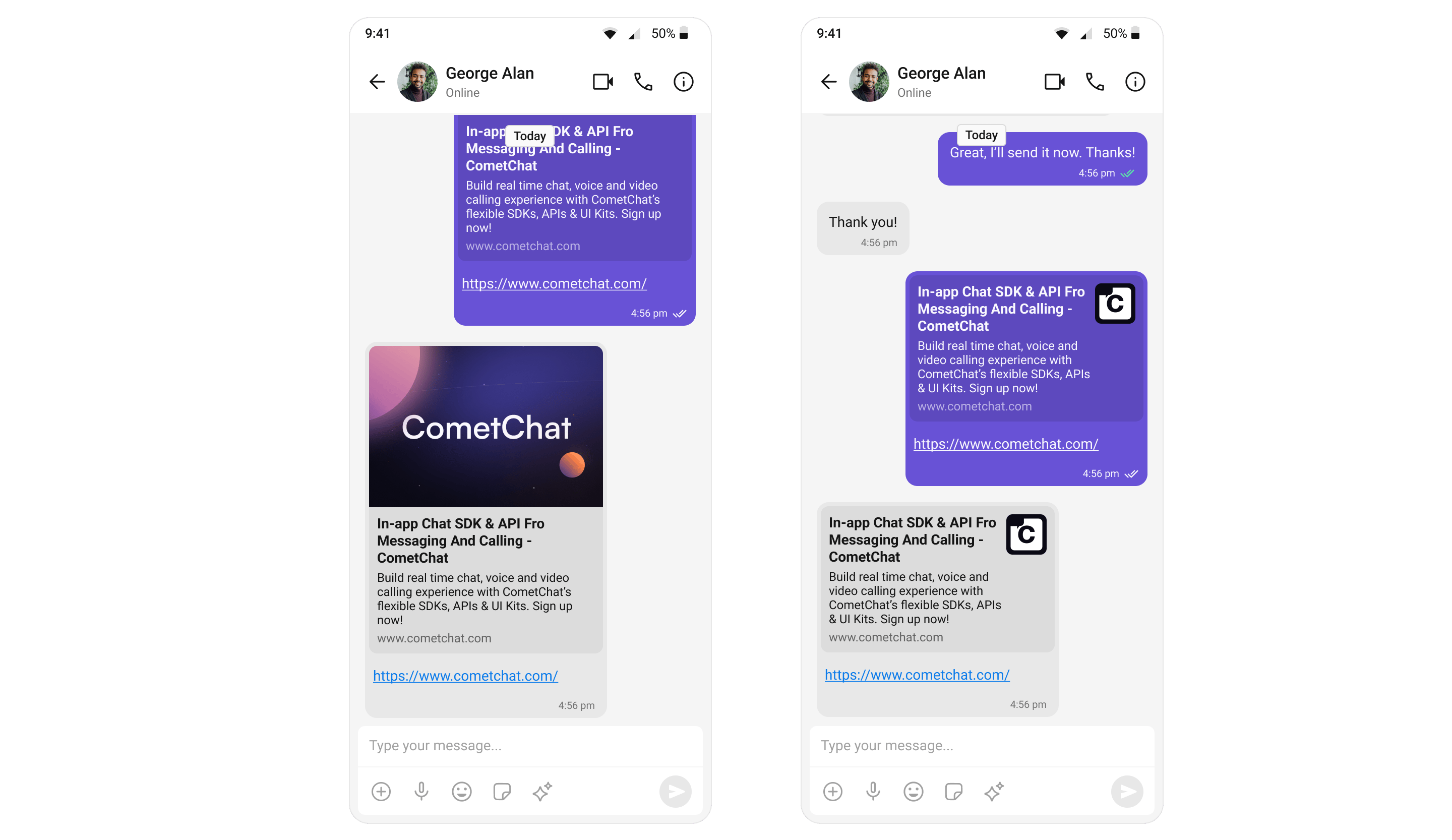
The Link Preview extension provides a summary of the URL shared in the chat. It includes the title, a description, and a thumbnail image from the web page. For a comprehensive understanding and guide on implementing and using the Link Preview Extension, refer to our specific guide on the [Link Preview Extension](/fundamentals/link-preview).
Once you have successfully activated the [Link Preview Extension](/fundamentals/link-preview) from your CometChat Dashboard, the feature will automatically be incorporated into the Message Bubble of [MessageList Widget](/ui-kit/flutter/v5/message-list) widget of UI Kits.
 ***
#### Thumbnail Generation
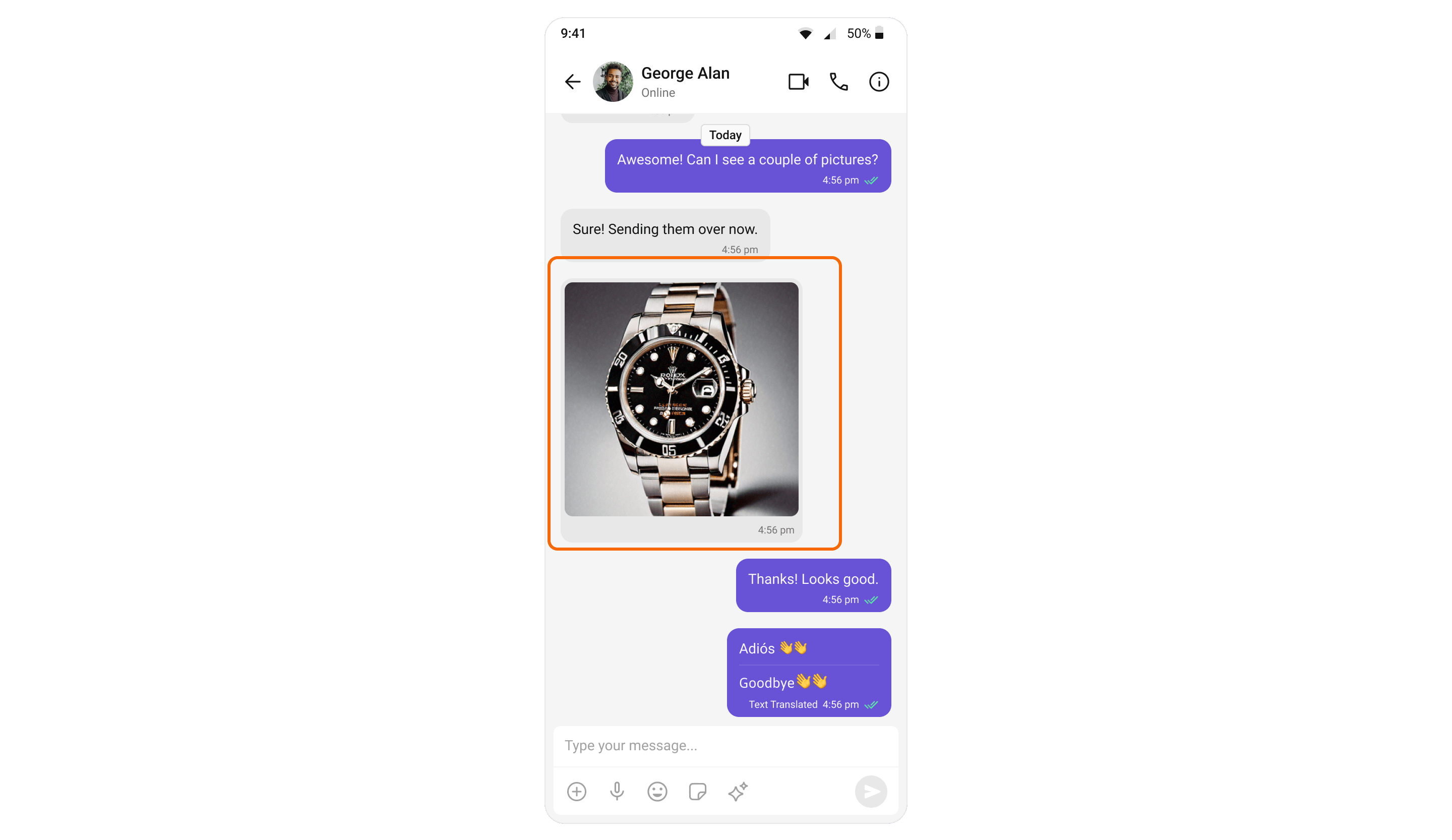
The Thumbnail Generation extension automatically creates a smaller preview image whenever a larger image is shared, helping to reduce the upload/download time and bandwidth usage. For a comprehensive understanding and guide on implementing and using the Thumbnail Generation Extension, refer to our specific guide on the [Thumbnail Generation Extension](/fundamentals/thumbnail-generation).
Once you have successfully activated the [Thumbnail Generation Extension](/fundamentals/thumbnail-generation) from your CometChat Dashboard, the feature will automatically be incorporated into the Message Bubble of [MessageList Widget](/ui-kit/flutter/v5/message-list) widget of UI Kits.
***
#### Thumbnail Generation
The Thumbnail Generation extension automatically creates a smaller preview image whenever a larger image is shared, helping to reduce the upload/download time and bandwidth usage. For a comprehensive understanding and guide on implementing and using the Thumbnail Generation Extension, refer to our specific guide on the [Thumbnail Generation Extension](/fundamentals/thumbnail-generation).
Once you have successfully activated the [Thumbnail Generation Extension](/fundamentals/thumbnail-generation) from your CometChat Dashboard, the feature will automatically be incorporated into the Message Bubble of [MessageList Widget](/ui-kit/flutter/v5/message-list) widget of UI Kits.
 ***
#### Bitly
Shortens long URLs in text messages using Bitly. See [Bitly Extension](/fundamentals/bitly).
***
#### TinyURL
URL shortening using TinyURL. See [TinyURL Extension](/fundamentals/tinyurl).
***
#### Message Shortcuts
Sends predefined messages using short codes (e.g., `!hb` expands to `Happy birthday!`). See [Message Shortcuts Extension](/fundamentals/message-shortcuts).
***
#### Pin Message
Pins important messages in a conversation for easy access. See [Pin Message Extension](/fundamentals/pin-message).
***
#### Save Message
Bookmarks messages for later reference. Saved messages are private to the user. See [Save Message Extension](/fundamentals/save-message).
***
#### Rich Media Preview
Generates rich preview panels for URLs using iFramely. See [Rich Media Preview Extension](/fundamentals/rich-media-preview).
***
#### Voice Transcription
Converts audio messages to text. See [Voice Transcription Extension](/fundamentals/voice-transcription).
***
### User Engagement
#### Stickers
The Stickers extension allows users to express their emotions more creatively. It adds a much-needed fun element to the chat by allowing users to send various pre-designed stickers. For a comprehensive understanding and guide on implementing and using the Sticker Extension, refer to our specific guide on the [Sticker Extension](/fundamentals/stickers).
Once you have successfully activated the [Sticker Extension](/fundamentals/stickers) from your CometChat Dashboard, the feature will automatically be incorporated into the [Message Composer](/ui-kit/flutter/v5/message-composer) widget of UI Kits.
***
#### Bitly
Shortens long URLs in text messages using Bitly. See [Bitly Extension](/fundamentals/bitly).
***
#### TinyURL
URL shortening using TinyURL. See [TinyURL Extension](/fundamentals/tinyurl).
***
#### Message Shortcuts
Sends predefined messages using short codes (e.g., `!hb` expands to `Happy birthday!`). See [Message Shortcuts Extension](/fundamentals/message-shortcuts).
***
#### Pin Message
Pins important messages in a conversation for easy access. See [Pin Message Extension](/fundamentals/pin-message).
***
#### Save Message
Bookmarks messages for later reference. Saved messages are private to the user. See [Save Message Extension](/fundamentals/save-message).
***
#### Rich Media Preview
Generates rich preview panels for URLs using iFramely. See [Rich Media Preview Extension](/fundamentals/rich-media-preview).
***
#### Voice Transcription
Converts audio messages to text. See [Voice Transcription Extension](/fundamentals/voice-transcription).
***
### User Engagement
#### Stickers
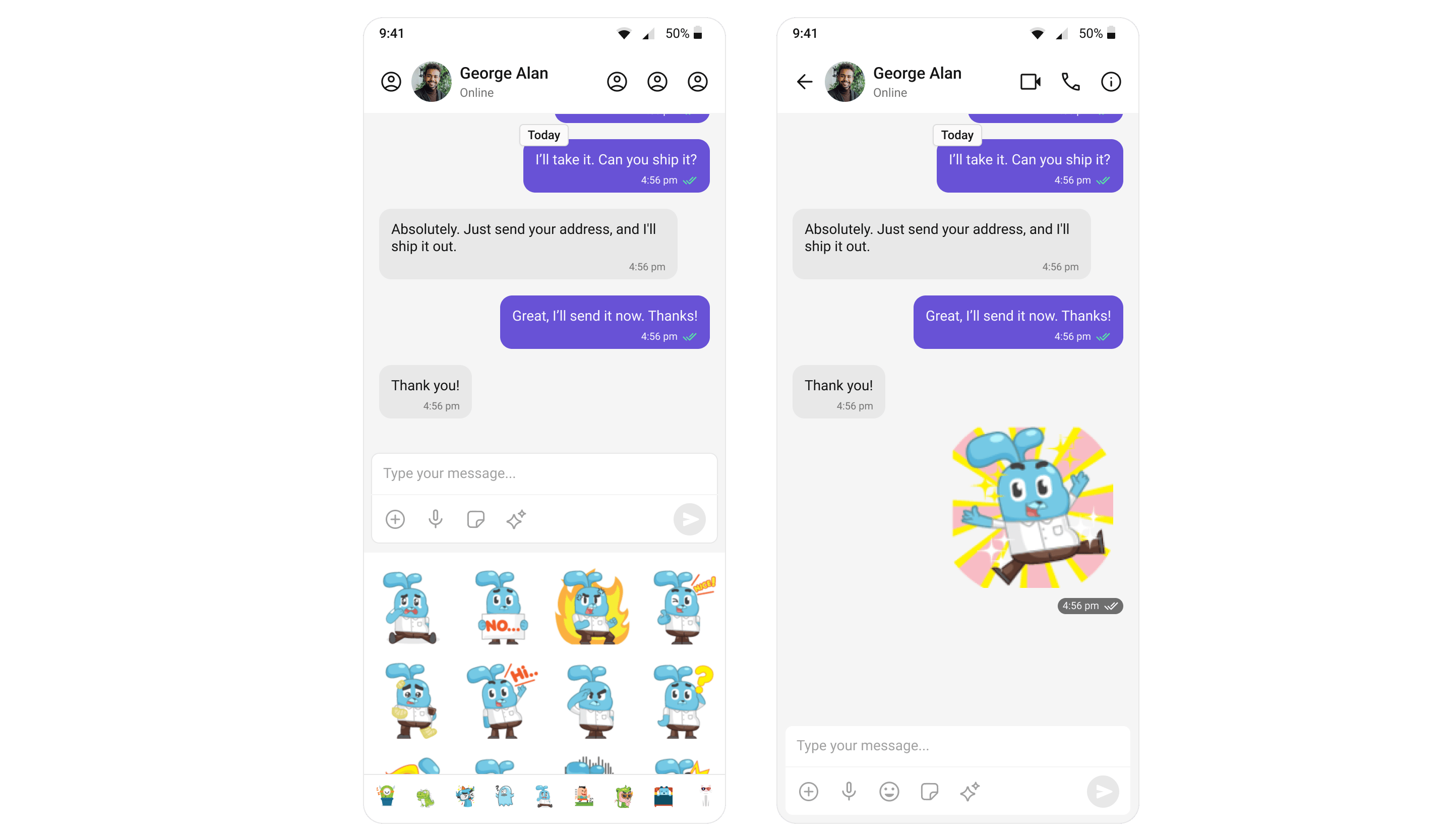
The Stickers extension allows users to express their emotions more creatively. It adds a much-needed fun element to the chat by allowing users to send various pre-designed stickers. For a comprehensive understanding and guide on implementing and using the Sticker Extension, refer to our specific guide on the [Sticker Extension](/fundamentals/stickers).
Once you have successfully activated the [Sticker Extension](/fundamentals/stickers) from your CometChat Dashboard, the feature will automatically be incorporated into the [Message Composer](/ui-kit/flutter/v5/message-composer) widget of UI Kits.
 ***
#### Polls
The Polls extension enhances group discussions by allowing users to create polls. Users can ask questions with a predefined list of answers, enabling a quick, organized way to gather group opinions. For a comprehensive understanding and guide on implementing and using the Polls Extension, refer to our specific guide on the [Polls Extension](/fundamentals/polls).
Once you have successfully activated the [Polls Extension](/fundamentals/polls) from your CometChat Dashboard, the feature will automatically be incorporated into the Action Sheet of the [Message Composer](/ui-kit/flutter/v5/message-composer) widget of UI Kits.
***
#### Polls
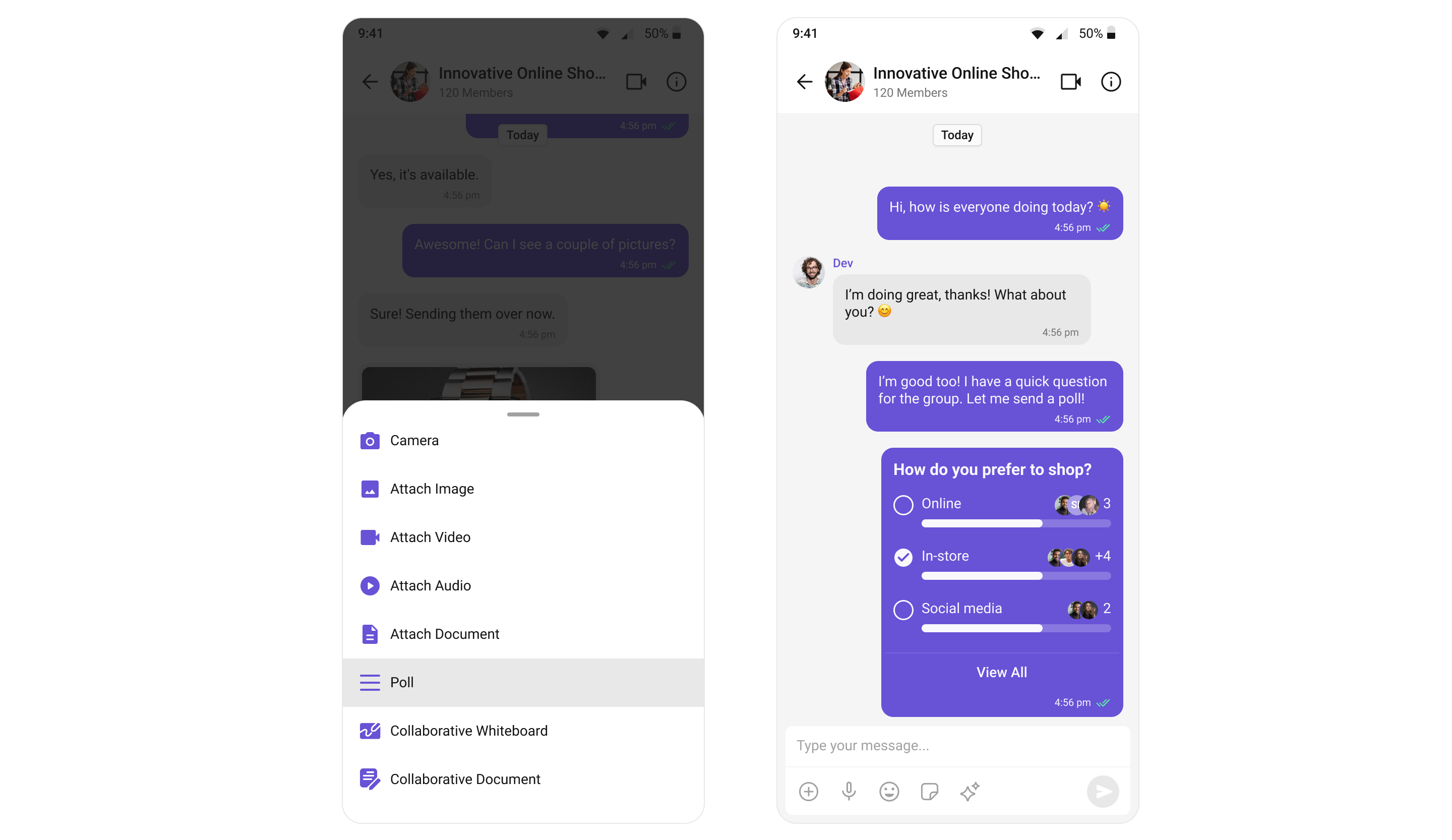
The Polls extension enhances group discussions by allowing users to create polls. Users can ask questions with a predefined list of answers, enabling a quick, organized way to gather group opinions. For a comprehensive understanding and guide on implementing and using the Polls Extension, refer to our specific guide on the [Polls Extension](/fundamentals/polls).
Once you have successfully activated the [Polls Extension](/fundamentals/polls) from your CometChat Dashboard, the feature will automatically be incorporated into the Action Sheet of the [Message Composer](/ui-kit/flutter/v5/message-composer) widget of UI Kits.
 ***
#### Message Translation
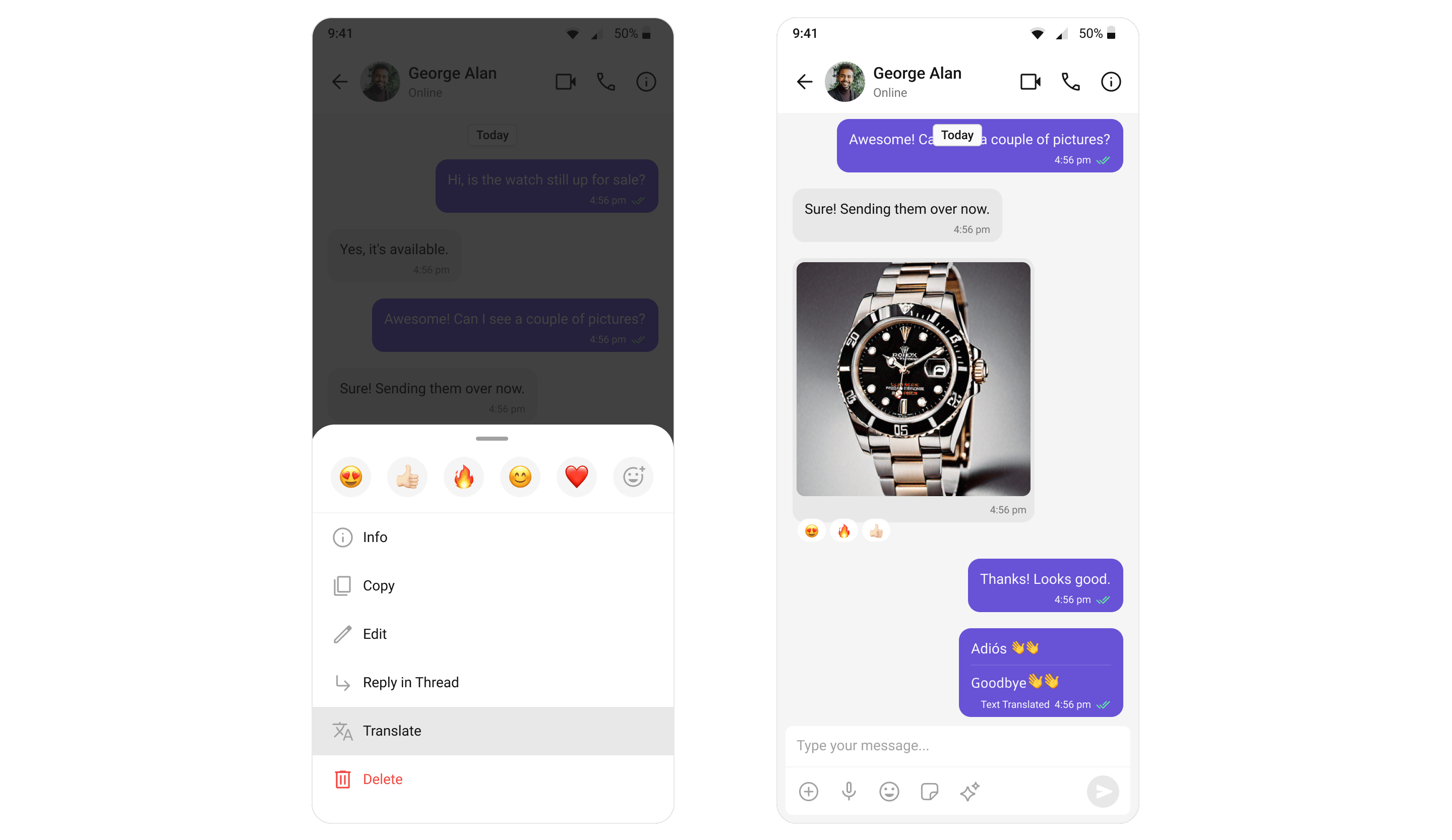
The Message Translation extension in CometChat is designed to translate any message into your local locale. It eliminates language barriers, making the chat more inclusive. For a comprehensive understanding and guide on implementing and using the Message Translation Extension, refer to our specific guide on the [Message Translation Extension](/fundamentals/message-translation).
Once you have successfully activated the [Message Translation Extension](/fundamentals/message-translation) from your CometChat Dashboard, the feature will automatically be incorporated into the Action Sheet of [MessageList Widget](/ui-kit/flutter/v5/message-list) widget of UI Kits.
***
#### Message Translation
The Message Translation extension in CometChat is designed to translate any message into your local locale. It eliminates language barriers, making the chat more inclusive. For a comprehensive understanding and guide on implementing and using the Message Translation Extension, refer to our specific guide on the [Message Translation Extension](/fundamentals/message-translation).
Once you have successfully activated the [Message Translation Extension](/fundamentals/message-translation) from your CometChat Dashboard, the feature will automatically be incorporated into the Action Sheet of [MessageList Widget](/ui-kit/flutter/v5/message-list) widget of UI Kits.
 ***
#### Giphy
Search and share GIFs from Giphy. See [Giphy Extension](/fundamentals/giphy).
***
#### Tenor
Search and share GIFs from Tenor. See [Tenor Extension](/fundamentals/tenor).
***
#### Stipop
Integrates Stipop's sticker library. See [Stipop Extension](/fundamentals/stickers-stipop).
***
#### Reminders
Sets reminders for messages or creates personal reminders. A bot sends a notification when due. See [Reminders Extension](/fundamentals/reminders).
***
### Collaboration
#### Collaborative Whiteboard
The Collaborative Whiteboard extension facilitates real-time collaboration. Users can draw, brainstorm, and share ideas on a shared digital whiteboard. For a comprehensive understanding and guide on implementing and using the Collaborative Whiteboard Extension, refer to our specific guide on the [Collaborative Whiteboard Extension](/fundamentals/collaborative-whiteboard).
Once you have successfully activated the [Collaborative Whiteboard Extension](/fundamentals/collaborative-whiteboard) from your CometChat Dashboard, the feature will automatically be incorporated into the Action Sheet of the [Message Composer](/ui-kit/flutter/v5/message-composer) widget of UI Kits.
***
#### Giphy
Search and share GIFs from Giphy. See [Giphy Extension](/fundamentals/giphy).
***
#### Tenor
Search and share GIFs from Tenor. See [Tenor Extension](/fundamentals/tenor).
***
#### Stipop
Integrates Stipop's sticker library. See [Stipop Extension](/fundamentals/stickers-stipop).
***
#### Reminders
Sets reminders for messages or creates personal reminders. A bot sends a notification when due. See [Reminders Extension](/fundamentals/reminders).
***
### Collaboration
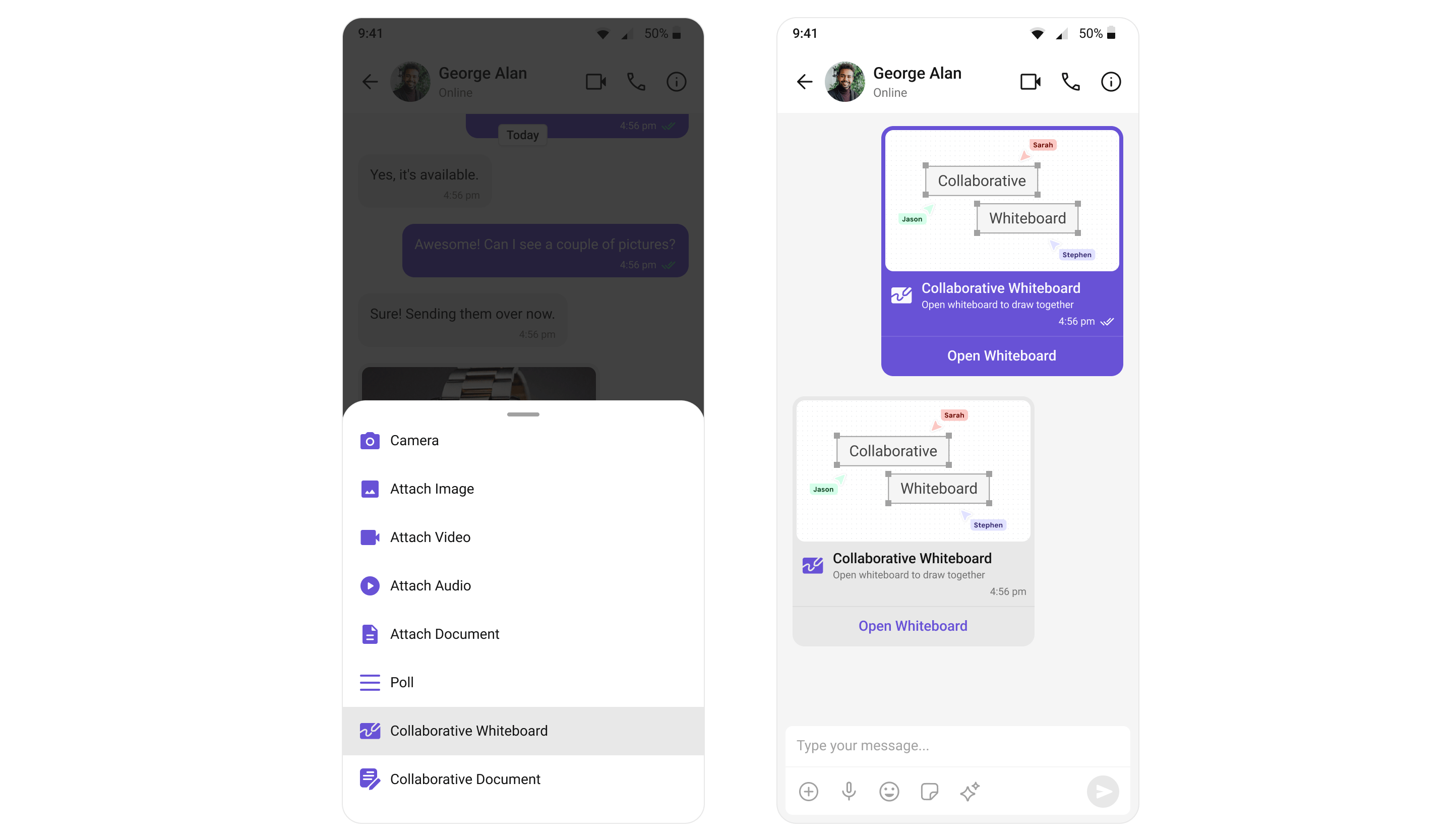
#### Collaborative Whiteboard
The Collaborative Whiteboard extension facilitates real-time collaboration. Users can draw, brainstorm, and share ideas on a shared digital whiteboard. For a comprehensive understanding and guide on implementing and using the Collaborative Whiteboard Extension, refer to our specific guide on the [Collaborative Whiteboard Extension](/fundamentals/collaborative-whiteboard).
Once you have successfully activated the [Collaborative Whiteboard Extension](/fundamentals/collaborative-whiteboard) from your CometChat Dashboard, the feature will automatically be incorporated into the Action Sheet of the [Message Composer](/ui-kit/flutter/v5/message-composer) widget of UI Kits.
 ***
#### Collaborative Document
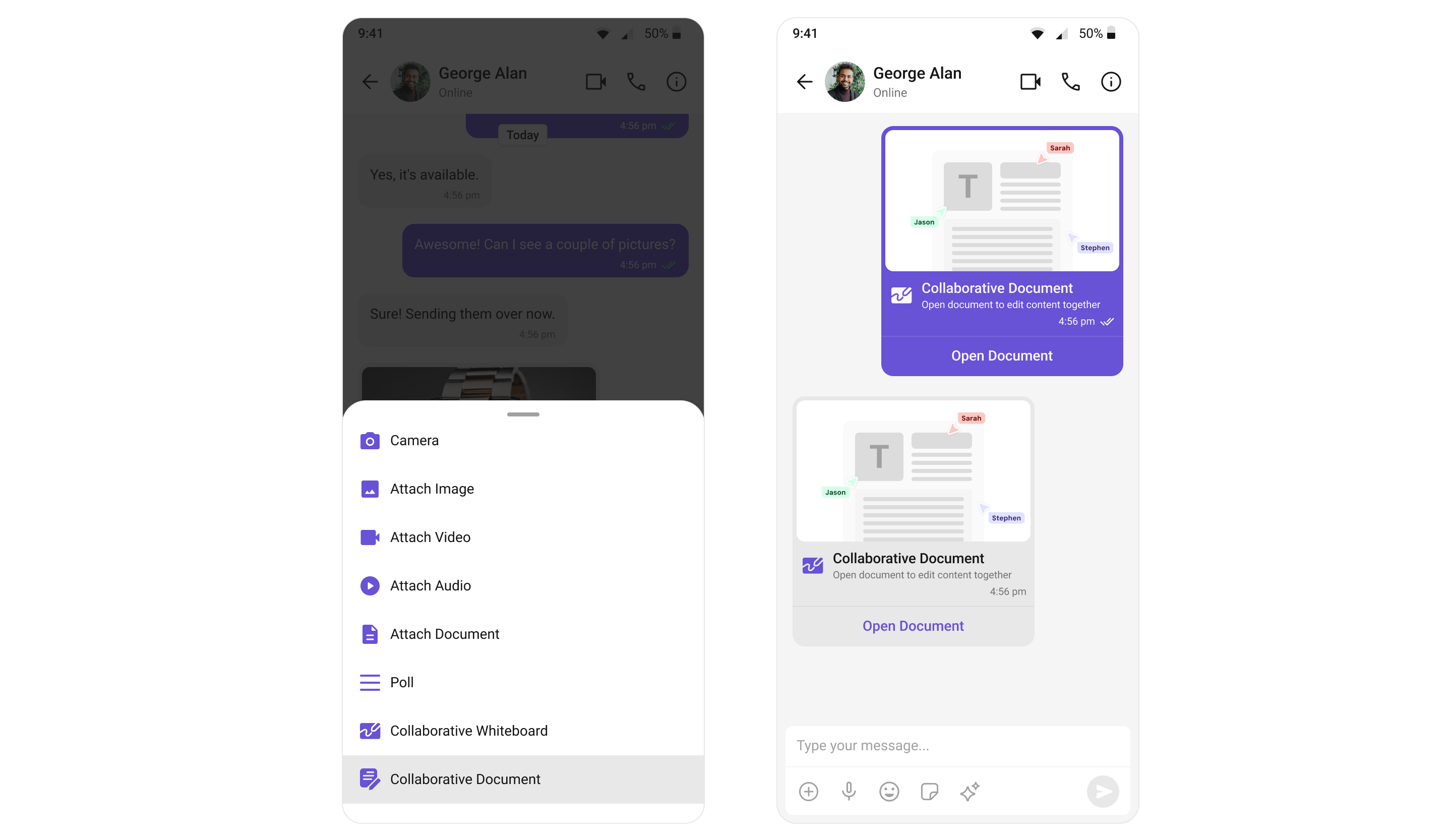
With the Collaborative Document extension, users can work together on a shared document. This feature is essential for remote teams where document collaboration is a recurring requirement. For a comprehensive understanding and guide on implementing and using the Collaborative Document Extension, refer to our specific guide on the [Collaborative Document Extension](/fundamentals/collaborative-document).
Once you have successfully activated the [Collaborative Document Extension](/fundamentals/collaborative-document) from your CometChat Dashboard, the feature will automatically be incorporated into the Action Sheet of the [Message Composer](/ui-kit/flutter/v5/message-composer) widget of UI Kits.
***
#### Collaborative Document
With the Collaborative Document extension, users can work together on a shared document. This feature is essential for remote teams where document collaboration is a recurring requirement. For a comprehensive understanding and guide on implementing and using the Collaborative Document Extension, refer to our specific guide on the [Collaborative Document Extension](/fundamentals/collaborative-document).
Once you have successfully activated the [Collaborative Document Extension](/fundamentals/collaborative-document) from your CometChat Dashboard, the feature will automatically be incorporated into the Action Sheet of the [Message Composer](/ui-kit/flutter/v5/message-composer) widget of UI Kits.
 ***
### Security
#### Disappearing Messages
Messages auto-delete after a specified interval. Works for 1:1 and group messages. See [Disappearing Messages Extension](/fundamentals/disappearing-messages).
***
### Customer Support
#### Chatwoot
Routes user messages to Chatwoot for customer support. See [Chatwoot Extension](/fundamentals/chatwoot).
***
#### Intercom
Integrates Intercom for in-app customer support. See [Intercom Extension](/fundamentals/intercom).
***
### Smart Chat Features
For AI-powered features like Conversation Starter, Smart Replies, and Conversation Summary, see [AI Features](/ui-kit/flutter/v5/ai-features).
***
## Enabling Extensions
To enable extensions in your Flutter app, configure them during initialization:
```dart theme={null}
UIKitSettings uiKitSettings = (UIKitSettingsBuilder()
..appId = "YOUR_APP_ID"
..region = "YOUR_REGION"
..authKey = "YOUR_AUTH_KEY"
..subscriptionType = CometChatSubscriptionType.allUsers
..extensions = CometChatUIKitChatExtensions.getDefaultExtensions() // Enable all default extensions
).build();
await CometChatUIKit.init(uiKitSettings: uiKitSettings);
```
***
## Next Steps
Learn how extensions integrate with the message composer
See how extensions enhance message display
Explore all available extensions in detail
Enable extensions from your CometChat Dashboard
***
***
### Security
#### Disappearing Messages
Messages auto-delete after a specified interval. Works for 1:1 and group messages. See [Disappearing Messages Extension](/fundamentals/disappearing-messages).
***
### Customer Support
#### Chatwoot
Routes user messages to Chatwoot for customer support. See [Chatwoot Extension](/fundamentals/chatwoot).
***
#### Intercom
Integrates Intercom for in-app customer support. See [Intercom Extension](/fundamentals/intercom).
***
### Smart Chat Features
For AI-powered features like Conversation Starter, Smart Replies, and Conversation Summary, see [AI Features](/ui-kit/flutter/v5/ai-features).
***
## Enabling Extensions
To enable extensions in your Flutter app, configure them during initialization:
```dart theme={null}
UIKitSettings uiKitSettings = (UIKitSettingsBuilder()
..appId = "YOUR_APP_ID"
..region = "YOUR_REGION"
..authKey = "YOUR_AUTH_KEY"
..subscriptionType = CometChatSubscriptionType.allUsers
..extensions = CometChatUIKitChatExtensions.getDefaultExtensions() // Enable all default extensions
).build();
await CometChatUIKit.init(uiKitSettings: uiKitSettings);
```
***
## Next Steps
Learn how extensions integrate with the message composer
See how extensions enhance message display
Explore all available extensions in detail
Enable extensions from your CometChat Dashboard
***