> ## Documentation Index
> Fetch the complete documentation index at: https://cometchat-22654f5b-docs-rn-guide-message-privately.mintlify.site/llms.txt
> Use this file to discover all available pages before exploring further.
# Calling Integration
> Add voice and video calling to your Flutter UI Kit application
## Overview
This guide walks you through adding voice and video calling capabilities to your Flutter application using the CometChat UI Kit.
Make sure you've completed the [Getting Started](/ui-kit/flutter/v5/getting-started) guide before proceeding.
## Step 1: Add Dependency
Add the following dependency to your `pubspec.yaml` file:
```yaml theme={null}
dependencies:
cometchat_calls_uikit: ^5.0.15
```
## Step 2: Update Android build.gradle
If your Flutter project's minimum Android SDK version is below API level 24, update it in `android/app/build.gradle`:
```groovy theme={null}
defaultConfig {
minSdkVersion 24
targetSdkVersion flutter.targetSdkVersion
versionCode flutterVersionCode.toInteger()
versionName flutterVersionName
}
```
## Step 3: Update iOS Podfile
In `ios/Podfile`, update the minimum iOS version to 12:
```ruby theme={null}
platform :ios, '12.0'
```
## Step 4: Enable Calling in UIKitSettings
Modify the UIKitSettings to activate calling features using `callingExtension`:
```dart theme={null}
UIKitSettings uiKitSettings = (UIKitSettingsBuilder()
..subscriptionType = CometChatSubscriptionType.allUsers
..autoEstablishSocketConnection = true
..region = "REGION" // Replace with your App Region
..appId = "APP_ID" // Replace with your App ID
..authKey = "AUTH_KEY" // Replace with your Auth Key
..extensions = CometChatUIKitChatExtensions.getDefaultExtensions()
..callingExtension = CometChatCallingExtension() // Enable calling
).build();
CometChatUIKit.init(uiKitSettings: uiKitSettings, onSuccess: (successMessage) {
// Success
}, onError: (e) {
// Error
});
```
## Step 5: Set Up Incoming Call Navigation
To allow launching the Incoming Call screen from any widget, provide the `CallNavigationContext.navigatorKey` in your top-level widget:
```dart theme={null}
CometChatUIKit.login(uid, onSuccess: (s) {
Navigator.push(context, MaterialPageRoute(
builder: (context) => CometChatUsersWithMessages(
key: CallNavigationContext.navigatorKey
)
));
}, onError: (e) {
// Error
});
```
## Verify Integration
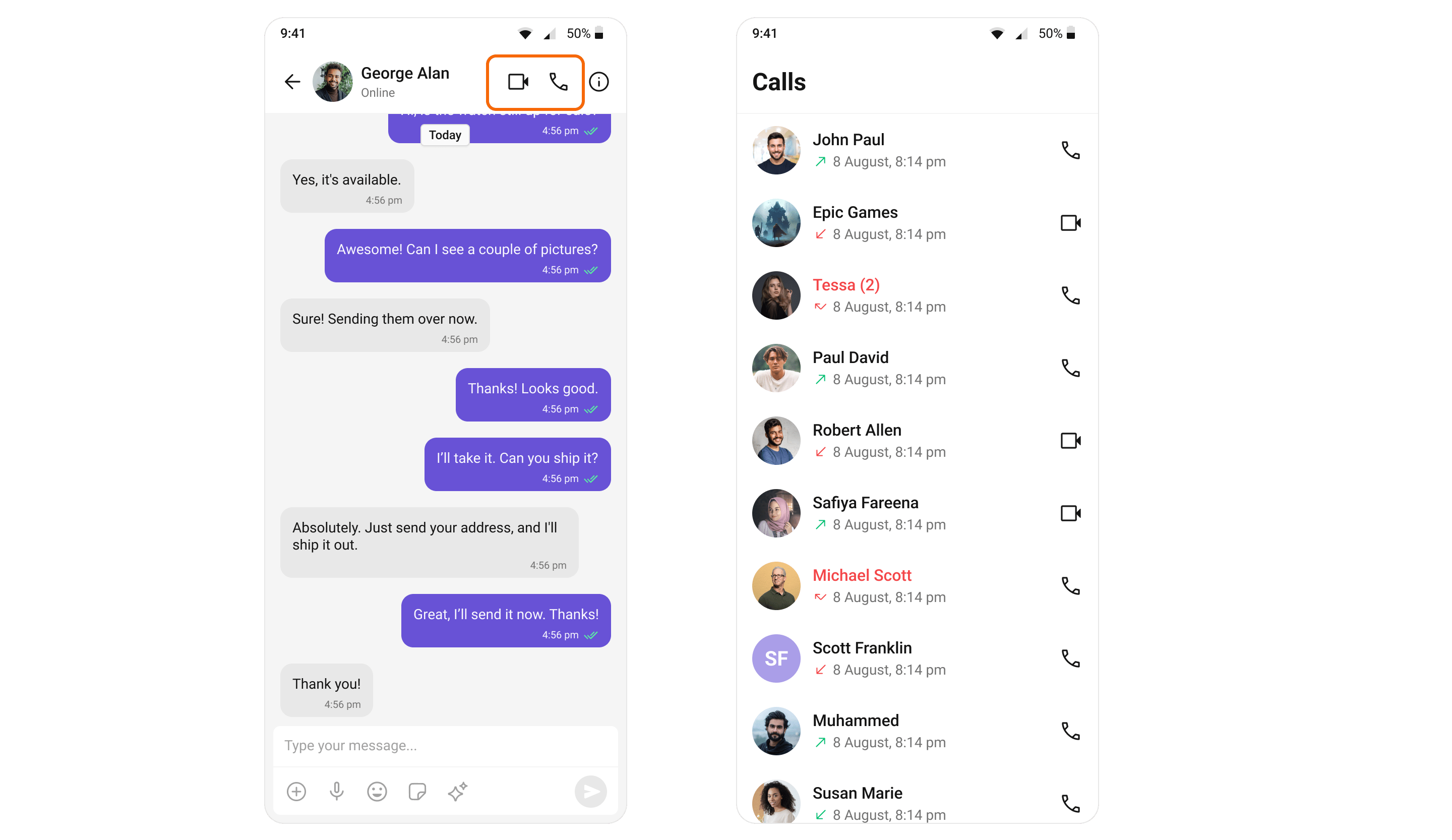
After adding the dependency, the Flutter UI Kit will automatically detect it and activate calling features. You will see [CallButtons](/ui-kit/flutter/v5/call-buttons) rendered in the [MessageHeader](/ui-kit/flutter/v5/message-header) widget.
 ## Set Up Call Listeners
For every top-level widget where you want to receive call events, register the CallListener:
```dart theme={null}
import 'package:cometchat/cometchat_sdk.dart';
class _YourClassNameState extends State with CallListener {
@override
void initState() {
super.initState();
CometChat.addCallListener(listenerId, this);
}
@override
void dispose() {
super.dispose();
CometChat.removeCallListener(listenerId);
}
@override
void onIncomingCallReceived(Call call) {
super.onIncomingCallReceived(call);
debugPrint("onIncomingCallReceived");
}
@override
void onOutgoingCallAccepted(Call call) {
super.onOutgoingCallAccepted(call);
debugPrint("onOutgoingCallAccepted");
}
@override
void onOutgoingCallRejected(Call call) {
super.onOutgoingCallRejected(call);
debugPrint("onOutgoingCallRejected");
}
@override
void onIncomingCallCancelled(Call call) {
super.onIncomingCallCancelled(call);
debugPrint("onIncomingCallCancelled");
}
@override
void onCallEndedMessageReceived(Call call) {
super.onCallEndedMessageReceived(call);
debugPrint("onCallEndedMessageReceived");
}
@override
Widget build(BuildContext context) {
// Your widget build
}
}
```
## Set Up Call Listeners
For every top-level widget where you want to receive call events, register the CallListener:
```dart theme={null}
import 'package:cometchat/cometchat_sdk.dart';
class _YourClassNameState extends State with CallListener {
@override
void initState() {
super.initState();
CometChat.addCallListener(listenerId, this);
}
@override
void dispose() {
super.dispose();
CometChat.removeCallListener(listenerId);
}
@override
void onIncomingCallReceived(Call call) {
super.onIncomingCallReceived(call);
debugPrint("onIncomingCallReceived");
}
@override
void onOutgoingCallAccepted(Call call) {
super.onOutgoingCallAccepted(call);
debugPrint("onOutgoingCallAccepted");
}
@override
void onOutgoingCallRejected(Call call) {
super.onOutgoingCallRejected(call);
debugPrint("onOutgoingCallRejected");
}
@override
void onIncomingCallCancelled(Call call) {
super.onIncomingCallCancelled(call);
debugPrint("onIncomingCallCancelled");
}
@override
void onCallEndedMessageReceived(Call call) {
super.onCallEndedMessageReceived(call);
debugPrint("onCallEndedMessageReceived");
}
@override
Widget build(BuildContext context) {
// Your widget build
}
}
```