> ## Documentation Index
> Fetch the complete documentation index at: https://cometchat-22654f5b-docs-rn-guide-message-privately.mintlify.site/llms.txt
> Use this file to discover all available pages before exploring further.
# Notification Feed
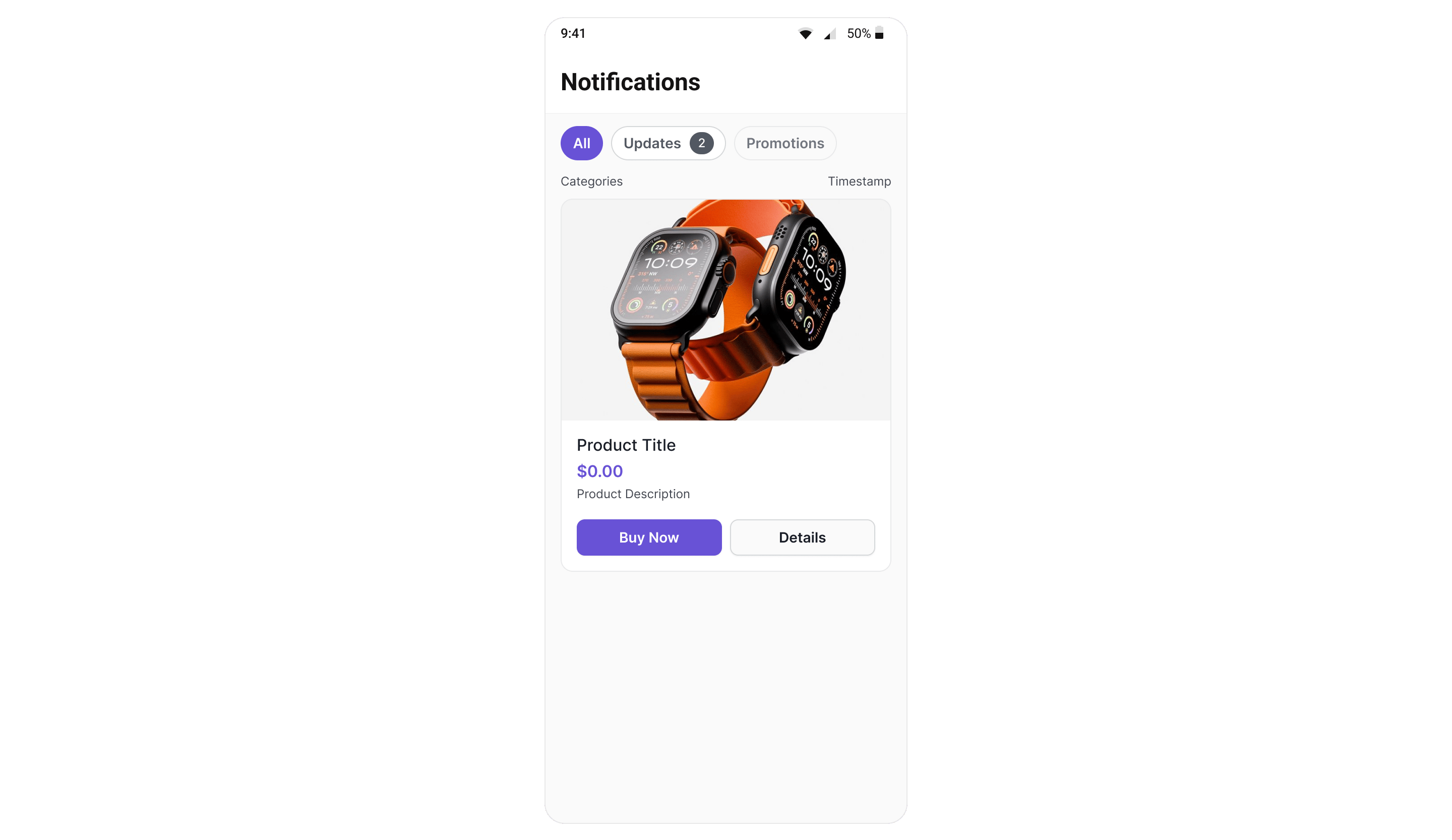
> Full-screen notification feed component with category filtering, card rendering, real-time updates, and engagement reporting.
`CometChatNotificationFeed` displays a scrollable notification feed where each item is rendered as a native card using the CometChat Cards library. It handles fetching, pagination, category filtering, timestamp grouping, real-time updates, and read/delivered/engagement reporting automatically.
 ***
## Where It Fits
`CometChatNotificationFeed` is a full-screen component. Drop it into a route or screen. It manages its own data fetching, state, and real-time listeners — you just handle navigation callbacks.
```dart theme={null}
import 'package:cometchat_chat_uikit/cometchat_chat_uikit.dart';
class NotificationsScreen extends StatelessWidget {
const NotificationsScreen({super.key});
@override
Widget build(BuildContext context) {
return CometChatNotificationFeed(
showBackButton: true,
onBackPress: () => Navigator.of(context).pop(),
onItemClick: (NotificationFeedItem item) {
// Handle item tap (e.g., open detail or deep link)
},
);
}
}
```
***
## Quick Start
```dart theme={null}
import 'package:cometchat_chat_uikit/cometchat_chat_uikit.dart';
@override
Widget build(BuildContext context) {
return const CometChatNotificationFeed();
}
```
Prerequisites: CometChat SDK initialized with `CometChatUIKit.init()` and a user logged in.
***
## Filtering Feed Items
Control what loads using custom request builders:
```dart theme={null}
CometChatNotificationFeed(
notificationFeedRequestBuilder: NotificationFeedRequestBuilder()
..setLimit(30)
..setReadState(FeedReadState.unread)
..setCategory("promotions"),
)
```
### Filter Options
| Builder Method | Description |
| ------------------------------ | ------------------------------------ |
| `.setLimit(int)` | Items per page (default 20, max 100) |
| `.setReadState(FeedReadState)` | `read`, `unread`, or `all` |
| `.setCategory(String)` | Filter by category ID |
| `.setChannelId(String)` | Filter by channel |
| `.setTags(List)` | Filter by tags |
| `.setDateFrom(String)` | ISO 8601 date lower bound |
| `.setDateTo(String)` | ISO 8601 date upper bound |
Pass the builder object (without calling `.build()`). The component calls `.build()` internally.
***
## Actions and Events
### Callback Methods
#### `onItemClick`
Fires when a feed item card is tapped.
```dart theme={null}
CometChatNotificationFeed(
onItemClick: (NotificationFeedItem item) {
// item.id, item.content (Card JSON), item.category
},
)
```
#### `onActionClick`
Fires when an interactive element (button, link) inside a card is tapped.
```dart theme={null}
CometChatNotificationFeed(
onActionClick: (NotificationFeedItem item, CometChatCardActionEvent action) {
if (action.action is CometChatCardOpenUrlAction) {
// Open URL in browser
} else if (action.action is CometChatCardChatWithUserAction) {
// Navigate to chat
}
},
)
```
#### `onError`
Fires when an internal error occurs (network failure, SDK exception).
```dart theme={null}
CometChatNotificationFeed(
onError: (String error) {
debugPrint("Feed error: $error");
},
)
```
#### `onBackPress`
Fires when the back button in the header is tapped.
```dart theme={null}
CometChatNotificationFeed(
showBackButton: true,
onBackPress: () => Navigator.of(context).pop(),
)
```
### Automatic Behaviors
The component handles these automatically — no manual setup needed:
| Behavior | Description |
| ------------------ | ------------------------------------------------------- |
| Real-time updates | New items appear at the top via WebSocket listener |
| Delivery reporting | Items are reported as delivered when fetched |
| Read reporting | Items are reported as read after 1 second of visibility |
| Infinite scroll | Fetches next page when scrolling near the bottom |
| Pull-to-refresh | Resets and fetches fresh data on pull |
| Timestamp grouping | Groups items as "Today", "Yesterday", day name, or date |
| Category filtering | Filter chips row for category-based filtering |
***
## Properties
| Property | Type | Default | Description |
| -------------------------------------- | ------------------------------------- | ----------------- | ---------------------------- |
| `title` | String | `"Notifications"` | Header title text |
| `showHeader` | bool | `true` | Toggle header visibility |
| `showBackButton` | bool | `false` | Toggle back button |
| `showFilterChips` | bool | `true` | Toggle category filter chips |
| `headerView` | Widget? | null | Custom header widget |
| `scrollToItemId` | String? | null | Deep link to a specific item |
| `notificationFeedRequestBuilder` | NotificationFeedRequestBuilder? | null | Custom feed request |
| `notificationCategoriesRequestBuilder` | NotificationCategoriesRequestBuilder? | null | Custom categories request |
| `cardThemeMode` | CometChatCardThemeMode? | null | Card renderer theme mode |
| `cardThemeOverride` | CometChatCardThemeOverride? | null | Card renderer theme override |
***
## Custom View Slots
### Header View
Replace the entire header:
```dart theme={null}
CometChatNotificationFeed(
headerView: Padding(
padding: const EdgeInsets.all(16),
child: Row(
children: [
Text(
"My Notifications",
style: TextStyle(fontSize: 20, fontWeight: FontWeight.bold),
),
],
),
),
)
```
### State Views
```dart theme={null}
CometChatNotificationFeed(
emptyStateView: Center(
child: Column(
mainAxisSize: MainAxisSize.min,
children: [
Icon(Icons.notifications_off, size: 64, color: Colors.grey),
SizedBox(height: 16),
Text("No notifications yet"),
],
),
),
errorStateView: Center(
child: Column(
mainAxisSize: MainAxisSize.min,
children: [
Text("Something went wrong"),
ElevatedButton(
onPressed: () { /* retry logic */ },
child: Text("Retry"),
),
],
),
),
loadingStateView: const Center(
child: CircularProgressIndicator(),
),
)
```
***
## Style
```dart theme={null}
CometChatNotificationFeed(
style: CometChatNotificationFeedStyle(
backgroundColor: Color(0xFFF5F5F5),
headerTitleColor: Color(0xFF141414),
chipActiveBackgroundColor: Color(0xFF3399FF),
chipActiveTextColor: Colors.white,
chipInactiveBackgroundColor: Colors.transparent,
chipInactiveTextColor: Color(0xFF727272),
chipBorderColor: Color(0xFFE0E0E0),
cardBackgroundColor: Colors.white,
cardBorderColor: Color(0xFFE0E0E0),
cardBorderRadius: 12,
unreadIndicatorColor: Color(0xFF3399FF),
),
)
```
### Style Properties
| Property | Type | Description |
| ----------------------------- | ---------- | --------------------------------- |
| `backgroundColor` | Color? | Screen background color |
| `headerTitleColor` | Color? | Header title text color |
| `headerTitleTextStyle` | TextStyle? | Header title text style |
| `backIconColor` | Color? | Back button icon color |
| `chipActiveBackgroundColor` | Color? | Selected filter chip background |
| `chipActiveTextColor` | Color? | Selected filter chip text |
| `chipInactiveBackgroundColor` | Color? | Unselected filter chip background |
| `chipInactiveTextColor` | Color? | Unselected filter chip text |
| `chipBorderColor` | Color? | Filter chip border |
| `chipTextStyle` | TextStyle? | Filter chip text style |
| `badgeBackgroundColor` | Color? | Badge background |
| `badgeTextColor` | Color? | Badge text |
| `badgeTextStyle` | TextStyle? | Badge text style |
| `timestampTextColor` | Color? | Item timestamp color |
| `timestampTextStyle` | TextStyle? | Item timestamp style |
| `timestampHeaderTextStyle` | TextStyle? | Section header timestamp style |
| `timestampHeaderTextColor` | Color? | Section header timestamp color |
| `cardBackgroundColor` | Color? | Card container background |
| `cardBorderColor` | Color? | Card container border |
| `cardBorderRadius` | double? | Card corner radius |
| `cardBorderWidth` | double? | Card border width |
| `unreadIndicatorColor` | Color? | Unread dot indicator color |
| `separatorColor` | Color? | Separator between cards |
All colors default to `null` to inherit from `CometChatTheme`. Override individual values without losing theme support.
***
## Deep Linking
Navigate directly to a specific feed item using `scrollToItemId`:
```dart theme={null}
CometChatNotificationFeed(
scrollToItemId: "announcement-id-from-push",
)
```
If the item is already loaded, the feed scrolls to it. If not, it fetches the item by ID and inserts it at the top.
***
## Common Patterns
### Show only unread items
```dart theme={null}
CometChatNotificationFeed(
notificationFeedRequestBuilder: NotificationFeedRequestBuilder()
..setReadState(FeedReadState.unread),
)
```
### Hide filter chips and header
```dart theme={null}
CometChatNotificationFeed(
showHeader: false,
showFilterChips: false,
)
```
### Custom categories request
```dart theme={null}
CometChatNotificationFeed(
notificationCategoriesRequestBuilder: NotificationCategoriesRequestBuilder()
..setLimit(10),
)
```
### Card theme mode override
```dart theme={null}
CometChatNotificationFeed(
cardThemeMode: CometChatCardThemeMode.dark,
)
```
***
## Next Steps
Overview of how campaigns work end-to-end
Low-level SDK APIs for feed items, categories, and engagement
Full styling reference for all components
Custom BLoCs, repositories, and data sources
***
## Where It Fits
`CometChatNotificationFeed` is a full-screen component. Drop it into a route or screen. It manages its own data fetching, state, and real-time listeners — you just handle navigation callbacks.
```dart theme={null}
import 'package:cometchat_chat_uikit/cometchat_chat_uikit.dart';
class NotificationsScreen extends StatelessWidget {
const NotificationsScreen({super.key});
@override
Widget build(BuildContext context) {
return CometChatNotificationFeed(
showBackButton: true,
onBackPress: () => Navigator.of(context).pop(),
onItemClick: (NotificationFeedItem item) {
// Handle item tap (e.g., open detail or deep link)
},
);
}
}
```
***
## Quick Start
```dart theme={null}
import 'package:cometchat_chat_uikit/cometchat_chat_uikit.dart';
@override
Widget build(BuildContext context) {
return const CometChatNotificationFeed();
}
```
Prerequisites: CometChat SDK initialized with `CometChatUIKit.init()` and a user logged in.
***
## Filtering Feed Items
Control what loads using custom request builders:
```dart theme={null}
CometChatNotificationFeed(
notificationFeedRequestBuilder: NotificationFeedRequestBuilder()
..setLimit(30)
..setReadState(FeedReadState.unread)
..setCategory("promotions"),
)
```
### Filter Options
| Builder Method | Description |
| ------------------------------ | ------------------------------------ |
| `.setLimit(int)` | Items per page (default 20, max 100) |
| `.setReadState(FeedReadState)` | `read`, `unread`, or `all` |
| `.setCategory(String)` | Filter by category ID |
| `.setChannelId(String)` | Filter by channel |
| `.setTags(List)` | Filter by tags |
| `.setDateFrom(String)` | ISO 8601 date lower bound |
| `.setDateTo(String)` | ISO 8601 date upper bound |
Pass the builder object (without calling `.build()`). The component calls `.build()` internally.
***
## Actions and Events
### Callback Methods
#### `onItemClick`
Fires when a feed item card is tapped.
```dart theme={null}
CometChatNotificationFeed(
onItemClick: (NotificationFeedItem item) {
// item.id, item.content (Card JSON), item.category
},
)
```
#### `onActionClick`
Fires when an interactive element (button, link) inside a card is tapped.
```dart theme={null}
CometChatNotificationFeed(
onActionClick: (NotificationFeedItem item, CometChatCardActionEvent action) {
if (action.action is CometChatCardOpenUrlAction) {
// Open URL in browser
} else if (action.action is CometChatCardChatWithUserAction) {
// Navigate to chat
}
},
)
```
#### `onError`
Fires when an internal error occurs (network failure, SDK exception).
```dart theme={null}
CometChatNotificationFeed(
onError: (String error) {
debugPrint("Feed error: $error");
},
)
```
#### `onBackPress`
Fires when the back button in the header is tapped.
```dart theme={null}
CometChatNotificationFeed(
showBackButton: true,
onBackPress: () => Navigator.of(context).pop(),
)
```
### Automatic Behaviors
The component handles these automatically — no manual setup needed:
| Behavior | Description |
| ------------------ | ------------------------------------------------------- |
| Real-time updates | New items appear at the top via WebSocket listener |
| Delivery reporting | Items are reported as delivered when fetched |
| Read reporting | Items are reported as read after 1 second of visibility |
| Infinite scroll | Fetches next page when scrolling near the bottom |
| Pull-to-refresh | Resets and fetches fresh data on pull |
| Timestamp grouping | Groups items as "Today", "Yesterday", day name, or date |
| Category filtering | Filter chips row for category-based filtering |
***
## Properties
| Property | Type | Default | Description |
| -------------------------------------- | ------------------------------------- | ----------------- | ---------------------------- |
| `title` | String | `"Notifications"` | Header title text |
| `showHeader` | bool | `true` | Toggle header visibility |
| `showBackButton` | bool | `false` | Toggle back button |
| `showFilterChips` | bool | `true` | Toggle category filter chips |
| `headerView` | Widget? | null | Custom header widget |
| `scrollToItemId` | String? | null | Deep link to a specific item |
| `notificationFeedRequestBuilder` | NotificationFeedRequestBuilder? | null | Custom feed request |
| `notificationCategoriesRequestBuilder` | NotificationCategoriesRequestBuilder? | null | Custom categories request |
| `cardThemeMode` | CometChatCardThemeMode? | null | Card renderer theme mode |
| `cardThemeOverride` | CometChatCardThemeOverride? | null | Card renderer theme override |
***
## Custom View Slots
### Header View
Replace the entire header:
```dart theme={null}
CometChatNotificationFeed(
headerView: Padding(
padding: const EdgeInsets.all(16),
child: Row(
children: [
Text(
"My Notifications",
style: TextStyle(fontSize: 20, fontWeight: FontWeight.bold),
),
],
),
),
)
```
### State Views
```dart theme={null}
CometChatNotificationFeed(
emptyStateView: Center(
child: Column(
mainAxisSize: MainAxisSize.min,
children: [
Icon(Icons.notifications_off, size: 64, color: Colors.grey),
SizedBox(height: 16),
Text("No notifications yet"),
],
),
),
errorStateView: Center(
child: Column(
mainAxisSize: MainAxisSize.min,
children: [
Text("Something went wrong"),
ElevatedButton(
onPressed: () { /* retry logic */ },
child: Text("Retry"),
),
],
),
),
loadingStateView: const Center(
child: CircularProgressIndicator(),
),
)
```
***
## Style
```dart theme={null}
CometChatNotificationFeed(
style: CometChatNotificationFeedStyle(
backgroundColor: Color(0xFFF5F5F5),
headerTitleColor: Color(0xFF141414),
chipActiveBackgroundColor: Color(0xFF3399FF),
chipActiveTextColor: Colors.white,
chipInactiveBackgroundColor: Colors.transparent,
chipInactiveTextColor: Color(0xFF727272),
chipBorderColor: Color(0xFFE0E0E0),
cardBackgroundColor: Colors.white,
cardBorderColor: Color(0xFFE0E0E0),
cardBorderRadius: 12,
unreadIndicatorColor: Color(0xFF3399FF),
),
)
```
### Style Properties
| Property | Type | Description |
| ----------------------------- | ---------- | --------------------------------- |
| `backgroundColor` | Color? | Screen background color |
| `headerTitleColor` | Color? | Header title text color |
| `headerTitleTextStyle` | TextStyle? | Header title text style |
| `backIconColor` | Color? | Back button icon color |
| `chipActiveBackgroundColor` | Color? | Selected filter chip background |
| `chipActiveTextColor` | Color? | Selected filter chip text |
| `chipInactiveBackgroundColor` | Color? | Unselected filter chip background |
| `chipInactiveTextColor` | Color? | Unselected filter chip text |
| `chipBorderColor` | Color? | Filter chip border |
| `chipTextStyle` | TextStyle? | Filter chip text style |
| `badgeBackgroundColor` | Color? | Badge background |
| `badgeTextColor` | Color? | Badge text |
| `badgeTextStyle` | TextStyle? | Badge text style |
| `timestampTextColor` | Color? | Item timestamp color |
| `timestampTextStyle` | TextStyle? | Item timestamp style |
| `timestampHeaderTextStyle` | TextStyle? | Section header timestamp style |
| `timestampHeaderTextColor` | Color? | Section header timestamp color |
| `cardBackgroundColor` | Color? | Card container background |
| `cardBorderColor` | Color? | Card container border |
| `cardBorderRadius` | double? | Card corner radius |
| `cardBorderWidth` | double? | Card border width |
| `unreadIndicatorColor` | Color? | Unread dot indicator color |
| `separatorColor` | Color? | Separator between cards |
All colors default to `null` to inherit from `CometChatTheme`. Override individual values without losing theme support.
***
## Deep Linking
Navigate directly to a specific feed item using `scrollToItemId`:
```dart theme={null}
CometChatNotificationFeed(
scrollToItemId: "announcement-id-from-push",
)
```
If the item is already loaded, the feed scrolls to it. If not, it fetches the item by ID and inserts it at the top.
***
## Common Patterns
### Show only unread items
```dart theme={null}
CometChatNotificationFeed(
notificationFeedRequestBuilder: NotificationFeedRequestBuilder()
..setReadState(FeedReadState.unread),
)
```
### Hide filter chips and header
```dart theme={null}
CometChatNotificationFeed(
showHeader: false,
showFilterChips: false,
)
```
### Custom categories request
```dart theme={null}
CometChatNotificationFeed(
notificationCategoriesRequestBuilder: NotificationCategoriesRequestBuilder()
..setLimit(10),
)
```
### Card theme mode override
```dart theme={null}
CometChatNotificationFeed(
cardThemeMode: CometChatCardThemeMode.dark,
)
```
***
## Next Steps
Overview of how campaigns work end-to-end
Low-level SDK APIs for feed items, categories, and engagement
Full styling reference for all components
Custom BLoCs, repositories, and data sources