> ## Documentation Index
> Fetch the complete documentation index at: https://cometchat-22654f5b-docs-rn-guide-message-privately.mintlify.site/llms.txt
> Use this file to discover all available pages before exploring further.
# Call Logs
> Show CometChat Flutter UI Kit call logs with audio/video status, missed calls, timestamps, pagination, and call actions.
`CometChatCallLogs` renders a scrollable list of call history with call type indicators (audio/video), call status (incoming/outgoing/missed), timestamps, and pagination support.
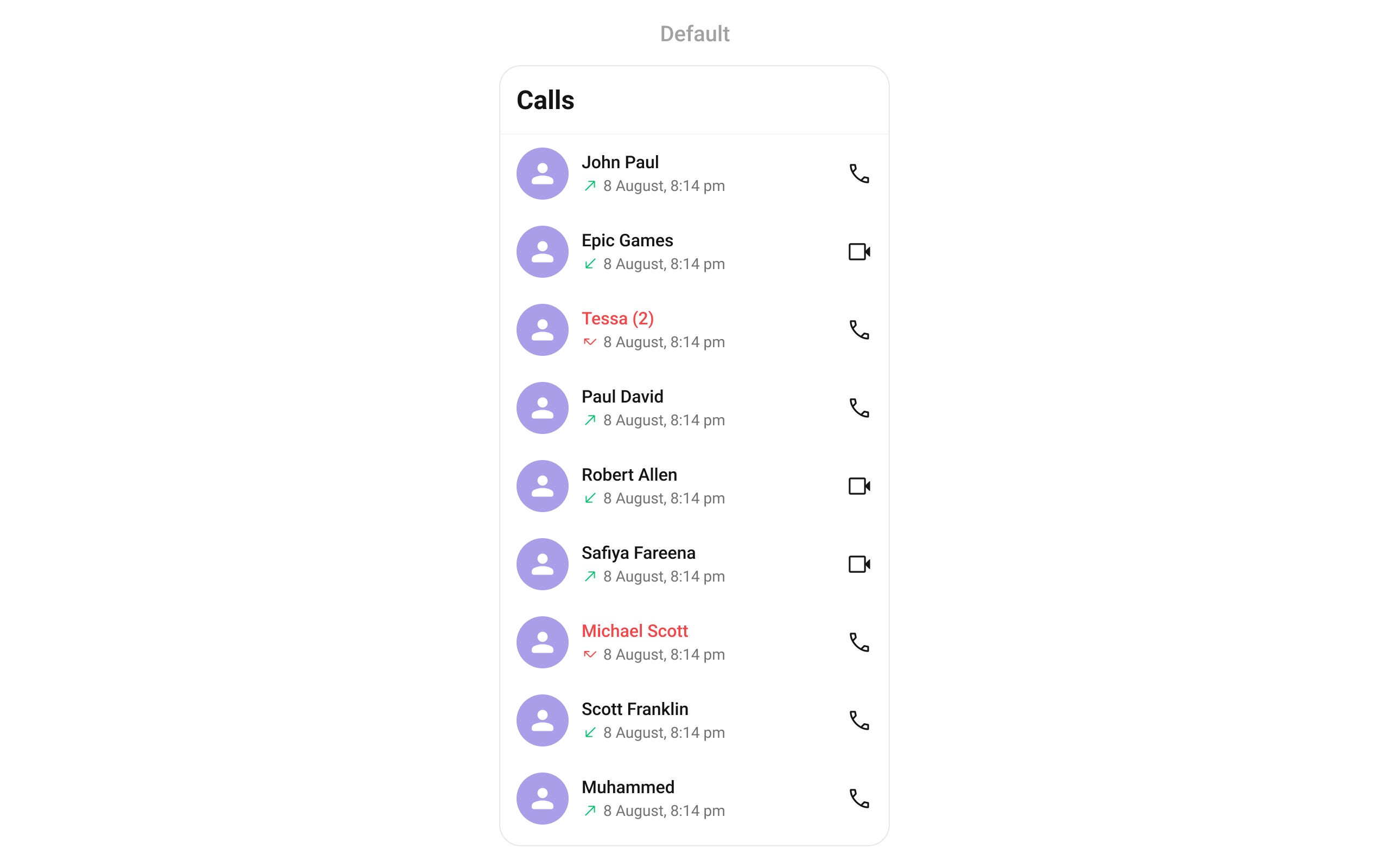 The `CometChatCallLogs` widget is composed of the following base widgets:
| Widget | Description |
| ----------------- | --------------------------------------------------------------------- |
| CometChatListBase | Container widget with title, background options, and list integration |
| CometChatListItem | Displays call log data on a card with title and subtitle |
***
## Where It Fits
`CometChatCallLogs` is a list component. It renders call history and emits the selected `CallLog` via `onItemClick`. Wire it to a detail screen or use `onCallLogIconClicked` to initiate a call directly from the log.
```dart theme={null}
CometChatCallLogs(
onItemClick: (callLog) {
// Navigate to call log details or open chat
Navigator.push(
context,
MaterialPageRoute(
builder: (context) => CometChatCallLogDetails(callLog: callLog),
),
);
},
)
```
***
## Quick Start
Using Navigator:
```dart theme={null}
Navigator.push(context, MaterialPageRoute(builder: (context) => const CometChatCallLogs()));
```
Embedding as a widget:
```dart theme={null}
import 'package:cometchat_chat_uikit/cometchat_calls_uikit.dart';
import 'package:flutter/material.dart';
class CallLogsExample extends StatefulWidget {
const CallLogsExample({super.key});
@override
State createState() => _CallLogsExampleState();
}
class _CallLogsExampleState extends State {
@override
Widget build(BuildContext context) {
return const Scaffold(
body: SafeArea(child: CometChatCallLogs()),
);
}
}
```
Prerequisites: CometChat SDK initialized with `CometChatUIKit.init()`, a user logged in, and the Calls UIKit dependency added. See [Call Features](/ui-kit/flutter/call-features) for setup.
***
## Filtering Call Logs
Pass a `CallLogRequestBuilder` to control what loads:
```dart theme={null}
CometChatCallLogs(
callLogsRequestBuilder: CallLogRequestBuilder()
..limit = 10
..hasRecording = true,
)
```
### Filter Recipes
| Recipe | Builder property |
| ------------------------- | ------------------------------ |
| Limit per page | `..limit = 10` |
| Audio calls only | `..callType = "audio"` |
| Video calls only | `..callType = "video"` |
| Missed calls only | `..callStatus = "missed"` |
| Incoming calls only | `..callDirection = "incoming"` |
| Outgoing calls only | `..callDirection = "outgoing"` |
| Calls with recording | `..hasRecording = true` |
| Calls for specific user | `..uid = "user_uid"` |
| Calls for specific group | `..guid = "group_guid"` |
| Call category (call/meet) | `..callCategory = "call"` |
### Filter Properties
| Property | Type | Description |
| --------------- | --------- | ---------------------------------------------------------------------------------------------------------------- |
| `authToken` | `String?` | Authentication token |
| `callCategory` | `String?` | Category: `"call"` or `"meet"` |
| `callDirection` | `String?` | Direction: `"incoming"` or `"outgoing"` |
| `callStatus` | `String?` | Status: `"ongoing"`, `"busy"`, `"rejected"`, `"cancelled"`, `"ended"`, `"missed"`, `"initiated"`, `"unanswered"` |
| `callType` | `String?` | Type: `"audio"`, `"video"`, or `"audio/video"` |
| `guid` | `String?` | Group ID filter |
| `hasRecording` | `bool` | Filter calls with recordings |
| `limit` | `int` | Max results per request |
| `uid` | `String?` | User ID filter |
***
## Actions and Events
### Callback Methods
#### `onItemClick`
Fires when a call log item is tapped. Primary navigation hook.
```dart theme={null}
CometChatCallLogs(
onItemClick: (callLog) {
// Navigate to call details or chat
},
)
```
#### `onItemLongPress`
Fires when a call log item is long-pressed, allowing additional actions.
```dart theme={null}
CometChatCallLogs(
onItemLongPress: (CallLog callLog) {
// Show context menu
},
)
```
#### `onBack`
Fires when the user presses the back button in the app bar.
```dart theme={null}
CometChatCallLogs(
onBack: () {
Navigator.pop(context);
},
)
```
#### `onError`
Fires on internal errors (network failure, SDK exception).
```dart theme={null}
CometChatCallLogs(
onError: (e) {
debugPrint("Error: ${e.message}");
},
)
```
#### `onLoad`
Fires when the list is successfully fetched and loaded.
```dart theme={null}
CometChatCallLogs(
onLoad: (list) {
debugPrint("Loaded ${list.length} call logs");
},
)
```
#### `onEmpty`
Fires when the list is empty after loading.
```dart theme={null}
CometChatCallLogs(
onEmpty: () {
debugPrint("No call logs found");
},
)
```
#### `onCallLogIconClicked`
Fires when the call icon on a call log item is tapped, typically used to initiate a call back.
```dart theme={null}
CometChatCallLogs(
onCallLogIconClicked: (CallLog callLog) {
// Initiate call back to this contact
},
)
```
### Events
The `CometChatCallLogs` widget does not emit global events.
***
## Functionality
| Property | Type | Default | Description |
| ----------------------- | --------- | ------- | ------------------------------------ |
| `showBackButton` | `bool?` | `true` | Toggle back button visibility |
| `hideAppbar` | `bool?` | `false` | Toggle app bar visibility |
| `backButton` | `Widget?` | `null` | Custom back button widget |
| `datePattern` | `String?` | `null` | Format pattern for date display |
| `dateSeparatorPattern` | `String?` | `null` | Format pattern for date separator |
| `hideSeparator` | `bool` | `false` | Hide separator between items |
| `emptyStateText` | `String?` | `null` | Text for empty state |
| `errorStateText` | `String?` | `null` | Text for error state |
| `incomingAudioCallIcon` | `Icon?` | `null` | Custom icon for incoming audio calls |
| `incomingVideoCallIcon` | `Icon?` | `null` | Custom icon for incoming video calls |
| `outgoingAudioCallIcon` | `Icon?` | `null` | Custom icon for outgoing audio calls |
| `outgoingVideoCallIcon` | `Icon?` | `null` | Custom icon for outgoing video calls |
| `missedAudioCallIcon` | `Icon?` | `null` | Custom icon for missed audio calls |
| `missedVideoCallIcon` | `Icon?` | `null` | Custom icon for missed video calls |
| `infoIconUrl` | `String?` | `null` | URL for the info icon |
| `loadingIconUrl` | `String?` | `null` | URL for the loading icon |
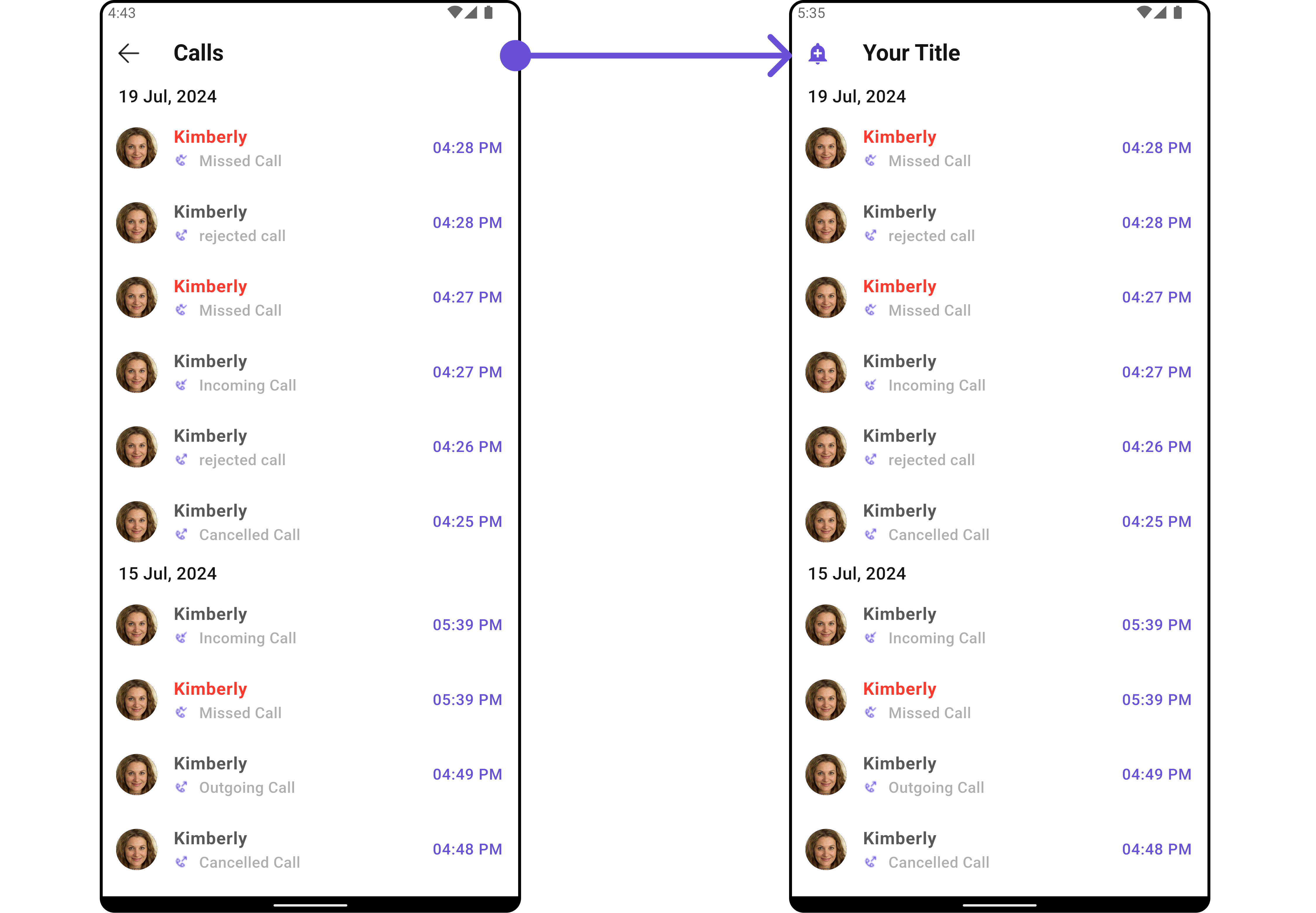
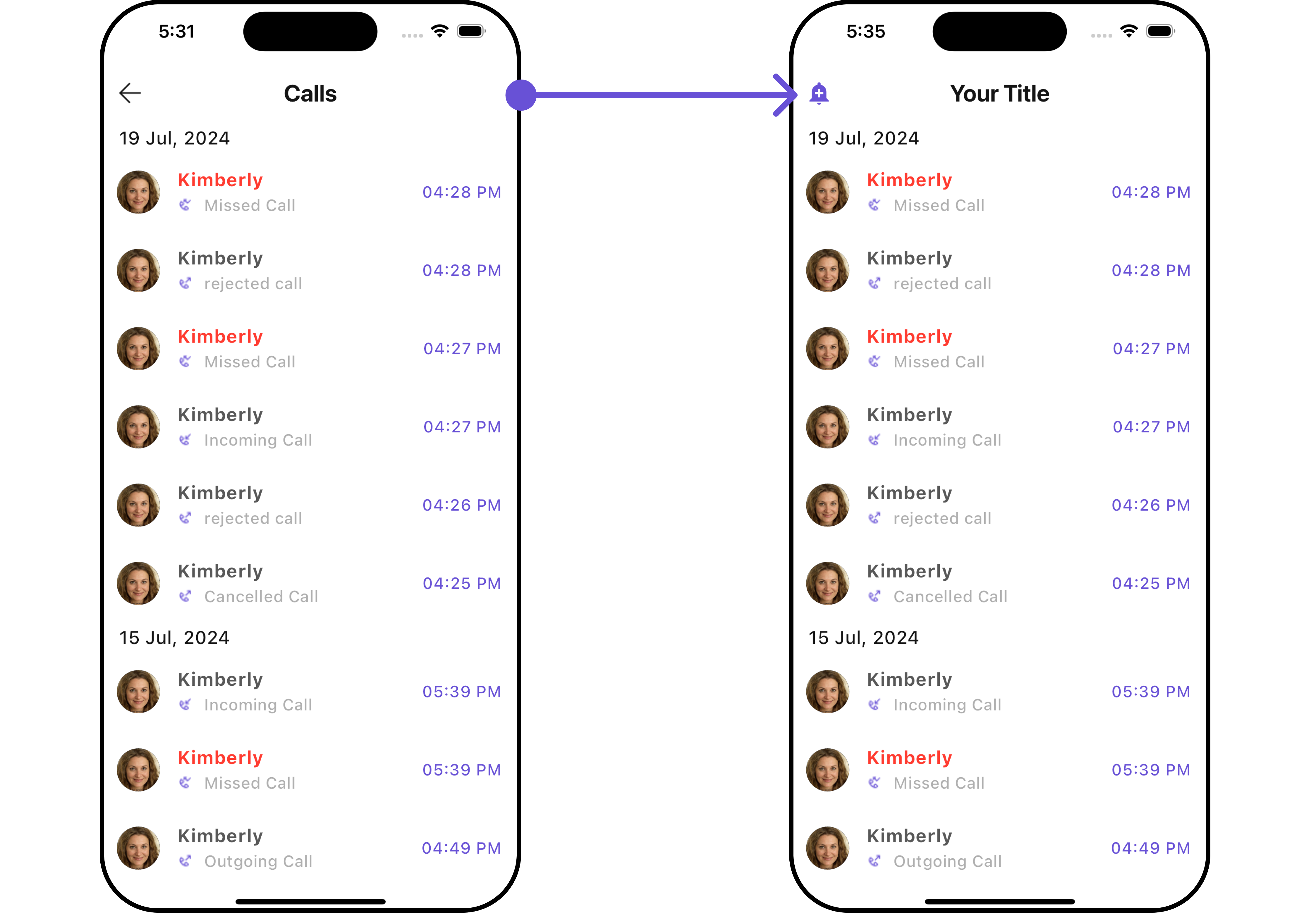
**Example — custom back button:**
```dart theme={null}
CometChatCallLogs(
backButton: Icon(Icons.arrow_back_ios, color: Color(0xFF6851D6)),
)
```
The `CometChatCallLogs` widget is composed of the following base widgets:
| Widget | Description |
| ----------------- | --------------------------------------------------------------------- |
| CometChatListBase | Container widget with title, background options, and list integration |
| CometChatListItem | Displays call log data on a card with title and subtitle |
***
## Where It Fits
`CometChatCallLogs` is a list component. It renders call history and emits the selected `CallLog` via `onItemClick`. Wire it to a detail screen or use `onCallLogIconClicked` to initiate a call directly from the log.
```dart theme={null}
CometChatCallLogs(
onItemClick: (callLog) {
// Navigate to call log details or open chat
Navigator.push(
context,
MaterialPageRoute(
builder: (context) => CometChatCallLogDetails(callLog: callLog),
),
);
},
)
```
***
## Quick Start
Using Navigator:
```dart theme={null}
Navigator.push(context, MaterialPageRoute(builder: (context) => const CometChatCallLogs()));
```
Embedding as a widget:
```dart theme={null}
import 'package:cometchat_chat_uikit/cometchat_calls_uikit.dart';
import 'package:flutter/material.dart';
class CallLogsExample extends StatefulWidget {
const CallLogsExample({super.key});
@override
State createState() => _CallLogsExampleState();
}
class _CallLogsExampleState extends State {
@override
Widget build(BuildContext context) {
return const Scaffold(
body: SafeArea(child: CometChatCallLogs()),
);
}
}
```
Prerequisites: CometChat SDK initialized with `CometChatUIKit.init()`, a user logged in, and the Calls UIKit dependency added. See [Call Features](/ui-kit/flutter/call-features) for setup.
***
## Filtering Call Logs
Pass a `CallLogRequestBuilder` to control what loads:
```dart theme={null}
CometChatCallLogs(
callLogsRequestBuilder: CallLogRequestBuilder()
..limit = 10
..hasRecording = true,
)
```
### Filter Recipes
| Recipe | Builder property |
| ------------------------- | ------------------------------ |
| Limit per page | `..limit = 10` |
| Audio calls only | `..callType = "audio"` |
| Video calls only | `..callType = "video"` |
| Missed calls only | `..callStatus = "missed"` |
| Incoming calls only | `..callDirection = "incoming"` |
| Outgoing calls only | `..callDirection = "outgoing"` |
| Calls with recording | `..hasRecording = true` |
| Calls for specific user | `..uid = "user_uid"` |
| Calls for specific group | `..guid = "group_guid"` |
| Call category (call/meet) | `..callCategory = "call"` |
### Filter Properties
| Property | Type | Description |
| --------------- | --------- | ---------------------------------------------------------------------------------------------------------------- |
| `authToken` | `String?` | Authentication token |
| `callCategory` | `String?` | Category: `"call"` or `"meet"` |
| `callDirection` | `String?` | Direction: `"incoming"` or `"outgoing"` |
| `callStatus` | `String?` | Status: `"ongoing"`, `"busy"`, `"rejected"`, `"cancelled"`, `"ended"`, `"missed"`, `"initiated"`, `"unanswered"` |
| `callType` | `String?` | Type: `"audio"`, `"video"`, or `"audio/video"` |
| `guid` | `String?` | Group ID filter |
| `hasRecording` | `bool` | Filter calls with recordings |
| `limit` | `int` | Max results per request |
| `uid` | `String?` | User ID filter |
***
## Actions and Events
### Callback Methods
#### `onItemClick`
Fires when a call log item is tapped. Primary navigation hook.
```dart theme={null}
CometChatCallLogs(
onItemClick: (callLog) {
// Navigate to call details or chat
},
)
```
#### `onItemLongPress`
Fires when a call log item is long-pressed, allowing additional actions.
```dart theme={null}
CometChatCallLogs(
onItemLongPress: (CallLog callLog) {
// Show context menu
},
)
```
#### `onBack`
Fires when the user presses the back button in the app bar.
```dart theme={null}
CometChatCallLogs(
onBack: () {
Navigator.pop(context);
},
)
```
#### `onError`
Fires on internal errors (network failure, SDK exception).
```dart theme={null}
CometChatCallLogs(
onError: (e) {
debugPrint("Error: ${e.message}");
},
)
```
#### `onLoad`
Fires when the list is successfully fetched and loaded.
```dart theme={null}
CometChatCallLogs(
onLoad: (list) {
debugPrint("Loaded ${list.length} call logs");
},
)
```
#### `onEmpty`
Fires when the list is empty after loading.
```dart theme={null}
CometChatCallLogs(
onEmpty: () {
debugPrint("No call logs found");
},
)
```
#### `onCallLogIconClicked`
Fires when the call icon on a call log item is tapped, typically used to initiate a call back.
```dart theme={null}
CometChatCallLogs(
onCallLogIconClicked: (CallLog callLog) {
// Initiate call back to this contact
},
)
```
### Events
The `CometChatCallLogs` widget does not emit global events.
***
## Functionality
| Property | Type | Default | Description |
| ----------------------- | --------- | ------- | ------------------------------------ |
| `showBackButton` | `bool?` | `true` | Toggle back button visibility |
| `hideAppbar` | `bool?` | `false` | Toggle app bar visibility |
| `backButton` | `Widget?` | `null` | Custom back button widget |
| `datePattern` | `String?` | `null` | Format pattern for date display |
| `dateSeparatorPattern` | `String?` | `null` | Format pattern for date separator |
| `hideSeparator` | `bool` | `false` | Hide separator between items |
| `emptyStateText` | `String?` | `null` | Text for empty state |
| `errorStateText` | `String?` | `null` | Text for error state |
| `incomingAudioCallIcon` | `Icon?` | `null` | Custom icon for incoming audio calls |
| `incomingVideoCallIcon` | `Icon?` | `null` | Custom icon for incoming video calls |
| `outgoingAudioCallIcon` | `Icon?` | `null` | Custom icon for outgoing audio calls |
| `outgoingVideoCallIcon` | `Icon?` | `null` | Custom icon for outgoing video calls |
| `missedAudioCallIcon` | `Icon?` | `null` | Custom icon for missed audio calls |
| `missedVideoCallIcon` | `Icon?` | `null` | Custom icon for missed video calls |
| `infoIconUrl` | `String?` | `null` | URL for the info icon |
| `loadingIconUrl` | `String?` | `null` | URL for the loading icon |
**Example — custom back button:**
```dart theme={null}
CometChatCallLogs(
backButton: Icon(Icons.arrow_back_ios, color: Color(0xFF6851D6)),
)
```
 ***
## Custom View Slots
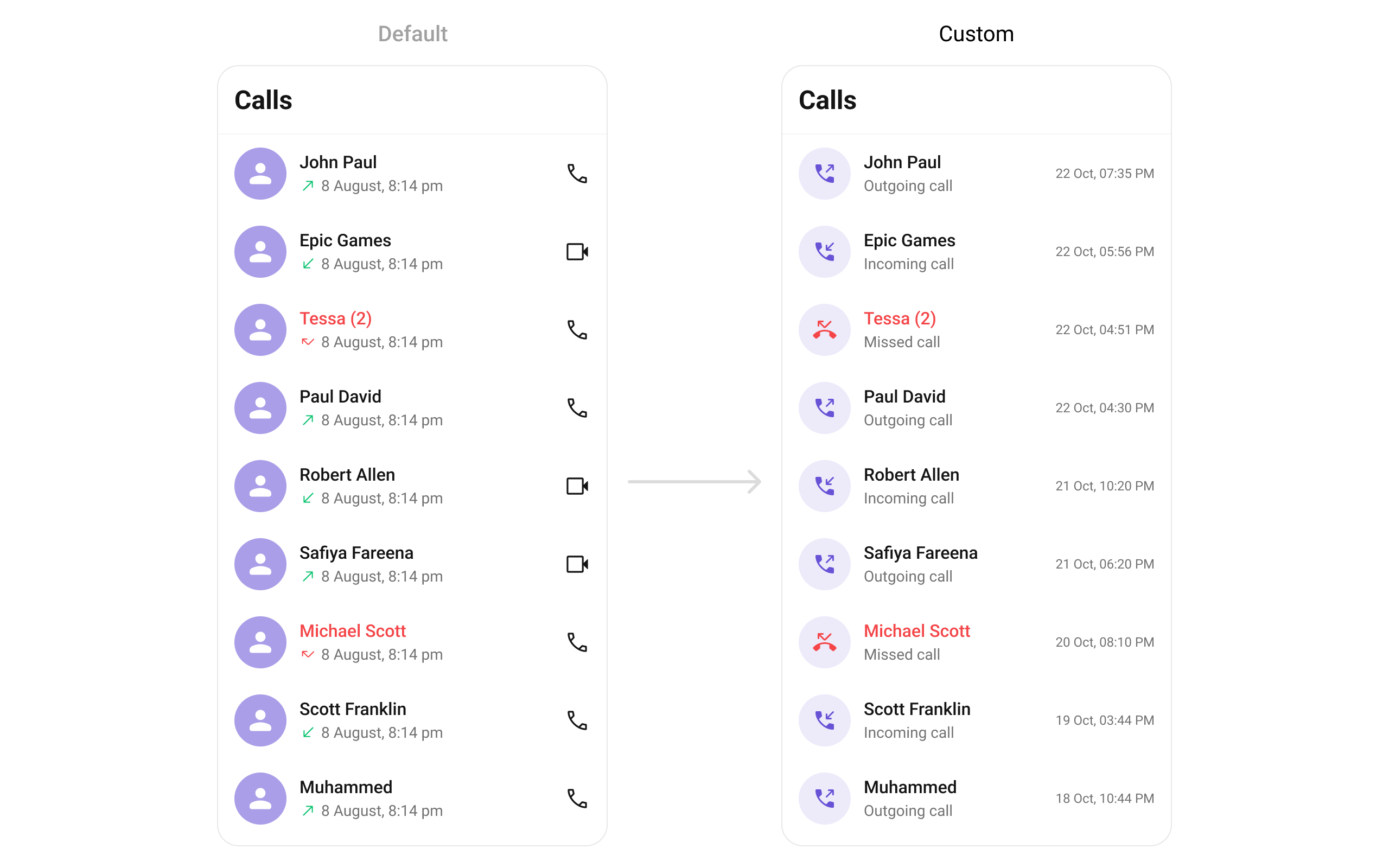
### List Item View
Replace the entire list item row with a custom widget.
```dart theme={null}
CometChatCallLogs(
listItemView: (callLog, context) {
final status = getCallStatus(context, callLog, CometChatUIKit.loggedInUser);
IconData icon = Icons.call;
Color? color;
Color? textColor;
if (status == "Incoming Call") {
icon = Icons.phone_callback_rounded;
color = Color(0xFF6852D6);
} else if (status == "Outgoing Call") {
icon = Icons.phone_forwarded;
color = Color(0xFF6852D6);
} else if (status == "Missed Call") {
icon = Icons.phone_missed;
color = Colors.red;
textColor = Colors.red;
}
String name = _getCallLogName(callLog);
String formattedDate = DateFormat('d MMM, hh:mm a').format(
DateTime.fromMillisecondsSinceEpoch((callLog.initiatedAt ?? 0) * 1000),
);
return ListTile(
leading: CircleAvatar(
backgroundColor: Color(0xFFEDEAFA),
child: Icon(icon, color: color, size: 24),
),
title: Text(name, style: TextStyle(
fontSize: 16, fontWeight: FontWeight.w500,
color: textColor ?? Color(0xFF141414),
)),
subtitle: Text(status, style: TextStyle(
color: Color(0xFF727272), fontSize: 14,
)),
trailing: Text(formattedDate, style: TextStyle(
color: Color(0xFF727272), fontSize: 14,
)),
);
},
)
```
```dart theme={null}
static String getCallStatus(BuildContext context, CallLog callLog, User? loggedInUser) {
String callMessageText = "";
if (callLog.receiverType == ReceiverTypeConstants.user) {
CallUser initiator = callLog.initiator as CallUser;
bool isMe = initiator.uid == loggedInUser?.uid;
switch (callLog.status) {
case CallStatusConstants.initiated:
callMessageText = isMe ? "Outgoing Call" : "Incoming Call";
break;
case CallStatusConstants.ongoing:
callMessageText = "Call Accepted";
break;
case CallStatusConstants.ended:
callMessageText = "Call Ended";
break;
case CallStatusConstants.unanswered:
case CallStatusConstants.cancelled:
case CallStatusConstants.rejected:
case CallStatusConstants.busy:
callMessageText = isMe ? "Call ${callLog.status}" : "Missed Call";
break;
}
}
return callMessageText;
}
```
***
## Custom View Slots
### List Item View
Replace the entire list item row with a custom widget.
```dart theme={null}
CometChatCallLogs(
listItemView: (callLog, context) {
final status = getCallStatus(context, callLog, CometChatUIKit.loggedInUser);
IconData icon = Icons.call;
Color? color;
Color? textColor;
if (status == "Incoming Call") {
icon = Icons.phone_callback_rounded;
color = Color(0xFF6852D6);
} else if (status == "Outgoing Call") {
icon = Icons.phone_forwarded;
color = Color(0xFF6852D6);
} else if (status == "Missed Call") {
icon = Icons.phone_missed;
color = Colors.red;
textColor = Colors.red;
}
String name = _getCallLogName(callLog);
String formattedDate = DateFormat('d MMM, hh:mm a').format(
DateTime.fromMillisecondsSinceEpoch((callLog.initiatedAt ?? 0) * 1000),
);
return ListTile(
leading: CircleAvatar(
backgroundColor: Color(0xFFEDEAFA),
child: Icon(icon, color: color, size: 24),
),
title: Text(name, style: TextStyle(
fontSize: 16, fontWeight: FontWeight.w500,
color: textColor ?? Color(0xFF141414),
)),
subtitle: Text(status, style: TextStyle(
color: Color(0xFF727272), fontSize: 14,
)),
trailing: Text(formattedDate, style: TextStyle(
color: Color(0xFF727272), fontSize: 14,
)),
);
},
)
```
```dart theme={null}
static String getCallStatus(BuildContext context, CallLog callLog, User? loggedInUser) {
String callMessageText = "";
if (callLog.receiverType == ReceiverTypeConstants.user) {
CallUser initiator = callLog.initiator as CallUser;
bool isMe = initiator.uid == loggedInUser?.uid;
switch (callLog.status) {
case CallStatusConstants.initiated:
callMessageText = isMe ? "Outgoing Call" : "Incoming Call";
break;
case CallStatusConstants.ongoing:
callMessageText = "Call Accepted";
break;
case CallStatusConstants.ended:
callMessageText = "Call Ended";
break;
case CallStatusConstants.unanswered:
case CallStatusConstants.cancelled:
case CallStatusConstants.rejected:
case CallStatusConstants.busy:
callMessageText = isMe ? "Call ${callLog.status}" : "Missed Call";
break;
}
}
return callMessageText;
}
```
 ### Title View
Replace the caller name / title text.
```dart theme={null}
CometChatCallLogs(
titleView: (callLog, context) {
return Text(
_getCallLogName(callLog),
style: TextStyle(fontWeight: FontWeight.bold, fontSize: 16),
);
},
)
```
### Leading View
Replace the avatar / left section.
```dart theme={null}
CometChatCallLogs(
leadingView: (callLog, context) {
return CircleAvatar(
backgroundColor: Color(0xFFEDEAFA),
child: Icon(Icons.call, color: Color(0xFF6852D6)),
);
},
)
```
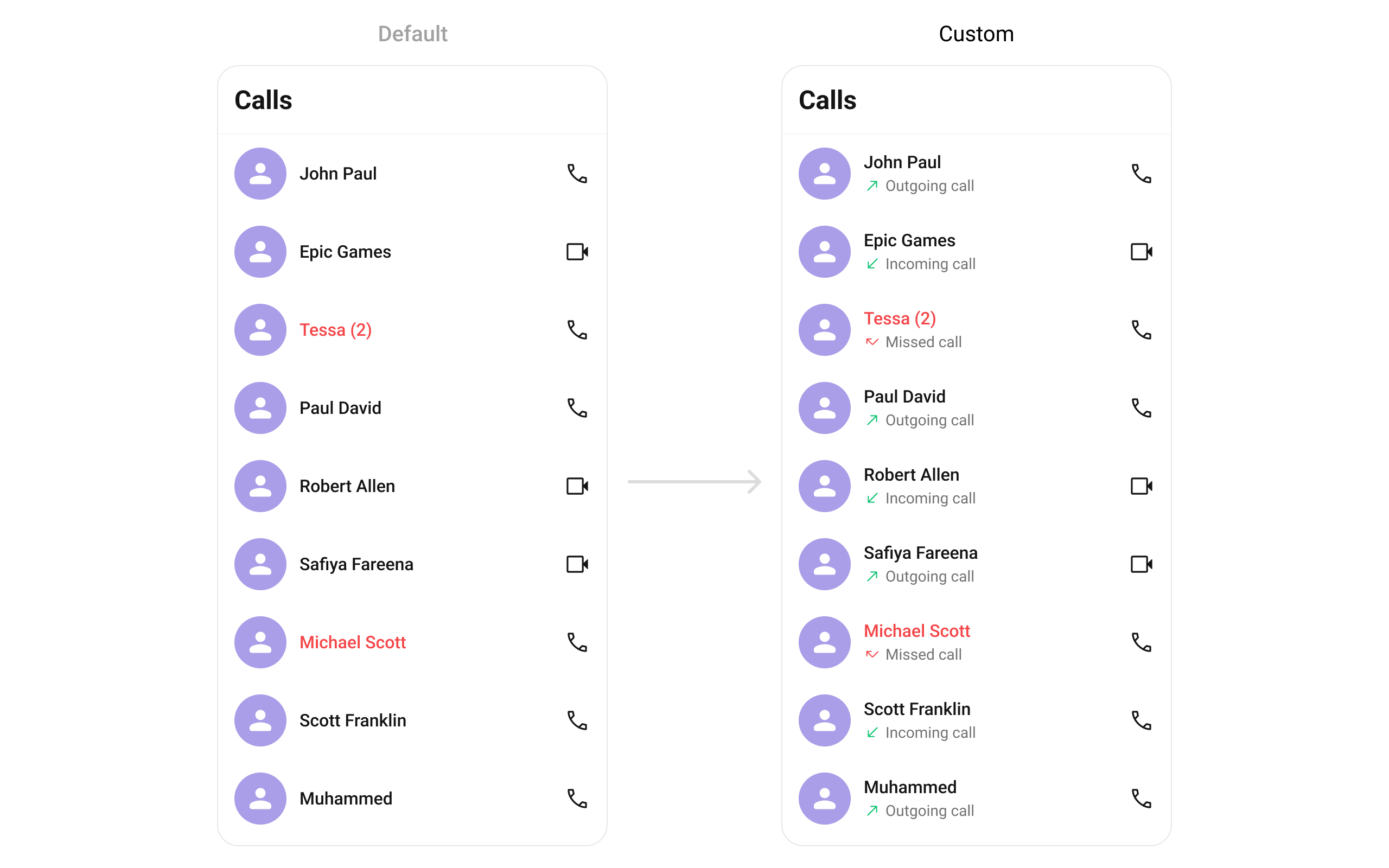
### Subtitle View
Replace the call status text below the name.
```dart theme={null}
CometChatCallLogs(
subTitleView: (callLog, context) {
return Row(
children: [
_getCallIcon(callLog, CometChatUIKit.loggedInUser),
SizedBox(width: 4),
Text(
getCallStatus(context, callLog, CometChatUIKit.loggedInUser),
style: TextStyle(color: Color(0xFF727272), fontSize: 14),
),
],
);
},
)
```
```dart theme={null}
static Widget _getCallIcon(CallLog callLog, User? loggedInUser) {
bool isMe = (callLog.initiator as CallUser?)?.uid == loggedInUser?.uid;
Widget incoming = Icon(Icons.call_received_outlined, color: Colors.red, size: 16);
Widget outgoing = Icon(Icons.call_made_outlined, color: Color(0xFF09C26F), size: 16);
Widget missed = Icon(Icons.call_received_outlined, color: Colors.red, size: 16);
switch (callLog.status) {
case CallStatusConstants.initiated:
case CallStatusConstants.ongoing:
case CallStatusConstants.ended:
return isMe ? outgoing : incoming;
case CallStatusConstants.unanswered:
case CallStatusConstants.cancelled:
case CallStatusConstants.rejected:
case CallStatusConstants.busy:
return isMe ? outgoing : missed;
default:
return const SizedBox();
}
}
```
### Title View
Replace the caller name / title text.
```dart theme={null}
CometChatCallLogs(
titleView: (callLog, context) {
return Text(
_getCallLogName(callLog),
style: TextStyle(fontWeight: FontWeight.bold, fontSize: 16),
);
},
)
```
### Leading View
Replace the avatar / left section.
```dart theme={null}
CometChatCallLogs(
leadingView: (callLog, context) {
return CircleAvatar(
backgroundColor: Color(0xFFEDEAFA),
child: Icon(Icons.call, color: Color(0xFF6852D6)),
);
},
)
```
### Subtitle View
Replace the call status text below the name.
```dart theme={null}
CometChatCallLogs(
subTitleView: (callLog, context) {
return Row(
children: [
_getCallIcon(callLog, CometChatUIKit.loggedInUser),
SizedBox(width: 4),
Text(
getCallStatus(context, callLog, CometChatUIKit.loggedInUser),
style: TextStyle(color: Color(0xFF727272), fontSize: 14),
),
],
);
},
)
```
```dart theme={null}
static Widget _getCallIcon(CallLog callLog, User? loggedInUser) {
bool isMe = (callLog.initiator as CallUser?)?.uid == loggedInUser?.uid;
Widget incoming = Icon(Icons.call_received_outlined, color: Colors.red, size: 16);
Widget outgoing = Icon(Icons.call_made_outlined, color: Color(0xFF09C26F), size: 16);
Widget missed = Icon(Icons.call_received_outlined, color: Colors.red, size: 16);
switch (callLog.status) {
case CallStatusConstants.initiated:
case CallStatusConstants.ongoing:
case CallStatusConstants.ended:
return isMe ? outgoing : incoming;
case CallStatusConstants.unanswered:
case CallStatusConstants.cancelled:
case CallStatusConstants.rejected:
case CallStatusConstants.busy:
return isMe ? outgoing : missed;
default:
return const SizedBox();
}
}
```
 ### Trailing View
Replace the timestamp / right section.
```dart theme={null}
CometChatCallLogs(
trailingView: (context, callLog) {
String formattedDate = DateFormat('d MMM, hh:mm a').format(
DateTime.fromMillisecondsSinceEpoch((callLog.initiatedAt ?? 0) * 1000),
);
return Text(
formattedDate,
style: TextStyle(color: Color(0xFF727272), fontSize: 14),
);
},
)
```
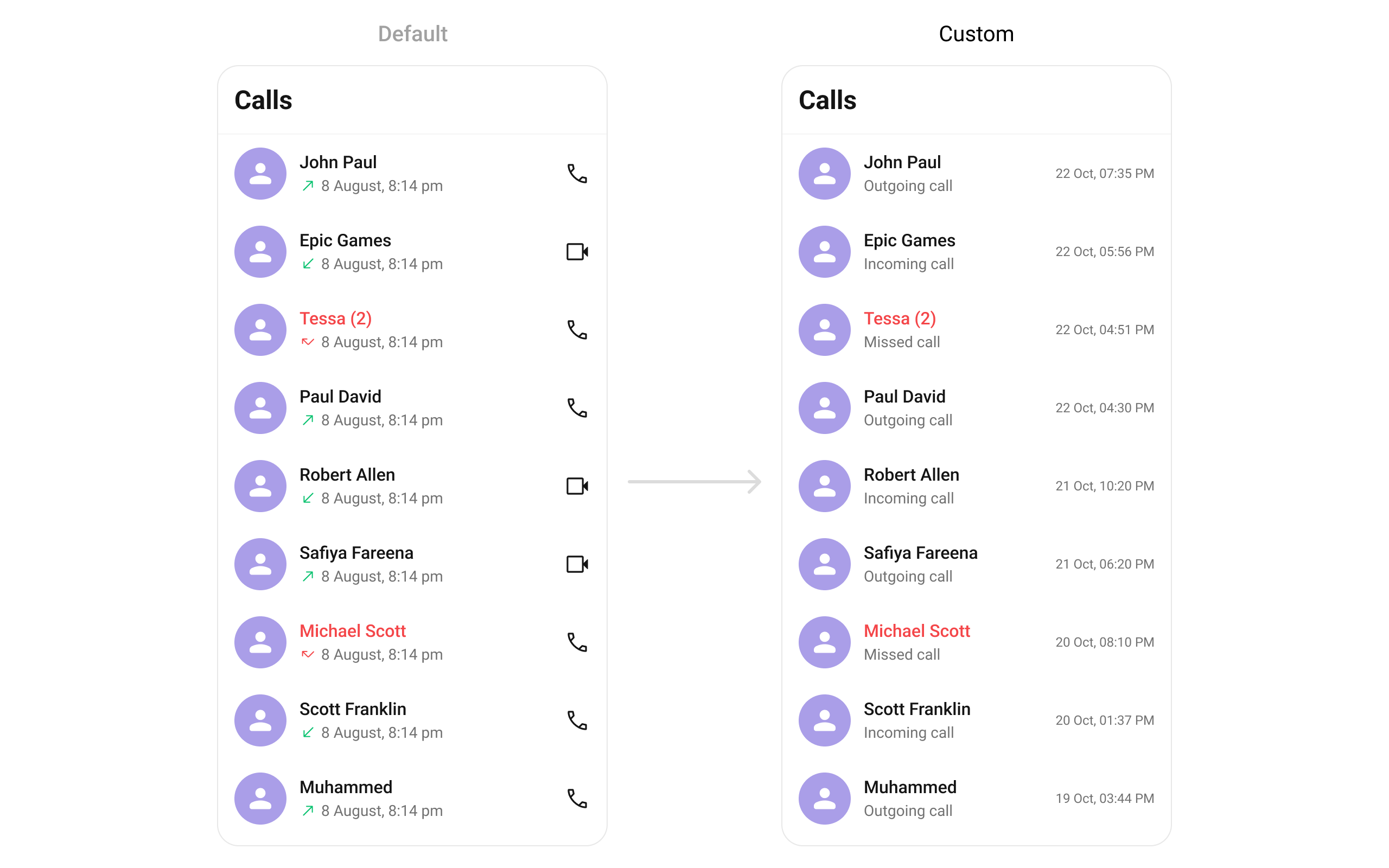
### Trailing View
Replace the timestamp / right section.
```dart theme={null}
CometChatCallLogs(
trailingView: (context, callLog) {
String formattedDate = DateFormat('d MMM, hh:mm a').format(
DateTime.fromMillisecondsSinceEpoch((callLog.initiatedAt ?? 0) * 1000),
);
return Text(
formattedDate,
style: TextStyle(color: Color(0xFF727272), fontSize: 14),
);
},
)
```
 ### State Views
```dart theme={null}
CometChatCallLogs(
emptyStateView: (context) => Center(child: Text("No call logs yet")),
errorStateView: (context) => Center(child: Text("Something went wrong")),
loadingStateView: (context) => Center(child: CircularProgressIndicator()),
)
```
***
## Menu Options
```dart theme={null}
// Replace all options
CometChatCallLogs(
setOptions: (callLog, controller, context) {
return [
CometChatOption(
id: "callback",
iconWidget: Icon(Icons.call),
title: "Call Back",
onClick: () {
// Initiate call back
},
),
];
},
)
// Append to defaults
CometChatCallLogs(
addOptions: (callLog, controller, context) {
return [
CometChatOption(
id: "block",
iconWidget: Icon(Icons.block),
title: "Block Number",
onClick: () {
// Block this contact
},
),
];
},
)
```
***
## Style
```dart theme={null}
CometChatCallLogs(
callLogsStyle: CometChatCallLogsStyle(
titleTextColor: Color(0xFFF76808),
separatorColor: Color(0xFFF76808),
avatarStyle: CometChatAvatarStyle(
borderRadius: BorderRadius.circular(8),
backgroundColor: Color(0xFFFBAA75),
),
),
)
```
### State Views
```dart theme={null}
CometChatCallLogs(
emptyStateView: (context) => Center(child: Text("No call logs yet")),
errorStateView: (context) => Center(child: Text("Something went wrong")),
loadingStateView: (context) => Center(child: CircularProgressIndicator()),
)
```
***
## Menu Options
```dart theme={null}
// Replace all options
CometChatCallLogs(
setOptions: (callLog, controller, context) {
return [
CometChatOption(
id: "callback",
iconWidget: Icon(Icons.call),
title: "Call Back",
onClick: () {
// Initiate call back
},
),
];
},
)
// Append to defaults
CometChatCallLogs(
addOptions: (callLog, controller, context) {
return [
CometChatOption(
id: "block",
iconWidget: Icon(Icons.block),
title: "Block Number",
onClick: () {
// Block this contact
},
),
];
},
)
```
***
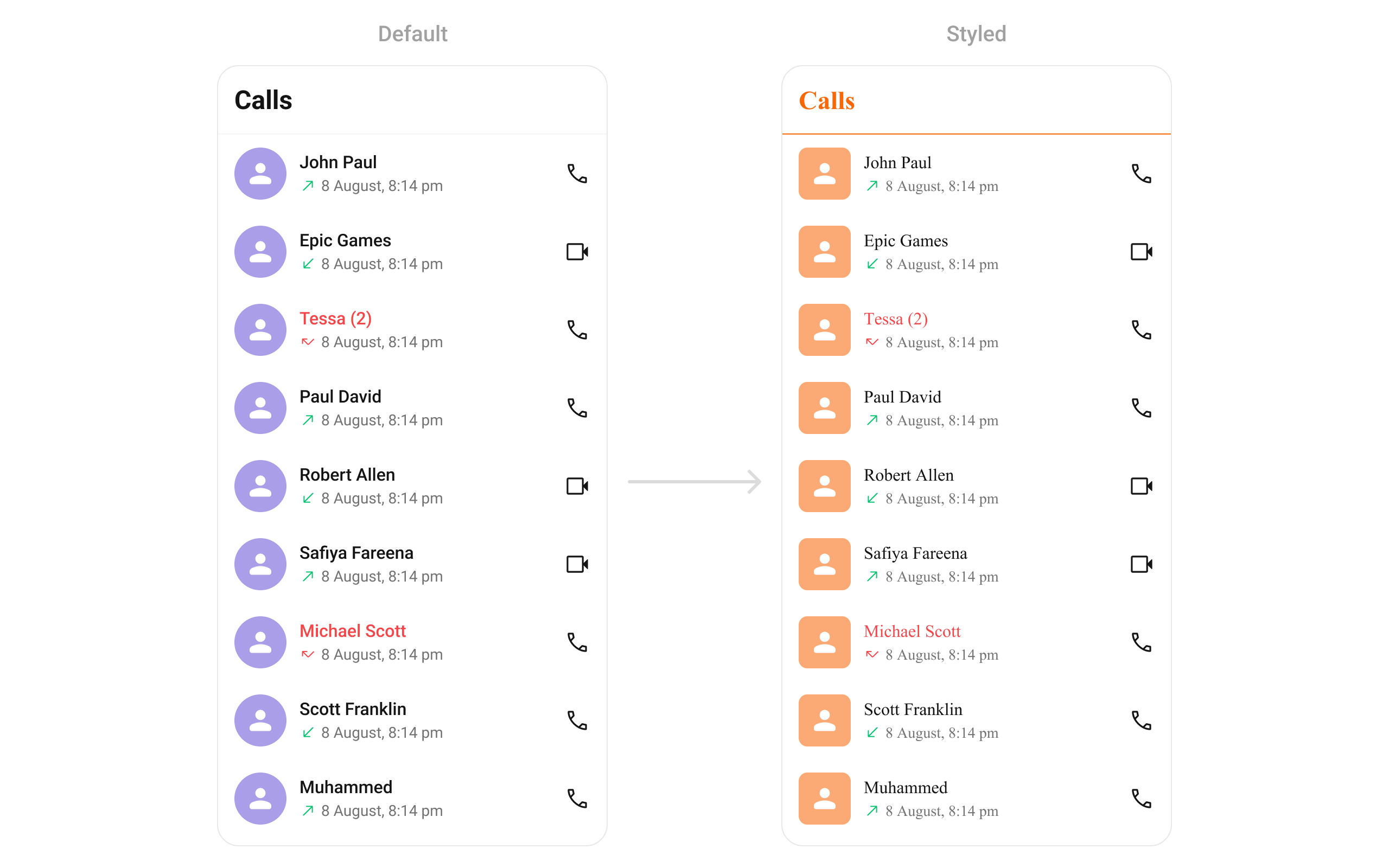
## Style
```dart theme={null}
CometChatCallLogs(
callLogsStyle: CometChatCallLogsStyle(
titleTextColor: Color(0xFFF76808),
separatorColor: Color(0xFFF76808),
avatarStyle: CometChatAvatarStyle(
borderRadius: BorderRadius.circular(8),
backgroundColor: Color(0xFFFBAA75),
),
),
)
```
 ***
## Configurations
### Outgoing Call
Customize the outgoing call component that appears when a call is initiated from a call log:
```dart theme={null}
CometChatCallLogs(
outgoingCallConfiguration: OutgoingCallConfiguration(
subtitle: "Outgoing Call",
outgoingCallStyle: OutgoingCallStyle(
background: Color(0xFFE4EBF5),
),
),
)
```
***
## Configurations
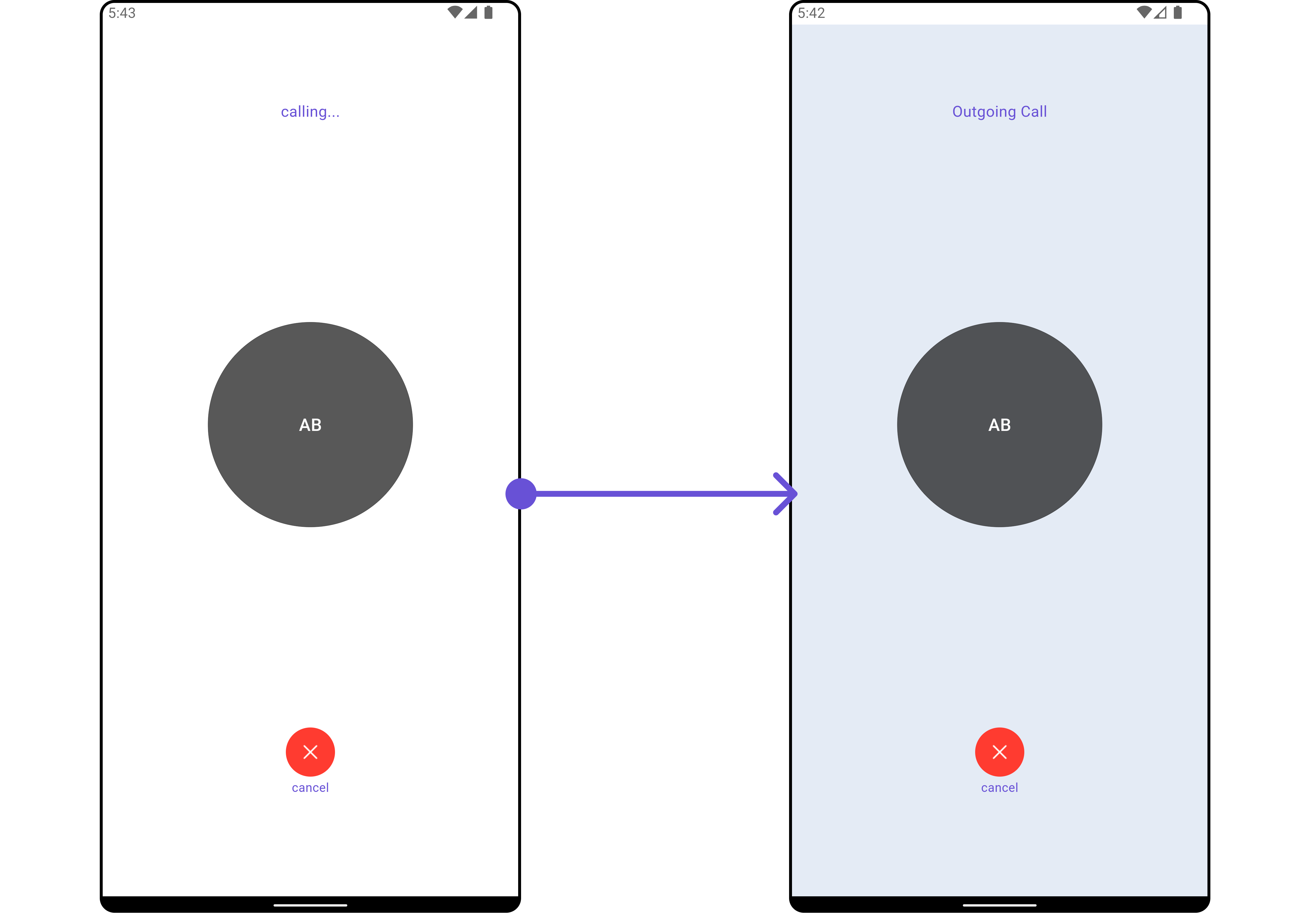
### Outgoing Call
Customize the outgoing call component that appears when a call is initiated from a call log:
```dart theme={null}
CometChatCallLogs(
outgoingCallConfiguration: OutgoingCallConfiguration(
subtitle: "Outgoing Call",
outgoingCallStyle: OutgoingCallStyle(
background: Color(0xFFE4EBF5),
),
),
)
```
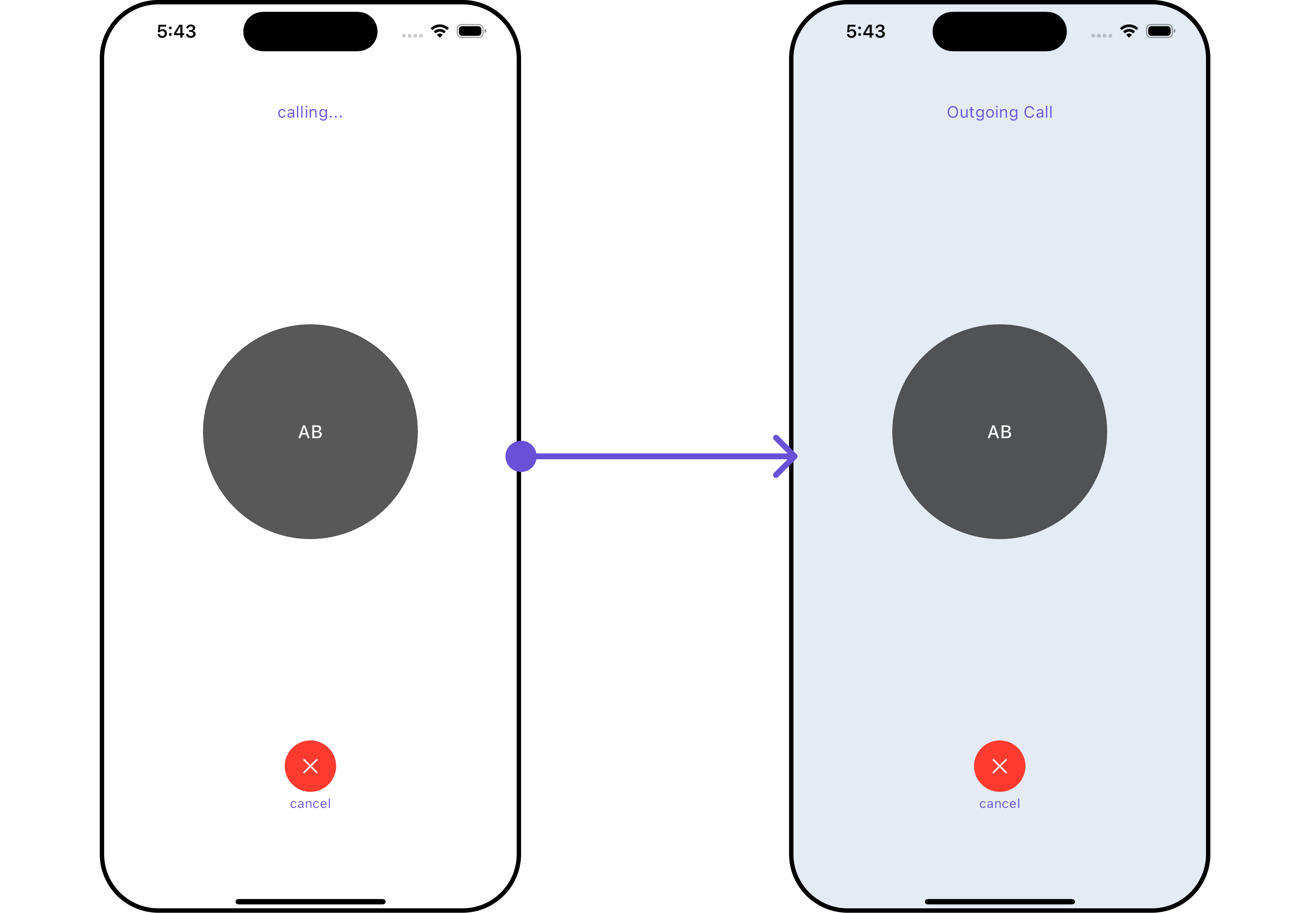 All exposed properties of `OutgoingCallConfiguration` can be found under [Outgoing Call](/ui-kit/flutter/outgoing-call).
***
## Next Steps
Build a call log details screen
Add voice and video call buttons
Detailed styling reference
Browse recent conversations
All exposed properties of `OutgoingCallConfiguration` can be found under [Outgoing Call](/ui-kit/flutter/outgoing-call).
***
## Next Steps
Build a call log details screen
Add voice and video call buttons
Detailed styling reference
Browse recent conversations