> ## Documentation Index
> Fetch the complete documentation index at: https://cometchat-22654f5b-docs-rn-guide-message-privately.mintlify.site/llms.txt
> Use this file to discover all available pages before exploring further.

# ShortCut Formatter

> ShortCut Formatter — CometChat integration guide.

## Overview

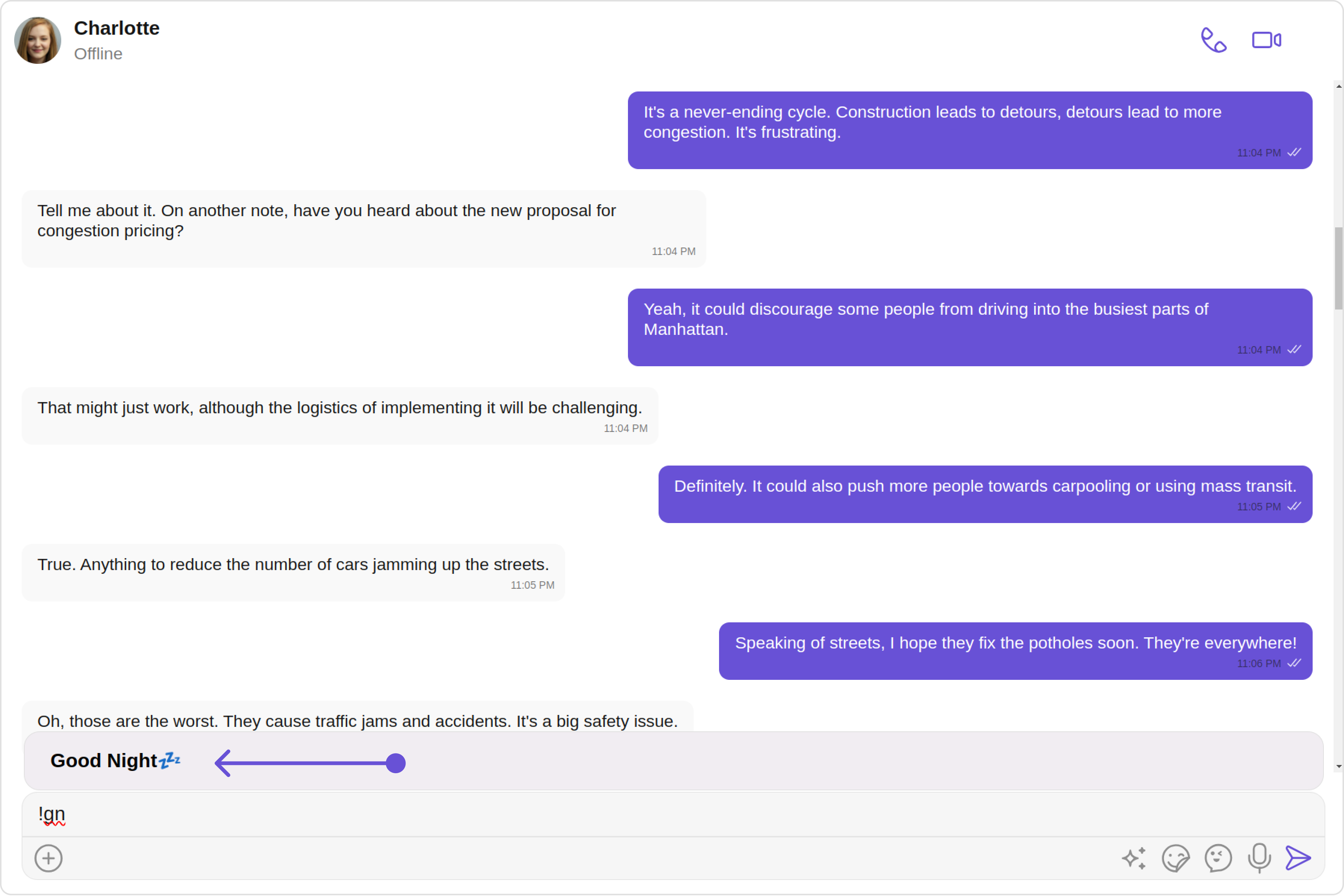
The `ShortCutFormatter` class extends the [CometChatTextFormatter](/ui-kit/angular/custom-text-formatter-guide) class to provide a mechanism for handling shortcuts within messages. This guide will walk you through the process of using `ShortCutFormatter` to implement shortcut extensions in your CometChat application.

<Frame>
  <img src="https://mintcdn.com/cometchat-22654f5b-docs-rn-guide-message-privately/ugckbRl5Q-H7t8X2/images/e2224d89-shortcutformatter_overview_web_screens-5e976b11936b33a6d544a03ad53842bc.png?fit=max&auto=format&n=ugckbRl5Q-H7t8X2&q=85&s=2bb9d9794eca440ea522b7bfd70cc59f" width="3600" height="2400" data-path="images/e2224d89-shortcutformatter_overview_web_screens-5e976b11936b33a6d544a03ad53842bc.png" />
</Frame>

## Usage

Here are the steps to create a `ShortCutFormatter` for CometChat using the CometChatTextFormatter:

1. Firstly, you need to import `CometChatTextFormatter` from the CometChat UI Kit angular library.

```javascript theme={null}
import { CometChatTextFormatter } from "@cometchat/chat-uikit-angular";
```

2. Now, extend the `CometChatTextFormatter` class to create your custom text formatter class. In this case, let's create a `HashTagTextFormatter`.

```java theme={null}
class ShortCutFormatter extends CometChatTextFormatter {
  ...
}
```

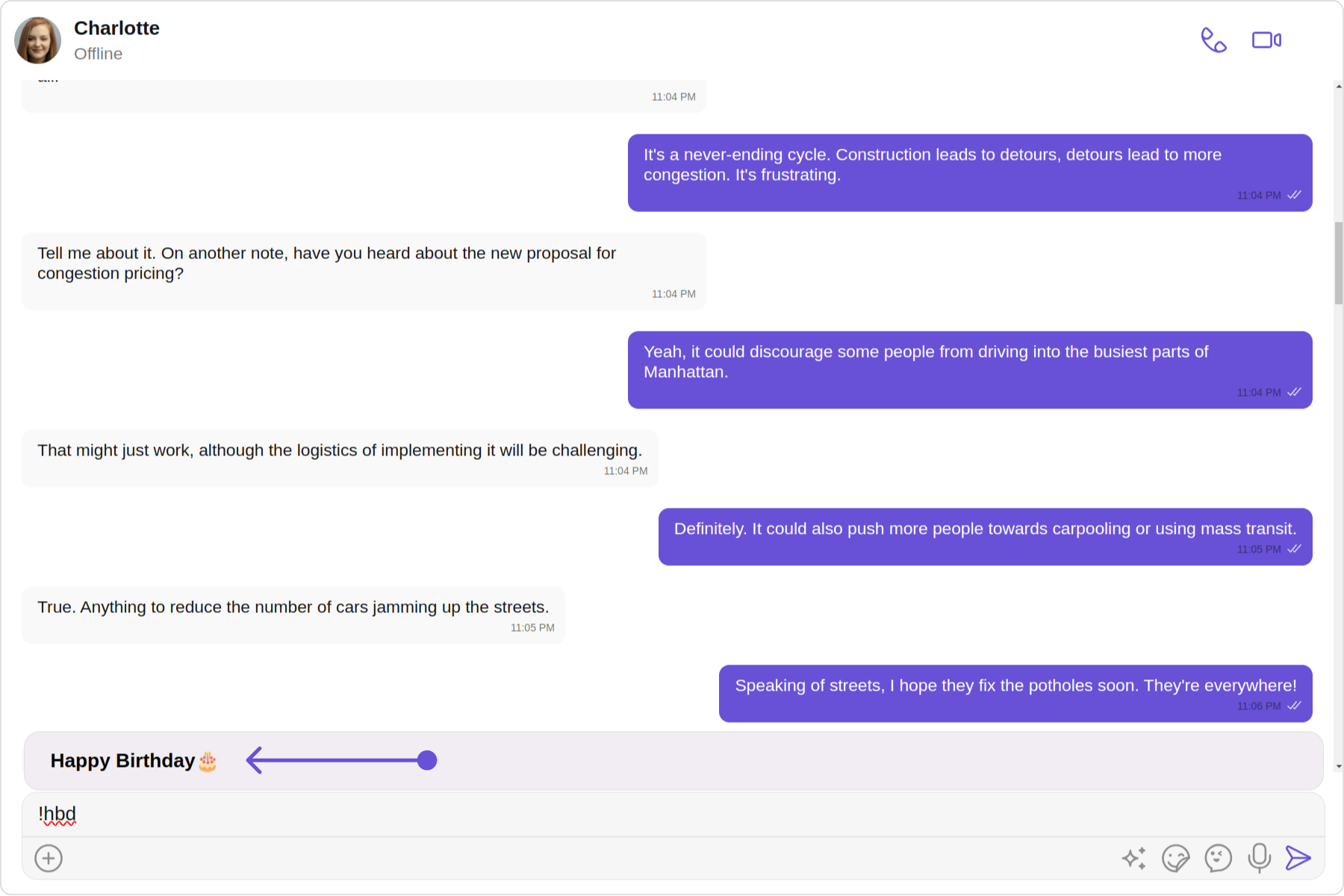
3. Set up the `trackCharacter` and define any necessary private fields.

```javascript theme={null}
this.setTrackingCharacter("!");
```

4. Implement the `onKeyDown` method to handle key events and trigger actions based on defined shortcuts.

```javascript theme={null}
onKeyDown(event: KeyboardEvent) {
  // Your implementation
}
```

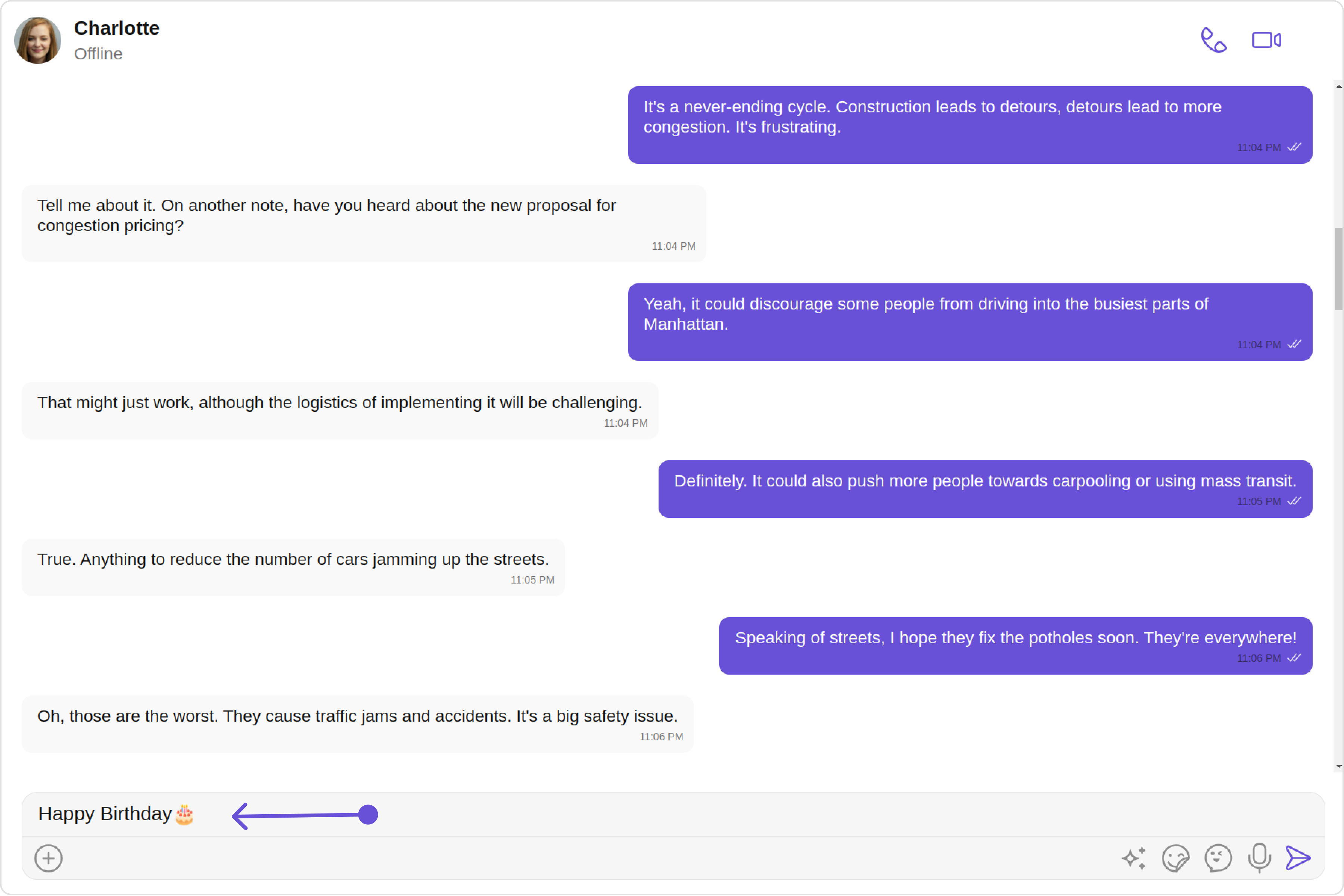
5. Implement any additional methods required for your custom formatter, such as opening and closing dialogs, handling button clicks, and formatting text.

```typescript theme={null}
openDialog(buttonText: string) {
  // Your implementation
}

closeDialog() {
  // Your implementation
}

handleButtonClick = () => {
  // Your implementation
};

getFormattedText(text: string): string {
  return text;
}

private getTextBeforeCaret(caretPosition: number): string {
  // Your implementation
}
```

## Example

Below is an example demonstrating how to use a custom formatter class in components such as [CometChatConversations](/ui-kit/angular/conversations), [CometChatMessageList](/ui-kit/angular/message-list), [CometChatMessageComposer](/ui-kit/angular/message-composer).
<Frame>
  <img src="https://mintcdn.com/cometchat-22654f5b-docs-rn-guide-message-privately/mNTojjz_O28of40c/images/fb445527-shortcutformatter-4818505361f333ec7728b029e9b2da54.png?fit=max&auto=format&n=mNTojjz_O28of40c&q=85&s=08f561c921bf2f324a60c5bab9424184" width="1800" height="1200" data-path="images/fb445527-shortcutformatter-4818505361f333ec7728b029e9b2da54.png" />
</Frame>

<Frame>
  <img src="https://mintcdn.com/cometchat-22654f5b-docs-rn-guide-message-privately/21UBnagXOw-XG0Sv/images/ad81ba1c-shortcutformatter_click_web_screens-253bff958c9b63d7d171d2adcd5a6673.png?fit=max&auto=format&n=21UBnagXOw-XG0Sv&q=85&s=678a1341f60398ed2e4cbbd6390a821d" width="3600" height="2400" data-path="images/ad81ba1c-shortcutformatter_click_web_screens-253bff958c9b63d7d171d2adcd5a6673.png" />
</Frame>

<Tabs>
  <Tab title="ShortCutFormatter.ts">
    ```ts theme={null}
    import { CometChatTextFormatter } from "@cometchat/uikit-shared";
    import { Subject } from 'rxjs';
    import { CometChat } from "@cometchat/chat-sdk-javascript";

    export class ShortcutFormatter extends CometChatTextFormatter {
        private shortcuts: { [key: string]: string } = {};
        private dialogIsOpen: boolean = false;
        private currentShortcut: string | null = null;
        private openDialogSubject = new Subject<{ closeDialog?: boolean, buttonText?: string, shortcut?: string, handleButtonClick?:any }>();
        openDialog$ = this.openDialogSubject.asObservable();

        constructor() {
            super();
            this.setTrackingCharacter('!');
            CometChat.callExtension('message-shortcuts', 'GET', 'v1/fetch', undefined)
                .then((data: any) => {
                    if (data && data.shortcuts) {
                        this.shortcuts = data.shortcuts;
                    }
                })
                .catch(error => console.log("error fetching shortcuts", error));
        }

        override onKeyDown(event: KeyboardEvent) {
            const caretPosition = this.currentCaretPosition instanceof Selection
                ? this.currentCaretPosition.anchorOffset
                : 0;
            const textBeforeCaret = this.getTextBeforeCaret(caretPosition);

            const match = textBeforeCaret.match(/!([a-zA-Z]+)$/);
            if (match) {
                const shortcut = match[0];
                const replacement = this.shortcuts[shortcut];
                if (replacement) {
                    if (this.dialogIsOpen && this.currentShortcut !== shortcut) {
                        this.closeDialog();
                    }
                    this.openDialog(replacement, shortcut);
                }
            }
        }

        getCaretPosition() {
            if (!this.currentCaretPosition?.rangeCount) return { x: 0, y: 0 };
            const range = this.currentCaretPosition?.getRangeAt(0);
            const rect = range.getBoundingClientRect();
            return {
                x: rect.left,
                y: rect.top
            };
        }

        openDialog(buttonText: string, shortcut: string) {
            this.openDialogSubject.next({ buttonText, shortcut , handleButtonClick: this.handleButtonClick});
            this.dialogIsOpen = true;
            this.currentShortcut = shortcut;
        }

        closeDialog() {
            this.openDialogSubject.next({closeDialog: true});
        }

        handleButtonClick = (buttonText: string) => {
            console.log(buttonText);
            
            if (this.currentCaretPosition && this.currentRange) {
                const shortcut = Object.keys(this.shortcuts).find(key => this.shortcuts[key] === buttonText);
                if (shortcut) {
                    const replacement = this.shortcuts[shortcut];
                    this.addAtCaretPosition(replacement, this.currentCaretPosition, this.currentRange);
                }
            }
            if (this.dialogIsOpen) {
                this.closeDialog();
            }
        };

        override getFormattedText(text: string): string {
            return text;
        }

        private getTextBeforeCaret(caretPosition: number): string {
            if (this.currentRange && this.currentRange.startContainer && typeof this.currentRange.startContainer.textContent === "string") {
                const textContent = this.currentRange.startContainer.textContent;
                if (textContent.length >= caretPosition) {
                    return textContent.substring(0, caretPosition);
                }
            }
            return "";
        }
    }

    export default ShortcutFormatter;
    ```
  </Tab>

  <Tab title="app.component.ts">
    ```ts theme={null}
    import { CometChat } from '@cometchat/chat-sdk-javascript';
    import { Component, OnInit } from '@angular/core';
    import { CometChatThemeService, CometChatUIKit } from '@cometchat/chat-uikit-angular';
    import "@cometchat/uikit-elements";
    import { ShortcutFormatter } from '../ShortCutFormatter';
    import { Subscription } from 'rxjs';

    @Component({
      selector: 'app-root',
      templateUrl: './app.component.html',
      styleUrls: ['./app.component.css']
    })
    export class AppComponent implements OnInit{

        dialogIsOpen: boolean = false;
        currentDialogButtonText: string = '';
        private dialogSubscription!: Subscription;
        onClick : any;

      ngOnInit(): void {
        CometChat.getUser("uid").then((user:CometChat.User)=>{
          this.userObject=user;
        });
      }

      public userObject!: CometChat.User;

      constructor(private themeService:CometChatThemeService) {
        themeService.theme.palette.setMode("light")
        themeService.theme.palette.setPrimary({ light: "#6851D6", dark: "#6851D6" })

        this.dialogSubscription = this.shortcutFormatter.openDialog$.subscribe(
          ({ closeDialog, buttonText, shortcut, handleButtonClick }) =>  {
            if(closeDialog) {
              this.closeDialog();
              return;
            }
            this.onOpenDialog(buttonText!, shortcut!, handleButtonClick!)
          }
        );
      }
      ngOnDestroy() {
      this.dialogSubscription.unsubscribe();
      }
      onOpenDialog(buttonText: string, shortcut: string, handleButtonClick: any) {
        this.currentDialogButtonText = buttonText;
        this.dialogIsOpen = true;
        this.onClick= handleButtonClick;
      }
      closeDialog() {
        this.dialogIsOpen = false;
        this.currentDialogButtonText = '';
      }


      onLogin(UID?: any) {
        CometChatUIKit.login({ uid: UID }).then(
          (user) => {
            setTimeout(() => {
              window.location.reload();
            }, 1000);
          },
          (error) => {
            console.log("Login failed with exception:", { error });
          }
        );
      }
    }
    ```
  </Tab>

  <Tab title="app.component.html">
    ```html theme={null}
    <div class="fullwidth">

    <cometchat-message-composer
    *ngIf="userObject"
    [user]="userObject"
    [textFormatters]="[shortcutFormatter]"
    ></cometchat-message-composer>

    </div>

    <div *ngIf="dialogIsOpen" [ngStyle]="{ position: 'absolute', top: '150px', left: '50%', transform: 'translateX(-50%)', width: '600px' }">
      <button (click)="onClick(currentDialogButtonText)" [ngStyle]="{ width: '100%', height: '100%', cursor: 'pointer', backgroundColor: '#f2e6ff', border: '2px solid #9b42f5', borderRadius: '12px', textAlign: 'left', font: '600 15px sans-serif, Inter' }">
        {{ currentDialogButtonText }}
      </button>
    </div>
    ```
  </Tab>
</Tabs>

***
