> ## Documentation Index
> Fetch the complete documentation index at: https://cometchat-22654f5b-docs-rn-guide-message-privately.mintlify.site/llms.txt
> Use this file to discover all available pages before exploring further.
# ShortCut Formatter
> Implement !shortcut style text expansions with extension APIs or dialogs in CometChat Angular UI Kit.
| Field | Value |
| --------------- | ----------------------------------------------------------------------------------------------------------------------------- |
| Package | `@cometchat/chat-uikit-angular` |
| Key class | `ShortcutFormatter` (extends `CometChatTextFormatter`) |
| Required setup | `CometChatUIKit.init(uiKitSettings)` then `CometChatUIKit.login("UID")` |
| Track character | `!` — triggers shortcut expansion in the message composer |
| Related | [Custom Text Formatter](/ui-kit/angular/guides/custom-text-formatter) \| [All Guides](/ui-kit/angular/guides/guides-overview) |
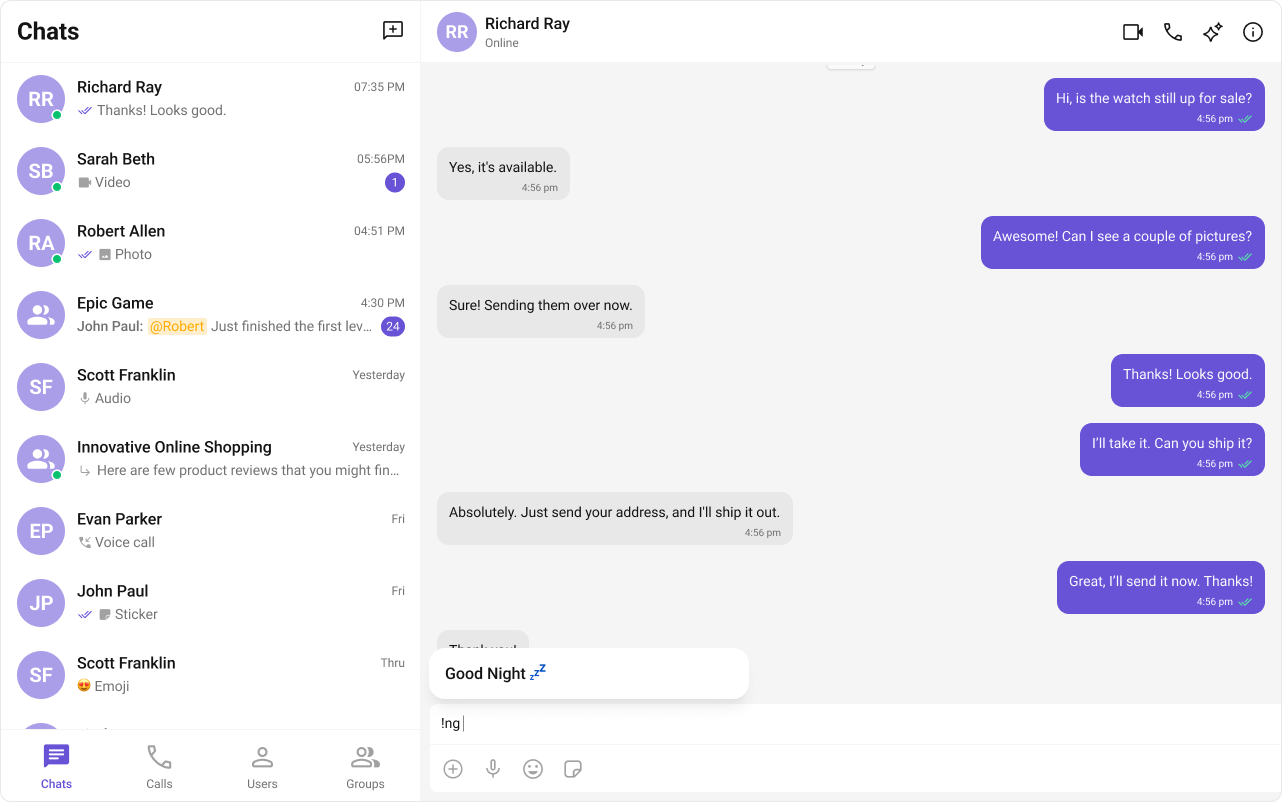
`ShortCutFormatter` extends [CometChatTextFormatter](/ui-kit/angular/guides/custom-text-formatter) to expand shortcodes (like `!hb`) into full text via the Message Shortcuts extension. When a user types a shortcut, a dialog appears with the expansion — clicking it inserts the text.
 ***
## Steps
### 1. Import the base class
```typescript theme={null}
import { CometChatTextFormatter } from "@cometchat/chat-uikit-angular";
```
### 2. Extend it
```typescript theme={null}
class ShortCutFormatter extends CometChatTextFormatter {
readonly id = "shortcut-formatter";
override priority = 50;
getRegex(): RegExp {
return /!([a-zA-Z]+)/g;
}
format(text: string): string {
this.originalText = text;
this.formattedText = text;
return text;
}
}
```
### 3. Fetch shortcuts from the extension
```typescript theme={null}
constructor() {
CometChat.callExtension("message-shortcuts", "GET", "v1/fetch", undefined)
.then((data: any) => {
if (data?.shortcuts) {
this.shortcuts = data.shortcuts;
}
});
}
```
### 4. Handle dialog and formatting methods
```typescript theme={null}
openDialog(buttonText: string, shortcut: string) { /* ... */ }
closeDialog() { /* ... */ }
handleButtonClick(buttonText: string) { /* ... */ }
```
***
## Example
***
## Steps
### 1. Import the base class
```typescript theme={null}
import { CometChatTextFormatter } from "@cometchat/chat-uikit-angular";
```
### 2. Extend it
```typescript theme={null}
class ShortCutFormatter extends CometChatTextFormatter {
readonly id = "shortcut-formatter";
override priority = 50;
getRegex(): RegExp {
return /!([a-zA-Z]+)/g;
}
format(text: string): string {
this.originalText = text;
this.formattedText = text;
return text;
}
}
```
### 3. Fetch shortcuts from the extension
```typescript theme={null}
constructor() {
CometChat.callExtension("message-shortcuts", "GET", "v1/fetch", undefined)
.then((data: any) => {
if (data?.shortcuts) {
this.shortcuts = data.shortcuts;
}
});
}
```
### 4. Handle dialog and formatting methods
```typescript theme={null}
openDialog(buttonText: string, shortcut: string) { /* ... */ }
closeDialog() { /* ... */ }
handleButtonClick(buttonText: string) { /* ... */ }
```
***
## Example
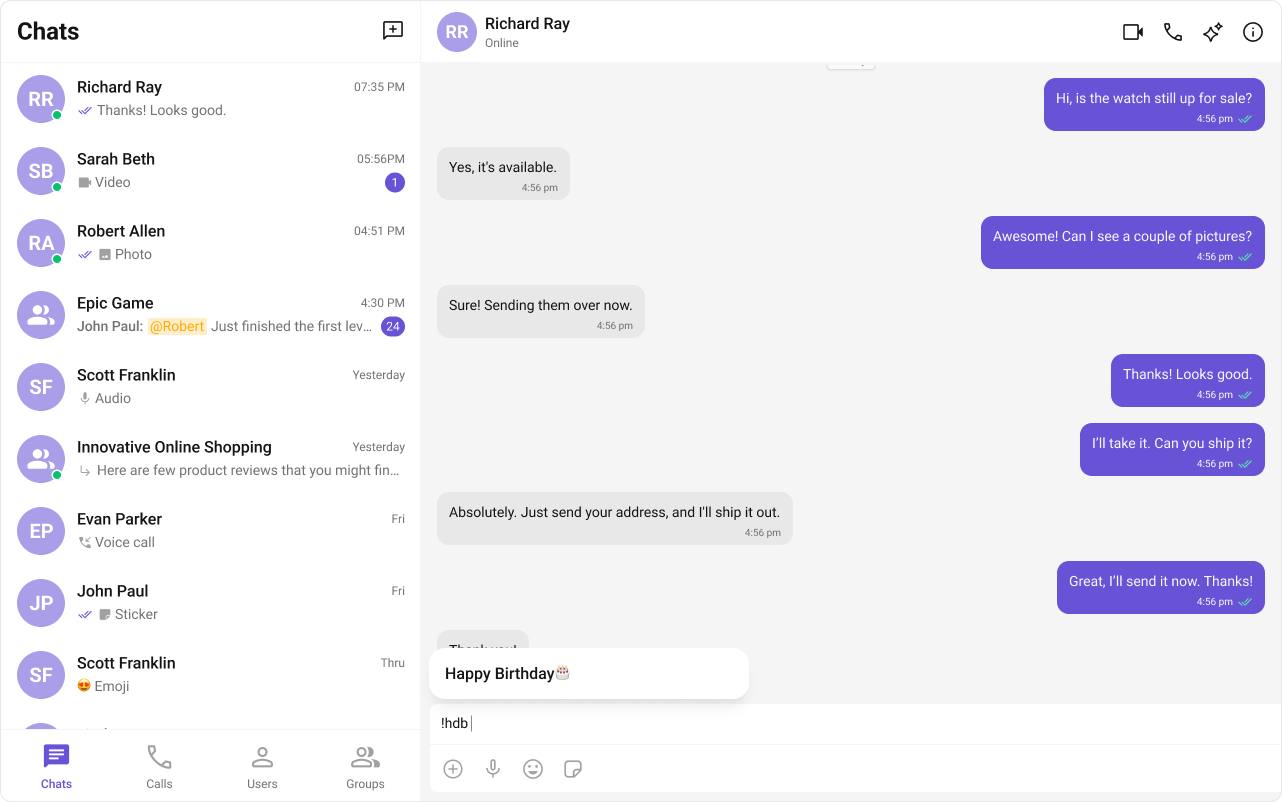
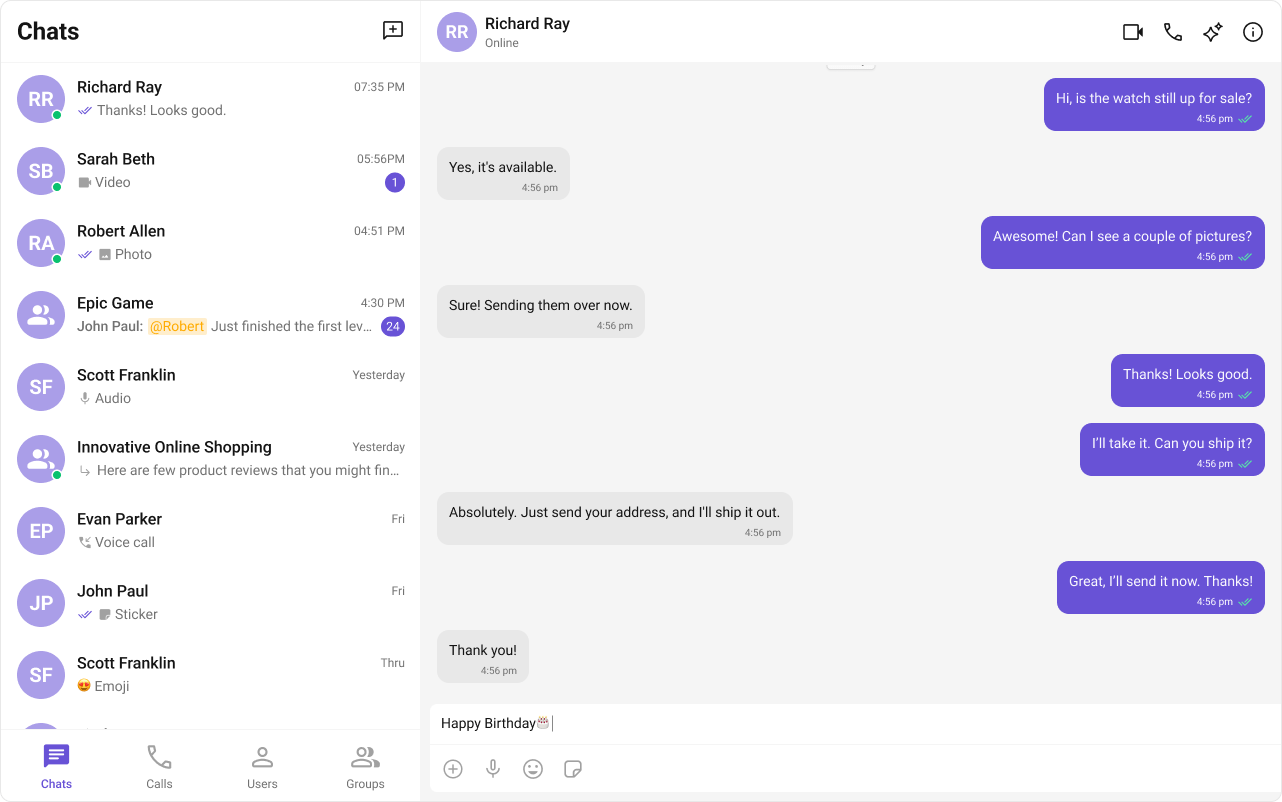 Fetches shortcuts from the Message Shortcuts extension on init. On `keyUp`, checks if the text before the caret matches a shortcut and opens a dialog with the expansion.
```typescript expandable theme={null}
import { CometChatTextFormatter, CometChatUIEvents, PanelAlignment } from "@cometchat/chat-uikit-angular";
import { CometChat } from "@cometchat/chat-sdk-javascript";
export class ShortcutFormatter extends CometChatTextFormatter {
readonly id = "shortcut-formatter";
override priority = 50;
private shortcuts: { [key: string]: string } = {};
private dialogIsOpen = false;
private currentShortcut: string | null = null;
constructor() {
super();
CometChat.callExtension("message-shortcuts", "GET", "v1/fetch", undefined)
.then((data: any) => {
if (data?.shortcuts) {
this.shortcuts = data.shortcuts;
}
})
.catch((error) => console.error("Error fetching shortcuts", error));
}
getRegex(): RegExp {
return /!([a-zA-Z]+)/g;
}
format(text: string): string {
// Shortcut formatter doesn't transform display text — it only triggers
// expansion dialogs in the composer. Pass text through unchanged.
this.originalText = text;
this.formattedText = text;
return text;
}
openDialog(buttonText: string, shortcut: string) {
// Note: In a real implementation, you would use a TemplateRef via a component.
// The CometChatUIEvents.ccShowPanel expects a TemplateRef, not an HTMLElement.
// Use a component with ViewChild to create the panel template.
CometChatUIEvents.ccShowPanel.next({
position: PanelAlignment.messageListFooter,
});
this.dialogIsOpen = true;
this.currentShortcut = shortcut;
}
closeDialog() {
CometChatUIEvents.ccHidePanel.next(PanelAlignment.messageListFooter);
this.dialogIsOpen = false;
this.currentShortcut = null;
}
handleButtonClick(buttonText: string) {
// The expansion text is available via the shortcuts map
const shortcut = Object.keys(this.shortcuts).find(
(key) => this.shortcuts[key] === buttonText
);
if (shortcut) {
// Emit the expansion text for the composer to insert
this.metadata = { expansion: this.shortcuts[shortcut] };
}
if (this.dialogIsOpen) {
this.closeDialog();
}
}
}
```
Pass the formatter via the `textFormatters` input on the composer.
```typescript expandable theme={null}
import { Component } from "@angular/core";
import { CometChatMessageComposerComponent } from "@cometchat/chat-uikit-angular";
import { ShortcutFormatter } from "./ShortCutFormatter";
@Component({
selector: "app-shortcut-demo",
standalone: true,
imports: [CometChatMessageComposerComponent],
template: `
`,
})
export class ShortcutDemoComponent {
textFormatters = [new ShortcutFormatter()];
}
```
The Message Shortcuts extension must be enabled in your CometChat Dashboard for this formatter to work. Configure your shortcuts in the Dashboard under Extensions → Message Shortcuts.
***
## Next Steps
Build custom inline text patterns.
Customize the message input component.
Browse all feature and formatter guides.
Add @mentions with styled tokens.
Fetches shortcuts from the Message Shortcuts extension on init. On `keyUp`, checks if the text before the caret matches a shortcut and opens a dialog with the expansion.
```typescript expandable theme={null}
import { CometChatTextFormatter, CometChatUIEvents, PanelAlignment } from "@cometchat/chat-uikit-angular";
import { CometChat } from "@cometchat/chat-sdk-javascript";
export class ShortcutFormatter extends CometChatTextFormatter {
readonly id = "shortcut-formatter";
override priority = 50;
private shortcuts: { [key: string]: string } = {};
private dialogIsOpen = false;
private currentShortcut: string | null = null;
constructor() {
super();
CometChat.callExtension("message-shortcuts", "GET", "v1/fetch", undefined)
.then((data: any) => {
if (data?.shortcuts) {
this.shortcuts = data.shortcuts;
}
})
.catch((error) => console.error("Error fetching shortcuts", error));
}
getRegex(): RegExp {
return /!([a-zA-Z]+)/g;
}
format(text: string): string {
// Shortcut formatter doesn't transform display text — it only triggers
// expansion dialogs in the composer. Pass text through unchanged.
this.originalText = text;
this.formattedText = text;
return text;
}
openDialog(buttonText: string, shortcut: string) {
// Note: In a real implementation, you would use a TemplateRef via a component.
// The CometChatUIEvents.ccShowPanel expects a TemplateRef, not an HTMLElement.
// Use a component with ViewChild to create the panel template.
CometChatUIEvents.ccShowPanel.next({
position: PanelAlignment.messageListFooter,
});
this.dialogIsOpen = true;
this.currentShortcut = shortcut;
}
closeDialog() {
CometChatUIEvents.ccHidePanel.next(PanelAlignment.messageListFooter);
this.dialogIsOpen = false;
this.currentShortcut = null;
}
handleButtonClick(buttonText: string) {
// The expansion text is available via the shortcuts map
const shortcut = Object.keys(this.shortcuts).find(
(key) => this.shortcuts[key] === buttonText
);
if (shortcut) {
// Emit the expansion text for the composer to insert
this.metadata = { expansion: this.shortcuts[shortcut] };
}
if (this.dialogIsOpen) {
this.closeDialog();
}
}
}
```
Pass the formatter via the `textFormatters` input on the composer.
```typescript expandable theme={null}
import { Component } from "@angular/core";
import { CometChatMessageComposerComponent } from "@cometchat/chat-uikit-angular";
import { ShortcutFormatter } from "./ShortCutFormatter";
@Component({
selector: "app-shortcut-demo",
standalone: true,
imports: [CometChatMessageComposerComponent],
template: `
`,
})
export class ShortcutDemoComponent {
textFormatters = [new ShortcutFormatter()];
}
```
The Message Shortcuts extension must be enabled in your CometChat Dashboard for this formatter to work. Configure your shortcuts in the Dashboard under Extensions → Message Shortcuts.
***
## Next Steps
Build custom inline text patterns.
Customize the message input component.
Browse all feature and formatter guides.
Add @mentions with styled tokens.