> ## Documentation Index
> Fetch the complete documentation index at: https://cometchat-22654f5b-docs-rn-guide-message-privately.mintlify.site/llms.txt
> Use this file to discover all available pages before exploring further.
# Upgrading From V4
> Upgrading from CometChat Angular UIKit v4 to v5 — architecture changes, theming, properties, and shared dependencies.
## Introduction
The **CometChat v5 Angular UI Kit** streamlines the integration of in-app chat functionality into your applications. Packed with prebuilt, modular UI components, it supports essential messaging features for both one-to-one and group conversations. With built-in theming options, including light and dark modes, customizable fonts, colors, and extensive configuration possibilities, developers can create chat experiences tailored to their application's needs.
 ## Integration
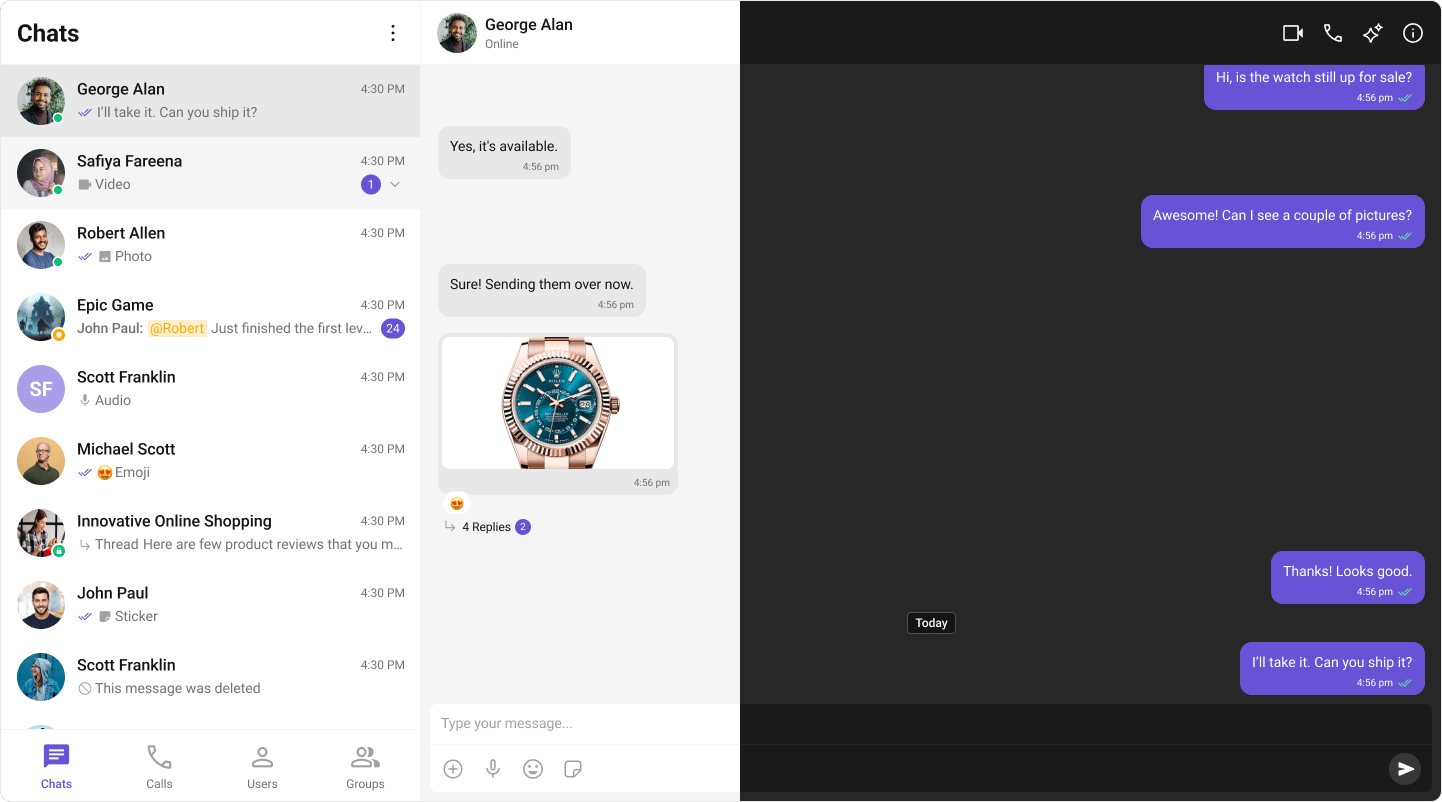
In **v4**, integration was straightforward due to the availability of composite components like `CometChatConversationsWithMessages`. This single component provided end-to-end functionality, including listing conversations, handling conversation clicks, loading messages (message header, list, composer), displaying user or group details, and supporting threaded messages. Developers could achieve all these features with minimal setup. However, customization posed significant challenges. Customizing the UI or adding custom views required a deep understanding of the internal flow of the composite component. Additionally, configurations were a mix of custom view props, behavioural props, and style props, which often led to confusion. Styling deeply nested components also proved cumbersome, limiting the developer's ability to make meaningful changes.
## Integration
In **v4**, integration was straightforward due to the availability of composite components like `CometChatConversationsWithMessages`. This single component provided end-to-end functionality, including listing conversations, handling conversation clicks, loading messages (message header, list, composer), displaying user or group details, and supporting threaded messages. Developers could achieve all these features with minimal setup. However, customization posed significant challenges. Customizing the UI or adding custom views required a deep understanding of the internal flow of the composite component. Additionally, configurations were a mix of custom view props, behavioural props, and style props, which often led to confusion. Styling deeply nested components also proved cumbersome, limiting the developer's ability to make meaningful changes.
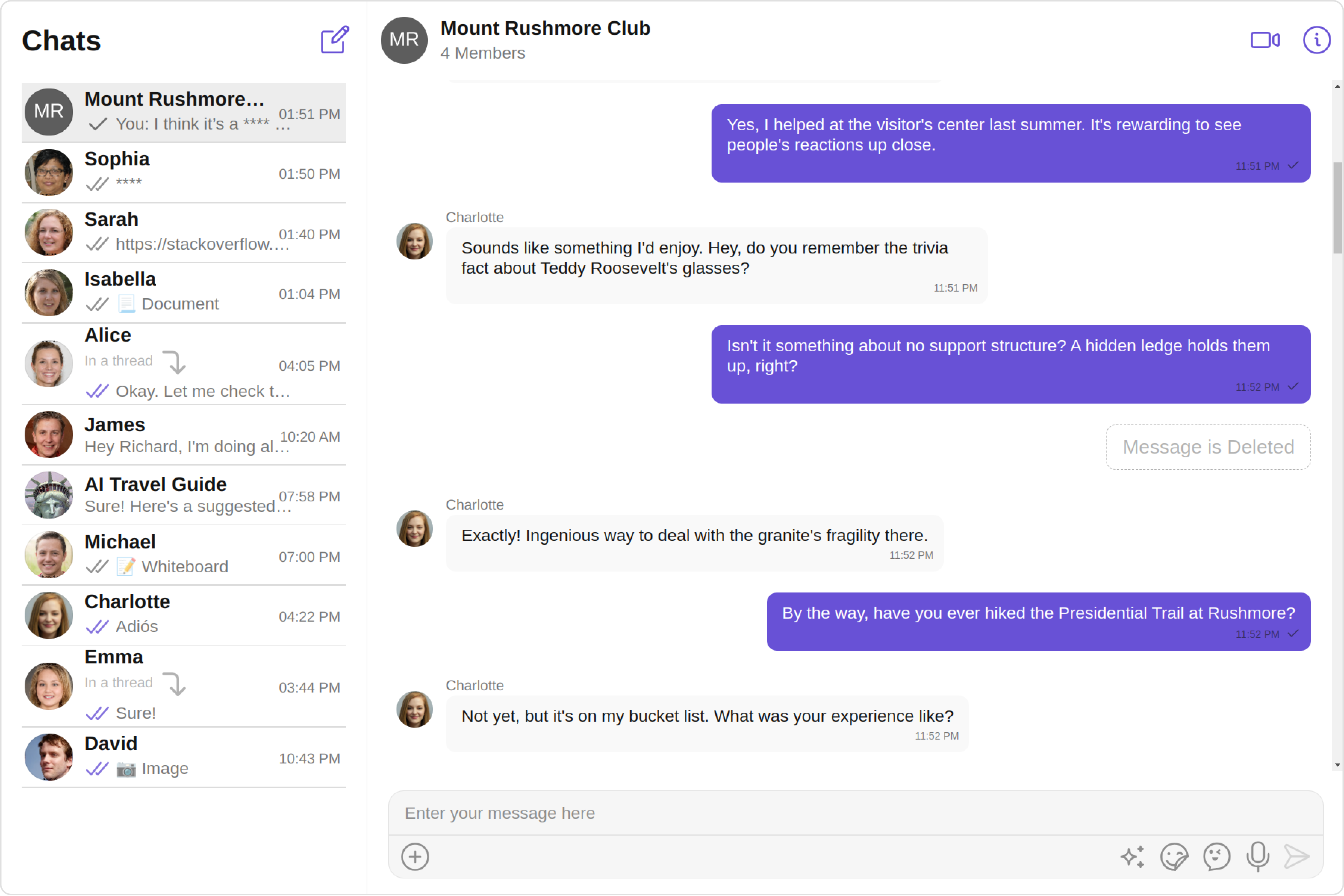 With **v5**, composite components have been replaced with smaller, modular standalone components, such as `CometChatConversations`, `CometChatMessageHeader`, `CometChatMessageList`, and `CometChatMessageComposer`. This modular approach makes integration more flexible and easier to understand. Each component has a well-defined purpose, allowing developers to use them in ways that suit their specific requirements. The need for complex configurations has been eliminated, as developers can now customize behavior and styling directly via CSS variables and Angular template projections. Styling has been significantly simplified, with every component carefully assigned thoughtful CSS class names following BEM methodology, enabling developers to customize styles globally or at the component level effortlessly.
To support the transition from v4 to v5, CometChat has built a [sample app](https://github.com/cometchat/cometchat-uikit-angular/tree/v5) that replicates the functionality of v4's composite components. This sample app serves as a reference for developers looking to build additional features such as user/group details, call log details, threaded messages, and advanced messaging capabilities. By following this approach, developers can take full advantage of v5's modular design while implementing complex functionality in an organized manner.
With **v5**, composite components have been replaced with smaller, modular standalone components, such as `CometChatConversations`, `CometChatMessageHeader`, `CometChatMessageList`, and `CometChatMessageComposer`. This modular approach makes integration more flexible and easier to understand. Each component has a well-defined purpose, allowing developers to use them in ways that suit their specific requirements. The need for complex configurations has been eliminated, as developers can now customize behavior and styling directly via CSS variables and Angular template projections. Styling has been significantly simplified, with every component carefully assigned thoughtful CSS class names following BEM methodology, enabling developers to customize styles globally or at the component level effortlessly.
To support the transition from v4 to v5, CometChat has built a [sample app](https://github.com/cometchat/cometchat-uikit-angular/tree/v5) that replicates the functionality of v4's composite components. This sample app serves as a reference for developers looking to build additional features such as user/group details, call log details, threaded messages, and advanced messaging capabilities. By following this approach, developers can take full advantage of v5's modular design while implementing complex functionality in an organized manner.
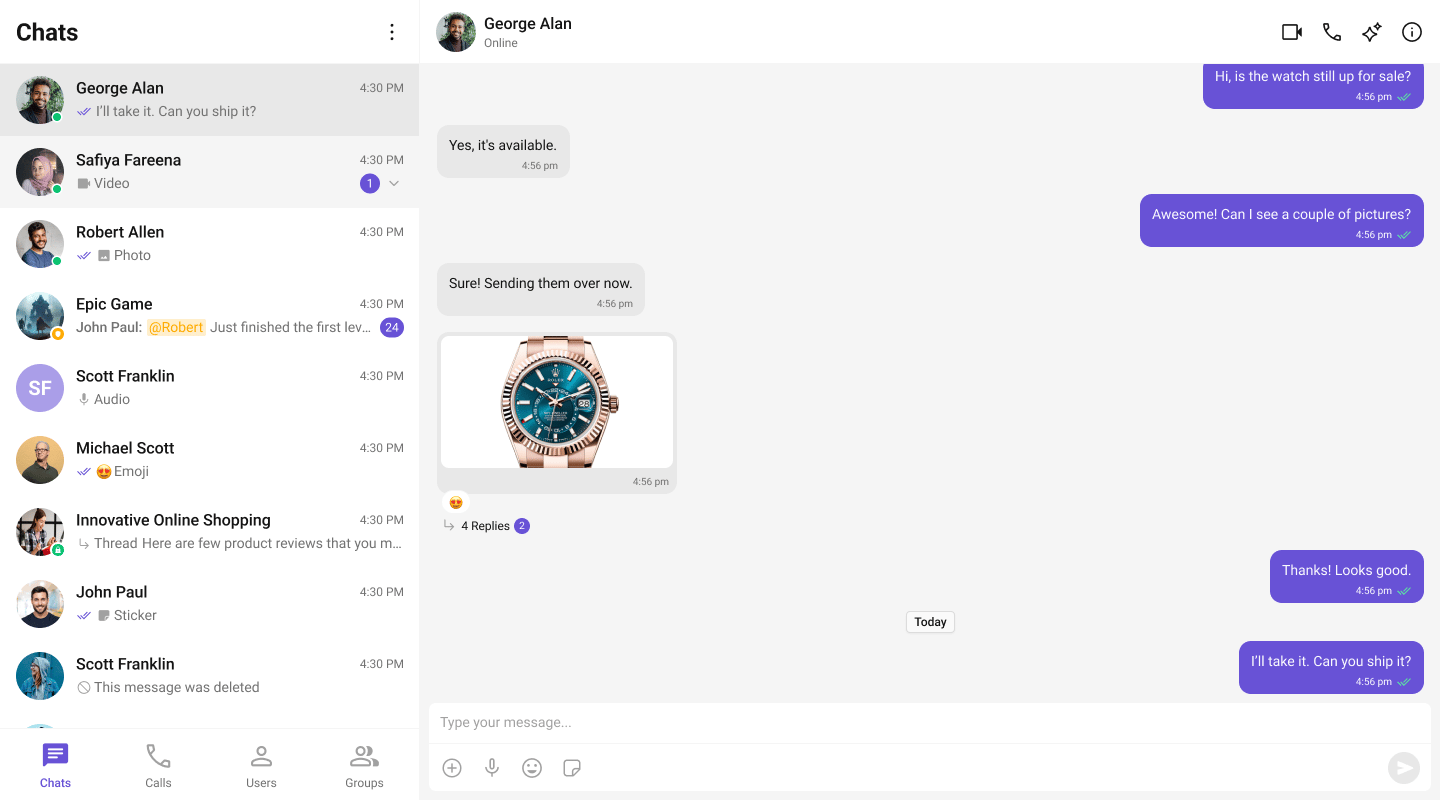 Learn how to build a complete messaging UI using the **v5 UI Kit** by following the step-by-step guide [here](/ui-kit/angular/integration).
## Components
The **v4** UI Kit provided composite components like `CometChatConversationsWithMessages`, which offered end-to-end functionality. These components integrated features such as conversation lists, message views (header, list, composer), user/group details, and threaded messages into a single unit. However, customization of deeply nested components through configuration was challenging and resulted in a suboptimal developer experience.
| Components in v4 UI Kit: | | |
| ---------------------------------- | -------------------------- | ---------------------------- |
| CometChatConversationsWithMessages | CometChatUsersWithMessages | CometChatGroupsWithMessages |
| CometChatMessages | CometChatMessageHeader | CometChatMessageList |
| CometChatMessageComposer | CometChatThreadedMessages | CometChatConversations |
| CometChatUsers | CometChatGroups | CometChatContacts |
| CometChatDetails | CometChatGroupMembers | CometChatAddMembers |
| CometChatBannedMembers | CometChatTransferOwnership | CometChatMessageInformation |
| CometChatIncomingCall | CometChatOngoingCall | CometChatOutgoingCall |
| CometChatCallButtons | CometChatCallLogs | CometChatCallLogDetails |
| CometChatCallLogHistory | CometChatCallLogRecordings | CometChatCallLogParticipants |
| CometChatCallLogsWithDetails | CometChatUserMemberWrapper | |
In **v5**, the composite approach is replaced with smaller, modular standalone components like `CometChatConversations`, `CometChatMessageHeader`, `CometChatMessageList`, and `CometChatMessageComposer`. Developers now stitch these components together to build the desired functionality. This change allows for greater flexibility and easier customization, significantly improving the developer experience while maintaining functionality.
| Components in v5 UI Kit: | | |
| ---------------------------- | ---------------------- | ---------------------------- |
| CometChatConversations | CometChatUsers | CometChatGroups |
| CometChatGroupMembers | CometChatMessageHeader | CometChatMessageList |
| CometChatMessageComposer | CometChatThreadHeader | CometChatIncomingCall |
| CometChatOutgoingCall | CometChatOngoingCall | CometChatCallButtons |
| CometChatCallLogs | CometChatSearch | CometChatMessageInformation |
| CometChatConversationStarter | CometChatSmartReplies | CometChatConversationSummary |
## Theming
In **v4**, theming was managed using the `CometChatThemeService`, an injectable Angular service with two key properties: `Palette` and `Typography`. The Palette property provided methods like `setPrimary()`, `setAccent()`, and `setMode()` for configuring colors and themes. The Typography property provided methods like `setFontFamily()` and `setFontWeightBold()` for configuring text styles. Developers injected this service in their component constructors and called setter methods to customize the appearance.
While this approach worked, it introduced several challenges. Customizing themes required programmatic interaction with the service in every component that needed theming. Switching between light and dark modes required calling `setMode()` on the palette. Per-component styling required passing dedicated style objects (like `ConversationsStyle`, `AvatarStyle`, `ListItemStyle`) as inputs, which was verbose and hard to maintain across large applications.
```typescript app.component.ts theme={null}
import { Component } from '@angular/core';
import { CometChatThemeService } from '@cometchat/chat-uikit-angular';
@Component({
selector: 'app-root',
templateUrl: './app.component.html'
})
export class AppComponent {
constructor(private themeService: CometChatThemeService) {
themeService.theme.palette.setMode("light");
themeService.theme.palette.setPrimary({ light: "#6851D6", dark: "#6851D6" });
themeService.theme.palette.setAccent({ light: "#6851D6", dark: "#6851D6" });
}
}
```
In **v5**, theming has been completely revamped. The older `CometChatThemeService` and style object system have been replaced with modern CSS variables. This means every design token — colors, spacing, typography — is now represented as a CSS variable. Changing the primary color is as simple as updating a CSS variable; no need to interact with complex theming logic or inject services. The use of CSS variables makes styling declarative and lightweight, enhancing both performance and developer experience.
To ensure consistency and scalability, the new theming system adheres to the **BEM** (Block Element Modifier) methodology for class naming. The new theming approach enables developers to style components either globally or at a component-specific level with precision. For example, applying a unique style to a particular element within a component or globally is now straightforward. This move to CSS variables and thoughtful class naming marks a significant improvement in theming flexibility and simplicity.
```css styles.css theme={null}
@import '@cometchat/chat-uikit-angular/styles/css-variables.css';
.cometchat {
--cometchat-primary-color: #f76808;
--cometchat-neutral-color-300: #ffffff;
--cometchat-background-color-03: #feede1;
}
@media (prefers-color-scheme: dark) {
.cometchat {
--cometchat-primary-color: #f76808;
--cometchat-neutral-color-300: #311502;
--cometchat-background-color-03: #451d02;
}
}
```
```typescript app.component.ts theme={null}
import { Component, OnInit } from '@angular/core';
@Component({
selector: 'app-root',
standalone: true,
template: `
Learn how to build a complete messaging UI using the **v5 UI Kit** by following the step-by-step guide [here](/ui-kit/angular/integration).
## Components
The **v4** UI Kit provided composite components like `CometChatConversationsWithMessages`, which offered end-to-end functionality. These components integrated features such as conversation lists, message views (header, list, composer), user/group details, and threaded messages into a single unit. However, customization of deeply nested components through configuration was challenging and resulted in a suboptimal developer experience.
| Components in v4 UI Kit: | | |
| ---------------------------------- | -------------------------- | ---------------------------- |
| CometChatConversationsWithMessages | CometChatUsersWithMessages | CometChatGroupsWithMessages |
| CometChatMessages | CometChatMessageHeader | CometChatMessageList |
| CometChatMessageComposer | CometChatThreadedMessages | CometChatConversations |
| CometChatUsers | CometChatGroups | CometChatContacts |
| CometChatDetails | CometChatGroupMembers | CometChatAddMembers |
| CometChatBannedMembers | CometChatTransferOwnership | CometChatMessageInformation |
| CometChatIncomingCall | CometChatOngoingCall | CometChatOutgoingCall |
| CometChatCallButtons | CometChatCallLogs | CometChatCallLogDetails |
| CometChatCallLogHistory | CometChatCallLogRecordings | CometChatCallLogParticipants |
| CometChatCallLogsWithDetails | CometChatUserMemberWrapper | |
In **v5**, the composite approach is replaced with smaller, modular standalone components like `CometChatConversations`, `CometChatMessageHeader`, `CometChatMessageList`, and `CometChatMessageComposer`. Developers now stitch these components together to build the desired functionality. This change allows for greater flexibility and easier customization, significantly improving the developer experience while maintaining functionality.
| Components in v5 UI Kit: | | |
| ---------------------------- | ---------------------- | ---------------------------- |
| CometChatConversations | CometChatUsers | CometChatGroups |
| CometChatGroupMembers | CometChatMessageHeader | CometChatMessageList |
| CometChatMessageComposer | CometChatThreadHeader | CometChatIncomingCall |
| CometChatOutgoingCall | CometChatOngoingCall | CometChatCallButtons |
| CometChatCallLogs | CometChatSearch | CometChatMessageInformation |
| CometChatConversationStarter | CometChatSmartReplies | CometChatConversationSummary |
## Theming
In **v4**, theming was managed using the `CometChatThemeService`, an injectable Angular service with two key properties: `Palette` and `Typography`. The Palette property provided methods like `setPrimary()`, `setAccent()`, and `setMode()` for configuring colors and themes. The Typography property provided methods like `setFontFamily()` and `setFontWeightBold()` for configuring text styles. Developers injected this service in their component constructors and called setter methods to customize the appearance.
While this approach worked, it introduced several challenges. Customizing themes required programmatic interaction with the service in every component that needed theming. Switching between light and dark modes required calling `setMode()` on the palette. Per-component styling required passing dedicated style objects (like `ConversationsStyle`, `AvatarStyle`, `ListItemStyle`) as inputs, which was verbose and hard to maintain across large applications.
```typescript app.component.ts theme={null}
import { Component } from '@angular/core';
import { CometChatThemeService } from '@cometchat/chat-uikit-angular';
@Component({
selector: 'app-root',
templateUrl: './app.component.html'
})
export class AppComponent {
constructor(private themeService: CometChatThemeService) {
themeService.theme.palette.setMode("light");
themeService.theme.palette.setPrimary({ light: "#6851D6", dark: "#6851D6" });
themeService.theme.palette.setAccent({ light: "#6851D6", dark: "#6851D6" });
}
}
```
In **v5**, theming has been completely revamped. The older `CometChatThemeService` and style object system have been replaced with modern CSS variables. This means every design token — colors, spacing, typography — is now represented as a CSS variable. Changing the primary color is as simple as updating a CSS variable; no need to interact with complex theming logic or inject services. The use of CSS variables makes styling declarative and lightweight, enhancing both performance and developer experience.
To ensure consistency and scalability, the new theming system adheres to the **BEM** (Block Element Modifier) methodology for class naming. The new theming approach enables developers to style components either globally or at a component-specific level with precision. For example, applying a unique style to a particular element within a component or globally is now straightforward. This move to CSS variables and thoughtful class naming marks a significant improvement in theming flexibility and simplicity.
```css styles.css theme={null}
@import '@cometchat/chat-uikit-angular/styles/css-variables.css';
.cometchat {
--cometchat-primary-color: #f76808;
--cometchat-neutral-color-300: #ffffff;
--cometchat-background-color-03: #feede1;
}
@media (prefers-color-scheme: dark) {
.cometchat {
--cometchat-primary-color: #f76808;
--cometchat-neutral-color-300: #311502;
--cometchat-background-color-03: #451d02;
}
}
```
```typescript app.component.ts theme={null}
import { Component, OnInit } from '@angular/core';
@Component({
selector: 'app-root',
standalone: true,
template: `
`
})
export class AppComponent implements OnInit {
theme = 'light';
ngOnInit(): void {
const mediaQuery = window.matchMedia('(prefers-color-scheme: dark)');
this.theme = mediaQuery.matches ? 'dark' : 'light';
mediaQuery.addEventListener('change', (e) => {
this.theme = e.matches ? 'dark' : 'light';
});
}
}
```
For detailed guidance on theming and customizing colors in the CometChat Angular UI Kit, refer to the following resources:
* **Theming Documentation:** [Guide to Theming](/ui-kit/angular/customization/theming)
## Properties
In **v5**, the approach to properties has been significantly refined to improve clarity and ease of use. All style-related inputs — previously used to customize components via style objects like `ConversationsStyle`, `AvatarStyle`, `ListItemStyle`, `BadgeStyle`, `DateStyle`, and `StatusIndicatorStyle` — have been replaced by a more efficient and native theming system based on CSS variables. This change ensures a seamless and flexible styling process without the need for verbose or redundant configuration within the component inputs.
Configuration inputs, which were prominent in v4, have also been eliminated. With v5's modular design, components are no longer nested inside composite wrappers, making such configurations unnecessary. Developers now have direct control over each component, reducing complexity and increasing flexibility in how components are used and styled.
Custom view inputs have undergone a comprehensive overhaul to ensure consistency across all components. For example, components that are represented as list items now share a uniform set of customizable template inputs, enabling a standardized approach to customization. These inputs include `itemView`, `leadingView`, `trailingView`, `subtitleView`, and `titleView`. This consistent naming convention makes it easier for developers to understand and apply customizations across various components, streamlining the development process.
**Event naming** has also been standardized. In v4, events were callback function inputs with an `on` prefix (e.g., `[onItemClick]="handler"`). In v5, events are proper Angular `@Output()` EventEmitters without the `on` prefix (e.g., `(itemClick)="handler($event)"`). This aligns with Angular conventions and provides better IDE support.
| v4 Event Pattern | v5 Event Pattern |
| --------------------------------------- | --------------------------------------------- |
| `[onItemClick]="handleItemClick"` | `(itemClick)="handleItemClick($event)"` |
| `[onSelect]="handleSelect"` | `(select)="handleSelect($event)"` |
| `[onError]="handleError"` | `(error)="handleError($event)"` |
| `[onBack]="handleBack"` | `(backClick)="handleBack()"` |
| `[onThreadRepliesClick]="handleThread"` | `(threadRepliesClick)="handleThread($event)"` |
## Shared Dependencies
In **v4**, the Angular UI Kit relied on three shared packages: `@cometchat/uikit-resources`, `@cometchat/uikit-elements`, and `@cometchat/uikit-shared`, designed to provide common functionality and resources across the Web UI Kits (React, Angular, Vue). While these shared packages promoted code reuse, they came with significant drawbacks.
One major issue was the reliance on web components in the `uikit-elements` and `uikit-shared` packages. This required the use of `CUSTOM_ELEMENTS_SCHEMA` in every Angular module that used CometChat components. Styling web components via CSS was inherently restrictive, often requiring additional effort to achieve desired results. Furthermore, the web component layer added complexity to Angular's change detection and made debugging more difficult. IDE support for web component attributes was also limited, reducing developer productivity.
```typescript theme={null}
// v4: Required CUSTOM_ELEMENTS_SCHEMA and peer dependencies
import { CUSTOM_ELEMENTS_SCHEMA, NgModule } from '@angular/core';
import { CometChatConversations } from '@cometchat/chat-uikit-angular';
import "@cometchat/uikit-elements"; // Required side-effect import
@NgModule({
imports: [CometChatConversations],
schemas: [CUSTOM_ELEMENTS_SCHEMA] // Required for web components
})
export class AppModule {}
```
In **v5**, these challenges have been addressed with a complete shift to pure Angular standalone components. The dependency on shared web component packages has been removed entirely, enabling seamless integration with Angular's ecosystem. Pure Angular components eliminate limitations around styling, allowing developers to leverage modern CSS techniques without restrictions. They also provide native Angular behavior — proper `@Input()` and `@Output()` bindings, full TypeScript type checking, and complete IDE autocompletion support — significantly enhancing the development experience.
```typescript theme={null}
// v5: No CUSTOM_ELEMENTS_SCHEMA, no peer dependencies, full type safety
import { Component } from '@angular/core';
import {
CometChatConversationsComponent,
CometChatMessageListComponent,
CometChatMessageComposerComponent
} from '@cometchat/chat-uikit-angular';
@Component({
selector: 'app-chat',
standalone: true,
imports: [
CometChatConversationsComponent,
CometChatMessageListComponent,
CometChatMessageComposerComponent
],
template: `
`
})
export class ChatComponent {
onSelect(conversation: any): void { }
}
```
This architectural redesign simplifies the UI Kit, aligns it with Angular best practices, and makes it more intuitive and extensible for developers. By resolving the limitations of v4, the v5 UI Kit offers a more streamlined, flexible, and productive environment for building modern applications.
## State Management
In **v4**, developers had to pass `[user]` or `[group]` inputs to every component that needed to know about the active conversation. This meant repeating the same binding across `cometchat-message-header`, `cometchat-message-list`, and `cometchat-message-composer` — leading to boilerplate and potential sync issues.
```typescript theme={null}
// v4: Pass user/group to every component manually
```
In **v5**, a new `ChatStateService` provides centralized state management. Set the active conversation once, and all downstream components automatically react to the change — no prop drilling required. Props still work and take priority when provided, giving developers the flexibility to override shared state for specific instances.
```typescript theme={null}
// v5: Set once, all components react
import { ChatStateService } from '@cometchat/chat-uikit-angular';
@Component({
template: `
`
})
export class ChatComponent {
constructor(private chatState: ChatStateService) {}
onConversationClick(conversation: any): void {
this.chatState.setActiveConversation(conversation);
}
}
```
For detailed guidance on state management patterns, refer to the [State Management Guide](/ui-kit/angular/guides/state-management) and the [ChatStateService API Reference](/ui-kit/angular/api-reference/chat-state-service).
## Localization
Both **v4** and **v5** use a built-in `CometChatLocalize` class for localization — no external libraries are required. The API has been slightly updated in v5 with method renames and expanded language support (19 languages, up from 12).
| v4 Method | v5 Method |
| ----------------------------------- | -------------------------------------------- |
| `CometChatLocalize.setLocale("hi")` | `CometChatLocalize.setCurrentLanguage("hi")` |
| `CometChatLocalize.getLocale()` | `CometChatLocalize.getCurrentLanguage()` |
| `CometChatLocalize.init()` | Not needed — auto-initializes |
v5 also introduces a `translate` pipe for use directly in templates:
```html theme={null}
{{ 'SEND_MESSAGE' | translate }}
```
## Quick Migration Checklist
* [ ] Update package: `npm install @cometchat/chat-uikit-angular`
* [ ] Remove peer dependencies: `npm uninstall @cometchat/uikit-elements @cometchat/uikit-resources @cometchat/uikit-shared`
* [ ] Remove `CUSTOM_ELEMENTS_SCHEMA` from NgModule schemas
* [ ] Remove `import "@cometchat/uikit-elements"` side-effect imports
* [ ] Convert components to standalone (recommended) or update module imports
* [ ] Import CSS variables in global styles: `@import '@cometchat/chat-uikit-angular/styles/css-variables.css'`
* [ ] Remove `CometChatThemeService` injection — use CSS variables instead
* [ ] Remove all `*Style` input properties (`[conversationsStyle]`, `[avatarStyle]`, etc.)
* [ ] Replace style objects with CSS variable overrides
* [ ] Update event bindings: `[onXxx]="handler"` → `(xxx)="handler($event)"`
* [ ] Optionally adopt `ChatStateService` for shared state (remove repeated `[user]`/`[group]` bindings)
* [ ] Update localization calls: `setLocale()` → `setCurrentLanguage()`
* [ ] Test dark mode with `data-theme="dark"` attribute
* [ ] Verify all functionality works as expected