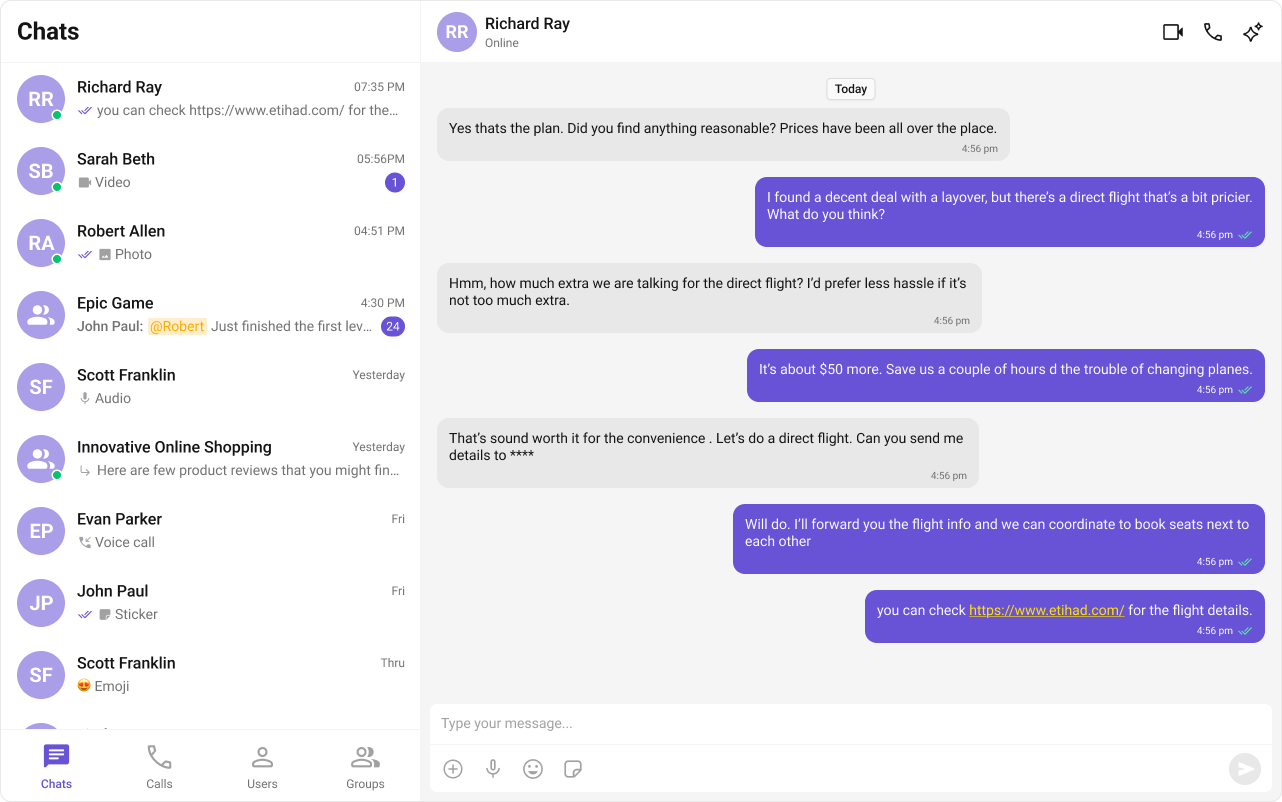
 ***
## What You're Building
Three sections working together:
1. **Tab bar** — switches between Chats, Call Logs, and Users
2. **List view** — renders the list for the active tab (conversations, call logs, or users)
3. **Message view** — header + messages + composer for the selected item
***
## Step 1 — Update AppComponent
Wire everything together. `ChatStateService` handles the state — `cometchat-conversations` and `cometchat-users` automatically update the service when an item is clicked, and the message components auto-subscribe.
```ts title="src/app/app.component.ts" expandable theme={null}
import { Component, inject, OnInit } from "@angular/core";
import {
CometChatUIKit,
CometChatConversationsComponent,
CometChatUsersComponent,
CometChatCallLogsComponent,
CometChatMessageHeaderComponent,
CometChatMessageListComponent,
CometChatMessageComposerComponent,
ChatStateService,
} from "@cometchat/chat-uikit-angular";
import { CometChat } from "@cometchat/chat-sdk-javascript";
@Component({
selector: "app-root",
standalone: true,
imports: [
CometChatConversationsComponent,
CometChatUsersComponent,
CometChatCallLogsComponent,
CometChatMessageHeaderComponent,
CometChatMessageListComponent,
CometChatMessageComposerComponent,
],
template: `
@if (isLoggedIn) {
***
## What You're Building
Three sections working together:
1. **Tab bar** — switches between Chats, Call Logs, and Users
2. **List view** — renders the list for the active tab (conversations, call logs, or users)
3. **Message view** — header + messages + composer for the selected item
***
## Step 1 — Update AppComponent
Wire everything together. `ChatStateService` handles the state — `cometchat-conversations` and `cometchat-users` automatically update the service when an item is clicked, and the message components auto-subscribe.
```ts title="src/app/app.component.ts" expandable theme={null}
import { Component, inject, OnInit } from "@angular/core";
import {
CometChatUIKit,
CometChatConversationsComponent,
CometChatUsersComponent,
CometChatCallLogsComponent,
CometChatMessageHeaderComponent,
CometChatMessageListComponent,
CometChatMessageComposerComponent,
ChatStateService,
} from "@cometchat/chat-uikit-angular";
import { CometChat } from "@cometchat/chat-sdk-javascript";
@Component({
selector: "app-root",
standalone: true,
imports: [
CometChatConversationsComponent,
CometChatUsersComponent,
CometChatCallLogsComponent,
CometChatMessageHeaderComponent,
CometChatMessageListComponent,
CometChatMessageComposerComponent,
],
template: `
@if (isLoggedIn) {
Loading...
} `, styles: ` :host { display: flex; height: 100vh; width: 100vw; } .tab-layout { display: flex; width: 100%; height: 100%; } .sidebar { width: 400px; display: flex; flex-direction: column; border-right: 1px solid #e0e0e0; } .tab-bar { display: flex; border-bottom: 1px solid #e0e0e0; } .tab-bar button { flex: 1; padding: 12px; border: none; background: transparent; cursor: pointer; font-size: 14px; } .tab-bar button.active { border-bottom: 2px solid #3399ff; font-weight: 600; } .tab-content { flex: 1; overflow: hidden; } .chat-window { flex: 1; display: flex; flex-direction: column; } .empty-conversation { height: 100vh; width: 100%; display: flex; justify-content: center; align-items: center; background: var(--cometchat-background-color-03, #F5F5F5); color: var(--cometchat-text-color-secondary, #727272); font: var(--cometchat-font-body-regular, 400 14px Roboto); } .cometchat .cometchat-message-composer { border-radius: 0px; } `, }) export class AppComponent implements OnInit { chatStateService = inject(ChatStateService); isLoggedIn = false; activeTab: "chats" | "calls" | "users" = "chats"; ngOnInit(): void { CometChatUIKit.getLoggedinUser().then((user: CometChat.User | null) => { if (!user) { CometChatUIKit.login("cometchat-uid-1") .then(() => (this.isLoggedIn = true)) .catch(console.log); } else { this.isLoggedIn = true; } }); } } ``` How it works: * The `activeTab` property drives which list component renders — `cometchat-conversations`, `cometchat-call-logs`, or `cometchat-users`. * `cometchat-conversations` calls `ChatStateService.setActiveConversation()` on click, which extracts the `User` or `Group` and sets it as the active entity. * `cometchat-users` calls `ChatStateService.setActiveUser()` on click. * `cometchat-message-header`, `cometchat-message-list`, and `cometchat-message-composer` auto-subscribe to `ChatStateService` — no `[user]` or `[group]` bindings needed. * The `@if` block reads `chatStateService.activeUser()` and `chatStateService.activeGroup()` signals to show the chat window or the empty state. *** ## Step 2 — Run the Project ```bash theme={null} ng serve ``` You should see the tab bar at the top of the sidebar. Switch between Chats, Call Logs, and Users — tapping any item loads the message view on the right. *** ## Next Steps