> ## Documentation Index
> Fetch the complete documentation index at: https://cometchat-22654f5b-docs-rn-guide-message-privately.mintlify.site/llms.txt
> Use this file to discover all available pages before exploring further.
# Building A Tab-Based Messaging UI
> Create a tab-based messaging UI with bottom navigation for Chats, Calls, Users, and Groups.
| Field | Value |
| ------------ | --------------------------------------------------------------------------------------------------------------------------------------------------------------------- |
| Components | `CometChatConversations`, `CometChatCallLogs`, `CometChatUsers`, `CometChatGroups` |
| Layout | Tabbed bottom navigation (Chats, Calls, Users, Groups) |
| Prerequisite | Complete [Kotlin Integration](/ui-kit/android/v6/getting-started-kotlin) or [Jetpack Compose Integration](/ui-kit/android/v6/getting-started-jetpack) Steps 1–3 first |
| Pattern | Full-featured messaging app with multiple sections |
This guide builds a tabbed messaging UI — Chats, Calls, Users, and Groups tabs via bottom navigation, with each tab loading its CometChat component.
This assumes you've already completed the integration guide for your chosen UI toolkit (project created, dependencies installed, init + login working).
***
## What You're Building
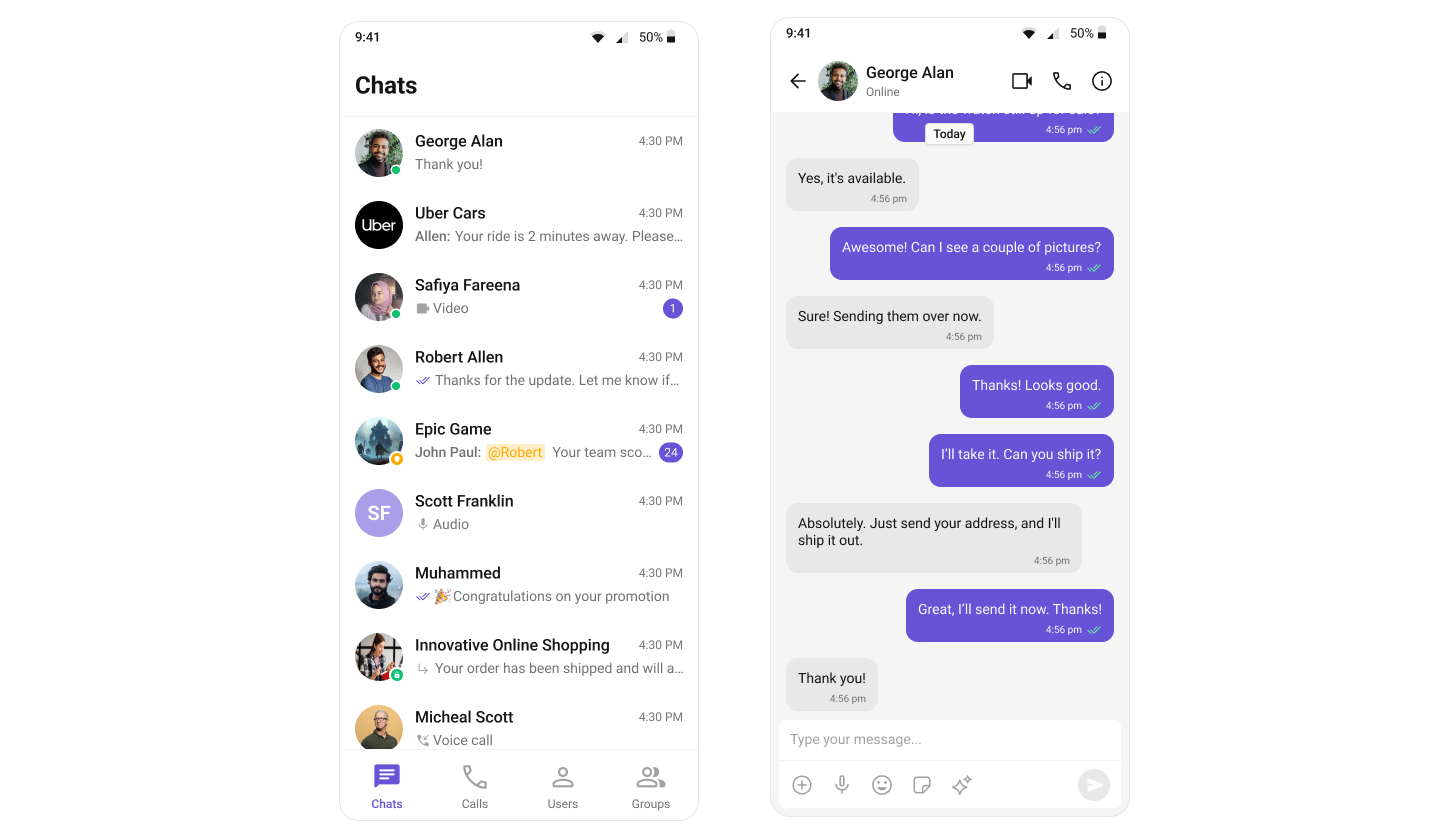 Two sections working together:
1. **Bottom navigation bar** — switches between Chats, Calls, Users, and Groups
2. **Content area** — renders the CometChat component for the active tab
This uses Android's `BottomNavigationView` with Fragments: `TabbedActivity` hosts the navigation and fragment container, user taps a tab, the corresponding Fragment loads.
This uses Material 3 `NavigationBar` with Compose state: a single composable manages the selected tab and renders the corresponding CometChat component.
***
## Step 1: Set Up the Tabbed Screen
Create a new Activity called `TabbedActivity` with `BottomNavigationView`.
**Layout** — `activity_tabbed.xml`:
```xml activity_tabbed.xml lines theme={null}
```
**Menu** — `res/menu/bottom_nav_menu.xml`:
```xml bottom_nav_menu.xml lines theme={null}
```
**Activity** — `TabbedActivity.kt`:
```kotlin TabbedActivity.kt lines theme={null}
import android.os.Bundle
import androidx.activity.enableEdgeToEdge
import androidx.appcompat.app.AppCompatActivity
import androidx.core.view.ViewCompat
import androidx.core.view.WindowInsetsCompat
import androidx.fragment.app.Fragment
import com.google.android.material.bottomnavigation.BottomNavigationView
class TabbedActivity : AppCompatActivity() {
private lateinit var bottomNav: BottomNavigationView
override fun onCreate(savedInstanceState: Bundle?) {
super.onCreate(savedInstanceState)
enableEdgeToEdge()
setContentView(R.layout.activity_tabbed)
ViewCompat.setOnApplyWindowInsetsListener(findViewById(R.id.main)) { v, insets ->
val bars = insets.getInsets(WindowInsetsCompat.Type.systemBars())
v.setPadding(bars.left, bars.top, bars.right, bars.bottom)
insets
}
bottomNav = findViewById(R.id.bottomNavigationView)
bottomNav.setOnItemSelectedListener { item ->
replaceFragment(
when (item.itemId) {
R.id.nav_chats -> ChatsFragment()
R.id.nav_call_logs -> CallLogsFragment()
R.id.nav_users -> UsersFragment()
R.id.nav_groups -> GroupsFragment()
else -> ChatsFragment()
}
)
true
}
if (savedInstanceState == null) {
replaceFragment(ChatsFragment())
}
}
private fun replaceFragment(fragment: Fragment) {
supportFragmentManager.beginTransaction()
.replace(R.id.fragmentContainer, fragment)
.commit()
}
}
```
Create a `TabbedScreen` composable with `NavigationBar`:
```kotlin TabbedScreen.kt lines theme={null}
import androidx.compose.foundation.layout.Box
import androidx.compose.foundation.layout.fillMaxSize
import androidx.compose.foundation.layout.size
import androidx.compose.material3.Icon
import androidx.compose.material3.NavigationBar
import androidx.compose.material3.NavigationBarItem
import androidx.compose.material3.Scaffold
import androidx.compose.material3.Text
import androidx.compose.runtime.Composable
import androidx.compose.runtime.getValue
import androidx.compose.runtime.mutableStateOf
import androidx.compose.runtime.saveable.rememberSaveable
import androidx.compose.runtime.setValue
import androidx.compose.ui.Modifier
import androidx.compose.ui.res.painterResource
import androidx.compose.ui.unit.dp
import com.cometchat.chat.models.Group
import com.cometchat.chat.models.User
import com.cometchat.uikit.compose.presentation.calllogs.ui.CometChatCallLogs
import com.cometchat.uikit.compose.presentation.conversations.ui.CometChatConversations
import com.cometchat.uikit.compose.presentation.groups.ui.CometChatGroups
import com.cometchat.uikit.compose.presentation.users.ui.CometChatUsers
enum class Tab(val label: String, val iconRes: Int) {
Chats("Chats", R.drawable.ic_chats),
Calls("Calls", R.drawable.ic_calls),
Users("Users", R.drawable.ic_users),
Groups("Groups", R.drawable.ic_groups)
}
@Composable
fun TabbedScreen(
onUserClick: (User) -> Unit = {},
onGroupClick: (Group) -> Unit = {}
) {
var selectedTab by rememberSaveable { mutableStateOf(Tab.Chats) }
Scaffold(
bottomBar = {
NavigationBar {
Tab.entries.forEach { tab ->
NavigationBarItem(
selected = selectedTab == tab,
onClick = { selectedTab = tab },
icon = {
Icon(
painter = painterResource(tab.iconRes),
contentDescription = tab.label,
modifier = Modifier.size(32.dp)
)
},
label = { Text(tab.label) }
)
}
}
}
) { paddingValues ->
Box(
modifier = Modifier
.fillMaxSize()
.padding(paddingValues)
) {
when (selectedTab) {
Tab.Chats -> CometChatConversations(
modifier = Modifier.fillMaxSize(),
title = "Chats",
onItemClick = { conversation ->
when (val entity = conversation.conversationWith) {
is User -> onUserClick(entity)
is Group -> onGroupClick(entity)
}
}
)
Tab.Calls -> CometChatCallLogs(
modifier = Modifier.fillMaxSize()
)
Tab.Users -> CometChatUsers(
modifier = Modifier.fillMaxSize(),
onItemClick = { user -> onUserClick(user) }
)
Tab.Groups -> CometChatGroups(
modifier = Modifier.fillMaxSize(),
onItemClick = { group -> onGroupClick(group) }
)
}
}
}
}
```
***
## Step 2: Create Tab Content
Create a Fragment for each tab. Each Fragment inflates a layout containing the corresponding CometChat component.
**ChatsFragment:**
```kotlin ChatsFragment.kt lines theme={null}
import android.os.Bundle
import android.view.LayoutInflater
import android.view.View
import android.view.ViewGroup
import androidx.fragment.app.Fragment
class ChatsFragment : Fragment() {
override fun onCreateView(inflater: LayoutInflater, container: ViewGroup?, savedInstanceState: Bundle?): View? {
return inflater.inflate(R.layout.fragment_chats, container, false)
}
}
```
```xml fragment_chats.xml lines theme={null}
```
**CallLogsFragment:**
```kotlin CallLogsFragment.kt lines theme={null}
import android.os.Bundle
import android.view.LayoutInflater
import android.view.View
import android.view.ViewGroup
import androidx.fragment.app.Fragment
class CallLogsFragment : Fragment() {
override fun onCreateView(inflater: LayoutInflater, container: ViewGroup?, savedInstanceState: Bundle?): View? {
return inflater.inflate(R.layout.fragment_call_logs, container, false)
}
}
```
```xml fragment_call_logs.xml lines theme={null}
```
**UsersFragment:**
```kotlin UsersFragment.kt lines theme={null}
import android.os.Bundle
import android.view.LayoutInflater
import android.view.View
import android.view.ViewGroup
import androidx.fragment.app.Fragment
class UsersFragment : Fragment() {
override fun onCreateView(inflater: LayoutInflater, container: ViewGroup?, savedInstanceState: Bundle?): View? {
return inflater.inflate(R.layout.fragment_users, container, false)
}
}
```
```xml fragment_users.xml lines theme={null}
```
**GroupsFragment:**
```kotlin GroupsFragment.kt lines theme={null}
import android.os.Bundle
import android.view.LayoutInflater
import android.view.View
import android.view.ViewGroup
import androidx.fragment.app.Fragment
class GroupsFragment : Fragment() {
override fun onCreateView(inflater: LayoutInflater, container: ViewGroup?, savedInstanceState: Bundle?): View? {
return inflater.inflate(R.layout.fragment_groups, container, false)
}
}
```
```xml fragment_groups.xml lines theme={null}
```
Download the navigation icons from the [CometChat UI Kit repository](https://github.com/cometchat/cometchat-uikit-android/tree/v6/sample-app-java/src/main/res/drawable) and place them in your `res/drawable/` directory.
No separate files needed — the tab content is already defined inline in the `TabbedScreen` composable above. Each `when` branch renders the corresponding CometChat component directly.
***
## Step 3: Launch the Tabbed Screen
Launch `TabbedActivity` from your `MainActivity` after successful login:
```kotlin MainActivity.kt lines theme={null}
private fun loginUser() {
CometChatUIKit.login("cometchat-uid-1", object : CometChat.CallbackListener() {
override fun onSuccess(user: User) {
Log.d(TAG, "Login successful: ${user.uid}")
// Launch Tab-Based Chat Experience
startActivity(Intent(this@MainActivity, TabbedActivity::class.java))
}
override fun onError(e: CometChatException) {
Log.e(TAG, "Login failed: ${e.message}")
}
})
}
```
Render `TabbedScreen` from your `MainActivity` after successful login:
```kotlin MainActivity.kt lines theme={null}
setContent {
when {
error != null -> {
Box(Modifier.fillMaxSize(), contentAlignment = Alignment.Center) {
Text(error ?: "Unknown error")
}
}
!isReady -> {
Box(Modifier.fillMaxSize(), contentAlignment = Alignment.Center) {
CircularProgressIndicator()
}
}
else -> {
TabbedScreen(
onUserClick = { user ->
// Navigate to message screen with user
},
onGroupClick = { group ->
// Navigate to message screen with group
}
)
}
}
}
```
***
## Step 4: Register Activity & Permissions
Add the activity to your `AndroidManifest.xml`:
```xml AndroidManifest.xml lines theme={null}
```
No additional activities needed — everything runs inside your existing `MainActivity`.
Ensure you've added the required permissions in your `AndroidManifest.xml`:
```xml AndroidManifest.xml lines theme={null}
```
For call features, also add:
```xml AndroidManifest.xml lines theme={null}
```
***
## Next Steps
Explore all available UI Kit components and their customization options
Customize colors, fonts, and styles to match your brand
Back to the main integration guide
Add capabilities like threaded messages, blocking, and group management
Two sections working together:
1. **Bottom navigation bar** — switches between Chats, Calls, Users, and Groups
2. **Content area** — renders the CometChat component for the active tab
This uses Android's `BottomNavigationView` with Fragments: `TabbedActivity` hosts the navigation and fragment container, user taps a tab, the corresponding Fragment loads.
This uses Material 3 `NavigationBar` with Compose state: a single composable manages the selected tab and renders the corresponding CometChat component.
***
## Step 1: Set Up the Tabbed Screen
Create a new Activity called `TabbedActivity` with `BottomNavigationView`.
**Layout** — `activity_tabbed.xml`:
```xml activity_tabbed.xml lines theme={null}
```
**Menu** — `res/menu/bottom_nav_menu.xml`:
```xml bottom_nav_menu.xml lines theme={null}
```
**Activity** — `TabbedActivity.kt`:
```kotlin TabbedActivity.kt lines theme={null}
import android.os.Bundle
import androidx.activity.enableEdgeToEdge
import androidx.appcompat.app.AppCompatActivity
import androidx.core.view.ViewCompat
import androidx.core.view.WindowInsetsCompat
import androidx.fragment.app.Fragment
import com.google.android.material.bottomnavigation.BottomNavigationView
class TabbedActivity : AppCompatActivity() {
private lateinit var bottomNav: BottomNavigationView
override fun onCreate(savedInstanceState: Bundle?) {
super.onCreate(savedInstanceState)
enableEdgeToEdge()
setContentView(R.layout.activity_tabbed)
ViewCompat.setOnApplyWindowInsetsListener(findViewById(R.id.main)) { v, insets ->
val bars = insets.getInsets(WindowInsetsCompat.Type.systemBars())
v.setPadding(bars.left, bars.top, bars.right, bars.bottom)
insets
}
bottomNav = findViewById(R.id.bottomNavigationView)
bottomNav.setOnItemSelectedListener { item ->
replaceFragment(
when (item.itemId) {
R.id.nav_chats -> ChatsFragment()
R.id.nav_call_logs -> CallLogsFragment()
R.id.nav_users -> UsersFragment()
R.id.nav_groups -> GroupsFragment()
else -> ChatsFragment()
}
)
true
}
if (savedInstanceState == null) {
replaceFragment(ChatsFragment())
}
}
private fun replaceFragment(fragment: Fragment) {
supportFragmentManager.beginTransaction()
.replace(R.id.fragmentContainer, fragment)
.commit()
}
}
```
Create a `TabbedScreen` composable with `NavigationBar`:
```kotlin TabbedScreen.kt lines theme={null}
import androidx.compose.foundation.layout.Box
import androidx.compose.foundation.layout.fillMaxSize
import androidx.compose.foundation.layout.size
import androidx.compose.material3.Icon
import androidx.compose.material3.NavigationBar
import androidx.compose.material3.NavigationBarItem
import androidx.compose.material3.Scaffold
import androidx.compose.material3.Text
import androidx.compose.runtime.Composable
import androidx.compose.runtime.getValue
import androidx.compose.runtime.mutableStateOf
import androidx.compose.runtime.saveable.rememberSaveable
import androidx.compose.runtime.setValue
import androidx.compose.ui.Modifier
import androidx.compose.ui.res.painterResource
import androidx.compose.ui.unit.dp
import com.cometchat.chat.models.Group
import com.cometchat.chat.models.User
import com.cometchat.uikit.compose.presentation.calllogs.ui.CometChatCallLogs
import com.cometchat.uikit.compose.presentation.conversations.ui.CometChatConversations
import com.cometchat.uikit.compose.presentation.groups.ui.CometChatGroups
import com.cometchat.uikit.compose.presentation.users.ui.CometChatUsers
enum class Tab(val label: String, val iconRes: Int) {
Chats("Chats", R.drawable.ic_chats),
Calls("Calls", R.drawable.ic_calls),
Users("Users", R.drawable.ic_users),
Groups("Groups", R.drawable.ic_groups)
}
@Composable
fun TabbedScreen(
onUserClick: (User) -> Unit = {},
onGroupClick: (Group) -> Unit = {}
) {
var selectedTab by rememberSaveable { mutableStateOf(Tab.Chats) }
Scaffold(
bottomBar = {
NavigationBar {
Tab.entries.forEach { tab ->
NavigationBarItem(
selected = selectedTab == tab,
onClick = { selectedTab = tab },
icon = {
Icon(
painter = painterResource(tab.iconRes),
contentDescription = tab.label,
modifier = Modifier.size(32.dp)
)
},
label = { Text(tab.label) }
)
}
}
}
) { paddingValues ->
Box(
modifier = Modifier
.fillMaxSize()
.padding(paddingValues)
) {
when (selectedTab) {
Tab.Chats -> CometChatConversations(
modifier = Modifier.fillMaxSize(),
title = "Chats",
onItemClick = { conversation ->
when (val entity = conversation.conversationWith) {
is User -> onUserClick(entity)
is Group -> onGroupClick(entity)
}
}
)
Tab.Calls -> CometChatCallLogs(
modifier = Modifier.fillMaxSize()
)
Tab.Users -> CometChatUsers(
modifier = Modifier.fillMaxSize(),
onItemClick = { user -> onUserClick(user) }
)
Tab.Groups -> CometChatGroups(
modifier = Modifier.fillMaxSize(),
onItemClick = { group -> onGroupClick(group) }
)
}
}
}
}
```
***
## Step 2: Create Tab Content
Create a Fragment for each tab. Each Fragment inflates a layout containing the corresponding CometChat component.
**ChatsFragment:**
```kotlin ChatsFragment.kt lines theme={null}
import android.os.Bundle
import android.view.LayoutInflater
import android.view.View
import android.view.ViewGroup
import androidx.fragment.app.Fragment
class ChatsFragment : Fragment() {
override fun onCreateView(inflater: LayoutInflater, container: ViewGroup?, savedInstanceState: Bundle?): View? {
return inflater.inflate(R.layout.fragment_chats, container, false)
}
}
```
```xml fragment_chats.xml lines theme={null}
```
**CallLogsFragment:**
```kotlin CallLogsFragment.kt lines theme={null}
import android.os.Bundle
import android.view.LayoutInflater
import android.view.View
import android.view.ViewGroup
import androidx.fragment.app.Fragment
class CallLogsFragment : Fragment() {
override fun onCreateView(inflater: LayoutInflater, container: ViewGroup?, savedInstanceState: Bundle?): View? {
return inflater.inflate(R.layout.fragment_call_logs, container, false)
}
}
```
```xml fragment_call_logs.xml lines theme={null}
```
**UsersFragment:**
```kotlin UsersFragment.kt lines theme={null}
import android.os.Bundle
import android.view.LayoutInflater
import android.view.View
import android.view.ViewGroup
import androidx.fragment.app.Fragment
class UsersFragment : Fragment() {
override fun onCreateView(inflater: LayoutInflater, container: ViewGroup?, savedInstanceState: Bundle?): View? {
return inflater.inflate(R.layout.fragment_users, container, false)
}
}
```
```xml fragment_users.xml lines theme={null}
```
**GroupsFragment:**
```kotlin GroupsFragment.kt lines theme={null}
import android.os.Bundle
import android.view.LayoutInflater
import android.view.View
import android.view.ViewGroup
import androidx.fragment.app.Fragment
class GroupsFragment : Fragment() {
override fun onCreateView(inflater: LayoutInflater, container: ViewGroup?, savedInstanceState: Bundle?): View? {
return inflater.inflate(R.layout.fragment_groups, container, false)
}
}
```
```xml fragment_groups.xml lines theme={null}
```
Download the navigation icons from the [CometChat UI Kit repository](https://github.com/cometchat/cometchat-uikit-android/tree/v6/sample-app-java/src/main/res/drawable) and place them in your `res/drawable/` directory.
No separate files needed — the tab content is already defined inline in the `TabbedScreen` composable above. Each `when` branch renders the corresponding CometChat component directly.
***
## Step 3: Launch the Tabbed Screen
Launch `TabbedActivity` from your `MainActivity` after successful login:
```kotlin MainActivity.kt lines theme={null}
private fun loginUser() {
CometChatUIKit.login("cometchat-uid-1", object : CometChat.CallbackListener() {
override fun onSuccess(user: User) {
Log.d(TAG, "Login successful: ${user.uid}")
// Launch Tab-Based Chat Experience
startActivity(Intent(this@MainActivity, TabbedActivity::class.java))
}
override fun onError(e: CometChatException) {
Log.e(TAG, "Login failed: ${e.message}")
}
})
}
```
Render `TabbedScreen` from your `MainActivity` after successful login:
```kotlin MainActivity.kt lines theme={null}
setContent {
when {
error != null -> {
Box(Modifier.fillMaxSize(), contentAlignment = Alignment.Center) {
Text(error ?: "Unknown error")
}
}
!isReady -> {
Box(Modifier.fillMaxSize(), contentAlignment = Alignment.Center) {
CircularProgressIndicator()
}
}
else -> {
TabbedScreen(
onUserClick = { user ->
// Navigate to message screen with user
},
onGroupClick = { group ->
// Navigate to message screen with group
}
)
}
}
}
```
***
## Step 4: Register Activity & Permissions
Add the activity to your `AndroidManifest.xml`:
```xml AndroidManifest.xml lines theme={null}
```
No additional activities needed — everything runs inside your existing `MainActivity`.
Ensure you've added the required permissions in your `AndroidManifest.xml`:
```xml AndroidManifest.xml lines theme={null}
```
For call features, also add:
```xml AndroidManifest.xml lines theme={null}
```
***
## Next Steps
Explore all available UI Kit components and their customization options
Customize colors, fonts, and styles to match your brand
Back to the main integration guide
Add capabilities like threaded messages, blocking, and group management