> ## Documentation Index
> Fetch the complete documentation index at: https://cometchat-22654f5b-docs-rn-guide-message-privately.mintlify.site/llms.txt
> Use this file to discover all available pages before exploring further.
# List Base
> List Base — CometChat documentation.
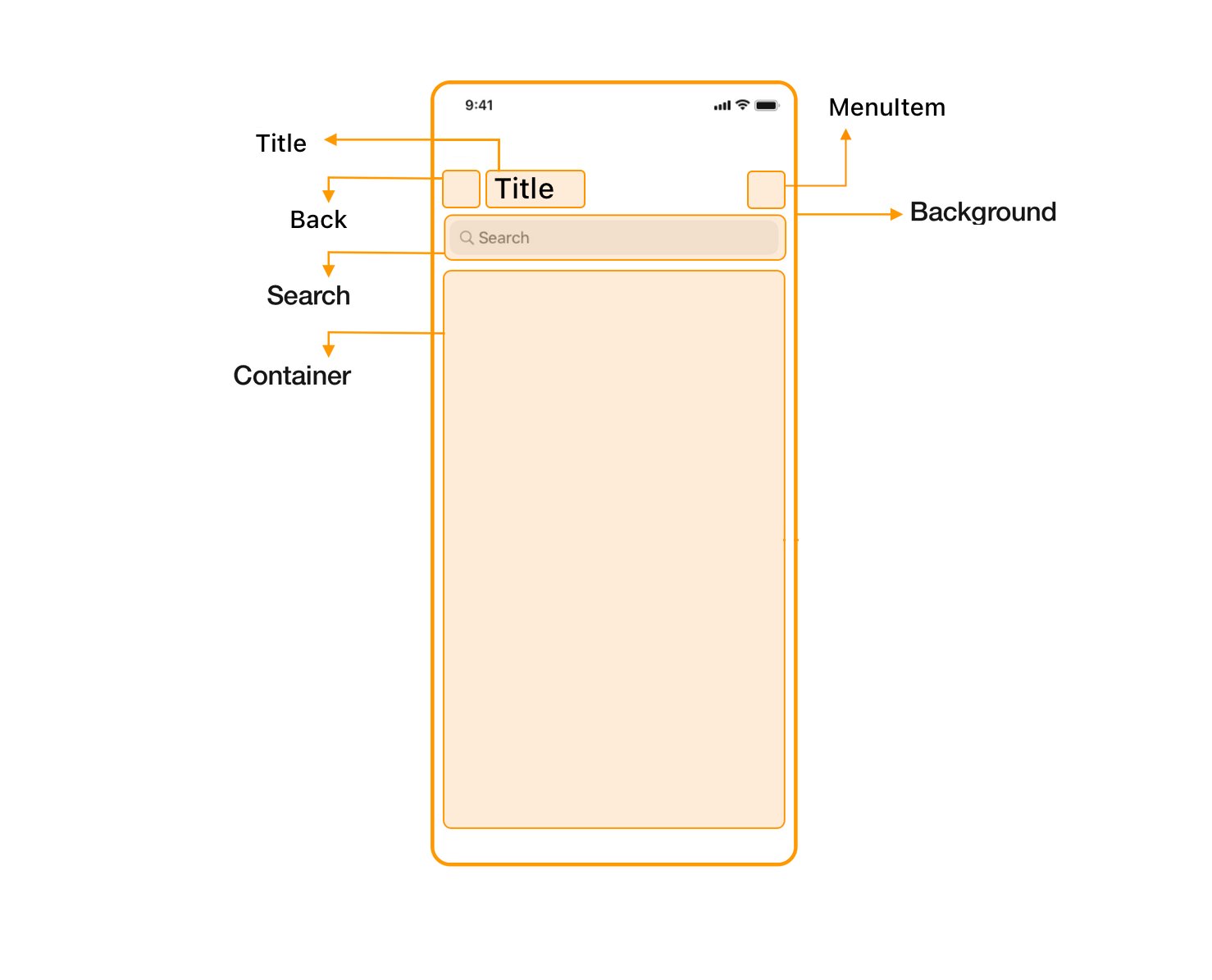
`CometChatListBase` is a custom UI Component which displays common components used across `Conversations`, `Groups` & `Users`. It serves as the base component from which these components are inherited.
 #### Usage in Java
` extends CometChatListBase`
Example: `CometChatUsers extends CometChatListBase`
***
### Methods
#### Background
The background is a View which is present in the backdrop for `CometChatListBase.` You will be able to modify the background using the below methods:
| Methods | Description |
| -------------------------------------------------------------------------- | ----------------------------------------------------------------------------------------------------------------------------------- |
| setBackground(@ColorInt int Color) | This method will set the background color for CometChatListBase. |
| setBackground(int\[] colorArray, GradientDrawable.Orientation orientation) | This method will set the background drawable for CometChatListBase,It take an array of multiple colors for the gradient background. |
| setBackground(Drawable drawable) | This method will set the background drawable for CometChatListBase. |
```java theme={null}
//syntax for setBackground(Drawable drawable)
super.setBackground(getResources().getDrawable(R.drawable.background));
//syntax for setBackground(int[] colorArray, GradientDrawable.Orientation orientation)
int colorArray[]={Color.parseColor("#7141e2"),Color.parseColor("#d46cb3")};
super.setBackground(colorArray, GradientDrawable.Orientation.BL_TR);
//syntax for setBackground(@ColorInt int Color)
super.setBackground(Color.parseColor("#FF606D"));
```
#### Title
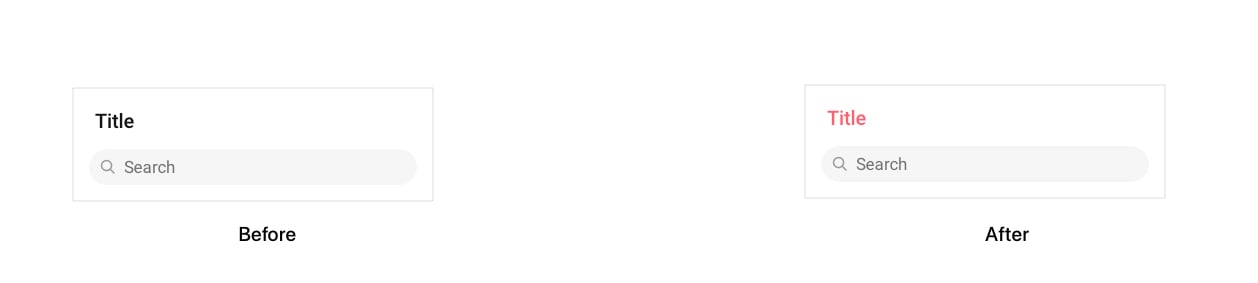
The title is a `TextView` that specifies a title for `CometChatListBase`. You will be able to modify the title using the below methods:
| Methods | Description |
| --------------------------------------- | ------------------------------------------------------------------ |
| setTitle(String title) | This method will set the title for CometChatListBase |
| setTitleColor(@ColorInt int color) | This method will set the title for CometChatListBase |
| setTitleFont(String font) | This method will set the title font for CometChatListBase |
| setTitleAppearance(int appearanceStyle) | This method will set the appearance of title for CometChatListBase |
```java theme={null}
// syntax for set setTitle(String title)
super.setTitle("Chats");
// syntax for setTitleColor(@ColorInt int color)
super.setTitleColor(Color.parseColor("#FF606D"));
// syntax for setTitleFont(String font)
super.setTitleFont("Roboto-Regular.ttf");
// syntax for setTitleAppearance(int appearanceStyle)
super.setTitleAppearance(R.style.Text1);
```
#### Usage in Java
` extends CometChatListBase`
Example: `CometChatUsers extends CometChatListBase`
***
### Methods
#### Background
The background is a View which is present in the backdrop for `CometChatListBase.` You will be able to modify the background using the below methods:
| Methods | Description |
| -------------------------------------------------------------------------- | ----------------------------------------------------------------------------------------------------------------------------------- |
| setBackground(@ColorInt int Color) | This method will set the background color for CometChatListBase. |
| setBackground(int\[] colorArray, GradientDrawable.Orientation orientation) | This method will set the background drawable for CometChatListBase,It take an array of multiple colors for the gradient background. |
| setBackground(Drawable drawable) | This method will set the background drawable for CometChatListBase. |
```java theme={null}
//syntax for setBackground(Drawable drawable)
super.setBackground(getResources().getDrawable(R.drawable.background));
//syntax for setBackground(int[] colorArray, GradientDrawable.Orientation orientation)
int colorArray[]={Color.parseColor("#7141e2"),Color.parseColor("#d46cb3")};
super.setBackground(colorArray, GradientDrawable.Orientation.BL_TR);
//syntax for setBackground(@ColorInt int Color)
super.setBackground(Color.parseColor("#FF606D"));
```
#### Title
The title is a `TextView` that specifies a title for `CometChatListBase`. You will be able to modify the title using the below methods:
| Methods | Description |
| --------------------------------------- | ------------------------------------------------------------------ |
| setTitle(String title) | This method will set the title for CometChatListBase |
| setTitleColor(@ColorInt int color) | This method will set the title for CometChatListBase |
| setTitleFont(String font) | This method will set the title font for CometChatListBase |
| setTitleAppearance(int appearanceStyle) | This method will set the appearance of title for CometChatListBase |
```java theme={null}
// syntax for set setTitle(String title)
super.setTitle("Chats");
// syntax for setTitleColor(@ColorInt int color)
super.setTitleColor(Color.parseColor("#FF606D"));
// syntax for setTitleFont(String font)
super.setTitleFont("Roboto-Regular.ttf");
// syntax for setTitleAppearance(int appearanceStyle)
super.setTitleAppearance(R.style.Text1);
```
 #### Search
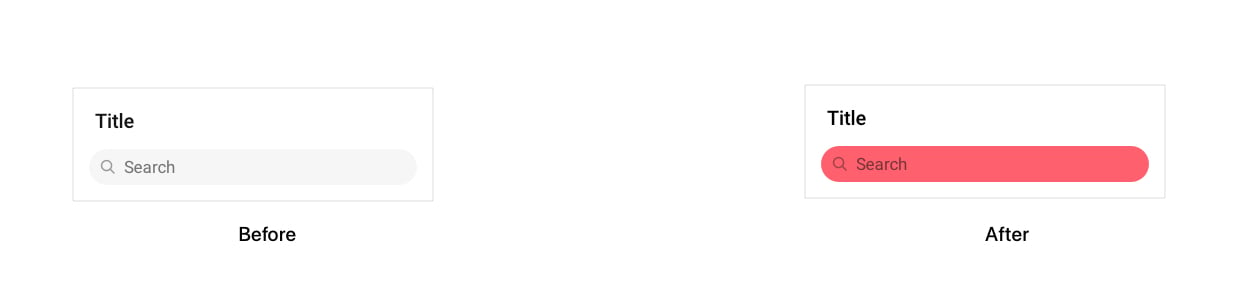
The search is a `TextInputLayout` which is responsible for displaying and handling events for the search bar in `CometChatListBase`. You will be able to modify the search bar using the below methods:
| Methods | Description |
| ------------------------------------------------- | ------------------------------------------------------------------------------ |
| setSearchBackground(@ColorInt int searchBoxColor) | This method will set the background color for seach bar in CometChatListBase |
| setSearchCornerRadius(float searchBarRadius) | This method will set the corner radius for the search bar in CometChatListBase |
| setSearchTextColor(@ColorInt int color) | This method will set the text color for search bar in CometChatListBase |
| setSearchText(String text) | This method will set the text for search bar in CometChatListBase |
| setSearchPlaceholderText(String placeholder) | This method will set the place holder text in search bar |
| setSearchPlaceHolderColor | This method will set the place holder text color in search bar |
| setSearchTextFont(String fontName) | This method will set the font for search bar in CometChatListBase |
| setSearchBorderWidth(int width) | This method will set the border for search bar in CometChatListBase |
| setSearchBorderColor(@ColorInt int color) | This method will set the border color for the search bar in CometChatListBase |
| hideSearch(boolean IsSearchBoxVisible) | This method will hide/unhide the search bar as per boolean value |
```java theme={null}
// syntax for setSearchBackground
super.setSearchBackground(Color.parseColor("#FF606D"));
// syntax for setSearchCornerRadius
super.setSearchCornerRadius(2);
// syntax for setSearchTextColor
super.setSearchTextColor(getResources().getColor(R.color.text_color));
// syntax for setSearchTextFont
super.setSearchTextFont("Roboto-Regular.ttf");
// syntax for setSearchText
super.setSearchText("");
// syntax for setSearchBorderWidth
super.setSearchBorderWidth(0);
// syntax for setSearchBorderColor
super.setSearchBorderColor(getResources().getColor(R.color.border_color));
// syntax for hideSearch
super.hideSearch(false);
```
#### Search
The search is a `TextInputLayout` which is responsible for displaying and handling events for the search bar in `CometChatListBase`. You will be able to modify the search bar using the below methods:
| Methods | Description |
| ------------------------------------------------- | ------------------------------------------------------------------------------ |
| setSearchBackground(@ColorInt int searchBoxColor) | This method will set the background color for seach bar in CometChatListBase |
| setSearchCornerRadius(float searchBarRadius) | This method will set the corner radius for the search bar in CometChatListBase |
| setSearchTextColor(@ColorInt int color) | This method will set the text color for search bar in CometChatListBase |
| setSearchText(String text) | This method will set the text for search bar in CometChatListBase |
| setSearchPlaceholderText(String placeholder) | This method will set the place holder text in search bar |
| setSearchPlaceHolderColor | This method will set the place holder text color in search bar |
| setSearchTextFont(String fontName) | This method will set the font for search bar in CometChatListBase |
| setSearchBorderWidth(int width) | This method will set the border for search bar in CometChatListBase |
| setSearchBorderColor(@ColorInt int color) | This method will set the border color for the search bar in CometChatListBase |
| hideSearch(boolean IsSearchBoxVisible) | This method will hide/unhide the search bar as per boolean value |
```java theme={null}
// syntax for setSearchBackground
super.setSearchBackground(Color.parseColor("#FF606D"));
// syntax for setSearchCornerRadius
super.setSearchCornerRadius(2);
// syntax for setSearchTextColor
super.setSearchTextColor(getResources().getColor(R.color.text_color));
// syntax for setSearchTextFont
super.setSearchTextFont("Roboto-Regular.ttf");
// syntax for setSearchText
super.setSearchText("");
// syntax for setSearchBorderWidth
super.setSearchBorderWidth(0);
// syntax for setSearchBorderColor
super.setSearchBorderColor(getResources().getColor(R.color.border_color));
// syntax for hideSearch
super.hideSearch(false);
```
 #### Back
The back button is the `ImageButton` the user can show if they wish to. This button can be modified using the following method:
| Methods | Description |
| --------------------------------- | --------------------------------------------------------------------------------------------------------------------------------- |
| showBackButton(boolean isVisible) | This method will hide/show the close button as per boolean value, the user must provide the tint color for the close button icon. |
| backIconTint(@ColorInt int color) | Set's the back icon color |
| backIcon(@DrawableRes int res) | Set's the back icon |
| backIcon(Drawable res) | Set's the back icon |
```java theme={null}
// syntax for showBackButton(boolean isVisible)
super.showBackButton(true);
// syntax for backIconTint(@ColorInt int color)
super.backIconTint(Color.parseColor("#FF606D"));
// syntax for backIcon(@DrawableRes int res)
super.backIcon(R.drawable.add_circle);
// syntax for backIcon(Drawable res)
super.backIcon(getResources().getDrawable(R.drawable.background));
```
#### View Methods
Below methods are used to merge view with CometChatListBase.
| Methods | Description |
| --------------------------- | ------------------------------------------------------------------------------- |
| setMenu | This method will help to add view at the top right corner of CometChatListBase. |
| hideMenuIcon(boolean value) | This Method will hide/unhide menu icon |
```java theme={null}
//syntax for addListView
super.addListView(rvConversationList);
//syntax for addMenuIcon(ImageView icon)
ImageView icon = new ImageView(context);
icon.setImageResource(R.drawable.ic_create);
super.addMenuIcon(icon);
//syntax for hideMenuIcon(boolean value)
super.hideMenuIcon(false);
```
***
### setListBaseEventListener
**CometChatListBase** uses an event listener named as `OnEventListener`it will provide the events for search-bar and on the click of back button present in the CometChatListBase.
| Event | Description |
| ----------------------------------------------- | -------------------------------------------------------------------------------------------------------------------------------------------------------------------------------- |
| addOnSearchListener(OnSearch eventListener) | This event will be executed whenever the text in search bar changes or "Search" Icon is clicked from keyboard. It will return the text which user has entered in the search bar. |
| addOnBackPressListener(OnBackPress onBackPress) | When the back button is visible and the user clicks on the back button then this event will be executed |
***
### Uses
```java theme={null}
//EventListener
addOnSearchListener(new CometChatListBase.OnSearch() {
@Override
public void onSearch(String state, String text) {
}
addOnBackPressListener(new CometChatListBase.OnBackPress() {
@Override
public void onBack() {
}
});
```
#### Back
The back button is the `ImageButton` the user can show if they wish to. This button can be modified using the following method:
| Methods | Description |
| --------------------------------- | --------------------------------------------------------------------------------------------------------------------------------- |
| showBackButton(boolean isVisible) | This method will hide/show the close button as per boolean value, the user must provide the tint color for the close button icon. |
| backIconTint(@ColorInt int color) | Set's the back icon color |
| backIcon(@DrawableRes int res) | Set's the back icon |
| backIcon(Drawable res) | Set's the back icon |
```java theme={null}
// syntax for showBackButton(boolean isVisible)
super.showBackButton(true);
// syntax for backIconTint(@ColorInt int color)
super.backIconTint(Color.parseColor("#FF606D"));
// syntax for backIcon(@DrawableRes int res)
super.backIcon(R.drawable.add_circle);
// syntax for backIcon(Drawable res)
super.backIcon(getResources().getDrawable(R.drawable.background));
```
#### View Methods
Below methods are used to merge view with CometChatListBase.
| Methods | Description |
| --------------------------- | ------------------------------------------------------------------------------- |
| setMenu | This method will help to add view at the top right corner of CometChatListBase. |
| hideMenuIcon(boolean value) | This Method will hide/unhide menu icon |
```java theme={null}
//syntax for addListView
super.addListView(rvConversationList);
//syntax for addMenuIcon(ImageView icon)
ImageView icon = new ImageView(context);
icon.setImageResource(R.drawable.ic_create);
super.addMenuIcon(icon);
//syntax for hideMenuIcon(boolean value)
super.hideMenuIcon(false);
```
***
### setListBaseEventListener
**CometChatListBase** uses an event listener named as `OnEventListener`it will provide the events for search-bar and on the click of back button present in the CometChatListBase.
| Event | Description |
| ----------------------------------------------- | -------------------------------------------------------------------------------------------------------------------------------------------------------------------------------- |
| addOnSearchListener(OnSearch eventListener) | This event will be executed whenever the text in search bar changes or "Search" Icon is clicked from keyboard. It will return the text which user has entered in the search bar. |
| addOnBackPressListener(OnBackPress onBackPress) | When the back button is visible and the user clicks on the back button then this event will be executed |
***
### Uses
```java theme={null}
//EventListener
addOnSearchListener(new CometChatListBase.OnSearch() {
@Override
public void onSearch(String state, String text) {
}
addOnBackPressListener(new CometChatListBase.OnBackPress() {
@Override
public void onBack() {
}
});
```