> ## Documentation Index
> Fetch the complete documentation index at: https://cometchat-22654f5b-docs-rn-guide-message-privately.mintlify.site/llms.txt
> Use this file to discover all available pages before exploring further.
# Threaded Messages Header
> Configure CometChat Android UI Kit threaded message headers with parent message context, reply views, composer layout, and back actions.
```json theme={null}
{
"component": "CometChatThreadHeader",
"package": "com.cometchat.chatuikit.threadheader",
"xmlElement": "",
"description": "Displays the parent message bubble and reply count for a threaded conversation. Requires setParentMessage(BaseMessage) to render.",
"primaryInput": {
"method": "setParentMessage",
"type": "BaseMessage",
"note": "Must be called to display the parent message in the thread header"
},
"primaryOutput": {
"description": "Renders the parent message bubble and reply count. No primary callback output."
},
"methods": {
"data": {
"setParentMessage": {
"type": "BaseMessage",
"note": "Sets the parent message for the thread header. Required."
}
},
"visibility": {
"setReactionVisibility": { "type": "int (View.VISIBLE | View.GONE)", "default": "View.VISIBLE" },
"setAvatarVisibility": { "type": "int (View.VISIBLE | View.GONE)", "default": "View.VISIBLE" },
"setReceiptsVisibility": { "type": "int (View.VISIBLE | View.GONE)", "default": "View.VISIBLE" },
"setReplyCountVisibility": { "type": "int (View.VISIBLE | View.GONE)", "default": "View.VISIBLE" },
"setReplyCountBarVisibility": { "type": "int (View.VISIBLE | View.GONE)", "default": "View.VISIBLE" }
},
"templates": {
"setTemplates": {
"type": "List",
"note": "Replaces the default list of message templates"
},
"addTemplate": {
"type": "CometChatMessageTemplate",
"note": "Adds a single template to the existing list"
}
},
"advanced": {
"setAlignment": "UIKitConstants.MessageListAlignment — STANDARD or LEFT_ALIGNED",
"setMaxHeight": "@Dimension int — maximum height in pixels",
"setTimeFormat": "SimpleDateFormat — custom time format for the parent message",
"setTextFormatters": "List — custom text formatters",
"setIncomingMessageBubbleStyle": "@StyleRes int — incoming bubble style",
"setOutgoingMessageBubbleStyle": "@StyleRes int — outgoing bubble style",
"getRecyclerView": "RecyclerView — internal RecyclerView",
"getBinding": "CometchatThreadHeaderBinding — root ViewBinding",
"getThreadedHeaderViewModel": "ThreadHeaderViewModel — internal ViewModel",
"getAdapter": "MessageAdapter — internal adapter"
},
"style": {
"setStyle": {
"type": "@StyleRes int",
"parent": "CometChatThreadHeaderStyle"
}
}
},
"events": [],
"sdkListeners": []
}
```
## Where It Fits
`CometChatThreadHeader` is a header component for threaded message views. It renders the parent message bubble and reply count. Wire it above a `CometChatMessageList` and `CometChatMessageComposer` to build a complete threaded conversation layout.
```kotlin ThreadActivity.kt lines theme={null}
class ThreadActivity : AppCompatActivity() {
private lateinit var threadHeader: CometChatThreadHeader
private lateinit var messageList: CometChatMessageList
private lateinit var messageComposer: CometChatMessageComposer
override fun onCreate(savedInstanceState: Bundle?) {
super.onCreate(savedInstanceState)
setContentView(R.layout.activity_thread)
threadHeader = findViewById(R.id.thread_header)
messageList = findViewById(R.id.message_list)
messageComposer = findViewById(R.id.message_composer)
// parentMessage is the BaseMessage that started the thread
threadHeader.setParentMessage(parentMessage)
messageList.setParentMessage(parentMessage)
messageComposer.setParentMessage(parentMessage)
}
}
```
```java ThreadActivity.java lines theme={null}
public class ThreadActivity extends AppCompatActivity {
private CometChatThreadHeader threadHeader;
private CometChatMessageList messageList;
private CometChatMessageComposer messageComposer;
@Override
protected void onCreate(Bundle savedInstanceState) {
super.onCreate(savedInstanceState);
setContentView(R.layout.activity_thread);
threadHeader = findViewById(R.id.thread_header);
messageList = findViewById(R.id.message_list);
messageComposer = findViewById(R.id.message_composer);
// parentMessage is the BaseMessage that started the thread
threadHeader.setParentMessage(parentMessage);
messageList.setParentMessage(parentMessage);
messageComposer.setParentMessage(parentMessage);
}
}
```
## Quick Start
Add the component to your layout XML:
```xml layout_activity.xml lines theme={null}
```
 Prerequisites: CometChat SDK initialized with `CometChatUIKit.init()`, a user logged in, and the `cometchat-chat-uikit-android` dependency added.
Set the parent message in your Activity:
```kotlin YourActivity.kt lines theme={null}
override fun onCreate(savedInstanceState: Bundle?) {
super.onCreate(savedInstanceState)
setContentView(R.layout.activity_thread)
val threadHeader = findViewById(R.id.thread_header)
threadHeader.setParentMessage(baseMessage)
}
```
```java YourActivity.java lines theme={null}
@Override
protected void onCreate(Bundle savedInstanceState) {
super.onCreate(savedInstanceState);
setContentView(R.layout.activity_thread);
CometChatThreadHeader threadHeader = findViewById(R.id.thread_header);
threadHeader.setParentMessage(baseMessage);
}
```
Or in a Fragment:
```kotlin YourFragment.kt lines theme={null}
override fun onCreateView(inflater: LayoutInflater, container: ViewGroup?, savedInstanceState: Bundle?): View {
val view = inflater.inflate(R.layout.fragment_thread, container, false)
val threadHeader = view.findViewById(R.id.thread_header)
threadHeader.setParentMessage(baseMessage)
return view
}
```
```java YourFragment.java lines theme={null}
@Override
public View onCreateView(LayoutInflater inflater, ViewGroup container, Bundle savedInstanceState) {
View view = inflater.inflate(R.layout.fragment_thread, container, false);
CometChatThreadHeader threadHeader = view.findViewById(R.id.thread_header);
threadHeader.setParentMessage(baseMessage);
return view;
}
```
## Actions and Events
### Callback Methods
`CometChatThreadHeader` does not expose component-specific callback methods like `setOnItemClick` or `setOnError`. It is a display-only header that renders the parent message and reply count.
### Global UI Events (CometChatMessageEvents)
`CometChatThreadHeader` does not emit its own global UI events. The parent message updates are handled internally via the `ThreadHeaderViewModel`, which listens for message edits, deletes, and reaction changes on the parent message.
### SDK Events (Real-Time, Automatic)
The component listens to SDK events internally via its ViewModel. No manual attachment needed.
| SDK Listener | Internal behavior |
| ------------------- | ------------------------------------------------------------------ |
| Message edited | Updates the parent message bubble if the parent message is edited |
| Message deleted | Updates the parent message bubble if the parent message is deleted |
| Reply count changed | Updates the reply count indicator when new replies are added |
> Automatic: parent message changes and reply count updates reflect in real time.
## Functionality
Small functional customizations such as toggling visibility of UI elements and configuring alignment.
| Method | Description | Code |
| ---------------------------- | ---------------------------------------------------------------------------------------- | ----------------------------------------------------------------- |
| `setReactionVisibility` | Shows or hides reactions on the parent message bubble | `.setReactionVisibility(View.GONE)` |
| `setAvatarVisibility` | Shows or hides the avatar in the thread header | `.setAvatarVisibility(View.GONE)` |
| `setReceiptsVisibility` | Shows or hides read receipts on the parent message bubble | `.setReceiptsVisibility(View.GONE)` |
| `setReplyCountVisibility` | Shows or hides the reply count text | `.setReplyCountVisibility(View.GONE)` |
| `setReplyCountBarVisibility` | Shows or hides the reply count bar/layout | `.setReplyCountBarVisibility(View.GONE)` |
| `setMaxHeight` | Sets the maximum height limit for the thread header in pixels | `.setMaxHeight(500)` |
| `setAlignment` | Sets bubble alignment: STANDARD (left/right by message type) or LEFT\_ALIGNED (all left) | `.setAlignment(UIKitConstants.MessageListAlignment.LEFT_ALIGNED)` |
* **Verify**: After calling a visibility method, confirm the corresponding UI element is shown or hidden.
## Custom View Slots
`CometChatThreadHeader` does not use the traditional `ViewHolderListener` pattern for view slots. Instead, it uses `CometChatMessageTemplate` to customize how the parent message bubble is rendered.
### `setTemplates`
Replaces the default list of message templates used to render the parent message bubble.
```kotlin lines theme={null}
val customTemplates: List = listOf(myCustomTemplate)
threadHeader.setTemplates(customTemplates)
```
```java lines theme={null}
List customTemplates = Arrays.asList(myCustomTemplate);
threadHeader.setTemplates(customTemplates);
```
> **What this does:** Replaces the entire set of message templates. The parent message bubble renders using the custom template configuration. If you pass an empty list, no message bubble renders.
### `addTemplate`
Adds a single message template to the existing list without replacing defaults.
```kotlin lines theme={null}
threadHeader.addTemplate(myCustomTemplate)
```
```java lines theme={null}
threadHeader.addTemplate(myCustomTemplate);
```
> **What this does:** Appends a new `CometChatMessageTemplate` to the existing template list. Use this when you want to support an additional message type without removing the built-in templates.
* **Verify**: After calling `setTemplates` or `addTemplate`, confirm the parent message bubble renders using the custom template configuration.
## Common Patterns
### Hide reactions on the parent message
```kotlin lines theme={null}
threadHeader.setReactionVisibility(View.GONE)
```
```java lines theme={null}
threadHeader.setReactionVisibility(View.GONE);
```
### Left-align all message bubbles
```kotlin lines theme={null}
threadHeader.setAlignment(UIKitConstants.MessageListAlignment.LEFT_ALIGNED)
```
```java lines theme={null}
threadHeader.setAlignment(UIKitConstants.MessageListAlignment.LEFT_ALIGNED);
```
### Custom time format
```kotlin lines theme={null}
threadHeader.setTimeFormat(SimpleDateFormat("hh:mm a", Locale.getDefault()))
```
```java lines theme={null}
threadHeader.setTimeFormat(new SimpleDateFormat("hh:mm a", Locale.getDefault()));
```
### Hide reply count and reply count bar
```kotlin lines theme={null}
threadHeader.setReplyCountVisibility(View.GONE)
threadHeader.setReplyCountBarVisibility(View.GONE)
```
```java lines theme={null}
threadHeader.setReplyCountVisibility(View.GONE);
threadHeader.setReplyCountBarVisibility(View.GONE);
```
## Advanced Methods
### `setParentMessage`
Sets the parent message for the thread header. This is required — the component will not render without it.
```kotlin lines theme={null}
threadHeader.setParentMessage(baseMessage)
```
```java lines theme={null}
threadHeader.setParentMessage(baseMessage);
```
### `setTemplates`
Replaces the default list of message templates used to render the parent message bubble.
```kotlin lines theme={null}
threadHeader.setTemplates(customTemplateList)
```
```java lines theme={null}
threadHeader.setTemplates(customTemplateList);
```
### `addTemplate`
Adds a single message template to the existing list.
```kotlin lines theme={null}
threadHeader.addTemplate(customTemplate)
```
```java lines theme={null}
threadHeader.addTemplate(customTemplate);
```
### `setTextFormatters`
Adds custom text formatters to the current list of formatters used in the thread header.
```kotlin lines theme={null}
threadHeader.setTextFormatters(listOf(myCustomFormatter))
```
```java lines theme={null}
threadHeader.setTextFormatters(Arrays.asList(myCustomFormatter));
```
### `setTimeFormat`
Sets a custom time format for the parent message display.
```kotlin lines theme={null}
threadHeader.setTimeFormat(SimpleDateFormat("hh:mm a", Locale.getDefault()))
```
```java lines theme={null}
threadHeader.setTimeFormat(new SimpleDateFormat("hh:mm a", Locale.getDefault()));
```
### `setAlignment`
Sets the bubble alignment for the parent message.
```kotlin lines theme={null}
threadHeader.setAlignment(UIKitConstants.MessageListAlignment.LEFT_ALIGNED)
```
```java lines theme={null}
threadHeader.setAlignment(UIKitConstants.MessageListAlignment.LEFT_ALIGNED);
```
> In `STANDARD` mode, the bubble appears on the left or right based on whether the message is incoming or outgoing. In `LEFT_ALIGNED` mode, all bubbles appear on the left.
### Internal Access
These methods provide direct access to internal components for advanced use cases.
| Method | Returns | Description |
| ------------------------------ | ------------------------------ | ---------------------------------------------------- |
| `getRecyclerView()` | `RecyclerView` | The RecyclerView used for the parent message bubble |
| `getBinding()` | `CometchatThreadHeaderBinding` | The ViewBinding for the component's root layout |
| `getThreadedHeaderViewModel()` | `ThreadHeaderViewModel` | The ViewModel managing thread header state |
| `getAdapter()` | `MessageAdapter` | The adapter powering the parent message RecyclerView |
### Bubble Style Methods
| Method | Type | Description |
| ------------------------------- | --------------- | ------------------------------------------- |
| `setIncomingMessageBubbleStyle` | `@StyleRes int` | Sets the style for incoming message bubbles |
| `setOutgoingMessageBubbleStyle` | `@StyleRes int` | Sets the style for outgoing message bubbles |
> Use internal access methods only when the standard API is insufficient. Directly manipulating the adapter or ViewModel may conflict with the component's internal state management.
## Style
The component uses XML theme styles. Define a custom style with parent `CometChatThreadHeaderStyle` in `themes.xml`, then apply with `setStyle()`.
Prerequisites: CometChat SDK initialized with `CometChatUIKit.init()`, a user logged in, and the `cometchat-chat-uikit-android` dependency added.
Set the parent message in your Activity:
```kotlin YourActivity.kt lines theme={null}
override fun onCreate(savedInstanceState: Bundle?) {
super.onCreate(savedInstanceState)
setContentView(R.layout.activity_thread)
val threadHeader = findViewById(R.id.thread_header)
threadHeader.setParentMessage(baseMessage)
}
```
```java YourActivity.java lines theme={null}
@Override
protected void onCreate(Bundle savedInstanceState) {
super.onCreate(savedInstanceState);
setContentView(R.layout.activity_thread);
CometChatThreadHeader threadHeader = findViewById(R.id.thread_header);
threadHeader.setParentMessage(baseMessage);
}
```
Or in a Fragment:
```kotlin YourFragment.kt lines theme={null}
override fun onCreateView(inflater: LayoutInflater, container: ViewGroup?, savedInstanceState: Bundle?): View {
val view = inflater.inflate(R.layout.fragment_thread, container, false)
val threadHeader = view.findViewById(R.id.thread_header)
threadHeader.setParentMessage(baseMessage)
return view
}
```
```java YourFragment.java lines theme={null}
@Override
public View onCreateView(LayoutInflater inflater, ViewGroup container, Bundle savedInstanceState) {
View view = inflater.inflate(R.layout.fragment_thread, container, false);
CometChatThreadHeader threadHeader = view.findViewById(R.id.thread_header);
threadHeader.setParentMessage(baseMessage);
return view;
}
```
## Actions and Events
### Callback Methods
`CometChatThreadHeader` does not expose component-specific callback methods like `setOnItemClick` or `setOnError`. It is a display-only header that renders the parent message and reply count.
### Global UI Events (CometChatMessageEvents)
`CometChatThreadHeader` does not emit its own global UI events. The parent message updates are handled internally via the `ThreadHeaderViewModel`, which listens for message edits, deletes, and reaction changes on the parent message.
### SDK Events (Real-Time, Automatic)
The component listens to SDK events internally via its ViewModel. No manual attachment needed.
| SDK Listener | Internal behavior |
| ------------------- | ------------------------------------------------------------------ |
| Message edited | Updates the parent message bubble if the parent message is edited |
| Message deleted | Updates the parent message bubble if the parent message is deleted |
| Reply count changed | Updates the reply count indicator when new replies are added |
> Automatic: parent message changes and reply count updates reflect in real time.
## Functionality
Small functional customizations such as toggling visibility of UI elements and configuring alignment.
| Method | Description | Code |
| ---------------------------- | ---------------------------------------------------------------------------------------- | ----------------------------------------------------------------- |
| `setReactionVisibility` | Shows or hides reactions on the parent message bubble | `.setReactionVisibility(View.GONE)` |
| `setAvatarVisibility` | Shows or hides the avatar in the thread header | `.setAvatarVisibility(View.GONE)` |
| `setReceiptsVisibility` | Shows or hides read receipts on the parent message bubble | `.setReceiptsVisibility(View.GONE)` |
| `setReplyCountVisibility` | Shows or hides the reply count text | `.setReplyCountVisibility(View.GONE)` |
| `setReplyCountBarVisibility` | Shows or hides the reply count bar/layout | `.setReplyCountBarVisibility(View.GONE)` |
| `setMaxHeight` | Sets the maximum height limit for the thread header in pixels | `.setMaxHeight(500)` |
| `setAlignment` | Sets bubble alignment: STANDARD (left/right by message type) or LEFT\_ALIGNED (all left) | `.setAlignment(UIKitConstants.MessageListAlignment.LEFT_ALIGNED)` |
* **Verify**: After calling a visibility method, confirm the corresponding UI element is shown or hidden.
## Custom View Slots
`CometChatThreadHeader` does not use the traditional `ViewHolderListener` pattern for view slots. Instead, it uses `CometChatMessageTemplate` to customize how the parent message bubble is rendered.
### `setTemplates`
Replaces the default list of message templates used to render the parent message bubble.
```kotlin lines theme={null}
val customTemplates: List = listOf(myCustomTemplate)
threadHeader.setTemplates(customTemplates)
```
```java lines theme={null}
List customTemplates = Arrays.asList(myCustomTemplate);
threadHeader.setTemplates(customTemplates);
```
> **What this does:** Replaces the entire set of message templates. The parent message bubble renders using the custom template configuration. If you pass an empty list, no message bubble renders.
### `addTemplate`
Adds a single message template to the existing list without replacing defaults.
```kotlin lines theme={null}
threadHeader.addTemplate(myCustomTemplate)
```
```java lines theme={null}
threadHeader.addTemplate(myCustomTemplate);
```
> **What this does:** Appends a new `CometChatMessageTemplate` to the existing template list. Use this when you want to support an additional message type without removing the built-in templates.
* **Verify**: After calling `setTemplates` or `addTemplate`, confirm the parent message bubble renders using the custom template configuration.
## Common Patterns
### Hide reactions on the parent message
```kotlin lines theme={null}
threadHeader.setReactionVisibility(View.GONE)
```
```java lines theme={null}
threadHeader.setReactionVisibility(View.GONE);
```
### Left-align all message bubbles
```kotlin lines theme={null}
threadHeader.setAlignment(UIKitConstants.MessageListAlignment.LEFT_ALIGNED)
```
```java lines theme={null}
threadHeader.setAlignment(UIKitConstants.MessageListAlignment.LEFT_ALIGNED);
```
### Custom time format
```kotlin lines theme={null}
threadHeader.setTimeFormat(SimpleDateFormat("hh:mm a", Locale.getDefault()))
```
```java lines theme={null}
threadHeader.setTimeFormat(new SimpleDateFormat("hh:mm a", Locale.getDefault()));
```
### Hide reply count and reply count bar
```kotlin lines theme={null}
threadHeader.setReplyCountVisibility(View.GONE)
threadHeader.setReplyCountBarVisibility(View.GONE)
```
```java lines theme={null}
threadHeader.setReplyCountVisibility(View.GONE);
threadHeader.setReplyCountBarVisibility(View.GONE);
```
## Advanced Methods
### `setParentMessage`
Sets the parent message for the thread header. This is required — the component will not render without it.
```kotlin lines theme={null}
threadHeader.setParentMessage(baseMessage)
```
```java lines theme={null}
threadHeader.setParentMessage(baseMessage);
```
### `setTemplates`
Replaces the default list of message templates used to render the parent message bubble.
```kotlin lines theme={null}
threadHeader.setTemplates(customTemplateList)
```
```java lines theme={null}
threadHeader.setTemplates(customTemplateList);
```
### `addTemplate`
Adds a single message template to the existing list.
```kotlin lines theme={null}
threadHeader.addTemplate(customTemplate)
```
```java lines theme={null}
threadHeader.addTemplate(customTemplate);
```
### `setTextFormatters`
Adds custom text formatters to the current list of formatters used in the thread header.
```kotlin lines theme={null}
threadHeader.setTextFormatters(listOf(myCustomFormatter))
```
```java lines theme={null}
threadHeader.setTextFormatters(Arrays.asList(myCustomFormatter));
```
### `setTimeFormat`
Sets a custom time format for the parent message display.
```kotlin lines theme={null}
threadHeader.setTimeFormat(SimpleDateFormat("hh:mm a", Locale.getDefault()))
```
```java lines theme={null}
threadHeader.setTimeFormat(new SimpleDateFormat("hh:mm a", Locale.getDefault()));
```
### `setAlignment`
Sets the bubble alignment for the parent message.
```kotlin lines theme={null}
threadHeader.setAlignment(UIKitConstants.MessageListAlignment.LEFT_ALIGNED)
```
```java lines theme={null}
threadHeader.setAlignment(UIKitConstants.MessageListAlignment.LEFT_ALIGNED);
```
> In `STANDARD` mode, the bubble appears on the left or right based on whether the message is incoming or outgoing. In `LEFT_ALIGNED` mode, all bubbles appear on the left.
### Internal Access
These methods provide direct access to internal components for advanced use cases.
| Method | Returns | Description |
| ------------------------------ | ------------------------------ | ---------------------------------------------------- |
| `getRecyclerView()` | `RecyclerView` | The RecyclerView used for the parent message bubble |
| `getBinding()` | `CometchatThreadHeaderBinding` | The ViewBinding for the component's root layout |
| `getThreadedHeaderViewModel()` | `ThreadHeaderViewModel` | The ViewModel managing thread header state |
| `getAdapter()` | `MessageAdapter` | The adapter powering the parent message RecyclerView |
### Bubble Style Methods
| Method | Type | Description |
| ------------------------------- | --------------- | ------------------------------------------- |
| `setIncomingMessageBubbleStyle` | `@StyleRes int` | Sets the style for incoming message bubbles |
| `setOutgoingMessageBubbleStyle` | `@StyleRes int` | Sets the style for outgoing message bubbles |
> Use internal access methods only when the standard API is insufficient. Directly manipulating the adapter or ViewModel may conflict with the component's internal state management.
## Style
The component uses XML theme styles. Define a custom style with parent `CometChatThreadHeaderStyle` in `themes.xml`, then apply with `setStyle()`.
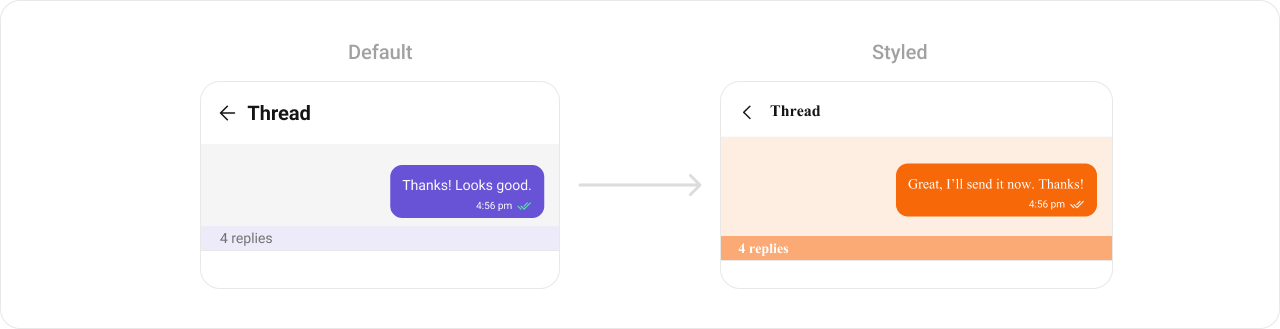 ```xml themes.xml lines theme={null}
```
```kotlin lines theme={null}
threadHeader.setStyle(R.style.CustomThreadHeaderStyle)
```
```java lines theme={null}
threadHeader.setStyle(R.style.CustomThreadHeaderStyle);
```
To know more such attributes, visit the [attributes file](https://github.com/cometchat/cometchat-uikit-android/blob/v5/chatuikit/src/main/res/values/attr_cometchat_thread_header.xml).
### Programmatic Style Properties
In addition to XML theme styles, the component exposes programmatic setters for fine-grained control:
| Method | Type | Description |
| ------------------------------- | --------------- | ---------------------------------------- |
| `setReplyCountBackgroundColor` | `@ColorInt int` | Background color of the reply count view |
| `setReplyCountTextColor` | `@ColorInt int` | Text color of the reply count view |
| `setReplyCountTextAppearance` | `@StyleRes int` | Text appearance of the reply count view |
| `setIncomingMessageBubbleStyle` | `@StyleRes int` | Style for incoming message bubbles |
| `setOutgoingMessageBubbleStyle` | `@StyleRes int` | Style for outgoing message bubbles |
## Customization Matrix
| What to change | Where | Property/API | Example |
| ------------------------------------------ | ----------------- | ------------------------------------------------- | ------------------------------------------------------------------------------------------------ |
| Parent message | Activity/Fragment | `setParentMessage(BaseMessage)` | `threadHeader.setParentMessage(baseMessage)` |
| Reaction visibility | Activity/Fragment | `setReactionVisibility(int)` | `.setReactionVisibility(View.GONE)` |
| Avatar visibility | Activity/Fragment | `setAvatarVisibility(int)` | `.setAvatarVisibility(View.GONE)` |
| Receipt visibility | Activity/Fragment | `setReceiptsVisibility(int)` | `.setReceiptsVisibility(View.GONE)` |
| Reply count visibility | Activity/Fragment | `setReplyCountVisibility(int)` | `.setReplyCountVisibility(View.GONE)` |
| Reply count bar visibility | Activity/Fragment | `setReplyCountBarVisibility(int)` | `.setReplyCountBarVisibility(View.GONE)` |
| Max height | Activity/Fragment | `setMaxHeight(int)` | `.setMaxHeight(500)` |
| Bubble alignment | Activity/Fragment | `setAlignment(MessageListAlignment)` | `.setAlignment(UIKitConstants.MessageListAlignment.LEFT_ALIGNED)` |
| Time format | Activity/Fragment | `setTimeFormat(SimpleDateFormat)` | `.setTimeFormat(new SimpleDateFormat("hh:mm a", Locale.getDefault()))` |
| Text formatters | Activity/Fragment | `setTextFormatters(List)` | `.setTextFormatters(formatterList)` |
| Message templates (replace) | Activity/Fragment | `setTemplates(List)` | `.setTemplates(templateList)` |
| Message templates (add) | Activity/Fragment | `addTemplate(CometChatMessageTemplate)` | `.addTemplate(template)` |
| Outgoing bubble style | `themes.xml` | `cometchatThreadHeaderOutgoingMessageBubbleStyle` | `
```xml themes.xml lines theme={null}
```
```kotlin lines theme={null}
threadHeader.setStyle(R.style.CustomThreadHeaderStyle)
```
```java lines theme={null}
threadHeader.setStyle(R.style.CustomThreadHeaderStyle);
```
To know more such attributes, visit the [attributes file](https://github.com/cometchat/cometchat-uikit-android/blob/v5/chatuikit/src/main/res/values/attr_cometchat_thread_header.xml).
### Programmatic Style Properties
In addition to XML theme styles, the component exposes programmatic setters for fine-grained control:
| Method | Type | Description |
| ------------------------------- | --------------- | ---------------------------------------- |
| `setReplyCountBackgroundColor` | `@ColorInt int` | Background color of the reply count view |
| `setReplyCountTextColor` | `@ColorInt int` | Text color of the reply count view |
| `setReplyCountTextAppearance` | `@StyleRes int` | Text appearance of the reply count view |
| `setIncomingMessageBubbleStyle` | `@StyleRes int` | Style for incoming message bubbles |
| `setOutgoingMessageBubbleStyle` | `@StyleRes int` | Style for outgoing message bubbles |
## Customization Matrix
| What to change | Where | Property/API | Example |
| ------------------------------------------ | ----------------- | ------------------------------------------------- | ------------------------------------------------------------------------------------------------ |
| Parent message | Activity/Fragment | `setParentMessage(BaseMessage)` | `threadHeader.setParentMessage(baseMessage)` |
| Reaction visibility | Activity/Fragment | `setReactionVisibility(int)` | `.setReactionVisibility(View.GONE)` |
| Avatar visibility | Activity/Fragment | `setAvatarVisibility(int)` | `.setAvatarVisibility(View.GONE)` |
| Receipt visibility | Activity/Fragment | `setReceiptsVisibility(int)` | `.setReceiptsVisibility(View.GONE)` |
| Reply count visibility | Activity/Fragment | `setReplyCountVisibility(int)` | `.setReplyCountVisibility(View.GONE)` |
| Reply count bar visibility | Activity/Fragment | `setReplyCountBarVisibility(int)` | `.setReplyCountBarVisibility(View.GONE)` |
| Max height | Activity/Fragment | `setMaxHeight(int)` | `.setMaxHeight(500)` |
| Bubble alignment | Activity/Fragment | `setAlignment(MessageListAlignment)` | `.setAlignment(UIKitConstants.MessageListAlignment.LEFT_ALIGNED)` |
| Time format | Activity/Fragment | `setTimeFormat(SimpleDateFormat)` | `.setTimeFormat(new SimpleDateFormat("hh:mm a", Locale.getDefault()))` |
| Text formatters | Activity/Fragment | `setTextFormatters(List)` | `.setTextFormatters(formatterList)` |
| Message templates (replace) | Activity/Fragment | `setTemplates(List)` | `.setTemplates(templateList)` |
| Message templates (add) | Activity/Fragment | `addTemplate(CometChatMessageTemplate)` | `.addTemplate(template)` |
| Outgoing bubble style | `themes.xml` | `cometchatThreadHeaderOutgoingMessageBubbleStyle` | `- @style/CustomOutgoingStyle
` |
| Incoming bubble style | `themes.xml` | `cometchatThreadHeaderIncomingMessageBubbleStyle` | `- @style/CustomIncomingStyle
` |
| Header background color | `themes.xml` | `cometchatThreadHeaderBackgroundColor` | `- #FEEDE1
` |
| Reply count text color | `themes.xml` | `cometchatThreadHeaderReplyCountTextColor` | `- #F76808
` |
| Reply count background color | `themes.xml` | `cometchatThreadHeaderReplyCountBackgroundColor` | `- #FEEDE1
` |
| Apply a custom style | Activity/Fragment | `setStyle(int styleRes)` | `threadHeader.setStyle(R.style.CustomThreadHeaderStyle)` |
| Incoming bubble style (programmatic) | Activity/Fragment | `setIncomingMessageBubbleStyle(int)` | `.setIncomingMessageBubbleStyle(R.style.CustomIncomingStyle)` |
| Outgoing bubble style (programmatic) | Activity/Fragment | `setOutgoingMessageBubbleStyle(int)` | `.setOutgoingMessageBubbleStyle(R.style.CustomOutgoingStyle)` |
| Reply count background (programmatic) | Activity/Fragment | `setReplyCountBackgroundColor(int)` | `.setReplyCountBackgroundColor(Color.parseColor("#FEEDE1"))` |
| Reply count text color (programmatic) | Activity/Fragment | `setReplyCountTextColor(int)` | `.setReplyCountTextColor(Color.parseColor("#F76808"))` |
| Reply count text appearance (programmatic) | Activity/Fragment | `setReplyCountTextAppearance(int)` | `.setReplyCountTextAppearance(R.style.CustomTextAppearance)` |
| Internal adapter access | Activity/Fragment | `getAdapter()` | Advanced use only |
## Next Steps
Display messages in a conversation
Display user/group info in the toolbar
Rich input for sending messages
Browse recent conversations