> ## Documentation Index
> Fetch the complete documentation index at: https://cometchat-22654f5b-docs-rn-guide-message-privately.mintlify.site/llms.txt
> Use this file to discover all available pages before exploring further.
# Outgoing Call
> Display CometChat Android UI Kit outgoing call screens with recipient details, cancel actions, custom sounds, and outgoing call callbacks.
```json theme={null}
{
"component": "CometChatOutgoingCall",
"package": "com.cometchat.chatuikit.calls.outgoingcall",
"xmlElement": "",
"description": "Full-screen outgoing call UI with recipient avatar, name, call status, and end-call button.",
"primaryOutput": {
"method": "setOnEndCallClick",
"type": "OnClick"
},
"methods": {
"data": {
"setCall": {
"type": "Call",
"note": "Sets the call object and extracts the receiver User automatically"
},
"setUser": {
"type": "User",
"note": "Sets the user directly (uid, name, avatar required)"
}
},
"callbacks": {
"setOnEndCallClick": "OnClick",
"setOnError": "OnError"
},
"functionality": {
"disableSoundForCall": { "type": "boolean", "default": "false" },
"setCustomSoundForCalls": { "type": "@RawRes int", "default": "SDK default" }
},
"viewSlots": {
"setTitleView": "Function2 — title text area",
"setSubtitleView": "Function2 — subtitle text area",
"setAvatarView": "Function2 — avatar / profile picture area",
"setEndCallView": "Function2 — end-call button area"
},
"advanced": {
"setCallSettingsBuilder": "CometChatCalls.CallSettingsBuilder — ongoing call configuration",
"getViewModel": "OutgoingViewModel — internal ViewModel access"
},
"style": {
"setStyle": {
"type": "@StyleRes int",
"parent": "CometChatOutgoingCallStyle"
}
}
},
"events": [
{
"name": "CometChatCallEvents.ccCallAccepted",
"payload": "Call",
"description": "Outgoing call was accepted by the receiver"
},
{
"name": "CometChatCallEvents.ccCallRejected",
"payload": "Call",
"description": "Outgoing call was rejected by the receiver"
}
],
"sdkListeners": [
"onOutgoingCallAccepted",
"onOutgoingCallRejected"
]
}
```
## Where It Fits
`CometChatOutgoingCall` is a call-initiation component. It renders the outgoing call screen and transitions to the ongoing call screen when the receiver accepts. Wire it to `CometChatCallEvents` to handle call-accepted and call-rejected transitions.
```kotlin CallActivity.kt lines theme={null}
class CallActivity : AppCompatActivity() {
private lateinit var outgoingCall: CometChatOutgoingCall
override fun onCreate(savedInstanceState: Bundle?) {
super.onCreate(savedInstanceState)
setContentView(R.layout.activity_call)
outgoingCall = findViewById(R.id.outgoing_call)
outgoingCall.setCall(call) // pass the Call object from CometChat SDK
}
}
```
```java CallActivity.java lines theme={null}
public class CallActivity extends AppCompatActivity {
private CometChatOutgoingCall outgoingCall;
@Override
protected void onCreate(Bundle savedInstanceState) {
super.onCreate(savedInstanceState);
setContentView(R.layout.activity_call);
outgoingCall = findViewById(R.id.outgoing_call);
outgoingCall.setCall(call); // pass the Call object from CometChat SDK
}
}
```
## Quick Start
Add the component to your layout XML:
```xml layout_activity.xml lines theme={null}
```
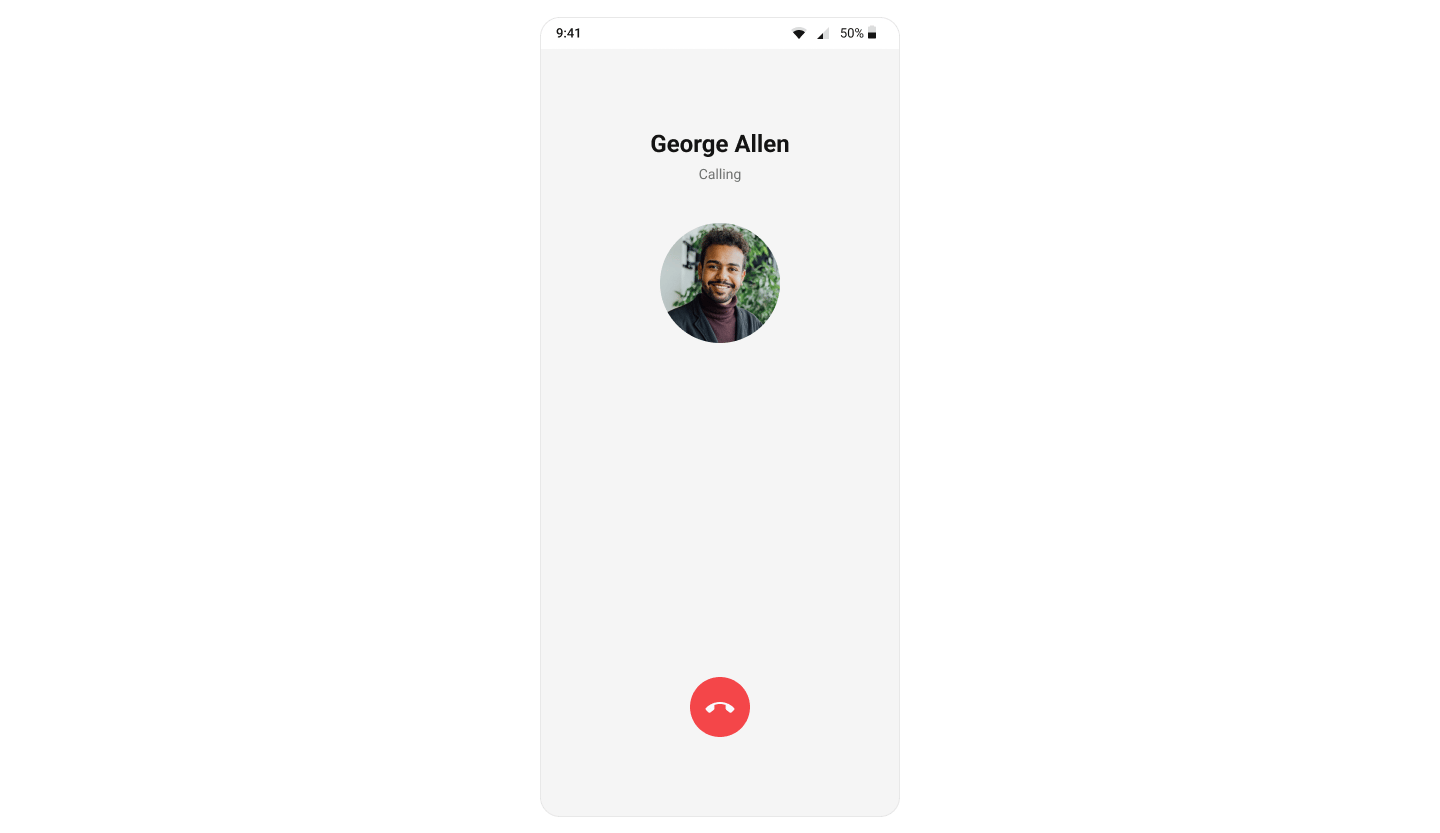 Prerequisites: CometChat SDK initialized with `CometChatUIKit.init()`, a user logged in, and the `cometchat-chat-uikit-android` dependency added.
To add programmatically in an Activity:
```kotlin YourActivity.kt lines theme={null}
private lateinit var cometchatOutgoingCall: CometChatOutgoingCall
override fun onCreate(savedInstanceState: Bundle?) {
super.onCreate(savedInstanceState)
cometchatOutgoingCall = CometChatOutgoingCall(this)
cometchatOutgoingCall.setCall(call) // Required — set the Call object
setContentView(cometchatOutgoingCall)
}
```
```java YourActivity.java lines theme={null}
CometChatOutgoingCall cometchatOutgoingCall;
@Override
protected void onCreate(Bundle savedInstanceState) {
super.onCreate(savedInstanceState);
cometchatOutgoingCall = new CometChatOutgoingCall(this);
cometchatOutgoingCall.setCall(call); // Required — set the Call object
setContentView(cometchatOutgoingCall);
}
```
Or in a Fragment:
```kotlin YourFragment.kt lines theme={null}
private lateinit var cometchatOutgoingCall: CometChatOutgoingCall
override fun onCreateView(
inflater: LayoutInflater,
container: ViewGroup?,
savedInstanceState: Bundle?
): View {
cometchatOutgoingCall = CometChatOutgoingCall(requireContext())
cometchatOutgoingCall.setCall(call) // Required — set the Call object
return cometchatOutgoingCall
}
```
```java YourFragment.java lines theme={null}
CometChatOutgoingCall cometchatOutgoingCall;
@Override
public View onCreateView(@NonNull LayoutInflater inflater, ViewGroup container, Bundle savedInstanceState) {
cometchatOutgoingCall = new CometChatOutgoingCall(requireContext());
cometchatOutgoingCall.setCall(call); // Required — set the Call object
return cometchatOutgoingCall;
}
```
## Actions and Events
### Callback Methods
#### `setOnEndCallClick`
Fires when the end-call button is tapped. Default: cancels the outgoing call via the SDK.
```kotlin YourActivity.kt lines theme={null}
cometchatOutgoingCall.setOnEndCallClick(OnClick {
// Your custom end-call logic
})
```
```java YourActivity.java lines theme={null}
cometchatOutgoingCall.setOnEndCallClick(new OnClick() {
@Override
public void onClick() {
// Your custom end-call logic
}
});
```
> **What this does:** Replaces the default end-call button behavior. When the user taps the end-call button, your custom `OnClick` lambda executes instead of the built-in call cancellation.
#### `setOnError`
Fires on internal errors (network failure, auth issue, SDK exception).
```kotlin YourActivity.kt lines theme={null}
cometchatOutgoingCall.setOnError(object : OnError {
override fun onError(context: Context, e: CometChatException) {
// Your error handling logic
}
})
```
```java YourActivity.java lines theme={null}
cometchatOutgoingCall.setOnError(new OnError() {
@Override
public void onError(CometChatException cometchatException) {
// Your error handling logic
}
});
```
> **What this does:** Registers an error callback on the `CometChatOutgoingCall` instance. When an error occurs within the component, the `onError` method is invoked with the `CometChatException` containing error details.
* **Verify**: After setting an action callback, trigger the corresponding user interaction (tap end-call, cause an error) and confirm your custom logic executes instead of the default behavior.
### Global UI Events (CometChatCallEvents)
`CometChatCallEvents` emits events subscribable from anywhere in the application. Add a listener and remove it when no longer needed.
| Event | Fires when | Payload |
| ---------------- | --------------------------------------------- | ------- |
| `ccCallAccepted` | The outgoing call is accepted by the receiver | `Call` |
| `ccCallRejected` | The outgoing call is rejected by the receiver | `Call` |
```kotlin Add Listener lines theme={null}
CometChatCallEvents.addListener("LISTENER_TAG", object : CometChatCallEvents() {
override fun ccCallAccepted(call: Call) {
super.ccCallAccepted(call)
}
override fun ccCallRejected(call: Call) {
super.ccCallRejected(call)
}
})
```
Remove Listener
```
CometChatCallEvents.removeListener("LISTENER_TAG")
```
```java Add Listener lines theme={null}
CometChatCallEvents.addListener("LISTENER_TAG", new CometChatCallEvents() {
@Override
public void ccCallAccepted(Call call) {
super.ccCallAccepted(call);
}
@Override
public void ccCallRejected(Call call) {
super.ccCallRejected(call);
}
});
```
Remove Listener
```
CometChatCallEvents.removeListener("LISTENER_TAG");
```
### SDK Events
The component listens to SDK call events internally. No manual attachment needed unless additional side effects are required.
| SDK Listener | Internal behavior |
| ------------------------ | ------------------------------------------------------- |
| `onOutgoingCallAccepted` | Transitions to the ongoing call screen |
| `onOutgoingCallRejected` | Finishes the activity or invokes the back-press handler |
## Functionality
Small functional customizations for sound and call behavior.
| Method | Description | Code |
| ------------------------ | ----------------------------------------------------------- | ------------------------------------------------- |
| `disableSoundForCall` | Enables or disables the outgoing call ringtone | `.disableSoundForCall(true);` |
| `setCustomSoundForCalls` | Sets a custom sound resource for the outgoing call ringtone | `.setCustomSoundForCalls(R.raw.custom_ringtone);` |
* **Verify**: After calling `disableSoundForCall(true)`, initiate an outgoing call and confirm no ringtone plays.
## Custom View Slots
Each slot replaces a section of the default UI. All view slots accept a `Function2` that receives the current context and `Call` object and returns a custom `View`.
| Slot | Method | Replaces |
| ------------- | ------------------------------------------------- | ---------------------------------- |
| Title view | `setTitleView(Function2)` | Name / title text |
| Subtitle view | `setSubtitleView(Function2)` | Subtitle text (e.g., "Calling...") |
| Avatar view | `setAvatarView(Function2)` | Avatar / profile picture area |
| End-call view | `setEndCallView(Function2)` | End-call button |
### `setTitleView`
Replace the name / title text area.
```kotlin YourActivity.kt lines theme={null}
cometchatOutgoingCall.setTitleView(object : Function2 {
override fun apply(context: Context?, call: Call?): View? {
return null
}
})
```
```java YourActivity.java lines theme={null}
cometchatOutgoingCall.setTitleView((context, call) -> {
return null;
});
```
> **What this does:** Registers a callback that receives the `Context` and `Call` object and returns a custom `View` to replace the default title area on the outgoing call screen.
Example with sender and receiver names:
Prerequisites: CometChat SDK initialized with `CometChatUIKit.init()`, a user logged in, and the `cometchat-chat-uikit-android` dependency added.
To add programmatically in an Activity:
```kotlin YourActivity.kt lines theme={null}
private lateinit var cometchatOutgoingCall: CometChatOutgoingCall
override fun onCreate(savedInstanceState: Bundle?) {
super.onCreate(savedInstanceState)
cometchatOutgoingCall = CometChatOutgoingCall(this)
cometchatOutgoingCall.setCall(call) // Required — set the Call object
setContentView(cometchatOutgoingCall)
}
```
```java YourActivity.java lines theme={null}
CometChatOutgoingCall cometchatOutgoingCall;
@Override
protected void onCreate(Bundle savedInstanceState) {
super.onCreate(savedInstanceState);
cometchatOutgoingCall = new CometChatOutgoingCall(this);
cometchatOutgoingCall.setCall(call); // Required — set the Call object
setContentView(cometchatOutgoingCall);
}
```
Or in a Fragment:
```kotlin YourFragment.kt lines theme={null}
private lateinit var cometchatOutgoingCall: CometChatOutgoingCall
override fun onCreateView(
inflater: LayoutInflater,
container: ViewGroup?,
savedInstanceState: Bundle?
): View {
cometchatOutgoingCall = CometChatOutgoingCall(requireContext())
cometchatOutgoingCall.setCall(call) // Required — set the Call object
return cometchatOutgoingCall
}
```
```java YourFragment.java lines theme={null}
CometChatOutgoingCall cometchatOutgoingCall;
@Override
public View onCreateView(@NonNull LayoutInflater inflater, ViewGroup container, Bundle savedInstanceState) {
cometchatOutgoingCall = new CometChatOutgoingCall(requireContext());
cometchatOutgoingCall.setCall(call); // Required — set the Call object
return cometchatOutgoingCall;
}
```
## Actions and Events
### Callback Methods
#### `setOnEndCallClick`
Fires when the end-call button is tapped. Default: cancels the outgoing call via the SDK.
```kotlin YourActivity.kt lines theme={null}
cometchatOutgoingCall.setOnEndCallClick(OnClick {
// Your custom end-call logic
})
```
```java YourActivity.java lines theme={null}
cometchatOutgoingCall.setOnEndCallClick(new OnClick() {
@Override
public void onClick() {
// Your custom end-call logic
}
});
```
> **What this does:** Replaces the default end-call button behavior. When the user taps the end-call button, your custom `OnClick` lambda executes instead of the built-in call cancellation.
#### `setOnError`
Fires on internal errors (network failure, auth issue, SDK exception).
```kotlin YourActivity.kt lines theme={null}
cometchatOutgoingCall.setOnError(object : OnError {
override fun onError(context: Context, e: CometChatException) {
// Your error handling logic
}
})
```
```java YourActivity.java lines theme={null}
cometchatOutgoingCall.setOnError(new OnError() {
@Override
public void onError(CometChatException cometchatException) {
// Your error handling logic
}
});
```
> **What this does:** Registers an error callback on the `CometChatOutgoingCall` instance. When an error occurs within the component, the `onError` method is invoked with the `CometChatException` containing error details.
* **Verify**: After setting an action callback, trigger the corresponding user interaction (tap end-call, cause an error) and confirm your custom logic executes instead of the default behavior.
### Global UI Events (CometChatCallEvents)
`CometChatCallEvents` emits events subscribable from anywhere in the application. Add a listener and remove it when no longer needed.
| Event | Fires when | Payload |
| ---------------- | --------------------------------------------- | ------- |
| `ccCallAccepted` | The outgoing call is accepted by the receiver | `Call` |
| `ccCallRejected` | The outgoing call is rejected by the receiver | `Call` |
```kotlin Add Listener lines theme={null}
CometChatCallEvents.addListener("LISTENER_TAG", object : CometChatCallEvents() {
override fun ccCallAccepted(call: Call) {
super.ccCallAccepted(call)
}
override fun ccCallRejected(call: Call) {
super.ccCallRejected(call)
}
})
```
Remove Listener
```
CometChatCallEvents.removeListener("LISTENER_TAG")
```
```java Add Listener lines theme={null}
CometChatCallEvents.addListener("LISTENER_TAG", new CometChatCallEvents() {
@Override
public void ccCallAccepted(Call call) {
super.ccCallAccepted(call);
}
@Override
public void ccCallRejected(Call call) {
super.ccCallRejected(call);
}
});
```
Remove Listener
```
CometChatCallEvents.removeListener("LISTENER_TAG");
```
### SDK Events
The component listens to SDK call events internally. No manual attachment needed unless additional side effects are required.
| SDK Listener | Internal behavior |
| ------------------------ | ------------------------------------------------------- |
| `onOutgoingCallAccepted` | Transitions to the ongoing call screen |
| `onOutgoingCallRejected` | Finishes the activity or invokes the back-press handler |
## Functionality
Small functional customizations for sound and call behavior.
| Method | Description | Code |
| ------------------------ | ----------------------------------------------------------- | ------------------------------------------------- |
| `disableSoundForCall` | Enables or disables the outgoing call ringtone | `.disableSoundForCall(true);` |
| `setCustomSoundForCalls` | Sets a custom sound resource for the outgoing call ringtone | `.setCustomSoundForCalls(R.raw.custom_ringtone);` |
* **Verify**: After calling `disableSoundForCall(true)`, initiate an outgoing call and confirm no ringtone plays.
## Custom View Slots
Each slot replaces a section of the default UI. All view slots accept a `Function2` that receives the current context and `Call` object and returns a custom `View`.
| Slot | Method | Replaces |
| ------------- | ------------------------------------------------- | ---------------------------------- |
| Title view | `setTitleView(Function2)` | Name / title text |
| Subtitle view | `setSubtitleView(Function2)` | Subtitle text (e.g., "Calling...") |
| Avatar view | `setAvatarView(Function2)` | Avatar / profile picture area |
| End-call view | `setEndCallView(Function2)` | End-call button |
### `setTitleView`
Replace the name / title text area.
```kotlin YourActivity.kt lines theme={null}
cometchatOutgoingCall.setTitleView(object : Function2 {
override fun apply(context: Context?, call: Call?): View? {
return null
}
})
```
```java YourActivity.java lines theme={null}
cometchatOutgoingCall.setTitleView((context, call) -> {
return null;
});
```
> **What this does:** Registers a callback that receives the `Context` and `Call` object and returns a custom `View` to replace the default title area on the outgoing call screen.
Example with sender and receiver names:
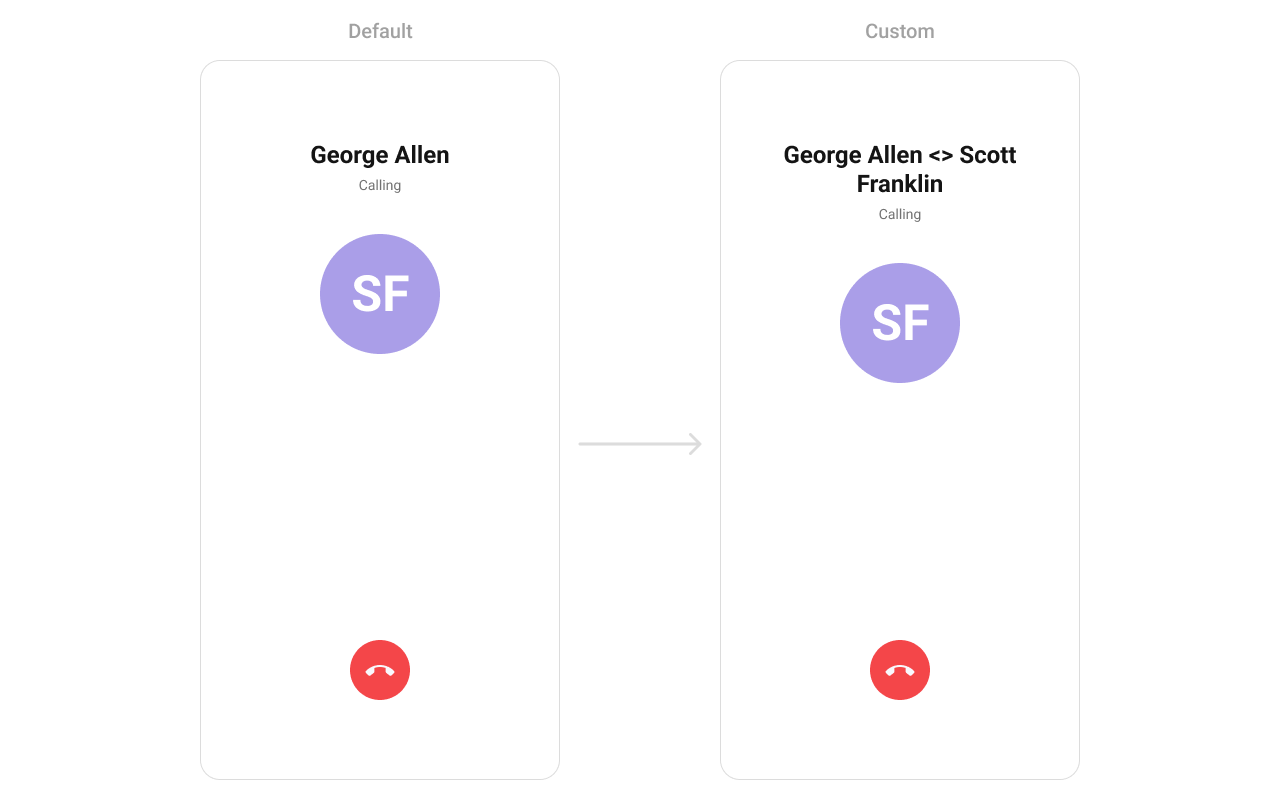 Create a `custom_title_view.xml` layout:
```xml custom_title_view.xml lines theme={null}
```
```kotlin YourActivity.kt lines theme={null}
cometchatOutgoingCall.setTitleView(object : Function2 {
override fun apply(context: Context?, call: Call?): View? {
val titleView: View = LayoutInflater.from(context).inflate(R.layout.custom_title_view, null)
val tvTitle = titleView.findViewById(R.id.title_text)
val user = call?.callReceiver as User
tvTitle.text = user.name + " <> " + call.sender.uid
return titleView
}
})
```
```java YourActivity.java lines theme={null}
cometchatOutgoingCall.setTitleView(new Function2() {
@Override
public View apply(Context context, Call call) {
View titleView = LayoutInflater.from(context).inflate(R.layout.custom_title_view, null);
TextView tvTitle = titleView.findViewById(R.id.title_text);
User user = (User) call.getCallReceiver();
tvTitle.setText(user.getName() + " <> " + call.getSender().getUid());
return titleView;
}
});
```
> **What this does:** Inflates the `custom_title_view` layout, retrieves the call receiver's name and the sender's UID, and sets the title text to display them separated by `" <> "`.
### `setSubtitleView`
Replace the subtitle text below the title.
```kotlin YourActivity.kt lines theme={null}
cometchatOutgoingCall.setSubtitleView(object : Function2 {
override fun apply(context: Context?, call: Call?): View? {
return null
}
})
```
```java YourActivity.java lines theme={null}
cometchatOutgoingCall.setSubtitleView((context, call) -> {
return null;
});
```
> **What this does:** Registers a callback that receives the `Context` and `Call` object and returns a custom `View` to replace the default subtitle area on the outgoing call screen.
Example with call-type icon and "Calling...." text:
Create a `custom_subtitle_view.xml` layout:
```xml custom_subtitle_view.xml lines theme={null}
```
```kotlin YourActivity.kt lines theme={null}
cometchatOutgoingCall.setSubtitleView(object : Function2 {
override fun apply(context: Context?, call: Call?): View? {
val subtitleView: View = LayoutInflater.from(context).inflate(R.layout.custom_subtitle_view, null)
val tvTitle = subtitleView.findViewById(R.id.subtitle_text)
tvTitle.text = "Calling...."
val ivCall = subtitleView.findViewById(R.id.call_iv)
if (CometChatConstants.CALL_TYPE_AUDIO == call?.type) {
ivCall.setImageResource(com.cometchat.chatuikit.R.drawable.cometchat_ic_call_voice)
} else {
ivCall.setImageResource(com.cometchat.chatuikit.R.drawable.cometchat_ic_call_video)
}
val layoutParams = LinearLayout.LayoutParams(
ViewGroup.LayoutParams.MATCH_PARENT,
ViewGroup.LayoutParams.WRAP_CONTENT
)
layoutParams.gravity = Gravity.CENTER_VERTICAL
subtitleView.layoutParams = layoutParams
return subtitleView
}
})
```
```java YourActivity.java lines theme={null}
cometchatOutgoingCall.setSubtitleView(new Function2() {
@Override
public View apply(Context context, Call call) {
View subtitleView = LayoutInflater.from(context).inflate(R.layout.custom_subtitle_view, null);
TextView tvTitle = subtitleView.findViewById(R.id.subtitle_text);
tvTitle.setText("Calling....");
ImageView ivCall = subtitleView.findViewById(R.id.call_iv);
if (CometChatConstants.CALL_TYPE_AUDIO.equals(call.getType())) {
ivCall.setImageResource(com.cometchat.chatuikit.R.drawable.cometchat_ic_call_voice);
} else {
ivCall.setImageResource(com.cometchat.chatuikit.R.drawable.cometchat_ic_call_video);
}
LinearLayout.LayoutParams layoutParams = new LinearLayout.LayoutParams(
ViewGroup.LayoutParams.MATCH_PARENT,
ViewGroup.LayoutParams.WRAP_CONTENT
);
layoutParams.gravity = Gravity.CENTER_VERTICAL;
subtitleView.setLayoutParams(layoutParams);
return subtitleView;
}
});
```
> **What this does:** Inflates the `custom_subtitle_view` layout, sets the subtitle text to "Calling....", and displays a voice call icon if the call type is `CALL_TYPE_AUDIO`, or a video call icon otherwise.
### `setAvatarView`
Replace the avatar / profile picture area.
```kotlin YourActivity.kt lines theme={null}
cometchatOutgoingCall.setAvatarView(object : Function2 {
override fun apply(context: Context?, call: Call?): View? {
return null
}
})
```
```java YourActivity.java lines theme={null}
cometchatOutgoingCall.setAvatarView((context, call) -> {
return null;
});
```
> **What this does:** Registers a callback that receives the `Context` and `Call` object and returns a custom `View` to replace the default avatar area on the outgoing call screen.
Example with admin badge:
Create a `custom_title_view.xml` layout:
```xml custom_title_view.xml lines theme={null}
```
```kotlin YourActivity.kt lines theme={null}
cometchatOutgoingCall.setTitleView(object : Function2 {
override fun apply(context: Context?, call: Call?): View? {
val titleView: View = LayoutInflater.from(context).inflate(R.layout.custom_title_view, null)
val tvTitle = titleView.findViewById(R.id.title_text)
val user = call?.callReceiver as User
tvTitle.text = user.name + " <> " + call.sender.uid
return titleView
}
})
```
```java YourActivity.java lines theme={null}
cometchatOutgoingCall.setTitleView(new Function2() {
@Override
public View apply(Context context, Call call) {
View titleView = LayoutInflater.from(context).inflate(R.layout.custom_title_view, null);
TextView tvTitle = titleView.findViewById(R.id.title_text);
User user = (User) call.getCallReceiver();
tvTitle.setText(user.getName() + " <> " + call.getSender().getUid());
return titleView;
}
});
```
> **What this does:** Inflates the `custom_title_view` layout, retrieves the call receiver's name and the sender's UID, and sets the title text to display them separated by `" <> "`.
### `setSubtitleView`
Replace the subtitle text below the title.
```kotlin YourActivity.kt lines theme={null}
cometchatOutgoingCall.setSubtitleView(object : Function2 {
override fun apply(context: Context?, call: Call?): View? {
return null
}
})
```
```java YourActivity.java lines theme={null}
cometchatOutgoingCall.setSubtitleView((context, call) -> {
return null;
});
```
> **What this does:** Registers a callback that receives the `Context` and `Call` object and returns a custom `View` to replace the default subtitle area on the outgoing call screen.
Example with call-type icon and "Calling...." text:
Create a `custom_subtitle_view.xml` layout:
```xml custom_subtitle_view.xml lines theme={null}
```
```kotlin YourActivity.kt lines theme={null}
cometchatOutgoingCall.setSubtitleView(object : Function2 {
override fun apply(context: Context?, call: Call?): View? {
val subtitleView: View = LayoutInflater.from(context).inflate(R.layout.custom_subtitle_view, null)
val tvTitle = subtitleView.findViewById(R.id.subtitle_text)
tvTitle.text = "Calling...."
val ivCall = subtitleView.findViewById(R.id.call_iv)
if (CometChatConstants.CALL_TYPE_AUDIO == call?.type) {
ivCall.setImageResource(com.cometchat.chatuikit.R.drawable.cometchat_ic_call_voice)
} else {
ivCall.setImageResource(com.cometchat.chatuikit.R.drawable.cometchat_ic_call_video)
}
val layoutParams = LinearLayout.LayoutParams(
ViewGroup.LayoutParams.MATCH_PARENT,
ViewGroup.LayoutParams.WRAP_CONTENT
)
layoutParams.gravity = Gravity.CENTER_VERTICAL
subtitleView.layoutParams = layoutParams
return subtitleView
}
})
```
```java YourActivity.java lines theme={null}
cometchatOutgoingCall.setSubtitleView(new Function2() {
@Override
public View apply(Context context, Call call) {
View subtitleView = LayoutInflater.from(context).inflate(R.layout.custom_subtitle_view, null);
TextView tvTitle = subtitleView.findViewById(R.id.subtitle_text);
tvTitle.setText("Calling....");
ImageView ivCall = subtitleView.findViewById(R.id.call_iv);
if (CometChatConstants.CALL_TYPE_AUDIO.equals(call.getType())) {
ivCall.setImageResource(com.cometchat.chatuikit.R.drawable.cometchat_ic_call_voice);
} else {
ivCall.setImageResource(com.cometchat.chatuikit.R.drawable.cometchat_ic_call_video);
}
LinearLayout.LayoutParams layoutParams = new LinearLayout.LayoutParams(
ViewGroup.LayoutParams.MATCH_PARENT,
ViewGroup.LayoutParams.WRAP_CONTENT
);
layoutParams.gravity = Gravity.CENTER_VERTICAL;
subtitleView.setLayoutParams(layoutParams);
return subtitleView;
}
});
```
> **What this does:** Inflates the `custom_subtitle_view` layout, sets the subtitle text to "Calling....", and displays a voice call icon if the call type is `CALL_TYPE_AUDIO`, or a video call icon otherwise.
### `setAvatarView`
Replace the avatar / profile picture area.
```kotlin YourActivity.kt lines theme={null}
cometchatOutgoingCall.setAvatarView(object : Function2 {
override fun apply(context: Context?, call: Call?): View? {
return null
}
})
```
```java YourActivity.java lines theme={null}
cometchatOutgoingCall.setAvatarView((context, call) -> {
return null;
});
```
> **What this does:** Registers a callback that receives the `Context` and `Call` object and returns a custom `View` to replace the default avatar area on the outgoing call screen.
Example with admin badge:
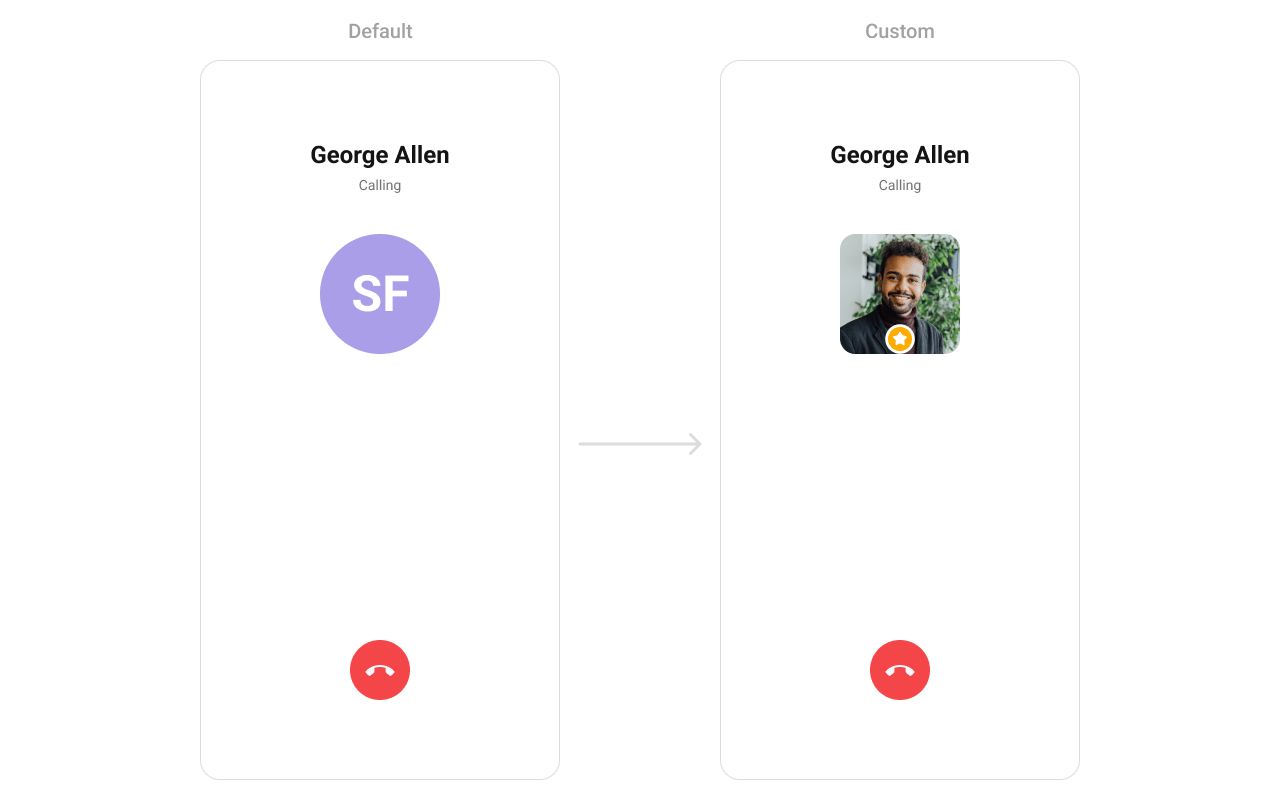 Create a `custom_avatar_view.xml` layout:
```xml custom_avatar_view.xml lines theme={null}
```
```kotlin YourActivity.kt lines theme={null}
cometchatOutgoingCall.setAvatarView(object : Function2 {
override fun apply(context: Context?, call: Call?): View? {
val avatarView: View = LayoutInflater.from(context).inflate(R.layout.custom_avatar_view, null)
val avatar = avatarView.findViewById(R.id.avatar)
val user = call?.receiver as User
avatar.setAvatar(user.uid, user.avatar)
val layoutParams = LinearLayout.LayoutParams(
ViewGroup.LayoutParams.MATCH_PARENT,
ViewGroup.LayoutParams.WRAP_CONTENT
)
layoutParams.gravity = Gravity.CENTER_VERTICAL
avatarView.layoutParams = layoutParams
return avatarView
}
})
```
```java YourActivity.java lines theme={null}
cometchatOutgoingCall.setAvatarView(new Function2() {
@Override
public View apply(Context context, Call call) {
View avatarView = LayoutInflater.from(context).inflate(R.layout.custom_avatar_view, null);
CometChatAvatar avatar = avatarView.findViewById(R.id.avatar);
User user = (User) call.getReceiver();
avatar.setAvatar(user.getUid(), user.getAvatar());
LinearLayout.LayoutParams layoutParams = new LinearLayout.LayoutParams(
ViewGroup.LayoutParams.MATCH_PARENT,
ViewGroup.LayoutParams.WRAP_CONTENT
);
layoutParams.gravity = Gravity.CENTER_VERTICAL;
avatarView.setLayoutParams(layoutParams);
return avatarView;
}
});
```
> **What this does:** Inflates the `custom_avatar_view` layout, retrieves the call receiver's UID and avatar URL, sets them on the `CometChatAvatar` widget, and applies centered layout params.
### `setEndCallView`
Replace the end-call button.
```kotlin YourActivity.kt lines theme={null}
cometchatOutgoingCall.setEndCallView(object : Function2 {
override fun apply(context: Context?, call: Call?): View? {
return null
}
})
```
```java YourActivity.java lines theme={null}
cometchatOutgoingCall.setEndCallView((context, call) -> {
return null;
});
```
> **What this does:** Registers a callback that receives the `Context` and `Call` object and returns a custom `View` to replace the default end-call button on the outgoing call screen.
Example with custom end-call card:
Create a `custom_avatar_view.xml` layout:
```xml custom_avatar_view.xml lines theme={null}
```
```kotlin YourActivity.kt lines theme={null}
cometchatOutgoingCall.setAvatarView(object : Function2 {
override fun apply(context: Context?, call: Call?): View? {
val avatarView: View = LayoutInflater.from(context).inflate(R.layout.custom_avatar_view, null)
val avatar = avatarView.findViewById(R.id.avatar)
val user = call?.receiver as User
avatar.setAvatar(user.uid, user.avatar)
val layoutParams = LinearLayout.LayoutParams(
ViewGroup.LayoutParams.MATCH_PARENT,
ViewGroup.LayoutParams.WRAP_CONTENT
)
layoutParams.gravity = Gravity.CENTER_VERTICAL
avatarView.layoutParams = layoutParams
return avatarView
}
})
```
```java YourActivity.java lines theme={null}
cometchatOutgoingCall.setAvatarView(new Function2() {
@Override
public View apply(Context context, Call call) {
View avatarView = LayoutInflater.from(context).inflate(R.layout.custom_avatar_view, null);
CometChatAvatar avatar = avatarView.findViewById(R.id.avatar);
User user = (User) call.getReceiver();
avatar.setAvatar(user.getUid(), user.getAvatar());
LinearLayout.LayoutParams layoutParams = new LinearLayout.LayoutParams(
ViewGroup.LayoutParams.MATCH_PARENT,
ViewGroup.LayoutParams.WRAP_CONTENT
);
layoutParams.gravity = Gravity.CENTER_VERTICAL;
avatarView.setLayoutParams(layoutParams);
return avatarView;
}
});
```
> **What this does:** Inflates the `custom_avatar_view` layout, retrieves the call receiver's UID and avatar URL, sets them on the `CometChatAvatar` widget, and applies centered layout params.
### `setEndCallView`
Replace the end-call button.
```kotlin YourActivity.kt lines theme={null}
cometchatOutgoingCall.setEndCallView(object : Function2 {
override fun apply(context: Context?, call: Call?): View? {
return null
}
})
```
```java YourActivity.java lines theme={null}
cometchatOutgoingCall.setEndCallView((context, call) -> {
return null;
});
```
> **What this does:** Registers a callback that receives the `Context` and `Call` object and returns a custom `View` to replace the default end-call button on the outgoing call screen.
Example with custom end-call card:
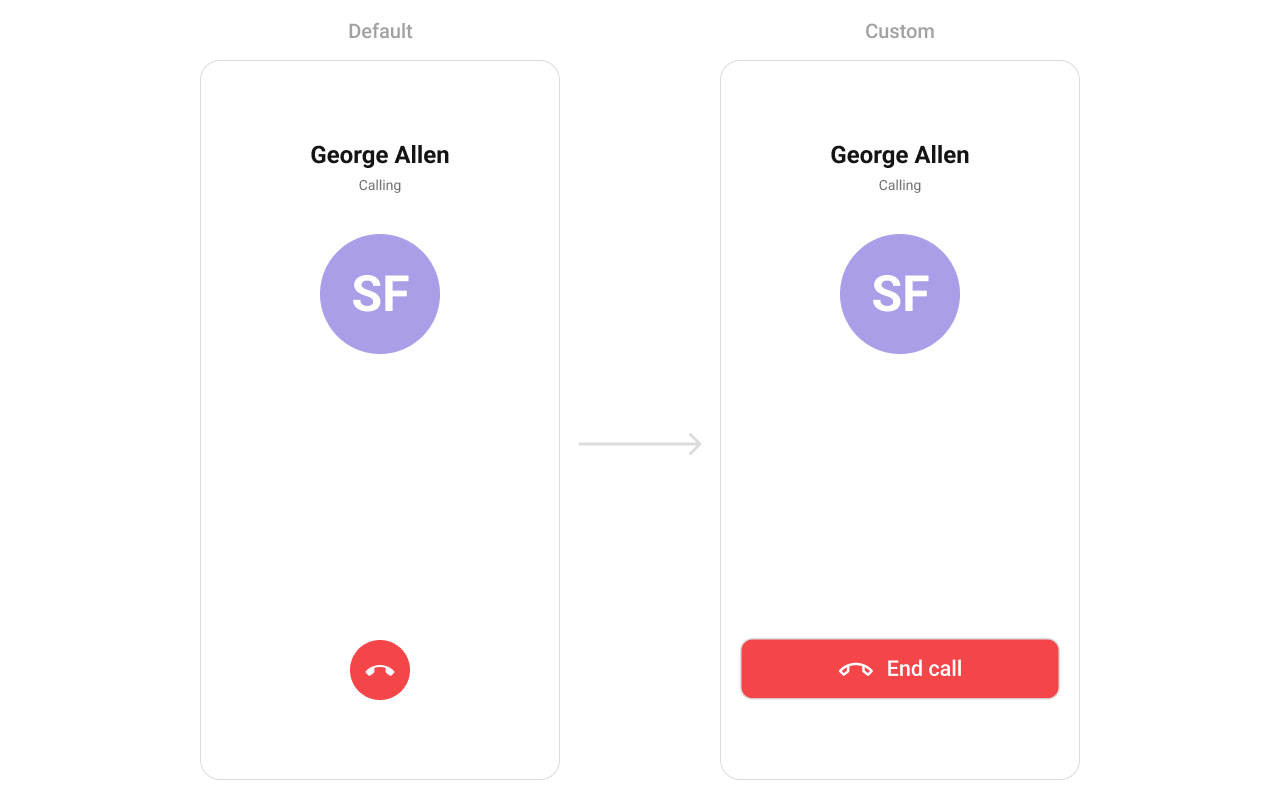 Create an `end_call_button.xml` layout:
```xml end_call_button.xml lines theme={null}
```
```kotlin YourActivity.kt lines theme={null}
cometchatOutgoingCall.setEndCallView(object : Function2 {
override fun apply(context: Context?, call: Call?): View? {
val endCallButtonView: View = LayoutInflater.from(context).inflate(R.layout.end_call_button, null)
endCallButtonView.setOnClickListener { Toast.makeText(context, "End call clicked", Toast.LENGTH_SHORT).show() }
val layoutParams = LinearLayout.LayoutParams(
ViewGroup.LayoutParams.MATCH_PARENT,
ViewGroup.LayoutParams.WRAP_CONTENT
)
layoutParams.bottomMargin = Utils.convertDpToPx(context, 40)
endCallButtonView.layoutParams = layoutParams
return endCallButtonView
}
})
```
```java YourActivity.java lines theme={null}
cometchatOutgoingCall.setEndCallView(new Function2() {
@Override
public View apply(Context context, Call call) {
View endCallButtonView = LayoutInflater.from(context).inflate(R.layout.end_call_button, null);
endCallButtonView.setOnClickListener(new View.OnClickListener() {
@Override
public void onClick(View v) {
Toast.makeText(context, "End call clicked", Toast.LENGTH_SHORT).show();
}
});
LinearLayout.LayoutParams layoutParams = new LinearLayout.LayoutParams(
ViewGroup.LayoutParams.MATCH_PARENT,
ViewGroup.LayoutParams.WRAP_CONTENT
);
layoutParams.bottomMargin = Utils.convertDpToPx(context, 40);
endCallButtonView.setLayoutParams(layoutParams);
return endCallButtonView;
}
});
```
> **What this does:** Inflates the `end_call_button` layout, attaches a click listener that shows a toast message "End call clicked", sets a 40dp bottom margin, and returns the custom end-call button view.
* **Verify**: After setting any custom view slot, confirm the custom view renders in the correct position on the outgoing call screen and that the data binding populates correctly.
## Common Patterns
### Silent outgoing call
```kotlin lines theme={null}
cometchatOutgoingCall.disableSoundForCall(true)
```
```java lines theme={null}
cometchatOutgoingCall.disableSoundForCall(true);
```
### Custom ringtone
```kotlin lines theme={null}
cometchatOutgoingCall.setCustomSoundForCalls(R.raw.custom_ringtone)
```
```java lines theme={null}
cometchatOutgoingCall.setCustomSoundForCalls(R.raw.custom_ringtone);
```
### Custom call settings for ongoing call
```kotlin lines theme={null}
val callSettingsBuilder = CometChatCalls.CallSettingsBuilder(this, true)
.setDefaultAudioMode("SPEAKER")
cometchatOutgoingCall.setCallSettingsBuilder(callSettingsBuilder)
```
```java lines theme={null}
CometChatCalls.CallSettingsBuilder callSettingsBuilder = new CometChatCalls.CallSettingsBuilder(this, true)
.setDefaultAudioMode("SPEAKER");
cometchatOutgoingCall.setCallSettingsBuilder(callSettingsBuilder);
```
### Handle end-call with custom navigation
```kotlin lines theme={null}
cometchatOutgoingCall.setOnEndCallClick(OnClick {
finish() // navigate back instead of default SDK rejection
})
```
```java lines theme={null}
cometchatOutgoingCall.setOnEndCallClick(() -> {
finish(); // navigate back instead of default SDK rejection
});
```
## Advanced Methods
### `setCall`
Sets the call object and extracts the receiver `User` automatically. Use this when you have a `Call` object from the SDK.
```kotlin lines theme={null}
cometChatOutgoingCall.setCall(call)
```
```java lines theme={null}
cometChatOutgoingCall.setCall(call);
```
> `setCall` internally extracts the receiver from the `Call` object and calls `setUser` with it. The component then displays the receiver's name and avatar.
### `setUser`
Sets the user directly when you don't have a `Call` object. The `uid`, `name`, and `avatar` fields are required.
```kotlin lines theme={null}
cometChatOutgoingCall.setUser(user)
```
```java lines theme={null}
cometChatOutgoingCall.setUser(user);
```
### `setCallSettingsBuilder`
Configures the ongoing call settings (audio mode, video settings, etc.) that apply once the call is accepted.
```kotlin lines theme={null}
val callSettingsBuilder = CometChatCalls.CallSettingsBuilder(this, true)
.setIsAudioOnly(true)
cometChatOutgoingCall.setCallSettingsBuilder(callSettingsBuilder)
```
```java lines theme={null}
CometChatCalls.CallSettingsBuilder callSettingsBuilder = new CometChatCalls.CallSettingsBuilder(this, true)
.setIsAudioOnly(true);
cometChatOutgoingCall.setCallSettingsBuilder(callSettingsBuilder);
```
### `setCustomSoundForCalls`
Sets a custom ringtone sound that plays while the outgoing call is ringing.
```kotlin lines theme={null}
cometChatOutgoingCall.setCustomSoundForCalls(R.raw.custom_ringtone)
```
```java lines theme={null}
cometChatOutgoingCall.setCustomSoundForCalls(R.raw.custom_ringtone);
```
### `disposeObservers`
Removes lifecycle observers manually. Normally handled automatically when the view detaches from the window.
```kotlin lines theme={null}
cometChatOutgoingCall.disposeObservers()
```
```java lines theme={null}
cometChatOutgoingCall.disposeObservers();
```
### Internal Access
| Method | Returns | Description |
| ---------------- | ------------------- | --------------------------------------------------- |
| `getViewModel()` | `OutgoingViewModel` | The ViewModel managing call state and SDK listeners |
> Use this only when the standard API is insufficient. Directly manipulating the ViewModel may conflict with the component's internal state management.
## Style
The component uses XML theme styles. Define a custom style with parent `CometChatOutgoingCallStyle` in `themes.xml`, then apply with `setStyle()`.
Create an `end_call_button.xml` layout:
```xml end_call_button.xml lines theme={null}
```
```kotlin YourActivity.kt lines theme={null}
cometchatOutgoingCall.setEndCallView(object : Function2 {
override fun apply(context: Context?, call: Call?): View? {
val endCallButtonView: View = LayoutInflater.from(context).inflate(R.layout.end_call_button, null)
endCallButtonView.setOnClickListener { Toast.makeText(context, "End call clicked", Toast.LENGTH_SHORT).show() }
val layoutParams = LinearLayout.LayoutParams(
ViewGroup.LayoutParams.MATCH_PARENT,
ViewGroup.LayoutParams.WRAP_CONTENT
)
layoutParams.bottomMargin = Utils.convertDpToPx(context, 40)
endCallButtonView.layoutParams = layoutParams
return endCallButtonView
}
})
```
```java YourActivity.java lines theme={null}
cometchatOutgoingCall.setEndCallView(new Function2() {
@Override
public View apply(Context context, Call call) {
View endCallButtonView = LayoutInflater.from(context).inflate(R.layout.end_call_button, null);
endCallButtonView.setOnClickListener(new View.OnClickListener() {
@Override
public void onClick(View v) {
Toast.makeText(context, "End call clicked", Toast.LENGTH_SHORT).show();
}
});
LinearLayout.LayoutParams layoutParams = new LinearLayout.LayoutParams(
ViewGroup.LayoutParams.MATCH_PARENT,
ViewGroup.LayoutParams.WRAP_CONTENT
);
layoutParams.bottomMargin = Utils.convertDpToPx(context, 40);
endCallButtonView.setLayoutParams(layoutParams);
return endCallButtonView;
}
});
```
> **What this does:** Inflates the `end_call_button` layout, attaches a click listener that shows a toast message "End call clicked", sets a 40dp bottom margin, and returns the custom end-call button view.
* **Verify**: After setting any custom view slot, confirm the custom view renders in the correct position on the outgoing call screen and that the data binding populates correctly.
## Common Patterns
### Silent outgoing call
```kotlin lines theme={null}
cometchatOutgoingCall.disableSoundForCall(true)
```
```java lines theme={null}
cometchatOutgoingCall.disableSoundForCall(true);
```
### Custom ringtone
```kotlin lines theme={null}
cometchatOutgoingCall.setCustomSoundForCalls(R.raw.custom_ringtone)
```
```java lines theme={null}
cometchatOutgoingCall.setCustomSoundForCalls(R.raw.custom_ringtone);
```
### Custom call settings for ongoing call
```kotlin lines theme={null}
val callSettingsBuilder = CometChatCalls.CallSettingsBuilder(this, true)
.setDefaultAudioMode("SPEAKER")
cometchatOutgoingCall.setCallSettingsBuilder(callSettingsBuilder)
```
```java lines theme={null}
CometChatCalls.CallSettingsBuilder callSettingsBuilder = new CometChatCalls.CallSettingsBuilder(this, true)
.setDefaultAudioMode("SPEAKER");
cometchatOutgoingCall.setCallSettingsBuilder(callSettingsBuilder);
```
### Handle end-call with custom navigation
```kotlin lines theme={null}
cometchatOutgoingCall.setOnEndCallClick(OnClick {
finish() // navigate back instead of default SDK rejection
})
```
```java lines theme={null}
cometchatOutgoingCall.setOnEndCallClick(() -> {
finish(); // navigate back instead of default SDK rejection
});
```
## Advanced Methods
### `setCall`
Sets the call object and extracts the receiver `User` automatically. Use this when you have a `Call` object from the SDK.
```kotlin lines theme={null}
cometChatOutgoingCall.setCall(call)
```
```java lines theme={null}
cometChatOutgoingCall.setCall(call);
```
> `setCall` internally extracts the receiver from the `Call` object and calls `setUser` with it. The component then displays the receiver's name and avatar.
### `setUser`
Sets the user directly when you don't have a `Call` object. The `uid`, `name`, and `avatar` fields are required.
```kotlin lines theme={null}
cometChatOutgoingCall.setUser(user)
```
```java lines theme={null}
cometChatOutgoingCall.setUser(user);
```
### `setCallSettingsBuilder`
Configures the ongoing call settings (audio mode, video settings, etc.) that apply once the call is accepted.
```kotlin lines theme={null}
val callSettingsBuilder = CometChatCalls.CallSettingsBuilder(this, true)
.setIsAudioOnly(true)
cometChatOutgoingCall.setCallSettingsBuilder(callSettingsBuilder)
```
```java lines theme={null}
CometChatCalls.CallSettingsBuilder callSettingsBuilder = new CometChatCalls.CallSettingsBuilder(this, true)
.setIsAudioOnly(true);
cometChatOutgoingCall.setCallSettingsBuilder(callSettingsBuilder);
```
### `setCustomSoundForCalls`
Sets a custom ringtone sound that plays while the outgoing call is ringing.
```kotlin lines theme={null}
cometChatOutgoingCall.setCustomSoundForCalls(R.raw.custom_ringtone)
```
```java lines theme={null}
cometChatOutgoingCall.setCustomSoundForCalls(R.raw.custom_ringtone);
```
### `disposeObservers`
Removes lifecycle observers manually. Normally handled automatically when the view detaches from the window.
```kotlin lines theme={null}
cometChatOutgoingCall.disposeObservers()
```
```java lines theme={null}
cometChatOutgoingCall.disposeObservers();
```
### Internal Access
| Method | Returns | Description |
| ---------------- | ------------------- | --------------------------------------------------- |
| `getViewModel()` | `OutgoingViewModel` | The ViewModel managing call state and SDK listeners |
> Use this only when the standard API is insufficient. Directly manipulating the ViewModel may conflict with the component's internal state management.
## Style
The component uses XML theme styles. Define a custom style with parent `CometChatOutgoingCallStyle` in `themes.xml`, then apply with `setStyle()`.
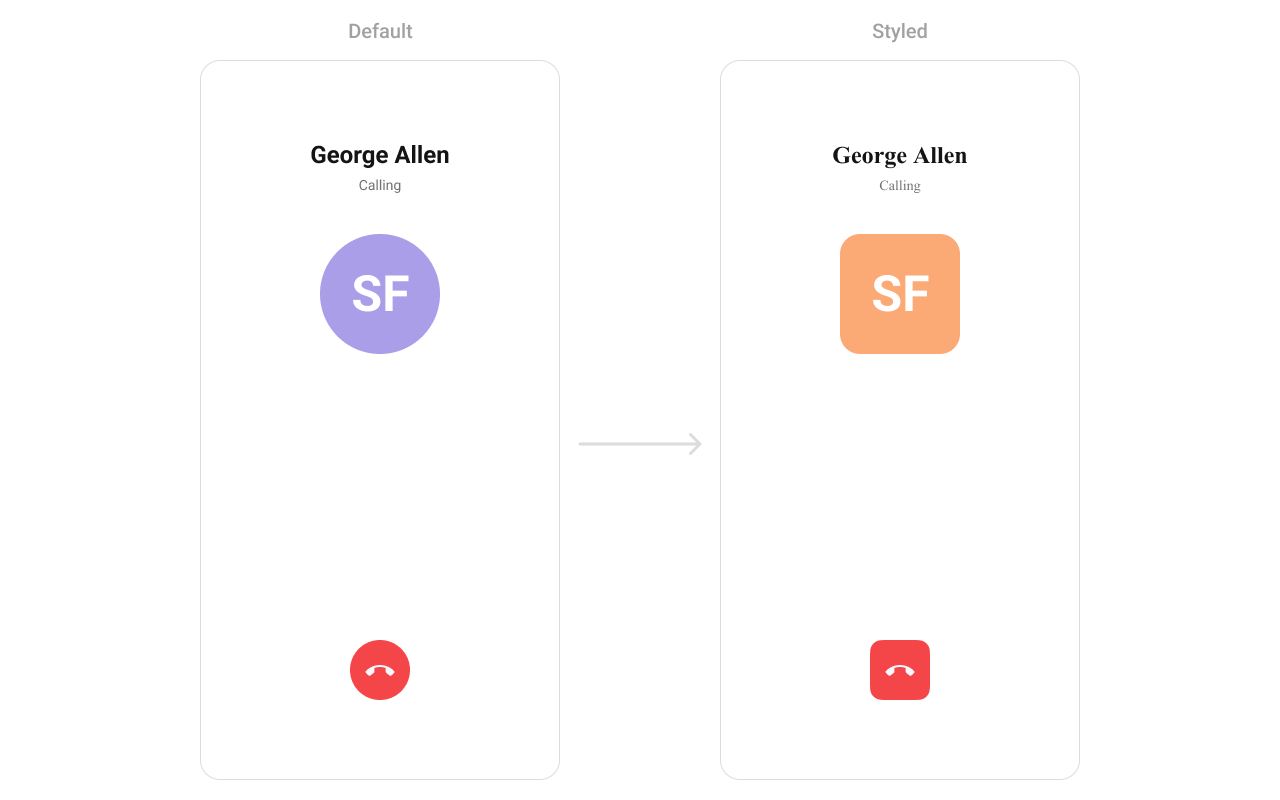 ```xml themes.xml lines theme={null}
```
```kotlin lines theme={null}
cometChatOutgoingCall.setStyle(R.style.CustomOutgoingCall)
```
```java lines theme={null}
cometChatOutgoingCall.setStyle(R.style.CustomOutgoingCall);
```
To know more such attributes, visit the [attributes file](https://github.com/cometchat/cometchat-uikit-android/blob/v5/chatuikit/src/main/res/values/attr_cometchat_outgoing_call.xml).
### Programmatic Style Properties
In addition to XML theme styles, the component exposes programmatic setters for fine-grained control:
| Method | Type | Description |
| --------------------------------- | ---------------- | ---------------------------------------- |
| `setBackgroundColor` | `@ColorInt int` | Background color of the component |
| `setTitleTextColor` | `@ColorInt int` | Title text color |
| `setTitleTextAppearance` | `@StyleRes int` | Title text appearance |
| `setSubtitleTextColor` | `@ColorInt int` | Subtitle text color |
| `setSubtitleTextAppearance` | `@StyleRes int` | Subtitle text appearance |
| `setEndCallIcon` | `Drawable` | Custom end-call button icon |
| `setEndCallIconTint` | `@ColorInt int` | Tint color for the end-call icon |
| `setEndCallButtonBackgroundColor` | `@ColorInt int` | Background color for the end-call button |
| `setAvatarStyle` | `@StyleRes int` | Style for the avatar |
| `setCornerRadius` | `@Dimension int` | Corner radius of the component |
| `setStrokeWidth` | `@Dimension int` | Stroke width of the component border |
| `setStrokeColor` | `@ColorInt int` | Stroke color of the component border |
## Customization Matrix
| What to change | Where | Property/API | Example |
| ---------------------------------------- | ----------------- | -------------------------------------------------------------------- | ------------------------------------------------------------- |
| Set the call object | Activity/Fragment | `setCall(Call)` | `.setCall(call)` |
| Set the user directly | Activity/Fragment | `setUser(User)` | `.setUser(user)` |
| Override end-call behavior | Activity/Fragment | `setOnEndCallClick(OnClick)` | See `setOnEndCallClick` code above |
| Handle errors | Activity/Fragment | `setOnError(OnError)` | See `setOnError` code above |
| Disable outgoing call sound | Activity/Fragment | `disableSoundForCall(boolean)` | `.disableSoundForCall(true);` |
| Set custom outgoing call sound | Activity/Fragment | `setCustomSoundForCalls(@RawRes int)` | `.setCustomSoundForCalls(R.raw.custom_ringtone);` |
| Configure ongoing call settings | Activity/Fragment | `setCallSettingsBuilder(CallSettingsBuilder)` | `.setCallSettingsBuilder(builder)` |
| Title view | Activity/Fragment | `setTitleView(Function2)` | See `setTitleView` code above |
| Subtitle view | Activity/Fragment | `setSubtitleView(Function2)` | See `setSubtitleView` code above |
| Avatar view | Activity/Fragment | `setAvatarView(Function2)` | See `setAvatarView` code above |
| End-call button view | Activity/Fragment | `setEndCallView(Function2)` | See `setEndCallView` code above |
| Avatar style (corner radius, background) | `themes.xml` | `CometChatOutgoingCallStyle` with `cometchatOutgoingCallAvatarStyle` | `
```xml themes.xml lines theme={null}
```
```kotlin lines theme={null}
cometChatOutgoingCall.setStyle(R.style.CustomOutgoingCall)
```
```java lines theme={null}
cometChatOutgoingCall.setStyle(R.style.CustomOutgoingCall);
```
To know more such attributes, visit the [attributes file](https://github.com/cometchat/cometchat-uikit-android/blob/v5/chatuikit/src/main/res/values/attr_cometchat_outgoing_call.xml).
### Programmatic Style Properties
In addition to XML theme styles, the component exposes programmatic setters for fine-grained control:
| Method | Type | Description |
| --------------------------------- | ---------------- | ---------------------------------------- |
| `setBackgroundColor` | `@ColorInt int` | Background color of the component |
| `setTitleTextColor` | `@ColorInt int` | Title text color |
| `setTitleTextAppearance` | `@StyleRes int` | Title text appearance |
| `setSubtitleTextColor` | `@ColorInt int` | Subtitle text color |
| `setSubtitleTextAppearance` | `@StyleRes int` | Subtitle text appearance |
| `setEndCallIcon` | `Drawable` | Custom end-call button icon |
| `setEndCallIconTint` | `@ColorInt int` | Tint color for the end-call icon |
| `setEndCallButtonBackgroundColor` | `@ColorInt int` | Background color for the end-call button |
| `setAvatarStyle` | `@StyleRes int` | Style for the avatar |
| `setCornerRadius` | `@Dimension int` | Corner radius of the component |
| `setStrokeWidth` | `@Dimension int` | Stroke width of the component border |
| `setStrokeColor` | `@ColorInt int` | Stroke color of the component border |
## Customization Matrix
| What to change | Where | Property/API | Example |
| ---------------------------------------- | ----------------- | -------------------------------------------------------------------- | ------------------------------------------------------------- |
| Set the call object | Activity/Fragment | `setCall(Call)` | `.setCall(call)` |
| Set the user directly | Activity/Fragment | `setUser(User)` | `.setUser(user)` |
| Override end-call behavior | Activity/Fragment | `setOnEndCallClick(OnClick)` | See `setOnEndCallClick` code above |
| Handle errors | Activity/Fragment | `setOnError(OnError)` | See `setOnError` code above |
| Disable outgoing call sound | Activity/Fragment | `disableSoundForCall(boolean)` | `.disableSoundForCall(true);` |
| Set custom outgoing call sound | Activity/Fragment | `setCustomSoundForCalls(@RawRes int)` | `.setCustomSoundForCalls(R.raw.custom_ringtone);` |
| Configure ongoing call settings | Activity/Fragment | `setCallSettingsBuilder(CallSettingsBuilder)` | `.setCallSettingsBuilder(builder)` |
| Title view | Activity/Fragment | `setTitleView(Function2)` | See `setTitleView` code above |
| Subtitle view | Activity/Fragment | `setSubtitleView(Function2)` | See `setSubtitleView` code above |
| Avatar view | Activity/Fragment | `setAvatarView(Function2)` | See `setAvatarView` code above |
| End-call button view | Activity/Fragment | `setEndCallView(Function2)` | See `setEndCallView` code above |
| Avatar style (corner radius, background) | `themes.xml` | `CometChatOutgoingCallStyle` with `cometchatOutgoingCallAvatarStyle` | `- 8dp
` |
| Apply a custom style | Activity/Fragment | `setStyle(@StyleRes int)` | `cometChatOutgoingCall.setStyle(R.style.CustomOutgoingCall);` |
| Title text color | Activity/Fragment | `setTitleTextColor(@ColorInt int)` | `.setTitleTextColor(Color.WHITE);` |
| Subtitle text color | Activity/Fragment | `setSubtitleTextColor(@ColorInt int)` | `.setSubtitleTextColor(Color.GRAY);` |
| End-call icon | Activity/Fragment | `setEndCallIcon(Drawable)` | `.setEndCallIcon(drawable);` |
| End-call icon tint | Activity/Fragment | `setEndCallIconTint(@ColorInt int)` | `.setEndCallIconTint(Color.WHITE);` |
| End-call button background | Activity/Fragment | `setEndCallButtonBackgroundColor(@ColorInt int)` | `.setEndCallButtonBackgroundColor(Color.RED);` |
| Background color | Activity/Fragment | `setBackgroundColor(@ColorInt int)` | `.setBackgroundColor(Color.BLACK);` |
| Corner radius | Activity/Fragment | `setCornerRadius(@Dimension int)` | `.setCornerRadius(16);` |
| Stroke width | Activity/Fragment | `setStrokeWidth(@Dimension int)` | `.setStrokeWidth(2);` |
| Stroke color | Activity/Fragment | `setStrokeColor(@ColorInt int)` | `.setStrokeColor(Color.GRAY);` |
## Next Steps
Incoming call notification with accept/reject
Voice and video call initiation buttons
View call history
Browse recent conversations