> ## Documentation Index
> Fetch the complete documentation index at: https://cometchat-22654f5b-docs-rn-guide-message-privately.mintlify.site/llms.txt
> Use this file to discover all available pages before exploring further.
# Message Template
> Define CometChat Android UI Kit message templates with custom bubble structure, content views, header views, reply views, and interactions.
A `MessageTemplate` defines and customizes both the structure and the behavior of the [MessageBubble](/ui-kit/android/message-bubble-styling#message-bubbles). It acts as a schema for creating `MessageBubble` components, allowing you to manage the appearance and interactions of message bubbles within your application.
## When to Use This
* You need to customize the header, content, footer, bottom, or status info view of a message bubble
* You want to replace the default bubble layout with a completely custom view
* You need to add or modify the long-press options on a message bubble
* You want to create a new template for a custom message type (e.g., a contact card)
* You need to change how a specific message type (text, image, etc.) renders in the [MessageList](/ui-kit/android/message-list)
## Prerequisites
* CometChat Android UI Kit dependency added to your project
* `CometChatUIKit.init()` called and completed
* A logged-in CometChat user
* Familiarity with the [MessageList](/ui-kit/android/message-list) component
* Familiarity with [MessageBubble styling](/ui-kit/android/message-bubble-styling#message-bubbles)
## Quick Start
1. Get the list of existing message templates from the data source:
```kotlin theme={null}
val messageTemplates = CometChatUIKit.getDataSource().getMessageTemplates(messagelist.additionParameter)
```
```java theme={null}
List messageTemplates = CometChatUIKit.getDataSource().getMessageTemplates(messagelist.getAdditionParameter());
```
> **What this does:** Retrieves all registered message templates from the UI Kit data source, giving you the full list of templates to modify or extend.
2. Find the template for the message type you want to customize (e.g., text messages):
```kotlin theme={null}
for (template in messageTemplates) {
if (template.type == UIKitConstants.MessageType.TEXT) {
// Code to customize text message template
}
}
```
```java theme={null}
for(CometChatMessageTemplate template : messageTemplates){
if(template.getType().equals(UIKitConstants.MessageType.TEXT)){
// Code to customize text message template
}
}
```
> **What this does:** Iterates through the templates list and matches the template whose `type` equals `UIKitConstants.MessageType.TEXT`, so you can customize only text message bubbles.
3. Customize a view on the matched template (e.g., set a custom content view):
```kotlin theme={null}
template.setContentView(object : MessagesViewHolderListener() {
override fun createView(
context: Context,
cometChatMessageBubble: CometChatMessageBubble,
messageBubbleAlignment: UIKitConstants.MessageBubbleAlignment
): View {
return LayoutInflater.from(context).inflate(R.layout.your_custom_layout, null)
}
override fun bindView(
context: Context,
view: View,
baseMessage: BaseMessage,
messageBubbleAlignment: UIKitConstants.MessageBubbleAlignment,
viewHolder: RecyclerView.ViewHolder,
list: List,
i: Int
) {
// Bind your custom view data here
}
})
```
```java theme={null}
template.setContentView(new MessagesViewHolderListener() {
@Override
public View createView(Context context, CometChatMessageBubble messageBubble, UIKitConstants.MessageBubbleAlignment alignment) {
return LayoutInflater.from(context).inflate(R.layout.your_custom_layout, null);
}
@Override
public void bindView(Context context,
View createdView,
BaseMessage message,
UIKitConstants.MessageBubbleAlignment alignment,
RecyclerView.ViewHolder holder,
List messageList,
int position) {
// Bind your custom view data here
}
});
```
> **What this does:** Overrides the content view of the matched template by providing a `MessagesViewHolderListener` that inflates a custom layout in `createView()` and binds message data to it in `bindView()`.
4. Apply the modified templates to the `MessageList` component:
```kotlin theme={null}
messageList.setTemplates(messageTemplates)
```
```java theme={null}
messageList.setTemplates(messageTemplates);
```
> **What this does:** Passes the modified templates list to the `MessageList` component so it uses your customized templates when rendering message bubbles.
## Core Concepts
### MessageBubble Structure
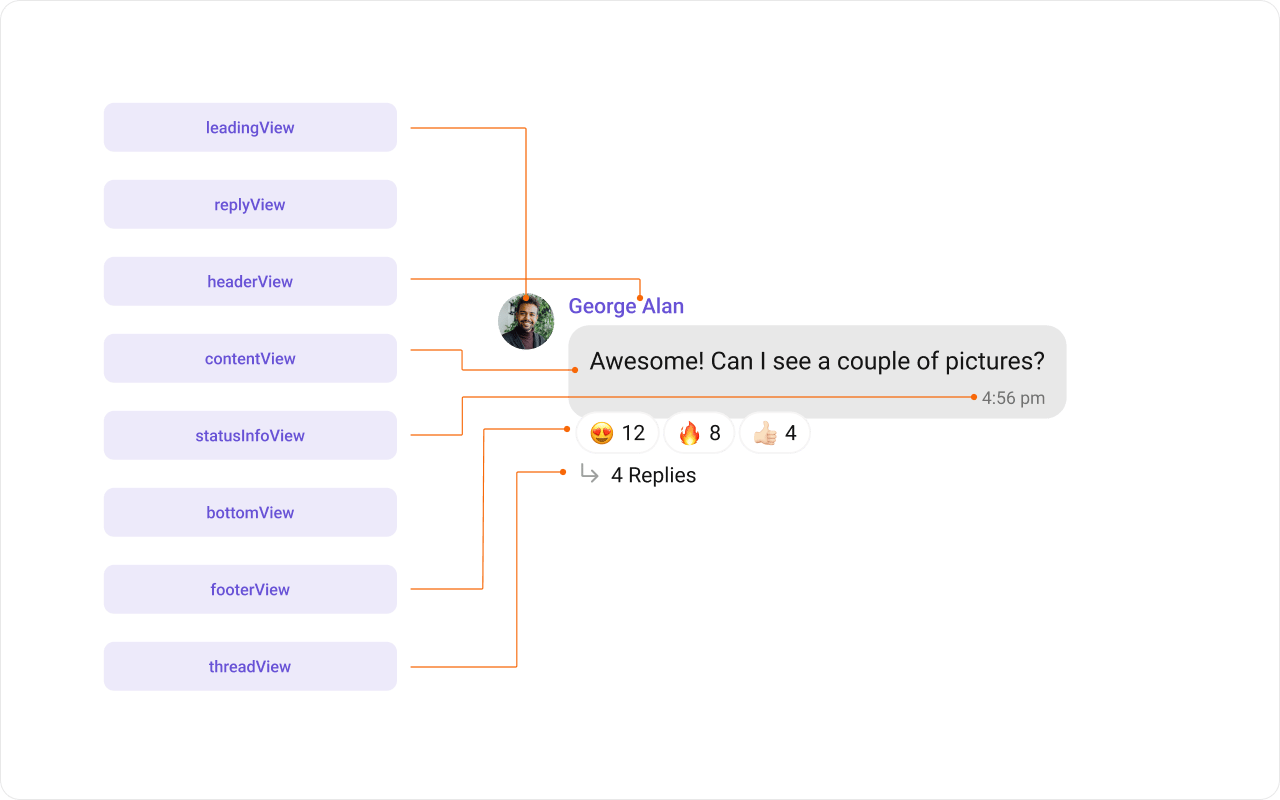 The `MessageBubble` structure is broken down into these views:
1. **Leading view**: Displays the sender's avatar. It appears on the left of the `MessageBubble` for messages from others and on the right for messages from the current user.
2. **Header view**: Displays the sender's name. This is useful in group chats where multiple users are sending messages.
3. **Content view**: The core of the `MessageBubble` where the message content (text, images, videos, etc.) is displayed.
4. **Bottom view**: Extends the `MessageBubble` with additional elements, such as link previews or a "load more" button for long messages. It is placed beneath the Content view.
5. **Footer view**: Displays the timestamp of the message and its delivery or read status. It is located at the bottom of the `MessageBubble`.
### Template Properties
`MessageTemplate` provides methods that allow you to alter various properties of the `MessageBubble`, including the `type` and `category` of a message, and the appearance and behavior of the header, content, and footer sections.
**Type**: Use `setType()` to set the type of `CometChatMessage`. This maps your `MessageTemplate` to the corresponding `CometChatMessage`.
```java theme={null}
messageTemplate.setType(UIKitConstants.MessageType.CUSTOM);
```
> **What this does:** Sets the message type on the template so the UI Kit knows which incoming messages this template applies to.
**Category**: Use `setCategory()` to set the category of a `MessageTemplate`. This creates a `MessageTemplate` with the specified category and links it with a `CometChatMessage` of the same category. Refer to the guide on [Message Categories](/sdk/android/message-structure-and-hierarchy) for a deeper understanding.
```java theme={null}
messageTemplate.setCategory(UIKitConstants.MessageCategory.CUSTOM);
```
> **What this does:** Sets the message category on the template, linking it to messages of the same category (e.g., `CUSTOM`).
## Implementation
### Header View
What you are changing: The header area of the message bubble, which displays above the content view.
* **Where**: `MessagesViewHolderListener` passed to `template.setHeaderView()`
* **Applies to**: Any message type matched by the template (e.g., `UIKitConstants.MessageType.TEXT`)
* **Default behavior**: Displays the sender's name
* **Override**: Pass a `MessagesViewHolderListener` to `setHeaderView()` that inflates a custom layout in `createView()` and binds data in `bindView()`
The `MessageBubble` structure is broken down into these views:
1. **Leading view**: Displays the sender's avatar. It appears on the left of the `MessageBubble` for messages from others and on the right for messages from the current user.
2. **Header view**: Displays the sender's name. This is useful in group chats where multiple users are sending messages.
3. **Content view**: The core of the `MessageBubble` where the message content (text, images, videos, etc.) is displayed.
4. **Bottom view**: Extends the `MessageBubble` with additional elements, such as link previews or a "load more" button for long messages. It is placed beneath the Content view.
5. **Footer view**: Displays the timestamp of the message and its delivery or read status. It is located at the bottom of the `MessageBubble`.
### Template Properties
`MessageTemplate` provides methods that allow you to alter various properties of the `MessageBubble`, including the `type` and `category` of a message, and the appearance and behavior of the header, content, and footer sections.
**Type**: Use `setType()` to set the type of `CometChatMessage`. This maps your `MessageTemplate` to the corresponding `CometChatMessage`.
```java theme={null}
messageTemplate.setType(UIKitConstants.MessageType.CUSTOM);
```
> **What this does:** Sets the message type on the template so the UI Kit knows which incoming messages this template applies to.
**Category**: Use `setCategory()` to set the category of a `MessageTemplate`. This creates a `MessageTemplate` with the specified category and links it with a `CometChatMessage` of the same category. Refer to the guide on [Message Categories](/sdk/android/message-structure-and-hierarchy) for a deeper understanding.
```java theme={null}
messageTemplate.setCategory(UIKitConstants.MessageCategory.CUSTOM);
```
> **What this does:** Sets the message category on the template, linking it to messages of the same category (e.g., `CUSTOM`).
## Implementation
### Header View
What you are changing: The header area of the message bubble, which displays above the content view.
* **Where**: `MessagesViewHolderListener` passed to `template.setHeaderView()`
* **Applies to**: Any message type matched by the template (e.g., `UIKitConstants.MessageType.TEXT`)
* **Default behavior**: Displays the sender's name
* **Override**: Pass a `MessagesViewHolderListener` to `setHeaderView()` that inflates a custom layout in `createView()` and binds data in `bindView()`
 **XML Layout:**
```xml message_template_header_view.xml lines theme={null}
```
> **What this does:** Defines a custom header layout with a single `TextView` that shows the sender's name and a status indicator.
**Code:**
```kotlin lines theme={null}
template.setHeaderView(object : MessagesViewHolderListener() {
override fun createView(
context: Context,
cometChatMessageBubble: CometChatMessageBubble,
messageBubbleAlignment: UIKitConstants.MessageBubbleAlignment
): View {
return layoutInflater.inflate(R.layout.message_template_header_view, null)
}
override fun bindView(
context: Context,
view: View,
baseMessage: BaseMessage,
messageBubbleAlignment: UIKitConstants.MessageBubbleAlignment,
viewHolder: RecyclerView.ViewHolder,
list: List,
i: Int
) {
val textView = view.findViewById(R.id.name_with_status)
textView.setText(baseMessage.getSender().getName() + " • " + "\uD83D\uDDD3\uFE0F In meeting")
}
})
```
```java lines theme={null}
template.setHeaderView(new MessagesViewHolderListener() {
@Override
public View createView(Context context, CometChatMessageBubble messageBubble, UIKitConstants.MessageBubbleAlignment alignment) {
return LayoutInflater.from(context).inflate(R.layout.message_template_header_view, null);
}
@Override
public void bindView(Context context,
View createdView,
BaseMessage message,
UIKitConstants.MessageBubbleAlignment alignment,
RecyclerView.ViewHolder holder,
List messageList,
int position) {
TextView textView = createdView.findViewById(R.id.name_with_status);
textView.setText(message.getSender().getName() + " • " + "\uD83D\uDDD3\uFE0F In meeting");
}
});
```
> **What this does:** The `createView()` method inflates `message_template_header_view.xml` as the header view for every message. The `bindView()` method sets the sender's name and a status emoji on the `TextView`, and is called every time a ViewHolder for that message type is bound.
* **Verify**: Each text message bubble displays a custom header showing the sender's name followed by " • 🗓️ In meeting" in the primary color, replacing the default sender name header.
### Content View
What you are changing: The main content area of the message bubble where the message body is displayed.
* **Where**: `MessagesViewHolderListener` passed to `template.setContentView()`
* **Applies to**: Any message type matched by the template (e.g., `UIKitConstants.MessageType.IMAGE`)
* **Default behavior**: Displays the [Text Bubble](/ui-kit/android/message-bubble-styling#text-bubble), [Image Bubble](/ui-kit/android/message-bubble-styling#image-bubble), [File Bubble](/ui-kit/android/message-bubble-styling#file-bubble), [Audio Bubble](/ui-kit/android/message-bubble-styling#audio-bubble), or [Video Bubble](/ui-kit/android/message-bubble-styling#video-bubble), depending on the message type
* **Override**: Pass a `MessagesViewHolderListener` to `setContentView()` that inflates a custom layout in `createView()` and binds data in `bindView()`
**XML Layout:**
```xml message_template_header_view.xml lines theme={null}
```
> **What this does:** Defines a custom header layout with a single `TextView` that shows the sender's name and a status indicator.
**Code:**
```kotlin lines theme={null}
template.setHeaderView(object : MessagesViewHolderListener() {
override fun createView(
context: Context,
cometChatMessageBubble: CometChatMessageBubble,
messageBubbleAlignment: UIKitConstants.MessageBubbleAlignment
): View {
return layoutInflater.inflate(R.layout.message_template_header_view, null)
}
override fun bindView(
context: Context,
view: View,
baseMessage: BaseMessage,
messageBubbleAlignment: UIKitConstants.MessageBubbleAlignment,
viewHolder: RecyclerView.ViewHolder,
list: List,
i: Int
) {
val textView = view.findViewById(R.id.name_with_status)
textView.setText(baseMessage.getSender().getName() + " • " + "\uD83D\uDDD3\uFE0F In meeting")
}
})
```
```java lines theme={null}
template.setHeaderView(new MessagesViewHolderListener() {
@Override
public View createView(Context context, CometChatMessageBubble messageBubble, UIKitConstants.MessageBubbleAlignment alignment) {
return LayoutInflater.from(context).inflate(R.layout.message_template_header_view, null);
}
@Override
public void bindView(Context context,
View createdView,
BaseMessage message,
UIKitConstants.MessageBubbleAlignment alignment,
RecyclerView.ViewHolder holder,
List messageList,
int position) {
TextView textView = createdView.findViewById(R.id.name_with_status);
textView.setText(message.getSender().getName() + " • " + "\uD83D\uDDD3\uFE0F In meeting");
}
});
```
> **What this does:** The `createView()` method inflates `message_template_header_view.xml` as the header view for every message. The `bindView()` method sets the sender's name and a status emoji on the `TextView`, and is called every time a ViewHolder for that message type is bound.
* **Verify**: Each text message bubble displays a custom header showing the sender's name followed by " • 🗓️ In meeting" in the primary color, replacing the default sender name header.
### Content View
What you are changing: The main content area of the message bubble where the message body is displayed.
* **Where**: `MessagesViewHolderListener` passed to `template.setContentView()`
* **Applies to**: Any message type matched by the template (e.g., `UIKitConstants.MessageType.IMAGE`)
* **Default behavior**: Displays the [Text Bubble](/ui-kit/android/message-bubble-styling#text-bubble), [Image Bubble](/ui-kit/android/message-bubble-styling#image-bubble), [File Bubble](/ui-kit/android/message-bubble-styling#file-bubble), [Audio Bubble](/ui-kit/android/message-bubble-styling#audio-bubble), or [Video Bubble](/ui-kit/android/message-bubble-styling#video-bubble), depending on the message type
* **Override**: Pass a `MessagesViewHolderListener` to `setContentView()` that inflates a custom layout in `createView()` and binds data in `bindView()`
 **XML Layout:**
```xml image_bubble_content_view.xml lines theme={null}
```
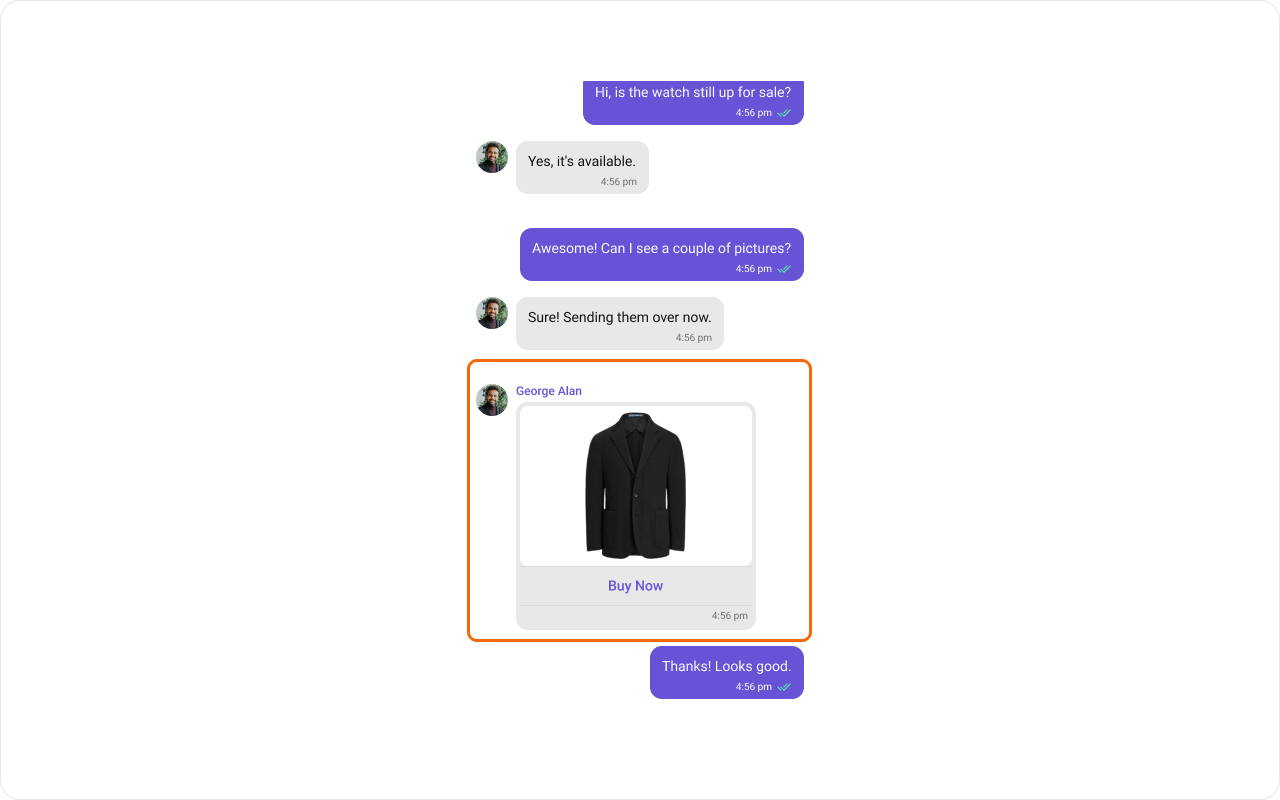
> **What this does:** Defines a custom content layout with a `CometChatImageBubble`, a "Buy Now" label below it, and a hidden `CometChatDeleteBubble` that appears when the message is deleted.
**Code:**
```kotlin lines theme={null}
val templates = ChatConfigurator.getDataSource().getMessageTemplates(messageList.additionParameter)
for (template in templates) {
if (template.type == UIKitConstants.MessageType.IMAGE) {
template.setContentView(object : MessagesViewHolderListener() {
override fun createView(
context: Context,
cometChatMessageBubble: CometChatMessageBubble,
messageBubbleAlignment: UIKitConstants.MessageBubbleAlignment
): View {
return LayoutInflater.from(context).inflate(R.layout.image_bubble_content_view, null)
}
override fun bindView(
context: Context,
view: View,
baseMessage: BaseMessage,
messageBubbleAlignment: UIKitConstants.MessageBubbleAlignment,
viewHolder: RecyclerView.ViewHolder,
list: List,
i: Int
) {
if (view != null) {
val deleteStyle: Int
val bubbleStyle: Int
if (messageBubbleAlignment == UIKitConstants.MessageBubbleAlignment.RIGHT) {
deleteStyle = com.cometchat.chatuikit.R.style.CometChatIncomingMessageDeleteStyle
bubbleStyle = com.cometchat.chatuikit.R.style.CometChatIncomingImageMessageBubbleStyle
} else {
deleteStyle = com.cometchat.chatuikit.R.style.CometChatOutgoingDeleteBubbleStyle
bubbleStyle = com.cometchat.chatuikit.R.style.CometChatOutgoingImageBubbleStyle
}
val linearLayout = view.findViewById(R.id.image_bubble_container)
val cometchatImageBubble = view.findViewById(R.id.imageBubble)
val deletedBubble = view.findViewById(com.cometchat.chatuikit.R.id.cometchat_delete_text_bubble)
val mediaMessage = baseMessage as MediaMessage
if (mediaMessage.deletedAt == 0L) {
cometchatImageBubble.style = bubbleStyle
deletedBubble.visibility = View.GONE
cometchatImageBubble.visibility = View.VISIBLE
val attachment = mediaMessage.attachment
val file = Utils.getFileFromLocalPath(mediaMessage)
cometchatImageBubble.setImageUrl(
file,
if (attachment != null) attachment.fileUrl else "",
attachment?.fileExtension?.equals("gif", ignoreCase = true) ?: Utils.isGifFile(file)
)
} else {
linearLayout.visibility = View.GONE
deletedBubble.visibility = View.VISIBLE
deletedBubble.style = deleteStyle
}
}
}
})
break
}
}
messageList.setTemplates(templates)
```
```java lines theme={null}
List templates = ChatConfigurator.getDataSource().getMessageTemplates(messageList.getAdditionParameter());
for (CometChatMessageTemplate template : templates) {
if (template.getType().equals(UIKitConstants.MessageType.IMAGE)) {
template.setContentView(new MessagesViewHolderListener() {
@Override
public View createView(Context context,
CometChatMessageBubble cometChatMessageBubble,
UIKitConstants.MessageBubbleAlignment messageBubbleAlignment) {
return LayoutInflater.from(context).inflate(R.layout.image_bubble_content_view, null);
}
@Override
public void bindView(Context context,
View view,
BaseMessage baseMessage,
UIKitConstants.MessageBubbleAlignment messageBubbleAlignment,
RecyclerView.ViewHolder viewHolder,
List list,
int i) {
if (view != null) {
int deleteStyle;
int bubbleStyle;
if (messageBubbleAlignment == UIKitConstants.MessageBubbleAlignment.RIGHT) {
deleteStyle = com.cometchat.chatuikit.R.style.CometChatIncomingMessageDeleteStyle;
bubbleStyle = com.cometchat.chatuikit.R.style.CometChatIncomingImageMessageBubbleStyle;
} else {
deleteStyle = com.cometchat.chatuikit.R.style.CometChatOutgoingDeleteBubbleStyle;
bubbleStyle = com.cometchat.chatuikit.R.style.CometChatOutgoingImageBubbleStyle;
}
LinearLayout linearLayout = view.findViewById(R.id.image_bubble_container);
CometChatImageBubble cometchatImageBubble = view.findViewById(R.id.imageBubble);
CometChatDeleteBubble deletedBubble = view.findViewById(com.cometchat.chatuikit.R.id.cometchat_delete_text_bubble);
MediaMessage mediaMessage = (MediaMessage) baseMessage;
if (mediaMessage.getDeletedAt() == 0) {
cometchatImageBubble.setStyle(bubbleStyle);
deletedBubble.setVisibility(View.GONE);
cometchatImageBubble.setVisibility(View.VISIBLE);
Attachment attachment = mediaMessage.getAttachment();
File file = Utils.getFileFromLocalPath(mediaMessage);
cometchatImageBubble.setImageUrl(file,
attachment != null ? attachment.getFileUrl() : "",
attachment != null ? attachment
.getFileExtension()
.equalsIgnoreCase("gif") : Utils.isGifFile(file));
} else {
linearLayout.setVisibility(View.GONE);
deletedBubble.setVisibility(View.VISIBLE);
deletedBubble.setStyle(deleteStyle);
}
}
}
});
break;
}
}
messageList.setTemplates(templates);
```
> **What this does:** The `createView()` method inflates `image_bubble_content_view.xml` as the content view for every image message. The `bindView()` method handles displaying the image with `CometChatImageBubble` when the message is not deleted, and showing a `CometChatDeleteBubble` when the message has been deleted.
* **Verify**: Image message bubbles display a `CometChatImageBubble` with a "Buy Now" label below it. If the message is deleted, the image is hidden and a delete bubble appears instead.
### Status Info View
What you are changing: The status info area inside the message bubble, which displays delivery/read status indicators.
* **Where**: `MessagesViewHolderListener` passed to `template.setStatusInfoView()` (and optionally `template.setFooterView()` for relocated status content)
* **Applies to**: Any message type matched by the template (e.g., `UIKitConstants.MessageType.TEXT`)
* **Default behavior**: Displays the message receipt and timestamp inside the bubble
* **Override**: Pass a `MessagesViewHolderListener` to `setStatusInfoView()` that returns a minimal empty view, and move the status content to the footer view using `setFooterView()`
**XML Layout:**
```xml image_bubble_content_view.xml lines theme={null}
```
> **What this does:** Defines a custom content layout with a `CometChatImageBubble`, a "Buy Now" label below it, and a hidden `CometChatDeleteBubble` that appears when the message is deleted.
**Code:**
```kotlin lines theme={null}
val templates = ChatConfigurator.getDataSource().getMessageTemplates(messageList.additionParameter)
for (template in templates) {
if (template.type == UIKitConstants.MessageType.IMAGE) {
template.setContentView(object : MessagesViewHolderListener() {
override fun createView(
context: Context,
cometChatMessageBubble: CometChatMessageBubble,
messageBubbleAlignment: UIKitConstants.MessageBubbleAlignment
): View {
return LayoutInflater.from(context).inflate(R.layout.image_bubble_content_view, null)
}
override fun bindView(
context: Context,
view: View,
baseMessage: BaseMessage,
messageBubbleAlignment: UIKitConstants.MessageBubbleAlignment,
viewHolder: RecyclerView.ViewHolder,
list: List,
i: Int
) {
if (view != null) {
val deleteStyle: Int
val bubbleStyle: Int
if (messageBubbleAlignment == UIKitConstants.MessageBubbleAlignment.RIGHT) {
deleteStyle = com.cometchat.chatuikit.R.style.CometChatIncomingMessageDeleteStyle
bubbleStyle = com.cometchat.chatuikit.R.style.CometChatIncomingImageMessageBubbleStyle
} else {
deleteStyle = com.cometchat.chatuikit.R.style.CometChatOutgoingDeleteBubbleStyle
bubbleStyle = com.cometchat.chatuikit.R.style.CometChatOutgoingImageBubbleStyle
}
val linearLayout = view.findViewById(R.id.image_bubble_container)
val cometchatImageBubble = view.findViewById(R.id.imageBubble)
val deletedBubble = view.findViewById(com.cometchat.chatuikit.R.id.cometchat_delete_text_bubble)
val mediaMessage = baseMessage as MediaMessage
if (mediaMessage.deletedAt == 0L) {
cometchatImageBubble.style = bubbleStyle
deletedBubble.visibility = View.GONE
cometchatImageBubble.visibility = View.VISIBLE
val attachment = mediaMessage.attachment
val file = Utils.getFileFromLocalPath(mediaMessage)
cometchatImageBubble.setImageUrl(
file,
if (attachment != null) attachment.fileUrl else "",
attachment?.fileExtension?.equals("gif", ignoreCase = true) ?: Utils.isGifFile(file)
)
} else {
linearLayout.visibility = View.GONE
deletedBubble.visibility = View.VISIBLE
deletedBubble.style = deleteStyle
}
}
}
})
break
}
}
messageList.setTemplates(templates)
```
```java lines theme={null}
List templates = ChatConfigurator.getDataSource().getMessageTemplates(messageList.getAdditionParameter());
for (CometChatMessageTemplate template : templates) {
if (template.getType().equals(UIKitConstants.MessageType.IMAGE)) {
template.setContentView(new MessagesViewHolderListener() {
@Override
public View createView(Context context,
CometChatMessageBubble cometChatMessageBubble,
UIKitConstants.MessageBubbleAlignment messageBubbleAlignment) {
return LayoutInflater.from(context).inflate(R.layout.image_bubble_content_view, null);
}
@Override
public void bindView(Context context,
View view,
BaseMessage baseMessage,
UIKitConstants.MessageBubbleAlignment messageBubbleAlignment,
RecyclerView.ViewHolder viewHolder,
List list,
int i) {
if (view != null) {
int deleteStyle;
int bubbleStyle;
if (messageBubbleAlignment == UIKitConstants.MessageBubbleAlignment.RIGHT) {
deleteStyle = com.cometchat.chatuikit.R.style.CometChatIncomingMessageDeleteStyle;
bubbleStyle = com.cometchat.chatuikit.R.style.CometChatIncomingImageMessageBubbleStyle;
} else {
deleteStyle = com.cometchat.chatuikit.R.style.CometChatOutgoingDeleteBubbleStyle;
bubbleStyle = com.cometchat.chatuikit.R.style.CometChatOutgoingImageBubbleStyle;
}
LinearLayout linearLayout = view.findViewById(R.id.image_bubble_container);
CometChatImageBubble cometchatImageBubble = view.findViewById(R.id.imageBubble);
CometChatDeleteBubble deletedBubble = view.findViewById(com.cometchat.chatuikit.R.id.cometchat_delete_text_bubble);
MediaMessage mediaMessage = (MediaMessage) baseMessage;
if (mediaMessage.getDeletedAt() == 0) {
cometchatImageBubble.setStyle(bubbleStyle);
deletedBubble.setVisibility(View.GONE);
cometchatImageBubble.setVisibility(View.VISIBLE);
Attachment attachment = mediaMessage.getAttachment();
File file = Utils.getFileFromLocalPath(mediaMessage);
cometchatImageBubble.setImageUrl(file,
attachment != null ? attachment.getFileUrl() : "",
attachment != null ? attachment
.getFileExtension()
.equalsIgnoreCase("gif") : Utils.isGifFile(file));
} else {
linearLayout.setVisibility(View.GONE);
deletedBubble.setVisibility(View.VISIBLE);
deletedBubble.setStyle(deleteStyle);
}
}
}
});
break;
}
}
messageList.setTemplates(templates);
```
> **What this does:** The `createView()` method inflates `image_bubble_content_view.xml` as the content view for every image message. The `bindView()` method handles displaying the image with `CometChatImageBubble` when the message is not deleted, and showing a `CometChatDeleteBubble` when the message has been deleted.
* **Verify**: Image message bubbles display a `CometChatImageBubble` with a "Buy Now" label below it. If the message is deleted, the image is hidden and a delete bubble appears instead.
### Status Info View
What you are changing: The status info area inside the message bubble, which displays delivery/read status indicators.
* **Where**: `MessagesViewHolderListener` passed to `template.setStatusInfoView()` (and optionally `template.setFooterView()` for relocated status content)
* **Applies to**: Any message type matched by the template (e.g., `UIKitConstants.MessageType.TEXT`)
* **Default behavior**: Displays the message receipt and timestamp inside the bubble
* **Override**: Pass a `MessagesViewHolderListener` to `setStatusInfoView()` that returns a minimal empty view, and move the status content to the footer view using `setFooterView()`
 **XML Layout:**
```xml status_info_layout.xml lines theme={null}
```
> **What this does:** Defines a custom status info layout with a time `TextView` and a `CometChatMessageReceipt` view arranged horizontally, aligned to the end of the bubble.
**Code:**
```kotlin lines theme={null}
val templates = ChatConfigurator.getDataSource().getMessageTemplates(messageList.additionParameter)
for (template in templates) {
if (template.type == UIKitConstants.MessageType.TEXT) {
template.setStatusInfoView(object : MessagesViewHolderListener() {
override fun createView(
context: Context,
cometChatMessageBubble: CometChatMessageBubble,
messageBubbleAlignment: UIKitConstants.MessageBubbleAlignment
): View {
val view = View(context)
val layoutParams = LinearLayout.LayoutParams(
context.resources.getDimensionPixelSize(com.cometchat.chatuikit.R.dimen.cometchat_1dp),
context.resources.getDimensionPixelSize(com.cometchat.chatuikit.R.dimen.cometchat_12dp)
)
view.layoutParams = layoutParams
return view
}
override fun bindView(
context: Context,
view: View,
baseMessage: BaseMessage,
messageBubbleAlignment: UIKitConstants.MessageBubbleAlignment,
viewHolder: RecyclerView.ViewHolder,
list: List,
i: Int
) {
}
})
template.setFooterView(object : MessagesViewHolderListener() {
override fun createView(
context: Context,
cometChatMessageBubble: CometChatMessageBubble,
messageBubbleAlignment: UIKitConstants.MessageBubbleAlignment
): View {
return LayoutInflater.from(context).inflate(R.layout.status_info_layout, null)
}
override fun bindView(
context: Context,
createdView: View,
baseMessage: BaseMessage,
messageBubbleAlignment: UIKitConstants.MessageBubbleAlignment,
viewHolder: RecyclerView.ViewHolder,
list: List,
i: Int
) {
val tvTime = createdView.findViewById(R.id.time)
val receipt = createdView.findViewById(R.id.receipt)
if (messageBubbleAlignment == UIKitConstants.MessageBubbleAlignment.RIGHT) {
receipt.visibility = View.VISIBLE
receipt.setMessageReceipt(MessageReceiptUtils.MessageReceipt(baseMessage))
} else {
receipt.visibility = View.GONE
}
tvTime.text = SimpleDateFormat("hh:mm a").format(baseMessage.sentAt * 1000)
}
})
break
}
}
messageList.setTemplates(templates)
```
```java lines theme={null}
List templates = ChatConfigurator.getDataSource().getMessageTemplates(messageList.getAdditionParameter());
for (CometChatMessageTemplate template : templates) {
if (template.getType().equals(UIKitConstants.MessageType.TEXT)) {
template.setStatusInfoView(new MessagesViewHolderListener() {
@Override
public View createView(Context context,
CometChatMessageBubble cometChatMessageBubble,
UIKitConstants.MessageBubbleAlignment messageBubbleAlignment) {
View view = new View(context);
LinearLayout.LayoutParams layoutParams = new LinearLayout.LayoutParams(
context.getResources().getDimensionPixelSize(com.cometchat.chatuikit.R.dimen.cometchat_1dp),
context.getResources().getDimensionPixelSize(com.cometchat.chatuikit.R.dimen.cometchat_12dp));
view.setLayoutParams(layoutParams);
return view;
}
@Override
public void bindView(Context context,
View view,
BaseMessage baseMessage,
UIKitConstants.MessageBubbleAlignment messageBubbleAlignment,
RecyclerView.ViewHolder viewHolder,
List list,
int i) {
}
});
template.setFooterView(new MessagesViewHolderListener() {
@Override
public View createView(Context context,
CometChatMessageBubble cometChatMessageBubble,
UIKitConstants.MessageBubbleAlignment messageBubbleAlignment) {
return LayoutInflater.from(context).inflate(R.layout.status_info_layout, null);
}
@Override
public void bindView(Context context,
View createdView,
BaseMessage baseMessage,
UIKitConstants.MessageBubbleAlignment messageBubbleAlignment,
RecyclerView.ViewHolder viewHolder,
List list,
int i) {
TextView tvTime = createdView.findViewById(R.id.time);
CometChatMessageReceipt receipt = createdView.findViewById(R.id.receipt);
if (messageBubbleAlignment.equals(UIKitConstants.MessageBubbleAlignment.RIGHT)) {
receipt.setVisibility(View.VISIBLE);
receipt.setMessageReceipt(MessageReceiptUtils.MessageReceipt(baseMessage));
} else {
receipt.setVisibility(View.GONE);
}
tvTime.setText(new SimpleDateFormat("hh:mm a").format(baseMessage.getSentAt() * 1000));
}
});
break;
}
}
messageList.setTemplates(templates);
```
> **What this does:** The `setStatusInfoView()` replaces the default in-bubble status info with a minimal 1dp×12dp empty view. The `setFooterView()` inflates `status_info_layout.xml` as the footer, displaying the timestamp and message receipt outside the bubble. If the alignment is `RIGHT` (sent messages), the receipt icon is visible; if `LEFT` (received messages), the receipt icon is hidden.
* **Verify**: Text message bubbles show the timestamp and delivery receipt below the bubble (in the footer area) instead of inside the bubble. Sent messages display both the time and receipt icon; received messages display only the time.
### Bottom View
What you are changing: The bottom area of the message bubble, placed beneath the content view.
* **Where**: `MessagesViewHolderListener` passed to `template.setBottomView()`
* **Applies to**: Any message type matched by the template (e.g., `UIKitConstants.MessageType.TEXT`)
* **Default behavior**: Displays buttons such as link previews or a "load more" button for long messages
* **Override**: Pass a `MessagesViewHolderListener` to `setBottomView()` that inflates a custom layout in `createView()` and binds data in `bindView()`
**XML Layout:**
```xml status_info_layout.xml lines theme={null}
```
> **What this does:** Defines a custom status info layout with a time `TextView` and a `CometChatMessageReceipt` view arranged horizontally, aligned to the end of the bubble.
**Code:**
```kotlin lines theme={null}
val templates = ChatConfigurator.getDataSource().getMessageTemplates(messageList.additionParameter)
for (template in templates) {
if (template.type == UIKitConstants.MessageType.TEXT) {
template.setStatusInfoView(object : MessagesViewHolderListener() {
override fun createView(
context: Context,
cometChatMessageBubble: CometChatMessageBubble,
messageBubbleAlignment: UIKitConstants.MessageBubbleAlignment
): View {
val view = View(context)
val layoutParams = LinearLayout.LayoutParams(
context.resources.getDimensionPixelSize(com.cometchat.chatuikit.R.dimen.cometchat_1dp),
context.resources.getDimensionPixelSize(com.cometchat.chatuikit.R.dimen.cometchat_12dp)
)
view.layoutParams = layoutParams
return view
}
override fun bindView(
context: Context,
view: View,
baseMessage: BaseMessage,
messageBubbleAlignment: UIKitConstants.MessageBubbleAlignment,
viewHolder: RecyclerView.ViewHolder,
list: List,
i: Int
) {
}
})
template.setFooterView(object : MessagesViewHolderListener() {
override fun createView(
context: Context,
cometChatMessageBubble: CometChatMessageBubble,
messageBubbleAlignment: UIKitConstants.MessageBubbleAlignment
): View {
return LayoutInflater.from(context).inflate(R.layout.status_info_layout, null)
}
override fun bindView(
context: Context,
createdView: View,
baseMessage: BaseMessage,
messageBubbleAlignment: UIKitConstants.MessageBubbleAlignment,
viewHolder: RecyclerView.ViewHolder,
list: List,
i: Int
) {
val tvTime = createdView.findViewById(R.id.time)
val receipt = createdView.findViewById(R.id.receipt)
if (messageBubbleAlignment == UIKitConstants.MessageBubbleAlignment.RIGHT) {
receipt.visibility = View.VISIBLE
receipt.setMessageReceipt(MessageReceiptUtils.MessageReceipt(baseMessage))
} else {
receipt.visibility = View.GONE
}
tvTime.text = SimpleDateFormat("hh:mm a").format(baseMessage.sentAt * 1000)
}
})
break
}
}
messageList.setTemplates(templates)
```
```java lines theme={null}
List templates = ChatConfigurator.getDataSource().getMessageTemplates(messageList.getAdditionParameter());
for (CometChatMessageTemplate template : templates) {
if (template.getType().equals(UIKitConstants.MessageType.TEXT)) {
template.setStatusInfoView(new MessagesViewHolderListener() {
@Override
public View createView(Context context,
CometChatMessageBubble cometChatMessageBubble,
UIKitConstants.MessageBubbleAlignment messageBubbleAlignment) {
View view = new View(context);
LinearLayout.LayoutParams layoutParams = new LinearLayout.LayoutParams(
context.getResources().getDimensionPixelSize(com.cometchat.chatuikit.R.dimen.cometchat_1dp),
context.getResources().getDimensionPixelSize(com.cometchat.chatuikit.R.dimen.cometchat_12dp));
view.setLayoutParams(layoutParams);
return view;
}
@Override
public void bindView(Context context,
View view,
BaseMessage baseMessage,
UIKitConstants.MessageBubbleAlignment messageBubbleAlignment,
RecyclerView.ViewHolder viewHolder,
List list,
int i) {
}
});
template.setFooterView(new MessagesViewHolderListener() {
@Override
public View createView(Context context,
CometChatMessageBubble cometChatMessageBubble,
UIKitConstants.MessageBubbleAlignment messageBubbleAlignment) {
return LayoutInflater.from(context).inflate(R.layout.status_info_layout, null);
}
@Override
public void bindView(Context context,
View createdView,
BaseMessage baseMessage,
UIKitConstants.MessageBubbleAlignment messageBubbleAlignment,
RecyclerView.ViewHolder viewHolder,
List list,
int i) {
TextView tvTime = createdView.findViewById(R.id.time);
CometChatMessageReceipt receipt = createdView.findViewById(R.id.receipt);
if (messageBubbleAlignment.equals(UIKitConstants.MessageBubbleAlignment.RIGHT)) {
receipt.setVisibility(View.VISIBLE);
receipt.setMessageReceipt(MessageReceiptUtils.MessageReceipt(baseMessage));
} else {
receipt.setVisibility(View.GONE);
}
tvTime.setText(new SimpleDateFormat("hh:mm a").format(baseMessage.getSentAt() * 1000));
}
});
break;
}
}
messageList.setTemplates(templates);
```
> **What this does:** The `setStatusInfoView()` replaces the default in-bubble status info with a minimal 1dp×12dp empty view. The `setFooterView()` inflates `status_info_layout.xml` as the footer, displaying the timestamp and message receipt outside the bubble. If the alignment is `RIGHT` (sent messages), the receipt icon is visible; if `LEFT` (received messages), the receipt icon is hidden.
* **Verify**: Text message bubbles show the timestamp and delivery receipt below the bubble (in the footer area) instead of inside the bubble. Sent messages display both the time and receipt icon; received messages display only the time.
### Bottom View
What you are changing: The bottom area of the message bubble, placed beneath the content view.
* **Where**: `MessagesViewHolderListener` passed to `template.setBottomView()`
* **Applies to**: Any message type matched by the template (e.g., `UIKitConstants.MessageType.TEXT`)
* **Default behavior**: Displays buttons such as link previews or a "load more" button for long messages
* **Override**: Pass a `MessagesViewHolderListener` to `setBottomView()` that inflates a custom layout in `createView()` and binds data in `bindView()`
 **XML Layout:**
```xml message_template_bottom_view.xml lines theme={null}
```
> **What this does:** Defines a custom bottom view layout with an error icon and a red warning text, used to display a policy warning below the message content.
**Code:**
```kotlin lines theme={null}
template.setBottomView(object : MessagesViewHolderListener() {
override fun createView(
context: Context,
cometChatMessageBubble: CometChatMessageBubble,
messageBubbleAlignment: UIKitConstants.MessageBubbleAlignment
): View {
return LayoutInflater.from(context).inflate(R.layout.message_template_bottom_view, null)
}
override fun bindView(
context: Context,
view: View,
baseMessage: BaseMessage,
messageBubbleAlignment: UIKitConstants.MessageBubbleAlignment,
viewHolder: RecyclerView.ViewHolder,
list: List,
i: Int
) {
view.setVisibility(View.GONE);
if (baseMessage.getMetadata() != null && MessageReceiptUtils.MessageReceipt(baseMessage).equals(Receipt.ERROR)) {
view.setVisibility(View.VISIBLE);
}
}
})
```
```java lines theme={null}
template.setBottomView(new MessagesViewHolderListener() {
@Override
public View createView(Context context, CometChatMessageBubble messageBubble, UIKitConstants.MessageBubbleAlignment alignment) {
return LayoutInflater.from(context).inflate(R.layout.message_template_bottom_view, null);
}
@Override
public void bindView(Context context,
View createdView,
BaseMessage message,
UIKitConstants.MessageBubbleAlignment alignment,
RecyclerView.ViewHolder holder,
List messageList,
int position) {
createdView.setVisibility(View.GONE);
if (message.getMetadata() != null && MessageReceiptUtils.MessageReceipt(message).equals(Receipt.ERROR)) {
createdView.setVisibility(View.VISIBLE);
}
}
});
```
> **What this does:** The `createView()` method inflates `message_template_bottom_view.xml` as the bottom view for every message. The `bindView()` method hides the bottom view by default and shows it only if the message has metadata and the message receipt equals `Receipt.ERROR`.
* **Verify**: The bottom view is hidden by default. If a message has an error receipt (`Receipt.ERROR`) and non-null metadata, a red warning banner with an error icon and text appears below the message content.
### Footer View
What you are changing: The footer area of the message bubble, located at the bottom of the bubble.
* **Where**: `MessagesViewHolderListener` passed to `template.setFooterView()`
* **Applies to**: Any message type matched by the template (e.g., `UIKitConstants.MessageType.TEXT`)
* **Default behavior**: Displays the receipt and timestamp
* **Override**: Pass a `MessagesViewHolderListener` to `setFooterView()` that inflates a custom layout in `createView()` and binds data in `bindView()`
**XML Layout:**
```xml message_template_bottom_view.xml lines theme={null}
```
> **What this does:** Defines a custom bottom view layout with an error icon and a red warning text, used to display a policy warning below the message content.
**Code:**
```kotlin lines theme={null}
template.setBottomView(object : MessagesViewHolderListener() {
override fun createView(
context: Context,
cometChatMessageBubble: CometChatMessageBubble,
messageBubbleAlignment: UIKitConstants.MessageBubbleAlignment
): View {
return LayoutInflater.from(context).inflate(R.layout.message_template_bottom_view, null)
}
override fun bindView(
context: Context,
view: View,
baseMessage: BaseMessage,
messageBubbleAlignment: UIKitConstants.MessageBubbleAlignment,
viewHolder: RecyclerView.ViewHolder,
list: List,
i: Int
) {
view.setVisibility(View.GONE);
if (baseMessage.getMetadata() != null && MessageReceiptUtils.MessageReceipt(baseMessage).equals(Receipt.ERROR)) {
view.setVisibility(View.VISIBLE);
}
}
})
```
```java lines theme={null}
template.setBottomView(new MessagesViewHolderListener() {
@Override
public View createView(Context context, CometChatMessageBubble messageBubble, UIKitConstants.MessageBubbleAlignment alignment) {
return LayoutInflater.from(context).inflate(R.layout.message_template_bottom_view, null);
}
@Override
public void bindView(Context context,
View createdView,
BaseMessage message,
UIKitConstants.MessageBubbleAlignment alignment,
RecyclerView.ViewHolder holder,
List messageList,
int position) {
createdView.setVisibility(View.GONE);
if (message.getMetadata() != null && MessageReceiptUtils.MessageReceipt(message).equals(Receipt.ERROR)) {
createdView.setVisibility(View.VISIBLE);
}
}
});
```
> **What this does:** The `createView()` method inflates `message_template_bottom_view.xml` as the bottom view for every message. The `bindView()` method hides the bottom view by default and shows it only if the message has metadata and the message receipt equals `Receipt.ERROR`.
* **Verify**: The bottom view is hidden by default. If a message has an error receipt (`Receipt.ERROR`) and non-null metadata, a red warning banner with an error icon and text appears below the message content.
### Footer View
What you are changing: The footer area of the message bubble, located at the bottom of the bubble.
* **Where**: `MessagesViewHolderListener` passed to `template.setFooterView()`
* **Applies to**: Any message type matched by the template (e.g., `UIKitConstants.MessageType.TEXT`)
* **Default behavior**: Displays the receipt and timestamp
* **Override**: Pass a `MessagesViewHolderListener` to `setFooterView()` that inflates a custom layout in `createView()` and binds data in `bindView()`
 **XML Layout:**
```html lines theme={null}
```
> **What this does:** Defines a custom footer layout with a thin separator line and a `CometChatMessageReaction` view that displays message reactions.
**Code:**
```kotlin lines theme={null}
template.setFooterView(object : MessagesViewHolderListener() {
override fun createView(context: Context, messageBubble: CometChatMessageBubble, alignment: MessageBubbleAlignment): View {
return LayoutInflater.from(context).inflate(R.layout.message_template_footer_view, null)
}
override fun bindView(
context: Context,
createdView: View,
message: BaseMessage,
alignment: MessageBubbleAlignment,
holder: RecyclerView.ViewHolder,
messageList: List,
position: Int
) {
val messageReaction = createdView.findViewById(R.id.cometchat_reaction_view)
val reactionLayout = createdView.findViewById(R.id.cometchat_reaction_layout_parent_container)
if (alignment == MessageBubbleAlignment.RIGHT) reactionLayout.setBackgroundColor(CometChatTheme.getPrimaryColor(context))
else reactionLayout.setBackgroundColor(CometChatTheme.getNeutralColor300(context))
messageReaction.setStyle(R.style.CometChatReactionStyle)
messageReaction.bindReactionsToMessage(message, 4)
}
})
```
```java lines theme={null}
template.setFooterView(new MessagesViewHolderListener() {
@Override
public View createView(Context context, CometChatMessageBubble messageBubble, UIKitConstants.MessageBubbleAlignment alignment) {
return LayoutInflater.from(context).inflate(R.layout.message_template_footer_view, null);
}
@Override
public void bindView(Context context,
View createdView,
BaseMessage message,
UIKitConstants.MessageBubbleAlignment alignment,
RecyclerView.ViewHolder holder,
List messageList,
int position) {
CometChatMessageReaction messageReaction = createdView.findViewById(R.id.cometchat_reaction_view);
LinearLayout reactionLayout = createdView.findViewById(R.id.cometchat_reaction_layout_parent_container);
if (alignment.equals(UIKitConstants.MessageBubbleAlignment.RIGHT))
reactionLayout.setBackgroundColor(CometChatTheme.getPrimaryColor(context));
else
reactionLayout.setBackgroundColor(CometChatTheme.getNeutralColor300(context));
messageReaction.setStyle(com.cometchat.chatuikit.R.style.CometChatReactionStyle);
messageReaction.bindReactionsToMessage(message, 4);
}
});
```
> **What this does:** The `createView()` method inflates a custom footer layout with a `CometChatMessageReaction` view. The `bindView()` method sets the background color based on alignment (primary color for sent messages, neutral color for received messages), applies the `CometChatReactionStyle`, and binds up to 4 reactions to the message.
* **Verify**: Each message bubble displays a reactions bar in the footer area with a separator line above it. Sent message footers use the primary color background; received message footers use the neutral color background. Up to 4 reactions are displayed per message.
### Bubble View
What you are changing: The entire message bubble, replacing the default combination of header, content, and footer views with a fully custom layout.
* **Where**: `MessagesViewHolderListener` passed to `template.setBubbleView()`
* **Applies to**: Any message type matched by the template (e.g., `UIKitConstants.MessageType.TEXT`)
* **Default behavior**: The `headerView`, `contentView`, and `footerView` together form a message bubble
* **Override**: Pass a `MessagesViewHolderListener` to `setBubbleView()` that inflates a completely custom bubble layout in `createView()` and binds data in `bindView()`
**XML Layout:**
```html lines theme={null}
```
> **What this does:** Defines a custom footer layout with a thin separator line and a `CometChatMessageReaction` view that displays message reactions.
**Code:**
```kotlin lines theme={null}
template.setFooterView(object : MessagesViewHolderListener() {
override fun createView(context: Context, messageBubble: CometChatMessageBubble, alignment: MessageBubbleAlignment): View {
return LayoutInflater.from(context).inflate(R.layout.message_template_footer_view, null)
}
override fun bindView(
context: Context,
createdView: View,
message: BaseMessage,
alignment: MessageBubbleAlignment,
holder: RecyclerView.ViewHolder,
messageList: List,
position: Int
) {
val messageReaction = createdView.findViewById(R.id.cometchat_reaction_view)
val reactionLayout = createdView.findViewById(R.id.cometchat_reaction_layout_parent_container)
if (alignment == MessageBubbleAlignment.RIGHT) reactionLayout.setBackgroundColor(CometChatTheme.getPrimaryColor(context))
else reactionLayout.setBackgroundColor(CometChatTheme.getNeutralColor300(context))
messageReaction.setStyle(R.style.CometChatReactionStyle)
messageReaction.bindReactionsToMessage(message, 4)
}
})
```
```java lines theme={null}
template.setFooterView(new MessagesViewHolderListener() {
@Override
public View createView(Context context, CometChatMessageBubble messageBubble, UIKitConstants.MessageBubbleAlignment alignment) {
return LayoutInflater.from(context).inflate(R.layout.message_template_footer_view, null);
}
@Override
public void bindView(Context context,
View createdView,
BaseMessage message,
UIKitConstants.MessageBubbleAlignment alignment,
RecyclerView.ViewHolder holder,
List messageList,
int position) {
CometChatMessageReaction messageReaction = createdView.findViewById(R.id.cometchat_reaction_view);
LinearLayout reactionLayout = createdView.findViewById(R.id.cometchat_reaction_layout_parent_container);
if (alignment.equals(UIKitConstants.MessageBubbleAlignment.RIGHT))
reactionLayout.setBackgroundColor(CometChatTheme.getPrimaryColor(context));
else
reactionLayout.setBackgroundColor(CometChatTheme.getNeutralColor300(context));
messageReaction.setStyle(com.cometchat.chatuikit.R.style.CometChatReactionStyle);
messageReaction.bindReactionsToMessage(message, 4);
}
});
```
> **What this does:** The `createView()` method inflates a custom footer layout with a `CometChatMessageReaction` view. The `bindView()` method sets the background color based on alignment (primary color for sent messages, neutral color for received messages), applies the `CometChatReactionStyle`, and binds up to 4 reactions to the message.
* **Verify**: Each message bubble displays a reactions bar in the footer area with a separator line above it. Sent message footers use the primary color background; received message footers use the neutral color background. Up to 4 reactions are displayed per message.
### Bubble View
What you are changing: The entire message bubble, replacing the default combination of header, content, and footer views with a fully custom layout.
* **Where**: `MessagesViewHolderListener` passed to `template.setBubbleView()`
* **Applies to**: Any message type matched by the template (e.g., `UIKitConstants.MessageType.TEXT`)
* **Default behavior**: The `headerView`, `contentView`, and `footerView` together form a message bubble
* **Override**: Pass a `MessagesViewHolderListener` to `setBubbleView()` that inflates a completely custom bubble layout in `createView()` and binds data in `bindView()`
 **XML Layouts:**
drawable/left\_bubble\_bg
```html lines theme={null}
```
> **What this does:** Defines a vector drawable for the left (incoming) bubble background with a speech-bubble tail pointing left, using the neutral color.
drawable/right\_bubble\_bg
```html lines theme={null}
```
> **What this does:** Defines a vector drawable for the right (outgoing) bubble background with a speech-bubble tail pointing right, using the primary color.
outgoing\_text\_bubble\_view\.xml
```html lines theme={null}
```
> **What this does:** Defines the outgoing (sent) text bubble layout with a right-aligned bubble background, a text message `TextView`, a timestamp, and a `CometChatMessageReceipt` view.
incoming\_text\_bubble\_view\.xml
```html lines theme={null}
```
> **What this does:** Defines the incoming (received) text bubble layout with a left-aligned bubble background, a text message `TextView`, and a timestamp (no receipt icon for incoming messages).
**Code:**
```kotlin lines theme={null}
template.setBubbleView(object : MessagesViewHolderListener() {
override fun createView(
context: Context,
messageBubble: CometChatMessageBubble,
alignment: MessageBubbleAlignment
): View {
return if (alignment == MessageBubbleAlignment.LEFT) LayoutInflater.from(context).inflate(R.layout.incoming_text_bubble_view, null)
else LayoutInflater.from(context).inflate(R.layout.outgoing_text_bubble_view, null)
}
override fun bindView(
context: Context,
createdView: View,
message: BaseMessage,
alignment: MessageBubbleAlignment,
holder: RecyclerView.ViewHolder,
messageList: List,
position: Int
) {
val textView = createdView.findViewById(R.id.text_message)
val tvTime = createdView.findViewById(R.id.time)
if (alignment == MessageBubbleAlignment.RIGHT) {
val receipt = createdView.findViewById(R.id.receipt)
receipt.setMessageReceipt(MessageReceiptUtils.MessageReceipt(message))
}
val textMessage = message as TextMessage
tvTime.text = SimpleDateFormat("hh:mm a").format(textMessage.sentAt * 1000)
textView.text = textMessage.text
}
})
```
```java lines theme={null}
template.setBubbleView(new MessagesViewHolderListener() {
@Override
public View createView(Context context,
CometChatMessageBubble messageBubble,
UIKitConstants.MessageBubbleAlignment alignment) {
if (alignment.equals(UIKitConstants.MessageBubbleAlignment.LEFT))
return LayoutInflater.from(context).inflate(R.layout.incoming_text_bubble_view, null);
else
return LayoutInflater.from(context).inflate(R.layout.outgoing_text_bubble_view, null);
}
@Override
public void bindView(Context context,
View createdView,
BaseMessage message,
UIKitConstants.MessageBubbleAlignment alignment,
RecyclerView.ViewHolder holder,
List messageList,
int position) {
TextView textView = createdView.findViewById(R.id.text_message);
TextView tvTime = createdView.findViewById(R.id.time);
if (alignment.equals(UIKitConstants.MessageBubbleAlignment.RIGHT)) {
CometChatMessageReceipt receipt = createdView.findViewById(R.id.receipt);
receipt.setMessageReceipt(MessageReceiptUtils.MessageReceipt(message));
}
TextMessage textMessage = (TextMessage) message;
tvTime.setText(new SimpleDateFormat("hh:mm a").format(textMessage.getSentAt() * 1000));
textView.setText(textMessage.getText());
}
});
```
> **What this does:** The `createView()` method inflates `incoming_text_bubble_view.xml` if the alignment is `LEFT` (received messages) or `outgoing_text_bubble_view.xml` if the alignment is `RIGHT` (sent messages). The `bindView()` method sets the message text, timestamp, and receipt icon (for sent messages only), completely replacing the default bubble structure.
* **Verify**: Text messages display with custom speech-bubble-shaped backgrounds — outgoing messages use the primary color with a right-pointing tail, incoming messages use the neutral color with a left-pointing tail. Each bubble shows the message text, timestamp, and (for sent messages) a delivery receipt icon.
### Options List
What you are changing: The list of actions that appear in the action sheet when a message is long-pressed.
* **Where**: Lambda/callback passed to `template.setOptions()` or `messageTemplate.setOptions()`
* **Applies to**: Any message type matched by the template
* **Default behavior**: Displays a set of options like "Reply", "Forward", "Edit", and "Delete"
* **Override**: Pass a lambda to `setOptions()` that returns a custom list of `CometChatMessageOption` objects
**XML Layouts:**
drawable/left\_bubble\_bg
```html lines theme={null}
```
> **What this does:** Defines a vector drawable for the left (incoming) bubble background with a speech-bubble tail pointing left, using the neutral color.
drawable/right\_bubble\_bg
```html lines theme={null}
```
> **What this does:** Defines a vector drawable for the right (outgoing) bubble background with a speech-bubble tail pointing right, using the primary color.
outgoing\_text\_bubble\_view\.xml
```html lines theme={null}
```
> **What this does:** Defines the outgoing (sent) text bubble layout with a right-aligned bubble background, a text message `TextView`, a timestamp, and a `CometChatMessageReceipt` view.
incoming\_text\_bubble\_view\.xml
```html lines theme={null}
```
> **What this does:** Defines the incoming (received) text bubble layout with a left-aligned bubble background, a text message `TextView`, and a timestamp (no receipt icon for incoming messages).
**Code:**
```kotlin lines theme={null}
template.setBubbleView(object : MessagesViewHolderListener() {
override fun createView(
context: Context,
messageBubble: CometChatMessageBubble,
alignment: MessageBubbleAlignment
): View {
return if (alignment == MessageBubbleAlignment.LEFT) LayoutInflater.from(context).inflate(R.layout.incoming_text_bubble_view, null)
else LayoutInflater.from(context).inflate(R.layout.outgoing_text_bubble_view, null)
}
override fun bindView(
context: Context,
createdView: View,
message: BaseMessage,
alignment: MessageBubbleAlignment,
holder: RecyclerView.ViewHolder,
messageList: List,
position: Int
) {
val textView = createdView.findViewById(R.id.text_message)
val tvTime = createdView.findViewById(R.id.time)
if (alignment == MessageBubbleAlignment.RIGHT) {
val receipt = createdView.findViewById(R.id.receipt)
receipt.setMessageReceipt(MessageReceiptUtils.MessageReceipt(message))
}
val textMessage = message as TextMessage
tvTime.text = SimpleDateFormat("hh:mm a").format(textMessage.sentAt * 1000)
textView.text = textMessage.text
}
})
```
```java lines theme={null}
template.setBubbleView(new MessagesViewHolderListener() {
@Override
public View createView(Context context,
CometChatMessageBubble messageBubble,
UIKitConstants.MessageBubbleAlignment alignment) {
if (alignment.equals(UIKitConstants.MessageBubbleAlignment.LEFT))
return LayoutInflater.from(context).inflate(R.layout.incoming_text_bubble_view, null);
else
return LayoutInflater.from(context).inflate(R.layout.outgoing_text_bubble_view, null);
}
@Override
public void bindView(Context context,
View createdView,
BaseMessage message,
UIKitConstants.MessageBubbleAlignment alignment,
RecyclerView.ViewHolder holder,
List messageList,
int position) {
TextView textView = createdView.findViewById(R.id.text_message);
TextView tvTime = createdView.findViewById(R.id.time);
if (alignment.equals(UIKitConstants.MessageBubbleAlignment.RIGHT)) {
CometChatMessageReceipt receipt = createdView.findViewById(R.id.receipt);
receipt.setMessageReceipt(MessageReceiptUtils.MessageReceipt(message));
}
TextMessage textMessage = (TextMessage) message;
tvTime.setText(new SimpleDateFormat("hh:mm a").format(textMessage.getSentAt() * 1000));
textView.setText(textMessage.getText());
}
});
```
> **What this does:** The `createView()` method inflates `incoming_text_bubble_view.xml` if the alignment is `LEFT` (received messages) or `outgoing_text_bubble_view.xml` if the alignment is `RIGHT` (sent messages). The `bindView()` method sets the message text, timestamp, and receipt icon (for sent messages only), completely replacing the default bubble structure.
* **Verify**: Text messages display with custom speech-bubble-shaped backgrounds — outgoing messages use the primary color with a right-pointing tail, incoming messages use the neutral color with a left-pointing tail. Each bubble shows the message text, timestamp, and (for sent messages) a delivery receipt icon.
### Options List
What you are changing: The list of actions that appear in the action sheet when a message is long-pressed.
* **Where**: Lambda/callback passed to `template.setOptions()` or `messageTemplate.setOptions()`
* **Applies to**: Any message type matched by the template
* **Default behavior**: Displays a set of options like "Reply", "Forward", "Edit", and "Delete"
* **Override**: Pass a lambda to `setOptions()` that returns a custom list of `CometChatMessageOption` objects
 **Code:**
```kotlin lines theme={null}
val messageTemplates = ChatConfigurator
.getDataSource()
.getMessageTemplates(messageList.additionParameter)
for (messageTemplate in messageTemplates) {
messageTemplate.setOptions { context: Context?, baseMessage: BaseMessage?, group: Group? ->
val refreshOption =
CometChatMessageOption(
"REFRESH",
"Refresh",
android.R.drawable.ic_refresh
) { Toast.makeText(context, "Refresh clicked", Toast.LENGTH_SHORT).show() }
val options: MutableList =
ArrayList()
options.add(refreshOption)
options.addAll(CometChatUIKit.getDataSource().getMessageOptions(context, baseMessage, group, messageList.additionParameter))
options
}
}
messageList.setTemplates(messageTemplates)
```
```java lines theme={null}
List messageTemplates = ChatConfigurator
.getDataSource()
.getMessageTemplates(messageList.getAdditionParameter());
for (CometChatMessageTemplate messageTemplate : messageTemplates) {
messageTemplate.setOptions((context, baseMessage, group) -> {
CometChatMessageOption refreshOption =
new CometChatMessageOption("REFRESH",
"Refresh",
R.drawable.ic_refresh,
() -> Toast.makeText(context, "Refresh clicked", Toast.LENGTH_SHORT).show());
List options = new ArrayList<>();
options.add(refreshOption);
options.addAll(CometChatUIKit.getDataSource().getMessageOptions(context, baseMessage, group, messageList.getAdditionParameter()));
return options;
});
}
messageList.setTemplates(messageTemplates);
```
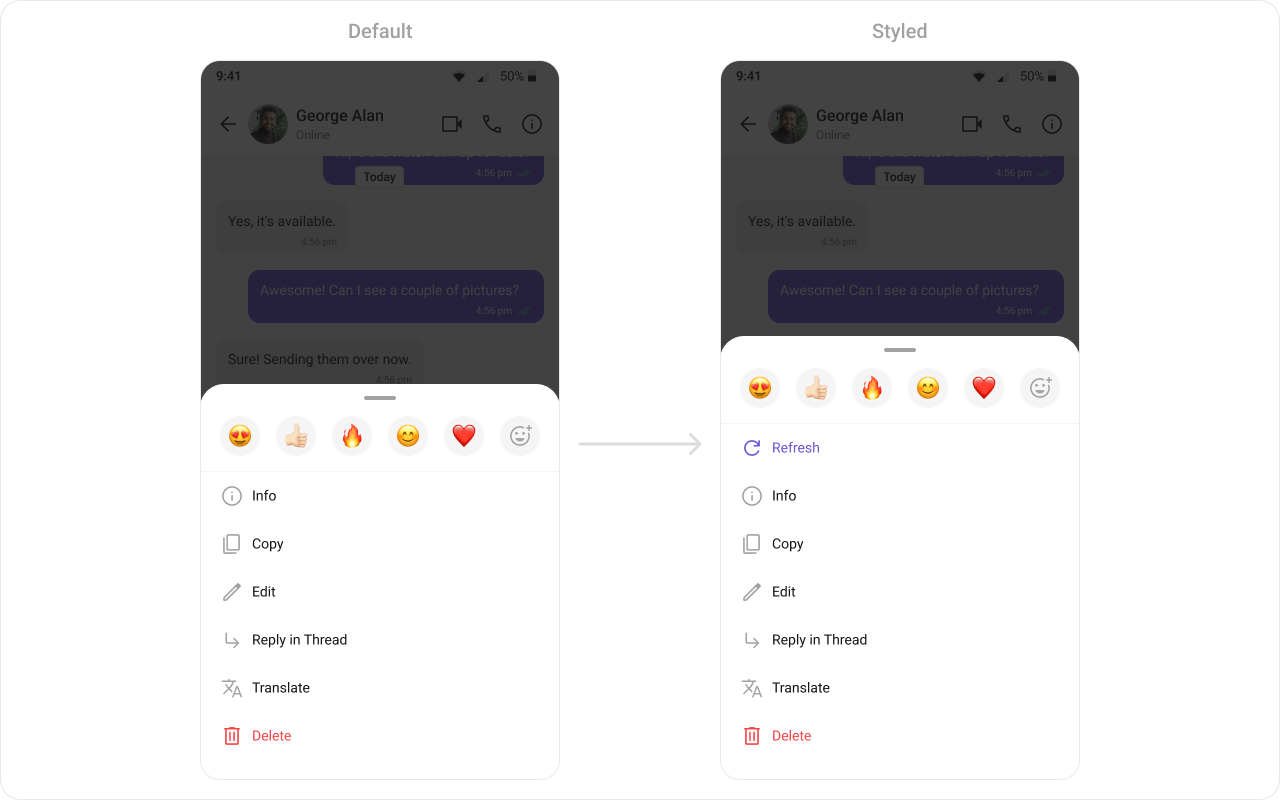
> **What this does:** Creates a custom "Refresh" option using `CometChatMessageOption` with an ID of `"REFRESH"`, a label, an icon, and a click handler that shows a toast. This option is prepended to the default options list retrieved from `CometChatUIKit.getDataSource().getMessageOptions()`, so the "Refresh" option appears first in the long-press action sheet for all message types.
* **Verify**: Long-pressing any message displays an action sheet with "Refresh" as the first option, followed by the default options (Reply, Forward, Edit, Delete, etc.). Tapping "Refresh" shows a toast message "Refresh clicked".
### New Template
What you are changing: Adding an entirely new message template for a custom message type that does not have a default template.
* **Where**: Create a new `CometChatMessageTemplate` instance and add it to the templates list
* **Applies to**: Custom message types (e.g., a "card" type with `UIKitConstants.MessageCategory.CUSTOM`)
* **Default behavior**: Custom message types without a template are not rendered in the `MessageList`
* **Override**: Create a new `CometChatMessageTemplate`, set its `type` and `category`, define a `setBubbleView()`, and add it to the templates list
**Code:**
```kotlin lines theme={null}
val messageTemplates = ChatConfigurator
.getDataSource()
.getMessageTemplates(messageList.additionParameter)
for (messageTemplate in messageTemplates) {
messageTemplate.setOptions { context: Context?, baseMessage: BaseMessage?, group: Group? ->
val refreshOption =
CometChatMessageOption(
"REFRESH",
"Refresh",
android.R.drawable.ic_refresh
) { Toast.makeText(context, "Refresh clicked", Toast.LENGTH_SHORT).show() }
val options: MutableList =
ArrayList()
options.add(refreshOption)
options.addAll(CometChatUIKit.getDataSource().getMessageOptions(context, baseMessage, group, messageList.additionParameter))
options
}
}
messageList.setTemplates(messageTemplates)
```
```java lines theme={null}
List messageTemplates = ChatConfigurator
.getDataSource()
.getMessageTemplates(messageList.getAdditionParameter());
for (CometChatMessageTemplate messageTemplate : messageTemplates) {
messageTemplate.setOptions((context, baseMessage, group) -> {
CometChatMessageOption refreshOption =
new CometChatMessageOption("REFRESH",
"Refresh",
R.drawable.ic_refresh,
() -> Toast.makeText(context, "Refresh clicked", Toast.LENGTH_SHORT).show());
List options = new ArrayList<>();
options.add(refreshOption);
options.addAll(CometChatUIKit.getDataSource().getMessageOptions(context, baseMessage, group, messageList.getAdditionParameter()));
return options;
});
}
messageList.setTemplates(messageTemplates);
```
> **What this does:** Creates a custom "Refresh" option using `CometChatMessageOption` with an ID of `"REFRESH"`, a label, an icon, and a click handler that shows a toast. This option is prepended to the default options list retrieved from `CometChatUIKit.getDataSource().getMessageOptions()`, so the "Refresh" option appears first in the long-press action sheet for all message types.
* **Verify**: Long-pressing any message displays an action sheet with "Refresh" as the first option, followed by the default options (Reply, Forward, Edit, Delete, etc.). Tapping "Refresh" shows a toast message "Refresh clicked".
### New Template
What you are changing: Adding an entirely new message template for a custom message type that does not have a default template.
* **Where**: Create a new `CometChatMessageTemplate` instance and add it to the templates list
* **Applies to**: Custom message types (e.g., a "card" type with `UIKitConstants.MessageCategory.CUSTOM`)
* **Default behavior**: Custom message types without a template are not rendered in the `MessageList`
* **Override**: Create a new `CometChatMessageTemplate`, set its `type` and `category`, define a `setBubbleView()`, and add it to the templates list
 **Sending a custom message:**
```kotlin lines theme={null}
val jsonObject = JSONObject()
try {
jsonObject.put("contact_name", "John Doe")
jsonObject.put("contact_avatar", "https://img.freepik.com/free-vector/blue-circle-with-white-user_78370-4707.jpg?semt=ais_hybrid")
jsonObject.put("contact_number", "+91 1234567890")
} catch (e: Exception) {
e.printStackTrace()
}
val customMessage = CustomMessage(
if (user != null) user!!.uid else group.getGuid(),
if (user != null) CometChatConstants.RECEIVER_TYPE_USER else CometChatConstants.RECEIVER_TYPE_GROUP,
"card",
jsonObject
)
CometChatUIKit.sendCustomMessage(customMessage, object : CallbackListener() {
override fun onSuccess(customMessage: CustomMessage?) {
}
override fun onError(e: CometChatException?) {
}
})
```
```java lines theme={null}
JSONObject jsonObject = new JSONObject();
try {
jsonObject.put("contact_name", "John Doe");
jsonObject.put("contact_avatar", "https://img.freepik.com/free-vector/blue-circle-with-white-user_78370-4707.jpg?semt=ais_hybrid");
jsonObject.put("contact_number", "+91 1234567890");
} catch (Exception e) {
e.printStackTrace();
}
CustomMessage customMessage = new CustomMessage(user != null ? user.getUid() : group.getGuid(),
user != null ? CometChatConstants.RECEIVER_TYPE_USER : CometChatConstants.RECEIVER_TYPE_GROUP,
"card",
jsonObject);
CometChatUIKit.sendCustomMessage(customMessage, new CometChat.CallbackListener() {
@Override
public void onSuccess(CustomMessage customMessage) {
}
@Override
public void onError(CometChatException e) {
}
});
```
> **What this does:** Creates a `CustomMessage` with type `"card"` containing contact data (`contact_name`, `contact_avatar`, `contact_number`) as a `JSONObject`, and sends it using `CometChatUIKit.sendCustomMessage()`.
**XML Layout for the contact card:**
```xml contact_card.xml lines theme={null}
```
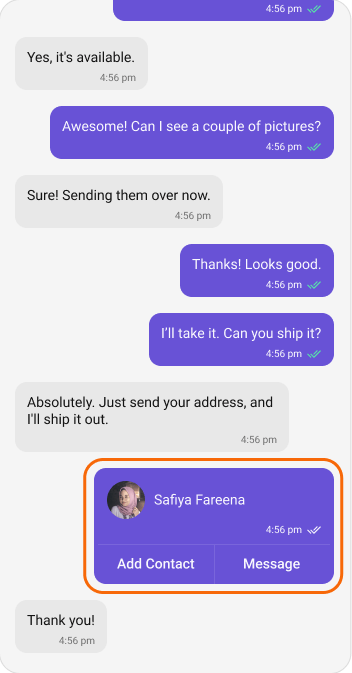
> **What this does:** Defines a contact card layout using `MaterialCardView` with a `CometChatAvatar`, contact name, timestamp, receipt icon, a separator, and two action buttons ("Add Contact" and "Message").
**Creating and registering the new template:**
```kotlin lines theme={null}
val contactTemplate = CometChatMessageTemplate()
contactTemplate.setType("card")
contactTemplate.setCategory(UIKitConstants.MessageCategory.CUSTOM)
contactTemplate.setBubbleView(object : MessagesViewHolderListener() {
override fun createView(
context: Context,
cometChatMessageBubble: CometChatMessageBubble,
messageBubbleAlignment: UIKitConstants.MessageBubbleAlignment
): View {
return LayoutInflater.from(context).inflate(R.layout.contact_card, null)
}
override fun bindView(
context: Context,
view: View,
baseMessage: BaseMessage,
alignment: UIKitConstants.MessageBubbleAlignment,
viewHolder: RecyclerView.ViewHolder,
list: List,
i: Int
) {
val layoutParams = LinearLayout.LayoutParams(
LinearLayout.LayoutParams.WRAP_CONTENT,
LinearLayout.LayoutParams.WRAP_CONTENT
)
view.layoutParams = layoutParams
val avatar = view.findViewById(R.id.avatar)
val name = view.findViewById(R.id.contactName)
val time = view.findViewById(R.id.time)
val receipt = view.findViewById(R.id.receipt)
val customMessage = baseMessage as CustomMessage
val jsonObject = customMessage.customData
try {
name.text = jsonObject.getString("contact_name")
avatar.avatar = jsonObject.getString("contact_avatar")
} catch (e: Exception) {
e.printStackTrace()
}
if (alignment == UIKitConstants.MessageBubbleAlignment.RIGHT) {
receipt.visibility = View.VISIBLE
receipt.setMessageReceipt(MessageReceiptUtils.MessageReceipt(baseMessage))
} else {
receipt.visibility = View.GONE
}
time.text = SimpleDateFormat("hh:mm a").format(baseMessage.getSentAt() * 1000)
}
})
messageTemplates.add(contactTemplate)
messageList.setTemplates(messageTemplates)
```
```java lines theme={null}
List messageTemplates = ChatConfigurator
.getDataSource()
.getMessageTemplates(messageList.getAdditionParameter());
CometChatMessageTemplate contactTemplate = new CometChatMessageTemplate();
contactTemplate.setType("card");
contactTemplate.setCategory(UIKitConstants.MessageCategory.CUSTOM);
contactTemplate.setBubbleView(new MessagesViewHolderListener() {
@Override
public View createView(Context context,
CometChatMessageBubble cometChatMessageBubble,
UIKitConstants.MessageBubbleAlignment messageBubbleAlignment) {
return LayoutInflater.from(context).inflate(R.layout.contact_card, null);
}
@Override
public void bindView(Context context,
View view,
BaseMessage baseMessage,
UIKitConstants.MessageBubbleAlignment alignment,
RecyclerView.ViewHolder viewHolder,
List list,
int i) {
LinearLayout.LayoutParams layoutParams = new LinearLayout.LayoutParams(LinearLayout.LayoutParams.WRAP_CONTENT,
LinearLayout.LayoutParams.WRAP_CONTENT);
view.setLayoutParams(layoutParams);
CometChatAvatar avatar = view.findViewById(R.id.avatar);
TextView name = view.findViewById(R.id.contactName);
TextView time = view.findViewById(R.id.time);
CometChatMessageReceipt receipt = view.findViewById(R.id.receipt);
CustomMessage customMessage = (CustomMessage) baseMessage;
JSONObject jsonObject = customMessage.getCustomData();
try {
name.setText(jsonObject.getString("contact_name"));
avatar.setAvatar(jsonObject.getString("contact_avatar"));
} catch (Exception e) {
e.printStackTrace();
}
if (alignment.equals(UIKitConstants.MessageBubbleAlignment.RIGHT)) {
receipt.setVisibility(View.VISIBLE);
receipt.setMessageReceipt(MessageReceiptUtils.MessageReceipt(baseMessage));
} else {
receipt.setVisibility(View.GONE);
}
time.setText(new SimpleDateFormat("hh:mm a").format(baseMessage.getSentAt() * 1000));
}
});
messageTemplates.add(contactTemplate);
messageList.setTemplates(messageTemplates);
```
> **What this does:** Creates a new `CometChatMessageTemplate` with type `"card"` and category `UIKitConstants.MessageCategory.CUSTOM`. The `setBubbleView()` inflates `contact_card.xml` and binds the contact name, avatar, timestamp, and receipt from the `CustomMessage`'s `customData` JSON. The new template is added to the existing templates list and applied to the `MessageList` via `setTemplates()`. This renders the custom "card" message as a contact card in the chat.
* **Verify**: Custom messages with type `"card"` appear in the `MessageList` as a purple contact card showing the contact's avatar, name, timestamp, delivery receipt (for sent messages), and two action buttons ("Add Contact" and "Message").
## Customization Matrix
| What you want to change | Where | Property/API | Example |
| ------------------------------- | -------------------------- | --------------------- | ------------------------------------------------------------------------------ |
| Message type mapping | `CometChatMessageTemplate` | `setType()` | `messageTemplate.setType(UIKitConstants.MessageType.CUSTOM)` |
| Message category mapping | `CometChatMessageTemplate` | `setCategory()` | `messageTemplate.setCategory(UIKitConstants.MessageCategory.CUSTOM)` |
| Header area (sender name) | `CometChatMessageTemplate` | `setHeaderView()` | Pass a `MessagesViewHolderListener` that inflates a custom header layout |
| Content area (message body) | `CometChatMessageTemplate` | `setContentView()` | Pass a `MessagesViewHolderListener` that inflates a custom content layout |
| Footer area (timestamp/receipt) | `CometChatMessageTemplate` | `setFooterView()` | Pass a `MessagesViewHolderListener` that inflates a custom footer layout |
| Bottom area (below content) | `CometChatMessageTemplate` | `setBottomView()` | Pass a `MessagesViewHolderListener` that inflates a custom bottom layout |
| Status info (in-bubble receipt) | `CometChatMessageTemplate` | `setStatusInfoView()` | Pass a `MessagesViewHolderListener` that returns a minimal or custom view |
| Entire bubble layout | `CometChatMessageTemplate` | `setBubbleView()` | Pass a `MessagesViewHolderListener` that inflates a fully custom bubble layout |
| Long-press action options | `CometChatMessageTemplate` | `setOptions()` | Pass a lambda returning a list of `CometChatMessageOption` objects |
## Next steps
Configure and customize the MessageList where templates are applied
Explore styling options for the default message bubble views
**Sending a custom message:**
```kotlin lines theme={null}
val jsonObject = JSONObject()
try {
jsonObject.put("contact_name", "John Doe")
jsonObject.put("contact_avatar", "https://img.freepik.com/free-vector/blue-circle-with-white-user_78370-4707.jpg?semt=ais_hybrid")
jsonObject.put("contact_number", "+91 1234567890")
} catch (e: Exception) {
e.printStackTrace()
}
val customMessage = CustomMessage(
if (user != null) user!!.uid else group.getGuid(),
if (user != null) CometChatConstants.RECEIVER_TYPE_USER else CometChatConstants.RECEIVER_TYPE_GROUP,
"card",
jsonObject
)
CometChatUIKit.sendCustomMessage(customMessage, object : CallbackListener() {
override fun onSuccess(customMessage: CustomMessage?) {
}
override fun onError(e: CometChatException?) {
}
})
```
```java lines theme={null}
JSONObject jsonObject = new JSONObject();
try {
jsonObject.put("contact_name", "John Doe");
jsonObject.put("contact_avatar", "https://img.freepik.com/free-vector/blue-circle-with-white-user_78370-4707.jpg?semt=ais_hybrid");
jsonObject.put("contact_number", "+91 1234567890");
} catch (Exception e) {
e.printStackTrace();
}
CustomMessage customMessage = new CustomMessage(user != null ? user.getUid() : group.getGuid(),
user != null ? CometChatConstants.RECEIVER_TYPE_USER : CometChatConstants.RECEIVER_TYPE_GROUP,
"card",
jsonObject);
CometChatUIKit.sendCustomMessage(customMessage, new CometChat.CallbackListener() {
@Override
public void onSuccess(CustomMessage customMessage) {
}
@Override
public void onError(CometChatException e) {
}
});
```
> **What this does:** Creates a `CustomMessage` with type `"card"` containing contact data (`contact_name`, `contact_avatar`, `contact_number`) as a `JSONObject`, and sends it using `CometChatUIKit.sendCustomMessage()`.
**XML Layout for the contact card:**
```xml contact_card.xml lines theme={null}
```
> **What this does:** Defines a contact card layout using `MaterialCardView` with a `CometChatAvatar`, contact name, timestamp, receipt icon, a separator, and two action buttons ("Add Contact" and "Message").
**Creating and registering the new template:**
```kotlin lines theme={null}
val contactTemplate = CometChatMessageTemplate()
contactTemplate.setType("card")
contactTemplate.setCategory(UIKitConstants.MessageCategory.CUSTOM)
contactTemplate.setBubbleView(object : MessagesViewHolderListener() {
override fun createView(
context: Context,
cometChatMessageBubble: CometChatMessageBubble,
messageBubbleAlignment: UIKitConstants.MessageBubbleAlignment
): View {
return LayoutInflater.from(context).inflate(R.layout.contact_card, null)
}
override fun bindView(
context: Context,
view: View,
baseMessage: BaseMessage,
alignment: UIKitConstants.MessageBubbleAlignment,
viewHolder: RecyclerView.ViewHolder,
list: List,
i: Int
) {
val layoutParams = LinearLayout.LayoutParams(
LinearLayout.LayoutParams.WRAP_CONTENT,
LinearLayout.LayoutParams.WRAP_CONTENT
)
view.layoutParams = layoutParams
val avatar = view.findViewById(R.id.avatar)
val name = view.findViewById(R.id.contactName)
val time = view.findViewById(R.id.time)
val receipt = view.findViewById(R.id.receipt)
val customMessage = baseMessage as CustomMessage
val jsonObject = customMessage.customData
try {
name.text = jsonObject.getString("contact_name")
avatar.avatar = jsonObject.getString("contact_avatar")
} catch (e: Exception) {
e.printStackTrace()
}
if (alignment == UIKitConstants.MessageBubbleAlignment.RIGHT) {
receipt.visibility = View.VISIBLE
receipt.setMessageReceipt(MessageReceiptUtils.MessageReceipt(baseMessage))
} else {
receipt.visibility = View.GONE
}
time.text = SimpleDateFormat("hh:mm a").format(baseMessage.getSentAt() * 1000)
}
})
messageTemplates.add(contactTemplate)
messageList.setTemplates(messageTemplates)
```
```java lines theme={null}
List messageTemplates = ChatConfigurator
.getDataSource()
.getMessageTemplates(messageList.getAdditionParameter());
CometChatMessageTemplate contactTemplate = new CometChatMessageTemplate();
contactTemplate.setType("card");
contactTemplate.setCategory(UIKitConstants.MessageCategory.CUSTOM);
contactTemplate.setBubbleView(new MessagesViewHolderListener() {
@Override
public View createView(Context context,
CometChatMessageBubble cometChatMessageBubble,
UIKitConstants.MessageBubbleAlignment messageBubbleAlignment) {
return LayoutInflater.from(context).inflate(R.layout.contact_card, null);
}
@Override
public void bindView(Context context,
View view,
BaseMessage baseMessage,
UIKitConstants.MessageBubbleAlignment alignment,
RecyclerView.ViewHolder viewHolder,
List list,
int i) {
LinearLayout.LayoutParams layoutParams = new LinearLayout.LayoutParams(LinearLayout.LayoutParams.WRAP_CONTENT,
LinearLayout.LayoutParams.WRAP_CONTENT);
view.setLayoutParams(layoutParams);
CometChatAvatar avatar = view.findViewById(R.id.avatar);
TextView name = view.findViewById(R.id.contactName);
TextView time = view.findViewById(R.id.time);
CometChatMessageReceipt receipt = view.findViewById(R.id.receipt);
CustomMessage customMessage = (CustomMessage) baseMessage;
JSONObject jsonObject = customMessage.getCustomData();
try {
name.setText(jsonObject.getString("contact_name"));
avatar.setAvatar(jsonObject.getString("contact_avatar"));
} catch (Exception e) {
e.printStackTrace();
}
if (alignment.equals(UIKitConstants.MessageBubbleAlignment.RIGHT)) {
receipt.setVisibility(View.VISIBLE);
receipt.setMessageReceipt(MessageReceiptUtils.MessageReceipt(baseMessage));
} else {
receipt.setVisibility(View.GONE);
}
time.setText(new SimpleDateFormat("hh:mm a").format(baseMessage.getSentAt() * 1000));
}
});
messageTemplates.add(contactTemplate);
messageList.setTemplates(messageTemplates);
```
> **What this does:** Creates a new `CometChatMessageTemplate` with type `"card"` and category `UIKitConstants.MessageCategory.CUSTOM`. The `setBubbleView()` inflates `contact_card.xml` and binds the contact name, avatar, timestamp, and receipt from the `CustomMessage`'s `customData` JSON. The new template is added to the existing templates list and applied to the `MessageList` via `setTemplates()`. This renders the custom "card" message as a contact card in the chat.
* **Verify**: Custom messages with type `"card"` appear in the `MessageList` as a purple contact card showing the contact's avatar, name, timestamp, delivery receipt (for sent messages), and two action buttons ("Add Contact" and "Message").
## Customization Matrix
| What you want to change | Where | Property/API | Example |
| ------------------------------- | -------------------------- | --------------------- | ------------------------------------------------------------------------------ |
| Message type mapping | `CometChatMessageTemplate` | `setType()` | `messageTemplate.setType(UIKitConstants.MessageType.CUSTOM)` |
| Message category mapping | `CometChatMessageTemplate` | `setCategory()` | `messageTemplate.setCategory(UIKitConstants.MessageCategory.CUSTOM)` |
| Header area (sender name) | `CometChatMessageTemplate` | `setHeaderView()` | Pass a `MessagesViewHolderListener` that inflates a custom header layout |
| Content area (message body) | `CometChatMessageTemplate` | `setContentView()` | Pass a `MessagesViewHolderListener` that inflates a custom content layout |
| Footer area (timestamp/receipt) | `CometChatMessageTemplate` | `setFooterView()` | Pass a `MessagesViewHolderListener` that inflates a custom footer layout |
| Bottom area (below content) | `CometChatMessageTemplate` | `setBottomView()` | Pass a `MessagesViewHolderListener` that inflates a custom bottom layout |
| Status info (in-bubble receipt) | `CometChatMessageTemplate` | `setStatusInfoView()` | Pass a `MessagesViewHolderListener` that returns a minimal or custom view |
| Entire bubble layout | `CometChatMessageTemplate` | `setBubbleView()` | Pass a `MessagesViewHolderListener` that inflates a fully custom bubble layout |
| Long-press action options | `CometChatMessageTemplate` | `setOptions()` | Pass a lambda returning a list of `CometChatMessageOption` objects |
## Next steps
Configure and customize the MessageList where templates are applied
Explore styling options for the default message bubble views