> ## Documentation Index
> Fetch the complete documentation index at: https://cometchat-22654f5b-docs-rn-guide-message-privately.mintlify.site/llms.txt
> Use this file to discover all available pages before exploring further.
# Message List
> Scrollable list of messages for a conversation with real-time updates, reactions, threaded replies, and message actions.
```json theme={null}
{
"component": "CometChatMessageList",
"package": "com.cometchat.chatuikit.messagelist",
"xmlElement": "",
"description": "Scrollable list of messages for a conversation with real-time updates, reactions, threaded replies, and message actions.",
"primaryOutput": {
"method": "setOnThreadRepliesClick",
"type": "ThreadReplyClick"
},
"methods": {
"data": {
"setUser": {
"type": "User",
"note": "Sets the user for a one-on-one conversation"
},
"setGroup": {
"type": "Group",
"note": "Sets the group for a group conversation"
},
"setMessagesRequestBuilder": {
"type": "MessagesRequest.MessagesRequestBuilder",
"default": "SDK default",
"note": "Pass the builder, not the result of .build()"
},
"setReactionsRequestBuilder": {
"type": "ReactionsRequest.ReactionsRequestBuilder",
"default": "SDK default",
"note": "Custom builder for fetching reactions"
}
},
"callbacks": {
"setOnThreadRepliesClick": "ThreadReplyClick",
"setOnReactionClick": "OnReactionClick",
"setOnReactionLongClick": "OnReactionLongClick",
"setOnAddMoreReactionsClick": "OnAddMoreReactionsClick",
"setOnReactionListItemClick": "OnReactionListItemClick",
"setOnError": "OnError",
"setOnLoad": "OnLoad",
"setOnEmpty": "OnEmpty"
},
"visibility": {
"setErrorStateVisibility": { "type": "int (View.VISIBLE | View.GONE)", "default": "View.VISIBLE" },
"setAvatarVisibility": { "type": "int", "default": "View.VISIBLE" },
"setReceiptsVisibility": { "type": "int", "default": "View.VISIBLE" },
"setStickyDateVisibility": { "type": "int", "default": "View.VISIBLE" },
"setReplyInThreadOptionVisibility": { "type": "int", "default": "View.VISIBLE" },
"setTranslateMessageOptionVisibility": { "type": "int", "default": "View.VISIBLE" },
"setEditMessageOptionVisibility": { "type": "int", "default": "View.VISIBLE" },
"setDeleteMessageOptionVisibility": { "type": "int", "default": "View.VISIBLE" },
"setMessageReactionOptionVisibility": { "type": "int", "default": "View.VISIBLE" },
"setMessagePrivatelyOptionVisibility": { "type": "int", "default": "View.VISIBLE" },
"setCopyMessageOptionVisibility": { "type": "int", "default": "View.VISIBLE" },
"setMessageInfoOptionVisibility": { "type": "int", "default": "View.VISIBLE" },
"setGroupActionMessageVisibility": { "type": "int", "default": "View.VISIBLE" },
"setReplyOptionVisibility": { "type": "int", "default": "View.VISIBLE" },
"setShareMessageOptionVisibility": { "type": "int", "default": "View.VISIBLE" },
"setMarkAsUnreadOptionVisibility": { "type": "int", "default": "View.VISIBLE" },
"setFlagOptionVisibility": { "type": "int", "default": "View.VISIBLE" },
"setModerationViewVisibility": { "type": "int", "default": "View.VISIBLE" }
},
"viewSlots": {
"setHeaderView": "View — custom view above the message list",
"setFooterView": "View — custom view below the message list",
"setLoadingStateView": "@LayoutRes int — loading spinner",
"setEmptyStateView": "@LayoutRes int — empty state",
"setErrorStateView": "@LayoutRes int — error state",
"setNewMessageIndicatorView": "View — new message indicator",
"setAIAssistantEmptyChatGreetingView": "@LayoutRes int — AI assistant greeting",
"setTemplates": "List — message bubble templates",
"setTextFormatters": "List — text formatters (mentions, etc.)"
},
"advanced": {
"scrollToBottom": "void — scrolls to the bottom of the list",
"scrollToMessageId": "long — scrolls to a specific message",
"gotoMessage": "long — navigates to a specific message by ID",
"generateConversationSummary": "void — triggers AI conversation summary",
"getAdapter": "MessageAdapter — internal adapter access",
"setAdapter": "MessageAdapter — replace the default adapter",
"getViewModel": "MessageListViewModel — internal ViewModel access",
"getRecyclerView": "RecyclerView — internal RecyclerView access",
"setParentMessage": "long — sets parent message ID for threaded view",
"setAutoFetch": "boolean — controls automatic message fetching",
"addMessage": "BaseMessage — programmatically adds a message",
"setList": "List — replaces the entire message list",
"updateMessage": "int — updates a message at a given index",
"copyMessage": "BaseMessage — copies message text to clipboard",
"shareMessage": "void — shares the selected message",
"showMessageInformation": "void — shows message info bottom sheet"
},
"style": {
"setStyle": {
"type": "@StyleRes int",
"parent": "CometChatMessageListStyle"
}
}
},
"events": [],
"sdkListeners": []
}
```
## Where It Fits
`CometChatMessageList` is a message display component. It requires either a `User` or `Group` object to fetch and render messages. Wire it with `CometChatMessageHeader` and `CometChatMessageComposer` to build a complete messaging layout.
```kotlin ChatActivity.kt lines theme={null}
class ChatActivity : AppCompatActivity() {
private lateinit var messageHeader: CometChatMessageHeader
private lateinit var messageList: CometChatMessageList
private lateinit var messageComposer: CometChatMessageComposer
override fun onCreate(savedInstanceState: Bundle?) {
super.onCreate(savedInstanceState)
setContentView(R.layout.activity_chat)
messageHeader = findViewById(R.id.message_header)
messageList = findViewById(R.id.message_list)
messageComposer = findViewById(R.id.message_composer)
// Set the user for all components
messageHeader.setUser(user)
messageList.setUser(user)
messageComposer.setUser(user)
}
}
```
```java ChatActivity.java lines theme={null}
public class ChatActivity extends AppCompatActivity {
private CometChatMessageHeader messageHeader;
private CometChatMessageList messageList;
private CometChatMessageComposer messageComposer;
@Override
protected void onCreate(Bundle savedInstanceState) {
super.onCreate(savedInstanceState);
setContentView(R.layout.activity_chat);
messageHeader = findViewById(R.id.message_header);
messageList = findViewById(R.id.message_list);
messageComposer = findViewById(R.id.message_composer);
// Set the user for all components
messageHeader.setUser(user);
messageList.setUser(user);
messageComposer.setUser(user);
}
}
```
## Quick Start
Add the component to your layout XML:
```xml layout_activity.xml lines theme={null}
```
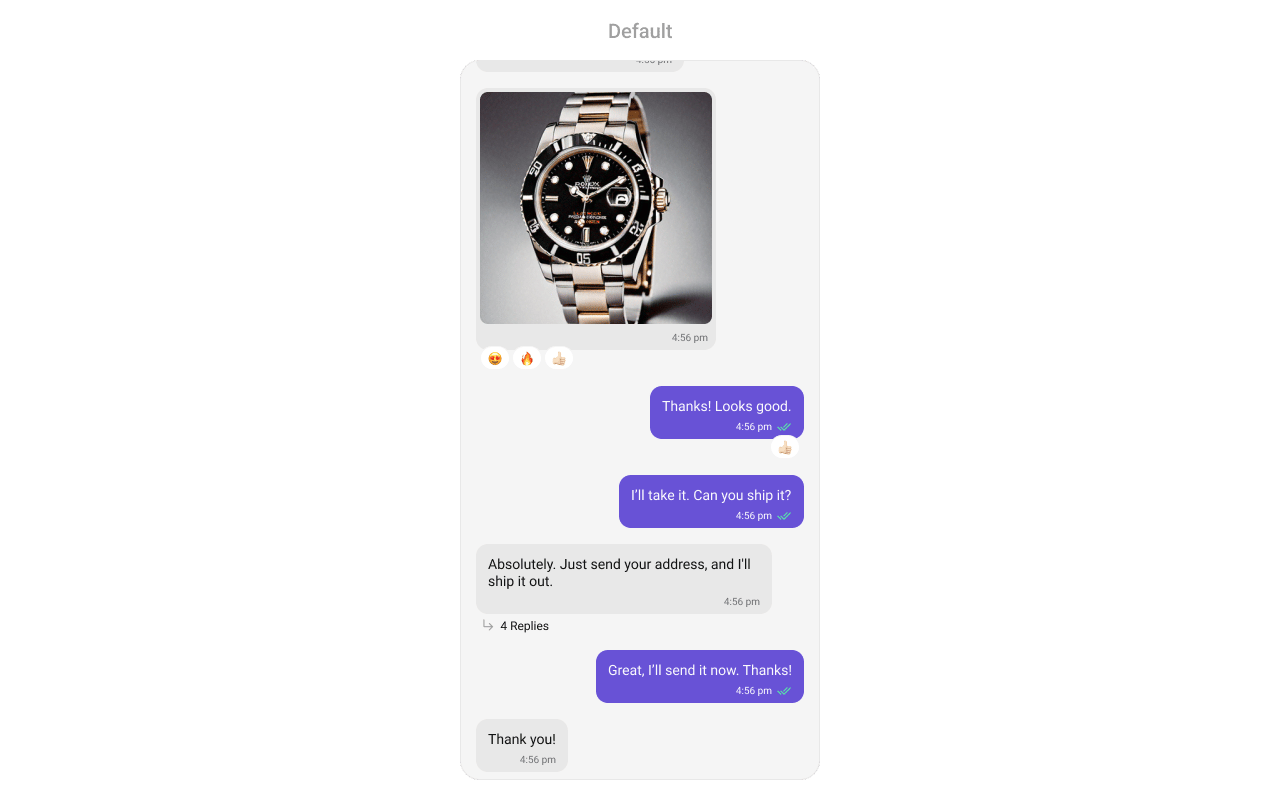 Prerequisites: CometChat SDK initialized with `CometChatUIKit.init()`, a user logged in, and the `cometchat-chat-uikit-android` dependency added.
Set a `User` or `Group` object in your Activity:
```kotlin YourActivity.kt lines theme={null}
val cometChatMessageList = findViewById(R.id.message_list)
cometChatMessageList.setUser(user)
```
```java YourActivity.java lines theme={null}
CometChatMessageList cometChatMessageList = findViewById(R.id.message_list);
cometChatMessageList.setUser(user);
```
For a group conversation, call `.setGroup(group)` with a `Group` object instead of `.setUser(user)`.
Simply adding the `MessageList` component to the layout will only display the loading indicator. To fetch messages for a specific entity, you need to supplement it with `User` or `Group` Object.
## Filtering Messages
Pass a `MessagesRequest.MessagesRequestBuilder` to `setMessagesRequestBuilder`. Pass the builder instance — not the result of `.build()`.
```kotlin lines theme={null}
val messagesRequest = MessagesRequest.MessagesRequestBuilder()
.setSearchKeyword("your search keyword")
.setUID("user uid")
messageList.messagesRequestBuilder = messagesRequest
```
```java lines theme={null}
MessagesRequest.MessagesRequestBuilder messagesRequest = new MessagesRequest.MessagesRequestBuilder()
.setSearchKeyword("your search keyword")
.setUID("user uid");
messageList.setMessagesRequestBuilder(messagesRequest);
```
### Filter Recipes
| Recipe | Code |
| --------------------- | ----------------------------------- |
| Search by keyword | `builder.setSearchKeyword("hello")` |
| Filter by UID | `builder.setUID("user_uid")` |
| Filter by GUID | `builder.setGUID("group_guid")` |
| Limit per page | `builder.setLimit(30)` |
| Filter by category | `builder.setCategory("message")` |
| Filter by type | `builder.setType("text")` |
| Unread only | `builder.setUnread(true)` |
| Hide deleted messages | `builder.hideDeletedMessages(true)` |
The following parameters in `MessagesRequestBuilder` will always be altered inside the message list:
1. UID
2. GUID
3. types
4. categories
> The component uses infinite scroll — older messages load as the user scrolls up. Refer to [MessagesRequestBuilder](/sdk/android/additional-message-filtering) for the full builder API.
### Reactions Request Builder
Use `setReactionsRequestBuilder` to customize how reactions are fetched:
```kotlin lines theme={null}
val reactionsBuilder = ReactionsRequest.ReactionsRequestBuilder()
messageList.setReactionsRequestBuilder(reactionsBuilder)
```
```java lines theme={null}
ReactionsRequest.ReactionsRequestBuilder reactionsBuilder = new ReactionsRequest.ReactionsRequestBuilder();
messageList.setReactionsRequestBuilder(reactionsBuilder);
```
## Actions and Events
### Callback Methods
#### `setOnThreadRepliesClick`
Fires when a user taps a threaded message bubble. No predefined behavior.
```kotlin YourActivity.kt lines theme={null}
cometchatMessageList.onThreadRepliesClick =
ThreadReplyClick { context, baseMessage, cometchatMessageTemplate -> }
```
```java YourActivity.java lines theme={null}
cometchatMessageList.setOnThreadRepliesClick((context, baseMessage, cometchatMessageTemplate) -> {
});
```
> **What this does:** Registers a callback that fires when a user taps a threaded message bubble. The callback receives the `context`, the `baseMessage`, and the `cometchatMessageTemplate`.
#### `setOnError`
Fires on internal errors (network failure, auth issue, SDK exception).
```kotlin YourActivity.kt lines theme={null}
cometchatMessageList.setOnError(object : OnError {
override fun onError(e: CometChatException) {
// Your Exception Handling code.
}
})
```
```java YourActivity.java lines theme={null}
cometchatMessageList.setOnError(new OnError() {
@Override
public void onError(CometChatException e) {
//Your Exception Handling code.
}
});
```
> **What this does:** Registers an error listener. If the component encounters an error (e.g., network failure), your callback receives the `CometChatException`.
#### `setOnLoad`
Fires when the list is successfully fetched and loaded.
```kotlin YourActivity.kt lines theme={null}
cometchatMessageList.setOnLoad(object : OnLoad {
override fun onLoad(list: MutableList?) {
}
})
```
```java YourActivity.java lines theme={null}
cometchatMessageList.setOnLoad(list -> {
});
```
> **What this does:** Registers a callback that fires after the message list is fetched and rendered. The callback receives the list of loaded `BaseMessage` objects.
#### `setOnEmpty`
Fires when the list is empty, enabling custom handling such as showing a placeholder.
```kotlin YourActivity.kt lines theme={null}
cometchatMessageList.setOnEmpty{
}
```
```java YourActivity.java lines theme={null}
cometchatMessageList.setOnEmpty(() -> {
});
```
> **What this does:** Registers a callback that fires when the message list has no items. Use this to show a custom empty-state message or trigger other logic.
#### `setOnReactionClick`
Fires when a reaction is tapped, enabling custom reaction interactions.
```kotlin YourActivity.kt lines theme={null}
cometchatMessageList.onReactionClick = OnReactionClick { emoji, baseMessage -> }
```
```java YourActivity.java lines theme={null}
cometchatMessageList.setOnReactionClick((emoji, baseMessage) -> {
});
```
> **What this does:** Replaces the default reaction-click behavior. When a user taps a reaction, your custom lambda executes with the `emoji` and `baseMessage`.
#### `setOnReactionLongClick`
Fires when a user long-presses on a reaction pill.
```kotlin YourActivity.kt lines theme={null}
cometchatMessageList.onReactionLongClick = OnReactionLongClick { emoji, baseMessage -> }
```
```java YourActivity.java lines theme={null}
cometchatMessageList.setOnReactionLongClick((emoji, baseMessage) -> {
});
```
> **What this does:** Replaces the default reaction long-press behavior. When a user long-presses a reaction pill, your custom lambda executes with the `emoji` and `baseMessage`.
#### `setOnAddMoreReactionsClick`
Fires when a user clicks the "Add More Reactions" button.
```kotlin YourActivity.kt lines theme={null}
cometchatMessageList.onAddMoreReactionsClick =
OnAddMoreReactionsClick {
}
```
```java YourActivity.java lines theme={null}
cometchatMessageList.setOnAddMoreReactionsClick(baseMessage -> {
});
```
> **What this does:** Replaces the default "Add More Reactions" button behavior. Your callback receives the `baseMessage` that the user wants to react to.
#### `setOnReactionListItemClick`
Fires when a reaction list item is clicked in `CometChatReactionsList`.
```kotlin YourActivity.kt lines theme={null}
cometchatMessageList.onReactionListItemClick =
OnReactionListItemClick { reaction, message -> }
```
```java YourActivity.java lines theme={null}
cometchatMessageList.setOnReactionListItemClick((reaction, message) -> {
});
```
> **What this does:** Replaces the default reaction list item click behavior. Your callback receives the `reaction` and `message` objects.
* **Verify**: After setting an action callback, trigger the corresponding user interaction (thread reply tap, reaction click, reaction long-press) and confirm your custom logic executes instead of the default behavior.
### Global UI Events
The MessageList component does not emit any global UI events of its own.
### SDK Events (Real-Time, Automatic)
The component listens to SDK message events internally. No manual attachment needed unless additional side effects are required.
> Automatic: new messages, edits, deletions, and reactions update the list in real time.
## Functionality
Small functional customizations such as toggling visibility of UI elements, setting custom sounds, configuring alignment, and enabling AI features.
```kotlin lines theme={null}
val cometChatMessageList = findViewById(R.id.message_list)
cometChatMessageList.setUser(user)
cometChatMessageList.setErrorStateVisibility(View.GONE)
cometChatMessageList.setReceiptsVisibility(View.GONE)
```
```java lines theme={null}
CometChatMessageList cometChatMessageList = findViewById(R.id.message_list);
cometChatMessageList.setUser(user);
cometChatMessageList.setErrorStateVisibility(View.GONE);
cometChatMessageList.setReceiptsVisibility(View.GONE);
```
| Method | Description | Code |
| ------------------------------------- | ------------------------------------------------------------------------------------------------- | --------------------------------------------------------------------- |
| `setUser` | Sets the user object to fetch messages for a one-on-one conversation | `.setUser(user);` |
| `setGroup` | Sets the group object to fetch messages for a group conversation | `.setGroup(group);` |
| `setMessageAlignment` | Sets the alignment of messages (`leftAligned` or `standard`) | `.setMessageAlignment(UIKitConstants.MessageListAlignment.STANDARD);` |
| `setErrorStateVisibility` | Toggles visibility of the error state | `.setErrorStateVisibility(View.GONE);` |
| `disableSoundForMessages` | Enables/disables sound for incoming/outgoing messages, default false | `.disableSoundForMessages(false);` |
| `setCustomSoundForMessages` | Sets a custom sound for outgoing messages | `.setCustomSoundForMessages(@RawRes resource);` |
| `setAvatarVisibility` | Toggles visibility for avatar | `.setAvatarVisibility(View.GONE);` |
| `scrollToBottomOnNewMessage` | If true, scrolls to bottom on new message. Default is false | `.scrollToBottomOnNewMessage(true);` |
| `setReceiptsVisibility` | Controls visibility of read receipts without disabling marking messages as read/delivered | `.setReceiptsVisibility(View.GONE);` |
| `setQuickReactions` | Replaces the predefined set of quick reactions | `.setQuickReactions(Arrays.asList("👻","😈","🙀","🤡","❤️"));` |
| `setStickyDateVisibility` | Toggles visibility for sticky date header | `.setStickyDateVisibility(View.GONE);` |
| `setReplyInThreadOptionVisibility` | Toggles visibility for thread reply option | `.setReplyInThreadOptionVisibility(View.GONE);` |
| `setTranslateMessageOptionVisibility` | Toggles visibility for translate option | `.setTranslateMessageOptionVisibility(View.GONE);` |
| `setEditMessageOptionVisibility` | Toggles visibility for edit option | `.setEditMessageOptionVisibility(View.GONE);` |
| `setDeleteMessageOptionVisibility` | Toggles visibility for delete option | `.setDeleteMessageOptionVisibility(View.GONE);` |
| `setMessageReactionOptionVisibility` | Toggles visibility for reaction option | `.setMessageReactionOptionVisibility(View.GONE);` |
| `setMessagePrivatelyOptionVisibility` | Toggles visibility for private message option | `.setMessagePrivatelyOptionVisibility(View.GONE);` |
| `setCopyMessageOptionVisibility` | Toggles visibility for copy option | `.setCopyMessageOptionVisibility(View.GONE);` |
| `setMessageInfoOptionVisibility` | Toggles visibility for info option | `.setMessageInfoOptionVisibility(View.GONE);` |
| `setGroupActionMessageVisibility` | Toggles visibility for group action messages | `.setGroupActionMessageVisibility(View.GONE);` |
| `setReplyOptionVisibility` | Toggles visibility for the reply option in the action sheet | `.setReplyOptionVisibility(View.GONE);` |
| `setShareMessageOptionVisibility` | Toggles visibility for the share message option | `.setShareMessageOptionVisibility(View.GONE);` |
| `setMarkAsUnreadOptionVisibility` | Toggles visibility for the mark-as-unread option | `.setMarkAsUnreadOptionVisibility(View.GONE);` |
| `setFlagOptionVisibility` | Toggles visibility for the flag/report option | `.setFlagOptionVisibility(View.GONE);` |
| `setModerationViewVisibility` | Toggles visibility for the moderation view | `.setModerationViewVisibility(View.GONE);` |
| `setSwipeToReplyEnabled` | Enables or disables swipe-to-reply gesture. Default is true | `.setSwipeToReplyEnabled(false);` |
| `setStartFromUnreadMessages` | When true, scrolls to the first unread message on load | `.setStartFromUnreadMessages(true);` |
| `setEnableConversationSummary` | Controls whether AI conversation summary is generated for conversations with many unread messages | `.setEnableConversationSummary(true);` |
| `setEnableConversationStarter` | Controls whether conversation starters are generated in new conversations | `.setEnableConversationStarter(true);` |
| `setEnableSmartReplies` | Enables smart replies for quick responses | `.setEnableSmartReplies(true);` |
| `setAISmartRepliesKeywords` | Defines keywords in incoming messages that trigger Smart Replies | `.setAISmartRepliesKeywords(Arrays.asList("hello", "hi"));` |
| `setSmartRepliesDelayDuration` | Sets the delay before Smart Replies are fetched after a message is received | `.setSmartRepliesDelayDuration(5000);` |
| `setUnreadMessageThreshold` | Sets the threshold for unread messages before triggering conversation summary | `.setUnreadMessageThreshold(10);` |
| `setFlagRemarkInputFieldVisibility` | Toggles visibility for the remark input field in the flag/report dialog | `.setFlagRemarkInputFieldVisibility(View.GONE);` |
| `setFlagReasonLocalization` | Sets localization map for flag/report reason labels | `.setFlagReasonLocalization(map);` |
| `setStreamingSpeed` | Sets the streaming speed for AI-generated content | `.setStreamingSpeed(100);` |
| `refreshStyle` | Refreshes the style of the message list | `.refreshStyle();` |
* **Verify**: After calling a visibility method, confirm the corresponding UI element is shown or hidden. After calling `disableSoundForMessages(true)`, confirm no sound plays on incoming messages.
## Custom View Slots
Each slot replaces a section of the default UI.
| Slot | Method | Replaces |
| --------------------- | ----------------------------------------------------- | ---------------------------------- |
| Header view | `setHeaderView(View)` | Custom view above the message list |
| Footer view | `setFooterView(View)` | Custom view below the message list |
| Loading view | `setLoadingStateView(@LayoutRes int)` | Loading spinner |
| Empty view | `setEmptyStateView(@LayoutRes int)` | Empty state |
| Error view | `setErrorStateView(@LayoutRes int)` | Error state |
| New message indicator | `setNewMessageIndicatorView(View)` | New message indicator |
| AI greeting view | `setAIAssistantEmptyChatGreetingView(@LayoutRes int)` | AI assistant empty chat greeting |
| Message templates | `setTemplates(List)` | Message bubble templates |
| Text formatters | `setTextFormatters(List)` | Text formatters (mentions, etc.) |
### `setHeaderView`
Sets a custom header view displayed at the top of the message list.
Prerequisites: CometChat SDK initialized with `CometChatUIKit.init()`, a user logged in, and the `cometchat-chat-uikit-android` dependency added.
Set a `User` or `Group` object in your Activity:
```kotlin YourActivity.kt lines theme={null}
val cometChatMessageList = findViewById(R.id.message_list)
cometChatMessageList.setUser(user)
```
```java YourActivity.java lines theme={null}
CometChatMessageList cometChatMessageList = findViewById(R.id.message_list);
cometChatMessageList.setUser(user);
```
For a group conversation, call `.setGroup(group)` with a `Group` object instead of `.setUser(user)`.
Simply adding the `MessageList` component to the layout will only display the loading indicator. To fetch messages for a specific entity, you need to supplement it with `User` or `Group` Object.
## Filtering Messages
Pass a `MessagesRequest.MessagesRequestBuilder` to `setMessagesRequestBuilder`. Pass the builder instance — not the result of `.build()`.
```kotlin lines theme={null}
val messagesRequest = MessagesRequest.MessagesRequestBuilder()
.setSearchKeyword("your search keyword")
.setUID("user uid")
messageList.messagesRequestBuilder = messagesRequest
```
```java lines theme={null}
MessagesRequest.MessagesRequestBuilder messagesRequest = new MessagesRequest.MessagesRequestBuilder()
.setSearchKeyword("your search keyword")
.setUID("user uid");
messageList.setMessagesRequestBuilder(messagesRequest);
```
### Filter Recipes
| Recipe | Code |
| --------------------- | ----------------------------------- |
| Search by keyword | `builder.setSearchKeyword("hello")` |
| Filter by UID | `builder.setUID("user_uid")` |
| Filter by GUID | `builder.setGUID("group_guid")` |
| Limit per page | `builder.setLimit(30)` |
| Filter by category | `builder.setCategory("message")` |
| Filter by type | `builder.setType("text")` |
| Unread only | `builder.setUnread(true)` |
| Hide deleted messages | `builder.hideDeletedMessages(true)` |
The following parameters in `MessagesRequestBuilder` will always be altered inside the message list:
1. UID
2. GUID
3. types
4. categories
> The component uses infinite scroll — older messages load as the user scrolls up. Refer to [MessagesRequestBuilder](/sdk/android/additional-message-filtering) for the full builder API.
### Reactions Request Builder
Use `setReactionsRequestBuilder` to customize how reactions are fetched:
```kotlin lines theme={null}
val reactionsBuilder = ReactionsRequest.ReactionsRequestBuilder()
messageList.setReactionsRequestBuilder(reactionsBuilder)
```
```java lines theme={null}
ReactionsRequest.ReactionsRequestBuilder reactionsBuilder = new ReactionsRequest.ReactionsRequestBuilder();
messageList.setReactionsRequestBuilder(reactionsBuilder);
```
## Actions and Events
### Callback Methods
#### `setOnThreadRepliesClick`
Fires when a user taps a threaded message bubble. No predefined behavior.
```kotlin YourActivity.kt lines theme={null}
cometchatMessageList.onThreadRepliesClick =
ThreadReplyClick { context, baseMessage, cometchatMessageTemplate -> }
```
```java YourActivity.java lines theme={null}
cometchatMessageList.setOnThreadRepliesClick((context, baseMessage, cometchatMessageTemplate) -> {
});
```
> **What this does:** Registers a callback that fires when a user taps a threaded message bubble. The callback receives the `context`, the `baseMessage`, and the `cometchatMessageTemplate`.
#### `setOnError`
Fires on internal errors (network failure, auth issue, SDK exception).
```kotlin YourActivity.kt lines theme={null}
cometchatMessageList.setOnError(object : OnError {
override fun onError(e: CometChatException) {
// Your Exception Handling code.
}
})
```
```java YourActivity.java lines theme={null}
cometchatMessageList.setOnError(new OnError() {
@Override
public void onError(CometChatException e) {
//Your Exception Handling code.
}
});
```
> **What this does:** Registers an error listener. If the component encounters an error (e.g., network failure), your callback receives the `CometChatException`.
#### `setOnLoad`
Fires when the list is successfully fetched and loaded.
```kotlin YourActivity.kt lines theme={null}
cometchatMessageList.setOnLoad(object : OnLoad {
override fun onLoad(list: MutableList?) {
}
})
```
```java YourActivity.java lines theme={null}
cometchatMessageList.setOnLoad(list -> {
});
```
> **What this does:** Registers a callback that fires after the message list is fetched and rendered. The callback receives the list of loaded `BaseMessage` objects.
#### `setOnEmpty`
Fires when the list is empty, enabling custom handling such as showing a placeholder.
```kotlin YourActivity.kt lines theme={null}
cometchatMessageList.setOnEmpty{
}
```
```java YourActivity.java lines theme={null}
cometchatMessageList.setOnEmpty(() -> {
});
```
> **What this does:** Registers a callback that fires when the message list has no items. Use this to show a custom empty-state message or trigger other logic.
#### `setOnReactionClick`
Fires when a reaction is tapped, enabling custom reaction interactions.
```kotlin YourActivity.kt lines theme={null}
cometchatMessageList.onReactionClick = OnReactionClick { emoji, baseMessage -> }
```
```java YourActivity.java lines theme={null}
cometchatMessageList.setOnReactionClick((emoji, baseMessage) -> {
});
```
> **What this does:** Replaces the default reaction-click behavior. When a user taps a reaction, your custom lambda executes with the `emoji` and `baseMessage`.
#### `setOnReactionLongClick`
Fires when a user long-presses on a reaction pill.
```kotlin YourActivity.kt lines theme={null}
cometchatMessageList.onReactionLongClick = OnReactionLongClick { emoji, baseMessage -> }
```
```java YourActivity.java lines theme={null}
cometchatMessageList.setOnReactionLongClick((emoji, baseMessage) -> {
});
```
> **What this does:** Replaces the default reaction long-press behavior. When a user long-presses a reaction pill, your custom lambda executes with the `emoji` and `baseMessage`.
#### `setOnAddMoreReactionsClick`
Fires when a user clicks the "Add More Reactions" button.
```kotlin YourActivity.kt lines theme={null}
cometchatMessageList.onAddMoreReactionsClick =
OnAddMoreReactionsClick {
}
```
```java YourActivity.java lines theme={null}
cometchatMessageList.setOnAddMoreReactionsClick(baseMessage -> {
});
```
> **What this does:** Replaces the default "Add More Reactions" button behavior. Your callback receives the `baseMessage` that the user wants to react to.
#### `setOnReactionListItemClick`
Fires when a reaction list item is clicked in `CometChatReactionsList`.
```kotlin YourActivity.kt lines theme={null}
cometchatMessageList.onReactionListItemClick =
OnReactionListItemClick { reaction, message -> }
```
```java YourActivity.java lines theme={null}
cometchatMessageList.setOnReactionListItemClick((reaction, message) -> {
});
```
> **What this does:** Replaces the default reaction list item click behavior. Your callback receives the `reaction` and `message` objects.
* **Verify**: After setting an action callback, trigger the corresponding user interaction (thread reply tap, reaction click, reaction long-press) and confirm your custom logic executes instead of the default behavior.
### Global UI Events
The MessageList component does not emit any global UI events of its own.
### SDK Events (Real-Time, Automatic)
The component listens to SDK message events internally. No manual attachment needed unless additional side effects are required.
> Automatic: new messages, edits, deletions, and reactions update the list in real time.
## Functionality
Small functional customizations such as toggling visibility of UI elements, setting custom sounds, configuring alignment, and enabling AI features.
```kotlin lines theme={null}
val cometChatMessageList = findViewById(R.id.message_list)
cometChatMessageList.setUser(user)
cometChatMessageList.setErrorStateVisibility(View.GONE)
cometChatMessageList.setReceiptsVisibility(View.GONE)
```
```java lines theme={null}
CometChatMessageList cometChatMessageList = findViewById(R.id.message_list);
cometChatMessageList.setUser(user);
cometChatMessageList.setErrorStateVisibility(View.GONE);
cometChatMessageList.setReceiptsVisibility(View.GONE);
```
| Method | Description | Code |
| ------------------------------------- | ------------------------------------------------------------------------------------------------- | --------------------------------------------------------------------- |
| `setUser` | Sets the user object to fetch messages for a one-on-one conversation | `.setUser(user);` |
| `setGroup` | Sets the group object to fetch messages for a group conversation | `.setGroup(group);` |
| `setMessageAlignment` | Sets the alignment of messages (`leftAligned` or `standard`) | `.setMessageAlignment(UIKitConstants.MessageListAlignment.STANDARD);` |
| `setErrorStateVisibility` | Toggles visibility of the error state | `.setErrorStateVisibility(View.GONE);` |
| `disableSoundForMessages` | Enables/disables sound for incoming/outgoing messages, default false | `.disableSoundForMessages(false);` |
| `setCustomSoundForMessages` | Sets a custom sound for outgoing messages | `.setCustomSoundForMessages(@RawRes resource);` |
| `setAvatarVisibility` | Toggles visibility for avatar | `.setAvatarVisibility(View.GONE);` |
| `scrollToBottomOnNewMessage` | If true, scrolls to bottom on new message. Default is false | `.scrollToBottomOnNewMessage(true);` |
| `setReceiptsVisibility` | Controls visibility of read receipts without disabling marking messages as read/delivered | `.setReceiptsVisibility(View.GONE);` |
| `setQuickReactions` | Replaces the predefined set of quick reactions | `.setQuickReactions(Arrays.asList("👻","😈","🙀","🤡","❤️"));` |
| `setStickyDateVisibility` | Toggles visibility for sticky date header | `.setStickyDateVisibility(View.GONE);` |
| `setReplyInThreadOptionVisibility` | Toggles visibility for thread reply option | `.setReplyInThreadOptionVisibility(View.GONE);` |
| `setTranslateMessageOptionVisibility` | Toggles visibility for translate option | `.setTranslateMessageOptionVisibility(View.GONE);` |
| `setEditMessageOptionVisibility` | Toggles visibility for edit option | `.setEditMessageOptionVisibility(View.GONE);` |
| `setDeleteMessageOptionVisibility` | Toggles visibility for delete option | `.setDeleteMessageOptionVisibility(View.GONE);` |
| `setMessageReactionOptionVisibility` | Toggles visibility for reaction option | `.setMessageReactionOptionVisibility(View.GONE);` |
| `setMessagePrivatelyOptionVisibility` | Toggles visibility for private message option | `.setMessagePrivatelyOptionVisibility(View.GONE);` |
| `setCopyMessageOptionVisibility` | Toggles visibility for copy option | `.setCopyMessageOptionVisibility(View.GONE);` |
| `setMessageInfoOptionVisibility` | Toggles visibility for info option | `.setMessageInfoOptionVisibility(View.GONE);` |
| `setGroupActionMessageVisibility` | Toggles visibility for group action messages | `.setGroupActionMessageVisibility(View.GONE);` |
| `setReplyOptionVisibility` | Toggles visibility for the reply option in the action sheet | `.setReplyOptionVisibility(View.GONE);` |
| `setShareMessageOptionVisibility` | Toggles visibility for the share message option | `.setShareMessageOptionVisibility(View.GONE);` |
| `setMarkAsUnreadOptionVisibility` | Toggles visibility for the mark-as-unread option | `.setMarkAsUnreadOptionVisibility(View.GONE);` |
| `setFlagOptionVisibility` | Toggles visibility for the flag/report option | `.setFlagOptionVisibility(View.GONE);` |
| `setModerationViewVisibility` | Toggles visibility for the moderation view | `.setModerationViewVisibility(View.GONE);` |
| `setSwipeToReplyEnabled` | Enables or disables swipe-to-reply gesture. Default is true | `.setSwipeToReplyEnabled(false);` |
| `setStartFromUnreadMessages` | When true, scrolls to the first unread message on load | `.setStartFromUnreadMessages(true);` |
| `setEnableConversationSummary` | Controls whether AI conversation summary is generated for conversations with many unread messages | `.setEnableConversationSummary(true);` |
| `setEnableConversationStarter` | Controls whether conversation starters are generated in new conversations | `.setEnableConversationStarter(true);` |
| `setEnableSmartReplies` | Enables smart replies for quick responses | `.setEnableSmartReplies(true);` |
| `setAISmartRepliesKeywords` | Defines keywords in incoming messages that trigger Smart Replies | `.setAISmartRepliesKeywords(Arrays.asList("hello", "hi"));` |
| `setSmartRepliesDelayDuration` | Sets the delay before Smart Replies are fetched after a message is received | `.setSmartRepliesDelayDuration(5000);` |
| `setUnreadMessageThreshold` | Sets the threshold for unread messages before triggering conversation summary | `.setUnreadMessageThreshold(10);` |
| `setFlagRemarkInputFieldVisibility` | Toggles visibility for the remark input field in the flag/report dialog | `.setFlagRemarkInputFieldVisibility(View.GONE);` |
| `setFlagReasonLocalization` | Sets localization map for flag/report reason labels | `.setFlagReasonLocalization(map);` |
| `setStreamingSpeed` | Sets the streaming speed for AI-generated content | `.setStreamingSpeed(100);` |
| `refreshStyle` | Refreshes the style of the message list | `.refreshStyle();` |
* **Verify**: After calling a visibility method, confirm the corresponding UI element is shown or hidden. After calling `disableSoundForMessages(true)`, confirm no sound plays on incoming messages.
## Custom View Slots
Each slot replaces a section of the default UI.
| Slot | Method | Replaces |
| --------------------- | ----------------------------------------------------- | ---------------------------------- |
| Header view | `setHeaderView(View)` | Custom view above the message list |
| Footer view | `setFooterView(View)` | Custom view below the message list |
| Loading view | `setLoadingStateView(@LayoutRes int)` | Loading spinner |
| Empty view | `setEmptyStateView(@LayoutRes int)` | Empty state |
| Error view | `setErrorStateView(@LayoutRes int)` | Error state |
| New message indicator | `setNewMessageIndicatorView(View)` | New message indicator |
| AI greeting view | `setAIAssistantEmptyChatGreetingView(@LayoutRes int)` | AI assistant empty chat greeting |
| Message templates | `setTemplates(List)` | Message bubble templates |
| Text formatters | `setTextFormatters(List)` | Text formatters (mentions, etc.) |
### `setHeaderView`
Sets a custom header view displayed at the top of the message list.
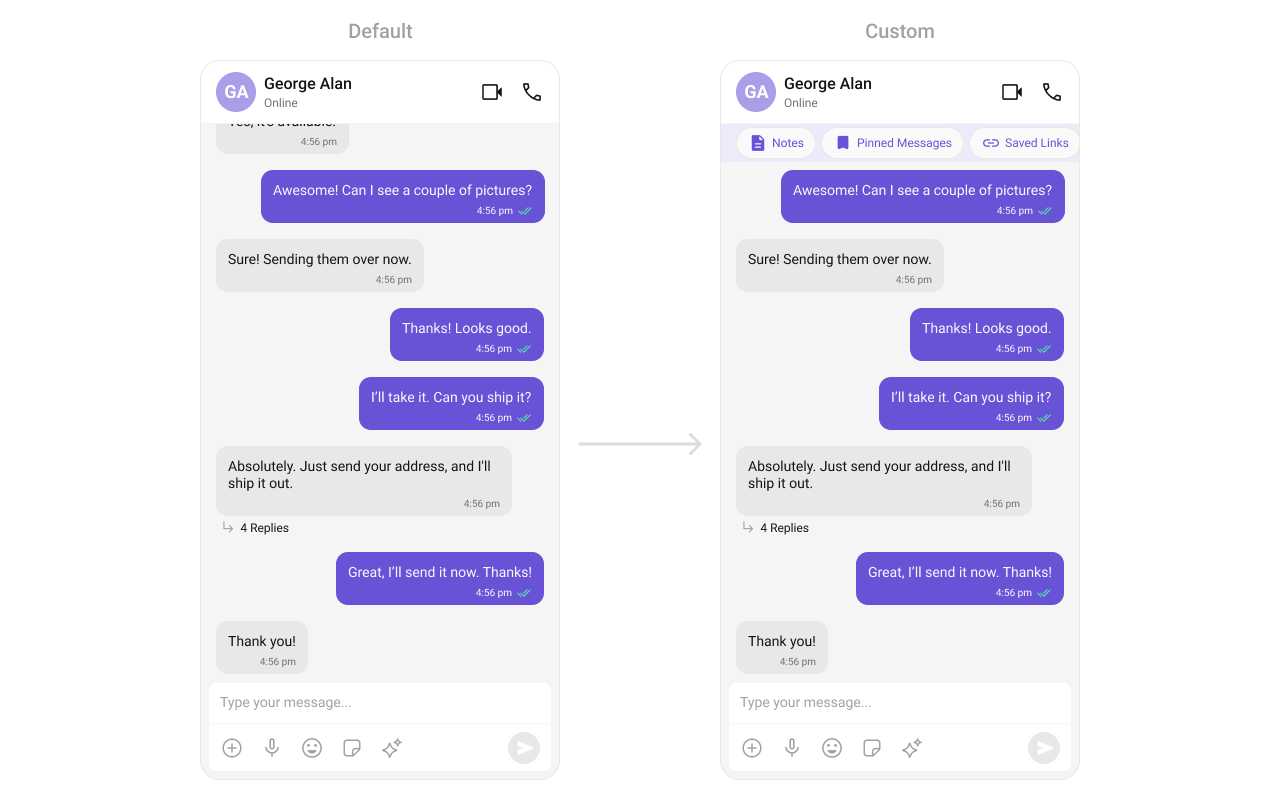 Create a `custom_header_layout.xml` layout:
```xml custom_header_layout.xml lines theme={null}
```
> **What this does:** Defines a custom header layout with three pill-shaped buttons: "Notes", "Pinned Messages", and "Saved Links". Each button uses a `MaterialCardView` with an icon and label styled with the primary color.
```kotlin lines theme={null}
cometChatMessageList.setHeaderView(View.inflate(context, R.layout.custom_header_layout, null))
```
```java lines theme={null}
cometChatMessageList.setHeaderView(View.inflate(getContext(), R.layout.custom_header_layout, null));
```
> **What this does:** Inflates the `custom_header_layout.xml` and sets it as the header view of the message list. The three pill buttons display above the messages.
### `setFooterView`
Sets a custom footer view displayed at the bottom of the message list.
Create a `custom_header_layout.xml` layout:
```xml custom_header_layout.xml lines theme={null}
```
> **What this does:** Defines a custom header layout with three pill-shaped buttons: "Notes", "Pinned Messages", and "Saved Links". Each button uses a `MaterialCardView` with an icon and label styled with the primary color.
```kotlin lines theme={null}
cometChatMessageList.setHeaderView(View.inflate(context, R.layout.custom_header_layout, null))
```
```java lines theme={null}
cometChatMessageList.setHeaderView(View.inflate(getContext(), R.layout.custom_header_layout, null));
```
> **What this does:** Inflates the `custom_header_layout.xml` and sets it as the header view of the message list. The three pill buttons display above the messages.
### `setFooterView`
Sets a custom footer view displayed at the bottom of the message list.
 ```xml custom_footer_layout.xml lines theme={null}
```
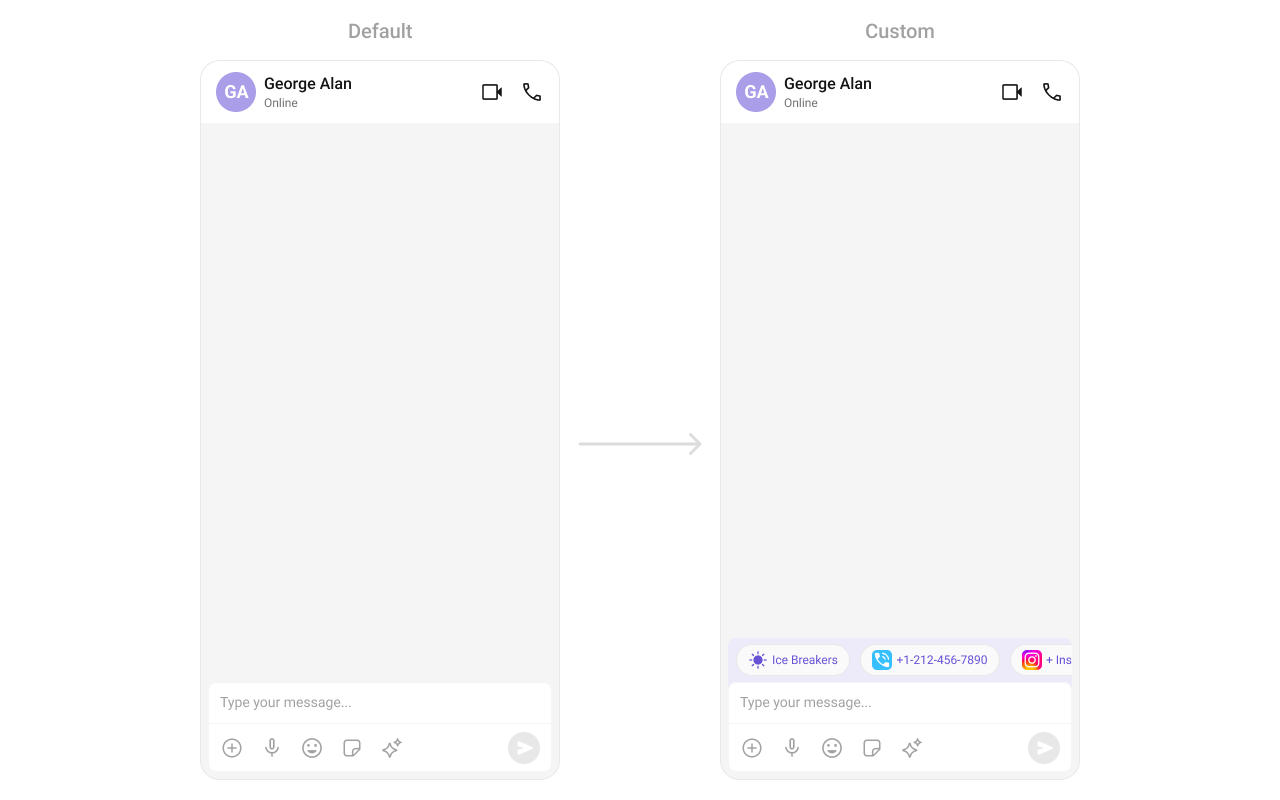
> **What this does:** Defines a custom footer layout with three pill-shaped buttons: "Notes", "Pinned Messages", and "Saved Links". Each button uses a `MaterialCardView` with an icon and label styled with the primary color.
```kotlin lines theme={null}
cometChatMessageList.setFooterView(View.inflate(context, R.layout.custom_footer_layout, null))
```
```java lines theme={null}
cometChatMessageList.setFooterView(View.inflate(getContext(), R.layout.custom_footer_layout, null));
```
> **What this does:** Inflates the `custom_footer_layout.xml` and sets it as the footer view of the message list. The three pill buttons display below the messages.
### `setLoadingStateView`
Customizes the loading indicator when messages are being fetched.
```kotlin lines theme={null}
cometchatMessageList.setLoadingStateView(R.layout.your_loading_view)
```
```java lines theme={null}
cometchatMessageList.setLoadingStateView(R.layout.your_loading_view);
```
> **What this does:** Replaces the default loading spinner with your custom layout resource. The custom view displays while messages are being fetched.
### `setEmptyStateView`
Defines a custom view displayed when no messages are available.
```kotlin lines theme={null}
cometchatMessageList.setEmptyStateView(R.layout.your_empty_view)
```
```java lines theme={null}
cometchatMessageList.setEmptyStateView(R.layout.your_empty_view);
```
> **What this does:** Replaces the default empty state with your custom layout resource. The custom view displays when the message list has no items.
### `setErrorStateView`
Custom error state view displayed when fetching messages fails.
```kotlin lines theme={null}
cometchatMessageList.setErrorStateView(R.layout.your_error_view)
```
```java lines theme={null}
cometchatMessageList.setErrorStateView(R.layout.your_error_view);
```
> **What this does:** Replaces the default error state with your custom layout resource. The custom view displays when the component encounters an error during message fetching.
### `setNewMessageIndicatorView`
Replaces the default "new messages" indicator that appears when new messages arrive while the user has scrolled up.
```kotlin YourActivity.kt lines theme={null}
val customIndicator = LayoutInflater.from(this).inflate(R.layout.custom_new_message_indicator, null)
cometchatMessageList.setNewMessageIndicatorView(customIndicator)
```
```java YourActivity.java lines theme={null}
View customIndicator = LayoutInflater.from(this).inflate(R.layout.custom_new_message_indicator, null);
cometchatMessageList.setNewMessageIndicatorView(customIndicator);
```
> **What this does:** Replaces the default new message indicator with a custom layout. The indicator appears when new messages arrive while the user is scrolled up in the message list.
### `setTemplates`
`CometChatMessageTemplate` is a pre-defined structure for creating message views (message bubbles). For more information, refer to [CometChatMessageTemplate](/ui-kit/android/message-template).
### `setTextFormatters`
Assigns the list of text formatters. If the provided list is not null, it sets the list. Otherwise, it assigns the default text formatters retrieved from the data source. To configure the existing Mentions look and feel check out [MentionsFormatter Guide](/ui-kit/android/mentions-formatter-guide).
```xml custom_footer_layout.xml lines theme={null}
```
> **What this does:** Defines a custom footer layout with three pill-shaped buttons: "Notes", "Pinned Messages", and "Saved Links". Each button uses a `MaterialCardView` with an icon and label styled with the primary color.
```kotlin lines theme={null}
cometChatMessageList.setFooterView(View.inflate(context, R.layout.custom_footer_layout, null))
```
```java lines theme={null}
cometChatMessageList.setFooterView(View.inflate(getContext(), R.layout.custom_footer_layout, null));
```
> **What this does:** Inflates the `custom_footer_layout.xml` and sets it as the footer view of the message list. The three pill buttons display below the messages.
### `setLoadingStateView`
Customizes the loading indicator when messages are being fetched.
```kotlin lines theme={null}
cometchatMessageList.setLoadingStateView(R.layout.your_loading_view)
```
```java lines theme={null}
cometchatMessageList.setLoadingStateView(R.layout.your_loading_view);
```
> **What this does:** Replaces the default loading spinner with your custom layout resource. The custom view displays while messages are being fetched.
### `setEmptyStateView`
Defines a custom view displayed when no messages are available.
```kotlin lines theme={null}
cometchatMessageList.setEmptyStateView(R.layout.your_empty_view)
```
```java lines theme={null}
cometchatMessageList.setEmptyStateView(R.layout.your_empty_view);
```
> **What this does:** Replaces the default empty state with your custom layout resource. The custom view displays when the message list has no items.
### `setErrorStateView`
Custom error state view displayed when fetching messages fails.
```kotlin lines theme={null}
cometchatMessageList.setErrorStateView(R.layout.your_error_view)
```
```java lines theme={null}
cometchatMessageList.setErrorStateView(R.layout.your_error_view);
```
> **What this does:** Replaces the default error state with your custom layout resource. The custom view displays when the component encounters an error during message fetching.
### `setNewMessageIndicatorView`
Replaces the default "new messages" indicator that appears when new messages arrive while the user has scrolled up.
```kotlin YourActivity.kt lines theme={null}
val customIndicator = LayoutInflater.from(this).inflate(R.layout.custom_new_message_indicator, null)
cometchatMessageList.setNewMessageIndicatorView(customIndicator)
```
```java YourActivity.java lines theme={null}
View customIndicator = LayoutInflater.from(this).inflate(R.layout.custom_new_message_indicator, null);
cometchatMessageList.setNewMessageIndicatorView(customIndicator);
```
> **What this does:** Replaces the default new message indicator with a custom layout. The indicator appears when new messages arrive while the user is scrolled up in the message list.
### `setTemplates`
`CometChatMessageTemplate` is a pre-defined structure for creating message views (message bubbles). For more information, refer to [CometChatMessageTemplate](/ui-kit/android/message-template).
### `setTextFormatters`
Assigns the list of text formatters. If the provided list is not null, it sets the list. Otherwise, it assigns the default text formatters retrieved from the data source. To configure the existing Mentions look and feel check out [MentionsFormatter Guide](/ui-kit/android/mentions-formatter-guide).
 ```xml themes.xml lines theme={null}
```
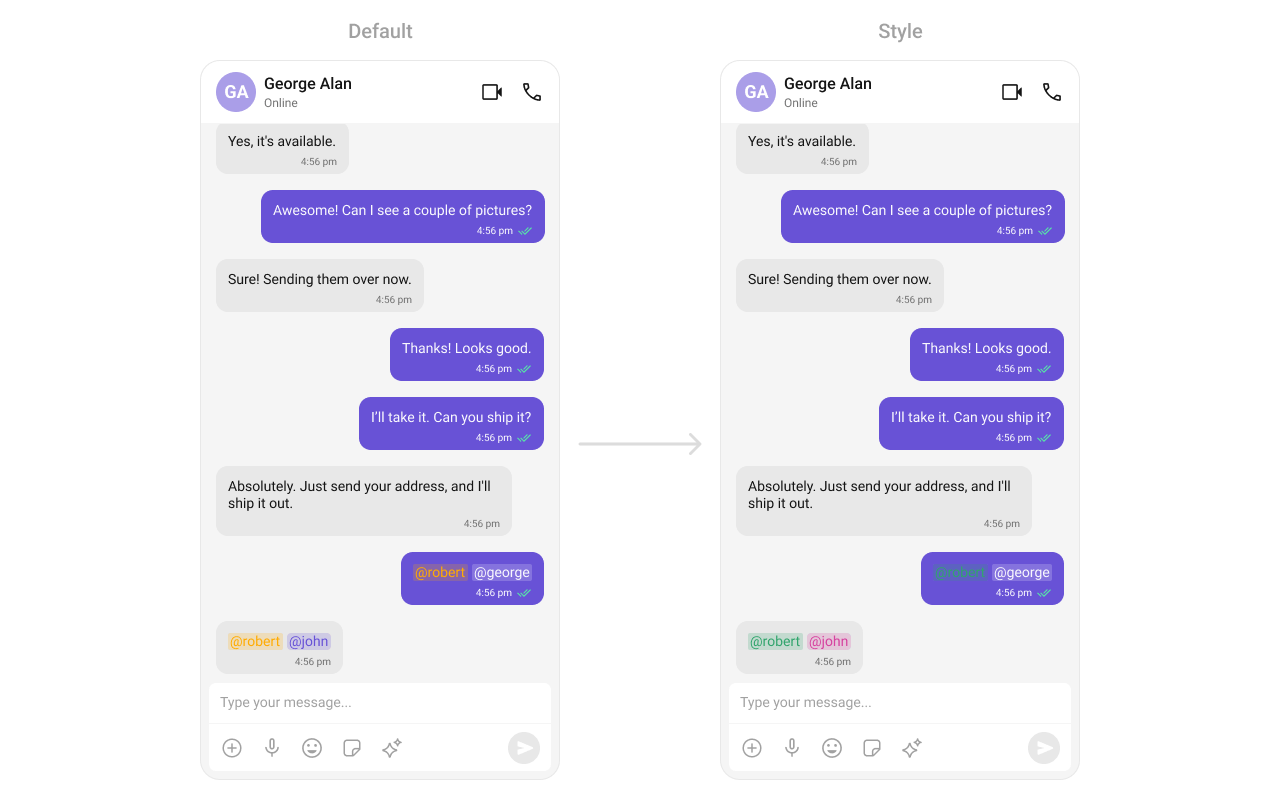
> **What this does:** Defines custom mention styles for incoming and outgoing message bubbles. Incoming mentions appear in pink (`#D6409F`) and outgoing mentions appear in white (`#FFFFFF`), both with green self-mentions (`#30A46C`).
```kotlin lines theme={null}
// Initialize CometChatMentionsFormatter
val mentionFormatter = CometChatMentionsFormatter(context)
//set style to customize bubble mention text
mentionFormatter.setOutgoingBubbleMentionTextStyle(context, R.style.CustomOutgoingMessageBubbleMentionStyle)
mentionFormatter.setIncomingBubbleMentionTextStyle(context, R.style.CustomIncomingMessageBubbleMentionStyle)
// This can be passed as an array of formatter in CometChatMessageList by using setTextFormatters method.
val textFormatters: MutableList = ArrayList()
textFormatters.add(mentionFormatter)
messageList.setTextFormatters(textFormatters)
```
```java lines theme={null}
// Initialize CometChatMentionsFormatter
CometChatMentionsFormatter mentionFormatter = new CometChatMentionsFormatter(context);
//set style to customize bubble mention text
mentionFormatter.setOutgoingBubbleMentionTextStyle(context, R.style.CustomOutgoingMessageBubbleMentionStyle);
mentionFormatter.setIncomingBubbleMentionTextStyle(context, R.style.CustomIncomingMessageBubbleMentionStyle);
// This can be passed as an array of formatter in CometChatMessageList by using setTextFormatters method.
List textFormatters = new ArrayList<>();
textFormatters.add(mentionFormatter);
messageList.setTextFormatters(textFormatters);
```
> **What this does:** Creates a `CometChatMentionsFormatter`, applies custom outgoing and incoming mention styles, adds it to a list of text formatters, and passes that list to the message list component. Mentions in message bubbles render with the custom colors.
### `setDateFormat`
Specifies a custom format for displaying sticky date separators in the chat.
```kotlin lines theme={null}
messageList.setDateFormat(SimpleDateFormat("MMM dd, yyyy", Locale.getDefault()))
```
```java lines theme={null}
messageList.setDateFormat(new SimpleDateFormat("MMM dd, yyyy", Locale.getDefault()));
```
> **What this does:** Sets the sticky date separator format to "MMM dd, yyyy" (e.g., "Jul 10, 2024") using the device's default locale.
### `setTimeFormat`
Defines the format in which time appears for each message bubble.
```kotlin lines theme={null}
messageList.setTimeFormat(SimpleDateFormat("hh:mm a", Locale.getDefault()))
```
```java lines theme={null}
messageList.setTimeFormat(new SimpleDateFormat("hh:mm a", Locale.getDefault()));
```
> **What this does:** Sets the message bubble time format to "hh:mm a" (e.g., "02:30 PM") using the device's default locale.
### `setDateTimeFormatter`
Provides a custom implementation of `DateTimeFormatterCallback` to configure how time and date values are displayed. Each method corresponds to a specific case:
* `time(long timestamp)` — Custom full timestamp format
* `today(long timestamp)` — Called when a message is from today
* `yesterday(long timestamp)` — Called for yesterday's messages
* `lastWeek(long timestamp)` — Messages from the past week
* `otherDays(long timestamp)` — Older messages
* `minutes(long diffInMinutesFromNow, long timestamp)` — e.g., "5 minutes ago"
* `hours(long diffInHourFromNow, long timestamp)` — e.g., "2 hours ago"
```kotlin lines theme={null}
import java.text.SimpleDateFormat
import java.util.*
cometchatMessageList.setDateTimeFormatter(object : DateTimeFormatterCallback {
private val fullTimeFormatter = SimpleDateFormat("hh:mm a", Locale.getDefault())
private val dateFormatter = SimpleDateFormat("dd MMM yyyy", Locale.getDefault())
override fun time(timestamp: Long): String {
return fullTimeFormatter.format(Date(timestamp))
}
override fun today(timestamp: Long): String {
return "Today"
}
override fun yesterday(timestamp: Long): String {
return "Yesterday"
}
override fun lastWeek(timestamp: Long): String {
return "Last Week"
}
override fun otherDays(timestamp: Long): String {
return dateFormatter.format(Date(timestamp))
}
override fun minutes(diffInMinutesFromNow: Long, timestamp: Long): String {
return "$diffInMinutesFromNow mins ago"
}
override fun hours(diffInHourFromNow: Long, timestamp: Long): String {
return "$diffInHourFromNow hrs ago"
}
});
```
```java lines theme={null}
import java.text.SimpleDateFormat;
import java.util.Date;
import java.util.Locale;
cometchatMessageList.setDateTimeFormatter(new DateTimeFormatterCallback() {
private final SimpleDateFormat fullTimeFormatter = new SimpleDateFormat("hh:mm a", Locale.getDefault());
private final SimpleDateFormat dateFormatter = new SimpleDateFormat("dd MMM yyyy", Locale.getDefault());
@Override
public String time(long timestamp) {
return fullTimeFormatter.format(new Date(timestamp));
}
@Override
public String today(long timestamp) {
return "Today";
}
@Override
public String yesterday(long timestamp) {
return "Yesterday";
}
@Override
public String lastWeek(long timestamp) {
return "Last Week";
}
@Override
public String otherDays(long timestamp) {
return dateFormatter.format(new Date(timestamp));
}
@Override
public String minutes(long diffInMinutesFromNow, long timestamp) {
return diffInMinutesFromNow + " mins ago";
}
@Override
public String hours(long diffInHourFromNow, long timestamp) {
return diffInHourFromNow + " hrs ago";
}
});
```
> **What this does:** Overrides the default date/time formatting for message timestamps. Today's messages show "Today", yesterday's show "Yesterday", recent messages show "X mins ago" or "X hrs ago", last week's show "Last Week", and older messages show the full date in "dd MMM yyyy" format.
* **Verify**: After setting any custom view slot, confirm the custom view renders in the correct position within the message list, and the data binding populates correctly.
## Common Patterns
### Hide all chrome — minimal message list
```kotlin lines theme={null}
cometChatMessageList.setAvatarVisibility(View.GONE)
cometChatMessageList.setReceiptsVisibility(View.GONE)
cometChatMessageList.setStickyDateVisibility(View.GONE)
cometChatMessageList.setGroupActionMessageVisibility(View.GONE)
```
```java lines theme={null}
cometChatMessageList.setAvatarVisibility(View.GONE);
cometChatMessageList.setReceiptsVisibility(View.GONE);
cometChatMessageList.setStickyDateVisibility(View.GONE);
cometChatMessageList.setGroupActionMessageVisibility(View.GONE);
```
### Hide all message action options
```kotlin lines theme={null}
cometChatMessageList.setReplyInThreadOptionVisibility(View.GONE)
cometChatMessageList.setEditMessageOptionVisibility(View.GONE)
cometChatMessageList.setDeleteMessageOptionVisibility(View.GONE)
cometChatMessageList.setCopyMessageOptionVisibility(View.GONE)
cometChatMessageList.setMessageReactionOptionVisibility(View.GONE)
cometChatMessageList.setTranslateMessageOptionVisibility(View.GONE)
cometChatMessageList.setMessagePrivatelyOptionVisibility(View.GONE)
cometChatMessageList.setMessageInfoOptionVisibility(View.GONE)
cometChatMessageList.setReplyOptionVisibility(View.GONE)
cometChatMessageList.setShareMessageOptionVisibility(View.GONE)
cometChatMessageList.setMarkAsUnreadOptionVisibility(View.GONE)
cometChatMessageList.setFlagOptionVisibility(View.GONE)
```
```java lines theme={null}
cometChatMessageList.setReplyInThreadOptionVisibility(View.GONE);
cometChatMessageList.setEditMessageOptionVisibility(View.GONE);
cometChatMessageList.setDeleteMessageOptionVisibility(View.GONE);
cometChatMessageList.setCopyMessageOptionVisibility(View.GONE);
cometChatMessageList.setMessageReactionOptionVisibility(View.GONE);
cometChatMessageList.setTranslateMessageOptionVisibility(View.GONE);
cometChatMessageList.setMessagePrivatelyOptionVisibility(View.GONE);
cometChatMessageList.setMessageInfoOptionVisibility(View.GONE);
cometChatMessageList.setReplyOptionVisibility(View.GONE);
cometChatMessageList.setShareMessageOptionVisibility(View.GONE);
cometChatMessageList.setMarkAsUnreadOptionVisibility(View.GONE);
cometChatMessageList.setFlagOptionVisibility(View.GONE);
```
### Enable AI features
```kotlin lines theme={null}
cometChatMessageList.setEnableSmartReplies(true)
cometChatMessageList.setEnableConversationStarter(true)
cometChatMessageList.setEnableConversationSummary(true)
```
```java lines theme={null}
cometChatMessageList.setEnableSmartReplies(true);
cometChatMessageList.setEnableConversationStarter(true);
cometChatMessageList.setEnableConversationSummary(true);
```
### Custom quick reactions
```kotlin lines theme={null}
cometChatMessageList.setQuickReactions(listOf("👻", "😈", "🙀", "🤡", "❤️"))
```
```java lines theme={null}
cometChatMessageList.setQuickReactions(Arrays.asList("👻", "😈", "🙀", "🤡", "❤️"));
```
### Start from unread messages
```kotlin lines theme={null}
cometChatMessageList.setStartFromUnreadMessages(true)
```
```java lines theme={null}
cometChatMessageList.setStartFromUnreadMessages(true);
```
## Advanced Methods
### Scroll and Navigation
#### `scrollToBottom`
Programmatically scrolls to the bottom of the message list.
```kotlin lines theme={null}
cometChatMessageList.scrollToBottom()
```
```java lines theme={null}
cometChatMessageList.scrollToBottom();
```
#### `scrollToMessageId`
Scrolls to a specific message by its ID and highlights it.
```kotlin lines theme={null}
cometChatMessageList.scrollToMessageId(messageId)
```
```java lines theme={null}
cometChatMessageList.scrollToMessageId(messageId);
```
#### `gotoMessage`
Navigates to a specific message by ID.
```kotlin lines theme={null}
cometChatMessageList.gotoMessage(messageId)
```
```java lines theme={null}
cometChatMessageList.gotoMessage(messageId);
```
### Message Manipulation
#### `addMessage`
Programmatically adds a message to the list.
```kotlin lines theme={null}
cometChatMessageList.addMessage(baseMessage)
```
```java lines theme={null}
cometChatMessageList.addMessage(baseMessage);
```
#### `setList`
Replaces the entire message list with a new list.
```kotlin lines theme={null}
cometChatMessageList.setList(messageList)
```
```java lines theme={null}
cometChatMessageList.setList(messageList);
```
#### `updateMessage`
Updates a message at a given index.
```kotlin lines theme={null}
cometChatMessageList.updateMessage(index)
```
```java lines theme={null}
cometChatMessageList.updateMessage(index);
```
### Threaded Messages
#### `setParentMessage`
Sets the parent message ID for threaded message view.
```kotlin lines theme={null}
cometChatMessageList.setParentMessage(parentMessageId)
```
```java lines theme={null}
cometChatMessageList.setParentMessage(parentMessageId);
```
### AI Features
#### `generateConversationSummary`
Triggers the generation of a conversation summary by fetching it from the ViewModel.
```kotlin lines theme={null}
cometChatMessageList.generateConversationSummary()
```
```java lines theme={null}
cometChatMessageList.generateConversationSummary();
```
#### `setAIAssistantSuggestedMessages`
Sets suggested messages for the AI assistant.
```kotlin lines theme={null}
cometChatMessageList.setAIAssistantSuggestedMessages(listOf("How can I help?", "Tell me more"))
```
```java lines theme={null}
cometChatMessageList.setAIAssistantSuggestedMessages(Arrays.asList("How can I help?", "Tell me more"));
```
#### `setAiAssistantTools`
Registers custom AI assistant tool call listeners.
```kotlin lines theme={null}
val tools = HashMap()
cometChatMessageList.setAiAssistantTools(tools)
```
```java lines theme={null}
HashMap tools = new HashMap<>();
cometChatMessageList.setAiAssistantTools(tools);
```
### Bubble Margins
| Method | Description |
| ------------------------------------------------ | ------------------------------------------------- |
| `setLeftBubbleMargin(top, bottom, left, right)` | Sets margins for incoming (left) message bubbles |
| `setRightBubbleMargin(top, bottom, left, right)` | Sets margins for outgoing (right) message bubbles |
| `setBubbleMargin(top, bottom, left, right)` | Sets margins for all message bubbles |
### Internal Access
These methods provide direct access to internal components for advanced use cases.
| Method | Returns | Description |
| -------------------------------------- | ---------------------------- | ---------------------------------------------- |
| `getAdapter()` | `MessageAdapter` | The adapter powering the RecyclerView |
| `setAdapter(MessageAdapter)` | `void` | Replaces the default adapter with a custom one |
| `getViewModel()` | `MessageListViewModel` | The ViewModel managing message data and state |
| `getRecyclerView()` | `RecyclerView` | The internal RecyclerView |
| `getView()` | `LinearLayout` | The root view of the component |
| `getNewMessageLayout()` | `MaterialCardView` | The new message indicator layout |
| `getNewMessageImageView()` | `ImageView` | The new message indicator image |
| `getStickyHeaderDecoration()` | `StickyHeaderDecoration` | The sticky date header decoration |
| `getParentMessageId()` | `long` | The parent message ID for threaded view |
| `getMentionsFormatter()` | `CometChatMentionsFormatter` | The mentions formatter instance |
| `atBottom()` | `boolean` | Whether the list is scrolled to the bottom |
| `isHasMore()` | `boolean` | Whether more messages are available to load |
| `setAutoFetch(boolean)` | `void` | Controls automatic message fetching |
| `setMentionAllLabelId(String, String)` | `void` | Sets the mention-all label ID and display text |
> Use these only when the standard API is insufficient. Directly manipulating the adapter or ViewModel may conflict with the component's internal state management.
## Style
The component uses XML theme styles. Define a custom style with parent `CometChatMessageListStyle` in `themes.xml`, then apply with `setStyle()`.
```xml themes.xml lines theme={null}
```
> **What this does:** Defines custom mention styles for incoming and outgoing message bubbles. Incoming mentions appear in pink (`#D6409F`) and outgoing mentions appear in white (`#FFFFFF`), both with green self-mentions (`#30A46C`).
```kotlin lines theme={null}
// Initialize CometChatMentionsFormatter
val mentionFormatter = CometChatMentionsFormatter(context)
//set style to customize bubble mention text
mentionFormatter.setOutgoingBubbleMentionTextStyle(context, R.style.CustomOutgoingMessageBubbleMentionStyle)
mentionFormatter.setIncomingBubbleMentionTextStyle(context, R.style.CustomIncomingMessageBubbleMentionStyle)
// This can be passed as an array of formatter in CometChatMessageList by using setTextFormatters method.
val textFormatters: MutableList = ArrayList()
textFormatters.add(mentionFormatter)
messageList.setTextFormatters(textFormatters)
```
```java lines theme={null}
// Initialize CometChatMentionsFormatter
CometChatMentionsFormatter mentionFormatter = new CometChatMentionsFormatter(context);
//set style to customize bubble mention text
mentionFormatter.setOutgoingBubbleMentionTextStyle(context, R.style.CustomOutgoingMessageBubbleMentionStyle);
mentionFormatter.setIncomingBubbleMentionTextStyle(context, R.style.CustomIncomingMessageBubbleMentionStyle);
// This can be passed as an array of formatter in CometChatMessageList by using setTextFormatters method.
List textFormatters = new ArrayList<>();
textFormatters.add(mentionFormatter);
messageList.setTextFormatters(textFormatters);
```
> **What this does:** Creates a `CometChatMentionsFormatter`, applies custom outgoing and incoming mention styles, adds it to a list of text formatters, and passes that list to the message list component. Mentions in message bubbles render with the custom colors.
### `setDateFormat`
Specifies a custom format for displaying sticky date separators in the chat.
```kotlin lines theme={null}
messageList.setDateFormat(SimpleDateFormat("MMM dd, yyyy", Locale.getDefault()))
```
```java lines theme={null}
messageList.setDateFormat(new SimpleDateFormat("MMM dd, yyyy", Locale.getDefault()));
```
> **What this does:** Sets the sticky date separator format to "MMM dd, yyyy" (e.g., "Jul 10, 2024") using the device's default locale.
### `setTimeFormat`
Defines the format in which time appears for each message bubble.
```kotlin lines theme={null}
messageList.setTimeFormat(SimpleDateFormat("hh:mm a", Locale.getDefault()))
```
```java lines theme={null}
messageList.setTimeFormat(new SimpleDateFormat("hh:mm a", Locale.getDefault()));
```
> **What this does:** Sets the message bubble time format to "hh:mm a" (e.g., "02:30 PM") using the device's default locale.
### `setDateTimeFormatter`
Provides a custom implementation of `DateTimeFormatterCallback` to configure how time and date values are displayed. Each method corresponds to a specific case:
* `time(long timestamp)` — Custom full timestamp format
* `today(long timestamp)` — Called when a message is from today
* `yesterday(long timestamp)` — Called for yesterday's messages
* `lastWeek(long timestamp)` — Messages from the past week
* `otherDays(long timestamp)` — Older messages
* `minutes(long diffInMinutesFromNow, long timestamp)` — e.g., "5 minutes ago"
* `hours(long diffInHourFromNow, long timestamp)` — e.g., "2 hours ago"
```kotlin lines theme={null}
import java.text.SimpleDateFormat
import java.util.*
cometchatMessageList.setDateTimeFormatter(object : DateTimeFormatterCallback {
private val fullTimeFormatter = SimpleDateFormat("hh:mm a", Locale.getDefault())
private val dateFormatter = SimpleDateFormat("dd MMM yyyy", Locale.getDefault())
override fun time(timestamp: Long): String {
return fullTimeFormatter.format(Date(timestamp))
}
override fun today(timestamp: Long): String {
return "Today"
}
override fun yesterday(timestamp: Long): String {
return "Yesterday"
}
override fun lastWeek(timestamp: Long): String {
return "Last Week"
}
override fun otherDays(timestamp: Long): String {
return dateFormatter.format(Date(timestamp))
}
override fun minutes(diffInMinutesFromNow: Long, timestamp: Long): String {
return "$diffInMinutesFromNow mins ago"
}
override fun hours(diffInHourFromNow: Long, timestamp: Long): String {
return "$diffInHourFromNow hrs ago"
}
});
```
```java lines theme={null}
import java.text.SimpleDateFormat;
import java.util.Date;
import java.util.Locale;
cometchatMessageList.setDateTimeFormatter(new DateTimeFormatterCallback() {
private final SimpleDateFormat fullTimeFormatter = new SimpleDateFormat("hh:mm a", Locale.getDefault());
private final SimpleDateFormat dateFormatter = new SimpleDateFormat("dd MMM yyyy", Locale.getDefault());
@Override
public String time(long timestamp) {
return fullTimeFormatter.format(new Date(timestamp));
}
@Override
public String today(long timestamp) {
return "Today";
}
@Override
public String yesterday(long timestamp) {
return "Yesterday";
}
@Override
public String lastWeek(long timestamp) {
return "Last Week";
}
@Override
public String otherDays(long timestamp) {
return dateFormatter.format(new Date(timestamp));
}
@Override
public String minutes(long diffInMinutesFromNow, long timestamp) {
return diffInMinutesFromNow + " mins ago";
}
@Override
public String hours(long diffInHourFromNow, long timestamp) {
return diffInHourFromNow + " hrs ago";
}
});
```
> **What this does:** Overrides the default date/time formatting for message timestamps. Today's messages show "Today", yesterday's show "Yesterday", recent messages show "X mins ago" or "X hrs ago", last week's show "Last Week", and older messages show the full date in "dd MMM yyyy" format.
* **Verify**: After setting any custom view slot, confirm the custom view renders in the correct position within the message list, and the data binding populates correctly.
## Common Patterns
### Hide all chrome — minimal message list
```kotlin lines theme={null}
cometChatMessageList.setAvatarVisibility(View.GONE)
cometChatMessageList.setReceiptsVisibility(View.GONE)
cometChatMessageList.setStickyDateVisibility(View.GONE)
cometChatMessageList.setGroupActionMessageVisibility(View.GONE)
```
```java lines theme={null}
cometChatMessageList.setAvatarVisibility(View.GONE);
cometChatMessageList.setReceiptsVisibility(View.GONE);
cometChatMessageList.setStickyDateVisibility(View.GONE);
cometChatMessageList.setGroupActionMessageVisibility(View.GONE);
```
### Hide all message action options
```kotlin lines theme={null}
cometChatMessageList.setReplyInThreadOptionVisibility(View.GONE)
cometChatMessageList.setEditMessageOptionVisibility(View.GONE)
cometChatMessageList.setDeleteMessageOptionVisibility(View.GONE)
cometChatMessageList.setCopyMessageOptionVisibility(View.GONE)
cometChatMessageList.setMessageReactionOptionVisibility(View.GONE)
cometChatMessageList.setTranslateMessageOptionVisibility(View.GONE)
cometChatMessageList.setMessagePrivatelyOptionVisibility(View.GONE)
cometChatMessageList.setMessageInfoOptionVisibility(View.GONE)
cometChatMessageList.setReplyOptionVisibility(View.GONE)
cometChatMessageList.setShareMessageOptionVisibility(View.GONE)
cometChatMessageList.setMarkAsUnreadOptionVisibility(View.GONE)
cometChatMessageList.setFlagOptionVisibility(View.GONE)
```
```java lines theme={null}
cometChatMessageList.setReplyInThreadOptionVisibility(View.GONE);
cometChatMessageList.setEditMessageOptionVisibility(View.GONE);
cometChatMessageList.setDeleteMessageOptionVisibility(View.GONE);
cometChatMessageList.setCopyMessageOptionVisibility(View.GONE);
cometChatMessageList.setMessageReactionOptionVisibility(View.GONE);
cometChatMessageList.setTranslateMessageOptionVisibility(View.GONE);
cometChatMessageList.setMessagePrivatelyOptionVisibility(View.GONE);
cometChatMessageList.setMessageInfoOptionVisibility(View.GONE);
cometChatMessageList.setReplyOptionVisibility(View.GONE);
cometChatMessageList.setShareMessageOptionVisibility(View.GONE);
cometChatMessageList.setMarkAsUnreadOptionVisibility(View.GONE);
cometChatMessageList.setFlagOptionVisibility(View.GONE);
```
### Enable AI features
```kotlin lines theme={null}
cometChatMessageList.setEnableSmartReplies(true)
cometChatMessageList.setEnableConversationStarter(true)
cometChatMessageList.setEnableConversationSummary(true)
```
```java lines theme={null}
cometChatMessageList.setEnableSmartReplies(true);
cometChatMessageList.setEnableConversationStarter(true);
cometChatMessageList.setEnableConversationSummary(true);
```
### Custom quick reactions
```kotlin lines theme={null}
cometChatMessageList.setQuickReactions(listOf("👻", "😈", "🙀", "🤡", "❤️"))
```
```java lines theme={null}
cometChatMessageList.setQuickReactions(Arrays.asList("👻", "😈", "🙀", "🤡", "❤️"));
```
### Start from unread messages
```kotlin lines theme={null}
cometChatMessageList.setStartFromUnreadMessages(true)
```
```java lines theme={null}
cometChatMessageList.setStartFromUnreadMessages(true);
```
## Advanced Methods
### Scroll and Navigation
#### `scrollToBottom`
Programmatically scrolls to the bottom of the message list.
```kotlin lines theme={null}
cometChatMessageList.scrollToBottom()
```
```java lines theme={null}
cometChatMessageList.scrollToBottom();
```
#### `scrollToMessageId`
Scrolls to a specific message by its ID and highlights it.
```kotlin lines theme={null}
cometChatMessageList.scrollToMessageId(messageId)
```
```java lines theme={null}
cometChatMessageList.scrollToMessageId(messageId);
```
#### `gotoMessage`
Navigates to a specific message by ID.
```kotlin lines theme={null}
cometChatMessageList.gotoMessage(messageId)
```
```java lines theme={null}
cometChatMessageList.gotoMessage(messageId);
```
### Message Manipulation
#### `addMessage`
Programmatically adds a message to the list.
```kotlin lines theme={null}
cometChatMessageList.addMessage(baseMessage)
```
```java lines theme={null}
cometChatMessageList.addMessage(baseMessage);
```
#### `setList`
Replaces the entire message list with a new list.
```kotlin lines theme={null}
cometChatMessageList.setList(messageList)
```
```java lines theme={null}
cometChatMessageList.setList(messageList);
```
#### `updateMessage`
Updates a message at a given index.
```kotlin lines theme={null}
cometChatMessageList.updateMessage(index)
```
```java lines theme={null}
cometChatMessageList.updateMessage(index);
```
### Threaded Messages
#### `setParentMessage`
Sets the parent message ID for threaded message view.
```kotlin lines theme={null}
cometChatMessageList.setParentMessage(parentMessageId)
```
```java lines theme={null}
cometChatMessageList.setParentMessage(parentMessageId);
```
### AI Features
#### `generateConversationSummary`
Triggers the generation of a conversation summary by fetching it from the ViewModel.
```kotlin lines theme={null}
cometChatMessageList.generateConversationSummary()
```
```java lines theme={null}
cometChatMessageList.generateConversationSummary();
```
#### `setAIAssistantSuggestedMessages`
Sets suggested messages for the AI assistant.
```kotlin lines theme={null}
cometChatMessageList.setAIAssistantSuggestedMessages(listOf("How can I help?", "Tell me more"))
```
```java lines theme={null}
cometChatMessageList.setAIAssistantSuggestedMessages(Arrays.asList("How can I help?", "Tell me more"));
```
#### `setAiAssistantTools`
Registers custom AI assistant tool call listeners.
```kotlin lines theme={null}
val tools = HashMap()
cometChatMessageList.setAiAssistantTools(tools)
```
```java lines theme={null}
HashMap tools = new HashMap<>();
cometChatMessageList.setAiAssistantTools(tools);
```
### Bubble Margins
| Method | Description |
| ------------------------------------------------ | ------------------------------------------------- |
| `setLeftBubbleMargin(top, bottom, left, right)` | Sets margins for incoming (left) message bubbles |
| `setRightBubbleMargin(top, bottom, left, right)` | Sets margins for outgoing (right) message bubbles |
| `setBubbleMargin(top, bottom, left, right)` | Sets margins for all message bubbles |
### Internal Access
These methods provide direct access to internal components for advanced use cases.
| Method | Returns | Description |
| -------------------------------------- | ---------------------------- | ---------------------------------------------- |
| `getAdapter()` | `MessageAdapter` | The adapter powering the RecyclerView |
| `setAdapter(MessageAdapter)` | `void` | Replaces the default adapter with a custom one |
| `getViewModel()` | `MessageListViewModel` | The ViewModel managing message data and state |
| `getRecyclerView()` | `RecyclerView` | The internal RecyclerView |
| `getView()` | `LinearLayout` | The root view of the component |
| `getNewMessageLayout()` | `MaterialCardView` | The new message indicator layout |
| `getNewMessageImageView()` | `ImageView` | The new message indicator image |
| `getStickyHeaderDecoration()` | `StickyHeaderDecoration` | The sticky date header decoration |
| `getParentMessageId()` | `long` | The parent message ID for threaded view |
| `getMentionsFormatter()` | `CometChatMentionsFormatter` | The mentions formatter instance |
| `atBottom()` | `boolean` | Whether the list is scrolled to the bottom |
| `isHasMore()` | `boolean` | Whether more messages are available to load |
| `setAutoFetch(boolean)` | `void` | Controls automatic message fetching |
| `setMentionAllLabelId(String, String)` | `void` | Sets the mention-all label ID and display text |
> Use these only when the standard API is insufficient. Directly manipulating the adapter or ViewModel may conflict with the component's internal state management.
## Style
The component uses XML theme styles. Define a custom style with parent `CometChatMessageListStyle` in `themes.xml`, then apply with `setStyle()`.
 ```xml themes.xml lines theme={null}
```
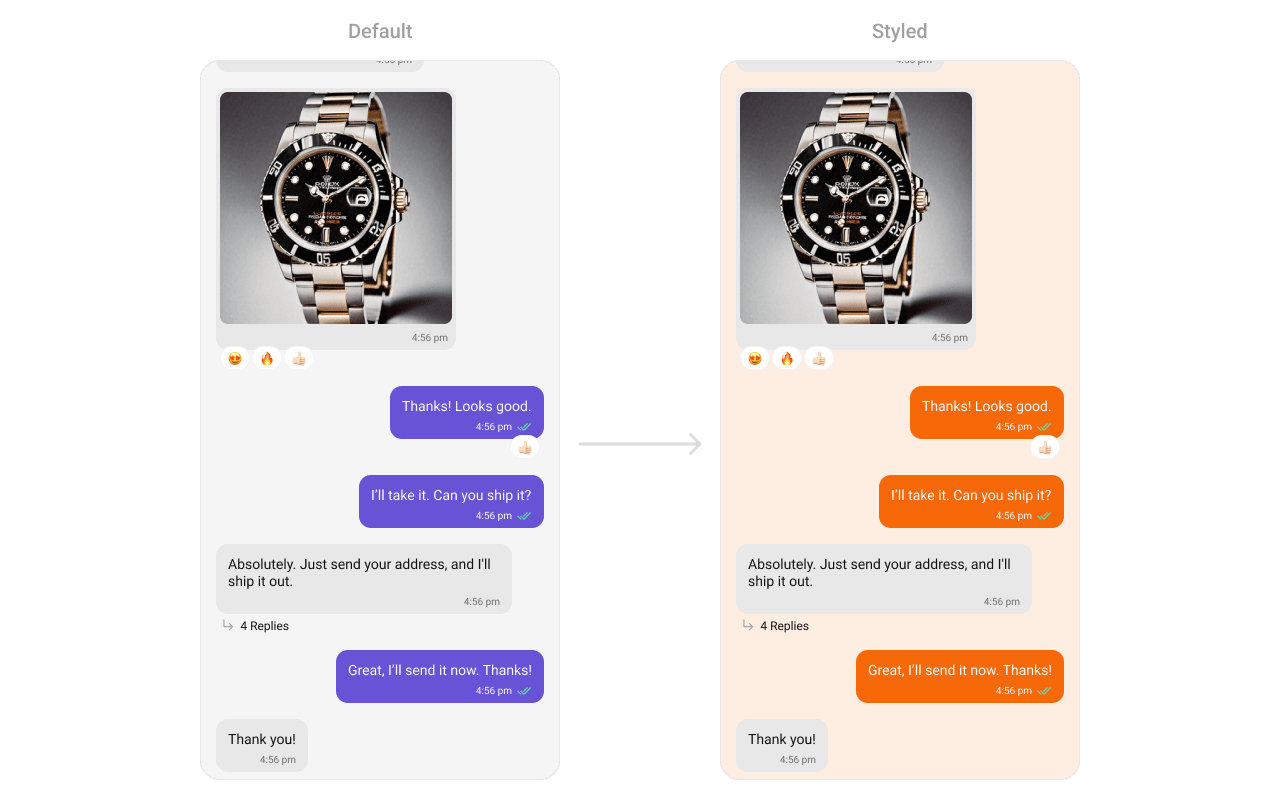
> **What this does:** Defines two custom styles: `CustomOutgoingMessageBubbleStyle` sets the outgoing message bubble background to orange (`#F76808`); `CustomCometChatMessageListStyle` sets the message list background to light peach (`#FEEDE1`) and applies the custom outgoing bubble style.
```kotlin lines theme={null}
cometChatMessageList.setStyle(R.style.CustomCometChatMessageListStyle)
```
```java lines theme={null}
cometChatMessageList.setStyle(R.style.CustomCometChatMessageListStyle);
```
To know more such attributes, visit the [attributes file](https://github.com/cometchat/cometchat-uikit-android/blob/v5/chatuikit/src/main/res/values/attr_cometchat_message_list.xml).
### Programmatic Style Properties
In addition to XML theme styles, the component exposes programmatic setters for fine-grained control:
| Method | Type | Description |
| ------------------------------------- | --------------- | --------------------------------------------- |
| `setIncomingMessageBubbleStyle` | `@StyleRes int` | Style for incoming message bubbles |
| `setOutgoingMessageBubbleStyle` | `@StyleRes int` | Style for outgoing message bubbles |
| `setDateSeparatorStyle` | `@StyleRes int` | Style for date separator headers |
| `setDeleteDialogStyle` | `@StyleRes int` | Style for the delete confirmation dialog |
| `setMessageInformationStyle` | `@StyleRes int` | Style for the message information sheet |
| `setMessageOptionSheetStyle` | `@StyleRes int` | Style for the message option action sheet |
| `setReactionListStyle` | `@StyleRes int` | Style for the reaction list bottom sheet |
| `setModerationViewStyle` | `@StyleRes int` | Style for the moderation view |
| `setFlagMessageStyle` | `@StyleRes int` | Style for the flag/report message dialog |
| `setBadgeStyle` | `@StyleRes int` | Style for the unread message badge |
| `setAISmartRepliesStyle` | `@StyleRes int` | Style for AI smart replies |
| `setAIConversationStarterStyle` | `@StyleRes int` | Style for AI conversation starters |
| `setAIConversationSummaryStyle` | `@StyleRes int` | Style for AI conversation summary |
| `setErrorStateTitleTextColor` | `@ColorInt int` | Title text color for the error state |
| `setErrorStateTitleTextAppearance` | `@StyleRes int` | Title text appearance for the error state |
| `setErrorStateSubtitleTextColor` | `@ColorInt int` | Subtitle text color for the error state |
| `setErrorStateSubtitleTextAppearance` | `@StyleRes int` | Subtitle text appearance for the error state |
| `setNewMessageIndicatorIconTint` | `@ColorInt int` | Tint color for the new message indicator icon |
| `setAddReactionIcon` | `int` | Custom icon for the add reaction button |
## Customization Matrix
| What to change | Where | Property/API | Example |
| ------------------------------------- | ----------------- | ------------------------------------------------------------------ | --------------------------------------------------------------------------------------- |
| Override behavior on user interaction | Activity/Fragment | `setOn` callbacks | `setOnThreadRepliesClick((ctx, msg, tpl) -> { ... })` |
| Filter which messages appear | Activity/Fragment | `setMessagesRequestBuilder` | `setMessagesRequestBuilder(builder)` |
| Customize reactions fetching | Activity/Fragment | `setReactionsRequestBuilder` | `setReactionsRequestBuilder(builder)` |
| Toggle visibility of UI elements | Activity/Fragment | `setVisibility(int)` | `setReceiptsVisibility(View.GONE)` |
| Replace header/footer views | Activity/Fragment | `setHeaderView` / `setFooterView` | `setHeaderView(view)` |
| Change colors, fonts, spacing | `themes.xml` | `CometChatMessageListStyle` | `
```xml themes.xml lines theme={null}
```
> **What this does:** Defines two custom styles: `CustomOutgoingMessageBubbleStyle` sets the outgoing message bubble background to orange (`#F76808`); `CustomCometChatMessageListStyle` sets the message list background to light peach (`#FEEDE1`) and applies the custom outgoing bubble style.
```kotlin lines theme={null}
cometChatMessageList.setStyle(R.style.CustomCometChatMessageListStyle)
```
```java lines theme={null}
cometChatMessageList.setStyle(R.style.CustomCometChatMessageListStyle);
```
To know more such attributes, visit the [attributes file](https://github.com/cometchat/cometchat-uikit-android/blob/v5/chatuikit/src/main/res/values/attr_cometchat_message_list.xml).
### Programmatic Style Properties
In addition to XML theme styles, the component exposes programmatic setters for fine-grained control:
| Method | Type | Description |
| ------------------------------------- | --------------- | --------------------------------------------- |
| `setIncomingMessageBubbleStyle` | `@StyleRes int` | Style for incoming message bubbles |
| `setOutgoingMessageBubbleStyle` | `@StyleRes int` | Style for outgoing message bubbles |
| `setDateSeparatorStyle` | `@StyleRes int` | Style for date separator headers |
| `setDeleteDialogStyle` | `@StyleRes int` | Style for the delete confirmation dialog |
| `setMessageInformationStyle` | `@StyleRes int` | Style for the message information sheet |
| `setMessageOptionSheetStyle` | `@StyleRes int` | Style for the message option action sheet |
| `setReactionListStyle` | `@StyleRes int` | Style for the reaction list bottom sheet |
| `setModerationViewStyle` | `@StyleRes int` | Style for the moderation view |
| `setFlagMessageStyle` | `@StyleRes int` | Style for the flag/report message dialog |
| `setBadgeStyle` | `@StyleRes int` | Style for the unread message badge |
| `setAISmartRepliesStyle` | `@StyleRes int` | Style for AI smart replies |
| `setAIConversationStarterStyle` | `@StyleRes int` | Style for AI conversation starters |
| `setAIConversationSummaryStyle` | `@StyleRes int` | Style for AI conversation summary |
| `setErrorStateTitleTextColor` | `@ColorInt int` | Title text color for the error state |
| `setErrorStateTitleTextAppearance` | `@StyleRes int` | Title text appearance for the error state |
| `setErrorStateSubtitleTextColor` | `@ColorInt int` | Subtitle text color for the error state |
| `setErrorStateSubtitleTextAppearance` | `@StyleRes int` | Subtitle text appearance for the error state |
| `setNewMessageIndicatorIconTint` | `@ColorInt int` | Tint color for the new message indicator icon |
| `setAddReactionIcon` | `int` | Custom icon for the add reaction button |
## Customization Matrix
| What to change | Where | Property/API | Example |
| ------------------------------------- | ----------------- | ------------------------------------------------------------------ | --------------------------------------------------------------------------------------- |
| Override behavior on user interaction | Activity/Fragment | `setOn` callbacks | `setOnThreadRepliesClick((ctx, msg, tpl) -> { ... })` |
| Filter which messages appear | Activity/Fragment | `setMessagesRequestBuilder` | `setMessagesRequestBuilder(builder)` |
| Customize reactions fetching | Activity/Fragment | `setReactionsRequestBuilder` | `setReactionsRequestBuilder(builder)` |
| Toggle visibility of UI elements | Activity/Fragment | `setVisibility(int)` | `setReceiptsVisibility(View.GONE)` |
| Replace header/footer views | Activity/Fragment | `setHeaderView` / `setFooterView` | `setHeaderView(view)` |
| Change colors, fonts, spacing | `themes.xml` | `CometChatMessageListStyle` | `- #FEEDE1
` |
| Outgoing bubble style | `themes.xml` | `cometchatMessageListOutgoingMessageBubbleStyle` | `- #F76808
` |
| Apply a custom style | Activity/Fragment | `setStyle(int styleRes)` | `cometChatMessageList.setStyle(R.style.CustomCometChatMessageListStyle);` |
| Set user for messages | Activity/Fragment | `setUser(User)` | `.setUser(user);` |
| Set group for messages | Activity/Fragment | `setGroup(Group)` | `.setGroup(group);` |
| Message alignment | Activity/Fragment | `setMessageAlignment(UIKitConstants.MessageListAlignment)` | `.setMessageAlignment(UIKitConstants.MessageListAlignment.STANDARD);` |
| Error state visibility | Activity/Fragment | `setErrorStateVisibility(int)` | `.setErrorStateVisibility(View.GONE);` |
| Incoming/outgoing message sound | Activity/Fragment | `disableSoundForMessages(boolean)` | `.disableSoundForMessages(true);` |
| Custom message sound | Activity/Fragment | `setCustomSoundForMessages(int)` | `.setCustomSoundForMessages(@RawRes resource);` |
| Avatar visibility | Activity/Fragment | `setAvatarVisibility(int)` | `.setAvatarVisibility(View.GONE);` |
| Scroll to bottom on new message | Activity/Fragment | `scrollToBottomOnNewMessage(boolean)` | `.scrollToBottomOnNewMessage(true);` |
| Read/delivered receipts visibility | Activity/Fragment | `setReceiptsVisibility(int)` | `.setReceiptsVisibility(View.GONE);` |
| Quick reactions list | Activity/Fragment | `setQuickReactions(List)` | `.setQuickReactions(Arrays.asList("👻","😈","🙀","🤡","❤️"));` |
| Sticky date visibility | Activity/Fragment | `setStickyDateVisibility(int)` | `.setStickyDateVisibility(View.GONE);` |
| Thread reply option visibility | Activity/Fragment | `setReplyInThreadOptionVisibility(int)` | `.setReplyInThreadOptionVisibility(View.GONE);` |
| Translate option visibility | Activity/Fragment | `setTranslateMessageOptionVisibility(int)` | `.setTranslateMessageOptionVisibility(View.GONE);` |
| Edit option visibility | Activity/Fragment | `setEditMessageOptionVisibility(int)` | `.setEditMessageOptionVisibility(View.GONE);` |
| Delete option visibility | Activity/Fragment | `setDeleteMessageOptionVisibility(int)` | `.setDeleteMessageOptionVisibility(View.GONE);` |
| Reaction option visibility | Activity/Fragment | `setMessageReactionOptionVisibility(int)` | `.setMessageReactionOptionVisibility(View.GONE);` |
| Private message option visibility | Activity/Fragment | `setMessagePrivatelyOptionVisibility(int)` | `.setMessagePrivatelyOptionVisibility(View.GONE);` |
| Copy option visibility | Activity/Fragment | `setCopyMessageOptionVisibility(int)` | `.setCopyMessageOptionVisibility(View.GONE);` |
| Message info option visibility | Activity/Fragment | `setMessageInfoOptionVisibility(int)` | `.setMessageInfoOptionVisibility(View.GONE);` |
| Group action message visibility | Activity/Fragment | `setGroupActionMessageVisibility(int)` | `.setGroupActionMessageVisibility(View.GONE);` |
| Reply option visibility | Activity/Fragment | `setReplyOptionVisibility(int)` | `.setReplyOptionVisibility(View.GONE);` |
| Share option visibility | Activity/Fragment | `setShareMessageOptionVisibility(int)` | `.setShareMessageOptionVisibility(View.GONE);` |
| Mark as unread option | Activity/Fragment | `setMarkAsUnreadOptionVisibility(int)` | `.setMarkAsUnreadOptionVisibility(View.GONE);` |
| Flag/report option | Activity/Fragment | `setFlagOptionVisibility(int)` | `.setFlagOptionVisibility(View.GONE);` |
| Moderation view visibility | Activity/Fragment | `setModerationViewVisibility(int)` | `.setModerationViewVisibility(View.GONE);` |
| Swipe to reply | Activity/Fragment | `setSwipeToReplyEnabled(boolean)` | `.setSwipeToReplyEnabled(false);` |
| Start from unread messages | Activity/Fragment | `setStartFromUnreadMessages(boolean)` | `.setStartFromUnreadMessages(true);` |
| Conversation starters | Activity/Fragment | `setEnableConversationStarter(boolean)` | `.setEnableConversationStarter(true);` |
| Smart replies | Activity/Fragment | `setEnableSmartReplies(boolean)` | `.setEnableSmartReplies(true);` |
| Smart replies keywords | Activity/Fragment | `setAISmartRepliesKeywords(List)` | `.setAISmartRepliesKeywords(Arrays.asList("hello", "hi"));` |
| Smart replies delay | Activity/Fragment | `setSmartRepliesDelayDuration(int)` | `.setSmartRepliesDelayDuration(5000);` |
| Conversation summary | Activity/Fragment | `setEnableConversationSummary(boolean)` | `.setEnableConversationSummary(true);` |
| Unread message threshold | Activity/Fragment | `setUnreadMessageThreshold(int)` | `.setUnreadMessageThreshold(10);` |
| Date/time formatting | Activity/Fragment | `setDateTimeFormatter(DateTimeFormatterCallback)` | See `setDateTimeFormatter` code above |
| Sticky date format | Activity/Fragment | `setDateFormat(SimpleDateFormat)` | `messageList.setDateFormat(new SimpleDateFormat("MMM dd, yyyy", Locale.getDefault()));` |
| Message bubble time format | Activity/Fragment | `setTimeFormat(SimpleDateFormat)` | `messageList.setTimeFormat(new SimpleDateFormat("hh:mm a", Locale.getDefault()));` |
| Loading view | Activity/Fragment | `setLoadingStateView(int)` | `cometchatMessageList.setLoadingStateView(R.layout.your_loading_view);` |
| Empty view | Activity/Fragment | `setEmptyStateView(int)` | `cometchatMessageList.setEmptyStateView(R.layout.your_empty_view);` |
| Error view | Activity/Fragment | `setErrorStateView(int)` | `cometchatMessageList.setErrorStateView(R.layout.your_error_view);` |
| Header view | Activity/Fragment | `setHeaderView(View)` | `cometChatMessageList.setHeaderView(view);` |
| Footer view | Activity/Fragment | `setFooterView(View)` | `cometChatMessageList.setFooterView(view);` |
| New message indicator view | Activity/Fragment | `setNewMessageIndicatorView(View)` | `cometchatMessageList.setNewMessageIndicatorView(view);` |
| Text formatters (mentions) | Activity/Fragment | `setTextFormatters(List)` | See `setTextFormatters` code above |
| Message templates | Activity/Fragment | `setTemplates(List)` | See [CometChatMessageTemplate](/ui-kit/android/message-template) |
| Refresh style | Activity/Fragment | `refreshStyle()` | `.refreshStyle();` |
| Streaming speed | Activity/Fragment | `setStreamingSpeed(Integer)` | `.setStreamingSpeed(100);` |
| Bubble margins | Activity/Fragment | `setLeftBubbleMargin` / `setRightBubbleMargin` / `setBubbleMargin` | `.setBubbleMargin(4, 4, 8, 8);` |
| Internal adapter access | Activity/Fragment | `getAdapter()` / `setAdapter()` | Advanced use only |
## Next Steps
Display user/group info in the toolbar
Rich input for sending messages
Browse recent conversations
Customize colors, fonts, and styles