> ## Documentation Index
> Fetch the complete documentation index at: https://cometchat-22654f5b-docs-rn-guide-message-privately.mintlify.site/llms.txt
> Use this file to discover all available pages before exploring further.
# Localize
> Localize CometChat Android UI Kit with supported languages, string resources, locale changes, and app-specific translations.
| Field | Value |
| ------------------- | ---------------------------------------------------------------------------------------------------------- |
| Package | `com.cometchat:chat-uikit-android` |
| Import | `com.cometchat.chatuikit.resources.localize.CometChatLocalize` |
| Set language | `CometChatLocalize.setLocale(context, Language.Code.fr)` |
| Get language | `CometChatLocalize.getLocale(context)` |
| Supported languages | 19: ar, de, en, es, fr, hi, hu, it, ja, ko, lt, ms, nl, pt, ru, sv, tr, zh, zh-TW |
| Override labels | `res/values/strings.xml` — override UI Kit string resource keys |
| Date formatting | `DateTimeFormatterCallback` for custom date/time labels |
| Related | [Theme Introduction](/ui-kit/android/theme-introduction) \| [Sound Manager](/ui-kit/android/sound-manager) |
Set the CometChat UI Kit language and override UI text so your Android app matches your users' locale.
## When to use this
* You want the UI Kit to follow the device language.
* You want to force a specific language regardless of device settings.
* You need to override default UI Kit labels with brand-specific wording.
* You want consistent date and time labels across all UI Kit screens.
## Prerequisites
* CometChat UI Kit for Android is installed and initialized. Use [Getting Started](/ui-kit/android/getting-started) if needed.
* You can access an Android `Context` (Activity or Application) to apply locale changes.
* You can edit `res/values/strings.xml` in your app module.
## Quick start
1. Choose a language code from Supported languages.
2. Add a locale call before you render UI Kit screens.
File: `app/src/main/java//LocalizeActivity.java` or `app/src/main/java//LocalizeActivity.kt`.
Use the code in Implementation > Set and read the UI Kit locale.
3. Override UI text keys in `res/values/strings.xml` if you need custom wording.
4. Rebuild and run the app.
5. Verify that UI Kit labels render in the selected language and your custom strings appear.
## Core concepts
* `CometChatLocalize`: Utility class to set and read the UI Kit locale from an Android `Context`.
* `Language.Code`: Constants for supported language codes to use with `setLocale`.
* `strings.xml`: Android string resources that control the visible text in UI Kit components.
* `DateTimeFormatterCallback`: Callback interface to control date and time labels like "Today" or "X mins ago".
### CometChatLocalize methods
* `setLocale(Context context, @Language.Code String language)`: Sets the UI Kit language using a `Language.Code` value.
* `getLocale(Context context)`: Returns the current locale country code for the provided context.
### Supported languages
UI Kit supports 19 languages for localization:
* Arabic (`ar`)
* Chinese (`zh`)
* Chinese (Traditional) (`zh-TW`)
* Dutch (`nl`)
* English (`en`)
* French (`fr`)
* German (`de`)
* Hindi (`hi`)
* Hungarian (`hu`)
* Italian (`it`)
* Japanese (`ja`)
* Korean (`ko`)
* Lithuanian (`lt`)
* Malay (`ms`)
* Portuguese (`pt`)
* Russian (`ru`)
* Spanish (`es`)
* Swedish (`sv`)
* Turkish (`tr`)
## Implementation
### Set and read the UI Kit locale
What you're changing: The UI Kit language for your app session.
* **Where to change it**: Your Activity or Application class before UI Kit screens are rendered.
* **Applies to**: All UI Kit screens.
* **Default behavior**: UI Kit uses the device locale.
* **Override**: Call `CometChatLocalize.setLocale(...)` with a `Language.Code` value.
* **Code**:
```kotlin LocalizeActivity.kt lines theme={null}
import android.os.Bundle
import androidx.appcompat.app.AppCompatActivity
import com.cometchat.chatuikit.shared.resources.localise.CometChatLocalize
import com.cometchat.chatuikit.shared.resources.localise.Language
class LocalizeActivity : AppCompatActivity() {
override fun onCreate(savedInstanceState: Bundle?) {
super.onCreate(savedInstanceState)
CometChatLocalize.setLocale(this, Language.Code.hi)
val currentLocale = CometChatLocalize.getLocale(this)
setContentView(R.layout.activity_localize)
}
}
```
```java LocalizeActivity.java lines theme={null}
import android.os.Bundle;
import androidx.appcompat.app.AppCompatActivity;
import com.cometchat.chatuikit.shared.resources.localise.CometChatLocalize;
import com.cometchat.chatuikit.shared.resources.localise.Language;
public class LocalizeActivity extends AppCompatActivity {
@Override
protected void onCreate(Bundle savedInstanceState) {
super.onCreate(savedInstanceState);
CometChatLocalize.setLocale(this, Language.Code.hi);
String currentLocale = CometChatLocalize.getLocale(this);
setContentView(R.layout.activity_localize);
}
}
```
* **What this does**: Sets the UI Kit language to Hindi for the current context and reads the current locale value for later use.
* **Verify**: Launch a UI Kit screen and confirm labels display in the selected language.
### Override UI Kit strings in `strings.xml`
What you're changing: Visible text used by UI Kit components.
* **Where to change it**: `app/src/main/res/values/strings.xml` in your app module.
* **Applies to**: All UI Kit components that reference the string key.
* **Default behavior**: UI Kit uses its internal `strings.xml` values.
* **Override**: Add the same key to your app's `strings.xml` to override the label.
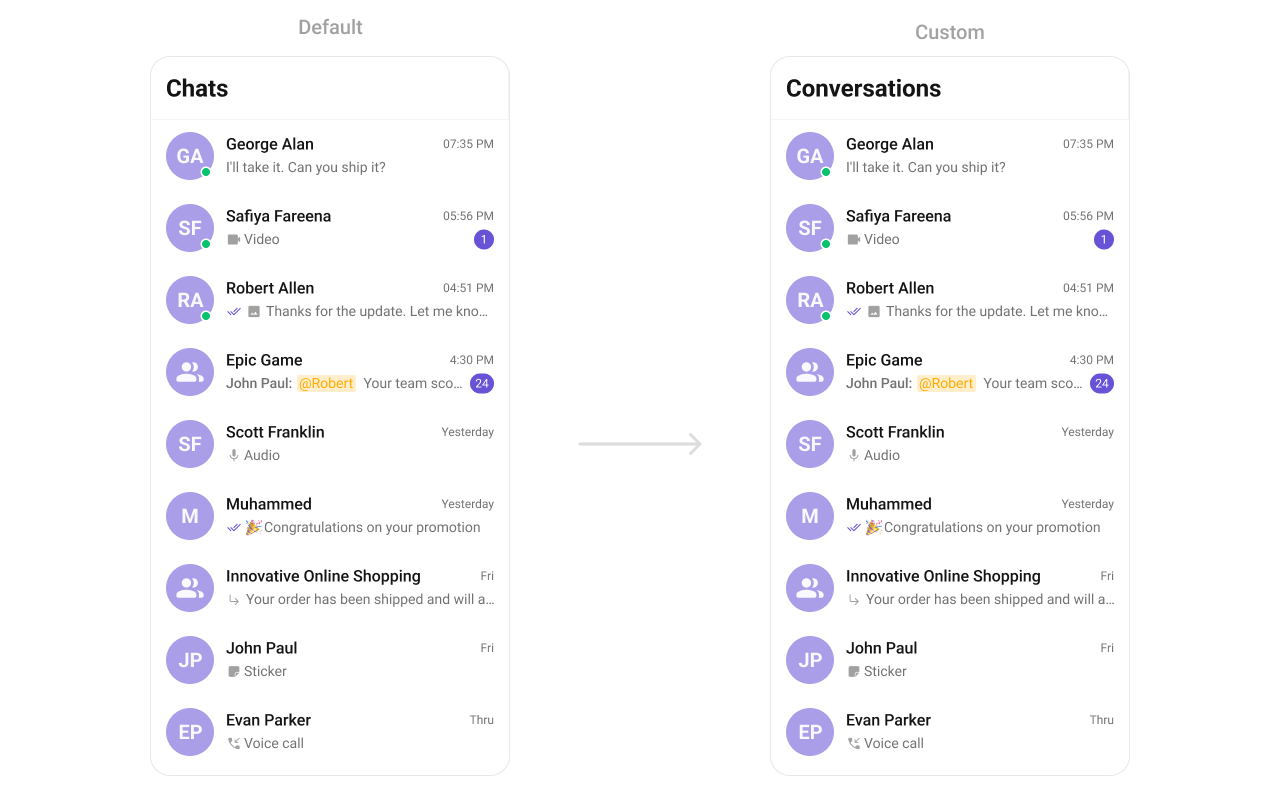
Example reference from UI Kit `strings.xml`:
 ```xml strings.xml lines theme={null}
Chats
....
```
* **What this does**: Shows the default UI Kit label for the conversations list.
Override the key in your app:
```xml res/values/strings.xml lines theme={null}
Conversations
....
```
* **What this does**: Replaces the UI Kit label with your custom text.
Why use this approach:
* No UI Kit source code changes required.
* Easy localization using Android resources.
* UI Kit updates do not overwrite your overrides.
* You can tailor text without affecting behavior.
### Customize date and time labels
What you're changing: Global time and date labels such as "Today", "Yesterday", and "X mins ago".
* **Where to change it**: Your UI Kit initialization (where you build `UIKitSettings`).
* **Applies to**: All UI Kit screens that display timestamps.
* **Default behavior**: UI Kit uses its built-in formatter.
* **Override**: Provide a `DateTimeFormatterCallback` when building `UIKitSettings`.
* **Code**:
```kotlin AppInit.kt lines theme={null}
import android.content.Context
import android.util.Log
import com.cometchat.chat.core.CometChat
import com.cometchat.chat.exceptions.CometChatException
import com.cometchat.chatuikit.shared.cometchatuikit.CometChatUIKit
import com.cometchat.chatuikit.shared.cometchatuikit.UIKitSettings
import com.cometchat.chatuikit.shared.interfaces.DateTimeFormatterCallback
import java.text.SimpleDateFormat
import java.util.Date
import java.util.Locale
object AppInit {
fun initUiKitWithDateFormatter(
context: Context,
appId: String,
region: String,
authKey: String
) {
val uiKitSettings = UIKitSettings.UIKitSettingsBuilder()
.setAppId(appId)
.setRegion(region)
.setDateTimeFormatterCallback(object : DateTimeFormatterCallback {
private val fullTimeFormatter = SimpleDateFormat("hh:mm a", Locale.getDefault())
private val dateFormatter = SimpleDateFormat("dd MMM yyyy", Locale.getDefault())
override fun time(timestamp: Long): String {
return fullTimeFormatter.format(Date(timestamp))
}
override fun today(timestamp: Long): String {
return "Today"
}
override fun yesterday(timestamp: Long): String {
return "Yesterday"
}
override fun lastWeek(timestamp: Long): String {
return "Last Week"
}
override fun otherDays(timestamp: Long): String {
return dateFormatter.format(Date(timestamp))
}
override fun minutes(diffInMinutesFromNow: Long, timestamp: Long): String {
return "$diffInMinutesFromNow mins ago"
}
override fun hours(diffInHourFromNow: Long, timestamp: Long): String {
return "$diffInHourFromNow hrs ago"
}
})
.setAuthKey(authKey)
.build()
CometChatUIKit.init(context, uiKitSettings, object : CometChat.CallbackListener() {
override fun onSuccess(s: String) {
Log.d("CometChatInit", "Success: $s")
}
override fun onError(e: CometChatException) {
Log.e("CometChatInit", "Error: ${e.message}")
}
})
}
}
```
```java AppInit.java lines theme={null}
import android.content.Context;
import android.util.Log;
import com.cometchat.chat.core.CometChat;
import com.cometchat.chat.exceptions.CometChatException;
import com.cometchat.chatuikit.shared.cometchatuikit.CometChatUIKit;
import com.cometchat.chatuikit.shared.cometchatuikit.UIKitSettings;
import com.cometchat.chatuikit.shared.interfaces.DateTimeFormatterCallback;
import java.text.SimpleDateFormat;
import java.util.Date;
import java.util.Locale;
public class AppInit {
public static void initUiKitWithDateFormatter(
Context context,
String appId,
String region,
String authKey
) {
UIKitSettings uiKitSettings = new UIKitSettings.UIKitSettingsBuilder()
.setAppId(appId)
.setRegion(region)
.setDateTimeFormatterCallback(new DateTimeFormatterCallback() {
private final SimpleDateFormat fullTimeFormatter = new SimpleDateFormat("hh:mm a", Locale.getDefault());
private final SimpleDateFormat dateFormatter = new SimpleDateFormat("dd MMM yyyy", Locale.getDefault());
@Override
public String time(long timestamp) {
return fullTimeFormatter.format(new Date(timestamp));
}
@Override
public String today(long timestamp) {
return "Today";
}
@Override
public String yesterday(long timestamp) {
return "Yesterday";
}
@Override
public String lastWeek(long timestamp) {
return "Last Week";
}
@Override
public String otherDays(long timestamp) {
return dateFormatter.format(new Date(timestamp));
}
@Override
public String minutes(long diffInMinutesFromNow, long timestamp) {
return diffInMinutesFromNow + " mins ago";
}
@Override
public String hours(long diffInHourFromNow, long timestamp) {
return diffInHourFromNow + " hrs ago";
}
})
.setAuthKey(authKey)
.build();
CometChatUIKit.init(context, uiKitSettings, new CometChat.CallbackListener() {
@Override
public void onSuccess(String s) {
Log.d("CometChatInit", "Success: " + s);
}
@Override
public void onError(CometChatException e) {
Log.e("CometChatInit", "Error: " + e.getMessage());
}
});
}
}
```
* **What this does**: Registers a global `DateTimeFormatterCallback` so all UI Kit timestamps use your formatting rules.
* **Verify**: Open a conversation list and confirm labels like "Today" or "X mins ago" match your formatter.
For the full callback reference, see [CometChatUIKit methods: DateFormatter](/ui-kit/android/methods#dateformatter).
## Customization matrix
| What you want to change | Where | Property/API | Example |
| ------------------------------- | -------------------------------------------------------- | ----------------------------------------------------- | --------------------------------------------------------------------------- |
| UI Kit language (global) | `app/src/main/java//LocalizeActivity.java` | `CometChatLocalize.setLocale(Context, Language.Code)` | `CometChatLocalize.setLocale(this, Language.Code.hi);` |
| Read current locale (optional) | `app/src/main/java//LocalizeActivity.java` | `CometChatLocalize.getLocale(Context)` | `String currentLocale = CometChatLocalize.getLocale(this);` |
| UI Kit label text (strings.xml) | `app/src/main/res/values/strings.xml` | `cometchat_chats` | `Conversations` |
| Global date and time labels | `app/src/main/java//AppInit.java` | `setDateTimeFormatterCallback(...)` | `.setDateTimeFormatterCallback(new DateTimeFormatterCallback() {` |
```xml strings.xml lines theme={null}
Chats
....
```
* **What this does**: Shows the default UI Kit label for the conversations list.
Override the key in your app:
```xml res/values/strings.xml lines theme={null}
Conversations
....
```
* **What this does**: Replaces the UI Kit label with your custom text.
Why use this approach:
* No UI Kit source code changes required.
* Easy localization using Android resources.
* UI Kit updates do not overwrite your overrides.
* You can tailor text without affecting behavior.
### Customize date and time labels
What you're changing: Global time and date labels such as "Today", "Yesterday", and "X mins ago".
* **Where to change it**: Your UI Kit initialization (where you build `UIKitSettings`).
* **Applies to**: All UI Kit screens that display timestamps.
* **Default behavior**: UI Kit uses its built-in formatter.
* **Override**: Provide a `DateTimeFormatterCallback` when building `UIKitSettings`.
* **Code**:
```kotlin AppInit.kt lines theme={null}
import android.content.Context
import android.util.Log
import com.cometchat.chat.core.CometChat
import com.cometchat.chat.exceptions.CometChatException
import com.cometchat.chatuikit.shared.cometchatuikit.CometChatUIKit
import com.cometchat.chatuikit.shared.cometchatuikit.UIKitSettings
import com.cometchat.chatuikit.shared.interfaces.DateTimeFormatterCallback
import java.text.SimpleDateFormat
import java.util.Date
import java.util.Locale
object AppInit {
fun initUiKitWithDateFormatter(
context: Context,
appId: String,
region: String,
authKey: String
) {
val uiKitSettings = UIKitSettings.UIKitSettingsBuilder()
.setAppId(appId)
.setRegion(region)
.setDateTimeFormatterCallback(object : DateTimeFormatterCallback {
private val fullTimeFormatter = SimpleDateFormat("hh:mm a", Locale.getDefault())
private val dateFormatter = SimpleDateFormat("dd MMM yyyy", Locale.getDefault())
override fun time(timestamp: Long): String {
return fullTimeFormatter.format(Date(timestamp))
}
override fun today(timestamp: Long): String {
return "Today"
}
override fun yesterday(timestamp: Long): String {
return "Yesterday"
}
override fun lastWeek(timestamp: Long): String {
return "Last Week"
}
override fun otherDays(timestamp: Long): String {
return dateFormatter.format(Date(timestamp))
}
override fun minutes(diffInMinutesFromNow: Long, timestamp: Long): String {
return "$diffInMinutesFromNow mins ago"
}
override fun hours(diffInHourFromNow: Long, timestamp: Long): String {
return "$diffInHourFromNow hrs ago"
}
})
.setAuthKey(authKey)
.build()
CometChatUIKit.init(context, uiKitSettings, object : CometChat.CallbackListener() {
override fun onSuccess(s: String) {
Log.d("CometChatInit", "Success: $s")
}
override fun onError(e: CometChatException) {
Log.e("CometChatInit", "Error: ${e.message}")
}
})
}
}
```
```java AppInit.java lines theme={null}
import android.content.Context;
import android.util.Log;
import com.cometchat.chat.core.CometChat;
import com.cometchat.chat.exceptions.CometChatException;
import com.cometchat.chatuikit.shared.cometchatuikit.CometChatUIKit;
import com.cometchat.chatuikit.shared.cometchatuikit.UIKitSettings;
import com.cometchat.chatuikit.shared.interfaces.DateTimeFormatterCallback;
import java.text.SimpleDateFormat;
import java.util.Date;
import java.util.Locale;
public class AppInit {
public static void initUiKitWithDateFormatter(
Context context,
String appId,
String region,
String authKey
) {
UIKitSettings uiKitSettings = new UIKitSettings.UIKitSettingsBuilder()
.setAppId(appId)
.setRegion(region)
.setDateTimeFormatterCallback(new DateTimeFormatterCallback() {
private final SimpleDateFormat fullTimeFormatter = new SimpleDateFormat("hh:mm a", Locale.getDefault());
private final SimpleDateFormat dateFormatter = new SimpleDateFormat("dd MMM yyyy", Locale.getDefault());
@Override
public String time(long timestamp) {
return fullTimeFormatter.format(new Date(timestamp));
}
@Override
public String today(long timestamp) {
return "Today";
}
@Override
public String yesterday(long timestamp) {
return "Yesterday";
}
@Override
public String lastWeek(long timestamp) {
return "Last Week";
}
@Override
public String otherDays(long timestamp) {
return dateFormatter.format(new Date(timestamp));
}
@Override
public String minutes(long diffInMinutesFromNow, long timestamp) {
return diffInMinutesFromNow + " mins ago";
}
@Override
public String hours(long diffInHourFromNow, long timestamp) {
return diffInHourFromNow + " hrs ago";
}
})
.setAuthKey(authKey)
.build();
CometChatUIKit.init(context, uiKitSettings, new CometChat.CallbackListener() {
@Override
public void onSuccess(String s) {
Log.d("CometChatInit", "Success: " + s);
}
@Override
public void onError(CometChatException e) {
Log.e("CometChatInit", "Error: " + e.getMessage());
}
});
}
}
```
* **What this does**: Registers a global `DateTimeFormatterCallback` so all UI Kit timestamps use your formatting rules.
* **Verify**: Open a conversation list and confirm labels like "Today" or "X mins ago" match your formatter.
For the full callback reference, see [CometChatUIKit methods: DateFormatter](/ui-kit/android/methods#dateformatter).
## Customization matrix
| What you want to change | Where | Property/API | Example |
| ------------------------------- | -------------------------------------------------------- | ----------------------------------------------------- | --------------------------------------------------------------------------- |
| UI Kit language (global) | `app/src/main/java//LocalizeActivity.java` | `CometChatLocalize.setLocale(Context, Language.Code)` | `CometChatLocalize.setLocale(this, Language.Code.hi);` |
| Read current locale (optional) | `app/src/main/java//LocalizeActivity.java` | `CometChatLocalize.getLocale(Context)` | `String currentLocale = CometChatLocalize.getLocale(this);` |
| UI Kit label text (strings.xml) | `app/src/main/res/values/strings.xml` | `cometchat_chats` | `Conversations` |
| Global date and time labels | `app/src/main/java//AppInit.java` | `setDateTimeFormatterCallback(...)` | `.setDateTimeFormatterCallback(new DateTimeFormatterCallback() {` |