> ## Documentation Index
> Fetch the complete documentation index at: https://cometchat-22654f5b-docs-rn-guide-message-privately.mintlify.site/llms.txt
> Use this file to discover all available pages before exploring further.
# Component Styling
> Style CometChat Android UI Kit components with style resources, component attributes, message bubbles, lists, headers, and call UI.
| Field | Value |
| ----------- | ---------------------------------------------------------------------------------------------------------------------------------------------------------------------------------- |
| Goal | Customize UI Kit component appearance (colors, fonts, icons) via XML theme attributes |
| Where | `app/src/main/res/values/themes.xml` — applied via `android:theme` in `AndroidManifest.xml` |
| Pattern | Create a custom style extending the component's parent style → assign it to `AppTheme` via the component's theme attribute |
| Example | `CometChatConversationsStyle` → `cometchatConversationsStyle`, `CometChatUsersStyle` → `cometchatUsersStyle` |
| Constraints | Must extend `CometChatTheme.DayNight` as parent theme; rebuild after updating styles |
| Related | [Theme Introduction](/ui-kit/android/theme-introduction) \| [Color Resources](/ui-kit/android/color-resources) \| [Message Bubble Styling](/ui-kit/android/message-bubble-styling) |
This page shows how to style CometChat UI Kit components in Android by overriding XML theme attributes. It is written for Android developers customizing UI Kit v5.
## When to use this
* You want UI Kit screens (lists, headers, and message UI) to match your brand colors and typography.
* You need to customize calling and AI UI components without rebuilding UI from scratch.
* You prefer centralized styling through `res/values/themes.xml`.
* You want consistent iconography by supplying your own vector drawables.
* You need a repeatable pattern that an AI coding agent can apply across components.
## Prerequisites
* CometChat Android UI Kit v5 installed in your app.
* Your app theme extends `CometChatTheme.DayNight`.
* You can edit `res/values/themes.xml` in your Android module.
* You can add drawable resources to `res/drawable/` when needed.
* You rebuild or sync Gradle after updating styles.
## Quick start
1. Open `res/values/themes.xml`.
2. Create a custom style that extends the component's parent style (for example, `CometChatConversationsStyle`).
3. Assign your custom style to `AppTheme` using the component's theme attribute (for example, `cometchatConversationsStyle`).
4. Sync Gradle and rebuild the app.
5. Navigate to the screen that uses the component and confirm the visual change.
```xml res/values/themes.xml lines theme={null}
```
* **What this does**: applies a custom avatar style to the Conversations list through your app theme.
* **Verify**: open the Conversations screen and confirm the avatar background and stroke radius changed.
## Core concepts
* `AppTheme` is the single place where UI Kit style hooks are wired.
* Each UI Kit component has a parent style (for example, `CometChatMessageListStyle`) and a theme attribute (for example, `cometchatMessageListStyle`).
* Custom styles must extend the correct parent style to inherit default behavior.
* Drawable overrides (for example, custom icons) live in `res/drawable/` and are referenced from styles.
* Fonts can be set once at the theme level and reused across components.
```xml res/values/themes.xml lines theme={null}
```
* **What this does**: sets UI Kit typography once so you do not repeat font assignments in every component.
## Implementation
Use the following sections to style each component. Each section lists what changes, where to change it, the exact code to paste, and how to verify the result.
### Chat lists and messaging UI
#### Conversations
The `CometChatConversations` component renders the recent chats list.
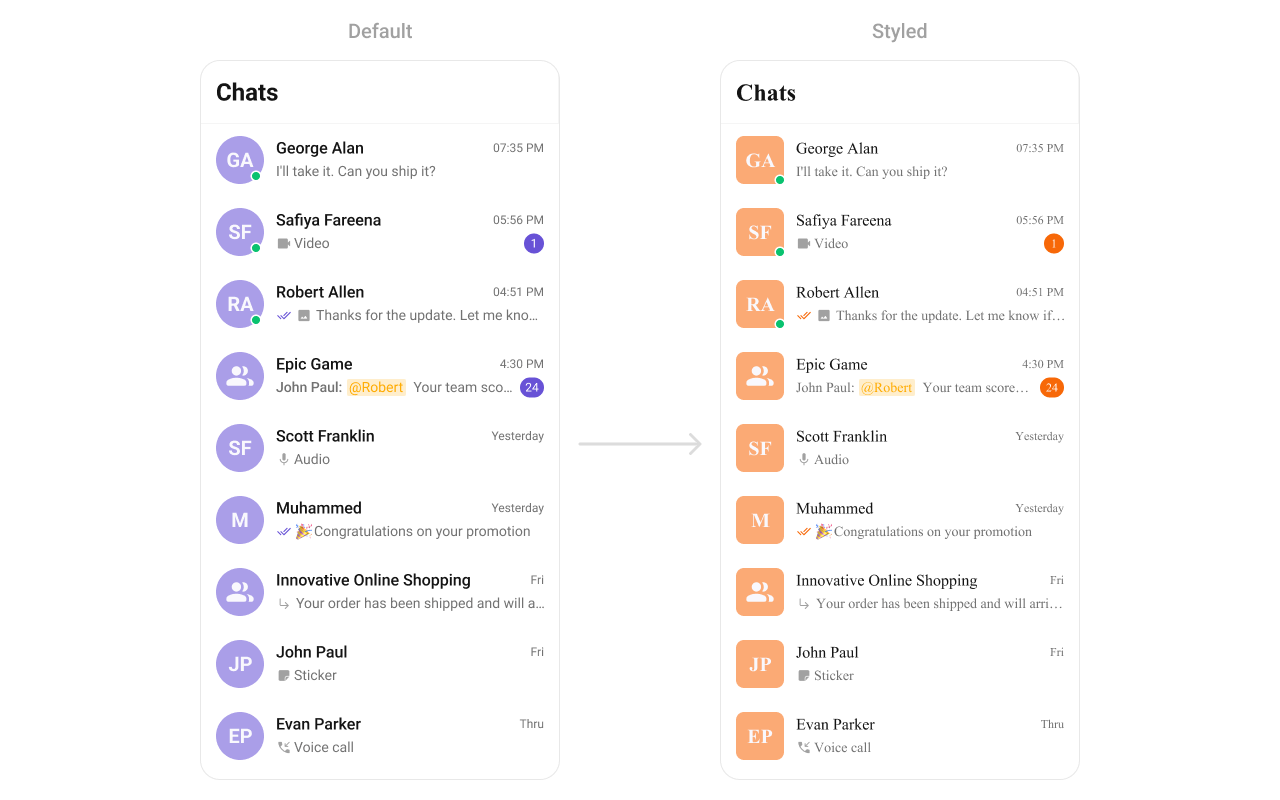 What you're changing: avatar and badge styling in the conversation list.
* **Where to change it**: `res/values/themes.xml`
* **Applies to**: `CometChatConversations`
* **Default behavior**: UI Kit default avatar and badge styles.
* **Override**: set `cometchatConversationsStyle` in `AppTheme`.
* **Code**:
```xml res/values/themes.xml lines theme={null}
```
* **What this does**: applies custom avatar and badge styles to conversation list items.
* **Verify**: the Conversations list shows updated avatar backgrounds and badge colors.
Attribute references:
* [Conversations attributes](https://github.com/cometchat/cometchat-uikit-android/blob/v5/chatuikit/src/main/res/values/attr_cometchat_conversations.xml)
* [Avatar attributes](https://github.com/cometchat/cometchat-uikit-android/blob/v5/chatuikit/src/main/res/values/attr_cometchat_avatar.xml)
* [Badge attributes](https://github.com/cometchat/cometchat-uikit-android/blob/v5/chatuikit/src/main/res/values/attr_cometchat_badge.xml)
#### Users
The `CometChatUsers` component renders a list of users for selection or navigation.
What you're changing: avatar and badge styling in the conversation list.
* **Where to change it**: `res/values/themes.xml`
* **Applies to**: `CometChatConversations`
* **Default behavior**: UI Kit default avatar and badge styles.
* **Override**: set `cometchatConversationsStyle` in `AppTheme`.
* **Code**:
```xml res/values/themes.xml lines theme={null}
```
* **What this does**: applies custom avatar and badge styles to conversation list items.
* **Verify**: the Conversations list shows updated avatar backgrounds and badge colors.
Attribute references:
* [Conversations attributes](https://github.com/cometchat/cometchat-uikit-android/blob/v5/chatuikit/src/main/res/values/attr_cometchat_conversations.xml)
* [Avatar attributes](https://github.com/cometchat/cometchat-uikit-android/blob/v5/chatuikit/src/main/res/values/attr_cometchat_avatar.xml)
* [Badge attributes](https://github.com/cometchat/cometchat-uikit-android/blob/v5/chatuikit/src/main/res/values/attr_cometchat_badge.xml)
#### Users
The `CometChatUsers` component renders a list of users for selection or navigation.
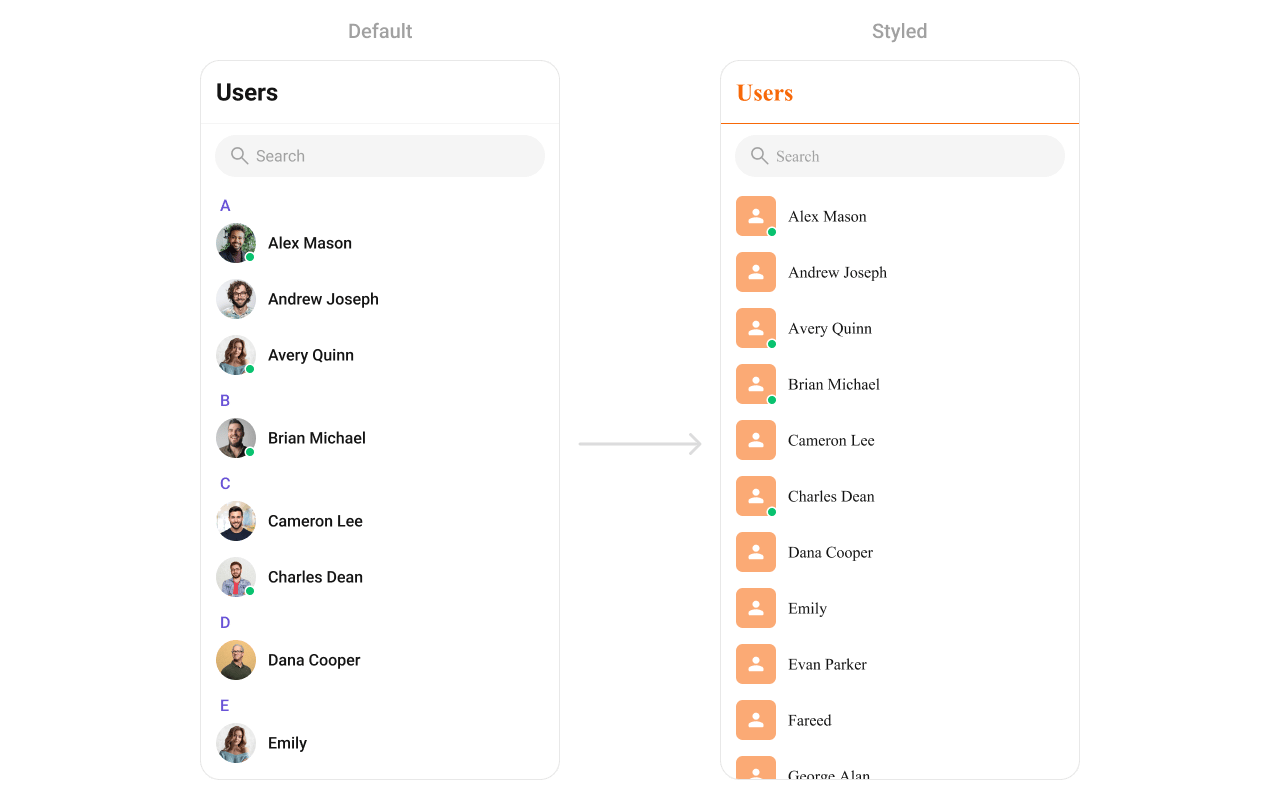 What you're changing: user list avatar and separator styling.
* **Where to change it**: `res/values/themes.xml`
* **Applies to**: `CometChatUsers`
* **Default behavior**: UI Kit default avatar and list styling.
* **Override**: set `cometchatUsersStyle` in `AppTheme`.
* **Code**:
```xml res/values/themes.xml lines theme={null}
```
* **What this does**: applies avatar and separator color overrides to the user list.
* **Verify**: the Users list shows updated avatar backgrounds and separator color.
Attribute references:
* [Users attributes](https://github.com/cometchat/cometchat-uikit-android/blob/v5/chatuikit/src/main/res/values/attr_cometchat_users.xml)
* [Avatar attributes](https://github.com/cometchat/cometchat-uikit-android/blob/v5/chatuikit/src/main/res/values/attr_cometchat_avatar.xml)
#### Groups
The `CometChatGroups` component renders group items and their summary data.
What you're changing: user list avatar and separator styling.
* **Where to change it**: `res/values/themes.xml`
* **Applies to**: `CometChatUsers`
* **Default behavior**: UI Kit default avatar and list styling.
* **Override**: set `cometchatUsersStyle` in `AppTheme`.
* **Code**:
```xml res/values/themes.xml lines theme={null}
```
* **What this does**: applies avatar and separator color overrides to the user list.
* **Verify**: the Users list shows updated avatar backgrounds and separator color.
Attribute references:
* [Users attributes](https://github.com/cometchat/cometchat-uikit-android/blob/v5/chatuikit/src/main/res/values/attr_cometchat_users.xml)
* [Avatar attributes](https://github.com/cometchat/cometchat-uikit-android/blob/v5/chatuikit/src/main/res/values/attr_cometchat_avatar.xml)
#### Groups
The `CometChatGroups` component renders group items and their summary data.
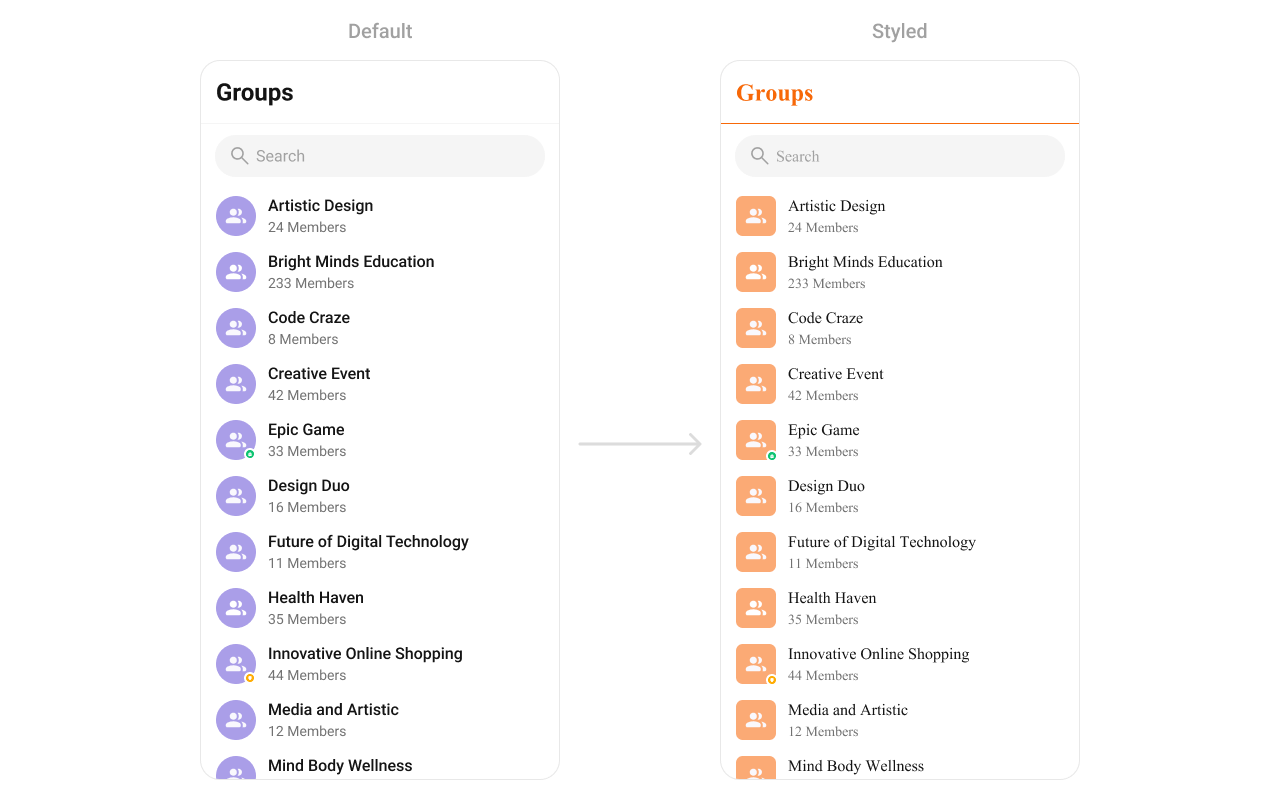 What you're changing: group list avatar and typography colors.
* **Where to change it**: `res/values/themes.xml`
* **Applies to**: `CometChatGroups`
* **Default behavior**: UI Kit default group item styling.
* **Override**: set `cometchatGroupsStyle` in `AppTheme`.
* **Code**:
```xml res/values/themes.xml lines theme={null}
```
* **What this does**: styles group avatars and separators in the Groups list.
* **Verify**: the Groups list shows the updated avatar background and title color.
Attribute references:
* [Groups attributes](https://github.com/cometchat/cometchat-uikit-android/blob/v5/chatuikit/src/main/res/values/attr_cometchat_groups.xml)
* [Avatar attributes](https://github.com/cometchat/cometchat-uikit-android/blob/v5/chatuikit/src/main/res/values/attr_cometchat_avatar.xml)
#### Message Header
The `CometChatMessageHeader` component renders the title, avatar, and action icons for a chat.
What you're changing: group list avatar and typography colors.
* **Where to change it**: `res/values/themes.xml`
* **Applies to**: `CometChatGroups`
* **Default behavior**: UI Kit default group item styling.
* **Override**: set `cometchatGroupsStyle` in `AppTheme`.
* **Code**:
```xml res/values/themes.xml lines theme={null}
```
* **What this does**: styles group avatars and separators in the Groups list.
* **Verify**: the Groups list shows the updated avatar background and title color.
Attribute references:
* [Groups attributes](https://github.com/cometchat/cometchat-uikit-android/blob/v5/chatuikit/src/main/res/values/attr_cometchat_groups.xml)
* [Avatar attributes](https://github.com/cometchat/cometchat-uikit-android/blob/v5/chatuikit/src/main/res/values/attr_cometchat_avatar.xml)
#### Message Header
The `CometChatMessageHeader` component renders the title, avatar, and action icons for a chat.
 What you're changing: title text color, avatar styling, and call button icons.
* **Where to change it**: `res/values/themes.xml`
* **Applies to**: `CometChatMessageHeader`
* **Default behavior**: UI Kit default header typography and icons.
* **Override**: set `cometchatMessageHeaderStyle` in `AppTheme`.
* **Code**:
```xml res/values/themes.xml lines theme={null}
```
* **What this does**: applies custom title color, avatar styling, and call button tints in the message header.
* **Verify**: open a conversation and check the header text and call button icons.
Attribute references:
* [Message Header attributes](https://github.com/cometchat/cometchat-uikit-android/blob/v5/chatuikit/src/main/res/values/attr_cometchat_message_header.xml)
* [Call Buttons attributes](https://github.com/cometchat/cometchat-uikit-android/blob/v5/chatuikit/src/main/res/values/attr_cometchat_call_buttons.xml)
#### Message List
The `CometChatMessageList` component renders conversation messages and their bubble styles.
What you're changing: title text color, avatar styling, and call button icons.
* **Where to change it**: `res/values/themes.xml`
* **Applies to**: `CometChatMessageHeader`
* **Default behavior**: UI Kit default header typography and icons.
* **Override**: set `cometchatMessageHeaderStyle` in `AppTheme`.
* **Code**:
```xml res/values/themes.xml lines theme={null}
```
* **What this does**: applies custom title color, avatar styling, and call button tints in the message header.
* **Verify**: open a conversation and check the header text and call button icons.
Attribute references:
* [Message Header attributes](https://github.com/cometchat/cometchat-uikit-android/blob/v5/chatuikit/src/main/res/values/attr_cometchat_message_header.xml)
* [Call Buttons attributes](https://github.com/cometchat/cometchat-uikit-android/blob/v5/chatuikit/src/main/res/values/attr_cometchat_call_buttons.xml)
#### Message List
The `CometChatMessageList` component renders conversation messages and their bubble styles.
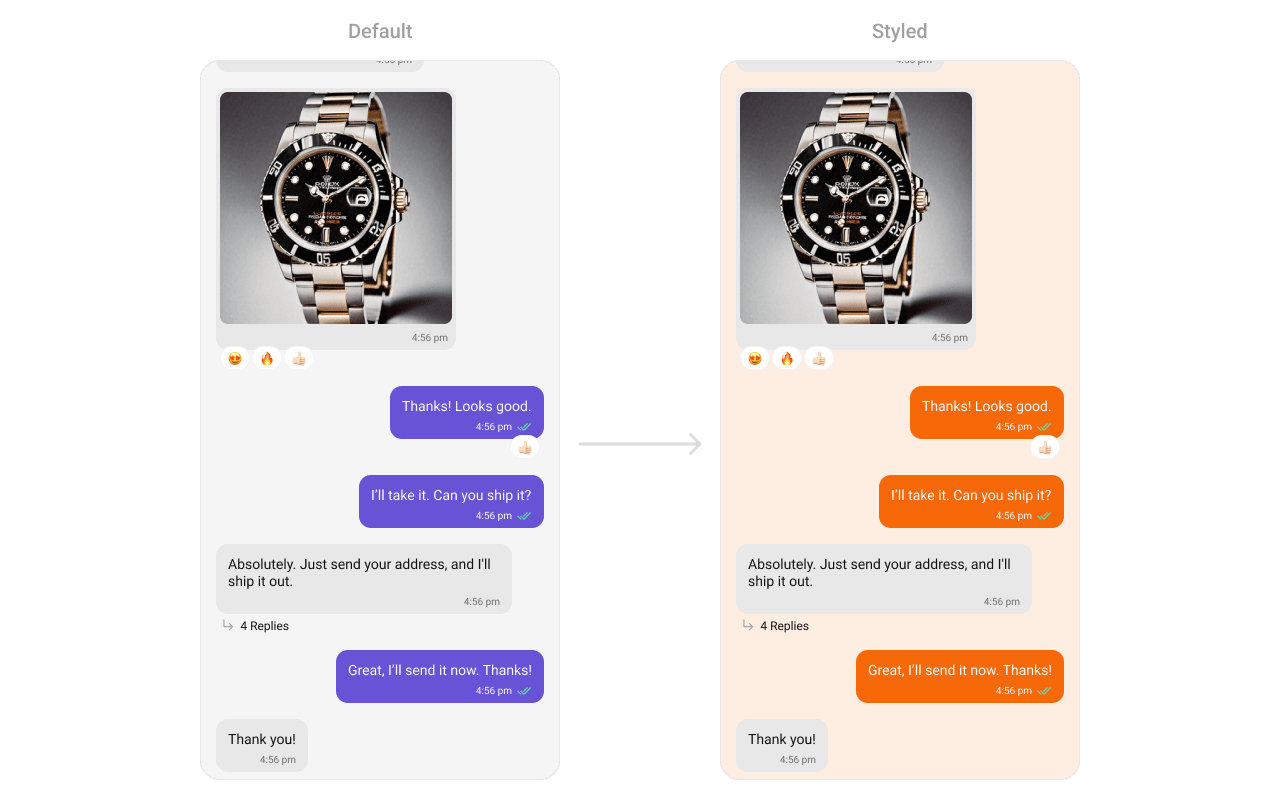 What you're changing: message list background and outgoing bubble styling.
* **Where to change it**: `res/values/themes.xml`
* **Applies to**: `CometChatMessageList`
* **Default behavior**: UI Kit default message list background and bubble colors.
* **Override**: set `cometchatMessageListStyle` in `AppTheme`.
* **Code**:
```xml res/values/themes.xml lines theme={null}
```
* **What this does**: changes the message list background and outgoing bubble color.
* **Verify**: open a conversation and check outgoing message bubble colors.
Attribute references:
* [Message List attributes](https://github.com/cometchat/cometchat-uikit-android/blob/v5/chatuikit/src/main/res/values/attr_cometchat_message_list.xml)
* [Message Bubble attributes](https://github.com/cometchat/cometchat-uikit-android/blob/v5/chatuikit/src/main/res/values/attr_cometchat_message_bubble.xml)
#### Message Composer
The `CometChatMessageComposer` component renders the input box and action buttons.
What you're changing: message list background and outgoing bubble styling.
* **Where to change it**: `res/values/themes.xml`
* **Applies to**: `CometChatMessageList`
* **Default behavior**: UI Kit default message list background and bubble colors.
* **Override**: set `cometchatMessageListStyle` in `AppTheme`.
* **Code**:
```xml res/values/themes.xml lines theme={null}
```
* **What this does**: changes the message list background and outgoing bubble color.
* **Verify**: open a conversation and check outgoing message bubble colors.
Attribute references:
* [Message List attributes](https://github.com/cometchat/cometchat-uikit-android/blob/v5/chatuikit/src/main/res/values/attr_cometchat_message_list.xml)
* [Message Bubble attributes](https://github.com/cometchat/cometchat-uikit-android/blob/v5/chatuikit/src/main/res/values/attr_cometchat_message_bubble.xml)
#### Message Composer
The `CometChatMessageComposer` component renders the input box and action buttons.
 What you're changing: send button icon and composer icon tints.
* **Where to change it**: `res/drawable/active_send_button.xml` and `res/values/themes.xml`
* **Applies to**: `CometChatMessageComposer`
* **Default behavior**: UI Kit default composer icons and send button drawable.
* **Override**: set `cometchatMessageComposerStyle` in `AppTheme` and reference a custom drawable.
* **Code**:
```xml res/drawable/active_send_button.xml lines theme={null}
```
* **What this does**: defines a custom circular send button drawable.
* **Code**:
```xml res/values/themes.xml lines theme={null}
```
* **What this does**: applies custom icon tints and the active send button drawable to the composer.
* **Verify**: the composer shows the custom send button and tinted icons.
Attribute references:
* [Message Composer attributes](https://github.com/cometchat/cometchat-uikit-android/blob/v5/chatuikit/src/main/res/values/attr_cometchat_message_composer.xml)
#### Group Members
The `CometChatGroupMembers` component lists users inside a group.
What you're changing: send button icon and composer icon tints.
* **Where to change it**: `res/drawable/active_send_button.xml` and `res/values/themes.xml`
* **Applies to**: `CometChatMessageComposer`
* **Default behavior**: UI Kit default composer icons and send button drawable.
* **Override**: set `cometchatMessageComposerStyle` in `AppTheme` and reference a custom drawable.
* **Code**:
```xml res/drawable/active_send_button.xml lines theme={null}
```
* **What this does**: defines a custom circular send button drawable.
* **Code**:
```xml res/values/themes.xml lines theme={null}
```
* **What this does**: applies custom icon tints and the active send button drawable to the composer.
* **Verify**: the composer shows the custom send button and tinted icons.
Attribute references:
* [Message Composer attributes](https://github.com/cometchat/cometchat-uikit-android/blob/v5/chatuikit/src/main/res/values/attr_cometchat_message_composer.xml)
#### Group Members
The `CometChatGroupMembers` component lists users inside a group.
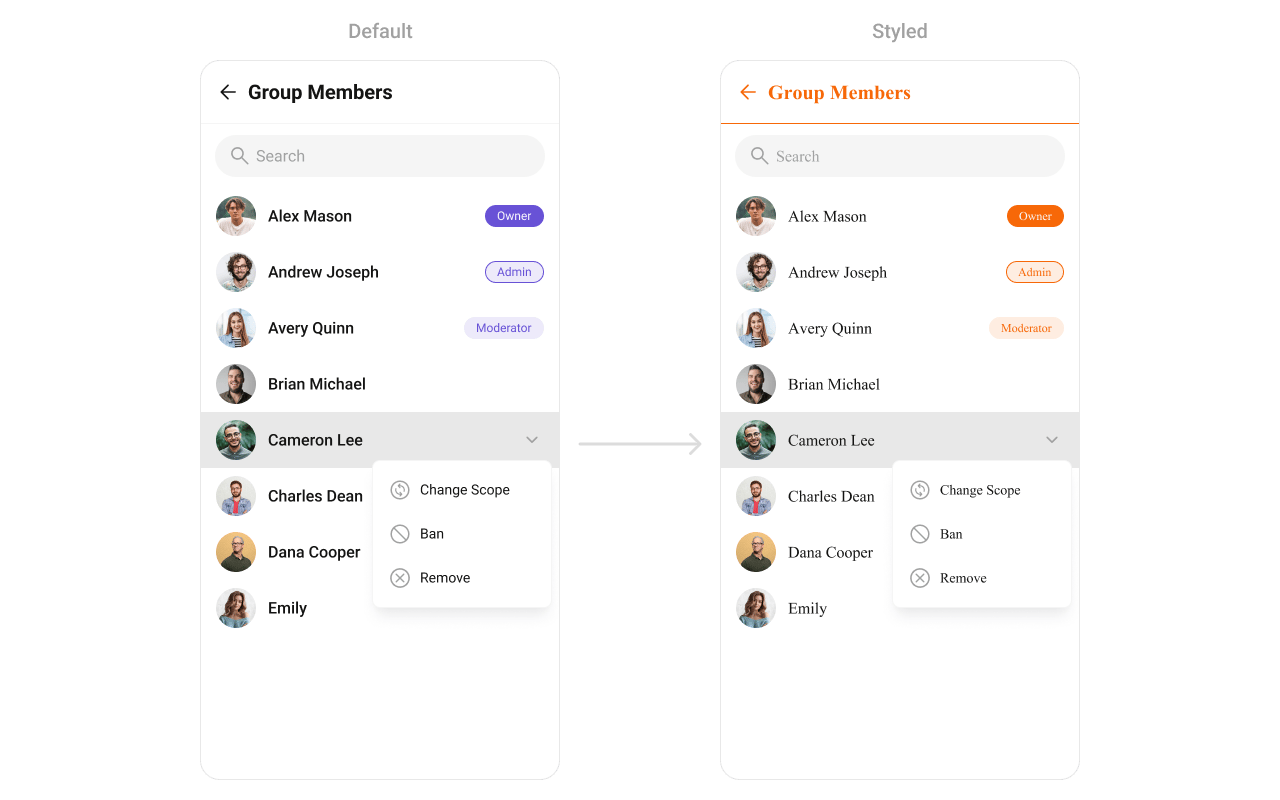 What you're changing: group member list avatars, separators, and back icon tint.
* **Where to change it**: `res/values/themes.xml`
* **Applies to**: `CometChatGroupMembers`
* **Default behavior**: UI Kit default list styling.
* **Override**: set `cometchatGroupMembersStyle` in `AppTheme`.
* **Code**:
```xml res/values/themes.xml lines theme={null}
```
* **What this does**: applies custom avatar and separator styling to the group members list.
* **Verify**: the group members screen shows updated avatar and separator colors.
Attribute references:
* [Group Members attributes](https://github.com/cometchat/cometchat-uikit-android/blob/v5/chatuikit/src/main/res/values/attr_cometchat_group_members.xml)
* [Avatar attributes](https://github.com/cometchat/cometchat-uikit-android/blob/v5/chatuikit/src/main/res/values/attr_cometchat_avatar.xml)
#### Thread Header
The `CometChatThreadHeader` component renders the parent message preview in threaded views.
What you're changing: group member list avatars, separators, and back icon tint.
* **Where to change it**: `res/values/themes.xml`
* **Applies to**: `CometChatGroupMembers`
* **Default behavior**: UI Kit default list styling.
* **Override**: set `cometchatGroupMembersStyle` in `AppTheme`.
* **Code**:
```xml res/values/themes.xml lines theme={null}
```
* **What this does**: applies custom avatar and separator styling to the group members list.
* **Verify**: the group members screen shows updated avatar and separator colors.
Attribute references:
* [Group Members attributes](https://github.com/cometchat/cometchat-uikit-android/blob/v5/chatuikit/src/main/res/values/attr_cometchat_group_members.xml)
* [Avatar attributes](https://github.com/cometchat/cometchat-uikit-android/blob/v5/chatuikit/src/main/res/values/attr_cometchat_avatar.xml)
#### Thread Header
The `CometChatThreadHeader` component renders the parent message preview in threaded views.
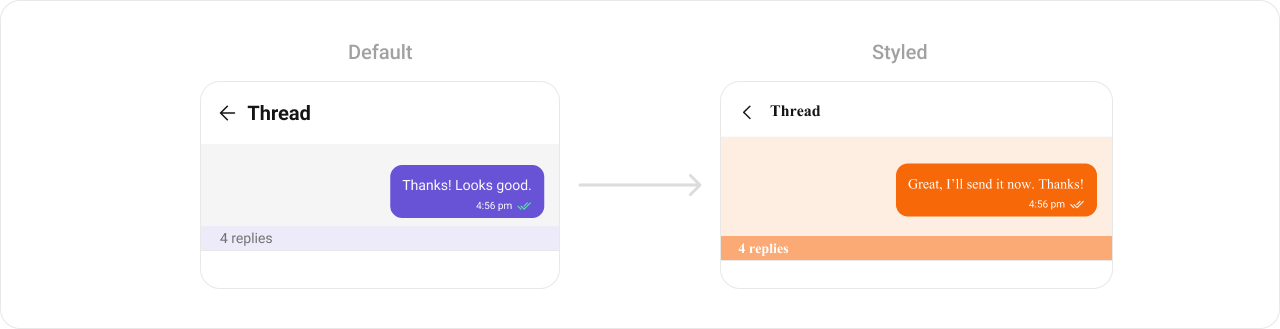 What you're changing: thread header bubble colors and reply count styling.
* **Where to change it**: `res/values/themes.xml`
* **Applies to**: `CometChatThreadHeader`
* **Default behavior**: UI Kit default thread header styling.
* **Override**: set `cometchatThreadHeaderStyle` in `AppTheme`.
* **Code**:
```xml res/values/themes.xml lines theme={null}
```
* **What this does**: customizes thread header bubble colors and reply count styling.
* **Verify**: open a thread and confirm the header background and reply count colors.
Attribute references:
* [Thread Header attributes](https://github.com/cometchat/cometchat-uikit-android/blob/v5/chatuikit/src/main/res/values/attr_cometchat_thread_header.xml)
* [Message Bubble attributes](https://github.com/cometchat/cometchat-uikit-android/blob/v5/chatuikit/src/main/res/values/attr_cometchat_message_bubble.xml)
#### Search
The `CometChatSearch` component provides cross-conversation and message search UI.
What you're changing: thread header bubble colors and reply count styling.
* **Where to change it**: `res/values/themes.xml`
* **Applies to**: `CometChatThreadHeader`
* **Default behavior**: UI Kit default thread header styling.
* **Override**: set `cometchatThreadHeaderStyle` in `AppTheme`.
* **Code**:
```xml res/values/themes.xml lines theme={null}
```
* **What this does**: customizes thread header bubble colors and reply count styling.
* **Verify**: open a thread and confirm the header background and reply count colors.
Attribute references:
* [Thread Header attributes](https://github.com/cometchat/cometchat-uikit-android/blob/v5/chatuikit/src/main/res/values/attr_cometchat_thread_header.xml)
* [Message Bubble attributes](https://github.com/cometchat/cometchat-uikit-android/blob/v5/chatuikit/src/main/res/values/attr_cometchat_message_bubble.xml)
#### Search
The `CometChatSearch` component provides cross-conversation and message search UI.
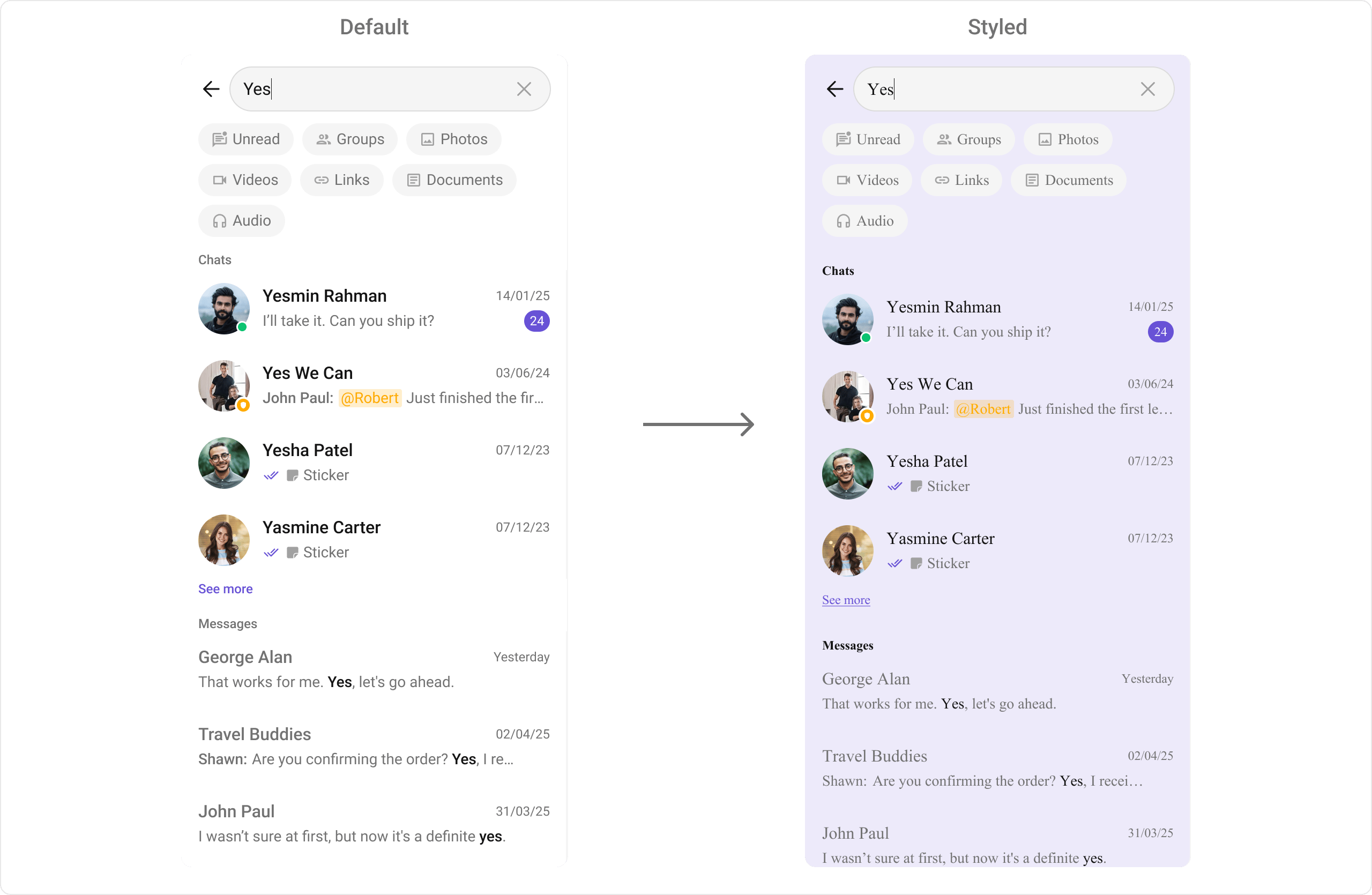 What you're changing: search background and typography styles.
* **Where to change it**: `res/values/themes.xml`
* **Applies to**: `CometChatSearch`
* **Default behavior**: UI Kit default search colors and text appearance.
* **Override**: set `cometchatSearchStyle` in `AppTheme`.
* **Code**:
```xml res/values/themes.xml lines theme={null}
```
* **What this does**: applies custom search colors and text styles across search UI sections.
* **Verify**: open Search and check section headers, chips, and list items.
Attribute references:
* [Search attributes](https://github.com/cometchat/cometchat-uikit-android/blob/v5/chatuikit/src/main/res/values/attr_cometchat_search.xml)
#### Message Information
The `CometChatMessageInformation` component displays message metadata such as delivery and read status.
What you're changing: search background and typography styles.
* **Where to change it**: `res/values/themes.xml`
* **Applies to**: `CometChatSearch`
* **Default behavior**: UI Kit default search colors and text appearance.
* **Override**: set `cometchatSearchStyle` in `AppTheme`.
* **Code**:
```xml res/values/themes.xml lines theme={null}
```
* **What this does**: applies custom search colors and text styles across search UI sections.
* **Verify**: open Search and check section headers, chips, and list items.
Attribute references:
* [Search attributes](https://github.com/cometchat/cometchat-uikit-android/blob/v5/chatuikit/src/main/res/values/attr_cometchat_search.xml)
#### Message Information
The `CometChatMessageInformation` component displays message metadata such as delivery and read status.
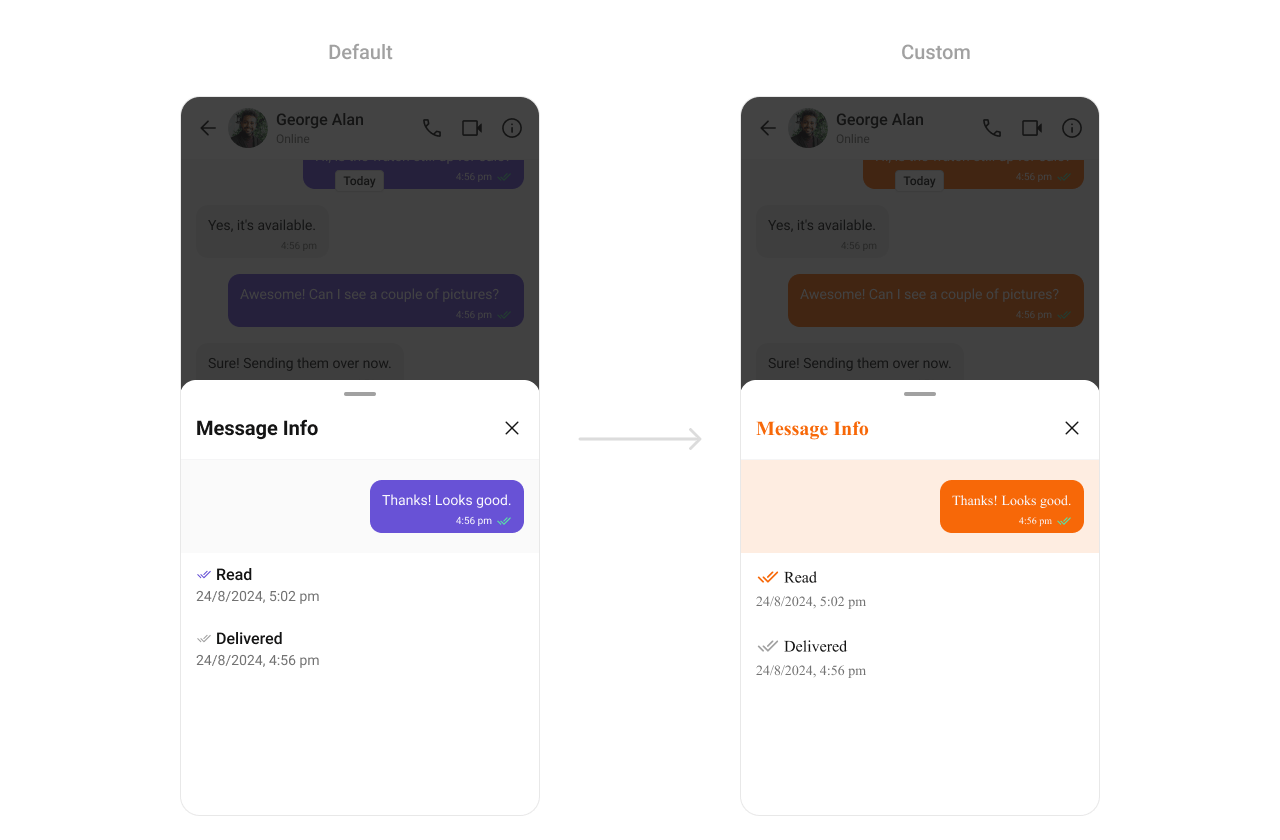 What you're changing: message information styling for metadata views.
* **Where to change it**: `res/values/themes.xml`
* **Applies to**: `CometChatMessageInformation`
* **Default behavior**: UI Kit default metadata styling.
* **Override**: set `cometchatMessageInformationStyle` in `AppTheme`.
* **Code**:
```xml res/values/themes.xml lines theme={null}
```
* **What this does**: wires a custom Message Information style so you can override specific metadata attributes.
* **Verify**: open Message Information and confirm your overrides apply.
Attribute references:
* [Message Information attributes](https://github.com/cometchat/cometchat-uikit-android/blob/v5/chatuikit/src/main/res/values/attr_cometchat_message_information.xml)
#### Message Option Sheet
The `CometChatMessageOptionSheet` component is the action menu for message-level actions.
What you're changing: message information styling for metadata views.
* **Where to change it**: `res/values/themes.xml`
* **Applies to**: `CometChatMessageInformation`
* **Default behavior**: UI Kit default metadata styling.
* **Override**: set `cometchatMessageInformationStyle` in `AppTheme`.
* **Code**:
```xml res/values/themes.xml lines theme={null}
```
* **What this does**: wires a custom Message Information style so you can override specific metadata attributes.
* **Verify**: open Message Information and confirm your overrides apply.
Attribute references:
* [Message Information attributes](https://github.com/cometchat/cometchat-uikit-android/blob/v5/chatuikit/src/main/res/values/attr_cometchat_message_information.xml)
#### Message Option Sheet
The `CometChatMessageOptionSheet` component is the action menu for message-level actions.
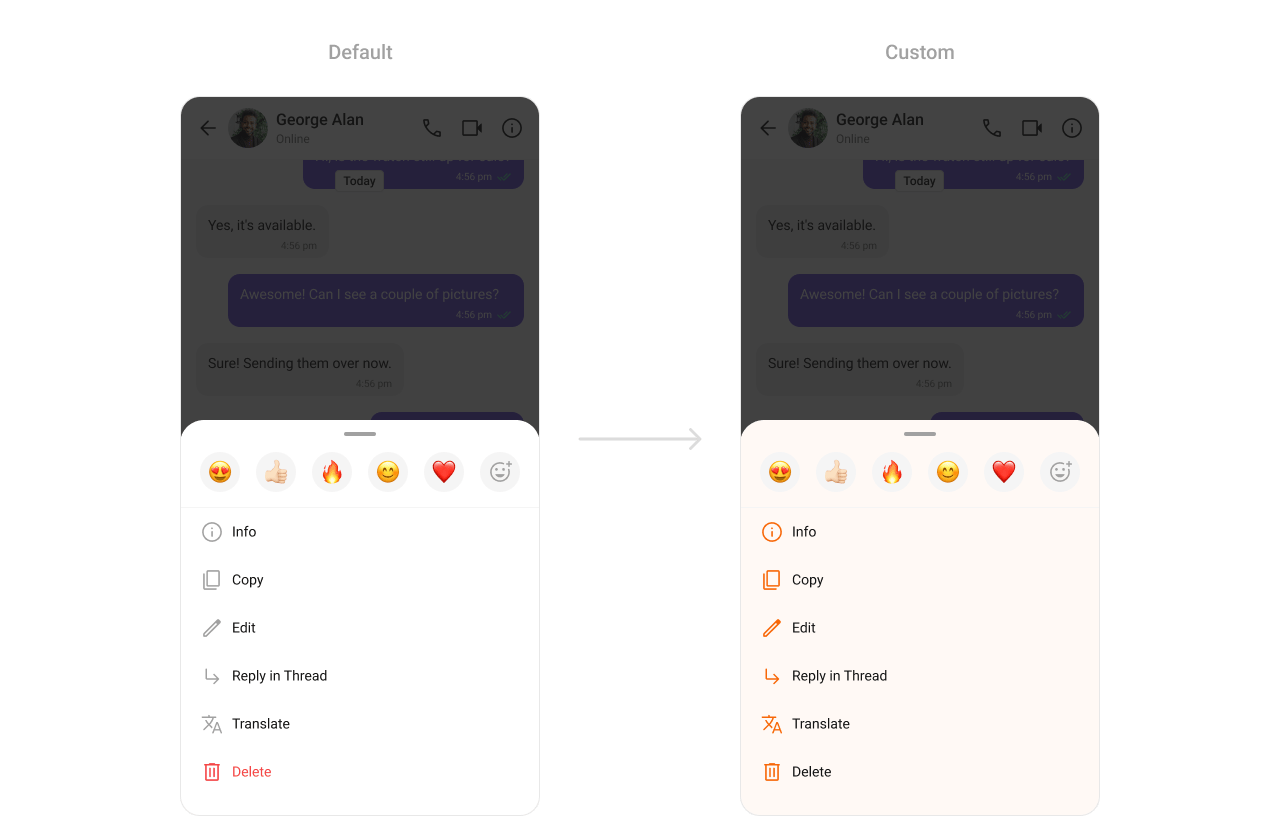 What you're changing: option sheet background and icon tint.
* **Where to change it**: `res/values/themes.xml`
* **Applies to**: `CometChatMessageOptionSheet`
* **Default behavior**: UI Kit default option sheet styling.
* **Override**: set `cometchatPopupMenuStyle` in `AppTheme`.
* **Code**:
```xml res/values/themes.xml lines theme={null}
```
* **What this does**: updates message option sheet icon tint and background color.
* **Verify**: long-press a message and confirm the option sheet styling.
Attribute references:
* [Message Option Sheet attributes](https://github.com/cometchat/cometchat-uikit-android/blob/v5/chatuikit/src/main/res/values/attr_cometchat_message_option_sheet.xml)
#### Attachment Option Sheet
The `CometChatAttachmentOptionSheet` component renders the attachment picker.
What you're changing: option sheet background and icon tint.
* **Where to change it**: `res/values/themes.xml`
* **Applies to**: `CometChatMessageOptionSheet`
* **Default behavior**: UI Kit default option sheet styling.
* **Override**: set `cometchatPopupMenuStyle` in `AppTheme`.
* **Code**:
```xml res/values/themes.xml lines theme={null}
```
* **What this does**: updates message option sheet icon tint and background color.
* **Verify**: long-press a message and confirm the option sheet styling.
Attribute references:
* [Message Option Sheet attributes](https://github.com/cometchat/cometchat-uikit-android/blob/v5/chatuikit/src/main/res/values/attr_cometchat_message_option_sheet.xml)
#### Attachment Option Sheet
The `CometChatAttachmentOptionSheet` component renders the attachment picker.
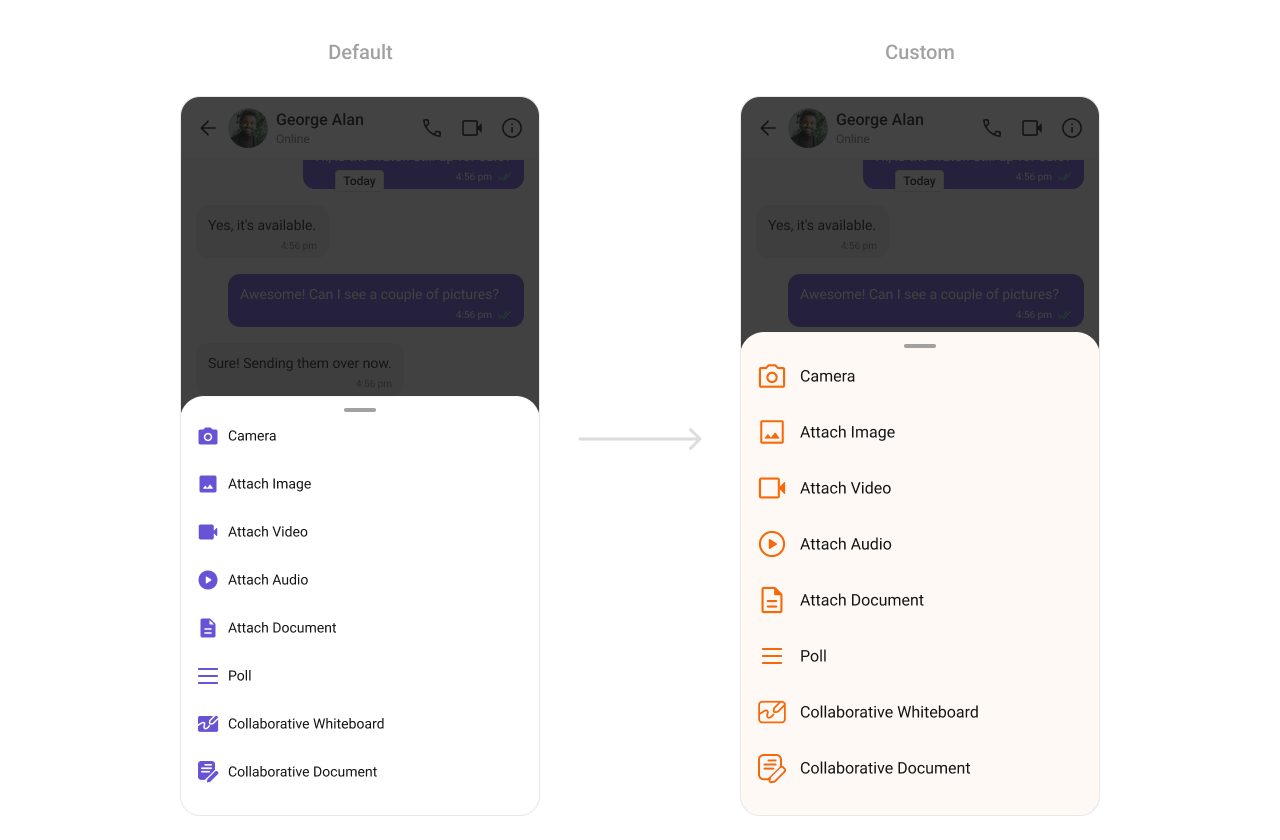 What you're changing: attachment option sheet background and icon tint.
* **Where to change it**: `res/values/themes.xml`
* **Applies to**: `CometChatAttachmentOptionSheet`
* **Default behavior**: UI Kit default attachment sheet styling.
* **Override**: set `cometchatAttachmentOptionSheetStyle` in `AppTheme`.
* **Code**:
```xml res/values/themes.xml lines theme={null}
```
* **What this does**: applies custom colors to the attachment picker sheet.
* **Verify**: open the attachment menu and confirm background and icons.
Attribute references:
* [Attachment Option Sheet attributes](https://github.com/cometchat/cometchat-uikit-android/blob/v5/chatuikit/src/main/res/values/attr_cometchat_attachment_option_sheet.xml)
#### Mentions
The `CometChatMentions` styling controls how user mentions appear inside messages.
What you're changing: attachment option sheet background and icon tint.
* **Where to change it**: `res/values/themes.xml`
* **Applies to**: `CometChatAttachmentOptionSheet`
* **Default behavior**: UI Kit default attachment sheet styling.
* **Override**: set `cometchatAttachmentOptionSheetStyle` in `AppTheme`.
* **Code**:
```xml res/values/themes.xml lines theme={null}
```
* **What this does**: applies custom colors to the attachment picker sheet.
* **Verify**: open the attachment menu and confirm background and icons.
Attribute references:
* [Attachment Option Sheet attributes](https://github.com/cometchat/cometchat-uikit-android/blob/v5/chatuikit/src/main/res/values/attr_cometchat_attachment_option_sheet.xml)
#### Mentions
The `CometChatMentions` styling controls how user mentions appear inside messages.
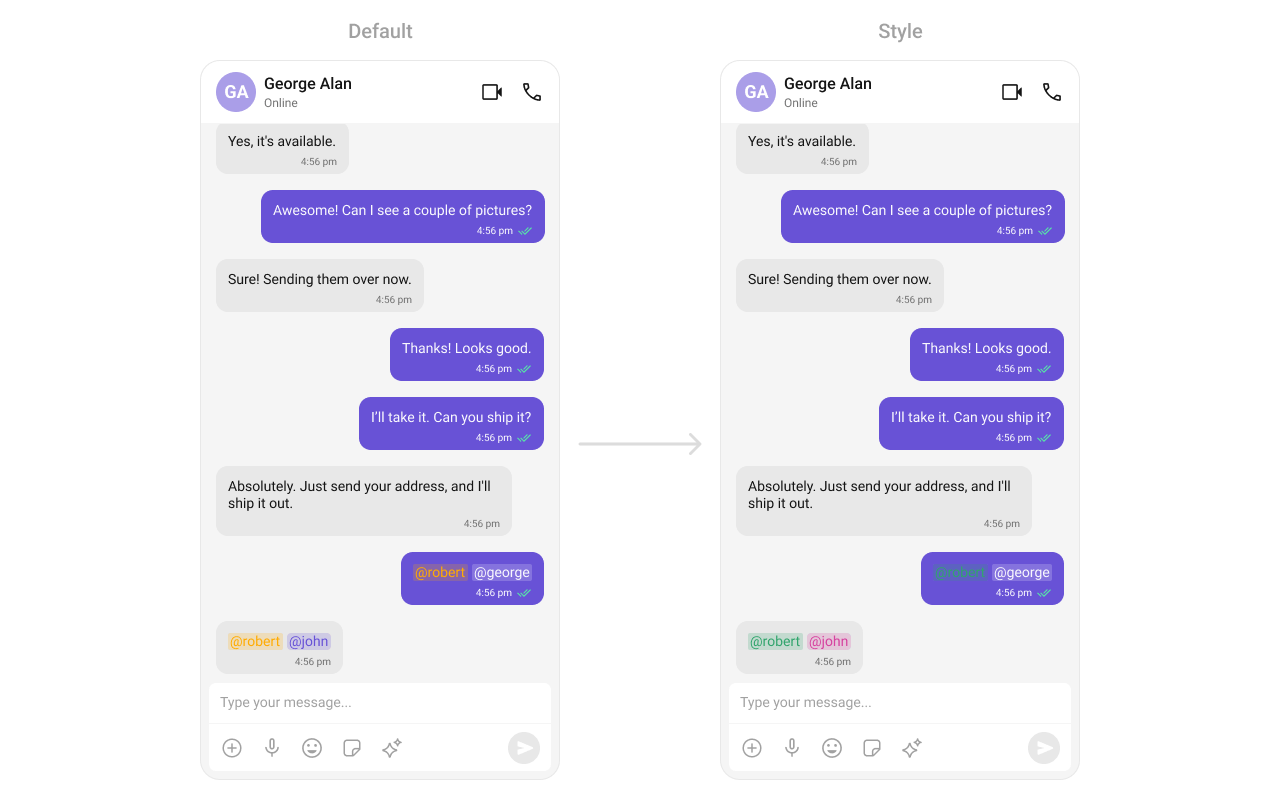 What you're changing: mention text and background styles for incoming and outgoing bubbles.
* **Where to change it**: `res/values/themes.xml`
* **Applies to**: `CometChatMentions`
* **Default behavior**: UI Kit default mention styling.
* **Override**: set `cometchatMessageBubbleMentionsStyle` in both incoming and outgoing bubble styles.
* **Code**:
```xml res/values/themes.xml lines theme={null}
```
* **What this does**: customizes mention colors for incoming and outgoing message bubbles.
* **Verify**: send a mention in a chat and check the mention highlight colors.
Attribute references:
* [Mentions attributes](https://github.com/cometchat/cometchat-uikit-android/blob/v5/chatuikit/src/main/res/values/attr_cometchat_mentions.xml)
* [Message Bubble attributes](https://github.com/cometchat/cometchat-uikit-android/blob/v5/chatuikit/src/main/res/values/attr_cometchat_message_bubble.xml)
### Calling UI
#### Call Logs
The `CometChatCallLogs` component renders recent call history.
What you're changing: mention text and background styles for incoming and outgoing bubbles.
* **Where to change it**: `res/values/themes.xml`
* **Applies to**: `CometChatMentions`
* **Default behavior**: UI Kit default mention styling.
* **Override**: set `cometchatMessageBubbleMentionsStyle` in both incoming and outgoing bubble styles.
* **Code**:
```xml res/values/themes.xml lines theme={null}
```
* **What this does**: customizes mention colors for incoming and outgoing message bubbles.
* **Verify**: send a mention in a chat and check the mention highlight colors.
Attribute references:
* [Mentions attributes](https://github.com/cometchat/cometchat-uikit-android/blob/v5/chatuikit/src/main/res/values/attr_cometchat_mentions.xml)
* [Message Bubble attributes](https://github.com/cometchat/cometchat-uikit-android/blob/v5/chatuikit/src/main/res/values/attr_cometchat_message_bubble.xml)
### Calling UI
#### Call Logs
The `CometChatCallLogs` component renders recent call history.
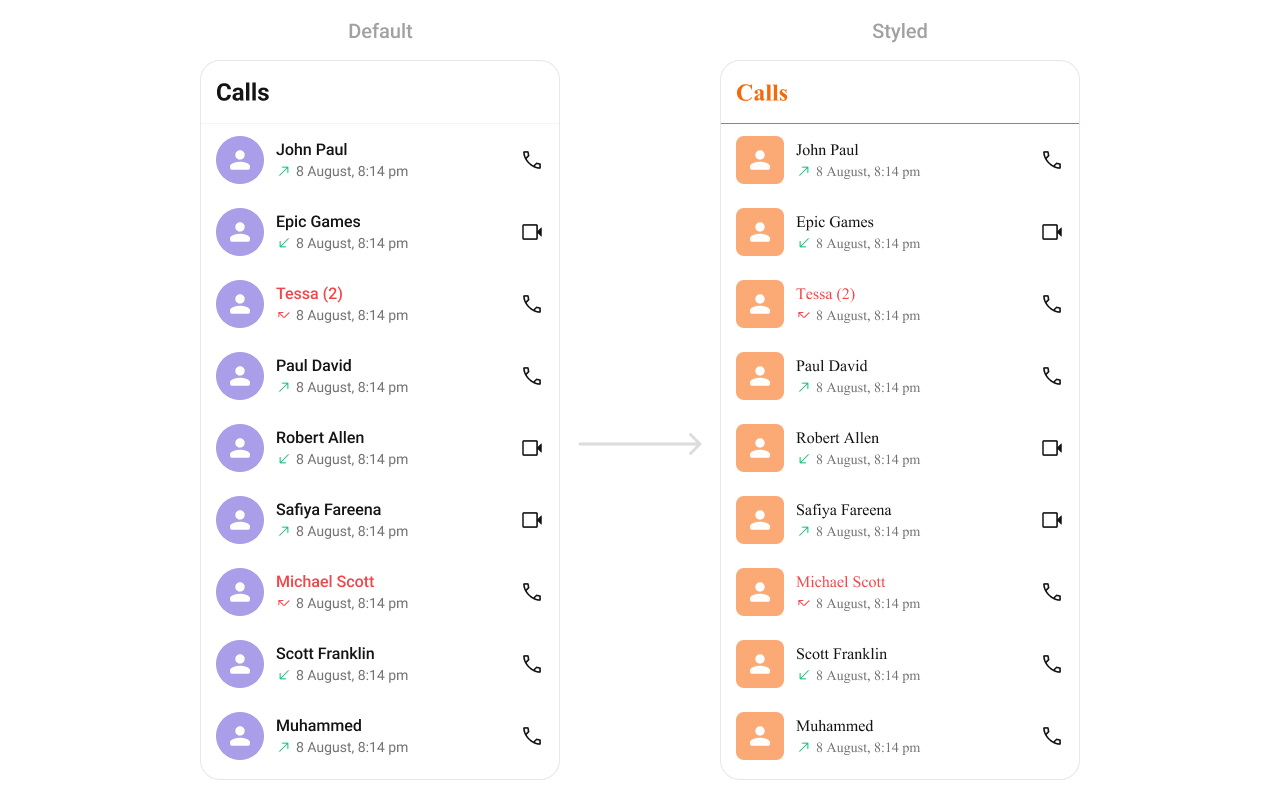 What you're changing: call log list separators and title colors.
* **Where to change it**: `res/values/themes.xml`
* **Applies to**: `CometChatCallLogs`
* **Default behavior**: UI Kit default call log styling.
* **Override**: set `cometchatCallLogsStyle` in `AppTheme`.
* **Code**:
```xml res/values/themes.xml lines theme={null}
```
* **What this does**: applies custom avatar and text colors to the call logs list.
* **Verify**: open Call Logs and confirm the separator and title colors.
Attribute references:
* [Call Logs attributes](https://github.com/cometchat/cometchat-uikit-android/blob/v5/chatuikit/src/main/res/values/attr_cometchat_call_logs.xml)
#### Incoming Call
The `CometChatIncomingCall` component renders the incoming call UI.
What you're changing: call log list separators and title colors.
* **Where to change it**: `res/values/themes.xml`
* **Applies to**: `CometChatCallLogs`
* **Default behavior**: UI Kit default call log styling.
* **Override**: set `cometchatCallLogsStyle` in `AppTheme`.
* **Code**:
```xml res/values/themes.xml lines theme={null}
```
* **What this does**: applies custom avatar and text colors to the call logs list.
* **Verify**: open Call Logs and confirm the separator and title colors.
Attribute references:
* [Call Logs attributes](https://github.com/cometchat/cometchat-uikit-android/blob/v5/chatuikit/src/main/res/values/attr_cometchat_call_logs.xml)
#### Incoming Call
The `CometChatIncomingCall` component renders the incoming call UI.
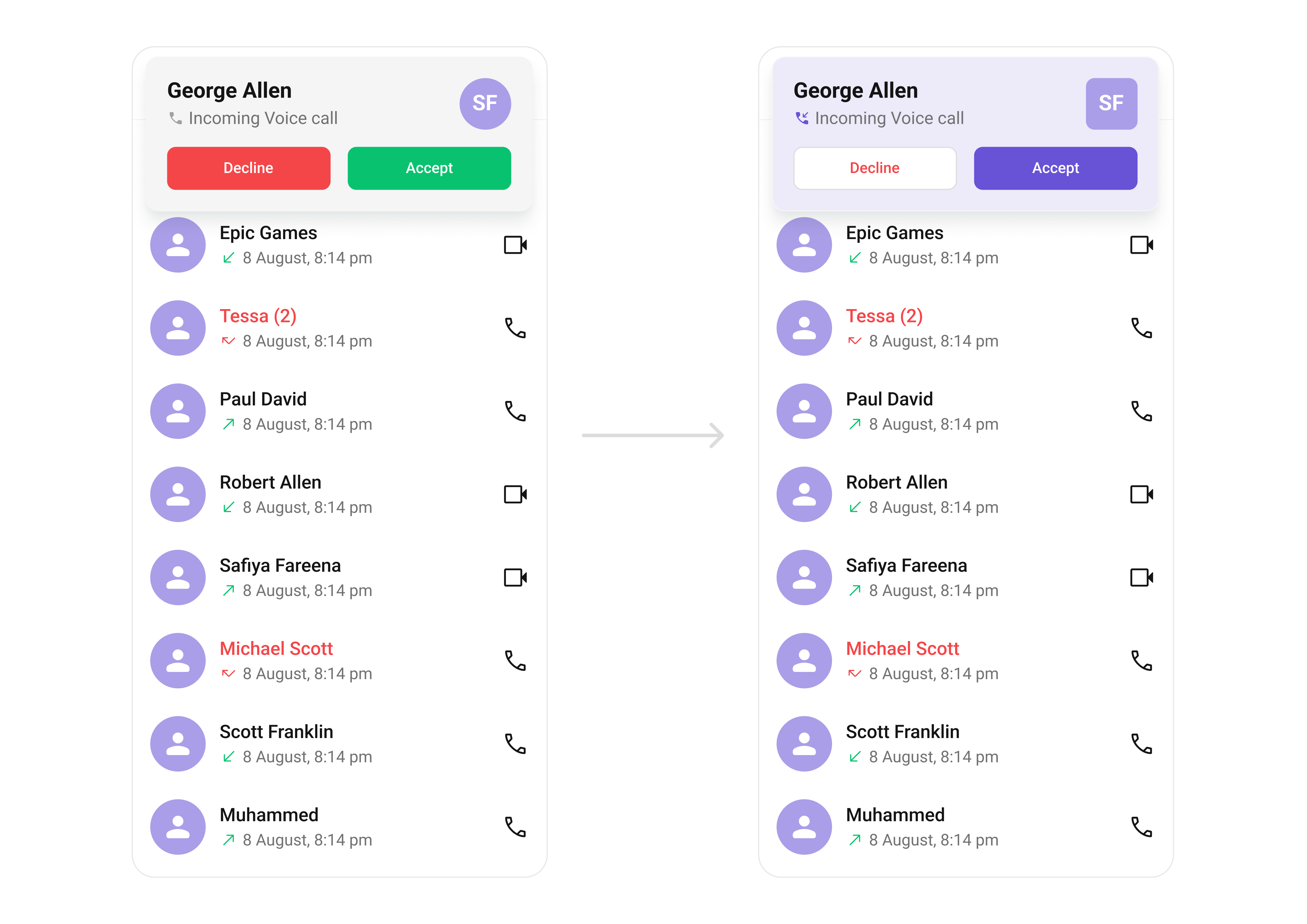 What you're changing: incoming call background, buttons, and avatar styling.
* **Where to change it**: `res/values/themes.xml`
* **Applies to**: `CometChatIncomingCall`
* **Default behavior**: UI Kit default incoming call layout and colors.
* **Override**: set `cometchatIncomingCallStyle` in `AppTheme`.
* **Code**:
```xml res/values/themes.xml lines theme={null}
```
* **What this does**: customizes the incoming call screen background and action buttons.
* **Verify**: trigger an incoming call and confirm the background and button colors.
Attribute references:
* [Incoming Call attributes](https://github.com/cometchat/cometchat-uikit-android/blob/v5/chatuikit/src/main/res/values/attr_cometchat_incoming_call.xml)
* [Avatar attributes](https://github.com/cometchat/cometchat-uikit-android/blob/v5/chatuikit/src/main/res/values/attr_cometchat_avatar.xml)
#### Outgoing Call
The `CometChatOutgoingCall` component renders the outgoing call UI.
What you're changing: incoming call background, buttons, and avatar styling.
* **Where to change it**: `res/values/themes.xml`
* **Applies to**: `CometChatIncomingCall`
* **Default behavior**: UI Kit default incoming call layout and colors.
* **Override**: set `cometchatIncomingCallStyle` in `AppTheme`.
* **Code**:
```xml res/values/themes.xml lines theme={null}
```
* **What this does**: customizes the incoming call screen background and action buttons.
* **Verify**: trigger an incoming call and confirm the background and button colors.
Attribute references:
* [Incoming Call attributes](https://github.com/cometchat/cometchat-uikit-android/blob/v5/chatuikit/src/main/res/values/attr_cometchat_incoming_call.xml)
* [Avatar attributes](https://github.com/cometchat/cometchat-uikit-android/blob/v5/chatuikit/src/main/res/values/attr_cometchat_avatar.xml)
#### Outgoing Call
The `CometChatOutgoingCall` component renders the outgoing call UI.
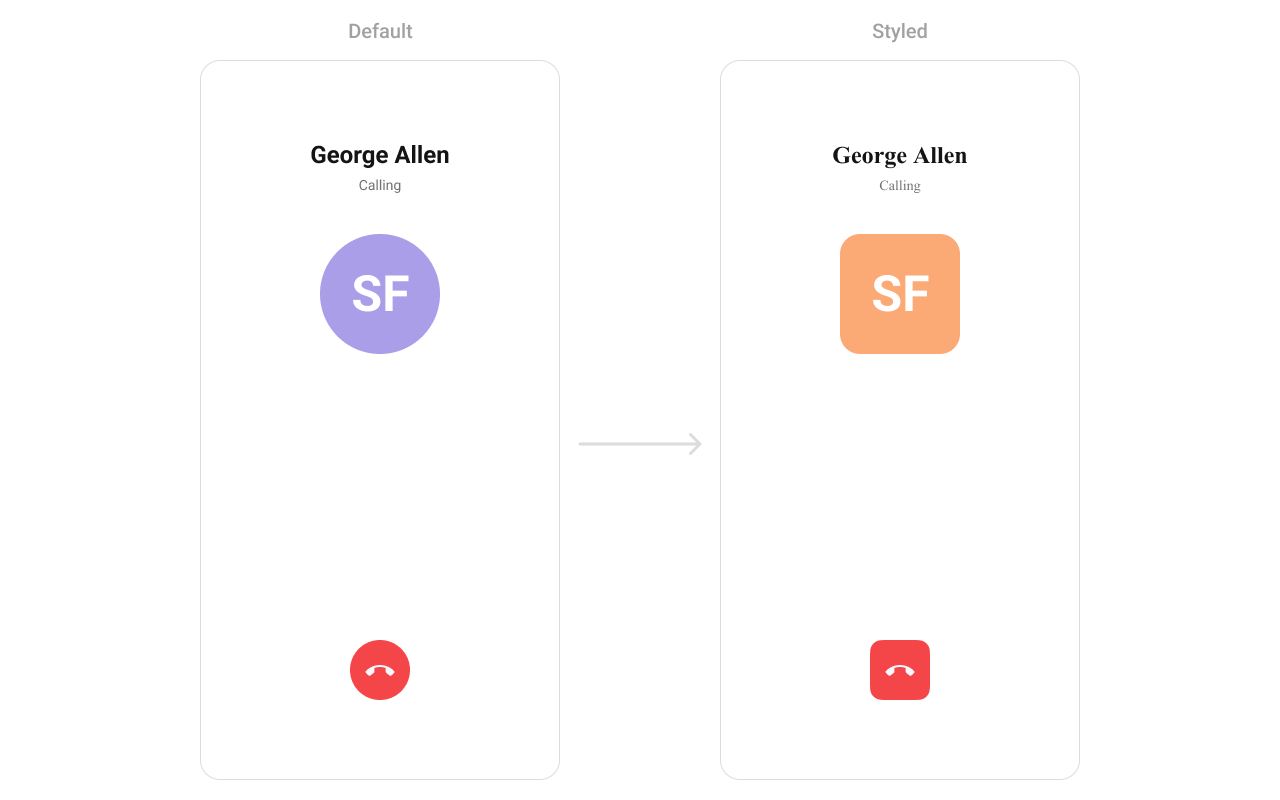 What you're changing: outgoing call avatar styling.
* **Where to change it**: `res/values/themes.xml`
* **Applies to**: `CometChatOutgoingCall`
* **Default behavior**: UI Kit default outgoing call styling.
* **Override**: set `cometchatOutgoingCallStyle` in `AppTheme`.
* **Code**:
```xml res/values/themes.xml lines theme={null}
```
* **What this does**: applies a custom avatar style to the outgoing call screen.
* **Verify**: place a call and confirm the avatar styling.
Attribute references:
* [Outgoing Call attributes](https://github.com/cometchat/cometchat-uikit-android/blob/v5/chatuikit/src/main/res/values/attr_cometchat_outgoing_call.xml)
* [Avatar attributes](https://github.com/cometchat/cometchat-uikit-android/blob/v5/chatuikit/src/main/res/values/attr_cometchat_avatar.xml)
#### Call Buttons
The `CometChatCallButton` component renders voice and video call buttons.
What you're changing: outgoing call avatar styling.
* **Where to change it**: `res/values/themes.xml`
* **Applies to**: `CometChatOutgoingCall`
* **Default behavior**: UI Kit default outgoing call styling.
* **Override**: set `cometchatOutgoingCallStyle` in `AppTheme`.
* **Code**:
```xml res/values/themes.xml lines theme={null}
```
* **What this does**: applies a custom avatar style to the outgoing call screen.
* **Verify**: place a call and confirm the avatar styling.
Attribute references:
* [Outgoing Call attributes](https://github.com/cometchat/cometchat-uikit-android/blob/v5/chatuikit/src/main/res/values/attr_cometchat_outgoing_call.xml)
* [Avatar attributes](https://github.com/cometchat/cometchat-uikit-android/blob/v5/chatuikit/src/main/res/values/attr_cometchat_avatar.xml)
#### Call Buttons
The `CometChatCallButton` component renders voice and video call buttons.
 What you're changing: button background, stroke, and icon tint.
* **Where to change it**: `res/values/themes.xml`
* **Applies to**: `CometChatCallButtons`
* **Default behavior**: UI Kit default call button styling.
* **Override**: set `cometchatCallButtonsStyle` in `AppTheme`.
* **Code**:
```xml res/values/themes.xml lines theme={null}
```
* **What this does**: customizes call button padding, background, and icon colors.
* **Verify**: open a chat header and confirm button styling.
Attribute references:
* [Call Buttons attributes](https://github.com/cometchat/cometchat-uikit-android/blob/v5/chatuikit/src/main/res/values/attr_cometchat_call_buttons.xml)
### AI UI
#### AI Assistant Chat History
The `CometChatAIAssistantChatHistory` component renders the AI conversation history view.
What you're changing: button background, stroke, and icon tint.
* **Where to change it**: `res/values/themes.xml`
* **Applies to**: `CometChatCallButtons`
* **Default behavior**: UI Kit default call button styling.
* **Override**: set `cometchatCallButtonsStyle` in `AppTheme`.
* **Code**:
```xml res/values/themes.xml lines theme={null}
```
* **What this does**: customizes call button padding, background, and icon colors.
* **Verify**: open a chat header and confirm button styling.
Attribute references:
* [Call Buttons attributes](https://github.com/cometchat/cometchat-uikit-android/blob/v5/chatuikit/src/main/res/values/attr_cometchat_call_buttons.xml)
### AI UI
#### AI Assistant Chat History
The `CometChatAIAssistantChatHistory` component renders the AI conversation history view.
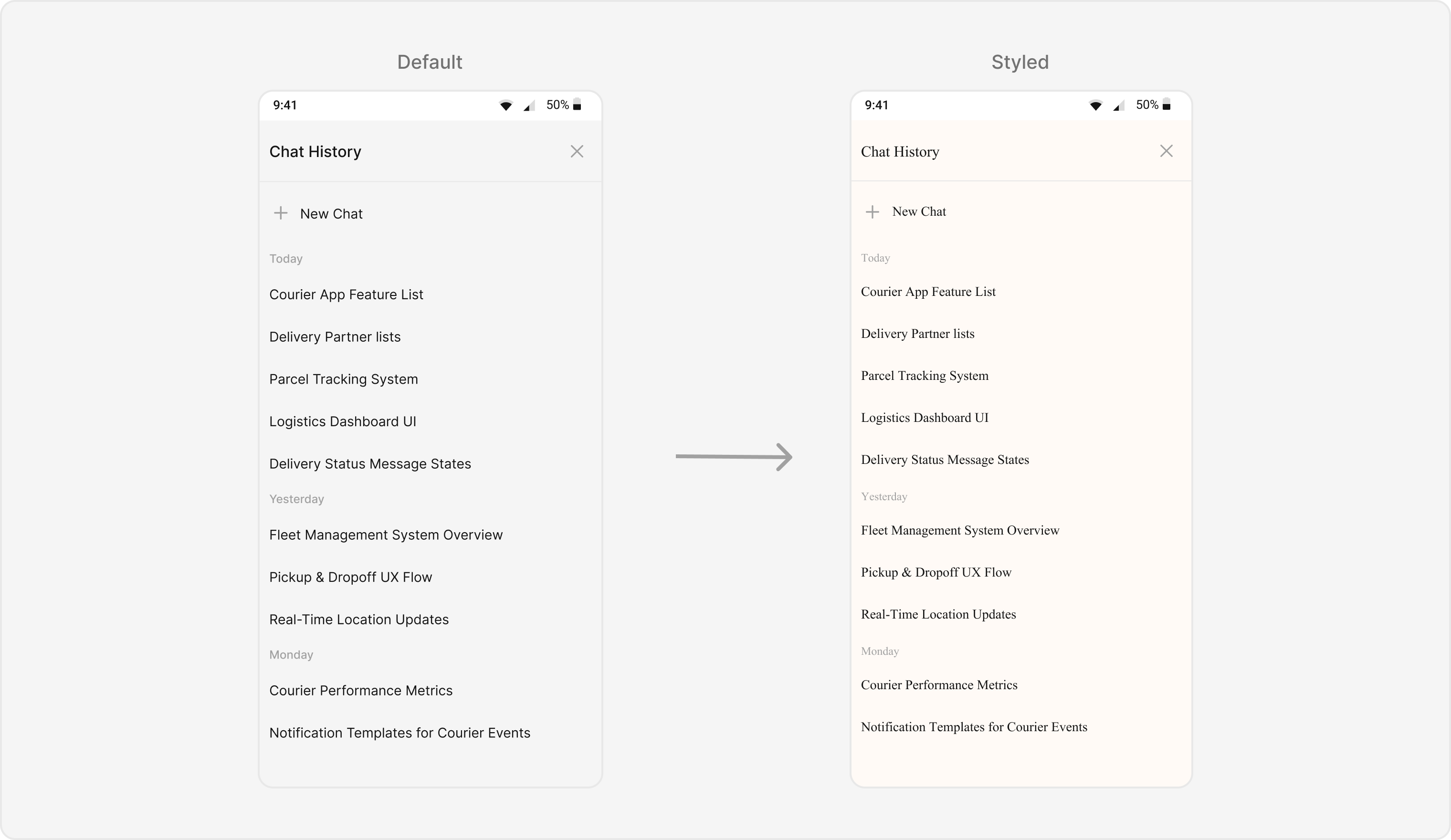 What you're changing: background, header, and list typography.
* **Where to change it**: `res/values/themes.xml`
* **Applies to**: `CometChatAIAssistantChatHistory`
* **Default behavior**: UI Kit default AI history styling.
* **Override**: set `cometChatAIAssistantChatHistoryStyle` in `AppTheme`.
* **Code**:
```xml res/values/themes.xml lines theme={null}
```
* **What this does**: applies custom colors and font styling to the AI Assistant history screen.
* **Verify**: open AI Assistant history and confirm background and header styling.
Attribute references:
* [AI Assistant Chat History attributes](https://github.com/cometchat/cometchat-uikit-android/blob/v5/chatuikit/src/main/res/values/attr_cometchat_ai_assistant_chat_history.xml)
#### AI Option Sheet
The `CometChatAIOptionSheet` component renders AI action options.
What you're changing: background, header, and list typography.
* **Where to change it**: `res/values/themes.xml`
* **Applies to**: `CometChatAIAssistantChatHistory`
* **Default behavior**: UI Kit default AI history styling.
* **Override**: set `cometChatAIAssistantChatHistoryStyle` in `AppTheme`.
* **Code**:
```xml res/values/themes.xml lines theme={null}
```
* **What this does**: applies custom colors and font styling to the AI Assistant history screen.
* **Verify**: open AI Assistant history and confirm background and header styling.
Attribute references:
* [AI Assistant Chat History attributes](https://github.com/cometchat/cometchat-uikit-android/blob/v5/chatuikit/src/main/res/values/attr_cometchat_ai_assistant_chat_history.xml)
#### AI Option Sheet
The `CometChatAIOptionSheet` component renders AI action options.
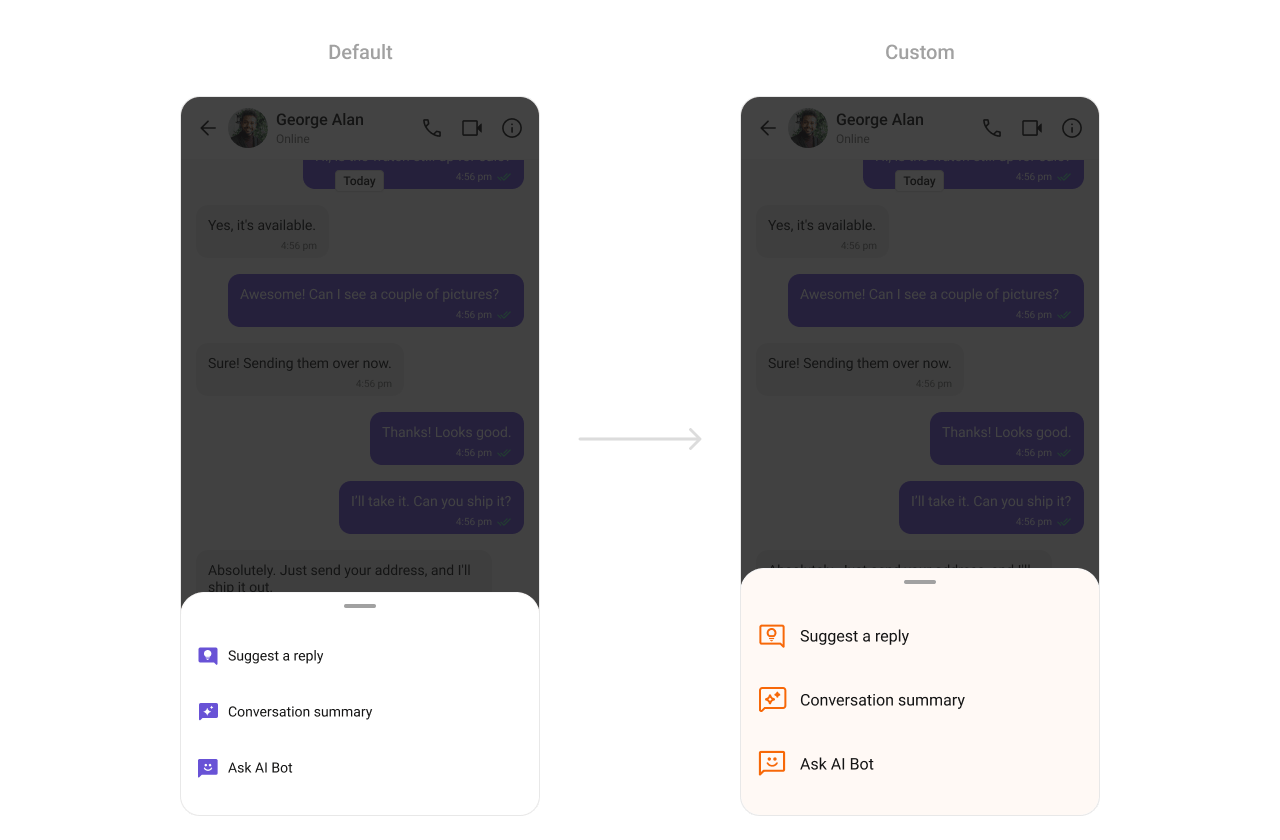 What you're changing: AI option sheet background and icon tint.
* **Where to change it**: `res/values/themes.xml`
* **Applies to**: `CometChatAIOptionSheet`
* **Default behavior**: UI Kit default AI option sheet styling.
* **Override**: set `cometchatAIOptionSheetStyle` in `AppTheme`.
* **Code**:
```xml res/values/themes.xml lines theme={null}
```
* **What this does**: customizes AI option sheet colors.
* **Verify**: open AI actions and confirm the option sheet styling.
Attribute references:
* [AI Option Sheet attributes](https://github.com/cometchat/cometchat-uikit-android/blob/v5/chatuikit/src/main/res/values/attr_cometchat_ai_option_sheet.xml)
#### Conversation Starter
The `CometChatConversationStarter` component renders AI-powered conversation starters.
What you're changing: AI option sheet background and icon tint.
* **Where to change it**: `res/values/themes.xml`
* **Applies to**: `CometChatAIOptionSheet`
* **Default behavior**: UI Kit default AI option sheet styling.
* **Override**: set `cometchatAIOptionSheetStyle` in `AppTheme`.
* **Code**:
```xml res/values/themes.xml lines theme={null}
```
* **What this does**: customizes AI option sheet colors.
* **Verify**: open AI actions and confirm the option sheet styling.
Attribute references:
* [AI Option Sheet attributes](https://github.com/cometchat/cometchat-uikit-android/blob/v5/chatuikit/src/main/res/values/attr_cometchat_ai_option_sheet.xml)
#### Conversation Starter
The `CometChatConversationStarter` component renders AI-powered conversation starters.
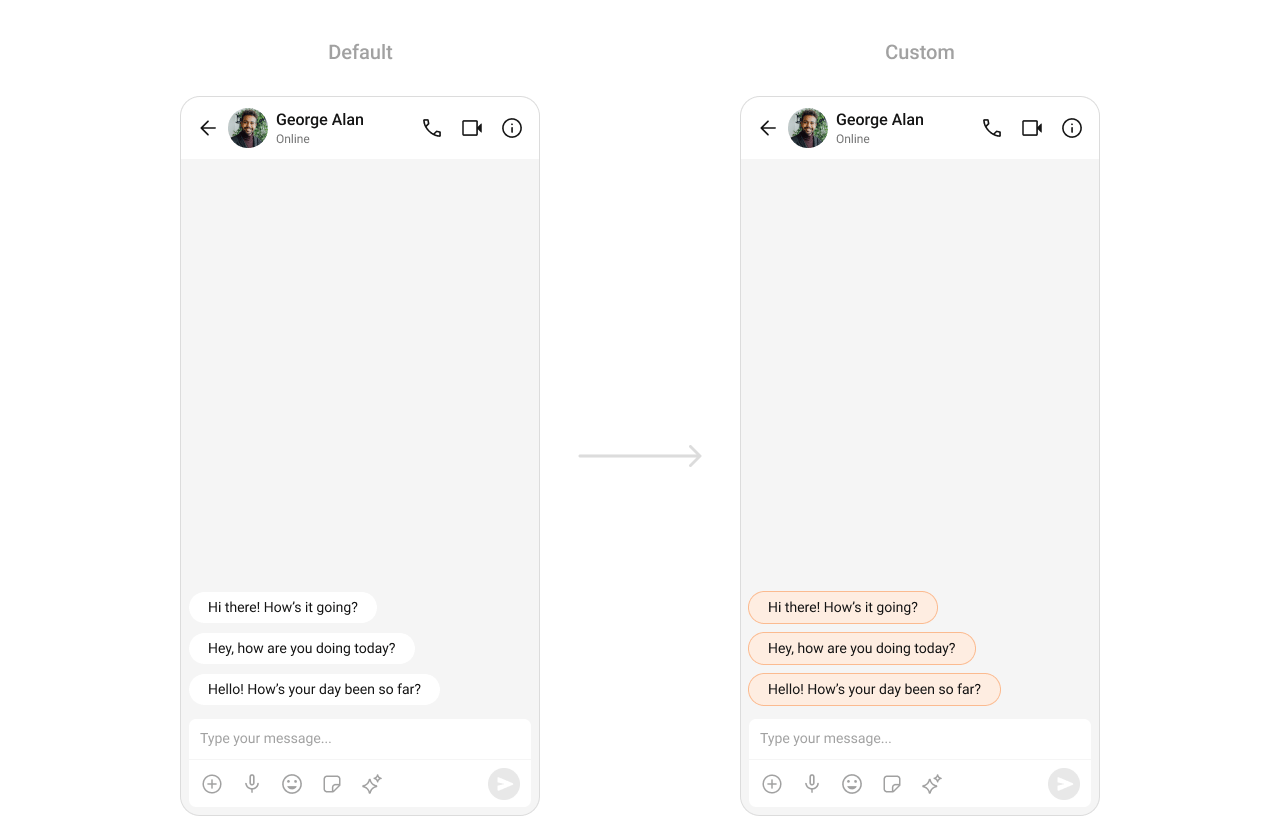 What you're changing: conversation starter item backgrounds.
* **Where to change it**: `res/values/themes.xml`
* **Applies to**: `CometChatConversationStarter`
* **Default behavior**: UI Kit default conversation starter styling.
* **Override**: set `cometchatAIConversationStarterStyle` in `AppTheme`.
* **Code**:
```xml res/values/themes.xml lines theme={null}
```
* **What this does**: applies a custom background color to AI conversation starter items.
* **Verify**: open a new chat and confirm the conversation starter chip color.
Attribute references:
* [AI Conversation Starter attributes](https://github.com/cometchat/cometchat-uikit-android/blob/v5/chatuikit/src/main/res/values/attr_cometchat_ai_conversation_starter.xml)
#### Conversation Summary
The `CometChatConversationSummary` component renders AI-generated summaries of chats.
What you're changing: conversation starter item backgrounds.
* **Where to change it**: `res/values/themes.xml`
* **Applies to**: `CometChatConversationStarter`
* **Default behavior**: UI Kit default conversation starter styling.
* **Override**: set `cometchatAIConversationStarterStyle` in `AppTheme`.
* **Code**:
```xml res/values/themes.xml lines theme={null}
```
* **What this does**: applies a custom background color to AI conversation starter items.
* **Verify**: open a new chat and confirm the conversation starter chip color.
Attribute references:
* [AI Conversation Starter attributes](https://github.com/cometchat/cometchat-uikit-android/blob/v5/chatuikit/src/main/res/values/attr_cometchat_ai_conversation_starter.xml)
#### Conversation Summary
The `CometChatConversationSummary` component renders AI-generated summaries of chats.
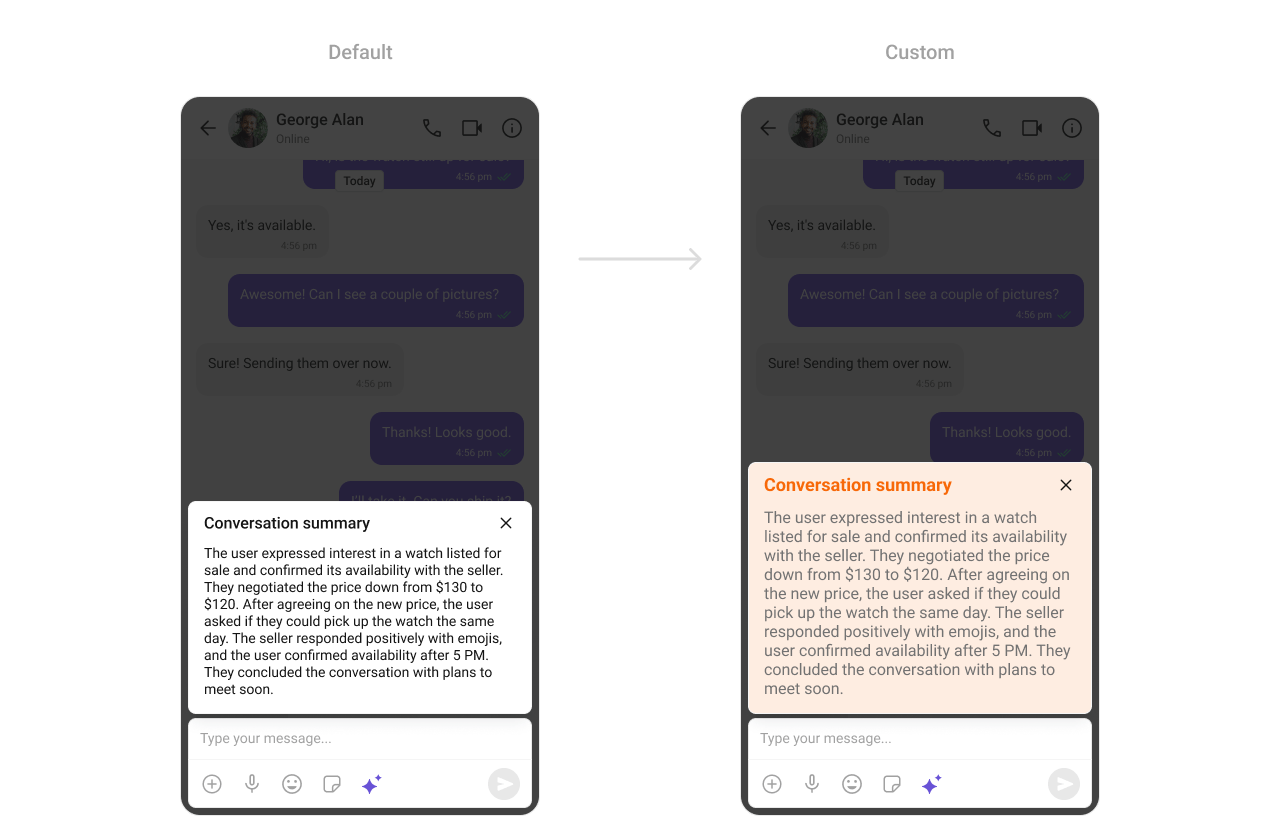 What you're changing: conversation summary background color.
* **Where to change it**: `res/values/themes.xml`
* **Applies to**: `CometChatConversationSummary`
* **Default behavior**: UI Kit default conversation summary styling.
* **Override**: set `cometchatAIConversationSummaryStyle` in `AppTheme`.
* **Code**:
```xml res/values/themes.xml lines theme={null}
```
* **What this does**: applies a custom background color to conversation summary cards.
* **Verify**: open a chat summary and confirm the background color.
Attribute references:
* [AI Conversation Summary attributes](https://github.com/cometchat/cometchat-uikit-android/blob/v5/chatuikit/src/main/res/values/attr_cometchat_ai_conversation_summary.xml)
#### Smart Replies
The `CometChatSmartReplies` component renders AI-generated reply suggestions.
What you're changing: conversation summary background color.
* **Where to change it**: `res/values/themes.xml`
* **Applies to**: `CometChatConversationSummary`
* **Default behavior**: UI Kit default conversation summary styling.
* **Override**: set `cometchatAIConversationSummaryStyle` in `AppTheme`.
* **Code**:
```xml res/values/themes.xml lines theme={null}
```
* **What this does**: applies a custom background color to conversation summary cards.
* **Verify**: open a chat summary and confirm the background color.
Attribute references:
* [AI Conversation Summary attributes](https://github.com/cometchat/cometchat-uikit-android/blob/v5/chatuikit/src/main/res/values/attr_cometchat_ai_conversation_summary.xml)
#### Smart Replies
The `CometChatSmartReplies` component renders AI-generated reply suggestions.
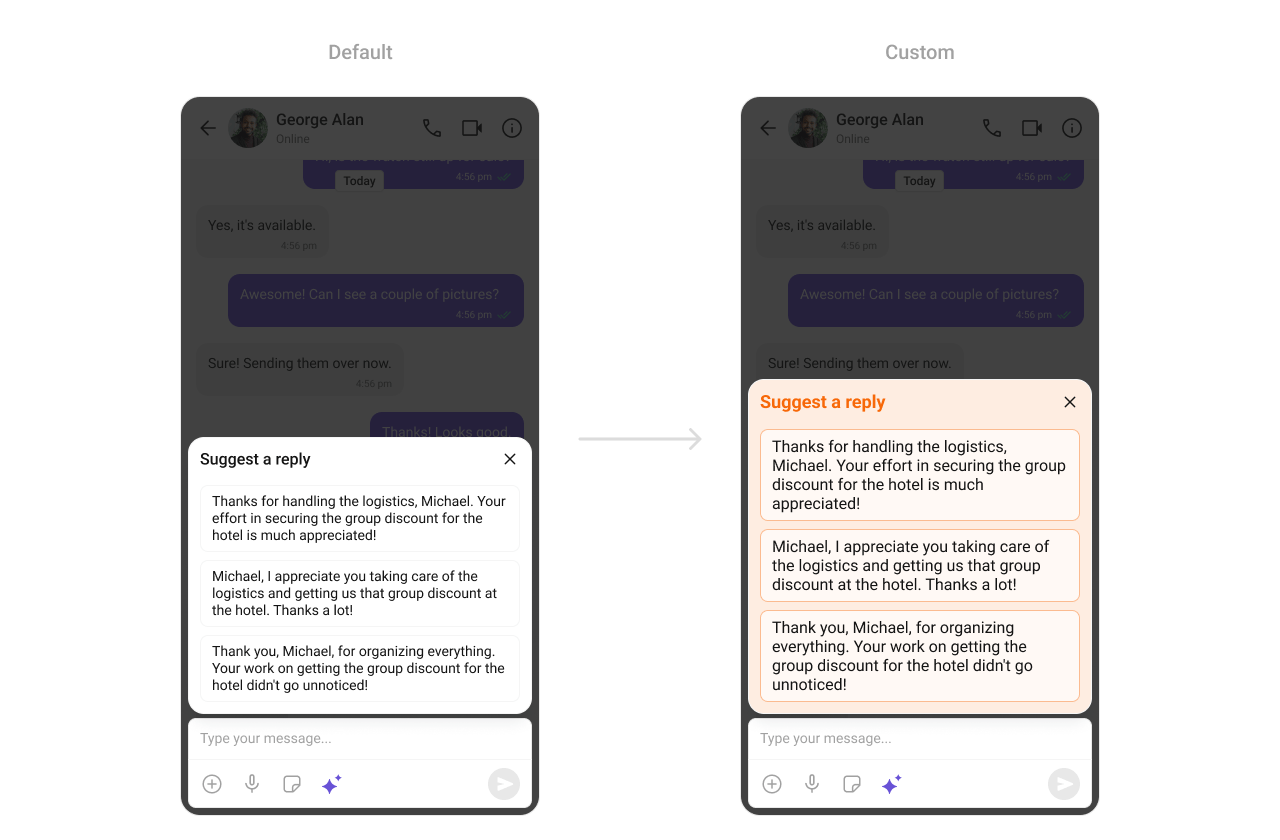 What you're changing: smart reply background, item color, and stroke.
* **Where to change it**: `res/values/themes.xml`
* **Applies to**: `CometChatSmartReplies`
* **Default behavior**: UI Kit default smart replies styling.
* **Override**: set `cometchatAISmartRepliesStyle` in `AppTheme`.
* **Code**:
```xml res/values/themes.xml lines theme={null}
```
* **What this does**: customizes smart reply container and chip styling.
* **Verify**: open a conversation with smart replies enabled and confirm chip styling.
Attribute references:
* [AI Smart Replies attributes](https://github.com/cometchat/cometchat-uikit-android/blob/v5/chatuikit/src/main/res/values/attr_cometchat_ai_smart_replies.xml)
### Base components
#### Avatar
The `CometChatAvatar` component is used across lists and headers.
What you're changing: smart reply background, item color, and stroke.
* **Where to change it**: `res/values/themes.xml`
* **Applies to**: `CometChatSmartReplies`
* **Default behavior**: UI Kit default smart replies styling.
* **Override**: set `cometchatAISmartRepliesStyle` in `AppTheme`.
* **Code**:
```xml res/values/themes.xml lines theme={null}
```
* **What this does**: customizes smart reply container and chip styling.
* **Verify**: open a conversation with smart replies enabled and confirm chip styling.
Attribute references:
* [AI Smart Replies attributes](https://github.com/cometchat/cometchat-uikit-android/blob/v5/chatuikit/src/main/res/values/attr_cometchat_ai_smart_replies.xml)
### Base components
#### Avatar
The `CometChatAvatar` component is used across lists and headers.
 What you're changing: avatar shape and background color.
* **Where to change it**: `res/values/themes.xml`
* **Applies to**: `CometChatAvatar`
* **Default behavior**: UI Kit default avatar styling.
* **Override**: set `cometchatAvatarStyle` in `AppTheme`.
* **Code**:
```xml res/values/themes.xml lines theme={null}
```
* **What this does**: applies a consistent avatar style across UI Kit components.
* **Verify**: open any list with avatars and confirm the style.
Attribute references:
* [Avatar attributes](https://github.com/cometchat/cometchat-uikit-android/blob/v5/chatuikit/src/main/res/values/attr_cometchat_avatar.xml)
#### Status Indicator
The `CometChatStatusIndicator` component shows user presence status.
What you're changing: avatar shape and background color.
* **Where to change it**: `res/values/themes.xml`
* **Applies to**: `CometChatAvatar`
* **Default behavior**: UI Kit default avatar styling.
* **Override**: set `cometchatAvatarStyle` in `AppTheme`.
* **Code**:
```xml res/values/themes.xml lines theme={null}
```
* **What this does**: applies a consistent avatar style across UI Kit components.
* **Verify**: open any list with avatars and confirm the style.
Attribute references:
* [Avatar attributes](https://github.com/cometchat/cometchat-uikit-android/blob/v5/chatuikit/src/main/res/values/attr_cometchat_avatar.xml)
#### Status Indicator
The `CometChatStatusIndicator` component shows user presence status.
 What you're changing: status indicator icon shape and drawable.
* **Where to change it**: `res/drawable/online_indicator_drawable.xml` and `res/values/themes.xml`
* **Applies to**: `CometChatStatusIndicator`
* **Default behavior**: UI Kit default presence icon.
* **Override**: set `cometchatStatusIndicatorStyle` in `AppTheme` and reference a custom drawable.
* **Code**:
```xml res/drawable/online_indicator_drawable.xml lines theme={null}
```
* **What this does**: defines a custom online indicator drawable.
* **Code**:
```xml res/values/themes.xml lines theme={null}
```
* **What this does**: applies the custom status indicator drawable in UI Kit components.
* **Verify**: check any user list to confirm the presence icon.
Attribute references:
* [Status Indicator attributes](https://github.com/cometchat/cometchat-uikit-android/blob/v5/chatuikit/src/main/res/values/attr_cometchat_status_indicator.xml)
#### Badge
The `CometChatBadge` component shows unread or notification counts.
What you're changing: status indicator icon shape and drawable.
* **Where to change it**: `res/drawable/online_indicator_drawable.xml` and `res/values/themes.xml`
* **Applies to**: `CometChatStatusIndicator`
* **Default behavior**: UI Kit default presence icon.
* **Override**: set `cometchatStatusIndicatorStyle` in `AppTheme` and reference a custom drawable.
* **Code**:
```xml res/drawable/online_indicator_drawable.xml lines theme={null}
```
* **What this does**: defines a custom online indicator drawable.
* **Code**:
```xml res/values/themes.xml lines theme={null}
```
* **What this does**: applies the custom status indicator drawable in UI Kit components.
* **Verify**: check any user list to confirm the presence icon.
Attribute references:
* [Status Indicator attributes](https://github.com/cometchat/cometchat-uikit-android/blob/v5/chatuikit/src/main/res/values/attr_cometchat_status_indicator.xml)
#### Badge
The `CometChatBadge` component shows unread or notification counts.
 What you're changing: badge background, text color, and corner radius.
* **Where to change it**: `res/values/themes.xml`
* **Applies to**: `CometChatBadge`
* **Default behavior**: UI Kit default badge styling.
* **Override**: set `cometchatBadgeStyle` in `AppTheme`.
* **Code**:
```xml res/values/themes.xml lines theme={null}
```
* **What this does**: applies a custom badge appearance across UI Kit lists.
* **Verify**: check any unread badge to confirm colors and radius.
Attribute references:
* [Badge attributes](https://github.com/cometchat/cometchat-uikit-android/blob/v5/chatuikit/src/main/res/values/attr_cometchat_badge.xml)
#### Date
The `CometChatDate` component formats timestamps in lists and message threads.
What you're changing: badge background, text color, and corner radius.
* **Where to change it**: `res/values/themes.xml`
* **Applies to**: `CometChatBadge`
* **Default behavior**: UI Kit default badge styling.
* **Override**: set `cometchatBadgeStyle` in `AppTheme`.
* **Code**:
```xml res/values/themes.xml lines theme={null}
```
* **What this does**: applies a custom badge appearance across UI Kit lists.
* **Verify**: check any unread badge to confirm colors and radius.
Attribute references:
* [Badge attributes](https://github.com/cometchat/cometchat-uikit-android/blob/v5/chatuikit/src/main/res/values/attr_cometchat_badge.xml)
#### Date
The `CometChatDate` component formats timestamps in lists and message threads.
 What you're changing: date text color.
* **Where to change it**: `res/values/themes.xml`
* **Applies to**: `CometChatDate`
* **Default behavior**: UI Kit default date styling.
* **Override**: set `cometchatDateStyle` in `AppTheme`.
* **Code**:
```xml res/values/themes.xml lines theme={null}
```
* **What this does**: customizes date text color in UI Kit lists and headers.
* **Verify**: check any timestamp and confirm the color.
Attribute references:
* [Date attributes](https://github.com/cometchat/cometchat-uikit-android/blob/v5/chatuikit/src/main/res/values/attr_cometchat_date.xml)
#### Receipts
The `CometChatReceipts` component renders read and delivered status icons.
What you're changing: date text color.
* **Where to change it**: `res/values/themes.xml`
* **Applies to**: `CometChatDate`
* **Default behavior**: UI Kit default date styling.
* **Override**: set `cometchatDateStyle` in `AppTheme`.
* **Code**:
```xml res/values/themes.xml lines theme={null}
```
* **What this does**: customizes date text color in UI Kit lists and headers.
* **Verify**: check any timestamp and confirm the color.
Attribute references:
* [Date attributes](https://github.com/cometchat/cometchat-uikit-android/blob/v5/chatuikit/src/main/res/values/attr_cometchat_date.xml)
#### Receipts
The `CometChatReceipts` component renders read and delivered status icons.
 What you're changing: read receipt icon drawable.
* **Where to change it**: `res/drawable/read_receipts.xml` and `res/values/themes.xml`
* **Applies to**: `CometChatReceipts`
* **Default behavior**: UI Kit default receipt icons.
* **Override**: set `cometchatMessageReceiptStyle` in `AppTheme` and reference a custom drawable.
* **Code**:
```xml res/drawable/read_receipts.xml lines theme={null}
```
* **What this does**: defines a custom read receipt icon.
* **Code**:
```xml res/values/themes.xml lines theme={null}
```
* **What this does**: applies the custom receipt icon to message status indicators.
* **Verify**: send a message and check the receipt icon for read status.
Attribute references:
* [Message Receipt attributes](https://github.com/cometchat/cometchat-uikit-android/blob/v5/chatuikit/src/main/res/values/attr_cometchat_message_receipt.xml)
#### Media Recorder
The `CometChatMediaRecorder` component controls audio and video message recording.
What you're changing: read receipt icon drawable.
* **Where to change it**: `res/drawable/read_receipts.xml` and `res/values/themes.xml`
* **Applies to**: `CometChatReceipts`
* **Default behavior**: UI Kit default receipt icons.
* **Override**: set `cometchatMessageReceiptStyle` in `AppTheme` and reference a custom drawable.
* **Code**:
```xml res/drawable/read_receipts.xml lines theme={null}
```
* **What this does**: defines a custom read receipt icon.
* **Code**:
```xml res/values/themes.xml lines theme={null}
```
* **What this does**: applies the custom receipt icon to message status indicators.
* **Verify**: send a message and check the receipt icon for read status.
Attribute references:
* [Message Receipt attributes](https://github.com/cometchat/cometchat-uikit-android/blob/v5/chatuikit/src/main/res/values/attr_cometchat_message_receipt.xml)
#### Media Recorder
The `CometChatMediaRecorder` component controls audio and video message recording.
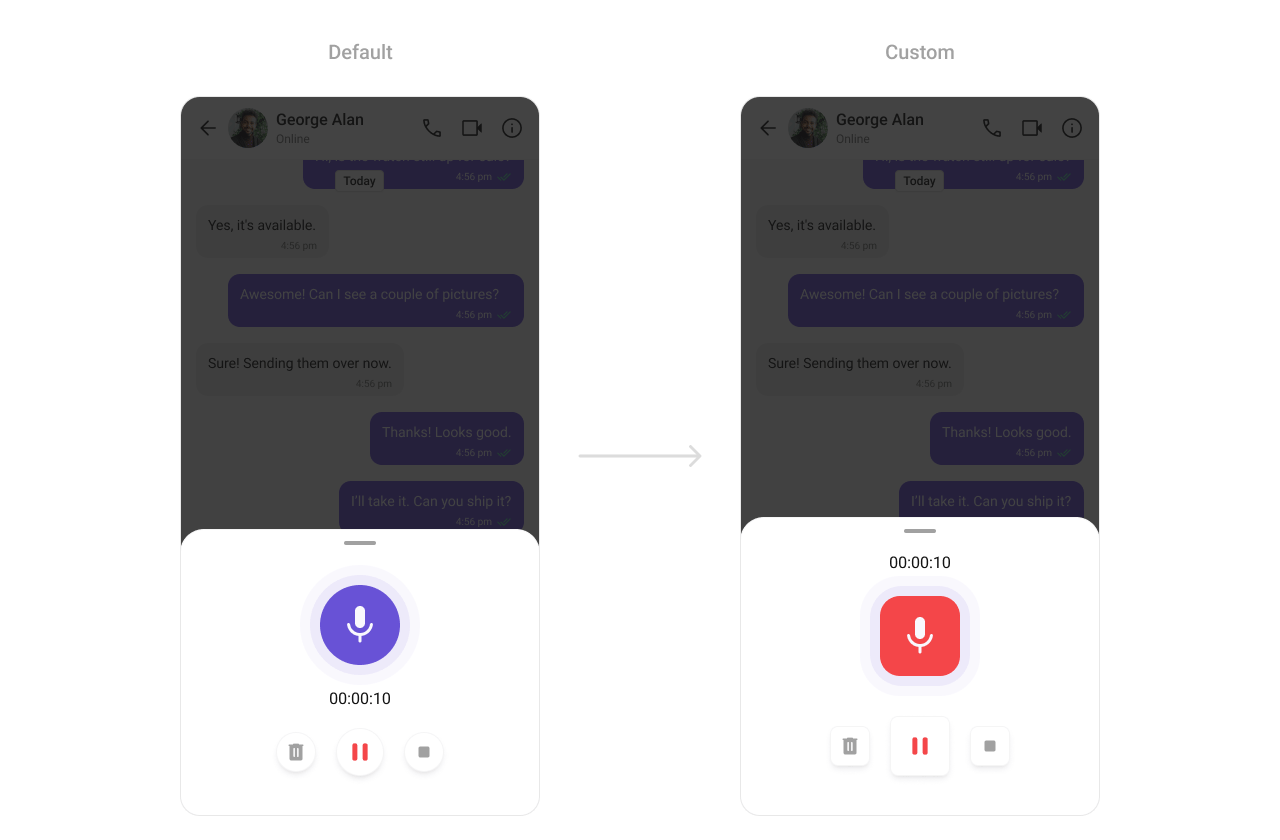 What you're changing: recorder icon sizes and recording button background color.
* **Where to change it**: `res/values/themes.xml`
* **Applies to**: `CometChatMediaRecorder`
* **Default behavior**: UI Kit default media recorder styling.
* **Override**: set `cometchatMediaRecorderStyle` in `AppTheme`.
* **Code**:
```xml res/values/themes.xml lines theme={null}
```
* **What this does**: applies custom sizing and color to the media recorder UI.
* **Verify**: open the recorder and check icon sizes and record button color.
Attribute references:
* [Media Recorder attributes](https://github.com/cometchat/cometchat-uikit-android/blob/v5/chatuikit/src/main/res/values/attr_cometchat_media_recorder.xml)
#### Sticker Keyboard
The `CometChatStickerKeyboard` component renders the sticker picker UI.
What you're changing: recorder icon sizes and recording button background color.
* **Where to change it**: `res/values/themes.xml`
* **Applies to**: `CometChatMediaRecorder`
* **Default behavior**: UI Kit default media recorder styling.
* **Override**: set `cometchatMediaRecorderStyle` in `AppTheme`.
* **Code**:
```xml res/values/themes.xml lines theme={null}
```
* **What this does**: applies custom sizing and color to the media recorder UI.
* **Verify**: open the recorder and check icon sizes and record button color.
Attribute references:
* [Media Recorder attributes](https://github.com/cometchat/cometchat-uikit-android/blob/v5/chatuikit/src/main/res/values/attr_cometchat_media_recorder.xml)
#### Sticker Keyboard
The `CometChatStickerKeyboard` component renders the sticker picker UI.
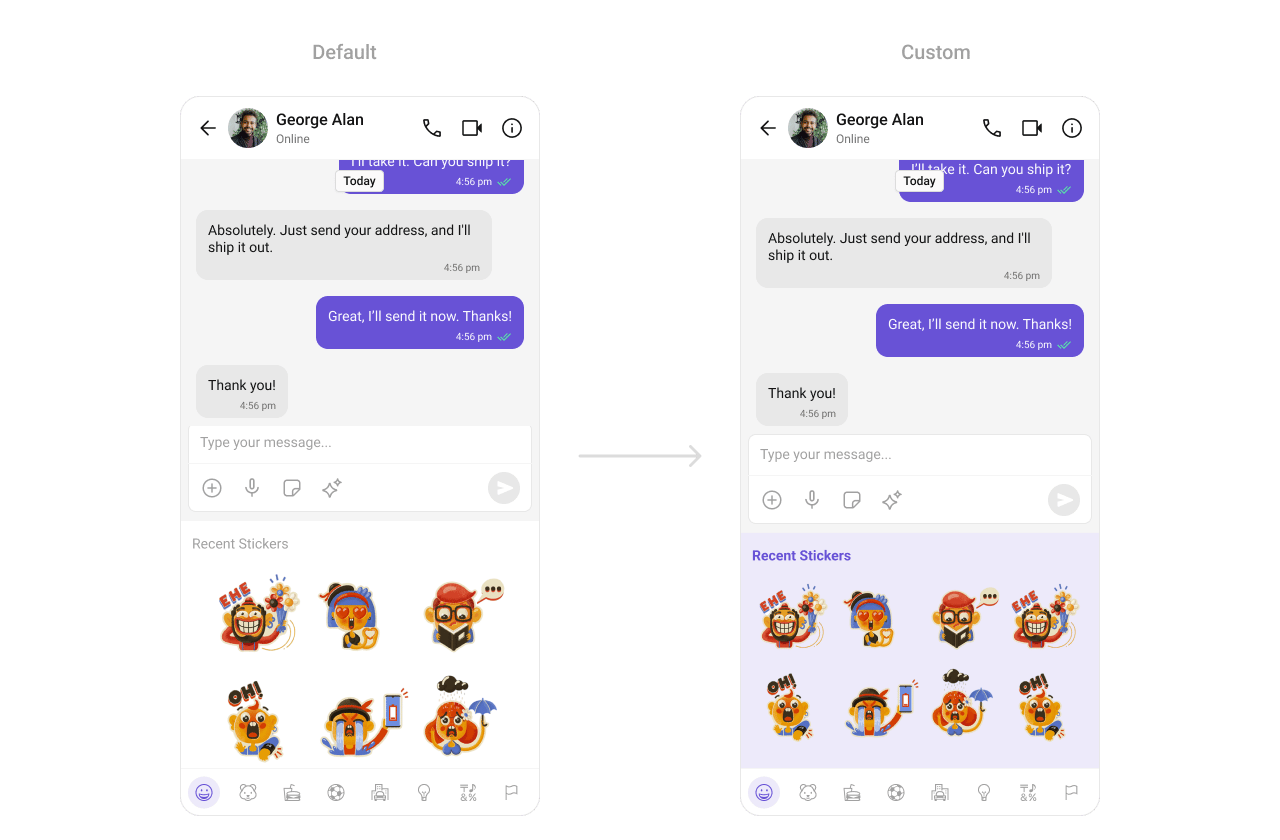 What you're changing: sticker keyboard background color.
* **Where to change it**: `res/values/themes.xml`
* **Applies to**: `CometChatStickerKeyboard`
* **Default behavior**: UI Kit default sticker keyboard styling.
* **Override**: set `cometchatStickerKeyboardStyle` in `AppTheme`.
* **Code**:
```xml res/values/themes.xml lines theme={null}
```
* **What this does**: applies a custom background color to the sticker keyboard.
* **Verify**: open the sticker keyboard and confirm the background color.
Attribute references:
* [Sticker Keyboard attributes](https://github.com/cometchat/cometchat-uikit-android/blob/v5/chatuikit/src/main/res/values/attr_cometchat_sticker_keyboard.xml)
#### Reaction List
The `CometChatReactionList` component renders reactions on messages.
What you're changing: sticker keyboard background color.
* **Where to change it**: `res/values/themes.xml`
* **Applies to**: `CometChatStickerKeyboard`
* **Default behavior**: UI Kit default sticker keyboard styling.
* **Override**: set `cometchatStickerKeyboardStyle` in `AppTheme`.
* **Code**:
```xml res/values/themes.xml lines theme={null}
```
* **What this does**: applies a custom background color to the sticker keyboard.
* **Verify**: open the sticker keyboard and confirm the background color.
Attribute references:
* [Sticker Keyboard attributes](https://github.com/cometchat/cometchat-uikit-android/blob/v5/chatuikit/src/main/res/values/attr_cometchat_sticker_keyboard.xml)
#### Reaction List
The `CometChatReactionList` component renders reactions on messages.
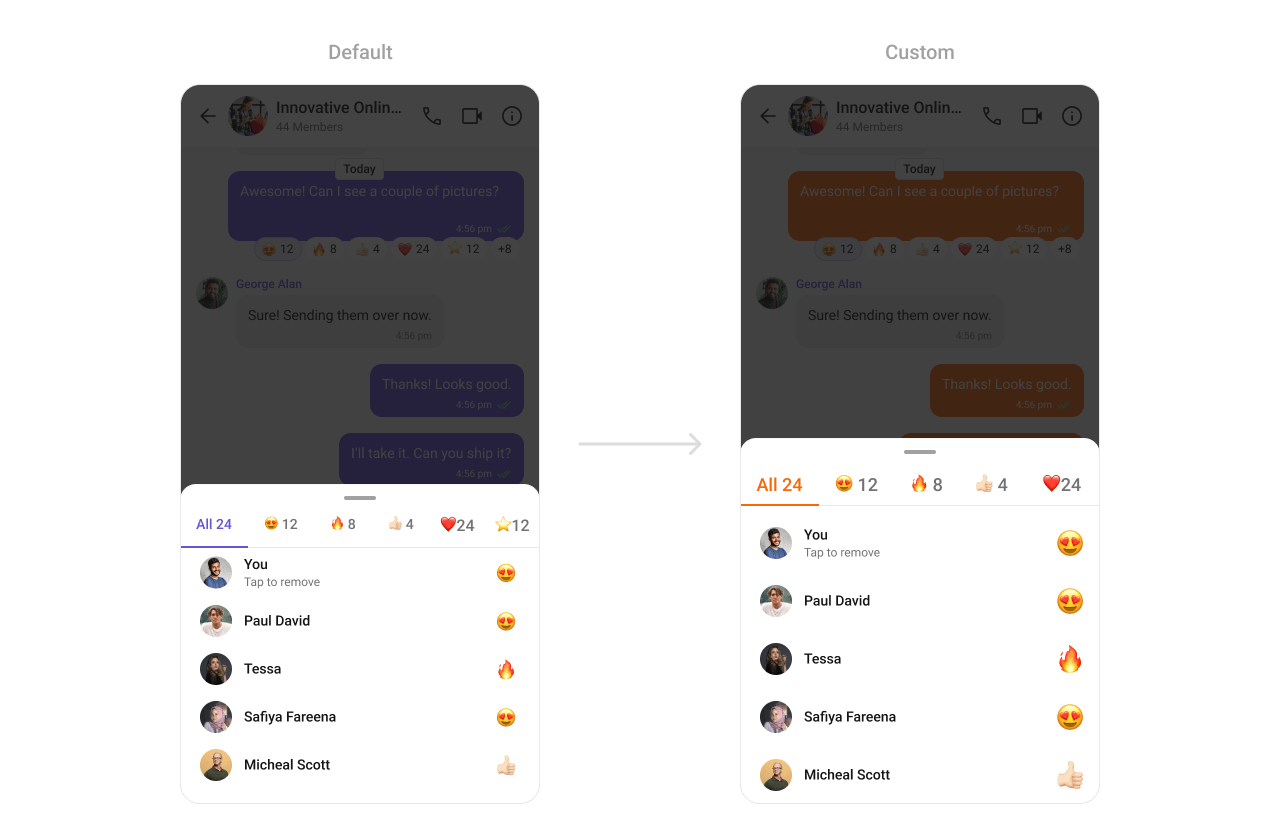 What you're changing: active tab color in the reaction list.
* **Where to change it**: `res/values/themes.xml`
* **Applies to**: `CometChatReactionList`
* **Default behavior**: UI Kit default reaction list styling.
* **Override**: set `cometchatReactionListStyle` in `AppTheme`.
* **Code**:
```xml res/values/themes.xml lines theme={null}
```
* **What this does**: applies a custom active tab color in the reaction list.
* **Verify**: open reactions and confirm the active tab color.
Attribute references:
* [Reaction List attributes](https://github.com/cometchat/cometchat-uikit-android/blob/v5/chatuikit/src/main/res/values/attr_cometchat_reaction_list.xml)
## Customization matrix
| What you want to change | Where | Property or API | Example |
| ------------------------------ | ------------------------------------- | -------------------------------------------------- | ---------------------------------------------- |
| Conversations avatar and badge | `res/values/themes.xml` | `cometchatConversationsStyle` | `cometchatConversationsBadgeStyle` |
| Users list separators | `res/values/themes.xml` | `cometchatUsersStyle` | `cometchatUsersSeparatorColor` |
| Group list titles | `res/values/themes.xml` | `cometchatGroupsStyle` | `cometchatGroupsTitleTextColor` |
| Header call icons | `res/values/themes.xml` | `cometchatMessageHeaderStyle` | `cometchatMessageHeaderCallButtonsStyle` |
| Message list background | `res/values/themes.xml` | `cometchatMessageListStyle` | `cometchatMessageListBackgroundColor` |
| Composer send button | `res/drawable/active_send_button.xml` | `cometchatMessageComposerActiveSendButtonDrawable` | `@drawable/active_send_button` |
| Search UI typography | `res/values/themes.xml` | `cometchatSearchStyle` | `cometchatSearchBarTextAppearance` |
| Call buttons styling | `res/values/themes.xml` | `cometchatCallButtonsStyle` | `cometchatCallButtonsVideoCallBackgroundColor` |
| AI smart replies chip style | `res/values/themes.xml` | `cometchatAISmartRepliesStyle` | `cometchatAISmartRepliesItemStrokeColor` |
| Mentions highlight colors | `res/values/themes.xml` | `cometchatMessageBubbleMentionsStyle` | `cometchatMentionTextColor` |
What you're changing: active tab color in the reaction list.
* **Where to change it**: `res/values/themes.xml`
* **Applies to**: `CometChatReactionList`
* **Default behavior**: UI Kit default reaction list styling.
* **Override**: set `cometchatReactionListStyle` in `AppTheme`.
* **Code**:
```xml res/values/themes.xml lines theme={null}
```
* **What this does**: applies a custom active tab color in the reaction list.
* **Verify**: open reactions and confirm the active tab color.
Attribute references:
* [Reaction List attributes](https://github.com/cometchat/cometchat-uikit-android/blob/v5/chatuikit/src/main/res/values/attr_cometchat_reaction_list.xml)
## Customization matrix
| What you want to change | Where | Property or API | Example |
| ------------------------------ | ------------------------------------- | -------------------------------------------------- | ---------------------------------------------- |
| Conversations avatar and badge | `res/values/themes.xml` | `cometchatConversationsStyle` | `cometchatConversationsBadgeStyle` |
| Users list separators | `res/values/themes.xml` | `cometchatUsersStyle` | `cometchatUsersSeparatorColor` |
| Group list titles | `res/values/themes.xml` | `cometchatGroupsStyle` | `cometchatGroupsTitleTextColor` |
| Header call icons | `res/values/themes.xml` | `cometchatMessageHeaderStyle` | `cometchatMessageHeaderCallButtonsStyle` |
| Message list background | `res/values/themes.xml` | `cometchatMessageListStyle` | `cometchatMessageListBackgroundColor` |
| Composer send button | `res/drawable/active_send_button.xml` | `cometchatMessageComposerActiveSendButtonDrawable` | `@drawable/active_send_button` |
| Search UI typography | `res/values/themes.xml` | `cometchatSearchStyle` | `cometchatSearchBarTextAppearance` |
| Call buttons styling | `res/values/themes.xml` | `cometchatCallButtonsStyle` | `cometchatCallButtonsVideoCallBackgroundColor` |
| AI smart replies chip style | `res/values/themes.xml` | `cometchatAISmartRepliesStyle` | `cometchatAISmartRepliesItemStrokeColor` |
| Mentions highlight colors | `res/values/themes.xml` | `cometchatMessageBubbleMentionsStyle` | `cometchatMentionTextColor` |