> ## Documentation Index
> Fetch the complete documentation index at: https://cometchat-22654f5b-docs-rn-guide-message-privately.mintlify.site/llms.txt
> Use this file to discover all available pages before exploring further.
# Calling Integration
> Add voice and video calling to CometChat Android UI Kit with Calls SDK installation, call listener setup, and incoming call launch.
## Overview
This guide walks you through adding voice and video calling capabilities to your Android application using the CometChat UI Kit.
Make sure you've completed the [Getting Started](/ui-kit/android/getting-started) guide before proceeding.
## Add the Calls SDK
Add the CometChat Calls SDK dependency to your `build.gradle` file:
```groovy theme={null}
dependencies {
implementation 'com.cometchat:calls-sdk-android:4.+.+'
}
```
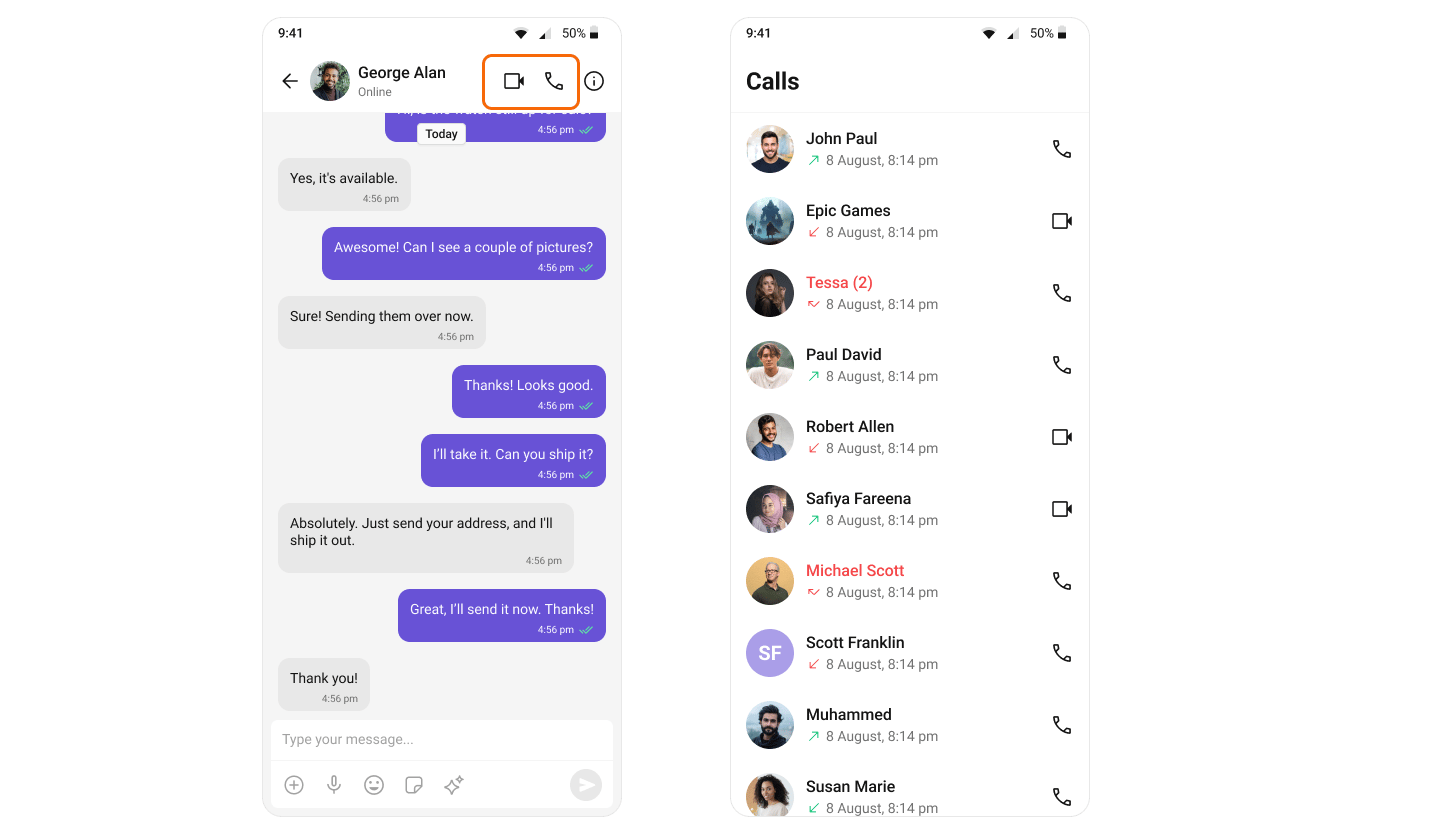
After adding this dependency, the Android UI Kit will automatically detect it and activate the calling features. You will see [CallButtons](/ui-kit/android/call-buttons) component rendered in the [MessageHeader](/ui-kit/android/message-header) component.
 ## Set Up Call Listener
To receive incoming calls globally in your app, add a `CallListener` before initializing the CometChat UI Kit. We recommend creating a custom Application class:
```kotlin theme={null}
class BaseApplication : Application() {
companion object {
private val LISTENER_ID = "${BaseApplication::class.java.simpleName}${System.currentTimeMillis()}"
}
override fun onCreate() {
super.onCreate()
CometChat.addCallListener(LISTENER_ID, object : CometChat.CallListener {
override fun onIncomingCallReceived(call: Call) {
CometChatCallActivity.launchIncomingCallScreen(this@BaseApplication, call, null)
// Pass null or IncomingCallConfiguration if need to configure CometChatIncomingCall component
}
override fun onOutgoingCallAccepted(call: Call) {
// Handle accepted outgoing call
}
override fun onOutgoingCallRejected(call: Call) {
// Handle rejected outgoing call
}
override fun onIncomingCallCancelled(call: Call) {
// Handle cancelled incoming call
}
})
}
}
```
```java theme={null}
public class BaseApplication extends Application {
private static String LISTENER_ID = BaseApplication.class.getSimpleName() + System.currentTimeMillis();
@Override
public void onCreate() {
super.onCreate();
CometChat.addCallListener(LISTENER_ID, new CometChat.CallListener() {
@Override
public void onIncomingCallReceived(Call call) {
CometChatCallActivity.launchIncomingCallScreen(BaseApplication.this, call, null);
// Pass null or IncomingCallConfiguration if need to configure CometChatIncomingCall component
}
@Override
public void onOutgoingCallAccepted(Call call) {
// Handle accepted outgoing call
}
@Override
public void onOutgoingCallRejected(Call call) {
// Handle rejected outgoing call
}
@Override
public void onIncomingCallCancelled(Call call) {
// Handle cancelled incoming call
}
});
}
}
```
## Set Up Call Listener
To receive incoming calls globally in your app, add a `CallListener` before initializing the CometChat UI Kit. We recommend creating a custom Application class:
```kotlin theme={null}
class BaseApplication : Application() {
companion object {
private val LISTENER_ID = "${BaseApplication::class.java.simpleName}${System.currentTimeMillis()}"
}
override fun onCreate() {
super.onCreate()
CometChat.addCallListener(LISTENER_ID, object : CometChat.CallListener {
override fun onIncomingCallReceived(call: Call) {
CometChatCallActivity.launchIncomingCallScreen(this@BaseApplication, call, null)
// Pass null or IncomingCallConfiguration if need to configure CometChatIncomingCall component
}
override fun onOutgoingCallAccepted(call: Call) {
// Handle accepted outgoing call
}
override fun onOutgoingCallRejected(call: Call) {
// Handle rejected outgoing call
}
override fun onIncomingCallCancelled(call: Call) {
// Handle cancelled incoming call
}
})
}
}
```
```java theme={null}
public class BaseApplication extends Application {
private static String LISTENER_ID = BaseApplication.class.getSimpleName() + System.currentTimeMillis();
@Override
public void onCreate() {
super.onCreate();
CometChat.addCallListener(LISTENER_ID, new CometChat.CallListener() {
@Override
public void onIncomingCallReceived(Call call) {
CometChatCallActivity.launchIncomingCallScreen(BaseApplication.this, call, null);
// Pass null or IncomingCallConfiguration if need to configure CometChatIncomingCall component
}
@Override
public void onOutgoingCallAccepted(Call call) {
// Handle accepted outgoing call
}
@Override
public void onOutgoingCallRejected(Call call) {
// Handle rejected outgoing call
}
@Override
public void onIncomingCallCancelled(Call call) {
// Handle cancelled incoming call
}
});
}
}
```