> ## Documentation Index
> Fetch the complete documentation index at: https://cometchat-22654f5b-docs-rn-guide-message-privately.mintlify.site/llms.txt
> Use this file to discover all available pages before exploring further.
# Building A Tab-Based Messaging UI
> Build CometChat Android UI Kit tab-based chat with Chats, Calls, Users, and Groups tabs, message views, and navigation setup.
| Field | Value |
| ------------ | ---------------------------------------------------------------------------------------------------------------------------------------------------------------- |
| Package | `com.cometchat:chat-uikit-android` |
| Components | `CometChatConversations`, `CometChatCallLogs`, `CometChatUsers`, `CometChatGroups`, `CometChatMessageHeader`, `CometChatMessageList`, `CometChatMessageComposer` |
| Layout | Tabbed bottom navigation (Chats, Calls, Users, Groups) + fragment container |
| Prerequisite | Complete [Integration](/ui-kit/android/getting-started) Steps 1–4 first |
| Pattern | Full-featured messaging app with multiple sections |
This guide builds a tabbed messaging UI — Chats, Calls, Users, and Groups tabs via `BottomNavigationView`, with each tab loading its CometChat component in a fragment container.
This assumes you've already completed [Integration](/ui-kit/android/getting-started) (project created, dependencies installed, init + login working, theme set up).
***
## What You're Building
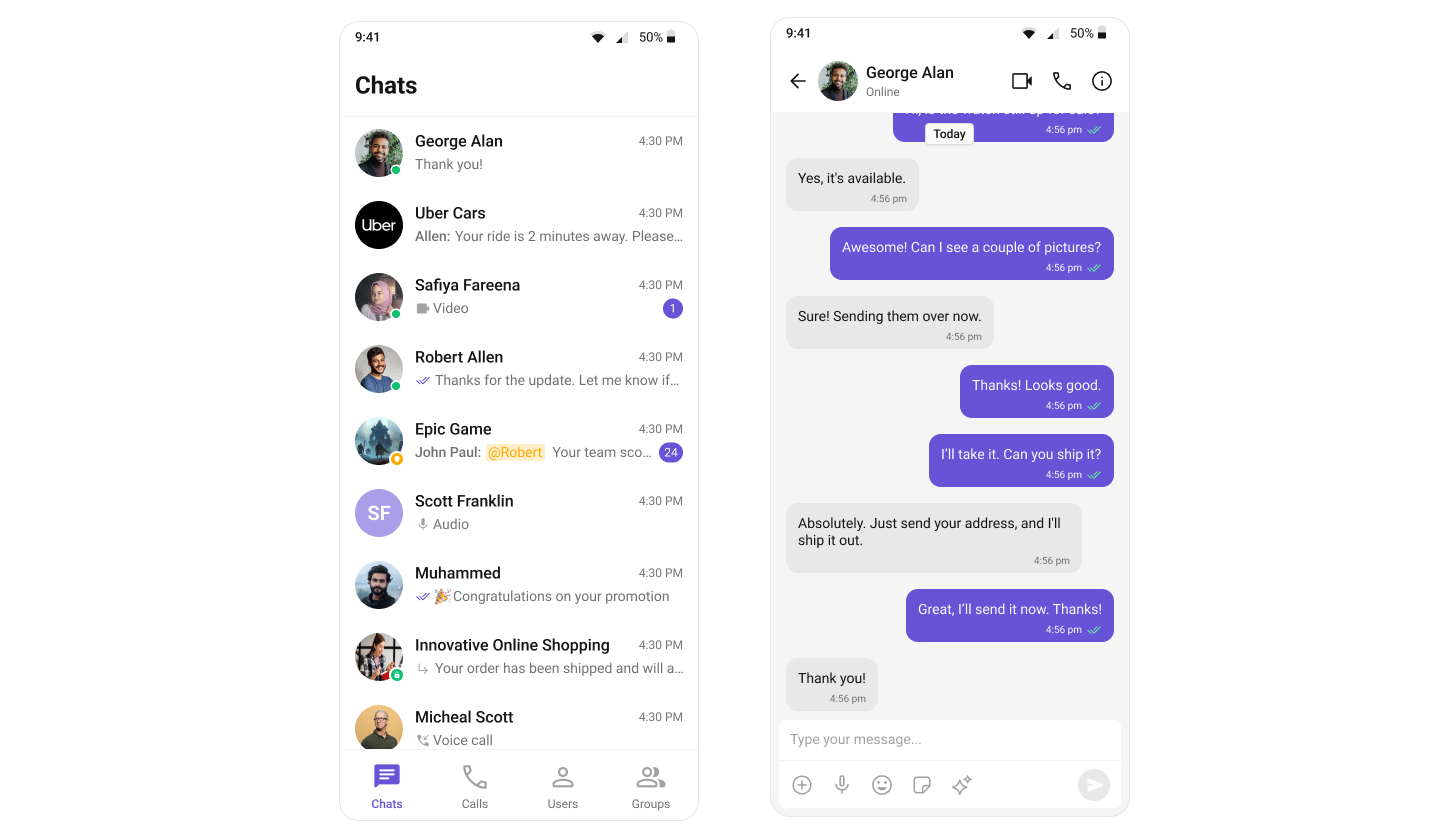 Three sections working together:
1. **Bottom navigation bar** — switches between Chats, Calls, Users, and Groups
2. **Fragment container** — renders the CometChat component for the active tab
3. **Dynamic content** — each tab loads its respective Fragment with real-time data
This uses Android's `BottomNavigationView` pattern: `TabbedActivity` hosts the navigation and fragment container, user taps a tab, the corresponding Fragment loads.
***
### Step 1: Set Up Tabbed Activity
Create a new Activity called `TabbedActivity` with **BottomNavigationView** to manage tab navigation.
#### Project Structure
Create the following files in your Android project:
```txt lines theme={null}
src/main/java/your-package-name/
├── TabbedActivity.kt (or .java)
├── ChatsFragment.kt (or .java)
├── CallLogsFragment.kt (or .java)
├── UsersFragment.kt (or .java)
└── GroupsFragment.kt (or .java)
src/main/java/your-package-name/
├── res/
│ ├── layout/
│ │ ├── activity_tabbed.xml
│ │ ├── fragment_chats.xml
│ │ ├── fragment_call_logs.xml
│ │ ├── fragment_users.xml
│ │ └── fragment_groups.xml
│ └── menu/
│ └── bottom_nav_menu.xml
```
#### Vector Drawable Icons
Download the navigation icons from the **CometChat UI Kit repository**:
🔗 [GitHub Drawable Resources](https://github.com/cometchat/cometchat-uikit-android/tree/v5/sample-app-java/src/main/res/drawable)
Place the icon files (`ic_chats.xml`, `ic_calls.xml`, `ic_user.xml`, `ic_group.xml`) in your `res/drawable/` directory.
#### Implementation
```kotlin TabbedActivity.kt highlight={} lines theme={null}
import android.os.Bundle
import androidx.activity.enableEdgeToEdge
import androidx.appcompat.app.AppCompatActivity
import androidx.core.view.ViewCompat
import androidx.core.view.WindowInsetsCompat
import androidx.fragment.app.Fragment
import com.google.android.material.bottomnavigation.BottomNavigationView
class TabbedActivity : AppCompatActivity() {
private lateinit var bottomNavigationView: BottomNavigationView
override fun onCreate(savedInstanceState: Bundle?) {
super.onCreate(savedInstanceState)
enableEdgeToEdge()
setContentView(R.layout.activity_tabbed)
setupWindowInsets()
initViews()
setupNavigation(savedInstanceState)
}
private fun setupWindowInsets() {
ViewCompat.setOnApplyWindowInsetsListener(findViewById(R.id.main)) { v, insets ->
val systemBars = insets.getInsets(WindowInsetsCompat.Type.systemBars())
v.setPadding(systemBars.left, systemBars.top, systemBars.right, systemBars.bottom)
insets
}
}
private fun initViews() {
bottomNavigationView = findViewById(R.id.bottomNavigationView)
}
private fun setupNavigation(savedInstanceState: Bundle?) {
bottomNavigationView.setOnItemSelectedListener { item ->
val fragment = createFragmentForNavItem(item.itemId)
replaceFragment(fragment)
true
}
// Set default fragment only when activity is first created
if (savedInstanceState == null) {
replaceFragment(ChatsFragment())
bottomNavigationView.selectedItemId = R.id.nav_chats
}
}
private fun createFragmentForNavItem(itemId: Int): Fragment {
return when (itemId) {
R.id.nav_chats -> ChatsFragment()
R.id.nav_call_logs -> CallLogsFragment()
R.id.nav_users -> UsersFragment()
R.id.nav_groups -> GroupsFragment()
else -> ChatsFragment()
}
}
private fun replaceFragment(fragment: Fragment) {
supportFragmentManager.beginTransaction()
.replace(R.id.fragmentContainer, fragment)
.commit()
}
}
```
```java TabbedActivity.java lines theme={null}
import android.os.Bundle;
import android.view.View;
import android.view.WindowInsets;
import android.view.WindowInsetsController;
import androidx.appcompat.app.AppCompatActivity;
import androidx.core.view.ViewCompat;
import androidx.core.view.WindowInsetsCompat;
import androidx.fragment.app.Fragment;
import com.google.android.material.bottomnavigation.BottomNavigationView;
public class TabbedActivity extends AppCompatActivity {
private BottomNavigationView bottomNavigationView;
@Override
protected void onCreate(Bundle savedInstanceState) {
super.onCreate(savedInstanceState);
enableEdgeToEdge(); // Optional depending on your implementation
setContentView(R.layout.activity_tabbed);
setupWindowInsets();
initViews();
setupNavigation(savedInstanceState);
}
private void enableEdgeToEdge() {
// This is equivalent to enableEdgeToEdge() in Kotlin
getWindow().setDecorFitsSystemWindows(false);
}
private void setupWindowInsets() {
View main = findViewById(R.id.main);
ViewCompat.setOnApplyWindowInsetsListener(main, (v, insets) -> {
WindowInsetsCompat systemBars = insets.getInsets(WindowInsetsCompat.Type.systemBars());
v.setPadding(systemBars.left, systemBars.top, systemBars.right, systemBars.bottom);
return insets;
});
}
private void initViews() {
bottomNavigationView = findViewById(R.id.bottomNavigationView);
}
private void setupNavigation(Bundle savedInstanceState) {
bottomNavigationView.setOnItemSelectedListener(item -> {
Fragment fragment = createFragmentForNavItem(item.getItemId());
replaceFragment(fragment);
return true;
});
// Set default fragment only when activity is first created
if (savedInstanceState == null) {
replaceFragment(new ChatsFragment());
bottomNavigationView.setSelectedItemId(R.id.nav_chats);
}
}
private Fragment createFragmentForNavItem(int itemId) {
switch (itemId) {
case R.id.nav_chats:
return new ChatsFragment();
case R.id.nav_call_logs:
return new CallLogsFragment();
case R.id.nav_users:
return new UsersFragment();
case R.id.nav_groups:
return new GroupsFragment();
default:
return new ChatsFragment();
}
}
private void replaceFragment(Fragment fragment) {
getSupportFragmentManager().beginTransaction()
.replace(R.id.fragmentContainer, fragment)
.commit();
}
}
```
```xml activity_tabbed.xml lines theme={null}
```
```xml res/menu/bottom_nav_menu.xml lines theme={null}
```
```xml res/drawable/ic_chats.xml lines theme={null}
```
```xml res/drawable/ic_calls.xml lines theme={null}
```
```xml res/drawable/ic_user.xml lines theme={null}
```
```xml res/drawable/ic_group.xml lines theme={null}
```
You must use an activity that supports the **lifecycle** API, such as:
* `AppCompatActivity`
* `ComponentActivity`
* `FragmentActivity`
This is necessary to properly manage the **UI Kit's lifecycle events**.
***
### Step 2: Create Fragments for Each Tab
Each tab displays a different CometChat UI component wrapped in a Fragment.
#### Chats Fragment
```kotlin ChatsFragment.kt lines theme={null}
import android.os.Bundle
import android.view.LayoutInflater
import android.view.View
import android.view.ViewGroup
import androidx.fragment.app.Fragment
class ChatsFragment : Fragment() {
override fun onCreateView(
inflater: LayoutInflater, container: ViewGroup?, savedInstanceState: Bundle?
): View? {
return inflater.inflate(R.layout.fragment_chats, container, false)
}
}
```
```java ChatsFragment.java lines theme={null}
import android.os.Bundle;
import android.view.LayoutInflater;
import android.view.View;
import android.view.ViewGroup;
import androidx.annotation.NonNull;
import androidx.annotation.Nullable;
import androidx.fragment.app.Fragment;
public class ChatsFragment extends Fragment {
@Nullable
@Override
public View onCreateView(@NonNull LayoutInflater inflater,
@Nullable ViewGroup container,
@Nullable Bundle savedInstanceState) {
return inflater.inflate(R.layout.fragment_chats, container, false);
}
}
```
```xml res/layout/fragment_chats.xml lines theme={null}
```
#### Call Logs Fragment
Make sure you’ve added the Calls SDK dependency to enable voice and video calling features.
```kotlin CallLogsFragment.kt lines theme={null}
import android.os.Bundle
import android.view.LayoutInflater
import android.view.View
import android.view.ViewGroup
import androidx.fragment.app.Fragment
class CallLogsFragment : Fragment() {
override fun onCreateView(
inflater: LayoutInflater, container: ViewGroup?, savedInstanceState: Bundle?
): View? {
return inflater.inflate(R.layout.fragment_call_logs, container, false)
}
}
```
```java CallLogsFragment.java lines theme={null}
import android.os.Bundle;
import android.view.LayoutInflater;
import android.view.View;
import android.view.ViewGroup;
import androidx.annotation.Nullable;
import androidx.fragment.app.Fragment;
public class CallLogsFragment extends Fragment {
@Nullable
@Override
public View onCreateView(LayoutInflater inflater, @Nullable ViewGroup container,
@Nullable Bundle savedInstanceState) {
return inflater.inflate(R.layout.fragment_call_logs, container, false);
}
}
```
```xml res/layout/fragment_call_logs.xml lines theme={null}
```
#### Users Fragment
```kotlin UsersFragment.kt lines theme={null}
import android.os.Bundle
import android.view.LayoutInflater
import android.view.View
import android.view.ViewGroup
import androidx.fragment.app.Fragment
class UsersFragment : Fragment() {
override fun onCreateView(
inflater: LayoutInflater, container: ViewGroup?, savedInstanceState: Bundle?
): View? {
return inflater.inflate(R.layout.fragment_users, container, false)
}
}
```
```java UsersFragment.java lines theme={null}
import android.os.Bundle;
import android.view.LayoutInflater;
import android.view.View;
import android.view.ViewGroup;
import androidx.annotation.Nullable;
import androidx.fragment.app.Fragment;
public class UsersFragment extends Fragment {
@Nullable
@Override
public View onCreateView(LayoutInflater inflater, @Nullable ViewGroup container,
@Nullable Bundle savedInstanceState) {
return inflater.inflate(R.layout.fragment_users, container, false);
}
}
```
```xml res/layout/fragment_users.xml lines theme={null}
```
#### Groups Fragment
```kotlin GroupsFragment.kt lines theme={null}
import android.os.Bundle
import android.view.LayoutInflater
import android.view.View
import android.view.ViewGroup
import androidx.fragment.app.Fragment
class GroupsFragment : Fragment() {
override fun onCreateView(
inflater: LayoutInflater, container: ViewGroup?, savedInstanceState: Bundle?
): View? {
return inflater.inflate(R.layout.fragment_groups, container, false)
}
}
```
```java GroupsFragment.java lines theme={null}
import android.os.Bundle;
import android.view.LayoutInflater;
import android.view.View;
import android.view.ViewGroup;
import androidx.annotation.Nullable;
import androidx.fragment.app.Fragment;
public class GroupsFragment extends Fragment {
@Nullable
@Override
public View onCreateView(LayoutInflater inflater, @Nullable ViewGroup container,
@Nullable Bundle savedInstanceState) {
return inflater.inflate(R.layout.fragment_groups, container, false);
}
}
```
```xml res/layout/fragment_groups.xml lines theme={null}
```
***
### Step 3: Launch TabbedActivity from Your App
Update your `MainActivity` to launch `TabbedActivity` after successful login:
```kotlin MainActivity.kt highlight={16-18, 20} lines theme={null}
import android.content.Intent
import android.os.Bundle
import android.util.Log
import androidx.activity.ComponentActivity
import androidx.activity.enableEdgeToEdge
import com.cometchat.chat.core.CometChat
import com.cometchat.chat.exceptions.CometChatException
import com.cometchat.chat.models.User
import com.cometchat.chatuikit.shared.cometchatuikit.CometChatUIKit
import com.cometchat.chatuikit.shared.cometchatuikit.UIKitSettings
class MainActivity : ComponentActivity() {
private val TAG = "MainActivity"
private val appID = "APP_ID" // Replace with your App ID
private val region = "REGION" // Replace with your App Region
private val authKey = "AUTH_KEY" // Replace with your Auth Key or leave blank if you are authenticating using Auth Token
private val uid = "cometchat-uid-1" // Replace with the UID of the user you want to log in
private val uiKitSettings = UIKitSettings.UIKitSettingsBuilder()
.setRegion(region)
.setAppId(appID)
.setAuthKey(authKey)
.subscribePresenceForAllUsers()
.build()
override fun onCreate(savedInstanceState: Bundle?) {
super.onCreate(savedInstanceState)
enableEdgeToEdge()
CometChatUIKit.init(this, uiKitSettings, object : CometChat.CallbackListener() {
override fun onSuccess(successString: String?) {
Log.d(TAG, "Initialization completed successfully")
loginUser()
}
override fun onError(e: CometChatException?) {}
})
}
private fun loginUser() {
CometChatUIKit.login(uid, object : CometChat.CallbackListener() {
override fun onSuccess(user: User) {
// Launch Tab-Based Chat Experience (Chats, Calls, Users, Groups)
startActivity(Intent(this@MainActivity, TabbedActivity::class.java))
}
override fun onError(e: CometChatException) {
// Handle login failure (e.g. show error message or retry)
Log.e("Login", "Login failed: ${e.message}")
}
})
}
}
```
```java MainActivity.java highlight={17-19, 21} lines theme={null}
package com.example.uikitsexamples;
import android.content.Intent;
import android.os.Bundle;
import android.util.Log;
import androidx.activity.ComponentActivity;
import com.cometchat.chat.core.CometChat;
import com.cometchat.chat.exceptions.CometChatException;
import com.cometchat.chat.models.User;
import com.cometchat.chatuikit.shared.cometchatuikit.CometChatUIKit;
import com.cometchat.chatuikit.shared.cometchatuikit.UIKitSettings;
public class MainActivity extends ComponentActivity {
private static final String TAG = "MainActivity";
private final String appID = "APP_ID"; // Replace with your App ID
private final String region = "REGION"; // Replace with your App Region
private final String authKey = "AUTH_KEY"; // Replace with your Auth Key
private final String uid = "cometchat-uid-1"; // Replace with the UID of the user you want to log in
@Override
protected void onCreate(Bundle savedInstanceState) {
super.onCreate(savedInstanceState);
getWindow().setDecorFitsSystemWindows(false); // Equivalent to enableEdgeToEdge()
UIKitSettings uiKitSettings = new UIKitSettings.UIKitSettingsBuilder()
.setRegion(region)
.setAppId(appID)
.setAuthKey(authKey)
.subscribePresenceForAllUsers()
.build();
CometChatUIKit.init(this, uiKitSettings, new CometChat.CallbackListener() {
@Override
public void onSuccess(String success) {
Log.d(TAG, "Initialization completed successfully");
loginUser();
}
@Override
public void onError(CometChatException e) {
Log.e(TAG, "Initialization failed: " + (e != null ? e.getMessage() : "Unknown error"));
}
});
}
private void loginUser() {
CometChatUIKit.login(uid, new CometChat.CallbackListener() {
@Override
public void onSuccess(User user) {
Log.d(TAG, "Login successful for user: " + user.getUid());
// Launch Tab-Based Chat Experience (Chats, Calls, Users, Groups)
startActivity(new Intent(MainActivity.this, TabbedActivity.class));
}
@Override
public void onError(CometChatException e) {
Log.e("Login", "Login failed: " + (e != null ? e.getMessage() : "Unknown error"));
}
});
}
}
```
***
## Running the Application
Once you've completed the setup, build and run your Android application:
```sh lines theme={null}
gradle build
```
**Required Permissions**
Ensure you've added the necessary permissions in your `AndroidManifest.xml`and initialized CometChat in your `Application` class:
```xml lines theme={null}
```
**For Call Features**, also add:
```xml lines theme={null}
```
***
## Next Steps
Explore all available UI Kit components and their customization options
Customize colors, fonts, and styles to match your brand
Back to the main setup guide
Add capabilities like threaded messages, blocking, and group management
Three sections working together:
1. **Bottom navigation bar** — switches between Chats, Calls, Users, and Groups
2. **Fragment container** — renders the CometChat component for the active tab
3. **Dynamic content** — each tab loads its respective Fragment with real-time data
This uses Android's `BottomNavigationView` pattern: `TabbedActivity` hosts the navigation and fragment container, user taps a tab, the corresponding Fragment loads.
***
### Step 1: Set Up Tabbed Activity
Create a new Activity called `TabbedActivity` with **BottomNavigationView** to manage tab navigation.
#### Project Structure
Create the following files in your Android project:
```txt lines theme={null}
src/main/java/your-package-name/
├── TabbedActivity.kt (or .java)
├── ChatsFragment.kt (or .java)
├── CallLogsFragment.kt (or .java)
├── UsersFragment.kt (or .java)
└── GroupsFragment.kt (or .java)
src/main/java/your-package-name/
├── res/
│ ├── layout/
│ │ ├── activity_tabbed.xml
│ │ ├── fragment_chats.xml
│ │ ├── fragment_call_logs.xml
│ │ ├── fragment_users.xml
│ │ └── fragment_groups.xml
│ └── menu/
│ └── bottom_nav_menu.xml
```
#### Vector Drawable Icons
Download the navigation icons from the **CometChat UI Kit repository**:
🔗 [GitHub Drawable Resources](https://github.com/cometchat/cometchat-uikit-android/tree/v5/sample-app-java/src/main/res/drawable)
Place the icon files (`ic_chats.xml`, `ic_calls.xml`, `ic_user.xml`, `ic_group.xml`) in your `res/drawable/` directory.
#### Implementation
```kotlin TabbedActivity.kt highlight={} lines theme={null}
import android.os.Bundle
import androidx.activity.enableEdgeToEdge
import androidx.appcompat.app.AppCompatActivity
import androidx.core.view.ViewCompat
import androidx.core.view.WindowInsetsCompat
import androidx.fragment.app.Fragment
import com.google.android.material.bottomnavigation.BottomNavigationView
class TabbedActivity : AppCompatActivity() {
private lateinit var bottomNavigationView: BottomNavigationView
override fun onCreate(savedInstanceState: Bundle?) {
super.onCreate(savedInstanceState)
enableEdgeToEdge()
setContentView(R.layout.activity_tabbed)
setupWindowInsets()
initViews()
setupNavigation(savedInstanceState)
}
private fun setupWindowInsets() {
ViewCompat.setOnApplyWindowInsetsListener(findViewById(R.id.main)) { v, insets ->
val systemBars = insets.getInsets(WindowInsetsCompat.Type.systemBars())
v.setPadding(systemBars.left, systemBars.top, systemBars.right, systemBars.bottom)
insets
}
}
private fun initViews() {
bottomNavigationView = findViewById(R.id.bottomNavigationView)
}
private fun setupNavigation(savedInstanceState: Bundle?) {
bottomNavigationView.setOnItemSelectedListener { item ->
val fragment = createFragmentForNavItem(item.itemId)
replaceFragment(fragment)
true
}
// Set default fragment only when activity is first created
if (savedInstanceState == null) {
replaceFragment(ChatsFragment())
bottomNavigationView.selectedItemId = R.id.nav_chats
}
}
private fun createFragmentForNavItem(itemId: Int): Fragment {
return when (itemId) {
R.id.nav_chats -> ChatsFragment()
R.id.nav_call_logs -> CallLogsFragment()
R.id.nav_users -> UsersFragment()
R.id.nav_groups -> GroupsFragment()
else -> ChatsFragment()
}
}
private fun replaceFragment(fragment: Fragment) {
supportFragmentManager.beginTransaction()
.replace(R.id.fragmentContainer, fragment)
.commit()
}
}
```
```java TabbedActivity.java lines theme={null}
import android.os.Bundle;
import android.view.View;
import android.view.WindowInsets;
import android.view.WindowInsetsController;
import androidx.appcompat.app.AppCompatActivity;
import androidx.core.view.ViewCompat;
import androidx.core.view.WindowInsetsCompat;
import androidx.fragment.app.Fragment;
import com.google.android.material.bottomnavigation.BottomNavigationView;
public class TabbedActivity extends AppCompatActivity {
private BottomNavigationView bottomNavigationView;
@Override
protected void onCreate(Bundle savedInstanceState) {
super.onCreate(savedInstanceState);
enableEdgeToEdge(); // Optional depending on your implementation
setContentView(R.layout.activity_tabbed);
setupWindowInsets();
initViews();
setupNavigation(savedInstanceState);
}
private void enableEdgeToEdge() {
// This is equivalent to enableEdgeToEdge() in Kotlin
getWindow().setDecorFitsSystemWindows(false);
}
private void setupWindowInsets() {
View main = findViewById(R.id.main);
ViewCompat.setOnApplyWindowInsetsListener(main, (v, insets) -> {
WindowInsetsCompat systemBars = insets.getInsets(WindowInsetsCompat.Type.systemBars());
v.setPadding(systemBars.left, systemBars.top, systemBars.right, systemBars.bottom);
return insets;
});
}
private void initViews() {
bottomNavigationView = findViewById(R.id.bottomNavigationView);
}
private void setupNavigation(Bundle savedInstanceState) {
bottomNavigationView.setOnItemSelectedListener(item -> {
Fragment fragment = createFragmentForNavItem(item.getItemId());
replaceFragment(fragment);
return true;
});
// Set default fragment only when activity is first created
if (savedInstanceState == null) {
replaceFragment(new ChatsFragment());
bottomNavigationView.setSelectedItemId(R.id.nav_chats);
}
}
private Fragment createFragmentForNavItem(int itemId) {
switch (itemId) {
case R.id.nav_chats:
return new ChatsFragment();
case R.id.nav_call_logs:
return new CallLogsFragment();
case R.id.nav_users:
return new UsersFragment();
case R.id.nav_groups:
return new GroupsFragment();
default:
return new ChatsFragment();
}
}
private void replaceFragment(Fragment fragment) {
getSupportFragmentManager().beginTransaction()
.replace(R.id.fragmentContainer, fragment)
.commit();
}
}
```
```xml activity_tabbed.xml lines theme={null}
```
```xml res/menu/bottom_nav_menu.xml lines theme={null}
```
```xml res/drawable/ic_chats.xml lines theme={null}
```
```xml res/drawable/ic_calls.xml lines theme={null}
```
```xml res/drawable/ic_user.xml lines theme={null}
```
```xml res/drawable/ic_group.xml lines theme={null}
```
You must use an activity that supports the **lifecycle** API, such as:
* `AppCompatActivity`
* `ComponentActivity`
* `FragmentActivity`
This is necessary to properly manage the **UI Kit's lifecycle events**.
***
### Step 2: Create Fragments for Each Tab
Each tab displays a different CometChat UI component wrapped in a Fragment.
#### Chats Fragment
```kotlin ChatsFragment.kt lines theme={null}
import android.os.Bundle
import android.view.LayoutInflater
import android.view.View
import android.view.ViewGroup
import androidx.fragment.app.Fragment
class ChatsFragment : Fragment() {
override fun onCreateView(
inflater: LayoutInflater, container: ViewGroup?, savedInstanceState: Bundle?
): View? {
return inflater.inflate(R.layout.fragment_chats, container, false)
}
}
```
```java ChatsFragment.java lines theme={null}
import android.os.Bundle;
import android.view.LayoutInflater;
import android.view.View;
import android.view.ViewGroup;
import androidx.annotation.NonNull;
import androidx.annotation.Nullable;
import androidx.fragment.app.Fragment;
public class ChatsFragment extends Fragment {
@Nullable
@Override
public View onCreateView(@NonNull LayoutInflater inflater,
@Nullable ViewGroup container,
@Nullable Bundle savedInstanceState) {
return inflater.inflate(R.layout.fragment_chats, container, false);
}
}
```
```xml res/layout/fragment_chats.xml lines theme={null}
```
#### Call Logs Fragment
Make sure you’ve added the Calls SDK dependency to enable voice and video calling features.
```kotlin CallLogsFragment.kt lines theme={null}
import android.os.Bundle
import android.view.LayoutInflater
import android.view.View
import android.view.ViewGroup
import androidx.fragment.app.Fragment
class CallLogsFragment : Fragment() {
override fun onCreateView(
inflater: LayoutInflater, container: ViewGroup?, savedInstanceState: Bundle?
): View? {
return inflater.inflate(R.layout.fragment_call_logs, container, false)
}
}
```
```java CallLogsFragment.java lines theme={null}
import android.os.Bundle;
import android.view.LayoutInflater;
import android.view.View;
import android.view.ViewGroup;
import androidx.annotation.Nullable;
import androidx.fragment.app.Fragment;
public class CallLogsFragment extends Fragment {
@Nullable
@Override
public View onCreateView(LayoutInflater inflater, @Nullable ViewGroup container,
@Nullable Bundle savedInstanceState) {
return inflater.inflate(R.layout.fragment_call_logs, container, false);
}
}
```
```xml res/layout/fragment_call_logs.xml lines theme={null}
```
#### Users Fragment
```kotlin UsersFragment.kt lines theme={null}
import android.os.Bundle
import android.view.LayoutInflater
import android.view.View
import android.view.ViewGroup
import androidx.fragment.app.Fragment
class UsersFragment : Fragment() {
override fun onCreateView(
inflater: LayoutInflater, container: ViewGroup?, savedInstanceState: Bundle?
): View? {
return inflater.inflate(R.layout.fragment_users, container, false)
}
}
```
```java UsersFragment.java lines theme={null}
import android.os.Bundle;
import android.view.LayoutInflater;
import android.view.View;
import android.view.ViewGroup;
import androidx.annotation.Nullable;
import androidx.fragment.app.Fragment;
public class UsersFragment extends Fragment {
@Nullable
@Override
public View onCreateView(LayoutInflater inflater, @Nullable ViewGroup container,
@Nullable Bundle savedInstanceState) {
return inflater.inflate(R.layout.fragment_users, container, false);
}
}
```
```xml res/layout/fragment_users.xml lines theme={null}
```
#### Groups Fragment
```kotlin GroupsFragment.kt lines theme={null}
import android.os.Bundle
import android.view.LayoutInflater
import android.view.View
import android.view.ViewGroup
import androidx.fragment.app.Fragment
class GroupsFragment : Fragment() {
override fun onCreateView(
inflater: LayoutInflater, container: ViewGroup?, savedInstanceState: Bundle?
): View? {
return inflater.inflate(R.layout.fragment_groups, container, false)
}
}
```
```java GroupsFragment.java lines theme={null}
import android.os.Bundle;
import android.view.LayoutInflater;
import android.view.View;
import android.view.ViewGroup;
import androidx.annotation.Nullable;
import androidx.fragment.app.Fragment;
public class GroupsFragment extends Fragment {
@Nullable
@Override
public View onCreateView(LayoutInflater inflater, @Nullable ViewGroup container,
@Nullable Bundle savedInstanceState) {
return inflater.inflate(R.layout.fragment_groups, container, false);
}
}
```
```xml res/layout/fragment_groups.xml lines theme={null}
```
***
### Step 3: Launch TabbedActivity from Your App
Update your `MainActivity` to launch `TabbedActivity` after successful login:
```kotlin MainActivity.kt highlight={16-18, 20} lines theme={null}
import android.content.Intent
import android.os.Bundle
import android.util.Log
import androidx.activity.ComponentActivity
import androidx.activity.enableEdgeToEdge
import com.cometchat.chat.core.CometChat
import com.cometchat.chat.exceptions.CometChatException
import com.cometchat.chat.models.User
import com.cometchat.chatuikit.shared.cometchatuikit.CometChatUIKit
import com.cometchat.chatuikit.shared.cometchatuikit.UIKitSettings
class MainActivity : ComponentActivity() {
private val TAG = "MainActivity"
private val appID = "APP_ID" // Replace with your App ID
private val region = "REGION" // Replace with your App Region
private val authKey = "AUTH_KEY" // Replace with your Auth Key or leave blank if you are authenticating using Auth Token
private val uid = "cometchat-uid-1" // Replace with the UID of the user you want to log in
private val uiKitSettings = UIKitSettings.UIKitSettingsBuilder()
.setRegion(region)
.setAppId(appID)
.setAuthKey(authKey)
.subscribePresenceForAllUsers()
.build()
override fun onCreate(savedInstanceState: Bundle?) {
super.onCreate(savedInstanceState)
enableEdgeToEdge()
CometChatUIKit.init(this, uiKitSettings, object : CometChat.CallbackListener() {
override fun onSuccess(successString: String?) {
Log.d(TAG, "Initialization completed successfully")
loginUser()
}
override fun onError(e: CometChatException?) {}
})
}
private fun loginUser() {
CometChatUIKit.login(uid, object : CometChat.CallbackListener() {
override fun onSuccess(user: User) {
// Launch Tab-Based Chat Experience (Chats, Calls, Users, Groups)
startActivity(Intent(this@MainActivity, TabbedActivity::class.java))
}
override fun onError(e: CometChatException) {
// Handle login failure (e.g. show error message or retry)
Log.e("Login", "Login failed: ${e.message}")
}
})
}
}
```
```java MainActivity.java highlight={17-19, 21} lines theme={null}
package com.example.uikitsexamples;
import android.content.Intent;
import android.os.Bundle;
import android.util.Log;
import androidx.activity.ComponentActivity;
import com.cometchat.chat.core.CometChat;
import com.cometchat.chat.exceptions.CometChatException;
import com.cometchat.chat.models.User;
import com.cometchat.chatuikit.shared.cometchatuikit.CometChatUIKit;
import com.cometchat.chatuikit.shared.cometchatuikit.UIKitSettings;
public class MainActivity extends ComponentActivity {
private static final String TAG = "MainActivity";
private final String appID = "APP_ID"; // Replace with your App ID
private final String region = "REGION"; // Replace with your App Region
private final String authKey = "AUTH_KEY"; // Replace with your Auth Key
private final String uid = "cometchat-uid-1"; // Replace with the UID of the user you want to log in
@Override
protected void onCreate(Bundle savedInstanceState) {
super.onCreate(savedInstanceState);
getWindow().setDecorFitsSystemWindows(false); // Equivalent to enableEdgeToEdge()
UIKitSettings uiKitSettings = new UIKitSettings.UIKitSettingsBuilder()
.setRegion(region)
.setAppId(appID)
.setAuthKey(authKey)
.subscribePresenceForAllUsers()
.build();
CometChatUIKit.init(this, uiKitSettings, new CometChat.CallbackListener() {
@Override
public void onSuccess(String success) {
Log.d(TAG, "Initialization completed successfully");
loginUser();
}
@Override
public void onError(CometChatException e) {
Log.e(TAG, "Initialization failed: " + (e != null ? e.getMessage() : "Unknown error"));
}
});
}
private void loginUser() {
CometChatUIKit.login(uid, new CometChat.CallbackListener() {
@Override
public void onSuccess(User user) {
Log.d(TAG, "Login successful for user: " + user.getUid());
// Launch Tab-Based Chat Experience (Chats, Calls, Users, Groups)
startActivity(new Intent(MainActivity.this, TabbedActivity.class));
}
@Override
public void onError(CometChatException e) {
Log.e("Login", "Login failed: " + (e != null ? e.getMessage() : "Unknown error"));
}
});
}
}
```
***
## Running the Application
Once you've completed the setup, build and run your Android application:
```sh lines theme={null}
gradle build
```
**Required Permissions**
Ensure you've added the necessary permissions in your `AndroidManifest.xml`and initialized CometChat in your `Application` class:
```xml lines theme={null}
```
**For Call Features**, also add:
```xml lines theme={null}
```
***
## Next Steps
Explore all available UI Kit components and their customization options
Customize colors, fonts, and styles to match your brand
Back to the main setup guide
Add capabilities like threaded messages, blocking, and group management