> ## Documentation Index
> Fetch the complete documentation index at: https://cometchat-22654f5b-docs-rn-guide-message-privately.mintlify.site/llms.txt
> Use this file to discover all available pages before exploring further.
# Message
> Understand CometChat JavaScript SDK message categories, types, and object hierarchy.
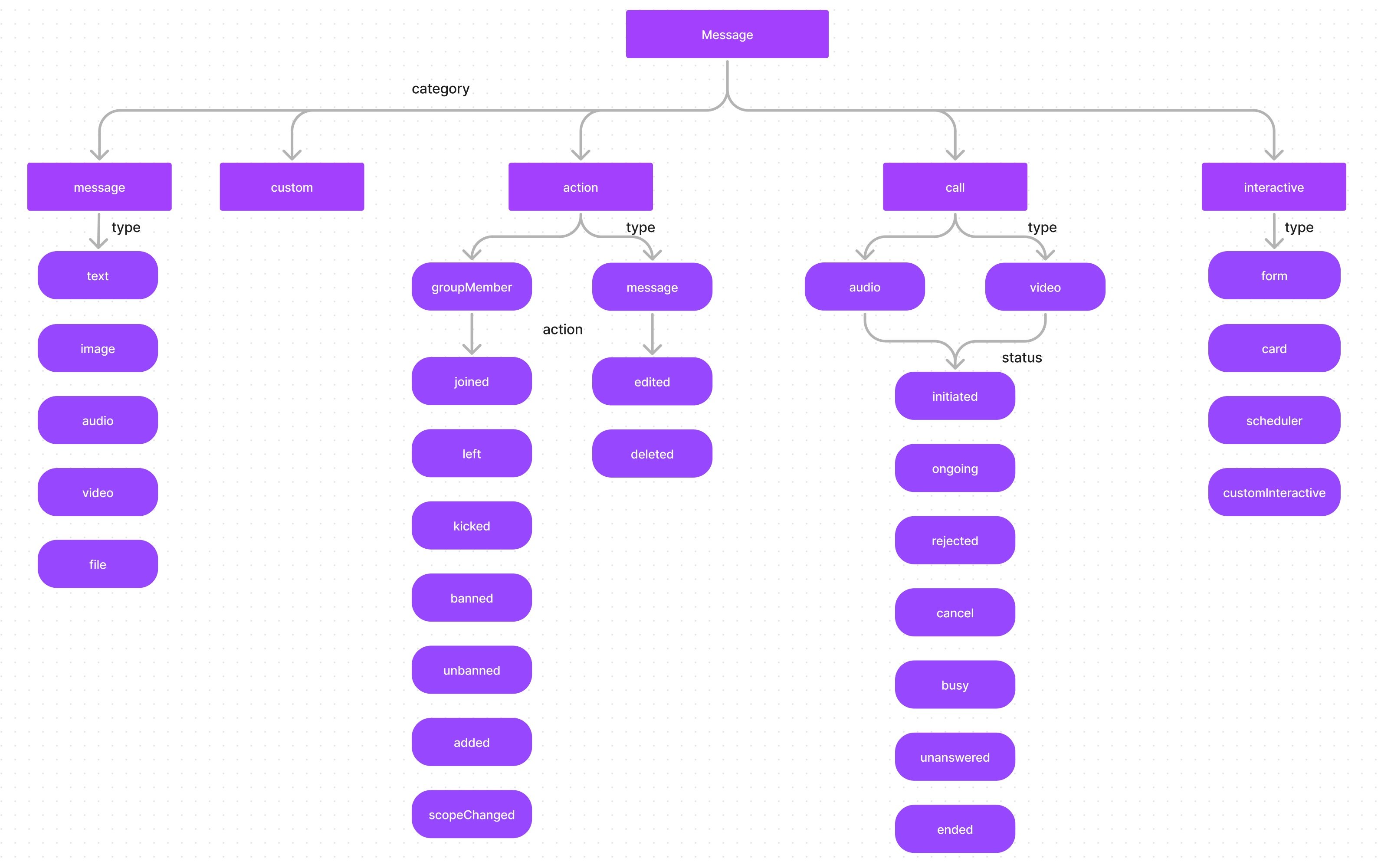
The below diagram helps you better understand the various message categories and types that a CometChat message can belong to.
 ## Categories Overview
| Category | Types | Description |
| --------- | ----------------------------------------- | ----------------------------------- |
| `message` | `text`, `image`, `video`, `audio`, `file` | Standard user messages |
| `custom` | Developer-defined | Custom data (location, polls, etc.) |
| `action` | `groupMember`, `message` | System-generated events |
| `call` | `audio`, `video` | Call-related messages |
## Checking Message Category and Type
Use `getCategory()` and `getType()` to determine how to handle a received message:
```typescript theme={null}
const category: string = message.getCategory();
const type: string = message.getType();
switch (category) {
case CometChat.CATEGORY_MESSAGE:
if (type === CometChat.MESSAGE_TYPE.TEXT) {
const textMsg = message as CometChat.TextMessage;
console.log("Text:", textMsg.getText());
} else if (type === CometChat.MESSAGE_TYPE.IMAGE) {
const mediaMsg = message as CometChat.MediaMessage;
console.log("Image URL:", mediaMsg.getData().url);
}
break;
case CometChat.CATEGORY_CUSTOM:
const customMsg = message as CometChat.CustomMessage;
console.log("Custom type:", type, "data:", customMsg.getData());
break;
case CometChat.CATEGORY_ACTION:
console.log("Action:", message.getAction());
break;
case CometChat.CATEGORY_CALL:
console.log("Call status:", message.getStatus());
break;
}
```
```javascript theme={null}
const category = message.getCategory();
const type = message.getType();
switch (category) {
case CometChat.CATEGORY_MESSAGE:
if (type === CometChat.MESSAGE_TYPE.TEXT) {
const textMsg = message as CometChat.TextMessage;
console.log("Text:", textMsg.getText());
} else if (type === CometChat.MESSAGE_TYPE.IMAGE) {
const mediaMsg = message as CometChat.MediaMessage;
console.log("Image URL:", mediaMsg.getData().url);
}
break;
case CometChat.CATEGORY_CUSTOM:
const customMsg = message as CometChat.CustomMessage;
console.log("Custom type:", type, "data:", customMsg.getData());
break;
case CometChat.CATEGORY_ACTION:
console.log("Action:", message.getAction());
break;
case CometChat.CATEGORY_CALL:
console.log("Call status:", message.getStatus());
break;
}
```
## Standard Messages (`message` Category)
Messages with category `message` are standard user-sent messages:
| Type | Description |
| ------- | ------------------ |
| `text` | Plain text message |
| `image` | Image attachment |
| `video` | Video attachment |
| `audio` | Audio attachment |
| `file` | File attachment |
## Custom Messages (`custom` Category)
Custom messages allow you to send data that doesn't fit the default categories. You define your own type to identify the message (e.g., `location`, `poll`, `sticker`).
```javascript theme={null}
// Example: Sending a location as a custom message
const customMessage = new CometChat.CustomMessage(
receiverID,
CometChat.RECEIVER_TYPE.USER,
"location",
{ latitude: 37.7749, longitude: -122.4194 }
);
```
See [Send Message → Custom Messages](/sdk/javascript/send-message#custom-message) for details.
## Action Messages (`action` Category)
Action messages are system-generated events. They have a `type` and an `action` property:
**Type: `groupMember`** — Actions on group members:
* `joined` — Member joined the group
* `left` — Member left the group
* `kicked` — Member was kicked
* `banned` — Member was banned
* `unbanned` — Member was unbanned
* `added` — Member was added
* `scopeChanged` — Member's scope was changed
**Type: `message`** — Actions on messages:
* `edited` — Message was edited
* `deleted` — Message was deleted
## Call Messages (`call` Category)
Call messages track call events with types `audio` or `video`. The `status` property indicates the call state:
| Status | Description |
| ------------ | ----------------------------- |
| `initiated` | Call started |
| `ongoing` | Call accepted and in progress |
| `canceled` | Caller canceled |
| `rejected` | Receiver rejected |
| `unanswered` | No answer |
| `busy` | Receiver on another call |
| `ended` | Call completed |
See [Default Calling](/sdk/javascript/default-call) or [Direct Calling](/sdk/javascript/direct-call) for implementation.
***
## Next Steps
Send text, media, and custom messages
Listen for incoming messages in real time
Advanced message filtering with RequestBuilder
## Categories Overview
| Category | Types | Description |
| --------- | ----------------------------------------- | ----------------------------------- |
| `message` | `text`, `image`, `video`, `audio`, `file` | Standard user messages |
| `custom` | Developer-defined | Custom data (location, polls, etc.) |
| `action` | `groupMember`, `message` | System-generated events |
| `call` | `audio`, `video` | Call-related messages |
## Checking Message Category and Type
Use `getCategory()` and `getType()` to determine how to handle a received message:
```typescript theme={null}
const category: string = message.getCategory();
const type: string = message.getType();
switch (category) {
case CometChat.CATEGORY_MESSAGE:
if (type === CometChat.MESSAGE_TYPE.TEXT) {
const textMsg = message as CometChat.TextMessage;
console.log("Text:", textMsg.getText());
} else if (type === CometChat.MESSAGE_TYPE.IMAGE) {
const mediaMsg = message as CometChat.MediaMessage;
console.log("Image URL:", mediaMsg.getData().url);
}
break;
case CometChat.CATEGORY_CUSTOM:
const customMsg = message as CometChat.CustomMessage;
console.log("Custom type:", type, "data:", customMsg.getData());
break;
case CometChat.CATEGORY_ACTION:
console.log("Action:", message.getAction());
break;
case CometChat.CATEGORY_CALL:
console.log("Call status:", message.getStatus());
break;
}
```
```javascript theme={null}
const category = message.getCategory();
const type = message.getType();
switch (category) {
case CometChat.CATEGORY_MESSAGE:
if (type === CometChat.MESSAGE_TYPE.TEXT) {
const textMsg = message as CometChat.TextMessage;
console.log("Text:", textMsg.getText());
} else if (type === CometChat.MESSAGE_TYPE.IMAGE) {
const mediaMsg = message as CometChat.MediaMessage;
console.log("Image URL:", mediaMsg.getData().url);
}
break;
case CometChat.CATEGORY_CUSTOM:
const customMsg = message as CometChat.CustomMessage;
console.log("Custom type:", type, "data:", customMsg.getData());
break;
case CometChat.CATEGORY_ACTION:
console.log("Action:", message.getAction());
break;
case CometChat.CATEGORY_CALL:
console.log("Call status:", message.getStatus());
break;
}
```
## Standard Messages (`message` Category)
Messages with category `message` are standard user-sent messages:
| Type | Description |
| ------- | ------------------ |
| `text` | Plain text message |
| `image` | Image attachment |
| `video` | Video attachment |
| `audio` | Audio attachment |
| `file` | File attachment |
## Custom Messages (`custom` Category)
Custom messages allow you to send data that doesn't fit the default categories. You define your own type to identify the message (e.g., `location`, `poll`, `sticker`).
```javascript theme={null}
// Example: Sending a location as a custom message
const customMessage = new CometChat.CustomMessage(
receiverID,
CometChat.RECEIVER_TYPE.USER,
"location",
{ latitude: 37.7749, longitude: -122.4194 }
);
```
See [Send Message → Custom Messages](/sdk/javascript/send-message#custom-message) for details.
## Action Messages (`action` Category)
Action messages are system-generated events. They have a `type` and an `action` property:
**Type: `groupMember`** — Actions on group members:
* `joined` — Member joined the group
* `left` — Member left the group
* `kicked` — Member was kicked
* `banned` — Member was banned
* `unbanned` — Member was unbanned
* `added` — Member was added
* `scopeChanged` — Member's scope was changed
**Type: `message`** — Actions on messages:
* `edited` — Message was edited
* `deleted` — Message was deleted
## Call Messages (`call` Category)
Call messages track call events with types `audio` or `video`. The `status` property indicates the call state:
| Status | Description |
| ------------ | ----------------------------- |
| `initiated` | Call started |
| `ongoing` | Call accepted and in progress |
| `canceled` | Caller canceled |
| `rejected` | Receiver rejected |
| `unanswered` | No answer |
| `busy` | Receiver on another call |
| `ended` | Call completed |
See [Default Calling](/sdk/javascript/default-call) or [Direct Calling](/sdk/javascript/direct-call) for implementation.
***
## Next Steps
Send text, media, and custom messages
Listen for incoming messages in real time
Advanced message filtering with RequestBuilder