> ## Documentation Index
> Fetch the complete documentation index at: https://cometchat-22654f5b-docs-rn-guide-message-privately.mintlify.site/llms.txt
> Use this file to discover all available pages before exploring further.
# Setup
> Install, configure, and initialize the CometChat Flutter SDK in your application.
```yaml theme={null}
# Install (pubspec.yaml)
cometchat_sdk: ^4.0.33
```
```dart theme={null}
import 'package:cometchat_sdk/cometchat_sdk.dart';
AppSettings appSettings = (AppSettingsBuilder()
..subscriptionType = CometChatSubscriptionType.allUsers
..region = "APP_REGION"
..autoEstablishSocketConnection = true
).build();
CometChat.init("APP_ID", appSettings,
onSuccess: (msg) => debugPrint("Init success"),
onError: (e) => debugPrint("Init failed: ${e.message}")
);
// Login (dev only)
CometChat.login("UID", "AUTH_KEY",
onSuccess: (user) => debugPrint("Login success"),
onError: (e) => debugPrint("Login failed: ${e.message}")
);
```
**Prerequisites:** Flutter SDK 1.2+, Android API Level 21+, iOS 11+
**Credentials:** App ID, Region, Auth Key (dev) or Auth Token (prod) from [CometChat Dashboard](https://app.cometchat.com)
## Prerequisites
| Requirement | Version |
| ----------------- | ------------- |
| Flutter SDK | 1.2 or higher |
| Android API Level | 21 or higher |
| AndroidX | Required |
| iOS | 11 or higher |
Get your credentials from the [CometChat Dashboard](https://app.cometchat.com):
1. Create a new app
2. Head over to the **API & Auth Keys** section and note the **Auth Key**, **App ID** & **Region**
**Auth Key** is for development/testing only. In production, generate **Auth Tokens** on your server using the REST API. Never expose Auth Keys in production client code.
## Installation
Add the following dependency to your `pubspec.yaml` file and run `pub get`:
```yaml theme={null}
cometchat_sdk: ^4.0.33
```
### iOS Setup
1. Add the following to your Podfile inside the iOS section of your app:
```ruby theme={null}
post_install do |installer|
installer.pods_project.targets.each do |target|
flutter_additional_ios_build_settings(target)
//Copy from here------->
target.build_configurations.each do |build_configuration|
build_configuration.build_settings['EXCLUDED_ARCHS[sdk=iphonesimulator*]'] = 'arm64 i386'
end
//Copy TILL here------->
end
end
```
**Apple Silicon (M1/M2/M3) users:** Excluding `arm64` from the simulator build prevents the app from running natively on Apple Silicon Macs. If you are developing on an Apple Silicon Mac, consider excluding only `i386` instead of `arm64 i386` to enable native simulator builds.
2. Change the deployment target to `11` or higher.
3. Navigate to your iOS folder in terminal and run `pod install`. For Apple Silicon systems, use a Rosetta terminal.
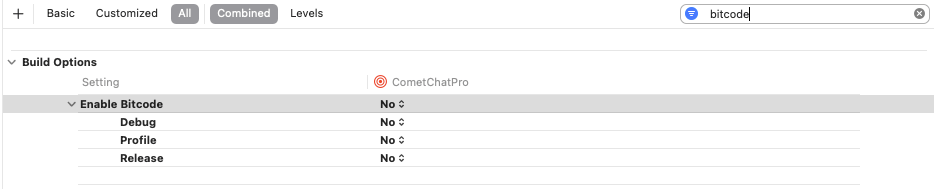
4. Set **Enabled Bitcode** to **NO** in the Build Settings of your Xcode project.
 ### Import the SDK
```dart theme={null}
import 'package:cometchat_sdk/cometchat_sdk.dart';
```
## Initialization
The `init()` method initializes the SDK and must be called before any other CometChat method. Call it once at app startup, typically in your root widget's `initState()` or `main()` function.
```dart theme={null}
String region = "APP_REGION";
String appId = "APP_ID";
AppSettings appSettings= (AppSettingsBuilder()
..subscriptionType = CometChatSubscriptionType.allUsers
..region= region
..adminHost = "" //optional
..clientHost = "" //optional
..autoEstablishSocketConnection = true
).build();
CometChat.init(appId, appSettings,
onSuccess: (String successMessage) {
debugPrint("Initialization completed successfully $successMessage");
}, onError: (CometChatException excep) {
debugPrint("Initialization failed with exception: ${excep.message}");
}
);
```
Replace `APP_ID` and `APP_REGION` with your credentials from the [Dashboard](https://app.cometchat.com).
`CometChat.init()` must be called before any other SDK method. Calling `login()`, `sendMessage()`, or registering listeners before `init()` will fail.
### Parameters
| Parameter | Type | Description |
| ------------- | ------------------------------ | ---------------------------------------------------- |
| `appId` | `String` | Your CometChat App ID |
| `appSettings` | `AppSettings` | Configuration object built with `AppSettingsBuilder` |
| `onSuccess` | `Function(String)` | Callback triggered on successful initialization |
| `onError` | `Function(CometChatException)` | Callback triggered on initialization failure |
### AppSettings Options
| Property | Type | Description | Default |
| ------------------------------- | --------------- | --------------------------------------------------------------------------------------- | -------- |
| `subscriptionType` | `String?` | Presence subscription type (`CometChatSubscriptionType.allUsers`, `.roles`, `.friends`) | — |
| `roles` | `List?` | Roles to subscribe to when using role-based presence | — |
| `region` | `String?` | Region where your app was created (`us`, `eu`, `in`) | Required |
| `autoEstablishSocketConnection` | `bool` | Let SDK manage WebSocket connections automatically | `true` |
| `adminHost` | `String?` | Custom admin URL (dedicated deployment) | — |
| `clientHost` | `String?` | Custom client URL (dedicated deployment) | — |
### Presence Subscription
Choose how to subscribe to user presence (online/offline status):
```dart theme={null}
// All users
AppSettings appSettings = (AppSettingsBuilder()
..subscriptionType = CometChatSubscriptionType.allUsers
..region = region
).build();
// Specific roles
AppSettings appSettings = (AppSettingsBuilder()
..subscriptionType = CometChatSubscriptionType.roles
..roles = ["admin", "moderator"]
..region = region
).build();
// Friends only
AppSettings appSettings = (AppSettingsBuilder()
..subscriptionType = CometChatSubscriptionType.friends
..region = region
).build();
```
See [User Presence](/sdk/flutter/user-presence) for more details.
**On Success** — A `String` message confirming SDK initialization:
| Parameter | Type | Description | Sample Value |
| --------- | -------- | ---------------------------- | ----------------------------------------- |
| `message` | `String` | Success confirmation message | `"Initialization completed successfully"` |
| Parameter | Type | Description | Sample Value |
| --------- | -------- | ---------------------------- | --------------------------------------------------------- |
| `code` | `String` | Error code identifier | `"ERR_CHAT_API_FAILURE"` |
| `message` | `String` | Human-readable error message | `"SDK initialization failed."` |
| `details` | `String` | Additional technical details | `"Please verify your App ID and region, then try again."` |
### WebSocket Connection
By default, the SDK manages WebSocket connections automatically. To manage them manually:
```dart theme={null}
AppSettings appSettings = (AppSettingsBuilder()
..region = region
..autoEstablishSocketConnection = false
).build();
```
See [Connection Behaviour](/sdk/flutter/connection-behaviour) for manual control.
***
## Next Steps
Log in users with Auth Key or Auth Token
Send your first message
### Import the SDK
```dart theme={null}
import 'package:cometchat_sdk/cometchat_sdk.dart';
```
## Initialization
The `init()` method initializes the SDK and must be called before any other CometChat method. Call it once at app startup, typically in your root widget's `initState()` or `main()` function.
```dart theme={null}
String region = "APP_REGION";
String appId = "APP_ID";
AppSettings appSettings= (AppSettingsBuilder()
..subscriptionType = CometChatSubscriptionType.allUsers
..region= region
..adminHost = "" //optional
..clientHost = "" //optional
..autoEstablishSocketConnection = true
).build();
CometChat.init(appId, appSettings,
onSuccess: (String successMessage) {
debugPrint("Initialization completed successfully $successMessage");
}, onError: (CometChatException excep) {
debugPrint("Initialization failed with exception: ${excep.message}");
}
);
```
Replace `APP_ID` and `APP_REGION` with your credentials from the [Dashboard](https://app.cometchat.com).
`CometChat.init()` must be called before any other SDK method. Calling `login()`, `sendMessage()`, or registering listeners before `init()` will fail.
### Parameters
| Parameter | Type | Description |
| ------------- | ------------------------------ | ---------------------------------------------------- |
| `appId` | `String` | Your CometChat App ID |
| `appSettings` | `AppSettings` | Configuration object built with `AppSettingsBuilder` |
| `onSuccess` | `Function(String)` | Callback triggered on successful initialization |
| `onError` | `Function(CometChatException)` | Callback triggered on initialization failure |
### AppSettings Options
| Property | Type | Description | Default |
| ------------------------------- | --------------- | --------------------------------------------------------------------------------------- | -------- |
| `subscriptionType` | `String?` | Presence subscription type (`CometChatSubscriptionType.allUsers`, `.roles`, `.friends`) | — |
| `roles` | `List?` | Roles to subscribe to when using role-based presence | — |
| `region` | `String?` | Region where your app was created (`us`, `eu`, `in`) | Required |
| `autoEstablishSocketConnection` | `bool` | Let SDK manage WebSocket connections automatically | `true` |
| `adminHost` | `String?` | Custom admin URL (dedicated deployment) | — |
| `clientHost` | `String?` | Custom client URL (dedicated deployment) | — |
### Presence Subscription
Choose how to subscribe to user presence (online/offline status):
```dart theme={null}
// All users
AppSettings appSettings = (AppSettingsBuilder()
..subscriptionType = CometChatSubscriptionType.allUsers
..region = region
).build();
// Specific roles
AppSettings appSettings = (AppSettingsBuilder()
..subscriptionType = CometChatSubscriptionType.roles
..roles = ["admin", "moderator"]
..region = region
).build();
// Friends only
AppSettings appSettings = (AppSettingsBuilder()
..subscriptionType = CometChatSubscriptionType.friends
..region = region
).build();
```
See [User Presence](/sdk/flutter/user-presence) for more details.
**On Success** — A `String` message confirming SDK initialization:
| Parameter | Type | Description | Sample Value |
| --------- | -------- | ---------------------------- | ----------------------------------------- |
| `message` | `String` | Success confirmation message | `"Initialization completed successfully"` |
| Parameter | Type | Description | Sample Value |
| --------- | -------- | ---------------------------- | --------------------------------------------------------- |
| `code` | `String` | Error code identifier | `"ERR_CHAT_API_FAILURE"` |
| `message` | `String` | Human-readable error message | `"SDK initialization failed."` |
| `details` | `String` | Additional technical details | `"Please verify your App ID and region, then try again."` |
### WebSocket Connection
By default, the SDK manages WebSocket connections automatically. To manage them manually:
```dart theme={null}
AppSettings appSettings = (AppSettingsBuilder()
..region = region
..autoEstablishSocketConnection = false
).build();
```
See [Connection Behaviour](/sdk/flutter/connection-behaviour) for manual control.
***
## Next Steps
Log in users with Auth Key or Auth Token
Send your first message