> ## Documentation Index
> Fetch the complete documentation index at: https://cometchat-22654f5b-docs-rn-guide-message-privately.mintlify.site/llms.txt
> Use this file to discover all available pages before exploring further.
# Lists Management
> Create and manage CometChat moderation lists for keywords, regex patterns, and sentences used across moderation rules.
Lists Management provides tools for creating and managing lists of keywords, regex patterns, or sentences that power your moderation rules. When detected in user-generated content, these lists trigger moderation actions like blocking or flagging messages.
**Lists are reusable.** Create a list once and use it across multiple rules. Update the list in one place and all rules using it are automatically updated.
***
## Quick Start
Create a custom keyword list in under 2 minutes:
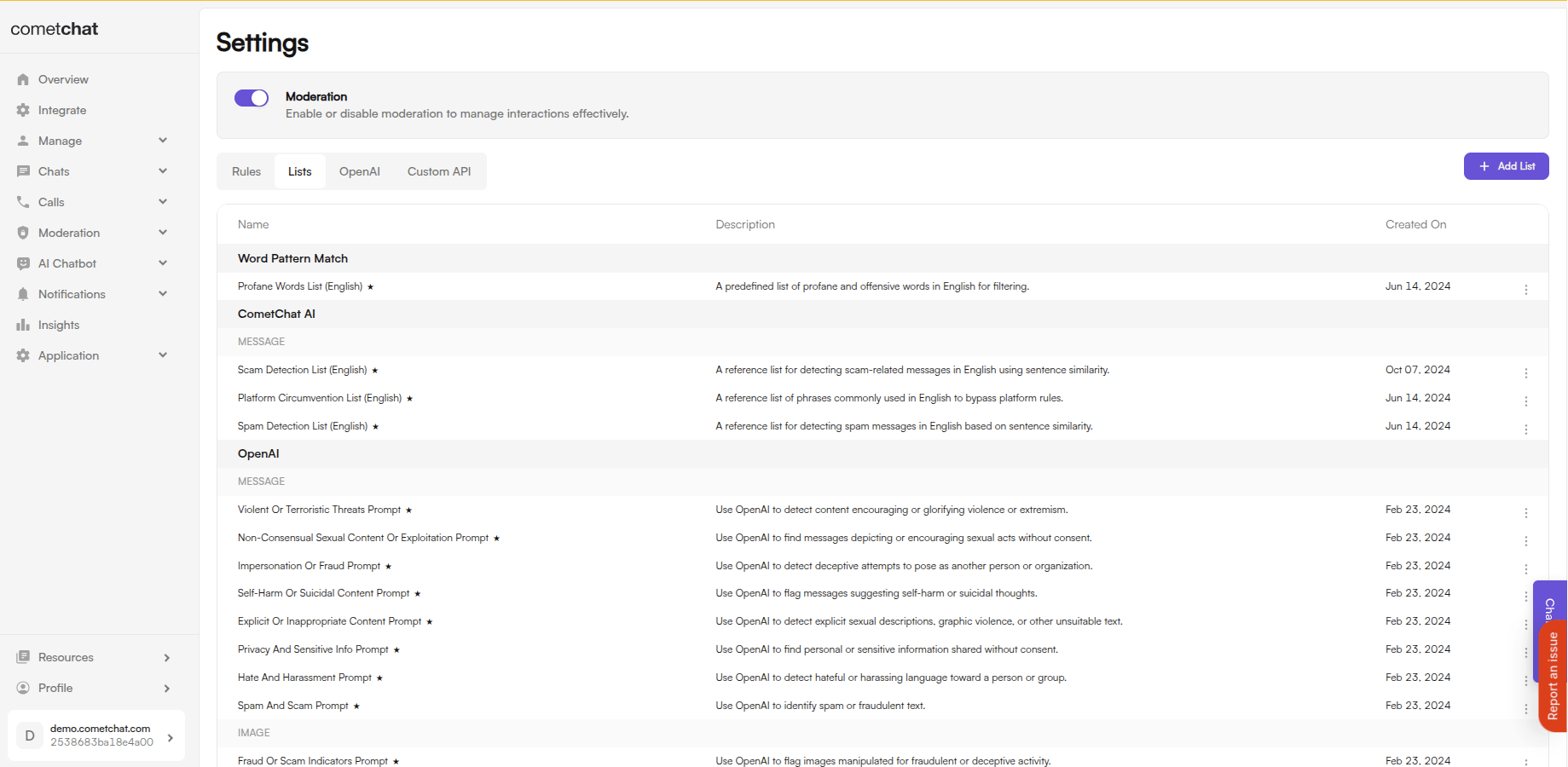
Login to [CometChat Dashboard](https://app.cometchat.com) → Select your app → **Moderation** → **Settings** → **Lists**
Click **Add** → Enter a name, select category (word/pattern/sentence), and add your terms
Go to **Rules** → Create or edit a rule → Select your list in the Conditions section
 ***
## List Types
Simple word matching. Use for:
* Profanity and offensive terms
* Brand names or competitors
* Industry-specific blocked terms
**Entry format:** Comma-separated. Add multiple keywords on the same line, separated by commas.
**Example:**
```
badword, offensive, blocked
```
Regular expression matching for complex patterns. Use for:
* Phone number formats
* Email patterns
* Custom data formats
**Entry format:** Newline-separated — one regex pattern per line. Commas are treated as literal characters inside a pattern, so do **not** comma-separate multiple patterns on the same line.
**Example:**
```
\b\d{3}[-.]?\d{3}[-.]?\d{4}\b
[A-Za-z0-9._%+-]+@[A-Za-z0-9.-]+\.[A-Za-z]{2,}
```
**Greedy Regex Not Allowed:** For system performance and security, greedy regex patterns (using `*`, `+`, `{n,}` without proper boundaries) are not permitted. Greedy patterns can cause excessive backtracking and impact system performance.
**Examples of prohibited patterns:**
* `.*` (matches everything)
* `.+` (matches one or more of anything)
* `(a+)+` (nested quantifiers)
* `\d{10,}` (unbounded quantifier)
**Use specific, bounded patterns instead:**
* `\d{3,10}` instead of `\d+`
* `[a-z]{1,50}` instead of `[a-z]+`
* `\b\w{3,20}\b` instead of `\w+`
AI-powered semantic matching. Use for:
* Scam message variations
* Platform circumvention attempts
* Context-aware blocking
**Entry format:** Newline-separated — one sentence or phrase per line.
**Example:**
```
Send me your credit card details
What is your bank account number
Share your OTP with me
```
**Entry format at a glance**
| List type | Format | Separator |
| ------------------- | ----------------- | --------- |
| Keywords | Comma-separated | `,` |
| Patterns (Regex) | Newline-separated | New line |
| Sentence Similarity | Newline-separated | New line |
If you paste comma-separated values into a Patterns or Sentence Similarity list, the entire string is stored as a single entry and will not match as expected.
***
## Default Lists Summary
Pre-configured lists ready to use with your rules:
| List | Description | Use Case |
| ------------------------------------- | ------------------------------------------- | ------------------------ |
| **Profane Words** | Common profanity and inappropriate language | General chat moderation |
| **Platform Circumvention** | Phrases attempting to bypass rules | Marketplace, dating apps |
| **Spam Detection** | Repetitive/promotional message patterns | High-traffic apps |
| **Scam Detection** | Deceptive messages and phishing attempts | Finance, marketplace |
| **Hate and Harassment Prompt** | Hate speech, threats, and slurs | Community platforms |
| **Explicit Content Prompt** | Sexual descriptions and violence | Family-friendly apps |
| **Privacy and Sensitive Info Prompt** | Personal data sharing | Healthcare, finance |
| **Self-Harm Content Prompt** | Self-harm and suicidal content | Mental health safety |
| **Spam and Scam Prompt** | Phishing and fraudulent schemes | All apps |
| **Violent Threats Prompt** | Violence and terrorism promotion | All apps |
| **Impersonation Prompt** | Identity fraud attempts | Business apps |
| **Non-Consensual Content Prompt** | Exploitation and grooming | Dating, social apps |
| List | Description | Use Case |
| ------------------------------------- | -------------------------------------- | -------------------- |
| **Hate or Harassment Prompt** | Hateful symbols and offensive gestures | Community platforms |
| **Explicit or Sexual Content Prompt** | Nudity and sexually explicit imagery | Social apps |
| **Graphic Violence Prompt** | Violent imagery and gore | Family-friendly apps |
| **Privacy or Personal Data Prompt** | IDs, financial docs, personal records | Finance, healthcare |
| **Minor Safety Prompt** | Child exploitation content | All apps |
| **Fraud or Scam Indicators Prompt** | Fake documents and counterfeit images | Marketplace |
| **Terrorism Prompt** | Extremist propaganda and recruitment | All apps |
***
## When to Create Custom Lists
Add terms specific to your industry that default lists don't cover:
* **Gaming:** Game-specific slurs, exploit terms
* **Finance:** Competitor names, prohibited investment terms
* **Healthcare:** Medical misinformation terms
Block mentions of:
* Competitor names
* Prohibited external links
* Trademark violations
Add localized profanity or slang that default English lists miss.
Create lists for your unique community guidelines:
* Prohibited topics
* Off-platform contact attempts
* Community-specific terms
***
## Best Practices
| Practice | Description |
| ------------------------------------- | -------------------------------------------------------------------------------------------------------------------------------------------------- |
| **Start with Defaults** | Use default lists first, then create custom lists only for gaps in coverage. |
| **Use Sentence Similarity for Scams** | Scammers constantly change wording. Sentence similarity catches variations automatically. |
| **Test Regex Patterns** | Test regex patterns before deploying. A bad pattern can block legitimate content. Avoid greedy patterns that can impact system performance. |
| **Avoid Greedy Regex** | Do not use unbounded quantifiers (`*`, `+`, `{n,}`) without proper boundaries. Always specify maximum lengths (e.g., `\d{3,10}` instead of `\d+`). |
| **Review Regularly** | Check blocked messages monthly and update lists based on new patterns. |
### Tips for Effective Lists
1. **Keep lists focused** - Create separate lists for different purposes (profanity vs. spam vs. competitors)
2. **Use CSV for bulk imports** - Upload large keyword lists via CSV instead of manual entry
3. **Combine list types** - Use keywords for exact matches + sentence similarity for variations
4. **Document your lists** - Add clear descriptions so team members understand each list's purpose
***
## Managing Lists
### Create List
***
## List Types
Simple word matching. Use for:
* Profanity and offensive terms
* Brand names or competitors
* Industry-specific blocked terms
**Entry format:** Comma-separated. Add multiple keywords on the same line, separated by commas.
**Example:**
```
badword, offensive, blocked
```
Regular expression matching for complex patterns. Use for:
* Phone number formats
* Email patterns
* Custom data formats
**Entry format:** Newline-separated — one regex pattern per line. Commas are treated as literal characters inside a pattern, so do **not** comma-separate multiple patterns on the same line.
**Example:**
```
\b\d{3}[-.]?\d{3}[-.]?\d{4}\b
[A-Za-z0-9._%+-]+@[A-Za-z0-9.-]+\.[A-Za-z]{2,}
```
**Greedy Regex Not Allowed:** For system performance and security, greedy regex patterns (using `*`, `+`, `{n,}` without proper boundaries) are not permitted. Greedy patterns can cause excessive backtracking and impact system performance.
**Examples of prohibited patterns:**
* `.*` (matches everything)
* `.+` (matches one or more of anything)
* `(a+)+` (nested quantifiers)
* `\d{10,}` (unbounded quantifier)
**Use specific, bounded patterns instead:**
* `\d{3,10}` instead of `\d+`
* `[a-z]{1,50}` instead of `[a-z]+`
* `\b\w{3,20}\b` instead of `\w+`
AI-powered semantic matching. Use for:
* Scam message variations
* Platform circumvention attempts
* Context-aware blocking
**Entry format:** Newline-separated — one sentence or phrase per line.
**Example:**
```
Send me your credit card details
What is your bank account number
Share your OTP with me
```
**Entry format at a glance**
| List type | Format | Separator |
| ------------------- | ----------------- | --------- |
| Keywords | Comma-separated | `,` |
| Patterns (Regex) | Newline-separated | New line |
| Sentence Similarity | Newline-separated | New line |
If you paste comma-separated values into a Patterns or Sentence Similarity list, the entire string is stored as a single entry and will not match as expected.
***
## Default Lists Summary
Pre-configured lists ready to use with your rules:
| List | Description | Use Case |
| ------------------------------------- | ------------------------------------------- | ------------------------ |
| **Profane Words** | Common profanity and inappropriate language | General chat moderation |
| **Platform Circumvention** | Phrases attempting to bypass rules | Marketplace, dating apps |
| **Spam Detection** | Repetitive/promotional message patterns | High-traffic apps |
| **Scam Detection** | Deceptive messages and phishing attempts | Finance, marketplace |
| **Hate and Harassment Prompt** | Hate speech, threats, and slurs | Community platforms |
| **Explicit Content Prompt** | Sexual descriptions and violence | Family-friendly apps |
| **Privacy and Sensitive Info Prompt** | Personal data sharing | Healthcare, finance |
| **Self-Harm Content Prompt** | Self-harm and suicidal content | Mental health safety |
| **Spam and Scam Prompt** | Phishing and fraudulent schemes | All apps |
| **Violent Threats Prompt** | Violence and terrorism promotion | All apps |
| **Impersonation Prompt** | Identity fraud attempts | Business apps |
| **Non-Consensual Content Prompt** | Exploitation and grooming | Dating, social apps |
| List | Description | Use Case |
| ------------------------------------- | -------------------------------------- | -------------------- |
| **Hate or Harassment Prompt** | Hateful symbols and offensive gestures | Community platforms |
| **Explicit or Sexual Content Prompt** | Nudity and sexually explicit imagery | Social apps |
| **Graphic Violence Prompt** | Violent imagery and gore | Family-friendly apps |
| **Privacy or Personal Data Prompt** | IDs, financial docs, personal records | Finance, healthcare |
| **Minor Safety Prompt** | Child exploitation content | All apps |
| **Fraud or Scam Indicators Prompt** | Fake documents and counterfeit images | Marketplace |
| **Terrorism Prompt** | Extremist propaganda and recruitment | All apps |
***
## When to Create Custom Lists
Add terms specific to your industry that default lists don't cover:
* **Gaming:** Game-specific slurs, exploit terms
* **Finance:** Competitor names, prohibited investment terms
* **Healthcare:** Medical misinformation terms
Block mentions of:
* Competitor names
* Prohibited external links
* Trademark violations
Add localized profanity or slang that default English lists miss.
Create lists for your unique community guidelines:
* Prohibited topics
* Off-platform contact attempts
* Community-specific terms
***
## Best Practices
| Practice | Description |
| ------------------------------------- | -------------------------------------------------------------------------------------------------------------------------------------------------- |
| **Start with Defaults** | Use default lists first, then create custom lists only for gaps in coverage. |
| **Use Sentence Similarity for Scams** | Scammers constantly change wording. Sentence similarity catches variations automatically. |
| **Test Regex Patterns** | Test regex patterns before deploying. A bad pattern can block legitimate content. Avoid greedy patterns that can impact system performance. |
| **Avoid Greedy Regex** | Do not use unbounded quantifiers (`*`, `+`, `{n,}`) without proper boundaries. Always specify maximum lengths (e.g., `\d{3,10}` instead of `\d+`). |
| **Review Regularly** | Check blocked messages monthly and update lists based on new patterns. |
### Tips for Effective Lists
1. **Keep lists focused** - Create separate lists for different purposes (profanity vs. spam vs. competitors)
2. **Use CSV for bulk imports** - Upload large keyword lists via CSV instead of manual entry
3. **Combine list types** - Use keywords for exact matches + sentence similarity for variations
4. **Document your lists** - Add clear descriptions so team members understand each list's purpose
***
## Managing Lists
### Create List
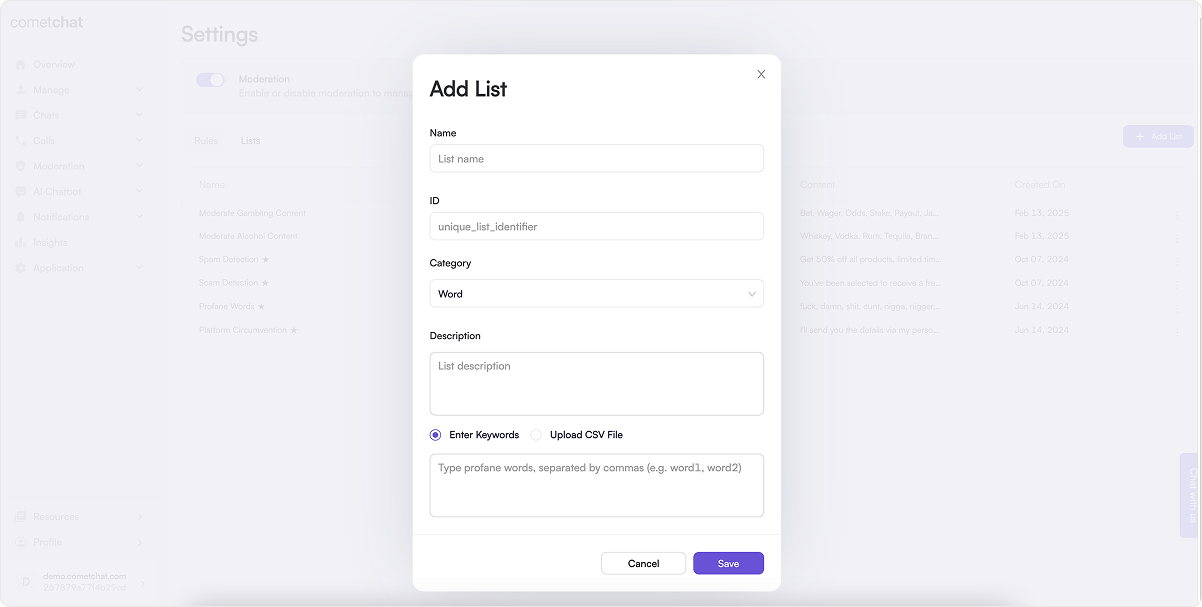 1. Click **Add** in the Lists tab
2. Configure:
* **Name**: Descriptive name for the list
* **ID**: Unique identifier
* **Category**: Word, Pattern, or Sentence Similarity
* **Description**: Purpose of the list
* **Source**: Enter terms manually or upload CSV. Format depends on the category:
* **Word**: comma-separated entries.
* **Pattern** and **Sentence Similarity**: one entry per line (newline-separated).
3. Click **Save**
### List All Lists
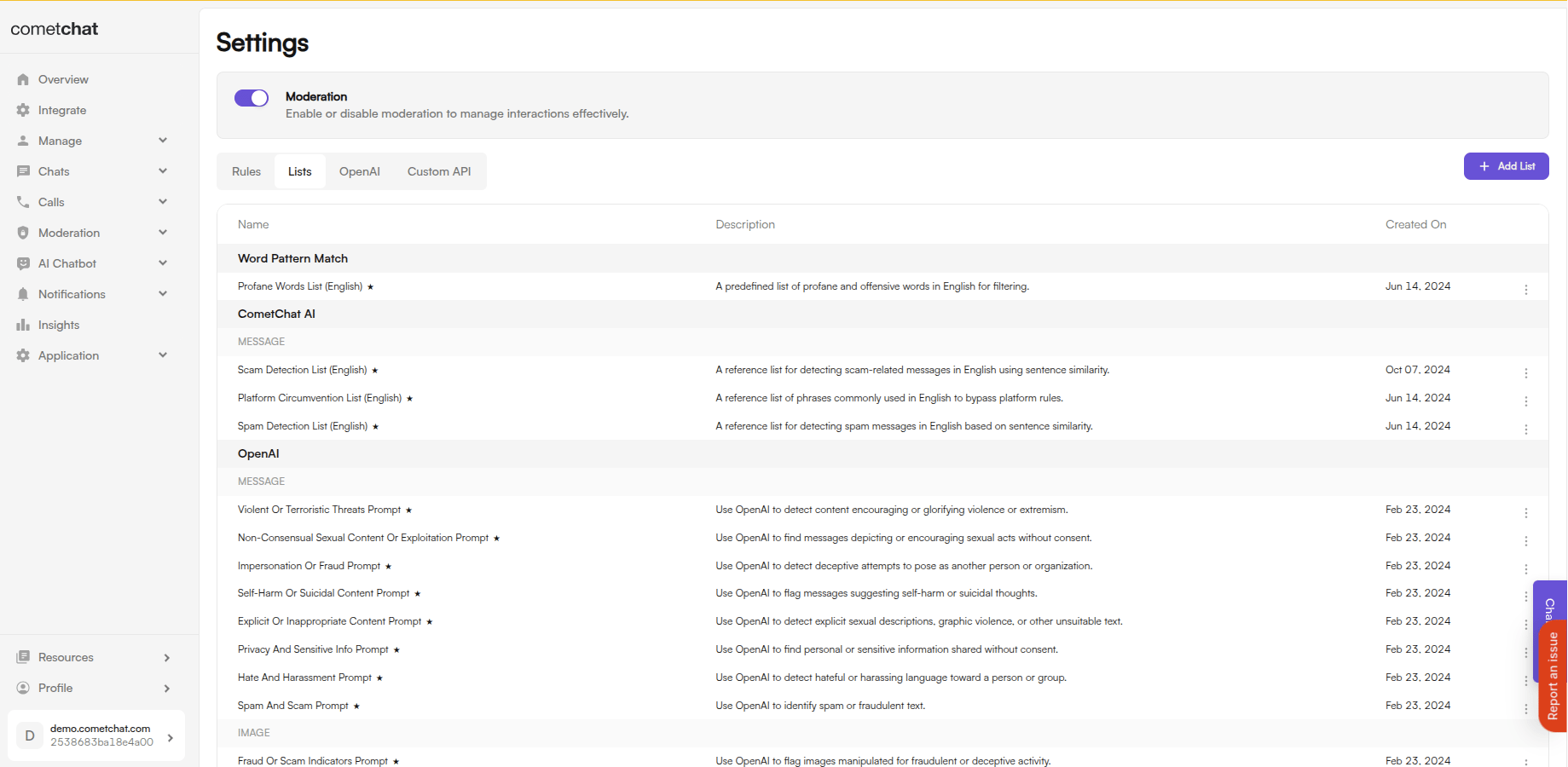
All configured lists are displayed in the Lists tab with their name, category, and item count.
1. Click **Add** in the Lists tab
2. Configure:
* **Name**: Descriptive name for the list
* **ID**: Unique identifier
* **Category**: Word, Pattern, or Sentence Similarity
* **Description**: Purpose of the list
* **Source**: Enter terms manually or upload CSV. Format depends on the category:
* **Word**: comma-separated entries.
* **Pattern** and **Sentence Similarity**: one entry per line (newline-separated).
3. Click **Save**
### List All Lists
All configured lists are displayed in the Lists tab with their name, category, and item count.
 ### Update List
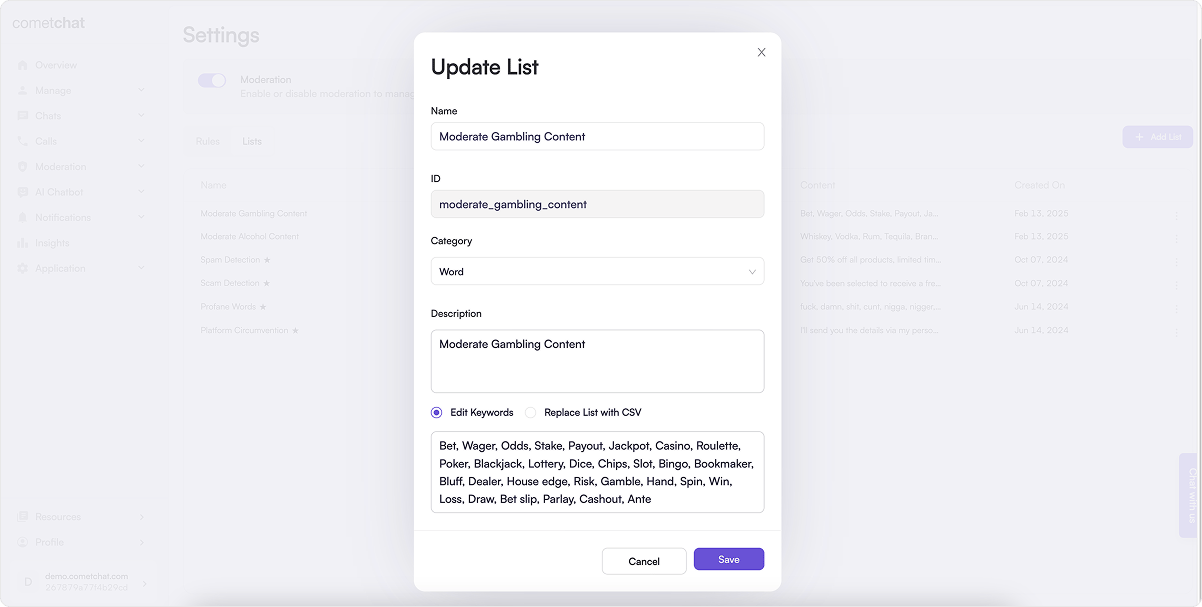 1. Click **Edit** in the action menu
2. Modify the list settings or add/remove terms
3. Click **Save**
### Delete List
1. Click **Edit** in the action menu
2. Modify the list settings or add/remove terms
3. Click **Save**
### Delete List
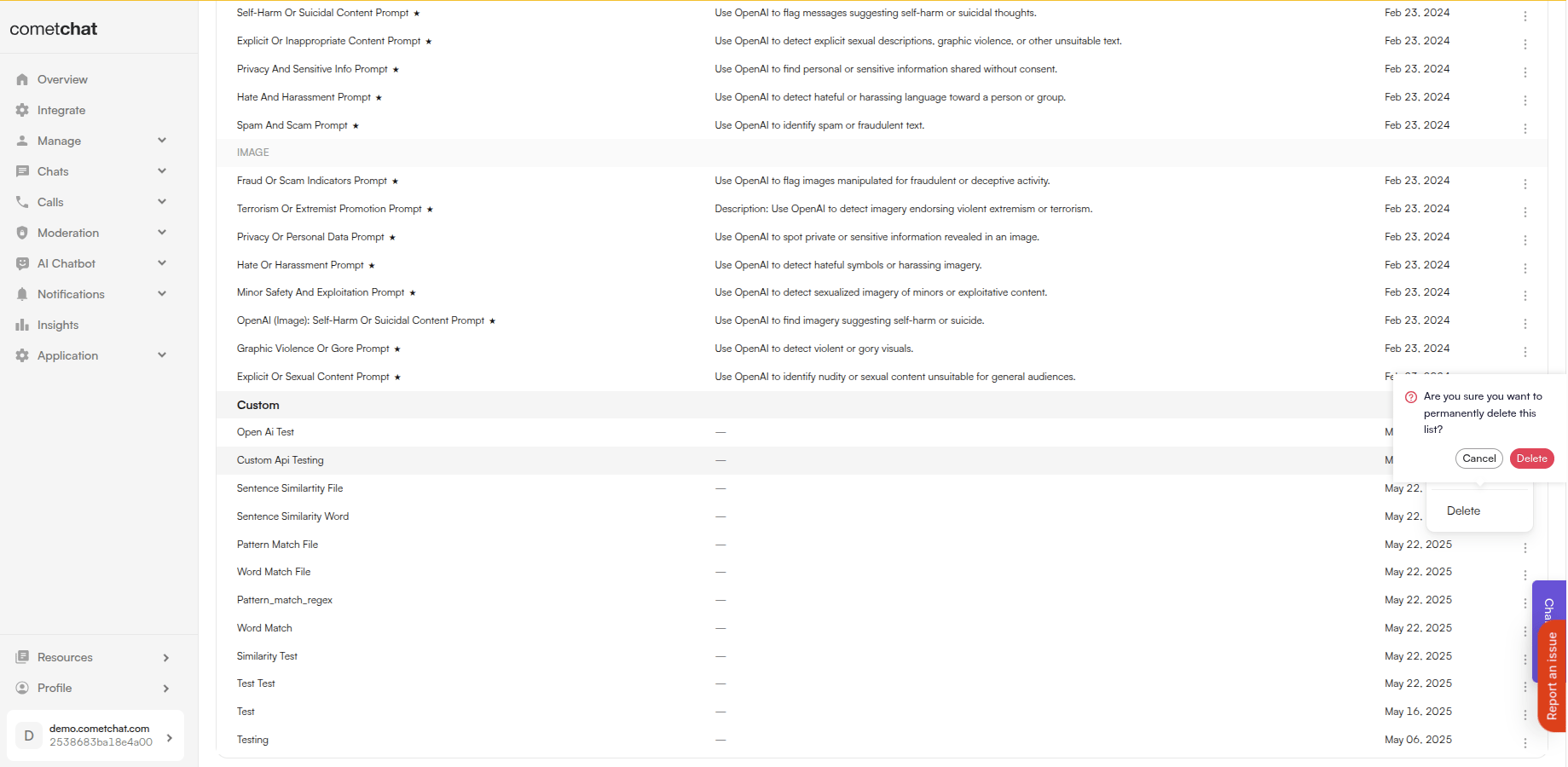 Click **Delete** in the action menu and confirm.
Deleting a list will affect any rules using it. Check rule dependencies before deleting.
***
## Related Resources
Create rules that use your lists
View content blocked by your lists
Review flagged content
Learn about the moderation system
Click **Delete** in the action menu and confirm.
Deleting a list will affect any rules using it. Check rule dependencies before deleting.
***
## Related Resources
Create rules that use your lists
View content blocked by your lists
Review flagged content
Learn about the moderation system